
Video is now the default format for marketing, training and social content, but most people still don’t own a camera crew, an editing suite, or the hours it takes to master one. VEED was built to close that gap. It’s a browser-based, AI-powered video platform that lets you generate talking-head clips from a script, auto-caption raw footage in seconds, translate a video into dozens of languages, and polish the whole thing with one-click AI tools — all without installing software or touching a traditional timeline unless you want to. Backed by $35 million from Sequoia Capital and used by teams at Amazon, Google, Netflix, Meta and the BBC, VEED has grown from a scrappy London bootstrap into one of the most recognizable names in browser-based video, with more than 10 million users and a 4-star Trustpilot reputation built on thousands of reviews.
For marketers, solopreneurs, podcasters, educators and social teams who need to turn an idea into a feed-ready video fast, VEED’s pitch is compelling: generate, edit and brand in one workflow, no switching between five different apps. But VEED isn’t the cheapest option on the market, its credit-based AI economy can be confusing, and a meaningful share of Trustpilot reviews flag billing and subscription friction worth knowing about before you commit. This 2026 review walks through what VEED actually does, its full pricing structure, how it stacks up against CapCut and Descript, the genuine pros and cons from real users, and exactly who should — and shouldn’t — build their video workflow around it.
VEED Review 2026: The AI Video Platform Built to Get You From Idea to Post
Overview and Background
VEED (styled VEED.IO) is a London-based video technology company founded in 2018 by CEO Sabba Keynejad and CTO Timur Mamedov. The company bootstrapped itself from zero revenue to millions in annual recurring revenue before taking any outside money, then raised a $35 million Series A from Sequoia Capital in 2022 at a $160 million valuation — Sequoia’s first check into the company after years of Keynejad and Mamedov being turned down by seed investors and rejected from Y Combinator multiple times. That underdog origin story matters for context: VEED grew almost entirely on product-led growth and word of mouth, not paid acquisition, and it shows in how deeply the free tier is baked into the funnel.
Today VEED has scaled well past its bootstrapped roots. The company reports over 10 million users, more than 210 staff working remotely with hubs in London, Amsterdam, Barcelona and Lisbon, and revenue that grew from roughly $7 million in 2022 to around $40 million by 2024, with more recent figures suggesting continued fast growth into 2026. It counts Amazon, Visa, Google, Netflix, Meta, the BBC, Target, P&G and NBCUniversal among the brands whose teams use the platform, and it recently picked up G2’s “Best AI Software” recognition for 2026, alongside placements in G2’s top AI products and design products lists.
What VEED actually is has shifted meaningfully over its lifetime. It started as a straightforward browser-based video editor known mainly for best-in-class auto-subtitles. In 2026 it repositions itself as an “AI video creation platform” — the homepage headline is literally “Imagine it. Generate it. Brand it.” — built around a proprietary AI model called Fabric 1.0 for talking-head and avatar generation, plus direct access to third-party generative models including OpenAI’s Sora 2, Google’s Veo 3.1, Kling and PixVerse inside a unified “AI Playground.” Traditional timeline editing, auto-captioning, dubbing and translation are all still there, but the strategic center of gravity has moved toward generating social-ready video from a prompt, not just editing footage you already shot.
That pivot mirrors a broader shift across the video-tools market: as generative models from OpenAI, Google and others got good enough to produce usable footage on demand, editors that only cut existing clips started to look incomplete next to platforms that could also create the clips in the first place. VEED’s answer was not to build one closed proprietary model and bet everything on it, but to become a distribution layer — a single subscription that gives credit-metered access to several of the industry’s leading video-generation models side by side, so teams can compare outputs without separately subscribing to each one. It’s a pragmatic strategy for a company that has always competed more on workflow simplicity than on raw model research, and it lets VEED keep pace with an AI landscape that changes every few months without having to out-invent OpenAI or Google in the process.
Why VEED Stands Out in 2026
Generation and editing live in one workflow: Most competitors make you generate a clip in one AI tool, then drag it into a separate editor to caption, brand and trim it. VEED collapses that into a single browser tab — generate a talking-head or B-roll clip, then immediately subtitle, brand and export it without ever leaving the project.
Access to the best generative video models, in one place: Rather than picking a single house model, VEED’s AI Playground gives you a credit-based front door to Sora 2, Sora 2 Pro, Veo 3.1 and Veo 3.1 Fast, Kling, PixVerse, MiniMax and its own Fabric 1.0 avatar model. For teams that want to compare outputs across models without juggling five separate subscriptions, that’s a genuine convenience.
Auto-subtitles that are still the benchmark: VEED’s automatic captioning across 125+ languages remains one of its most consistently praised features across Trustpilot and G2 — reviewers repeatedly single it out as more accurate and easier to style than rivals, which matters given how much social video is watched muted.
A genuinely deep AI toolset beyond captions: Clean Audio (background noise removal), Eye Contact AI (fixes off-camera gaze), automatic background removal, voice cloning and dubbing, a teleprompter, and an AI Clips tool that turns long-form podcasts or webinars into vertical, subtitle-ready shorts — the breadth of single-click tools is one of VEED’s strongest arguments over a bare-bones editor.
No install, real-time team collaboration: Because everything runs in the browser and renders in the cloud, teams can comment on a project, share a workspace and hand off edits the way you’d collaborate on a Google Doc — a real advantage over desktop-only tools like Premiere Pro or DaVinci Resolve for distributed marketing teams.
A brand kit that actually gets applied automatically: Paid plans let you lock in brand colors, fonts, logos and voice so every export — generated or edited — looks consistent, which matters for any team publishing daily across multiple platforms.
Credible enterprise trust signals: Sequoia backing, a public trust center, SOC-style enterprise security options on higher tiers, and a customer roster spanning Netflix to the BBC give VEED a level of institutional credibility that smaller AI-video startups can’t match.
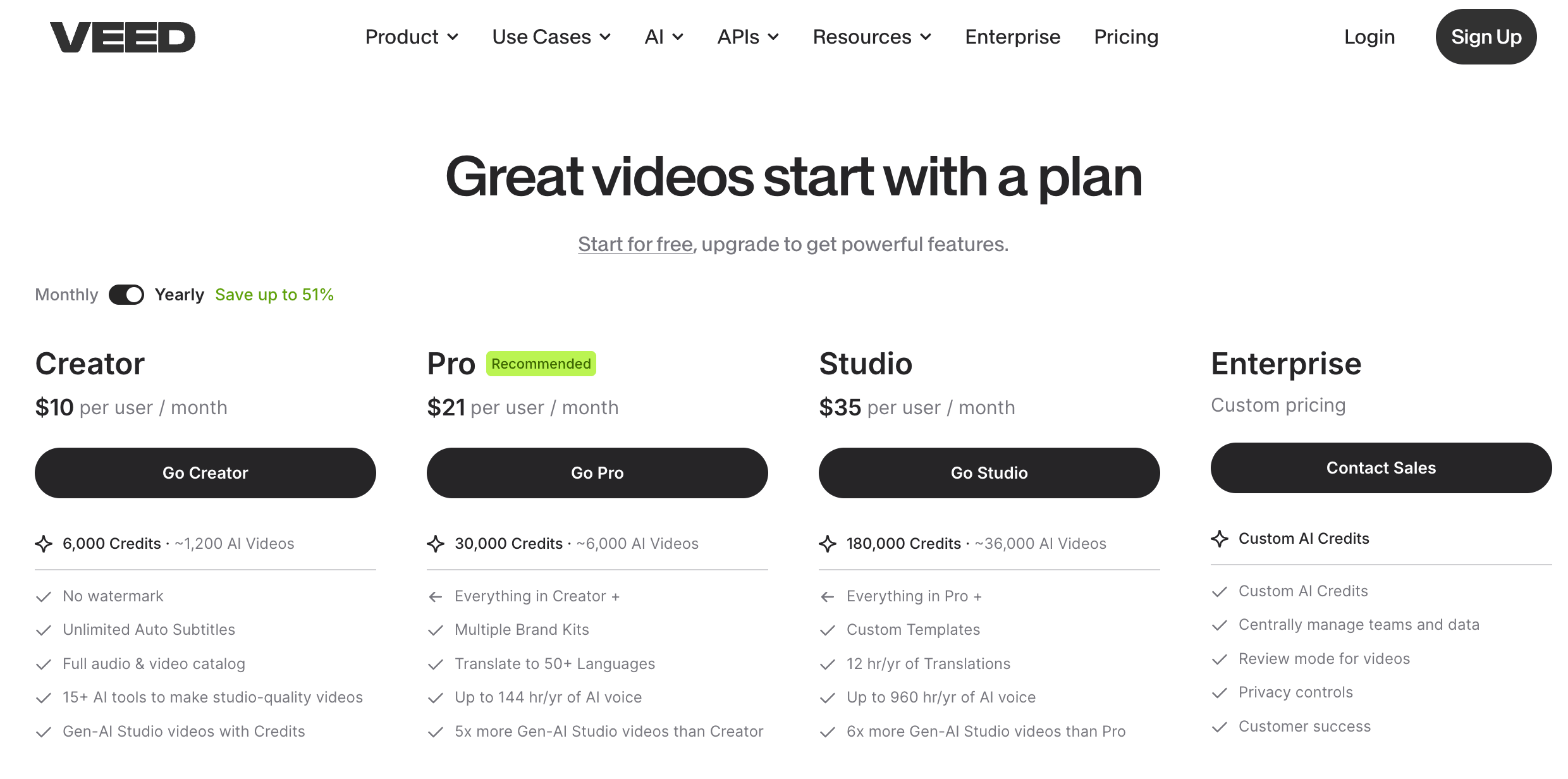
VEED combines AI video generation, auto-subtitles and brand-consistent editing in a single browser-based workflow — no separate apps required.
Key Features and Technology
VEED’s feature set is broad enough that it can feel like several products stitched together. Here’s how the platform actually breaks down into its core pillars.
AI Video Generation and the AI Playground
VEED’s Generate workflow turns a text prompt or product image into a short video using its own Fabric 1.0 model or a routed third-party model (Sora 2, Sora 2 Pro, Veo 3.1, Veo 3.1 Fast, Veo 3, Kling, PixVerse, MiniMax, Seedance, LTX Video). Fabric 1.0 is VEED’s proprietary talking-head/avatar model, tuned for natural lip-sync so a generated presenter looks like it’s actually speaking your script rather than lip-flapping over it. Generation runs on a credit system, and every model burns credits at a different rate — premium models like Sora 2 Pro consume noticeably more than lighter options, so teams that iterate heavily on prompts should budget extra headroom.
Timeline Editing and Screen Recording
Underneath the AI layer, VEED still has a full multi-track timeline editor — trim, split, layer text, add transitions and stock media from a library of tens of thousands of clips and audio tracks. A built-in screen recorder captures webcam and screen simultaneously (useful for tutorials, Loom-style updates and product demos), and a teleprompter helps presenters read scripts naturally on camera without an external app.
Subtitles, Translation and Dubbing
Auto-captioning covers 125+ languages with claimed accuracy in the high-90s percent range on clear audio, and dozens of ready-made caption styles (including the punchy, word-by-word “dynamic subtitle” look popular on TikTok and Reels). Paid tiers add AI dubbing and voice cloning that translate and re-voice a video into 50+ languages, useful for teams localizing training content or ads across markets without rebooking a voice actor for every language.
Clean Audio, Eye Contact AI and Background Tools
Clean Audio strips background hum and hiss from a track with one click, Eye Contact AI digitally corrects a speaker’s gaze so they appear to be looking at the lens even if they were reading a teleprompter off to the side, and the background remover replaces or blurs a webcam background without a green screen. These sit on Pro and above and are frequently cited by UGC-ad creators as ROI-positive on their own.
Pricing, Plans, and Package Structure
VEED runs a freemium, per-seat subscription model with roughly five tiers, and the plan names have shifted in 2026 (some sources still reference the older Free / Lite / Pro / Business naming, others the newer Free / Creator / Pro / Studio / Enterprise structure) — so treat the labels below as directional rather than fixed, and always confirm the live tier names and prices at checkout. Annual billing consistently runs 30–50% cheaper per month than paying monthly, and AI features are gated separately by credit or hour allowances on top of the base subscription.
| Product | Price (USD) | What It Is | Best For |
|---|---|---|---|
| Free | $0 | Watermarked exports, 720p, ~10-min video cap, ~30 min/mo of auto-subtitles | Testing the platform, one-off internal clips |
| Lite / Creator | ~$12–19/mo (from ~$12 billed annually) | No watermark, 1080p exports, ~12 hrs/mo subtitles, basic brand kit, stock library access | Solo creators, small business social content |
| Pro | ~$21–49/mo (from ~$21–24 billed annually) | Unlimited AI Studio videos, full brand kit, 50+ language translation, Eye Contact AI, limited AI avatar hours | Regular content creators, marketing professionals |
| Business / Studio | ~$39–59/seat/mo (annual billing) | 4K exports, up to 5 seats, larger AI credit pool, dedicated customer success manager | Marketing teams, agencies, multi-person workflows |
| Enterprise | Custom (contact sales) | SSO, custom AI avatars, multiple brand kits, advanced security, priority support | Large organizations, regulated industries |
How VEED Compares to Alternatives
| Factor | VEED | CapCut | Descript |
|---|---|---|---|
| Core approach | AI generation + timeline editing, browser-based | Timeline editing + templates, mobile-first | Transcript-based editing (edit text, not timeline) |
| Free plan | Yes — watermarked, 720p, 10-min cap | Yes — no watermark, more generous | Yes — limited transcription minutes |
| Entry paid price | ~$12–19/mo | Free (Pro ~$8–10/mo for extra effects) | ~$16+/mo |
| AI video generation | Multi-model (Sora 2, Veo 3.1, Fabric 1.0, more) | Basic AI effects, template-driven | AI voice clone (Overdub); limited video generation |
| Team collaboration | Strong — shared workspace, comments, brand kit | Limited, more individual-creator focused | Good, especially for podcast/interview teams |
| Best editing model | Traditional timeline + AI tools layered on top | Traditional timeline, TikTok-native effects | Edit by deleting/typing words in a transcript |
| Best for | Marketers & teams generating + editing social video | Individual creators, TikTok/Reels-first workflows | Podcasters & interview-heavy, dialogue-driven content |
vs. CapCut: CapCut is free, backed by ByteDance’s massive TikTok distribution, and reportedly reaches 500+ million monthly active users — an incredible scale VEED can’t match on price. But CapCut is built for individual creators editing on a phone or desktop, with far weaker team collaboration, brand kit management and multi-model AI generation. If you’re a solo TikTok creator, CapCut’s free tier is hard to beat; if you’re a business publishing consistently on-brand video across a team, VEED’s collaboration and generation layer earns its price.
vs. Descript: Descript’s transcript-based editing — delete a word from the text, the video clip disappears too — is genuinely revolutionary for podcast and interview-heavy content, and its Overdub voice cloning is excellent for fixing flubbed lines. VEED’s timeline is more traditional but pairs it with far broader AI video generation and a bigger stock/template library, making it the stronger pick for visual-first social content rather than dialogue-first audio content.
vs. Synthesia and HeyGen: Dedicated AI avatar platforms like Synthesia and HeyGen focus almost entirely on corporate training and presenter-style video, typically at a higher price point, with deeper avatar customization than VEED’s Fabric 1.0 offers today. If your only use case is scripted corporate avatars at scale, those specialists may edge ahead; if you want avatars alongside full editing, subtitles and multi-model generation in one subscription, VEED covers more ground.
vs. Canva: Canva brings its massive design-and-template audience into video, bundling timeline animation with the brand management workflows its users already know from graphics and slides. It’s a strong fit if your team already lives in Canva for design assets and wants video to slot into the same workspace. VEED, by contrast, is built video-first from the ground up — its timeline, AI generation and subtitle tools go deeper than Canva’s video module, making it the better choice once video (not slides or social graphics) is the primary output.
Pros and Cons
What Users Love
Genuinely easy to pick up: The most repeated praise across Trustpilot is how quickly new users get productive — reviewers describe jumping straight into editing without watching tutorials, which is a real differentiator against more complex desktop editors.
Auto-subtitle quality is a standout: Users across languages consistently rate the automatic captioning as fast, accurate and easy to style, and several call it the single feature that keeps them coming back.
The AI toolset saves real time: Clean Audio, Eye Contact AI and background removal are repeatedly called out as ROI-positive for UGC ad creators and marketers, who report the corrections alone justify the subscription.
Fast, reliable rendering: Multiple reviewers note VEED renders projects noticeably faster than tools they’ve switched from, which matters when you’re publishing daily.
Responsive human support, when you reach it: Several reviews specifically praise individual support staff for going out of their way to resolve issues quickly and clearly.
A free tier that’s actually useful: Even without paying, users can edit, caption and export short clips — enough for many reviewers to test the platform thoroughly before ever entering a card number.
Limitations Worth Knowing
Subscription and billing complaints are common: A recurring theme across recent Trustpilot reviews is frustration with pricing changes, being upsold into features that turned out to be limited, and difficulty getting a refund once a service has been used — worth reading the current terms carefully before you subscribe.
Per-workspace billing catches people off guard: Because each workspace is billed and canceled separately, users who set up a second workspace for a new project have reported being surprised that their original subscription kept charging even after they thought they’d canceled everything.
The free watermark is large and hard to miss: Multiple reviewers specifically call out the size and placement of the free-tier watermark as more intrusive than competitors like CapCut, pushing them toward a paid plan faster than they expected.
AI credits and hours don’t roll over: Unused annual AI credits and avatar/dubbing hours expire at renewal rather than carrying forward, which can feel like paying for capacity you never actually got to use if your usage is uneven month to month.
First-line support is often AI-driven: Some reviewers report being routed to a chatbot with a limited set of canned answers before reaching a human, which is frustrating for anything outside the standard FAQ.
Not a script-to-finished-video generator: VEED does not narrate or fully auto-produce a complete video from a text prompt the way some single-purpose AI generators do — you still assemble scenes, pick a model per clip and edit the result, which is more powerful but also more hands-on than “type a prompt, get an ad.”
Who Should Use VEED
Marketers and social media managers: If you’re publishing branded video across TikTok, Instagram, LinkedIn and YouTube every week, VEED’s combination of brand kit, subtitle styling and multi-format resizing removes a lot of repetitive manual work.
Solopreneurs and small business owners: The AI generation tools give you a way to produce talking-head or product-explainer videos without hiring a videographer, and the Lite/Creator tier is priced accessibly enough for a bootstrapped budget.
Distributed marketing and content teams: Real-time collaboration, shared brand kits and per-seat plans make VEED a natural fit for teams that need multiple editors touching the same project without emailing files back and forth.
Educators and accessibility-focused creators: Fast, accurate multi-language subtitles make VEED a strong pick for anyone whose primary goal is making video content accessible and translatable, from online course creators to government and nonprofit communications teams.
Who should look elsewhere: Hobbyist creators on a strict $0 budget who don’t mind CapCut’s watermark-free free tier may find better value there. Podcast-first teams whose main job is trimming dialogue will likely prefer Descript’s transcript editing. And anyone who needs a fully offline, install-once desktop editor with deep color grading — say, for high-end post-production — should look at DaVinci Resolve instead, since VEED requires a stable internet connection and doesn’t compete on granular color/timeline control.
Getting Started: Step by Step
- Sign up and stay on Free to test the workflow. Create an account with no credit card required, upload a short clip or try the AI Generate tool, and get a feel for the editor before deciding whether to upgrade.
- Choose your starting point: generate or edit. If you have raw footage, start in the timeline editor. If you’re starting from an idea or a script, use the Generate tab and pick a model (Fabric 1.0 for a talking head, Veo or Sora for cinematic B-roll) based on your budget of AI credits.
- Add auto-subtitles first. Run auto-captioning early in your edit — it’s fast, and having accurate captions on the timeline makes it much easier to trim and pace the rest of the video around spoken beats.
- Apply your brand kit. On paid plans, set up your brand colors, fonts and logo once so every future export — generated or edited — stays visually consistent without manual reformatting each time.
- Clean up with one-click AI tools. Run Clean Audio to remove background noise, Eye Contact AI if the speaker was reading off-center, and background removal if you need a clean or branded backdrop.
- Export, resize and track your credit usage. Auto-resize the final video for each platform’s aspect ratio, export at the resolution your plan allows, and check your AI credit and subtitle-minute balance in account settings so you’re not caught off guard at renewal.
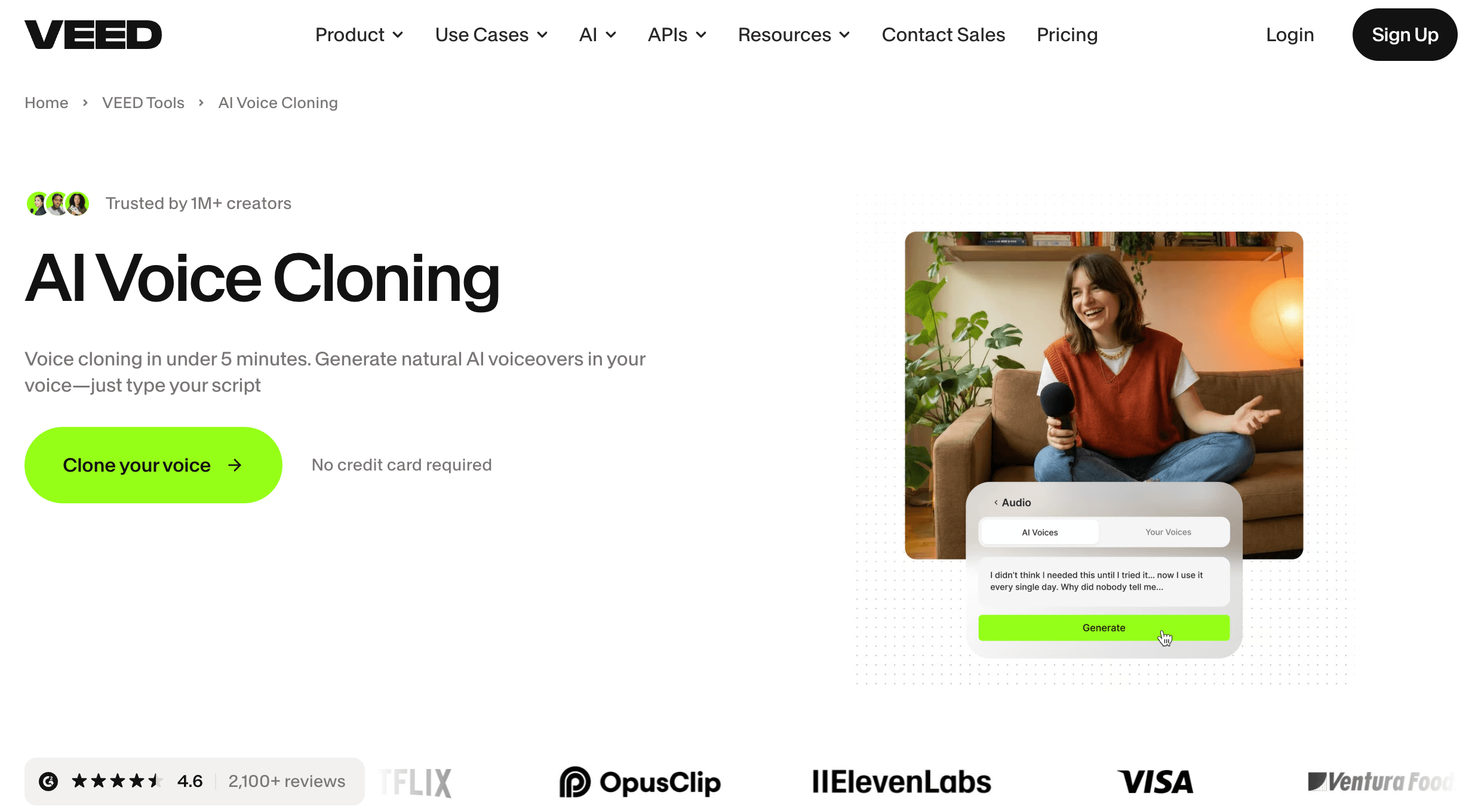
From script to subtitled, on-brand export — VEED keeps generation and editing in the same browser tab.
Tips for Getting Maximum Value
Start every subscription decision by estimating your actual AI usage — minutes of subtitles, hours of avatar or dubbing time, and how many generation credits you’ll realistically burn iterating on prompts — before picking a tier, since the base subscription price is only part of the real monthly cost once a team scales past one seat. Budget for 30–50% more AI credit consumption than your first estimate, because failed generations, model experimentation and re-renders after edits all eat into the same pool. Lean on the brand kit from day one rather than manually reformatting each export, and batch your auto-subtitle runs early in the editing process so captions guide your pacing instead of being an afterthought. If you’re on a team, agree on a single workspace structure up front — since VEED bills per workspace, spinning up extras without a plan is the single most common source of billing confusion in user reviews. Finally, start with monthly billing for your first cycle if you’re unsure the platform fits, then switch to annual once you’ve confirmed your workflow — the savings are real, but only worth locking in once you know the plan covers what you actually need.
Future Outlook and Final Assessment
Browser-based video tools are converging fast on the same idea: generation and editing shouldn’t live in separate apps. VEED has moved earlier and more aggressively than most established editors to embrace that shift, routing multiple frontier AI video models through one interface while keeping the editing, captioning and brand tools that built its original reputation. With Sequoia’s backing, a growing enterprise customer list, and reported revenue climbing well past $40 million ARR, VEED looks positioned to keep expanding rather than fading — and as generative video models keep improving, a platform that lets you compare and combine them in one place only gets more useful.
The honest caveats remain real, though: the per-seat, credit-based pricing structure takes real effort to fully understand, a meaningful share of recent reviews cite billing and subscription friction, and VEED still isn’t a true one-prompt-to-finished-video generator. Competitors like CapCut undercut it on price for solo creators, and specialists like Descript and Synthesia can out-perform it on their specific niche. Within those honest limits, VEED remains one of the most complete browser-based video platforms available in 2026 for teams that need to generate and edit branded video without hopping between apps.
Conclusion
VEED set out to make video editing accessible to anyone with a browser tab, and in 2026 it’s expanded that mission to cover AI generation as well — putting Sora 2, Veo 3.1 and its own Fabric 1.0 avatar model alongside a full editor, best-in-class auto-subtitles and a genuinely useful AI toolset. It rewards teams who take the time to understand its credit-based pricing and per-workspace billing, and it’s not the right fit for hobbyists on a zero budget or podcast-first editors who want transcript-based control. But for marketers, solopreneurs and content teams who want to generate, edit and brand video without switching apps, VEED remains one of the strongest all-in-one options on the market. Confirm the current pricing and included AI allowances before you subscribe, and it can genuinely take the friction out of getting from idea to posted video.
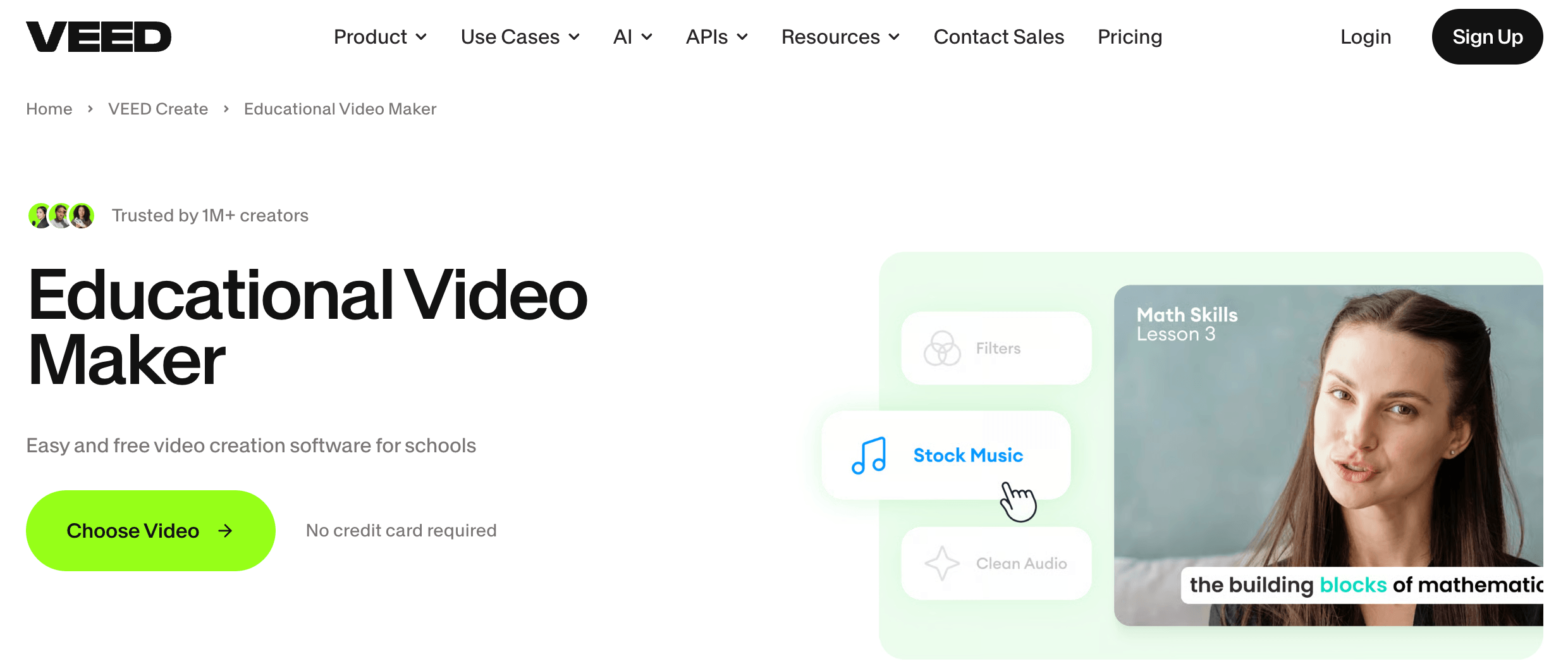
Shared workspaces and brand kits make VEED a practical choice for teams publishing consistent, on-brand video at scale.
Ready to turn your next idea into a scroll-stopping video?
Explore more honest reviews, tutorials and tech comparisons to find the right gear for the way you work, travel and live — at World Of Tech, where we make everything easy.
👉 Shop VEED: https://worldoftech.space/veed
👉 Our YouTube Channel: youtube.com/@world_tech79
👉 Our Facebook Fanpage: Facebook
👉 Our X (Twitter): @worldoftech79
Pricing, specifications and policy details in this review were verified against veed.io and independent review sources (including Trustpilot, G2 and third-party pricing trackers) as of July 2026. VEED’s plan names and pricing have changed more than once in the past year, so confirm current tiers, prices and included AI allowances on the official site before subscribing. Competitor prices are approximate and subject to change.





