
If you have ever missed a school event because the reminder was buried in a phone, argued over whose turn it was to do the dishes, or felt quietly annoyed that a wall calendar wanted a monthly subscription just to sync with Google, you already understand the problem ApoloSign set out to solve. ApoloSign is a factory-direct smart-display brand built around one idea: a single, always-on screen on your wall that keeps the whole household organized — schedules, chores, meals, reminders and photos — with no recurring fees. Its flagship is the world’s-first “dual-mode” Digital Calendar, which flips between a clean family Calendar Mode and a full Android dashboard, and it sits inside a wider lineup of battery-powered Portable TVs on wheels and glowing Neon-Lit photo frames. Backed by a stated one-million-plus households, a 4.5-star reputation across Amazon and Trustpilot, and a “buy once, own forever” pricing model, ApoloSign has grown from learning tablets and photo frames into one of the more talked-about names in home displays.
For busy parents, remote workers, renters and anyone tired of paying subscription “tax” on hardware they already bought, the pitch is immediate: a premium family command center — and a portable entertainment screen — for a one-time price, with the openness of Google Play instead of a locked-down appliance. But ApoloSign is not flawless, and an honest look surfaces real trade-offs around software polish, customer support and a few hardware limits worth knowing before you buy. This 2026 review walks through ApoloSign’s full lineup — the Dual-Mode Digital Calendars, the Smart Portable TVs, the Neon photo frames, the features and technology, the real pricing, head-to-head comparisons against Skylight, Cozyla and Hearth, the genuine pros and cons, and exactly who should (and shouldn’t) buy in.
ApoloSign Review 2026: The Subscription-Free Smart Display Brand Bringing Order and Entertainment to Every Room
Overview and Background
ApoloSign is a smart-display brand and direct-to-consumer electronics company that designs touchscreen family calendars, portable TVs and digital photo frames. It isn’t a general appliance maker or a software subscription service — it’s purpose-built around one idea: high-quality home screens sold at honest, factory-direct prices with no monthly fees. According to the company’s own account, ApoloSign traces its roots to 2008, starting with learning tablets and smart photo frames before narrowing its focus to two core categories — Portable TVs that move entertainment around the home, and all-in-one Digital Calendars that keep family life organized. The brand is operated out of Los Angeles and says it now serves more than one million households worldwide.
The company’s defining moment came in 2025, when it launched what it calls the world’s first Dual-Mode Calendar — a single screen that switches between a glanceable family Calendar Mode and a fully customizable Android “Widgets Dashboard.” That dual-mode idea is the heart of the whole brand: instead of a one-trick appliance, you get a device that is a calendar, a chore chart, a meal planner, a photo frame, a smart-home controller and a general-purpose Android tablet, all in one. ApoloSign leans hard on a factory-direct philosophy — uniting design, R&D and manufacturing under one roof to cut out markups — and it repeats one core belief across its marketing: “a truly great product is one that everyone can afford.”
On reputation, ApoloSign has built genuine credibility rather than the anonymity of a marketplace no-name. It sells directly and through Amazon and Walmart, carries a 4.5-star average across Amazon and Trustpilot (roughly 250 Trustpilot reviews and climbing at the time of writing, skewing strongly positive), and points to press recognition including a “Best Digital Wall Calendar” nod from Wired. Every product ships with free U.S. shipping, a 30-day return window and a 12-month warranty with free repair service — a support posture that signals a real brand standing behind its hardware, even if, as we’ll see, service execution isn’t perfect for everyone.
Why ApoloSign Stands Out in 2026
No subscription — you own it forever: This is ApoloSign’s defining advantage and the entire reason it exists. Most rival smart calendars charge a recurring fee — often around $60–$80 a year — just to keep core syncing, chore or photo features working. ApoloSign makes all core features (calendar, chores, rewards, to-dos and the photo screensaver) free for the life of the device; only optional AI features sit behind a paid tier. Over three to five years, avoiding a subscription can save more than the price of the device itself.
A true dual-mode screen — not a locked appliance: With one tap you switch between Calendar Mode (a clean, color-coded family schedule anyone can read from across the room) and Android Mode (a customizable dashboard of widgets, apps and smart-home tiles). Competing calendars run a proprietary, locked operating system that does one thing well; ApoloSign gives you a real, flexible computer behind the calendar.
Full Google Play and a real smart-home hub: Because the calendars and TVs run standard Android with full Google Play Store access, you can install Todoist, a recipe app, a fitness video app or a streaming service directly on the screen, ask Google Assistant (and Gemini AI) to run things hands-free, and link Google Home to your doorbell, cameras and lights. It’s a smart-home hub, not just a scheduler.
One device does many jobs: The same screen is a family calendar, an interactive chore chart, a meal and grocery planner, a message board with countdowns, a Google Photos digital frame and a general Android tablet. Owners describe it as their household’s “mission control” — replacing a whiteboard, a paper planner, a photo frame and a pile of scattered phone reminders with a single always-visible display.
Chores that kids actually do: A reward-based chore system turns tasks into points and rewards, which parents repeatedly say gets children to compete to empty the dishwasher or finish homework. The gamified routines, color-coded per family member, are one of the most-loved features in real-world reviews — and a genuine differentiator from a plain shared calendar.
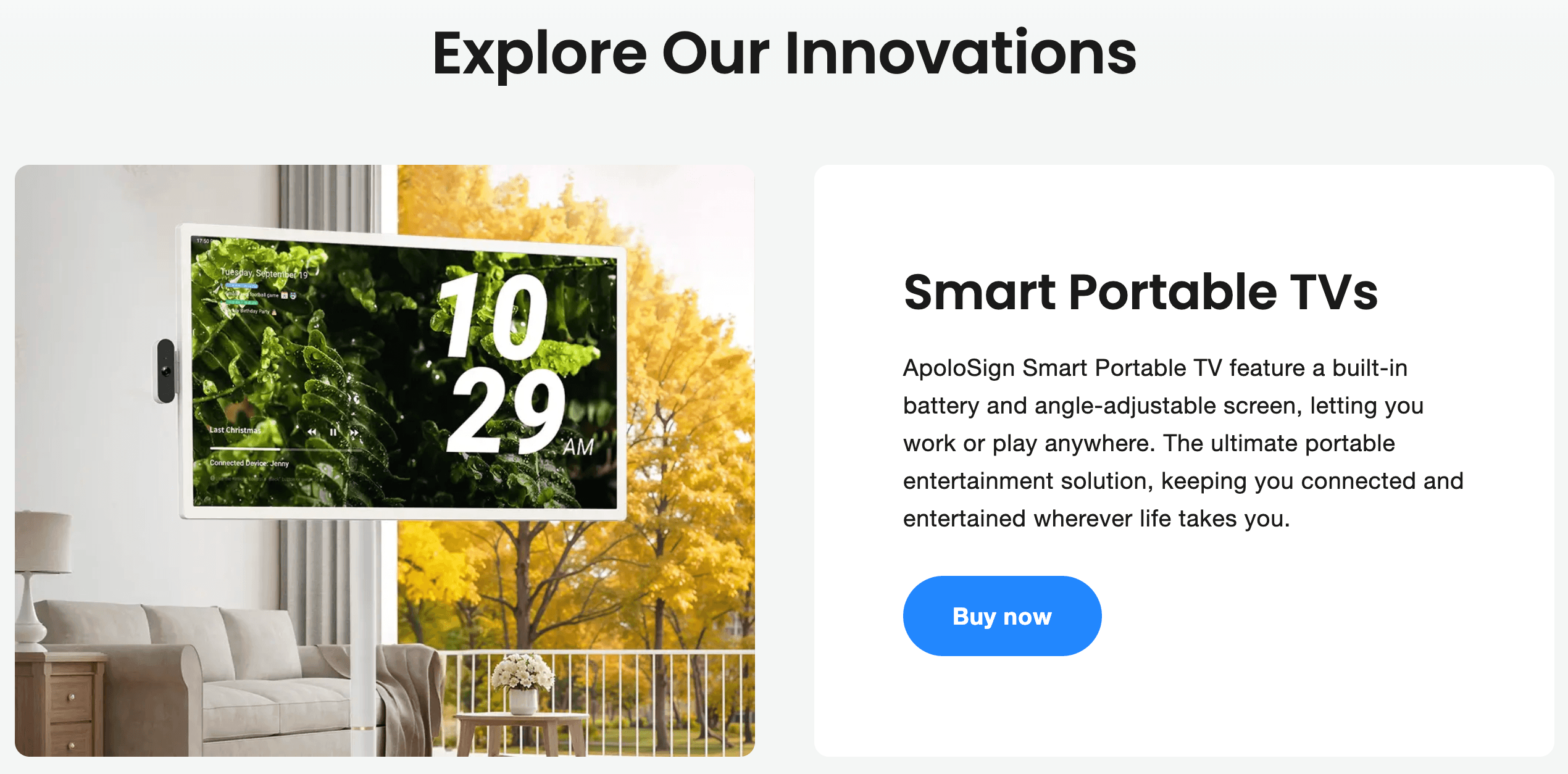
Entertainment that rolls anywhere: Beyond calendars, ApoloSign makes battery-powered Portable TVs on wheels — 24-inch and 32-inch touchscreens plus a briefcase-style PackGo — that run the same Android and even display the family calendar. With built-in batteries and rolling stands, they move from kitchen to bedroom to patio, which is a genuinely different value proposition from a fixed wall TV.
Factory-direct value and a full lineup: From a $279 compact calendar to a $1,099 briefcase TV, and a range of standard and glowing Neon-Lit photo frames in between, ApoloSign covers a lot of ground at prices that typically match or undercut the competition. Backed by a 4.5-star reputation, a 12-month warranty and multiple sizes and colors, it’s a brand designed to fit real budgets, not just early adopters.
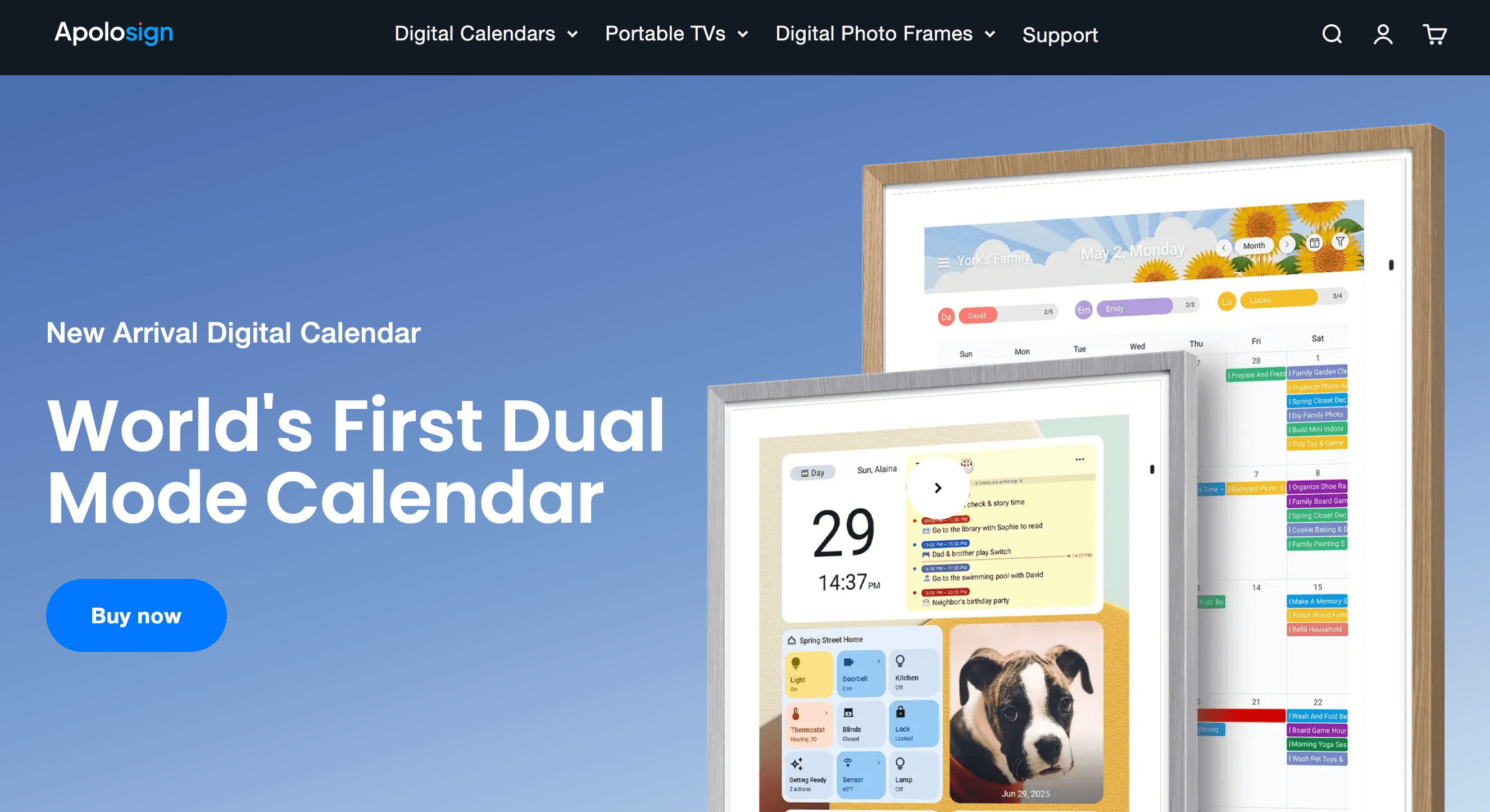
ApoloSign’s flagship Dual-Mode Digital Calendar switches between a glanceable family schedule and a full Android dashboard — with no subscription for core features like calendar sync, chores and photos.
Key Features and Technology
ApoloSign’s catalog is broad, but it organizes cleanly into a handful of pillars. Here’s how the platform actually breaks down.
Dual-Mode: Calendar View + Android Dashboard
The heart of the product. Calendar Mode presents a simple, color-coded month, week or day view that the whole family can read at a glance and that hides the complexity of an operating system. One tap flips to Android Mode — a fully customizable dashboard where you arrange widgets (weather, to-dos, clock, photos, smart-home controls) and launch any app you’ve installed. It’s the feature that lets a single screen be both “grandma-simple” and “power-user flexible,” and it’s the capability ApoloSign built the entire brand around.
Sync, Chores, Meals and the Message Board
The calendar auto-syncs Google Calendar, Apple/iCloud and Outlook (iCloud is imported as a shared calendar), pulling everyone’s schedules into one real-time source of truth. A reward-based chore chart gamifies tasks with points; a meal planner organizes recipes and weekly menus; grocery, shopping and wish lists live in the shared space; and a message board handles color-coded notes, reminders and countdowns to birthdays or holidays. A companion ApoloSign App (iOS and Android) lets any family member add events, chores and lists remotely from their phone — so the wall display stays current even when you’re not home.
Photo Frame, Privacy and Display Quality
When it isn’t showing your schedule, the screen becomes a digital photo frame pulling from Google Photos or local storage — with no extra subscription. A one-tap privacy swipe instantly hides sensitive schedule details behind a photo screensaver when guests arrive. Screens use an anti-glare matte glass finish with auto-brightness to cut eye strain in bright rooms. The calendars come in 15.6″, 21.5″ and 27″ sizes at 1080p Full HD, with a dedicated 27″ 4K UHD model for the sharpest text and photos. Note that the 15.6″ ships with a desktop stand for countertop use, while the 21.5″ and larger sizes include a wall mount only.
Voice Control, Gemini AI and Smart Home
A built-in microphone and Google Assistant integration enable hands-free “Hey Google” control, and newer models add Gemini AI chat for questions and assistance. Through Google Home, the display links to compatible doorbells, cameras and smart lights, turning the wall calendar into a control panel for the house. This is where ApoloSign’s open-Android approach pays off most clearly: capabilities that a locked, proprietary calendar simply can’t offer. (These AI features are the part of the experience that can carry an optional subscription — the everyday calendar, chores and photos remain free.)
The Wider Lineup: Portable TVs and Neon Frames
Beyond calendars, ApoloSign ships a full range of screens. The Smart Portable TVs (24″ and 32″) run Android 16 with EDLA certification and full Google Play, ride on a five-wheel rolling stand that tilts and rotates to portrait, pack built-in batteries for roughly 4–6 hours cordless, and include dual speakers, an 8MP camera and a mic for video calls — the 32″ 4K “Gen2″ model carries a 15,000mAh battery and up to 256GB of storage. The briefcase-style PackGo 27″ adds 40W speakers, a 6-hour battery and 45W fast charging in a carry-anywhere shell. Rounding it out are standard Digital Photo Frames (10.1″ and 15.6″) and the eye-catching Neon-Lit Photo Frames (9.7″ 2K, 10.1″ and 14.1”) with glowing edges that make them a distinctive gift.
Pricing, Plans, and Package Structure
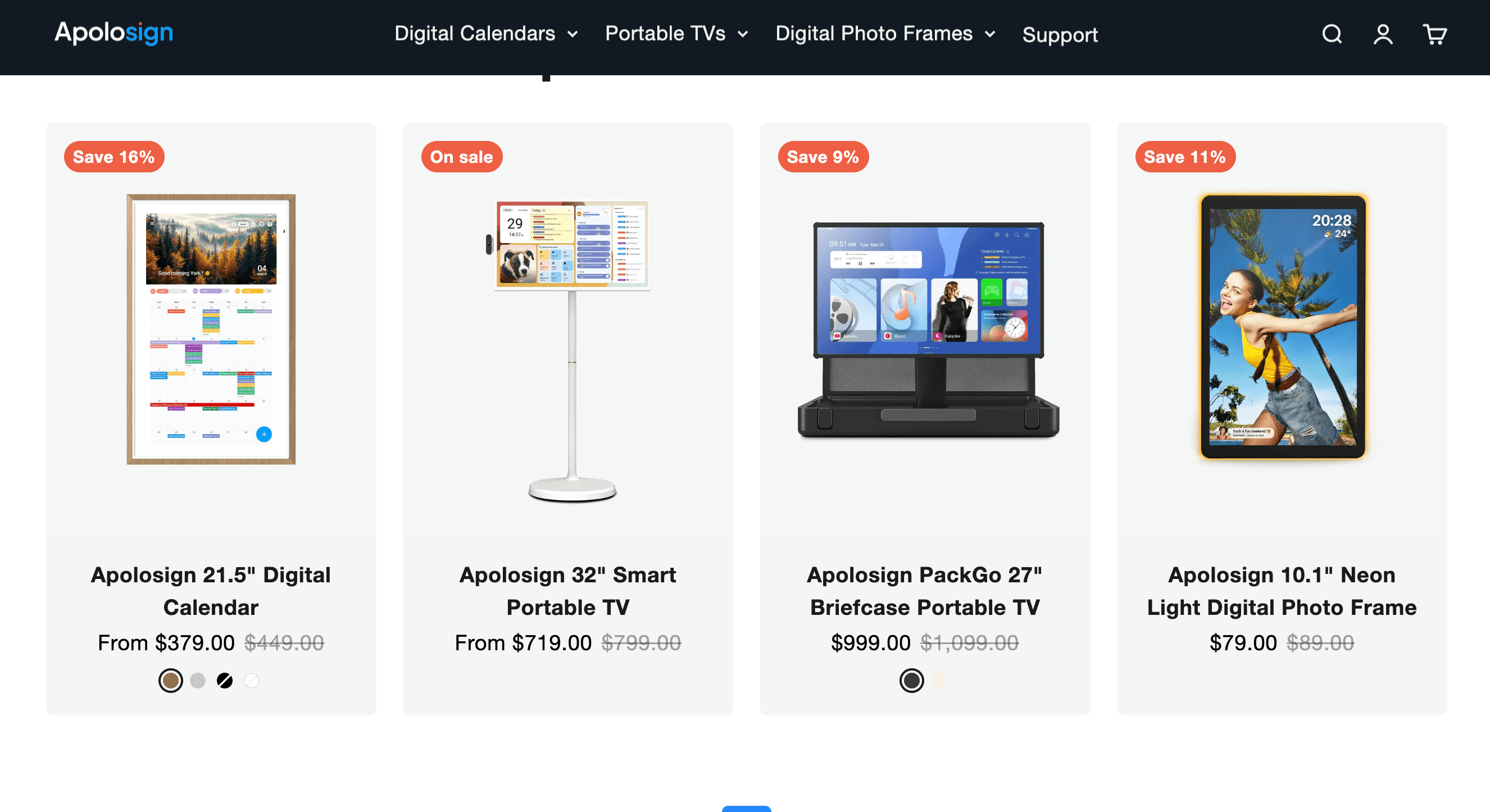
ApoloSign sells hardware on a one-time, “own forever” basis — there’s no mandatory subscription, and only optional AI features carry a recurring fee. The prices below are ApoloSign’s standard (regular) rates, with typical on-sale prices noted in parentheses; the brand runs frequent seasonal promotions (there’s often an active sale, such as a World Cup 2026 event knocking money off the Portable TVs), so always confirm the live price and any coupon before checkout. Calendars come in Teak Yellow, Spruce Grey, Black and White; the 4K calendar comes in Dark Oak.
| Product | Price (USD) | What It Is | Best For |
|---|---|---|---|
| 15.6″ Digital Calendar | $349 (from ~$279) | Compact dual-mode calendar with desktop stand | Desks, small kitchens, first-timers |
| 21.5″ Digital Calendar | $449 (from ~$379) | Mid-size 1080p wall calendar & command center | Most families, kitchen walls |
| 27″ Digital Calendar | $699 (from ~$579) | Large 1080p hub (octa-core, 64GB, Wi-Fi 6) | Big families, main household hub |
| 27″ 4K Digital Calendar | $799 (from ~$679) | 4K UHD version of the flagship calendar | Sharpest text & photos, premium buyers |
| 24″ Smart Portable TV | $699 (from ~$619) | FHD touchscreen TV on wheels, ~4h battery | Renters, roaming entertainment |
| 32″ Smart Portable TV | $799 (from ~$719) | 32″ (FHD/4K) Android 16 TV on wheels, ~6h battery | Bigger rolling screen, video calls |
| PackGo 27″ Briefcase TV | $1,099 (from ~$999) | Briefcase-style TV, 40W speakers, 45W charging | Outdoor movie nights, events, travel |
| Photo Frames (Neon & Standard) | ~$69.90–$149 | Digital & glowing Neon-Lit frames (9.7″–15.6″) | Gifts, desks, sharing memories |
ApoloSign’s Portable TVs run full Android with Google Play on a battery-powered rolling stand — a screen that moves from the kitchen to the bedroom to the patio and can even show your family calendar.
How ApoloSign Compares to Alternatives
| Factor | ApoloSign | Skylight Calendar | Cozyla / Hearth |
|---|---|---|---|
| Subscription | None for core; AI optional | ~$39–$79/yr for full features | Cozyla: none · Hearth: subscription |
| OS & apps | Full Android + Google Play | Proprietary, locked OS | Cozyla: Android apps · Hearth: curated |
| Dual mode (Calendar + tablet) | Yes — the core feature | No (calendar appliance) | Partial / varies |
| Screen options | 15.6″–27″, 1080p or 4K | ~15″ / 27″, up to QHD | Mostly ~15.6″ |
| Voice & smart home | Google Assistant + Gemini + Home | Limited | Limited / varies |
| Entry price (approx.) | ~$279 (15.6″) / $579 (27″) | ~$160 (15″) / $600 (27″) + sub | Cozyla ~$180–$250 · Hearth ~$599+ |
| Best for | Own-forever families wanting an open hub | Simplest, most polished appliance | Budget no-sub (Cozyla) / concierge (Hearth) |
vs. Skylight: Skylight is the famous incumbent and arguably the most polished, “appliance-simple” experience in the category — but it runs a locked proprietary OS and puts several features behind a recurring Plus fee (commonly around $39–$79 a year). Its 27″ Calendar Max even uses a sharper QHD panel. ApoloSign counters with no subscription, double the storage on comparable models, full Google Play app freedom and real smart-home control. If you want the simplest possible dedicated calendar and don’t mind the fee, Skylight is excellent; if you value ownership, flexibility and long-term cost, ApoloSign pulls ahead.
vs. Cozyla and Hearth: Cozyla is ApoloSign’s closest philosophical rival — also subscription-free and Android-app-friendly, usually cheaper, but with a narrower size range and a less complete ecosystem. Hearth sits at the premium end with a large, beautifully designed display and concierge-style features, but leans on a subscription that pushes total cost well up. ApoloSign threads the middle: no core subscription like Cozyla, plus a broader lineup (multiple sizes, 4K, portable TVs) that neither fully matches.
vs. a tablet or a standard portable TV: You could bolt a cheap Android tablet to the wall, or buy a fixed TV, and save money up front. But a generic tablet lacks the family calendar software, the chore-and-reward system and the always-on dashboard, and a wall TV can’t roll from room to room. Against direct rolling-TV rivals like VLH, ApoloSign sometimes gives up battery capacity or a lower sticker price, but it wins on ecosystem integration — the same account, app and calendar sync across your calendar and your TV. The smart play for many households isn’t either/or; it’s a calendar in the kitchen and a portable TV that follows the family around.
Pros and Cons
What Owners Love
The “no subscription” value: The single most consistent praise across reviews is not paying a monthly or annual fee for features that competitors charge for. Owners repeatedly frame it as long-term value — the app that lets you use widgets, rewards and meal planning doesn’t cost extra every month like rival calendars, and that adds up to real money saved over the life of the device.
Genuine dual-mode flexibility: Being able to switch from a clean family calendar to a full Android dashboard is a recurring favorite. Reviewers describe it as a calendar, picture frame and Android tablet in one, and value that a single screen can be simple for the whole family yet customizable for a power user.
Premium build, packaging and easy setup: Owners frequently call out the quality packaging, sturdy build and how straightforward setup is — often praising clear box instructions and a video tutorial. Even self-described non-technical buyers report getting up and running quickly, and many note how good the display looks mounted on a wall.
The chore-and-reward system actually works: Parents repeatedly credit the gamified chore chart with getting kids to compete over tasks and build routines. Color-coding each family member’s schedule and turning chores into rewards is one of the most-loved everyday features, and a real reason families say they stay organized.
Fast, free shipping and strong value: Quick delivery and free U.S. shipping come up constantly, as does the sense that the hardware is well-priced against the competition. Several buyers specifically mention the value for money being better than rival digital calendars.
Multifunctional and giftable: Owners love that one device replaces a whiteboard, planner, photo frame and tablet — and gift buyers report the calendars and glowing Neon frames go over well as housewarming and family presents. The range of sizes and colors makes it easy to match a room or a recipient.
Limitations Worth Knowing
App-and-widget sync bugs: The most common software complaint is that the ApoloSign calendar app and the on-screen widget can fall out of sync — for example, the app showing you as off on a day the widget shows as working. It’s usually a minor, fixable annoyance, but it points to software polish that still trails the hardware.
Occasional setup friction: A recurring report is the system hanging during the initial Google account sync, sometimes requiring a factory reset and a manual re-setup to resolve. Once past that, most users say everything runs smoothly — but the first-run experience isn’t always seamless.
Email-only support and return friction: There’s no customer-service phone number — support is handled by email and live chat, which most find responsive, but a minority describe frustration around returns and refunds. The company does appear to reach out proactively and process refunds, yet if you want a phone line and white-glove service, set expectations accordingly.
Interface quirks and performance: Some owners note UX rough edges — such as having to repeatedly select the keyboard when entering items — and a few wish for more RAM to feel faster. The wall/desk calendars also have no battery, so they must stay plugged in; a couple of reviewers specifically wished for a built-in battery.
Casting limits on the Portable TVs: The TVs mirror your phone’s screen and local media but don’t support AirPlay or streaming-service casting (Google Cast). You install apps directly on the device instead, which works well — but if you expected to “cast” a stream from your phone, that specific workflow isn’t supported.
Practical caveats: The 21.5″ and larger calendars include a wall mount only (no desktop stand); shipping can slow down around peak holiday periods; and because it’s a direct-to-consumer brand, a few automated site-safety scanners flag generic caution even though it’s a legitimate, well-reviewed Shopify storefront. Buy with realistic expectations, keep your order details, and register the warranty.
Beyond calendars and TVs, ApoloSign’s glowing Neon-Lit photo frames round out a lineup built to keep families organized, entertained and connected — all without a subscription.
Who Should Use ApoloSign
Busy families and parents: This is ApoloSign’s sweet spot. If your household juggles work shifts, school runs, activities and appointments across too many phones, a wall calendar that everyone can read — with chores, meals, lists and reminders in one place — genuinely cuts missed appointments and daily friction. The 21.5″ or 27″ models make natural kitchen command centers.
Anyone tired of subscriptions: If the idea of paying $60–$80 a year forever to keep a calendar working bothers you, ApoloSign’s own-forever model is the whole point. You pay once and keep every core feature for the life of the device — a meaningful long-term saving over subscription-based rivals.
Google and smart-home households: Because it runs full Android with Google Assistant, Gemini and Google Home, it slots neatly into a Google-centric home — controlling lights, viewing a doorbell feed, and running any Play Store app. If you want a hub rather than a single-purpose appliance, the openness is a genuine advantage.
Renters and flexible-space users: The battery-powered Portable TVs on wheels are ideal if you can’t (or don’t want to) wall-mount a fixed TV. They roll between rooms, tilt to portrait, handle video calls and even double as a second calendar display — a flexible fit for apartments, dorms and multi-use spaces.
Gift buyers: The calendars make popular housewarming and family gifts, and the glowing Neon-Lit photo frames — starting under $90 — are a distinctive, easy present for grandparents and remote family who want shared photos without any subscription.
Who should look elsewhere: If you want the most polished, “it just works” appliance and don’t mind paying a subscription, Skylight may suit you better. If phone-based, white-glove support is a must-have, the email-first model may frustrate you. And if you specifically need AirPlay/Google Cast casting to a portable TV, a battery-powered calendar, or a screen that never shows any software rough edges, go in clear-eyed — ApoloSign trades a little polish and a few conveniences for openness and value.
Getting Started: Step by Step
- Pick the right size and product. For a family calendar, choose the 15.6″ for a desk (it’s the only one with a desktop stand), the 21.5″ as the value sweet spot for a kitchen wall, or a 27″/27″ 4K for a large main hub. If you want entertainment that moves, look at the 24″ or 32″ Portable TV or the PackGo briefcase; for gifts, consider a Neon-Lit photo frame. Confirm the live sale price and any coupon before checkout.
- Mount or place it and power up. Wall-mount the 21.5″+ calendars (a mount is included) or stand the 15.6″ on a counter; Portable TVs assemble onto their rolling stand. Plug in and turn on — remember the calendars run on mains power (no battery), while the Portable TVs can run cordless on their built-in battery.
- Connect Wi-Fi and your Google account. Join your network and sign in. If the initial Google sync hangs, don’t panic — a factory reset and manual re-setup resolves it for most users, after which it runs smoothly. Following the included video tutorial makes this step easier.
- Sync your calendars and set up the family. Connect Google Calendar, Outlook and iCloud (imported as a shared calendar), then add family members, assign colors, and build your chore-and-reward chart, meal plan and shared lists. Install the ApoloSign App on each person’s phone so everyone can add events remotely.
- Customize the dashboard and voice control. In Android Mode, arrange the widgets you actually use — weather, to-dos, photos, smart-home tiles — and install any Google Play apps you want. Set up “Hey Google” voice control and link Google Home for lights, cameras and doorbells.
- Add photos and register your warranty. Connect Google Photos (or load local images) so the screen doubles as a photo frame, enable the one-tap privacy swipe if you want to hide your schedule from guests, and register your 12-month warranty. Keep your order details in case you ever need support or a return.
Tips for Getting Maximum Value
Lean on the ApoloSign App from day one — the wall display is far more useful when every family member can drop events, chores and grocery items onto it from their phone, so the screen stays current without anyone standing in the kitchen to type. Take a few minutes to color-code each person and turn real chores into rewards; that small setup is what turns the calendar from a passive display into something kids actually engage with. Time your purchase around one of ApoloSign’s frequent seasonal sales and check for an active coupon, since the machines rarely need to be bought at full price — and remember the biggest saving is the annual subscription you’re avoiding entirely. Because it’s open Android, install the apps you’d genuinely use (a recipe app, a fitness video app, a to-do app, a streaming service) so the screen earns its place, and set up the one-tap privacy swipe if the display sits somewhere guests will see. If you’re buying a Portable TV, plan to run apps natively rather than casting from your phone, keep a USB-C power source handy for long cordless sessions, and register your warranty right away so support is simple if you ever need it.
Future Outlook and Final Assessment
The smart-display market in 2026 is splitting into two camps: subscription appliances that are polished but rented, and open, own-forever devices that trade a little polish for freedom and value. ApoloSign has planted its flag firmly in the second camp, and the timing looks smart — subscription fatigue is real, and a “buy once, own forever” family hub with full Android and smart-home control is an easy story to tell. With a stated million-plus households, a growing 4.5-star reputation, and a lineup that now spans calendars, portable TVs and neon frames, ApoloSign has momentum and a clear identity as the anti-subscription option.
The honest caveats remain: the software still trails the hardware, first-run setup can be bumpy, support is email-first, and a few conveniences (casting, a battery in the calendars, phone support) are missing. If ApoloSign keeps tightening app-and-widget sync and smoothing onboarding, it could close the gap with the most polished rivals while keeping its price-and-ownership edge. But even today, within those boundaries, it delivers one of the best value-to-capability ratios in home displays — and on the core job of organizing a family without a subscription, it’s one of the most compelling options available in 2026.
Conclusion
ApoloSign isn’t trying to be the most luxurious screen in your home — it’s trying to be the most useful and the most honest about cost, and at that job it’s remarkably effective. By combining a glanceable family calendar with a full Android dashboard, keeping core features free of any subscription, and extending the same open, connected experience across portable TVs and photo frames, it removes two of the biggest frustrations in this category: locked-down appliances and endless recurring fees. It rewards a little setup and realistic expectations with a genuinely capable, own-forever household hub, and it’s not the right call for buyers who want flawless polish or phone-based concierge support — but for families who want order, entertainment and control without a monthly bill, few brands deliver more for the money. Confirm the current sale price, check for an active coupon, and ApoloSign can take the chaos out of a busy household and make it genuinely easy.
Ready to organize your whole family on one subscription-free screen?
Explore more honest reviews, tutorials and tech comparisons to find the right gear for the way you work, travel and live — at World Of Tech, where we make everything easy.
👉 Shop ApoloSign: https://worldoftech.space/apolosign
👉 Our YouTube Channel: youtube.com/@world_tech79
👉 Our Facebook Fanpage: Facebook
👉 Our X (Twitter): @worldoftech79
Pricing, specifications and policy details in this review were verified against apolosign.com and independent review sources (including Amazon and Trustpilot customer feedback) as of July 2026. Smart-display hardware, pricing and promotions change frequently, so confirm current details on the official site before purchasing. Competitor prices are approximate and subject to change.





