
If you have spent any time in developer circles or AI Twitter in 2026, you have almost certainly heard the noise around OpenClaw — the open-source personal AI agent that raced to hundreds of thousands of GitHub stars, got its creator hired by OpenAI, and can genuinely run errands across your inbox, calendar and messaging apps. There is just one catch: installing it, keeping the runtime alive, wiring up model keys and connectors, and babysitting a server is a real project in itself. MyClaw exists to erase that catch. It is a managed cloud hosting platform that spins up a private, always-on OpenClaw (or Hermes Agent) instance for you in about 30 seconds, handles the updates, backups and uptime, and layers a cleaner dashboard on top — so you can give your agent a goal instead of fighting with DevOps.
For non-technical founders, marketers, operators and busy developers who want the payoff of an autonomous AI agent without the operational burden, the pitch is immediately appealing: a teammate that works 24/7, for less than the cost of a part-time hire. But MyClaw isn’t magic, and an honest look surfaces real trade-offs — most importantly that AI model usage is billed separately and can dwarf the hosting fee, plus a thin and mixed third-party track record worth understanding before you subscribe. This 2026 review walks through exactly what MyClaw is, the OpenClaw and Hermes agents it runs, its features and real pricing, how it stacks up against self-hosting and rival hosts, the genuine pros and cons, and precisely who should — and shouldn’t — sign up.
MyClaw Review 2026: Managed OpenClaw and Hermes Hosting That Runs Your AI Agent 24/7 Without the DevOps
Overview and Background
MyClaw (MyClaw.ai) is a managed cloud hosting service — operated under Cubo World Inc. — built for running open-source AI agents, specifically OpenClaw and Hermes Agent. It is important to be clear about what it is and isn’t: MyClaw is not the official OpenClaw project, nor the tool itself. It is a third-party host. You pay a monthly fee, and MyClaw spins up and maintains a dedicated, private instance of your chosen agent — configured, optimized and kept online — so you can skip the entire install, runtime and maintenance layer that stops most people from ever getting an agent working.
To understand MyClaw you have to understand OpenClaw, the star it hosts. OpenClaw is a free, open-source autonomous AI agent created by developer Peter Steinberger (@steipete). It became one of the fastest-growing projects in GitHub history — now sitting around 380,000 stars — and drew enough attention that Steinberger joined OpenAI in early 2026, with an OpenClaw Foundation set up to steward the project. It began life as “Clawd” and was renamed through “Clawdbot” and “Moltbot” before landing on OpenClaw, partly following a trademark complaint from Anthropic over the closeness to “Claude.” OpenClaw runs locally, connects to messaging apps like WhatsApp, Telegram, Slack and Discord, and doesn’t just chat — it browses, writes code, manages files and completes multi-step tasks. MyClaw takes that powerful-but-fiddly free software and runs it for you in the cloud.
MyClaw hosts two flagship agents. Alongside OpenClaw sits Hermes Agent, Nous Research’s self-improving agent (around 194,000 GitHub stars) that carries persistent memory and turns solved tasks into reusable skills, getting sharper the longer it runs. Every MyClaw plan provides a dedicated, isolated and encrypted container, 24/7 uptime, automatic updates, daily backups, one-click deployment and a bring-your-own-key model setup. One transparency note worth flagging up front: the site’s footer credits Cubo World Inc., but public company detail is limited, and MyClaw’s own About page describes it simply as an independent service.
Why MyClaw Stands Out in 2026
It runs a genuinely hard-to-run tool for you: OpenClaw is powerful but notoriously fiddly — one of its own maintainers has warned that it is far too dangerous to run safely for anyone who can’t use a command line. MyClaw removes the install, runtime, keys, connectors and configuration entirely, and hands you a working agent in roughly 30 seconds. For most people, that gap between “this looks amazing” and “I actually have it running” is exactly what MyClaw closes.
Always-on, not just when your laptop is open: Because your agent lives on a dedicated cloud instance, scheduled jobs — daily reports, price monitoring, inbox triage, page watching — keep running whether or not your own machine is on. Auto-updates, daily backups and crash recovery are handled for you, so the runtime stays alive without you nursing it.
Two of the most talked-about agents on one platform: MyClaw hosts both OpenClaw (Steinberger’s project, ~380k stars) and Hermes Agent (Nous Research, ~194k stars and the self-improving one with persistent memory). Better still, a buy-one-get-one offer lets you subscribe to one and claim a free 30-day Max trial of the other from your dashboard — a genuinely easy way to compare them.
A cleaner cockpit over the raw console: Native OpenClaw is a developer’s console. MyClaw keeps the runtime visible but moves daily work — tasks, approvals, results and settings — into a simpler UI. That lowers the barrier for non-technical users who want to use an agent, not decode one.
Real model freedom (bring your own key): You are not locked to a single model. Route Claude for reasoning, GPT for coding, Gemini for long context, DeepSeek for cost control — the platform advertises 200+ model options through compatible providers, all using your own keys. That flexibility lets you tune quality against cost task by task.
Connectors and channels you already use: Reach your agent from email, Telegram, WhatsApp, Discord or a browser, and connect it to the tools your workflow already runs on — Gmail, Google Docs, Sheets and Calendar, Slack, Notion, GitHub, Shopify, Salesforce, Jira and more. No exports, no copy-pasting, no context switching.
Private, isolated instances: Each subscription runs on its own secure, isolated container with encrypted access and daily backups, rather than sharing a crowded multi-tenant box. For anything beyond casual tinkering, having your own private runtime is reassuring — provided you weigh the broader trust questions covered later in this review.
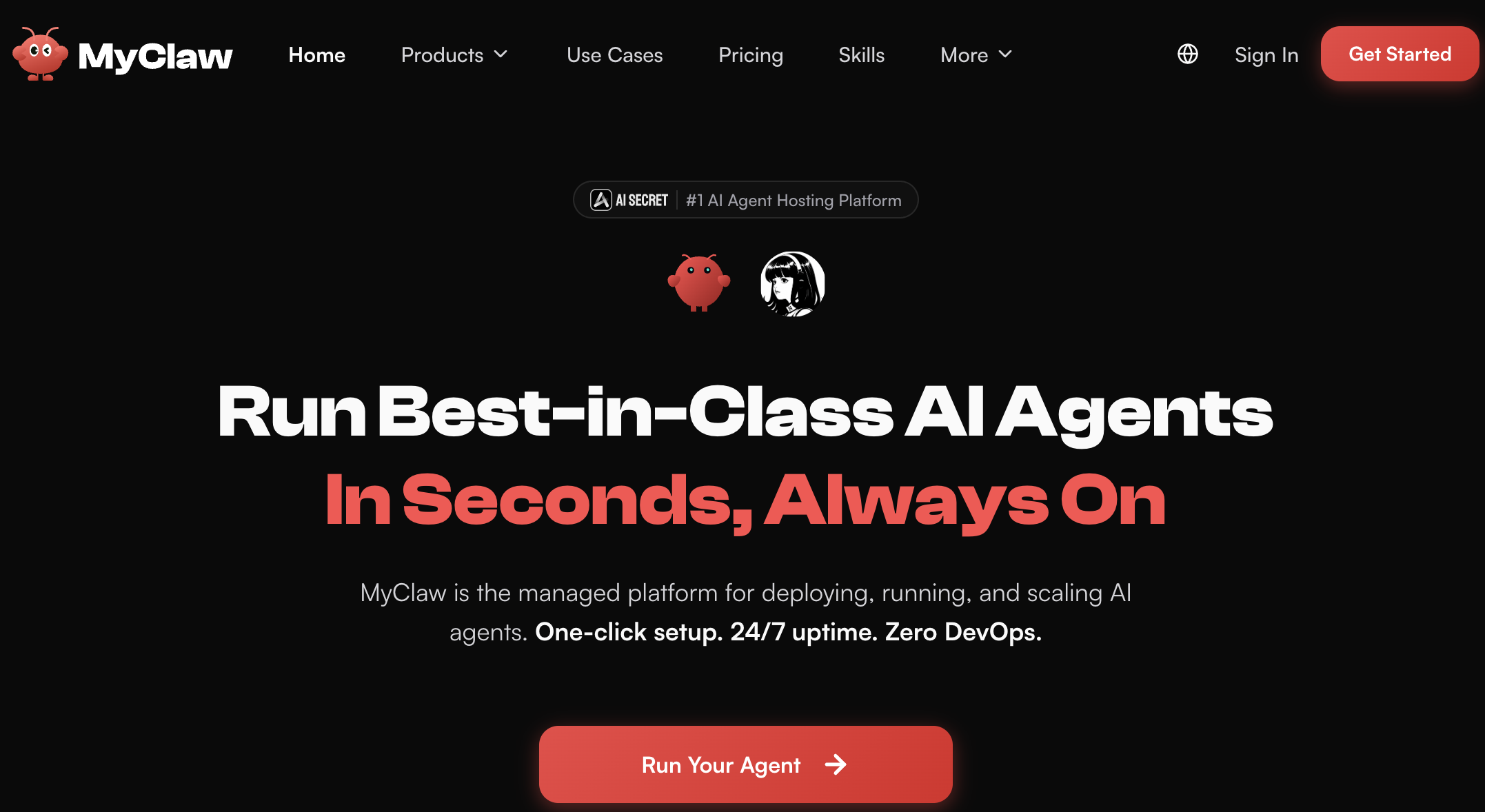
MyClaw deploys a private, always-on OpenClaw or Hermes Agent instance in about 30 seconds and layers a simpler dashboard over the raw runtime — so you can give your agent a goal instead of managing a server.
Key Features and Technology
MyClaw’s offering is narrow but deep: it does one thing — host AI agents well — and organizes cleanly into a handful of pillars. Here’s how the platform actually breaks down.
Managed OpenClaw Hosting
The core product. OpenClaw is a multi-channel personal agent that reaches you through messaging apps and does real work — workflow automation, code and dev tasks, browser control, file and system management, smart-home control, API integration, content creation and everyday personal-assistant duties. MyClaw handles the part most people can’t: it installs and keeps the runtime alive, pre-configures models, keys, connectors and skills, and gives you an expert-configured instance that is ready out of the box instead of a blank command line.
Hermes Agent Hosting
The second flagship. Hermes Agent, from Nous Research, is a self-improving agent with persistent memory: it researches, writes code, runs tools and — crucially — turns successful work into reusable skills, so it gets sharper with every run. It connects to Notion, project tools, CRMs, docs and your data to work from your existing context, and MyClaw runs it 24/7 with the same hosting, updates and recovery. If you want an agent that compounds its usefulness over time, Hermes is the pick, and MyClaw is one of the few hosts offering it alongside OpenClaw.
Model Flexibility and BYOK
MyClaw keeps your agent free to use the right model for the job rather than locking you in. You connect your own provider keys and route work across 200+ model options — Claude for reasoning, GPT for coding, Gemini for long context, DeepSeek and others for cost control. The important flip side of bring-your-own-key is billing: model usage runs on your provider account, not MyClaw’s subscription, which is where the real running cost lives and where careful model routing pays off.
Connectors, Channels and Skills
Agents are only useful if they plug into your world. MyClaw exposes the standard OpenClaw connector set — Gmail, Google Workspace, Slack, Notion, GitHub, Shopify, Salesforce, Canva, Box, Discord, ClickUp, Jira, Linear, Trello and more — reachable over Telegram, WhatsApp, Discord, email or browser. Capabilities are extended through Skills, defined as simple SKILL.md files, with a large community marketplace (ClawHub) hosting thousands of contributed skills. MyClaw’s approach is to surface a small set of curated starter skills you can install in one click, then let you go wider once the essentials are in place.
Instances, Resources and Isolation
Each plan is a dedicated container with defined resources — from 2 vCPU / 4 GB RAM / 40 GB SSD on the entry tier up to 16-64 vCPU / 32-128 GB RAM / 320-1280 GB SSD at the top. Every instance is fully private and encrypted with daily backups, and the higher tiers add priority support and, on the flagship Ultra plan, high-performance guaranteed resources. This is the layer you are really renting: managed, isolated infrastructure sized to how heavily your agent works.
Deployment and Management
Deployment is one-click and takes about 30 seconds. From there the platform handles auto-updates and maintenance, and the dashboard centralizes tasks, approvals, results and settings so day-to-day use doesn’t require touching the underlying runtime. The workflow MyClaw promotes is simple: pick a plan, let them stand up your instance, then give the agent a goal and let it bring finished results back to you.
Pricing, Plans, and Package Structure
MyClaw sits in the premium tier of OpenClaw hosting. There are four plans, each billed monthly or yearly (paying annually saves roughly 43-45%), and each includes always-on uptime, auto-updates, daily backups, a private encrypted instance, and access to both OpenClaw and Hermes Agent. There is no free trial at the time of writing. The prices below are MyClaw’s standard rates — and remember the recurring theme of this review: AI token usage is billed separately, so these figures are your hosting cost, not your total monthly cost. Always confirm the live price before checkout.
| Plan | Price (USD) | What You Get | Best For |
|---|---|---|---|
| Lite | $29/mo (or $199/yr, ~$16.6/mo) | 2 vCPU, 4 GB RAM, 40 GB SSD; private, daily backups | Personal projects and getting started |
| Pro (Most Popular) | $59/mo (or $399/yr, ~$33.3/mo) | 4 vCPU, 8 GB RAM, 80 GB SSD; adds priority support | Power users who rely on AI daily |
| Max | $119/mo (or $799/yr, ~$66.6/mo) | 8 vCPU, 16 GB RAM, 160 GB SSD; priority support | Heavy workloads and higher performance |
| Ultra | From $239/mo (or $1,599/yr, ~$133.3/mo) | 16-64 vCPU, 32-128 GB RAM, 320-1280 GB SSD; guaranteed resources | Demanding, high-intensity workloads |
| OpenClaw / Hermes software | Free (open-source) | The agent itself; self-host on your own server | Technical users who want full control |
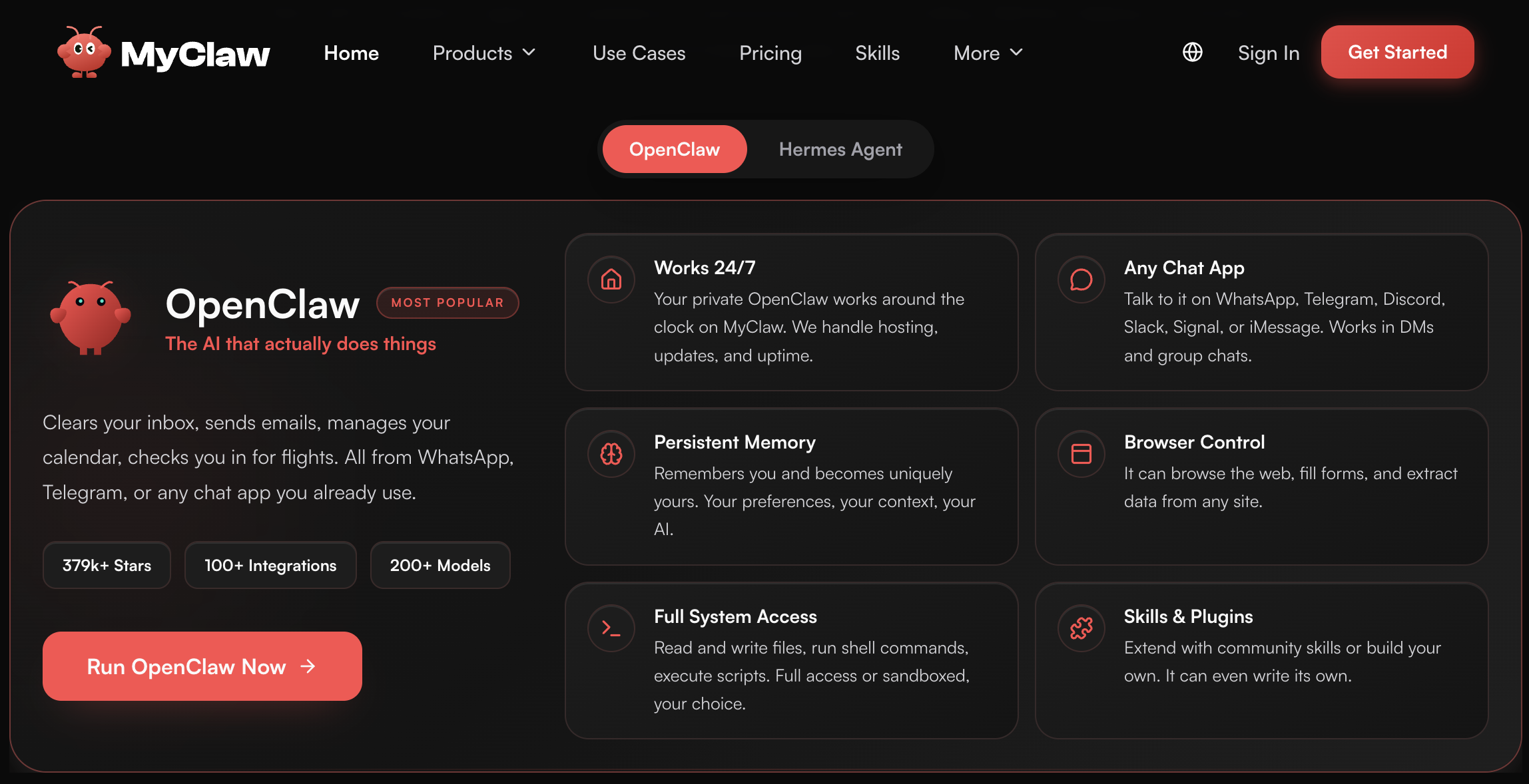
MyClaw’s plans cover hosting only — AI model tokens are billed separately through your own provider key, which is usually the real monthly cost of running an agent.
How MyClaw Compares to Alternatives
| Factor | MyClaw | Self-Hosting (DIY) | Other Managed Hosts (xCloud / KiloClaw) |
|---|---|---|---|
| Software cost | Free agent, hosted for you | Free (you install it) | Free agent, hosted for you |
| Hosting cost (approx.) | $29-$239/mo | ~$5-20/mo for a VPS | From ~$5.59-$10+/mo |
| AI token cost | Separate (bring your own key) | Separate (bring your own key) | Separate (KiloClaw advertises 0% markup) |
| Setup effort | ~30s, one-click | Hours; command line and config | Minutes, one-click |
| Maintenance | Fully managed | You (updates, security, uptime) | Managed |
| Control and customization | Within the managed environment | Full (source-level) | Varies by host |
| Transparency (audit / trial) | No public audit; no free trial | Fully auditable (open source) | KiloClaw: published audit + free trial |
| Best for | Non-DevOps users who want it done, plus both agents | Technical users wanting full control and lowest cost | Reliability-first or transparency-first technical teams |
vs. self-hosting: The software is free, a capable VPS runs roughly $5-20/month, and you still bring your own model tokens — so on paper, self-hosting is by far the cheapest route and gives you full, source-level control. The catch is everything after “git clone”: you own the install, updates, security, secrets, networking and debugging, and OpenClaw is genuinely tricky to keep running well. MyClaw’s premium is the price of making that operational burden disappear. If you enjoy managing your own stack, DIY wins on cost and control; if your time is worth more than the difference, MyClaw wins on convenience.
vs. other managed hosts: This is a crowded field in 2026. xCloud takes a managed-VPS approach starting around $5.59/month with 280+ Trustpilot reviews and a reliability focus, though it leans text-only. OneClaw positions itself as an official-style managed host from around $9.99/month. KiloClaw — from the Kilo team, co-founded by a GitLab co-founder — leads on trust, offering a published independent security audit, a genuine free trial and 0% token markup. Several of these undercut MyClaw on hosting price and offer things MyClaw currently lacks: a free trial, a published audit and a clearly named operator. MyClaw counters with a polished UI, both OpenClaw and Hermes on one platform, and the buy-one-get-one offer. If price and transparency lead your decision, the rivals are compelling; if you want the two flagship agents and a clean dashboard in one place, MyClaw makes its case.
vs. a mainstream assistant (ChatGPT or the Claude app): A normal chatbot subscription is cheaper and simpler — but it answers rather than acts. There’s no always-on runtime, no messaging-app channels, and no autonomous multi-step jobs running against your own tools and data. MyClaw, via OpenClaw or Hermes, is for people who want an agent that does work in the background, not a chat window you open. For many, the smart play isn’t either/or — it’s a chat assistant for questions and a hosted agent for the recurring work.
Pros and Cons
What Users Love
Setup genuinely disappears: The most consistent praise from hands-on reviewers is that MyClaw does what it promises — a clean setup, reliable performance, and real, measurable time saved versus wrestling with servers. For a tool as fiddly as OpenClaw, removing the infrastructure step is the whole value, and reviewers agree it delivers there.
A working agent for non-DevOps people: Founders, marketers, operators and agencies repeatedly come up as the ideal fit — people who want OpenClaw-class automation without hiring a DevOps engineer or spending weekends on maintenance. The abstraction is the point, and for this audience it opens a door that was previously shut.
Always-on and self-improving: The cloud instance runs 24/7 for scheduled reports, monitoring and inbox triage, and with Hermes’ learning loop the agent can get sharper the longer it runs. Set a goal once and the work keeps moving without your machine being involved.
Real model freedom: Bring-your-own-key across 200+ models lets owners optimize for quality or cost on a per-task basis instead of being locked to one provider. It’s a genuine advantage for anyone who wants to control both output and spend.
Both flagship agents, one clean UI: Running OpenClaw and Hermes from a single simplified dashboard — with a buy-one-get-one trial to compare them — is a genuinely convenient way to find which agent fits your workflow without setting up two separate stacks.
Private, isolated hosting: Each instance runs in its own encrypted container with daily backups rather than a shared box, which is reassuring for anything beyond casual experimentation — provided you also weigh the trust questions in the next section.
Limitations Worth Knowing
AI tokens aren’t included — and can shock you: This is the number-one complaint, and it’s a big one. The subscription covers hosting only; you pay for model usage separately, and because agents browse, read files and retry steps, that bill can balloon fast — one Trustpilot reviewer described burning through around $200 of tokens in three days. Several users also felt this wasn’t made clear enough before subscribing. Model the real total, not the sticker price, before you commit.
A thin and mixed third-party track record: MyClaw’s Trustpilot presence is very small — only a handful of reviews — and skews negative, with the profile currently unclaimed. Reported issues include being pushed to buy credits after subscribing, sessions that crash or freeze, messages that disappear without being processed, and outputs that are hard to retrieve. Independent hands-on reviews are notably more positive, but the public rating is not yet reassuring, and that gap is worth taking seriously.
Premium pricing over a bare VPS: MyClaw’s entry plan costs several times more than a comparable managed-VPS OpenClaw host, and the underlying software is free and open-source. You are paying a real premium for the managed layer and the cleaner UI — clearly worth it for non-technical users, harder to justify for anyone technically capable of self-hosting.
Transparency gaps: The footer credits Cubo World Inc., but there is limited public company information, no published security audit, and no clearly stated data-residency policy on the site at the time of writing. Those are meaningful questions when you’re handing an agent your inbox, calendar and API keys — and some competitors specifically lead on the audit and named-operator details that MyClaw doesn’t currently surface.
You inherit OpenClaw’s security surface: OpenClaw’s power comes from broad access, which is also its risk. It is susceptible to prompt-injection attacks, and Cisco’s security researchers found a third-party OpenClaw skill quietly exfiltrating data with no user awareness. A managed host removes the server hassle but not the fundamental risk of an autonomous agent with access to your accounts — the concern was serious enough that some governments restricted OpenClaw on official devices. Scope permissions tightly and vet the skills you install.
Managed means less control, and it’s young: For engineers who want to modify source, tune the stack, or self-host for data sovereignty, the managed environment will feel limiting. MyClaw is also a new service with no free trial currently, still building its reputation. Read the terms and refund policy, and start with the smallest plan before scaling up.
Who Should Use MyClaw
Non-technical founders and operators: This is MyClaw’s sweet spot. If you want agent workflows — inbox triage, daily reports, monitoring, content and ops routines — but have no desire to own infrastructure, MyClaw gets you a working agent without a DevOps hire. The convenience is exactly what you’re paying for, and it lands.
Solo developers and small teams short on time: You could self-host, but if your hours are worth more than the hosting premium, letting MyClaw keep the runtime alive is a rational trade. It turns a weekend project into a same-day setup.
Agencies and consultants: If you deploy OpenClaw-based solutions for clients, a stable, professionally hosted instance is easier to stand behind than a self-managed box — and the isolated, private containers help keep client work separated.
People curious to compare OpenClaw and Hermes: The buy-one-get-one 30-day Max trial makes it genuinely easy to try both flagship agents side by side and decide which one suits how you actually work, without setting up two separate environments.
Who should look elsewhere: Senior engineers who want full control and enjoy managing their own stack, strict budget-conscious technical users (self-hosting or a bare-VPS host is far cheaper), and teams with hard data-residency or compliance requirements who need a published audit and a signed DPA will all hit MyClaw’s limits. So will anyone unwilling to budget separately for token costs. For those users, self-hosting or a transparency-first rival like KiloClaw is likely the better fit — and everyone should go in clear-eyed that model usage, not hosting, is where the money goes.
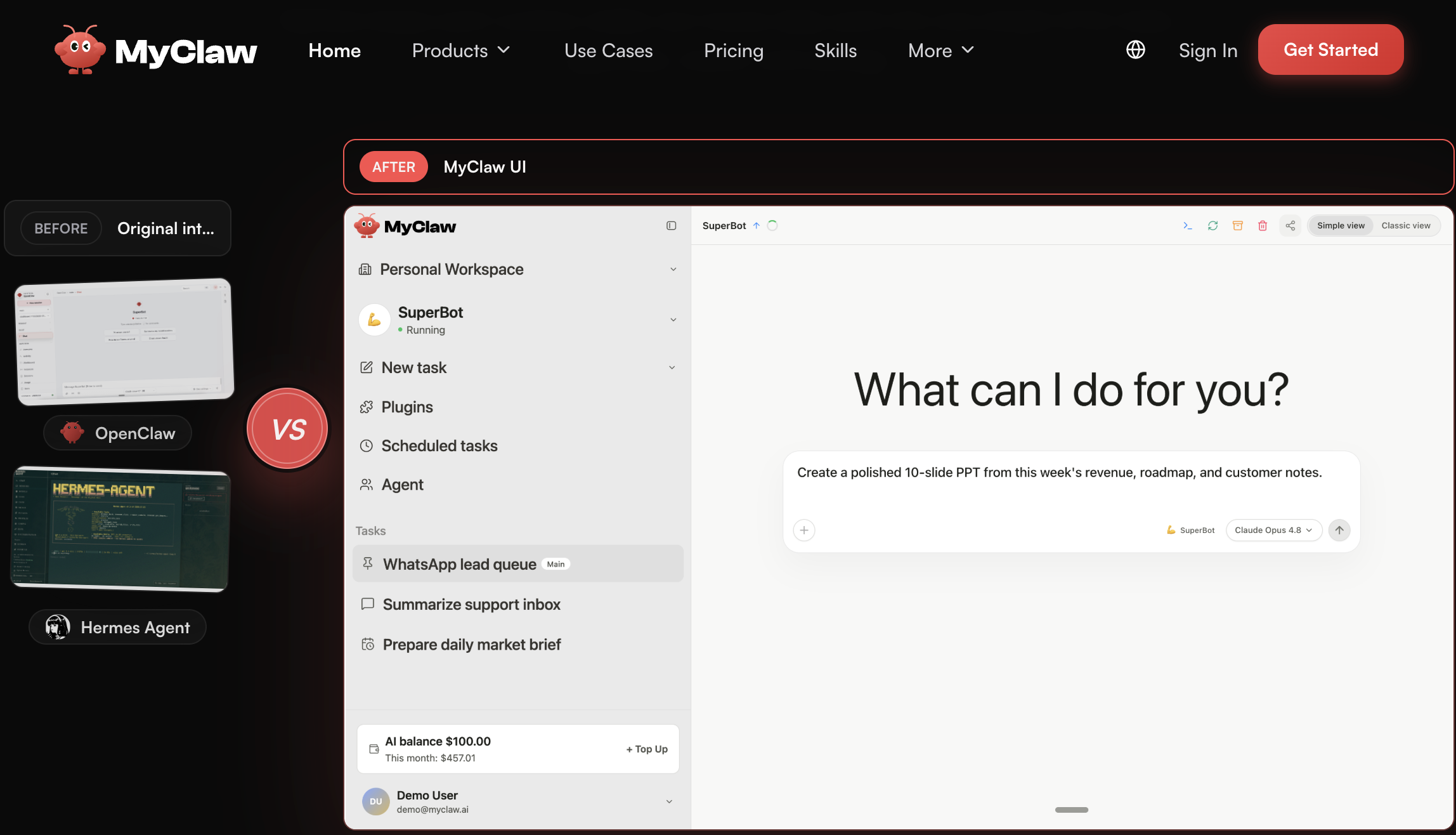
Once deployed, a hosted OpenClaw or Hermes agent runs 24/7 — handling scheduled reports, monitoring and inbox triage while you focus on higher-value work.
Getting Started: Step by Step
- Pick the right agent and plan. Choose OpenClaw for a multi-channel personal assistant across your messaging apps, or Hermes for a self-improving agent with persistent memory. Start on Lite to try it, step up to Pro or Max for daily or heavy use, and switch to yearly billing (~44% off) once you’re confident it fits.
- Deploy your instance. Use the one-click deploy. MyClaw stands up a dedicated, isolated, encrypted container configured and optimized for you in about 30 seconds — no servers to provision, no runtime to install.
- Connect your model key (BYOK). Add your own provider key — Claude, GPT, Gemini, DeepSeek and others are supported. Remember token usage bills to that provider, not MyClaw, so start by routing a cheaper model for routine tasks to keep costs down.
- Wire up channels and connectors. Link your channels (Telegram, WhatsApp, Discord, email or browser) and the tools you use (Gmail, Notion, GitHub, Slack and more). Scope access narrowly at first, granting only what a given job genuinely needs.
- Install a few strong skills and set goals. Add a small set of curated starter skills in one click rather than everything in the marketplace, then give the agent clear, well-defined goals — and review its outputs before letting it act unsupervised on anything sensitive.
- Claim your free second agent and iterate. Use the buy-one-get-one 30-day Max trial to test the other agent, then expand skills, connectors and automations gradually as you learn how you actually use it day to day.
Tips for Getting Maximum Value
Lean on cheaper models for simple, high-volume tasks and reserve premium models for genuinely hard reasoning, since inference — not hosting — is usually the real cost of running an agent. Pay annually only once you’re confident MyClaw fits, and take the buy-one-get-one trial to compare OpenClaw and Hermes for free before committing to a second subscription. Start every integration with the narrowest access that still gets the job done before widening it, review the agent’s outputs before letting it act unsupervised on sensitive systems, and keep an eye on the ClawHub skills you install, since third-party skills have been caught misbehaving. If you’re technical, run the numbers against a $5-20/month VPS to be sure the managed premium is worth it for you. And read MyClaw’s terms and refund policy before subscribing, since there is no free trial at the time of writing — treat the first month as your real-world test.
Future Outlook and Final Assessment
The AI-agent-hosting market is exploding in 2026 on the back of OpenClaw’s meteoric rise, and dozens of managed hosts now compete for the same users. With Peter Steinberger at OpenAI and the OpenClaw Foundation stewarding the project, the underlying tools are only getting more capable, and self-improving agents like Hermes point to where the category is heading. MyClaw is well-positioned as a polished, multi-agent option, and offering both OpenClaw and Hermes under one roof — with a clean UI over the raw runtime — is a smart bet as more non-technical users look for a way in.
The honest caveats remain, and they’re substantial: the real cost is tokens, not hosting; the public track record is thin and skews negative; transparency and a published security audit lag some rivals; and the whole category carries genuine security questions that no host fully removes. Competitors undercut on price and out-document on trust. But within those boundaries — for the specific person who wants a working agent without touching a server — MyClaw delivers real, measurable convenience, and that is a use case a growing number of people have.
Conclusion
MyClaw isn’t trying to reinvent the AI agent — it’s trying to make one of 2026’s most powerful open-source agents usable for people who don’t want to run a server, and at that narrow job it largely succeeds. By deploying a private, always-on OpenClaw or Hermes instance in seconds, handling updates, backups and uptime, and layering a cleaner dashboard on top, it removes the single biggest barrier between curious users and a genuinely useful autonomous agent. It rewards realistic expectations — chiefly that model usage, not hosting, is where the money goes — and it isn’t the right call for control-focused engineers or transparency-first buyers. But for the fast-growing group who want the payoff of an AI teammate without the operational headache, MyClaw is worth a serious look. Confirm the current pricing, budget for your own tokens, start small, and it can turn a complicated tool into something you actually use every day.
Ready to put an always-on AI agent to work without touching a server?
Explore more honest reviews, tutorials and tech comparisons to find the right tools for the way you work, build and automate — at World Of Tech, where we make everything easy.
👉 Try MyClaw: https://myclaw.sjv.io/aNLYqW
👉 Our YouTube Channel: youtube.com/@world_tech79
👉 Our Facebook Fanpage: Facebook
👉 Our X (Twitter): @worldoftech79
Pricing, specifications and policy details in this review were verified against myclaw.ai and independent review sources (including Trustpilot and hands-on reviewer testing) as of July 2026. Managed AI hosting plans, model and token costs, and features change frequently, so confirm current details on the official site before subscribing. Competitor prices are approximate and subject to change.





