
If you have ever juggled a separate tool for AI images, another for video, a third for voice-overs, and yet another for upscaling, you already know the quiet tax of a fragmented creative stack: four subscriptions, four logins, four credit systems, and files bouncing between them all day. ImagineArt was built to collapse that mess into a single window. It’s an all-in-one AI creative suite that pulls image generation, video, voice and music, editing, upscaling and even automated workflows into one dashboard — and, unusually, it doesn’t lock you to a single house model. Instead it bundles a rotating roster of the industry’s best engines (Google’s Nano Banana and Veo, ByteDance’s Seedance, Black Forest Labs’ FLUX, OpenAI’s GPT Image, Kling and more) alongside its own ImagineArt models, so you can chase the right look without switching apps. Built by Vyro AI, a startup that has bootstrapped the product to roughly $35M ARR and 800,000+ daily active users, ImagineArt has grown from a simple “AI art generator” phone app into a genuine creative platform with a 4.1/5 “Great” Trustpilot rating across more than 1,000 reviews.
For marketers, content creators, small agencies and solo designers who want professional visuals without professional overhead, the pitch is immediate: one subscription that replaces three or four, starting around the price of a single competitor’s entry plan. But ImagineArt isn’t flawless, and an honest look surfaces real trade-offs around its credit system, monthly credit expiry, strict content moderation and some pointed criticism of its advertising that are worth understanding before you pay. This 2026 review walks through ImagineArt’s full toolset — the multi-model image and video studios, the pricing and credit math, head-to-head comparisons against Midjourney and Leonardo AI, the genuine pros and cons, and exactly who should (and shouldn’t) subscribe.
ImagineArt Review 2026: The Multi-Model AI Creative Suite That Puts Images, Video and Voice Under One Roof
Overview and Background
ImagineArt is a web, Android and iOS creative platform built by Vyro AI, an Islamabad-based startup founded in 2018 that later formalized its generative-AI push under the Vyro brand around 2022. The product started life as a straightforward mobile app called “Imagine: AI Art Generator,” but it has since been rebuilt into something far broader: a unified creative suite where text-to-image, image editing, video generation, voice and music synthesis, upscaling and workflow automation all live in the same interface. It isn’t a single-model image generator or a narrow editing app — it’s positioned as the one place a creator can move an idea from prompt to finished asset without leaving the tab.
The company’s growth has been notable, and it has scaled globally despite competing with far larger Silicon Valley labs. Vyro reports figures in the range of 150 million+ downloads across its apps, billions of images processed, and hundreds of thousands of daily active users, and the team has publicly described building ImagineArt bootstrapped to roughly $35 million in annual recurring revenue. It’s not a fly-by-night marketplace clone — it’s a funded, actively developed platform that ships new models and features at a genuinely aggressive pace, which is both its biggest strength and, as you’ll see, part of what some users find overwhelming.
What separates ImagineArt from most rivals is its aggregator approach. Rather than betting everything on one proprietary model, it integrates a wide catalog of leading third-party engines — recent additions have included Google’s Nano Banana Pro and Veo, ByteDance’s Seedance, Black Forest Labs’ FLUX, OpenAI’s GPT Image, Recraft, Kling and Runway — sitting next to Vyro’s own ImagineArt models. Layered on top are purpose-built modes like Film Studio, Ad Studio and Fashion Studio, a Workflows automation system, an Audio Studio, team collaboration features, an API, and even plugins for tools like Adobe Premiere Pro. The whole thing runs on a single credit currency shared across every tool.
Why ImagineArt Stands Out in 2026
Many top models, one subscription: This is ImagineArt’s defining advantage and the main reason to choose it over a single-model tool. Instead of paying separately for a best-in-class image model, a separate video model and a third voice tool, you get a rotating catalog of leading engines under one login and one credit balance. When a new state-of-the-art model drops, it tends to appear inside ImagineArt quickly, so you’re not stuck waiting for one vendor to catch up.
A genuinely all-in-one creative workflow: Image generation, image editing and inpainting, text-to-video and image-to-video, upscaling, and voice and music synthesis all live in the same dashboard. For a solo creator or a lean marketing team, that consolidation removes a huge amount of friction — you can storyboard, generate, edit and export without exporting files between three different apps.
Purpose-built studios, not just a prompt box: Beyond raw generation, ImagineArt ships focused modes like Ad Studio (spin up ad creative fast), Film Studio (assemble cinematic sequences and export to editors), and Fashion Studio (virtual try-on, pose and location variation from a single image). These templated workflows lower the skill floor, so you spend less time prompt-engineering and more time shipping.
Strong photorealism and 4K output: ImagineArt’s own models have earned a reputation for realistic faces, accurate detail and solid prompt adherence, and the platform’s Pro-tier generation adds native 4K with cleaner text rendering and finer textures. Reviewers repeatedly single out the image quality as a highlight, especially when they feed it a style reference.
Fast, relentless iteration: Few platforms update as often. New models, effects and studios arrive almost weekly, and long-time reviewers describe the team as unusually responsive to feedback. If you value being on the leading edge of what AI generation can do, ImagineArt keeps pace better than most.
A real free tier plus low entry pricing: Unlike Midjourney, ImagineArt offers a free plan (100 credits that refresh daily) so you can test the interface before paying, and its cheapest paid plan starts well below what many rivals charge for comparable breadth. For budget-conscious creators, that combination is genuinely rare.
Teams, API and integrations: Higher tiers include multiple seats, shared workspaces and centralized billing, and an API and plugins (including one for Adobe Premiere Pro) let the platform slot into existing production pipelines rather than replacing them. That makes ImagineArt a plausible pick for small agencies, not just hobbyists.
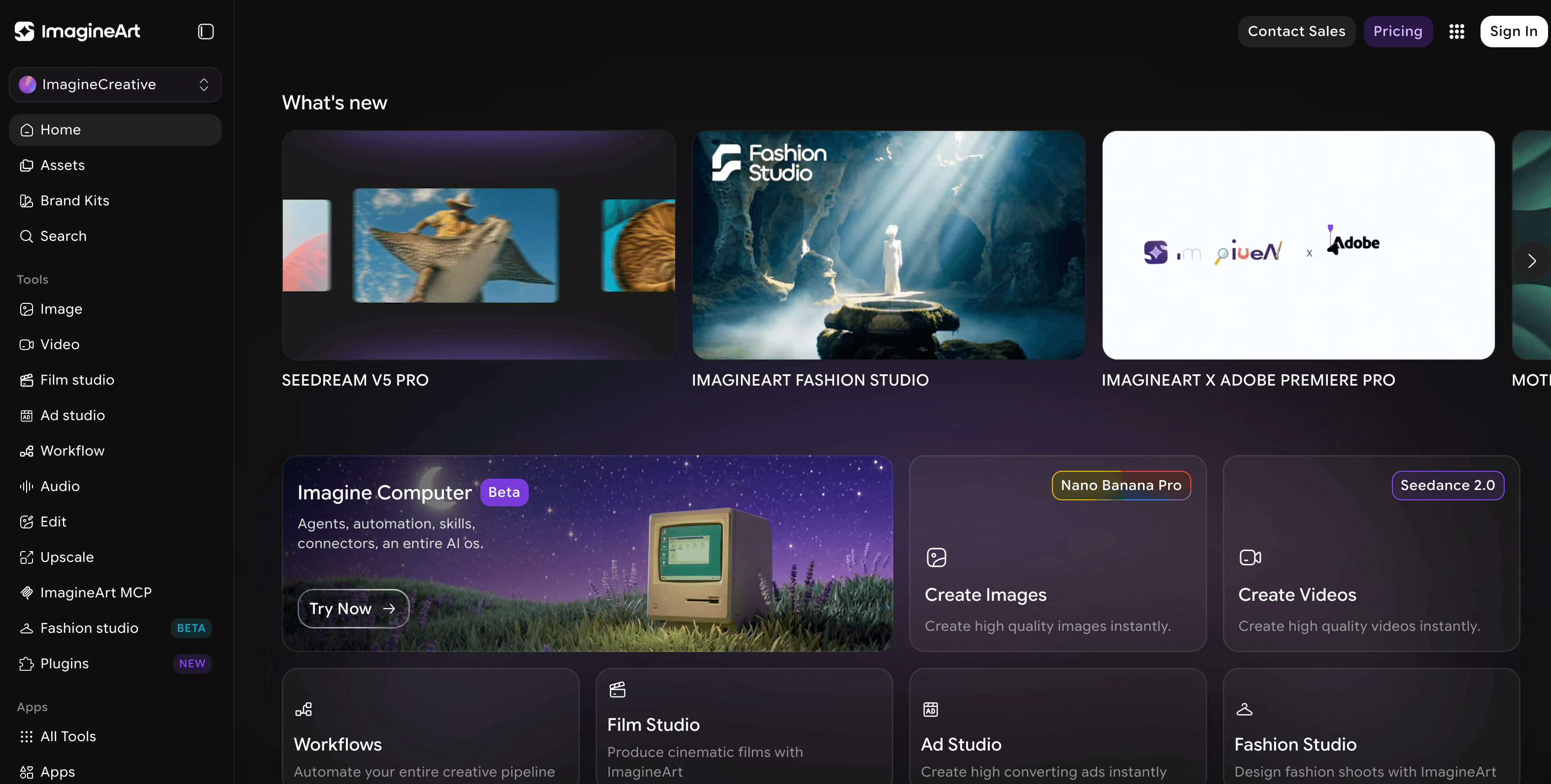
ImagineArt bundles many of the best image and video models under a single login and one credit balance — image generation, editing, video, voice and workflows in one dashboard.
Key Features and Technology
ImagineArt’s feature list is broad enough to feel sprawling, but it organizes cleanly into a handful of pillars. Here’s how the platform actually breaks down.
Multi-Model Image Generation
At its core, ImagineArt is a text-to-image engine — but instead of one model, you pick from a menu that spans Vyro’s own ImagineArt models plus third-party engines like Nano Banana, FLUX, GPT Image, Recraft and Seedream. Each has different strengths (photorealism, illustration, text rendering, speed), and because they share one credit pool you can A/B a prompt across several models to find the best result. Controls for aspect ratio, resolution, style references and prompt enhancement round out the studio, and higher tiers unlock native 4K.
Video: Text-to-Video and Image-to-Video
Video is where the all-in-one pitch gets compelling. ImagineArt integrates leading video engines — recent lineups have featured Veo, Seedance, Kling, Runway and Pixverse — for both text-to-video and image-to-video, with effects, motion transfer and lip-sync tools. The Film Studio mode goes further, letting you assemble multi-shot sequences, reframe or relight shots, extend clips, and export a finished edit straight into a Premiere sequence via the plugin. Video generations are credit-heavy, so this is where usage adds up fastest.
Editing, Inpainting and Upscaling
Beyond generation, ImagineArt includes a full editing layer: inpainting to add or remove elements, style transfer, background cleanup, magic text, relight, and an upscaler to push outputs to higher resolution. Because these tools sit next to generation rather than in a separate app, you can refine an image without breaking your flow — a meaningful time-saver for anyone producing at volume.
Ad Studio, Fashion Studio and Workflows
The studios are templated shortcuts to common commercial jobs. Ad Studio aims to produce ready-to-ship ad creative in about a minute; Fashion Studio handles virtual try-on, multi-angle coverage, pose variation and location changes from a single product or model image; and Workflows lets you chain steps into a repeatable, automated pipeline. For teams that make the same kind of asset over and over, these can turn a multi-step manual process into one click.
Audio, Voice and the Wider Ecosystem
An Audio Studio adds voice and music synthesis so a video project can get its soundtrack and narration in the same place. Around all of this sits the broader ecosystem: web, Android and iOS apps, team workspaces with shared billing, an API for developers, an MCP integration, and a community gallery for inspiration. The consistent theme is consolidation — ImagineArt wants to be the only creative subscription you keep.
Pricing, Plans, and Package Structure
ImagineArt runs on a credit-based subscription. All paid plans are available for Individuals and Teams, with Monthly, Quarterly (around 15% off) or Yearly (around 30% off) billing, and credits refresh monthly no matter which term you pick. The prices below are ImagineArt’s standard monthly rates from its official documentation; discounts and promotions change frequently and vary by location, so always confirm the live price on the subscription page before checkout. The image and video counts are the platform’s own approximate estimates and will vary with the models and settings you choose.
| Plan | Price (USD) | What It Is | Best For |
|---|---|---|---|
| Free | $0 | 100 credits that refresh every 24 hours; limited models, resolution and speed | Testing the platform, not production |
| Basic | $13/mo (~$9/mo yearly) | 3,000 credits/mo (~600 images / ~97 videos), public visibility, 1 seat | Light, entry-level individual use |
| Standard | $30/mo (~$20/mo yearly) | 8,000 credits/mo (~1,000 images / ~125 videos), private generations, 3 seats | Regular creators who need privacy |
| Ultimate | $50/mo (~$34/mo yearly) | 16,000 credits/mo (~3,000 images / ~375 videos), all models, priority queue, 6 seats | Power users and heavy video work |
| Creator | $250/mo (~$175/mo yearly) | 100,000 credits/mo (~8,000 images / ~1,000 videos), highest priority, 20 seats | High-volume studios and agencies |
| Enterprise | Custom | Custom limits, SSO, SLAs and dedicated support via sales | Larger teams with advanced needs |
| Top-up credits | One-time (varies) | Extra credits when you run out mid-month | Covering usage spikes without upgrading |
How ImagineArt Compares to Alternatives
| Factor | ImagineArt | Midjourney | Leonardo AI |
|---|---|---|---|
| Starting price | Free + $13/mo (~$9 yearly) | $10/mo (no free tier)* | Free + ~$12/mo* |
| Free tier | Yes — 100 credits, daily refresh | None (trial removed in 2024) | Yes — ~150 tokens/day |
| What it makes | Image + video + voice/music + editing + workflows | Image (plus growing video) | Image + video + model training |
| Model choice | Many 3rd-party + own models | Own Midjourney model only | Own + some 3rd-party |
| Private generations | From Standard ($30) | Stealth Mode from Pro ($60) | On paid tiers |
| Teams / seats | Yes (3 / 6 / 20 + Enterprise) | No official team plan | Yes (team plan available) |
| Best for | One suite for image, video & audio on a budget | Best artistic image quality | Image + video with custom model training |
*Competitor prices are approximate and subject to change; confirm on each vendor’s official site.
vs. Midjourney: Midjourney is widely regarded as the quality benchmark for artistic, aesthetically striking image generation, and serious image purists often prefer its look. But it’s image-first, has no free tier, uses a confusing GPU-hour model, keeps your work public unless you pay $60/month for Stealth Mode, and offers no official team plan. ImagineArt counters with a free tier, far broader output (video, voice, editing, workflows), model choice, private generations from $30, and real team features — trading a slight edge in pure artistic polish for enormously more breadth and flexibility.
vs. Leonardo AI: Leonardo is the closest structural rival — it also offers a free tier, image and video, and near-identical entry pricing, plus a standout feature ImagineArt doesn’t emphasize: custom model training on your own images. Where ImagineArt pulls ahead is the sheer number of bundled third-party models and the depth of its non-image tools (Ad/Film/Fashion studios, voice, workflows). Multiple reviewers switching from Leonardo specifically cite ImagineArt’s better cost-to-quality on stills and its wider style range as the reason. If custom-trained models are central to your workflow, Leonardo may fit better; for everything-in-one-place, ImagineArt wins.
vs. buying separate best-in-class tools: You can always stack a dedicated image model, a dedicated video model and a separate voice tool for maximum quality in each lane — and for a large studio with the budget, that’s a legitimate choice. But it means multiple subscriptions, logins and credit systems. ImagineArt’s bet is that most creators would rather have 90% of the quality with 100% of the convenience in a single, cheaper subscription. For solo creators and small teams, that trade usually favors ImagineArt.

With bundled video engines and a Film Studio that exports straight into editors, ImagineArt reaches well beyond still images — but video is where credits are spent fastest.
Pros and Cons
What Users Love
Everything under one roof: The most consistent praise across Trustpilot is having every model and format they want in a single place — image, video, audio and workflows — instead of juggling separate subscriptions. Reviewers repeatedly describe it as replacing three or four tools with one.
Image quality and prompt adherence: Owners frequently highlight sharp, detailed 4K output and strong realism, especially when supplying a style reference. Photographers, architects and designers in the reviews single out how closely results match their prompts.
Constant evolution: A striking number of long-term users praise how quickly new models and features land, and how responsive the team is to feedback. For people who want to stay on the cutting edge, that pace is a genuine selling point.
Cost-to-quality on a budget: Several reviewers who moved over from rivals like Leonardo AI say ImagineArt gave them more style variety and better value for the money, calling out the low entry price and free tier as reasons they stayed.
Beginner-friendly interface: Reviewers new to AI art often mention how approachable the platform is — a clean, Midjourney-like gallery UX where they can reuse prompts and variate images easily, lowering the learning curve for non-technical creators.
Real workflow value for pros: Architects, marketers and studio users describe it speeding up real jobs — from design ideation to storyboarding to ad creative — with the studios and workflows turning multi-step tasks into a click.
Limitations Worth Knowing
Credit costs vary and can surprise you: A recurring complaint is that different models cost very different amounts of credits, so spend is hard to predict — some generations are cheap, others (especially high-res video) drain credits fast. New users are sometimes caught out burning through an allotment quicker than expected.
Monthly credits expire: Unused credits don’t roll over at month-end. If your workload is uneven, that model can feel wasteful compared with pay-as-you-go alternatives, and it’s the single biggest structural gripe about the pricing.
Strict content moderation: Multiple reviewers note the AI moderation is aggressive and sometimes blocks harmless prompts, occasionally costing them a five-star rating. If your work sits near the platform’s content boundaries, expect friction.
Ads and pop-ups in the experience: A common irritation is the volume of in-app promotions and pop-ups pushing new features or upgrades, which some users find distracting during a creative session.
Criticism of advertising practices: A minority of reviewers have accused ImagineArt of running sponsored ads that lean on competitor names (such as “Midjourney”) in a way they found misleading, and a few report slow support responses. These are not the majority experience, but the pattern appears often enough to flag — go in aware and judge the product on your own trial.
Free tier is really a trial: The 100 daily free credits are great for testing, but resolution, speed and model access are limited, so the free plan isn’t viable for ongoing production work. Treat it as a way to evaluate the interface, not a permanent free tool.
Who Should Use ImagineArt
Content creators and social marketers: This is ImagineArt’s sweet spot. If you produce a steady stream of images, short videos and thumbnails across platforms and don’t want to pay for three tools, the all-in-one suite plus low entry price is hard to beat. The studios and workflows are built for exactly this kind of high-cadence output.
Solo designers and freelancers: For a one-person shop, consolidating image, video, editing and voice into a single subscription removes real cost and friction. The private generations from Standard upward matter here, since freelance work is usually client-facing.
Small agencies and lean teams: Multi-seat plans, shared workspaces, centralized billing, an API and the Premiere plugin make ImagineArt a plausible team tool — especially for agencies that want to move fast across formats without stitching together a toolchain.
Beginners and experimenters: If you’re new to AI generation or like testing many models against one prompt, the free tier plus the sheer breadth of engines make ImagineArt an ideal sandbox to learn in before you commit money.
Who should look elsewhere: Image purists chasing the absolute best artistic quality may still prefer Midjourney; creators who rely on custom-trained models may prefer Leonardo; and anyone with highly uneven, bursty usage may be better served by a no-expiry, pay-as-you-go tool than by monthly credits that reset. If your work regularly bumps into content-moderation limits, test those exact prompts on the free tier first before subscribing.
Getting Started: Step by Step
- Create a free account. Sign up on the web or via the Android or iOS app and claim your 100 free credits, which refresh every 24 hours. Use this window to explore the interface with no commitment.
- Test the models you’ll actually use. Run the same prompt across a few different image and video models to see which suits your style and how many credits each one costs. This is the single most useful thing you can do before paying, because it tells you what plan size you really need.
- Pick a plan that matches your monthly volume. Choose Basic for light individual use, Standard once you need private generations and more headroom, Ultimate for heavy video and all-model access, or Creator/Enterprise for teams. Start monthly, and only switch to yearly (about 30% off) once you’re sure it fits.
- Set up your workspace. If you’re on a team plan, invite seats, organize shared folders, and connect the API or Premiere plugin if it fits your pipeline. Solo users should bookmark the studios (Ad, Film, Fashion) they’ll rely on most.
- Create with references and prompt enhancement. For the best results, upload a style reference, use the prompt enhancer, and set your aspect ratio and resolution before generating. Iterate with variate and inpainting rather than starting from scratch each time to save credits.
- Manage credits and export. Keep an eye on your remaining monthly credits (they don’t roll over), buy top-ups only for genuine spikes, and export finished assets — or send a Film Studio edit straight into your video editor to finish the job.
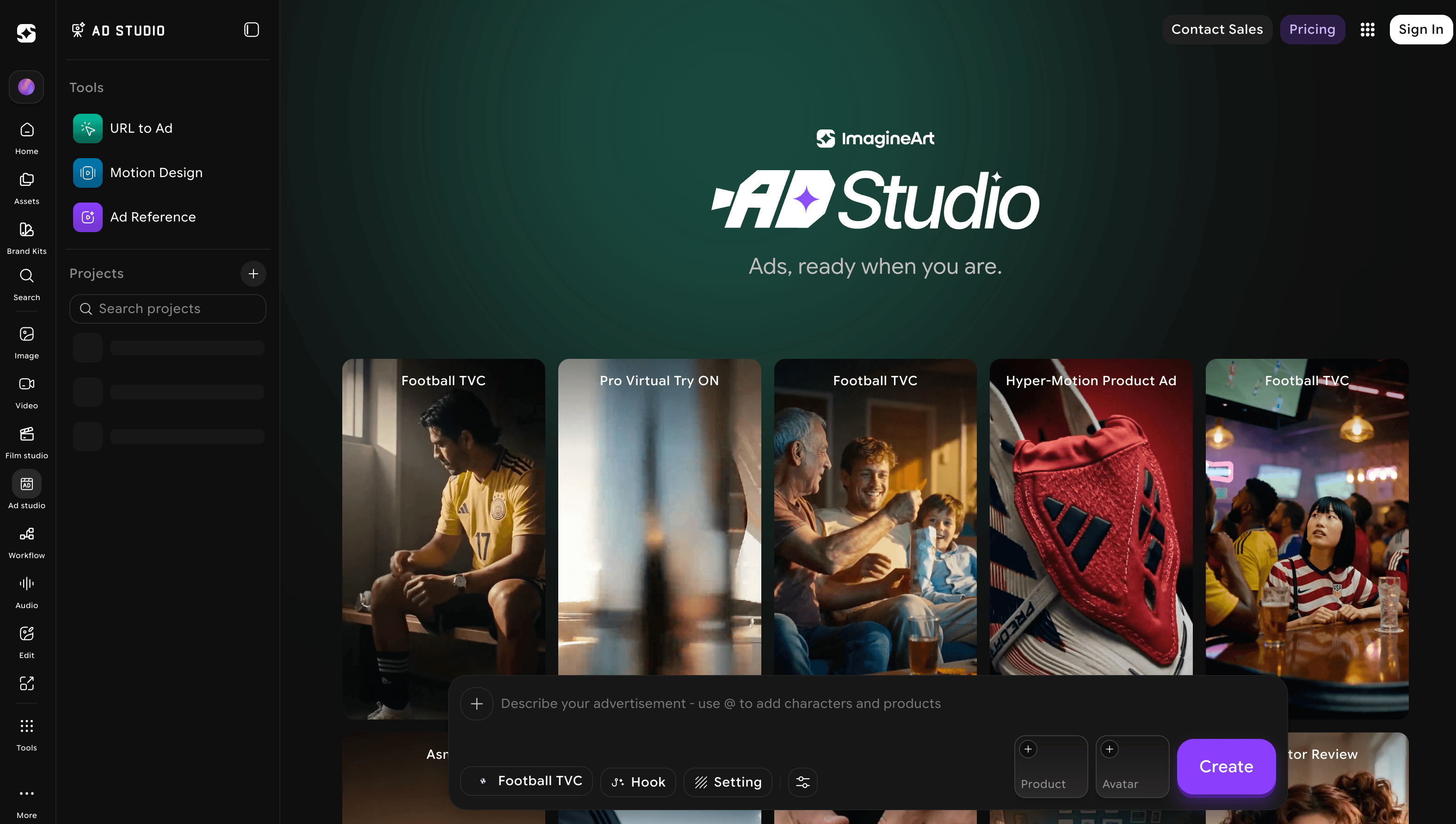
Start on the free tier, test the exact models you’ll use, then size your plan to your real monthly volume — the smartest way to avoid wasted credits.
Tips for Getting Maximum Value
Treat credits as your real budget, not the sticker price: check the per-model credit cost before you generate, reserve expensive high-resolution video for finals rather than rough drafts, and use cheaper image models for early iteration. Because unused credits expire monthly, size your plan to a realistic average and cover occasional busy months with one-time top-ups instead of permanently over-buying a bigger tier. Lean on a style reference and the prompt enhancer to hit the look you want in fewer attempts, and refine with variate and inpainting rather than regenerating from zero, which quietly saves a lot of credits over a month. If you do any client or brand work, subscribe at Standard or above so your generations are private. Commit to yearly billing only after a month or two on monthly confirms the platform fits your workflow — the roughly 30% discount is only a saving if you’d have stayed anyway. And before you rely on ImagineArt for a specific type of content, run those exact prompts through the free tier first, since the content moderation can be strict and it’s better to learn the boundaries for free than mid-project.
Future Outlook and Final Assessment
The AI creative market in 2026 is consolidating fast, and the center of gravity is shifting from single-purpose tools toward integrated, agent-assisted suites that carry an idea from prompt to finished asset in one place. ImagineArt is one of the clearest bets on that future — a genuinely multi-model, multi-format platform that keeps absorbing new engines almost as fast as they launch. Its bootstrapped growth to a large, active user base and a 4.1/5 Trustpilot reputation shows the approach resonates, and as long as the team keeps integrating leading models quickly, its core advantage (breadth in one subscription) only compounds.
The honest caveats remain real: the credit system takes some learning, monthly credits expire, moderation can be strict, the in-app promotions grate, and a vocal minority have criticized the platform’s advertising and support. Dedicated single-model rivals still edge it on pure image artistry (Midjourney) or custom model training (Leonardo). But within those boundaries, ImagineArt delivers one of the most complete and best-value creative toolkits available in 2026 — and for the everyday reality of producing images, video and audio across many formats, few platforms offer more for the money.
Conclusion
ImagineArt isn’t trying to win a single category outright — it’s trying to be the one place a creator can do all of them, and at that goal it’s remarkably effective. By bundling many of the best image and video models with editing, voice, purpose-built studios and workflow automation under one credit system, it removes the cost and friction of a fragmented creative stack. It rewards a little planning around credits and a realistic view of its monthly-expiry model, and it isn’t the right call for image purists or anyone with wildly uneven usage — but for the high-volume, multi-format reality of modern content creation, few platforms deliver more per dollar. Test it free, confirm the current pricing and the models you need, and ImagineArt can take a whole shelf of separate tools and make them genuinely easy to run from one tab.
Ready to create images, video and voice from one place?
Explore more honest reviews, tutorials and tech comparisons to find the right gear for the way you work, travel and live — at World Of Tech, where we make everything easy.
👉 Try ImagineArt: https://worldoftech.space/imagineart
👉 Our YouTube Channel: youtube.com/@world_tech79
👉 Our Facebook Fanpage: Facebook
👉 Our X (Twitter): @worldoftech79
Pricing, specifications and policy details in this review were verified against imagine.art and independent review sources (including Trustpilot and third-party pricing analyses) as of July 2026. AI software pricing, models and features change frequently, so confirm current details on the official site before purchasing. Competitor prices are approximate and subject to change.





