
Most “AI app builders” hand you a slick web prototype and leave the actual work of shipping to a real phone up to you. Appy Pie takes a narrower, more useful bet: type a plain-English prompt, and its AI generates a native Android and iOS app — real Kotlin and Swift binaries, not a wrapped website — complete with a working backend, push notifications and payment rails already wired in. It’s not a new company chasing a trend; Appy Pie has been building no-code app tools since 2016 and serves a claimed base of over 10 million users, which shows in how mature the publishing, hosting and support layers around the AI generator actually are.
That maturity is also where the trade-offs live. Appy Pie is a fully hosted platform — there’s no code export, and building anything outside its pre-built modules (custom server logic, standalone watchOS apps, 3D game engines) isn’t on the table. This 2026 review walks through what the AI app generator actually produces, what it costs across the Basic, Gold and Platinum tiers, how it stacks up against web-first AI builders like Lovable and Bolt.new, and who should — and shouldn’t — build their next app on it.
Appy Pie Review 2026: AI App Builder That Ships Real Native Apps
Overview and Background
Appy Pie is an AI app generator built by Appy Pie LLP, a no-code platform vendor headquartered with operations spanning the US and India. The pitch is straightforward: describe an app idea in a sentence — “build a restaurant app with menu browsing, online ordering, table booking, loyalty rewards, and Stripe payments” — and the AI produces a working preview with screens, navigation, data models and the integrations needed to make it functional, typically inside a minute. From there you customize in a visual editor or keep prompting for changes, and the platform handles the signed Android and iOS builds plus assistance getting through App Store and Google Play review.
Unlike code-export AI builders that hand you a Git repo and step out of the picture, Appy Pie stays involved for the app’s entire lifecycle: hosting, bandwidth, push notification delivery, an admin panel and a full app-analytics dashboard are bundled into every paid plan. That’s a meaningfully different product shape than a coding copilot, and it’s worth setting expectations before the pricing section — you’re renting a managed app platform, not buying a codebase.
The company’s track record backs up that positioning. Appy Pie has previously won Gartner’s Reviewers’ Choice award for App Development Software, and it currently holds a G2 rating of 4.7/5 across 1,388 reviews and a Capterra rating of 4.6/5 across 1,389 reviews — two independent B2B software marketplaces with review-verification processes stricter than most. That combination of a long operating history and consistent scores across multiple third-party platforms is something a lot of newer AI app-builder entrants simply can’t point to yet.
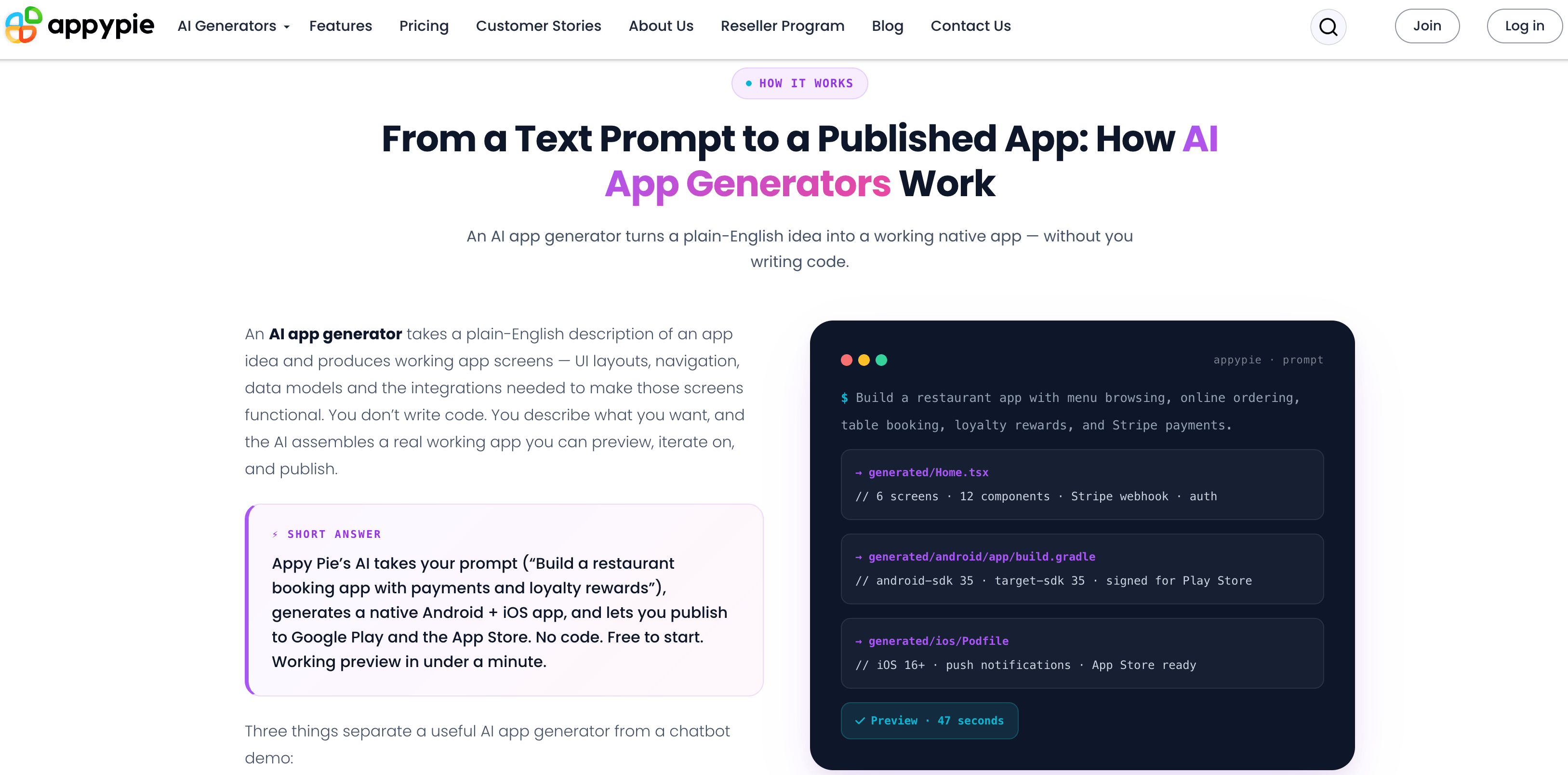
Appy Pie turns a plain-English prompt into a working native app preview in under a minute.
Why Appy Pie Stands Out in 2026
Real native output, not a web wrapper: The AI produces genuine Kotlin binaries for Android and Swift/SwiftUI binaries for iOS. Apps install from Google Play and the App Store, run offline, support push notifications and show up correctly in app-store search — none of which is true of a PWA dressed up to look like an app.
Backend included out of the box: User accounts (email, phone, Google, Apple sign-in), payments through Stripe, PayPal, Apple Pay, Google Pay plus 17+ regional gateways, push notifications, and an admin panel all ship with the generated app. You’re not stitching together a separate database, auth provider and hosting account.
Iterative prompting on a persistent project: Instead of regenerating from scratch, you stay in the same workspace and stack prompts — “add a loyalty tab,” then “swap to dark mode,” then “translate to Spanish” — and the AI updates the existing app rather than restarting.
Publishing assistance that actually helps first-timers: Paid plans include first-time App Store and Google Play submission support — screenshots, listing copy, signing and the walkthrough of a process that trips up a lot of first-time app founders.
Multilingual prompting: The AI natively understands prompts in eight languages — English, Spanish, Arabic, Hindi, French, Portuguese, Italian and German — including voice-to-prompt input, which is a genuinely useful accessibility feature for non-English-first founders.
Enterprise-grade compliance for a no-code tool: GDPR, SOC 2 Type I and PCI DSS compliance, plus HIPAA-eligible support at the Enterprise tier, is unusual to find bundled this deeply into a self-serve app builder rather than gated entirely behind a sales call.
A decade-plus of platform maturity: Appy Pie isn’t a six-month-old AI wrapper startup — it’s been iterating on no-code app publishing since 2016, and that shows in how few rough edges exist in the hosting, analytics and push-notification infrastructure around the newer AI generator.
Key Features and Technology
Appy Pie’s AI generator centers on a prompt-to-app workflow, but the platform underneath it covers the full app lifecycle from first draft to store submission and ongoing management.
AI App Generation
A single prompt generates screens, navigation, data models and the integrations needed to make them work — typically a first working preview in 30 to 90 seconds. Behind the scenes, the AI is producing platform-specific build artifacts rather than a single generic template: a working Android build targets the current Play Store SDK requirements, while the iOS build is scaffolded against a recent iOS baseline with push notification entitlements pre-configured. The AI covers well-understood app patterns well: ordering, booking, community, content delivery, education, fitness and ecommerce. Nine app-type starting points — restaurant ordering, booking and scheduling, fitness tracking, quiz and learning, social networking, ecommerce, event listings, news readers and community/membership apps — each come with a tuned starter prompt that fleshes out further in seconds. Apps with unusual real-time logic, hardware integration or bespoke workflows will need more iteration prompts, and some will need a developer regardless of which AI tool generates the first draft.
Visual Editor and Iteration
Colors, fonts, icons and layout can be edited directly in the visual editor, or adjusted by asking the AI in plain English. Individual sections can be regenerated without touching the rest of the app, and every AI iteration is checkpointed, so a bad change is a one-click rollback rather than a redo-from-scratch.
Payments and Monetization
Stripe, PayPal, Apple Pay, Google Pay and over 17 regional payment gateways are pre-wired, alongside in-app ad monetization through Appy Pie’s own ad network and Google AdMob for apps that want an advertising revenue stream instead of, or alongside, subscriptions.
Publishing, Hosting, and Security
Paid plans include unlimited bandwidth and hosting on infrastructure Appy Pie says serves its full 10-million-plus user base, backed by AWS Shield DDoS protection, a dedicated web application firewall and periodic penetration testing. First-time submission support walks new publishers through App Store and Google Play review — though Appy Pie is upfront that it cannot guarantee approval, since that decision ultimately sits with Apple and Google.
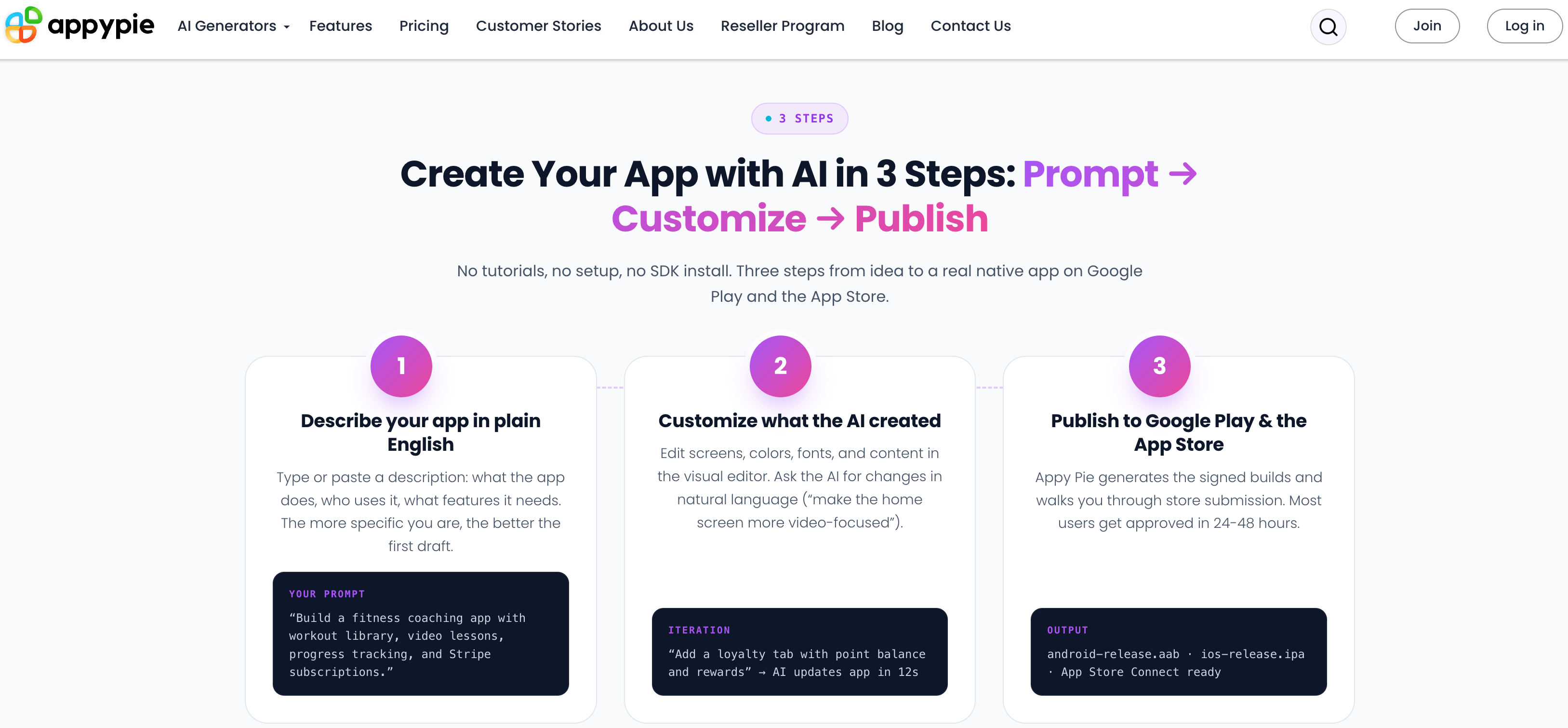
Every generated app ships with backend, push notifications, and payments already wired in.
Pricing, Plans, and Package Structure
Building and previewing an app with Appy Pie’s AI generator is free. Publishing to the app stores, removing the Appy Pie badge, and unlocking premium features require a paid plan, priced per app and billed either monthly or annually (annual billing saves up to 20%, shown below as the effective per-month rate). Every tier ships on a 7-day free trial with no credit card required to start building.
| Plan | Price | What It Is | Best For |
|---|---|---|---|
| Basic (Gold tier label) | $16/app/mo (annual) · $32/mo (monthly) | Android publishing, unlimited hosting/bandwidth/editing, 500 push notifications, 500 downloads/mo, email support | Solo founders shipping Android-only first |
| Gold | $36/app/mo (annual) · $72/mo (monthly) | Android + premium features, 1,000 push notifications, 1,000 downloads/mo, email + chat support | Growing apps that need more headroom on Android |
| Platinum | $60/app/mo (annual) · $120/mo (monthly) | Android + iOS publishing, 2,000 push notifications, 2,000 downloads/mo, email/chat/call support | Anyone publishing to both app stores |
| Enterprise | Custom (contact sales) | Unlimited apps/push, dedicated account manager, HIPAA-eligible security, 24/7 support with SLA | Regulated industries and multi-app organizations |
A few costs sit outside the subscription: Google Play charges a one-time $25 developer fee and Apple charges a $99 annual developer fee, neither of which Appy Pie’s pricing covers. Removing Appy Pie branding entirely for a white-label app requires the Add-On Package, priced at 2x the current plan. Overage charges apply beyond committed push notifications ($0.001/extra) and downloads ($0.009/extra).
How Appy Pie Compares to Alternatives
Appy Pie’s closest competitive set in 2026 is the new wave of AI app/website generators — Lovable, Bolt.new and Base44 — plus Replit’s AI coding assistant. The comparison below reflects each platform’s publicly stated output and starting price as of mid-2026.
| Factor | Appy Pie | Lovable / Bolt.new | Base44 |
|---|---|---|---|
| Output | Real native iOS + Android binaries | Web app / prototype | Web app, internal-tool focus |
| Publish-to-store flow | Built in, assisted | Not applicable / DIY | Not applicable / DIY |
| Code export | No (hosted only) | Yes | Partial |
| Starting price | $16/app/mo | ~$20/mo (approximate) | ~$20/mo (approximate) |
| Best for | Shipping a real app to the app stores | Fast web SaaS prototypes, code ownership | Internal business tools |
Appy Pie vs. Lovable/Bolt.new comes down to what you’re actually shipping. If the end goal is an app that lives on Google Play and the App Store with push notifications and payments, Appy Pie’s native output and publishing assistance close a gap those code-first web builders leave completely open. If the goal is a fast web prototype you’ll own and export, Lovable and Bolt.new’s code-export model is the better fit — and you give up the store-publishing help to get it.
Appy Pie vs. Base44 is less of a direct rivalry — Base44 leans toward internal business tools and dashboards rather than consumer-facing native apps, so the two rarely compete for the same project.
Pros and Cons
What Users Love
Genuinely no-code, even for non-technical founders: Trustpilot reviewers repeatedly single out how little technical knowledge the platform actually requires — describing an idea and having it built automatically comes up as the single most-praised aspect of the product.
Support quality that outlasts the sale: Named support agents show up constantly across years of reviews for resolving publishing issues, billing questions and Apple/Google certificate renewals — not just onboarding calls.
Strong third-party validation: Appy Pie holds a 4.6/5 “Excellent” rating on Trustpilot from over 4,400 reviews, a 4.7/5 on G2 from 1,388 reviews, and a 4.6/5 on Capterra from 1,389 reviews — consistent scores across three independent review platforms.
Fast first draft: Reviewers on both Trustpilot and the vendor’s own case studies describe going from a prompt to a testable app the same day, which matters a lot for founders validating an idea before committing real budget.
Limitations Worth Knowing
Upsell pressure is a recurring complaint: A meaningful minority of Trustpilot reviews describe pricing that “looks cheap at first” but escalates once support, resubmissions or the Add-On Package come into play — one reviewer’s billing dispute was resolved only after the vendor intervened directly.
Cancellation friction: Multiple reviews describe difficulty closing accounts or stopping subscriptions, including one account-lockout complaint that dragged on for over a year and a separate issue tied to Apple sign-in confirmation emails not reaching the account holder.
No source code ownership: Apps run entirely on Appy Pie’s hosted infrastructure. There’s no Git repo, no export — if you ever need to migrate off the platform or need a developer to extend the codebase directly, that path doesn’t exist.
Publishing delays do happen: A handful of reviews describe apps stuck for months awaiting resubmission after store rejection, with limited explanation from support about what specifically triggered the rejection — worth planning around if your launch has a hard deadline.
No arbitrary custom backend logic: Anything outside Appy Pie’s pre-built modules needs a developer regardless of plan tier — the AI won’t write novel server-side logic for unusual business rules.
Who Should Use Appy Pie
Local business owners who need a real app fast: Restaurants, salons, churches and community groups fit squarely into Appy Pie’s strongest patterns — ordering, booking, loyalty, community — and the case studies bear this out with apps live within days to weeks.
Non-technical founders validating an idea: The combination of a free build tier and a 7-day paid trial makes it cheap to test whether a native app idea has legs before committing developer budget.
Agencies building repeatable app types for clients: The reseller program and white-label Add-On Package suit shops that build similar app categories — ordering, booking, community apps — repeatedly for different clients.
Non-English-first founders: Native prompting support across eight languages, including voice input, is a real differentiator for founders who’d otherwise lose nuance describing an idea in a second language.
Founders who need full code ownership, plan to hand development off to an in-house engineering team later, or are building something with unusual real-time logic, hardware integration or a 3D game engine should look elsewhere — a code-export tool or a traditional development shop will serve those needs better than a hosted AI app generator ever will.
Getting Started: Step by Step
- Write a specific prompt. Describe what the app does, who uses it, and which features it needs — the more specific the prompt, the better the first draft.
- Review the generated preview. The AI produces a working preview with screens, navigation and integrations in under a minute; test the core flow before customizing anything.
- Customize in the visual editor. Adjust colors, fonts and content directly, or keep prompting the AI in natural language for structural changes.
- Wire up payments and push notifications. Connect Stripe, PayPal or a regional gateway if the app takes payments, and configure push notification campaigns from the admin panel.
- Pick a plan based on platform needs. Choose Basic for Android-only, Platinum if iOS matters at all — switching later means re-doing store listings.
- Submit for App Store and Google Play review. Use the included first-time submission support to prepare screenshots, listing copy and signing, budgeting the standard $25 Google Play and $99/year Apple developer fees separately.
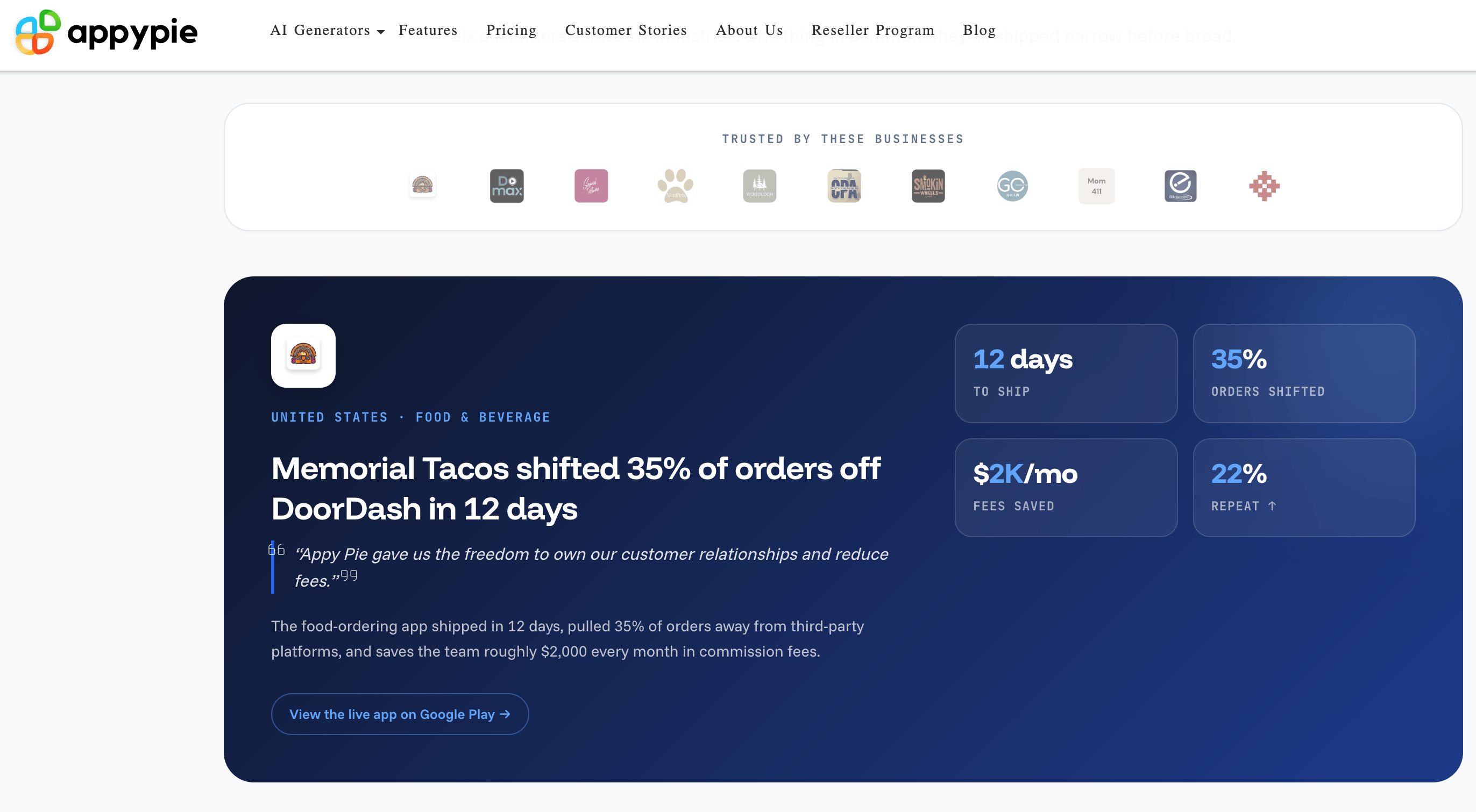
Most users go from first prompt to a live app on the stores within 5-10 days.
Tips for Getting Maximum Value
Front-load specificity into your very first prompt rather than relying entirely on iteration — a detailed initial description (“restaurant ordering app with Stripe payments, loyalty stamps, and push notifications for daily specials”) produces a noticeably stronger starting point than a vague one, saving several rounds of correction prompts later. Use the version history checkpoint feature liberally when testing bigger structural changes, since it removes the risk of a bad prompt undoing good work. If your business touches payments or personal data at any scale, read the Add-On Package and Enterprise compliance terms before you’re mid-launch rather than after — HIPAA-eligible and PCI DSS coverage exist, but they’re not automatic on the entry-level Basic plan. And if you’ve read a negative Trustpilot review about billing or cancellation friction, get the relevant terms in writing from a support rep before upgrading, since several resolved complaints in the review history came down to a direct conversation with the billing team clearing up a misunderstanding.
Future Outlook and Final Assessment
The AI app generation space is crowded and moving fast, and Appy Pie’s bet — that most people who say “I want to build an app” actually mean a native app on Google Play and the App Store, not a web prototype — looks like the right read on the market. Competing directly with code-export tools on developer mindshare would be a losing fight; competing on “idea to published app with zero DevOps” is a fight Appy Pie is positioned to keep winning as it layers more AI generation capability onto infrastructure it has already spent a decade hardening.
The honesty of Appy Pie’s own “what we won’t pretend to do” section — no custom server logic, no code export, no guaranteed store approval — is a good sign for a category where overpromising is the norm. Combined with consistent 4.6+ ratings across three independent review platforms and thousands of reviews, the balance of evidence points to a platform that reliably does what it says, with billing and cancellation friction as the clearest recurring weak spot to watch for.
Conclusion
Appy Pie earns its “highest rated no-code platform” claim honestly — real native output, a genuinely useful backend bundle, and near-decade-old infrastructure make it one of the few AI app builders that can take a founder from prompt to published app without a developer in the loop. It isn’t the right choice for anyone who needs source-code ownership or highly custom backend logic, and the billing and cancellation complaints in its review history are worth reading before you commit a year of prepaid subscription. For local businesses, agencies and non-technical founders who want a real app on the stores fast, though, it remains one of the most complete options available.
Ready to turn your app idea into a real download?
Explore more honest reviews, tutorials and tech comparisons to find the right gear for the way you work, travel and live — at World Of Tech, where we make everything easy.
👉 Try Appy Pie: https://worldoftech.space/appypie
👉 Our YouTube Channel: youtube.com/@world_tech79
👉 Our Facebook Fanpage: Facebook
👉 Our X (Twitter): @worldoftech79
Pricing, specifications and policy details in this review were verified against appypie.com and independent review sources (Trustpilot, G2, Capterra) as of July 2026. SaaS pricing and features change frequently, so confirm current details on the official site before purchasing. Competitor prices are approximate and subject to change.





