
If your meetings still get wrecked by a barking dog, a noisy café, or a coworker’s crying kid, or if you’re tired of manually typing up notes after every call, Krisp was built to fix both problems at once. It’s a Voice AI platform that sits between your microphone and whatever app you’re calling on — Zoom, Google Meet, Microsoft Teams, Slack Huddles, Discord, even plain phone calls — and cleans up the audio in real time while a bot-free AI Note Taker quietly records, transcribes, and summarizes the conversation. Founded in 2017 and now running on more than 200 million devices, processing over 75 billion minutes of voice traffic every month, Krisp has grown from a scrappy noise-cancellation plugin into a genuine voice AI infrastructure company trusted by Cisco, GitHub, VMware, Discord, and Twilio.
For remote workers, sales teams, interpreters, and anyone who spends their day on calls, the pitch is simple: sound professional no matter where you’re working from, and never manually take meeting notes again. But Krisp isn’t flawless — pricing has shifted more than once in ways that have frustrated long-time users, the mobile app still lacks noise cancellation, and Krisp is currently locked in active patent litigation with a rival over its newer Accent Conversion feature. This 2026 review walks through what Krisp actually does, its full pricing structure across Meeting AI, Call Center AI, and Developer SDKs, how it stacks up against Otter.ai and Granola, the real pros and cons from verified users, and exactly who should (and shouldn’t) sign up.
Krisp Review 2026: Is the #1 Noise Cancellation App Still Worth the Subscription?
Overview and Background
Krisp Technologies, Inc. is headquartered in Berkeley, California, with deep engineering roots in Armenia, where the company was founded in 2017. It started as a single-purpose tool — AI-powered noise cancellation that could strip barking dogs, keyboard clatter, traffic, and crosstalk out of any call — and licensed that technology to major platforms including Discord, Twilio, and RingCentral before most people had ever heard of the company. That B2B licensing business is still a meaningful part of Krisp’s DNA today: the same underlying noise-suppression and voice-isolation models now power three distinct product lines sold directly to end users.
Those three products are the AI Meeting Assistant (for individuals and teams — noise cancellation plus a bot-free note taker, transcription, and recording), Call Center AI (for BPOs and contact centers — agent-side and customer-side noise cancellation, real-time accent conversion, live voice translation across 80+ languages, and AI agent assist), and a Developer SDK platform for teams embedding Krisp’s voice models — noise cancellation, voice isolation, accent conversion, and turn-taking prediction — directly into their own apps. All three share the same core AI voice engine, but they’re sold, installed, and billed separately; buying one does not unlock the others.
Krisp’s credibility shows up in its customer list more than its marketing copy: Siemens, Okta, Skechers, Autodesk, Sony, Cisco, ServiceTitan, GitHub, VMware, Concentrix, TTEC, and Foundever are all named users. On G2, Krisp Technologies carries a strong 4.6 out of 5 rating from over 1,178 verified reviews — enterprise buyers consistently praise the noise cancellation and note-taking accuracy. On Trustpilot, where consumer and small-business subscribers weigh in, the picture is more mixed: 3.9 out of 5 from roughly 406 reviews, with a recurring cluster of complaints about auto-renewal billing, unexpected price changes for early adopters, and slow refund processes. That gap between enterprise sentiment and individual-subscriber sentiment is one of the most consistent patterns in Krisp’s review history, and it’s worth knowing about before you hand over a credit card.
Why Krisp Stands Out in 2026
Best-in-class, bidirectional noise cancellation: Krisp is still widely regarded as the noise cancellation benchmark in the category. It runs entirely on-device, processing your microphone input and other participants’ incoming audio locally — no audio is sent to the cloud for noise suppression — and it works across virtually any calling app since it installs as a virtual microphone and speaker at the OS level, not as a plugin tied to one platform.
A genuinely bot-free note taker: Unlike most AI meeting assistants that join your call as a visible third-party bot, Krisp’s AI Note Taker runs invisibly on your own device. That matters for anyone in regulated industries, sales calls where a visible recording bot creates friction, or simply anyone whose company doesn’t allow external bots into meetings.
Real-time Accent Conversion: No other mainstream meeting tool ships live accent conversion the way Krisp does — it can soften or convert a speaker’s accent in real time on either the speaker’s or the listener’s side. It supports Indian, Filipino, South African, and LatAm accents on the speaker side today, and this is arguably Krisp’s most differentiated (and most legally contested — more on that below) feature.
Works with in-person and hybrid meetings too: The Krisp mobile app extends recording and transcription to walk-and-talk conversations, in-person meetings, and offline audio uploads — something most Zoom-tethered competitors can’t touch. It works offline, which matters for interpreters, journalists, and field workers.
Deep MCP and workflow integrations: Beyond the expected Slack, HubSpot, Zapier, and Salesforce integrations, Krisp now ships MCP (Model Context Protocol) integration so meeting data can flow directly into Claude, ChatGPT, Cursor, and other AI tools — a genuinely forward-looking move most competitors haven’t matched yet.
Enterprise-grade compliance out of the box: SOC 2 Type II, GDPR, HIPAA, and PCI-DSS certifications, AES-256 encryption at rest and TLS 1.3 in transit, and an explicit no-model-training policy on customer voice data make Krisp a realistic choice for healthcare, legal, and financial teams that can’t touch tools with looser data practices.
Genuine scale behind the product: Processing more than 75 billion minutes of voice conversations a month across 200M+ devices isn’t a marketing number pulled out of thin air — it means the underlying models have been trained and refined against an enormous, diverse dataset of real-world noisy environments, which shows up in day-to-day reliability.
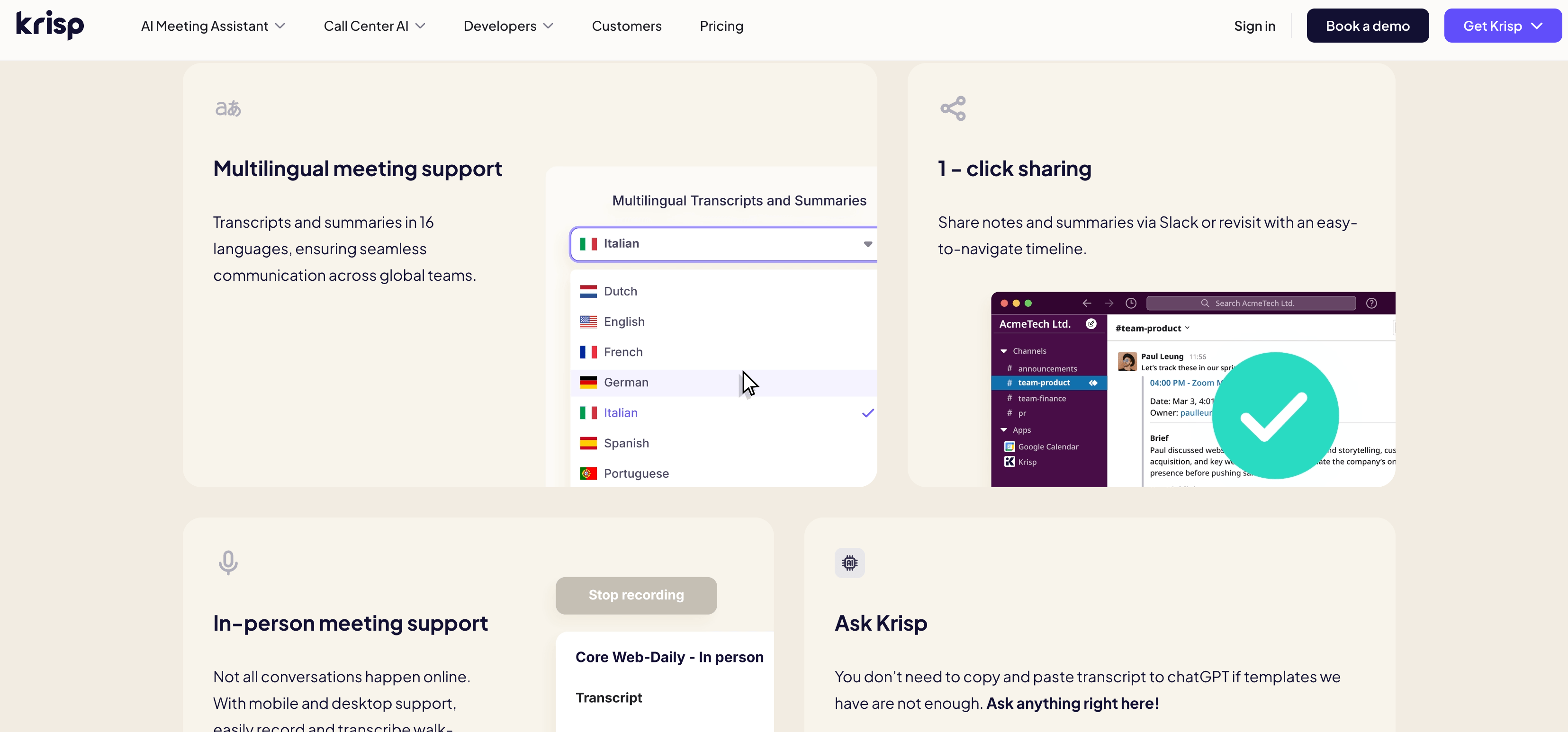
Krisp strips background noise from both sides of the call in real time while quietly recording, transcribing, and summarizing the conversation — with no bot ever visible in the meeting.
Key Features and Technology
Krisp’s feature set spans three connected pillars — real-time audio, post-meeting intelligence, and pre-meeting prep. Here’s how it actually breaks down.
Noise, Echo, and Background Voice Cancellation
Krisp removes background noise, echo, and even other people’s voices talking in the background — not just static or hum — from both the outgoing (your mic) and incoming (other participants’) audio streams. It’s unlimited on every paid plan and available even during the free trial, and it works across any application that uses your system’s default audio devices, with zero per-platform configuration required.
AI Note Taker, Transcription, and Recording
Krisp records audio and video, transcribes calls with on-device English processing (for speed and privacy) plus server-based transcription in 15 additional languages including Spanish, French, German, Hindi, and Korean, and generates structured summaries with key discussion points and action items after each call. A Custom Vocabulary feature supports up to 750 workspace-level terms so names, acronyms, and industry jargon get transcribed correctly, and an “Ask Krisp” AI chat lets you query your own meeting history conversationally instead of copy-pasting transcripts into ChatGPT.
Accent Conversion and Voice Translation
On the Meeting AI side, Accent Conversion is capped by plan — the free trial gets limited access, Core gets 1 hour a day on the speaker side with unlimited listener-side conversion, and Advanced bumps that to 4 hours a day. On the Call Center AI side, a separate Voice Translation add-on delivers real-time, bi-directional voice-to-voice translation across more than 80 languages for agents talking to global customers.
CRM Sync, Integrations, and MCP
Notes and action items push directly into Slack, HubSpot, Notion, Pipedrive, Affinity, and Zapier on every paid tier, with Salesforce and ConnectWise integration added at the Advanced tier and above. The newer MCP integration lets Claude, ChatGPT, Cursor, and other AI agents query your meeting history directly — a meaningful step ahead of most meeting-assistant competitors, who are still catching up on agentic workflows.
Call Center AI: Agent Assist and Speech Analytics
Krisp’s contact center product goes well beyond noise cancellation, adding real-time Knowledge Chat for agents, voice macros for mandatory compliance scripts, live AI-powered captions, after-call summary reporting, and voice security features for real-time fraud detection. It’s deployed at scale with BPOs including Concentrix, TTEC, Foundever, Startek, and Everise, and the Call Center plan requires a minimum 40-seat commitment.
Pricing, Plans, and Package Structure
Krisp’s AI Meeting Assistant pricing is per-seat, with a steep discount for annual billing (roughly 50% off the monthly rate). Noise cancellation is unlimited on every tier including the free trial, so you’re really paying for note-taking limits, accent conversion hours, storage, and admin controls as you move up. Call Center AI and Developer SDK pricing are largely custom/sales-assisted. The table below reflects Krisp’s published rates as of mid-2026 — always confirm current pricing on krisp.ai/pricing before purchasing, since SaaS pricing and promotions shift frequently.
| Plan | Price | What It Is | Best For |
|---|---|---|---|
| Free Trial | $0 (7 days) | Unlimited transcription, noise cancellation, and recording; limited accent conversion; no card required | Testing before committing |
| Core | $16/mo/user (~$8/mo billed annually) | Unlimited note-taker, unlimited noise cancellation, 1hr/day accent conversion, 10GB storage, core integrations | Individuals and small teams |
| Advanced | $30/mo/user (~$15/mo billed annually) | Everything in Core, 4hrs/day accent conversion, Salesforce/ConnectWise, manager view, 60GB storage, advanced admin controls | Teams needing admin, compliance, or sales tooling |
| Enterprise (Meeting AI) | Custom | SSO/SCIM, HIPAA compliance, BAA signing (100+ seats), on-device private transcription, unlimited storage | Org-wide rollout and security |
| CC Core (Call Center AI) | From $10/agent/mo (annual, 40-seat min) | Agent/customer noise cancellation, voice isolation, SSO/SCIM, usage analytics | BPOs and contact centers |
| Developer SDK | Custom (apply for access) | Noise cancellation, voice isolation, accent conversion, turn-taking prediction SDKs | Voice AI app developers |
How Krisp Compares to Alternatives
| Factor | Krisp | Otter.ai | Granola |
|---|---|---|---|
| Noise cancellation | Real-time, bidirectional, on-device | None | None |
| Meeting bot required | No, bot-free by default | Yes, visible bot joins | No, desktop app-based |
| Accent conversion | Yes, real-time, speaker + listener side | No | No |
| In-person / mobile recording | Yes (no noise cancellation on mobile yet) | Yes, strong mobile app | Limited |
| Entry paid price | ~$8/mo (annual) | ~$8.33/mo (annual) | ~$18/mo (annual), approximate |
| Note-taking / summary quality | Strong, structured, action items | Very strong, mature product | Widely praised as top-tier |
| Best for | Noisy environments, global/accented teams, call centers | Students, journalists, mobile-first users | Founders and teams wanting the cleanest notes UI |
vs. Otter.ai: Otter is the more mature, mobile-friendly transcription specialist with a bigger free tier for casual note-taking, but it joins meetings as a visible bot and offers zero audio cleanup. If your problem is bad audio, not just missing notes, Otter doesn’t solve it; Krisp does both.
vs. Granola: Granola has earned a loyal following for producing some of the cleanest, most human-sounding meeting notes in the category, and it’s genuinely bot-free too. But it has zero noise cancellation, no live audio enhancement, and a thinner free tier. If clean notes are your only priority and your audio is already fine, Granola is a strong pick; if your calls are frequently noisy, Krisp covers ground Granola simply doesn’t touch.
vs. built-in noise suppression (Zoom, Teams, Meet): Every major conferencing app now ships some noise suppression natively, and for light background noise it’s often “good enough.” Krisp’s real edge shows up in genuinely hostile audio environments — call centers, shared living spaces, outdoor or in-transit calls — and in working identically across every app rather than being tied to one platform’s built-in filter.
Pros and Cons
What Users Love
Noise cancellation that genuinely works: This is the single most consistent theme across G2 and Trustpilot alike — users repeatedly describe barking dogs, crying kids, keyboard noise, traffic, and neighbor noise disappearing entirely, with coworkers commenting they “sound like they’re in a studio.”
Bidirectional filtering is a real differentiator: Users specifically call out that Krisp filters noise coming from other participants too, not just their own microphone — silencing a noisy coworker’s environment even when that coworker isn’t running Krisp themselves.
Accurate, well-structured meeting notes: Reviewers on G2 and Product Hunt consistently praise the quality of AI summaries, action items, and key-points extraction, and several specifically prefer Krisp’s non-bot approach over competitors that require a visible recording participant.
Genuinely lightweight and easy to set up: Multiple reviewers describe installation and configuration taking under two minutes, with the app running quietly in the background without hijacking other audio settings on the system.
Support that resolves billing issues when escalated: Despite the billing complaints below, a fair number of Trustpilot reviews describe support ultimately issuing refunds or fixing account issues once a user escalates directly — several reviewers upgraded a 1-star review to 5 stars after resolution.
Limitations Worth Knowing
Auto-renewal and refund complaints are the top consumer pain point: A recurring cluster of Trustpilot reviews describes annual subscriptions auto-renewing on dormant accounts without a clear renewal notice, and a strict no-refund policy that some users found difficult to navigate. This is worth checking your calendar for before you commit to annual billing.
Legacy lifetime-deal users report shrinking value over time: Reviews from early AppSumo lifetime-deal buyers describe features being reorganized or gated in ways they feel weren’t part of the original purchase, including a calendar feature some found to be unwanted bloatware they couldn’t fully disable.
No noise cancellation on mobile yet: The mobile app handles transcription and recording well but does not currently include real-time noise cancellation — Krisp says it’s coming, but as of this review it isn’t live.
A live patent lawsuit shadows Accent Conversion: Krisp is currently a defendant in ongoing U.S. federal litigation (Sanas.AI Inc. v. Krisp Technologies, N.D. Cal.) alleging patent infringement and trade secret misappropriation related to its Accent Conversion technology, plus a parallel suit in Indian courts. In February 2026, the court declined to dismiss Sanas’s patent claims at an early stage, allowing the case to proceed to discovery — a procedural ruling, not a finding on the merits, but worth knowing if Accent Conversion is central to why you’re evaluating Krisp for a business deployment.
Some users report noise cancellation costs voice fidelity: A minority of reviews describe the noise filtering muting certain speech sounds (like /s/ and /sh/ consonants) or making a voice sound slightly processed, which is a real concern for interpreters, teachers, and anyone doing pronunciation-sensitive work.
The app can be resource-heavy: A few reviewers note Krisp is fairly CPU-intensive, occasionally straining older machines during screen-share-heavy calls — worth testing on your actual hardware during the free trial rather than assuming it’s lightweight.
Krisp’s pricing scales from a no-card 7-day trial up through per-agent Call Center AI plans — most individuals only ever need Core or Advanced.
Who Should Use Krisp
Remote and hybrid workers in unpredictable environments: If you work from a shared apartment, a coworking space, a home with kids or pets, or anywhere you can’t fully control background noise, Krisp solves a real, recurring problem that built-in conferencing filters often can’t.
Global and distributed teams: Multilingual transcript support across 16 languages and real-time accent conversion make Krisp genuinely useful for teams spanning multiple countries and native languages, especially where accent-related communication friction is a recurring issue.
Sales, customer success, and interpreter-heavy roles: Anyone spending most of the workday on calls benefits from both the audio cleanup and the automatic note-taking, and the bot-free approach avoids the friction of a visible recording participant on sensitive customer calls.
Contact centers and BPOs: Call Center AI’s combination of noise cancellation, accent conversion, and agent assist has driven measurable adoption at scale among major BPOs, and it’s a legitimate fit for any center with 40+ seats and demonstrable noise or accent-related CSAT issues.
Krisp is a weaker fit if you almost exclusively take calls from a quiet home office, since your marginal benefit from noise cancellation shrinks fast; if you specifically want a mobile-first assistant for in-person and on-the-go recording with strong offline noise handling (Otter.ai currently has the edge there); if you’re deeply price-sensitive and only want noise cancellation without paying for a bundled note-taker; or if you’re uncomfortable proceeding with a vendor mid-litigation on a feature central to your use case, in which case it’s worth waiting for the Sanas suit to resolve before betting your workflow on Accent Conversion specifically.
Getting Started: Step by Step
- Start the free 7-day trial. Sign up at krisp.ai with no credit card required and get unlimited noise cancellation, transcription, and recording immediately to test in your real environment.
- Set Krisp as your default mic and speaker. Once installed, Krisp registers as a virtual audio device — select it in Zoom, Teams, Google Meet, or your OS-level sound settings, and it applies to every calling app automatically.
- Connect your calendar (or skip it). Link Google or Outlook calendar for automatic meeting capture, or contact sales for the zero-calendar-permissions option if your company restricts that access.
- Take a real call and review the output. Join an actual meeting, then check the transcript accuracy, summary quality, and how well the noise cancellation handled your specific background noise before deciding on a paid plan.
- Connect your integrations. Link Slack, HubSpot, Notion, or Salesforce (Advanced tier) so notes and action items push automatically into your existing workflow instead of sitting inside Krisp’s own dashboard.
- Choose Core or Advanced based on accent conversion and admin needs. Most individuals and small teams only need Core; move to Advanced only if you need more than 1 hour/day of speaker-side accent conversion, Salesforce sync, or team-level admin controls.
Beyond meetings, Krisp’s Call Center AI brings real-time accent conversion and voice translation to global contact center agents.
Tips for Getting Maximum Value
Mark your renewal date on a calendar the day you sign up for an annual plan, since Krisp’s auto-renewal and refund policy is one of the most common sources of frustration in its review history — a two-minute reminder avoids the entire problem. If you’re only after clean audio for occasional calls, don’t overlook the free trial’s unlimited noise cancellation before assuming you need a paid tier. Build out your Custom Vocabulary list early with your company’s product names, acronyms, and team members’ names — it meaningfully improves transcript accuracy from day one. If accent conversion is a core reason you’re evaluating Krisp for a team deployment, keep an eye on the Sanas litigation as it moves through discovery, since an adverse ruling could affect the feature’s availability or design down the line. And for MacBook or lower-spec Windows users running Krisp alongside screen sharing, monitor CPU usage during your trial period, since a handful of users report it’s noticeably resource-intensive on older hardware.
Future Outlook and Final Assessment
The AI meeting assistant category has gotten crowded fast, with Otter, Granola, Fireflies, Fathom, and native platform features from Zoom and Teams all competing for the same workflow. Krisp’s answer to that crowding has been to lean into what nobody else does well: real-time audio quality, not just after-the-fact notes. As voice increasingly becomes the interface for AI tools — the new MCP integration is an early signal of where this is heading — Krisp’s position as an audio-layer company with a decade of noise-cancellation R&D behind it looks more like an asset than a legacy feature.
The honest caveats remain real, though: the Trustpilot billing complaints are a genuine pattern rather than a handful of outliers, the mobile experience still trails the desktop app, and the Sanas litigation over Accent Conversion introduces a layer of uncertainty around one of Krisp’s newest and most differentiated features. None of that erases what Krisp does exceptionally well — but it does mean going in with clear eyes about which parts of the platform are rock-solid (noise cancellation, transcription) and which are newer and carry more risk (accent conversion, pricing predictability for long-term subscribers).
Conclusion
Krisp solves a problem almost everyone who works remotely has run into: sounding unprofessional because of noise you can’t control, and losing track of what was actually said and agreed to in a call. It does both jobs well, backed by a strong G2 track record among enterprise and BPO customers and a decade of noise-cancellation engineering that’s genuinely hard to replicate. The Trustpilot billing pattern and the mobile app’s missing noise cancellation are real trade-offs worth knowing before you buy, and the Accent Conversion litigation is worth watching if that specific feature is central to your decision. For most remote workers, sales teams, and global-distributed organizations dealing with noisy environments or accent-related friction on calls, Krisp remains one of the most complete voice AI tools available in 2026 — start with the free trial, test it against your real environment, and set a calendar reminder before you go annual.
Ready to sound clearer on every call?
Explore more honest reviews, tutorials and tech comparisons to find the right gear for the way you work, travel and live — at World Of Tech, where we make everything easy.
👉 Shop Krisp: https://worldoftech.space/krisp
👉 Our YouTube Channel: youtube.com/@world_tech79
👉 Our Facebook Fanpage: Facebook
👉 Our X (Twitter): @worldoftech79
Pricing, specifications and policy details in this review were verified against krisp.ai/pricing and independent review sources (including G2, Trustpilot, and court filings) as of July 2026. SaaS pricing and features change frequently, so confirm current details on the official site before purchasing. Competitor prices are approximate and subject to change.





