
If your best ideas usually arrive as a tangled rush — half-formed, out of order, faster than you can write them down — a blank page is the worst possible place to catch them. Inspiration is built for exactly that moment. It is a visual-thinking tool that lets you brain-dump ideas as a mind map or concept map, connect and rearrange them on screen, and then flip the whole thing into a clean, structured outline you can turn into a finished essay, report or presentation. Rather than a flashy new startup app, Inspiration is a veteran of visual learning: the software has been used by millions of students and teachers over more than two decades, it is now developed and sold by UK-based TechEdology, and it carries a 4.5/5 “Excellent” Trustpilot rating with reviewers who have relied on it for ten, twenty, even thirty years. It is ISO 9001 certified, a member of the British Assistive Technology Association, and approved as the first visual-mapping tool for Microsoft’s Windows 11 SE education devices.
For students with dyslexia, ADHD or autism, for educators and schools, and for writers, researchers and planners who think better in pictures than in paragraphs, the appeal is immediate: get the mess out of your head, see how it fits together, and let the software hand you a structure to write from. But Inspiration is not for everyone — it is primarily Windows desktop software with a one-off licence, it is not a real-time cloud-collaboration whiteboard, and an honest look turns up genuine trade-offs around platform, dated visuals and upgrade policy. This 2026 review walks through Inspiration’s full picture — the Diagram-to-Outline workflow, the RapidFire and templates that speed it up, the complete product range and pricing, head-to-head comparisons against MindManager and XMind, the real pros and cons, and exactly who should (and shouldn’t) install it.
Inspiration Review 2026: The Veteran Visual-Thinking Tool That Turns Mind Maps Into Finished Writing
Overview and Background
Inspiration is a visual-thinking and learning application designed around one core idea: make your thoughts visible. It turns abstract ideas into structured visuals — concept maps, mind maps, webbing diagrams and graphic organisers — and then, crucially, converts those visuals into a hierarchical outline you can use to kickstart writing. It is not a general drawing app or a corporate whiteboard; it is a focused tool for planning, organising and communicating ideas, with deep roots in education and assistive technology.
The brand has serious heritage. Inspiration was originally created by Inspiration Software, Inc. more than 25 years ago and became a staple in K-12 classrooms, used by tens of millions of students and teachers worldwide. Today the Inspiration and RapidFire trademarks belong to Diagramming Apps, LLC, while the inspiration-at.com site — and the ongoing development of the desktop software — is run by TechEdology Ltd, a small team based in Pewsey, Wiltshire in the UK, with a US arm as well. That continuity matters: this is a mature, well-understood product being actively maintained, not abandonware, and reviewers repeatedly express relief that “a group has taken it over who will further develop it.”
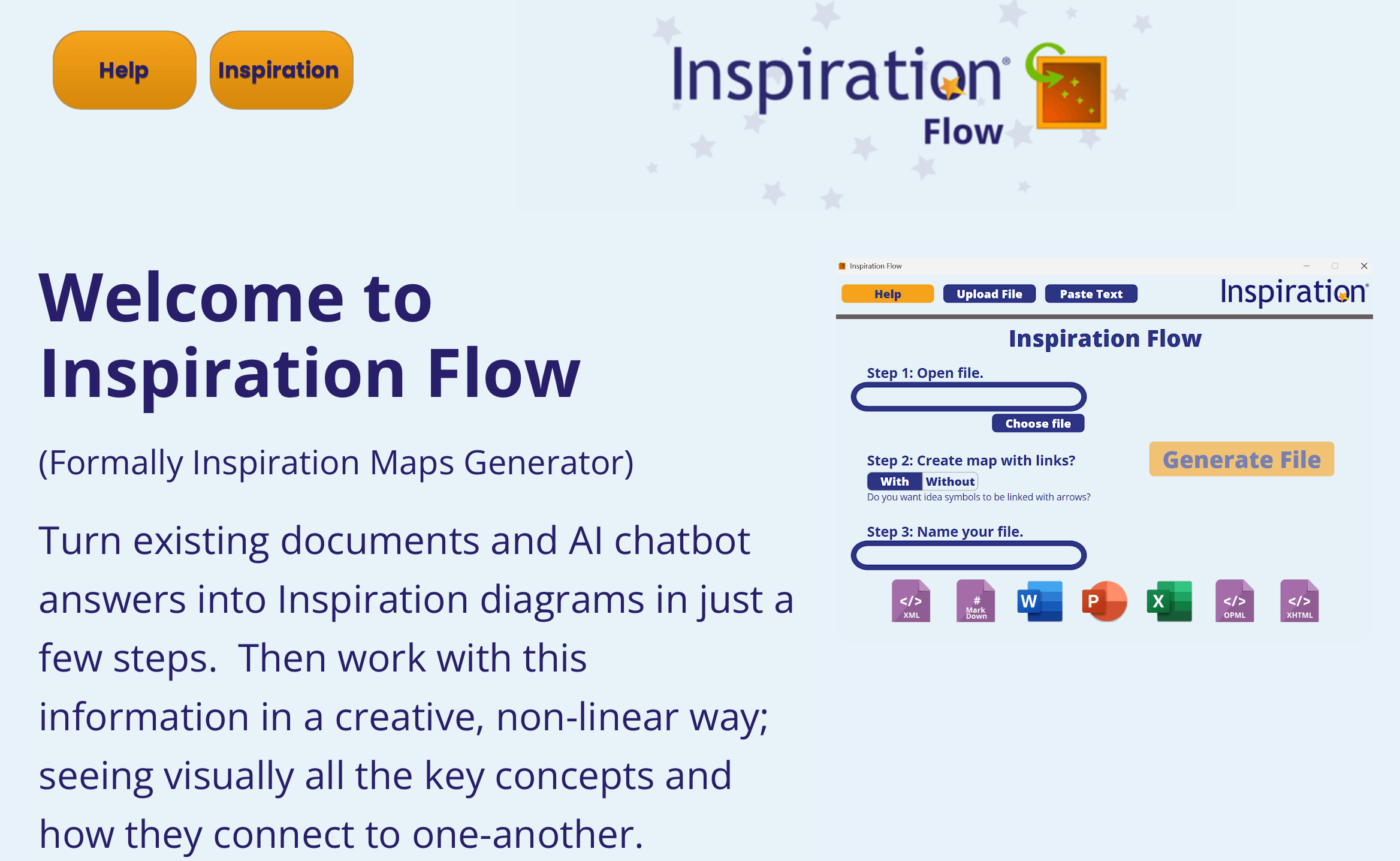
The current flagship is Inspiration 12 for Windows, released roughly two years after Inspiration 11, and sold as a perpetual one-off licence rather than a subscription. Around it sits a small family of products: Inspiration RD, a cloud-based remote-desktop service that brings Inspiration to macOS and Chromebooks; Inspiration Maps, a separate iPad, iPhone and Mac app; Inspiration Flow, a newer browser-based tool for building maps online; and add-ons including a Software Assurance upgrade plan and a Dragon Command Pack for voice control. Credibility markers back it up: ISO 9001 certification, membership of the British Assistive Technology Association, approval for Windows 11 SE education devices, and a 4.5/5 Trustpilot score (around 195 reviews, with 79% five-star) where the company replies to 100% of negative reviews, usually within a day.
Why Inspiration Stands Out in 2026
Diagram and Outline in one click — its defining feature: This is the reason long-time users say nothing else compares. You capture ideas visually in Diagram View, then switch instantly to Outline View to see the same content as a structured, hierarchical document — and back again. DiagramSync even re-sorts your outline to match the layout of your map. For anyone whose real goal is a finished piece of writing, this two-way link between picture and prose is genuinely hard to find elsewhere.
RapidFire keeps up with your brain: The signature RapidFire tool lets you type a stream of ideas and have them drop onto the canvas as connected topics, as fast as you can think them. It removes the friction of placing and linking each box by hand, which is exactly what people with racing or non-linear thoughts say finally let them get everything down before it slipped away.
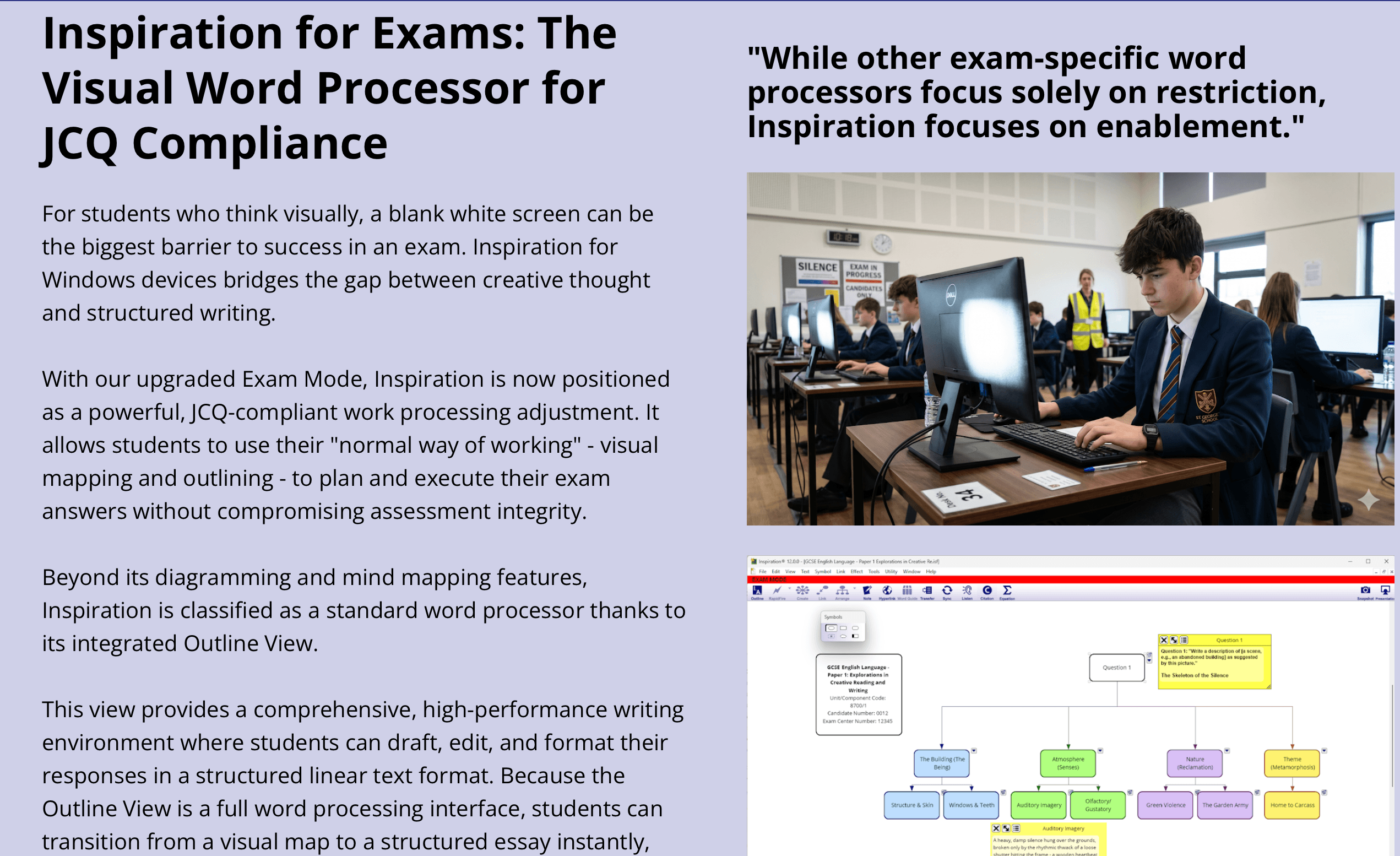
A genuine education and assistive-technology pedigree: Inspiration was built for classrooms and refined for learners who think differently. Reviewers with ASD, ADHD and dyslexia describe it as transformative — one user called it “like not being able to walk and being given a wheelchair.” It is recognised in UK funding routes such as the Disabled Student Allowance (DSA) and Access to Work (AtW), and includes a JCQ-compliant Exam Mode so students can plan answers in their normal visual way without breaking assessment rules.
A one-off licence in a subscription world: The core Inspiration 12 for Windows is a perpetual, one-time purchase — you buy it once and own it, install it on two of your own computers, and move the licence to a new PC when you upgrade. As most rivals push monthly or annual subscriptions, that buy-it-and-keep-it model is increasingly rare and a real draw for individuals and budget-conscious schools.
Deep template and personalisation library: Inspiration ships with templates for subjects across the curriculum plus practical structures like family trees, timelines/chronologies and citation maps, and lets you personalise everything — colours, shapes, fonts, arrow styles, backgrounds and a built-in symbol library, plus images from the web or your own device. You start from a useful structure instead of a blank page.
Speech, accessibility and flexible platforms: An optional Dragon Command Pack adds hands-free voice control, pairing speech technology with mind mapping so you can build maps without typing. And while the desktop app is Windows-based, Inspiration RD extends it to Mac and Chromebook, while Inspiration Maps covers iPad, iPhone and Mac — so most learners can find a way in.
Maturity, support and trust: Two decades of refinement show in how quickly people get productive — many report being up and running within an hour of watching the short tutorials. Backed by a 4.5/5 Trustpilot reputation, ISO 9001 certification, and a support team that replies to every negative review within about a day, Inspiration is a tool buyers keep coming back to, sometimes for decades.
Inspiration’s signature move: capture ideas visually in Diagram View, then switch instantly to a structured Outline View you can write from — and back again with DiagramSync.
Key Features and Technology
Inspiration is deliberately focused, but a handful of well-honed tools do the heavy lifting. Here is how the platform actually breaks down.
Diagram View and RapidFire
Diagram View is the visual canvas where you build mind maps, concept maps and webbing diagrams. The Link tool connects ideas with labelled relationships, while RapidFire lets you machine-gun a list of thoughts onto the canvas as linked topics without stopping to position each one. You can drag and drop files and media in to embed or hyperlink them, attach notes to any topic, and refine the layout with align, nudge, spacing and auto-arrange controls. It is fast, forgiving and designed to keep pace with the way ideas actually arrive.
Outline View and DiagramSync
This is the feature reviewers prize most. With one click, your diagram becomes a clean, hierarchical outline — topics, subtopics, prefixes and indentation — that works like a word processor built for structure. DiagramSync re-sorts the outline to mirror the arrangement of symbols in your map, so the order you laid out visually becomes the order you write in. You can then export to a writing app to finish the document, making Inspiration a true bridge from brainstorm to first draft.
Templates, Symbols and Personalisation
A large built-in template library covers curriculum subjects and practical layouts — family trees, timelines, citation maps and more — so you rarely start cold. Everything is customisable: background and line colours, link styles, fonts, shapes, arrow styles, and a symbol library you can supplement with images from the web or your own camera roll. You can also import .txt and .rtf files to turn existing notes into topic symbols and outlines, and build your own reusable templates.
Platforms: Inspiration 12, RD, Maps and Flow
The core Inspiration 12 desktop app runs on Windows 10 and 11 (both x86 and ARM devices). For other platforms, Inspiration RD is a cloud remote-desktop subscription that delivers the full Windows experience on macOS, ChromeOS and Windows, typically set up within one working day. Inspiration Maps is a separate, touch-friendly app for iPad, iPhone and Mac (published by Diagramming Apps), and Inspiration Flow is a newer browser-based tool for generating maps online. It is a flexible spread — just note that these are distinct products rather than one app that syncs seamlessly across every device.
Accessibility, Speech and Exam Mode
Accessibility is core to Inspiration’s identity. The optional Dragon Command Pack adds voice control for hands-free mapping, the visual workflow suits dyslexic and neurodivergent thinkers, and an upgraded JCQ-compliant Exam Mode lets students use visual planning and outlining as their “normal way of working” in assessments without compromising integrity. Combined with recognition under DSA and Access to Work funding, this is a tool genuinely engineered for inclusive learning.
Pricing, Plans, and Package Structure
Inspiration’s pricing is refreshingly straightforward and leans on a perpetual, one-off model for individuals, with subscription options for organisations and for the cloud/Mac route. Orders are processed worldwide through FastSpring in your preferred currency, so the exact figure is confirmed at checkout. The numbers below are approximate guides drawn from the official site and reseller listings; treat them as a ballpark and always confirm the live price before buying. Schools and disabled students should also note the DSA and Access to Work funding routes, which can cover the cost entirely for eligible UK users.
| Product / Plan | Price (approx.) | What It Is | Best For |
|---|---|---|---|
| Inspiration 12 — Single User | One-off, ~US$100+ (confirm at checkout) | Perpetual Windows licence; install on 2 PCs; movable | Individuals, students & pros on Windows |
| Software Assurance (add-on) | Annual subscription | Free version upgrades + 24/7 online install management | Staying current & easy device moves |
| Inspiration RD | Annual subscription (~US$130+/yr education; confirm) | Cloud remote-desktop access on Mac, Chromebook & Windows | Mac & Chromebook users |
| Inspiration Maps (add-on) | One-off App Store purchase | Touch-friendly iPad, iPhone & Mac app | Apple users (50% VPP education for 20+) |
| Organisation / Volume & Enterprise | Custom volume pricing | Perpetual volume (10+), BYOD & site-wide subs, 3-yr enterprise | Schools, businesses, gov & non-profits |
| Free trial | Free (30 days) | Full-featured trial of Inspiration before buying | Trying it risk-free first |
Inspiration 12 is a one-off perpetual licence for Windows, with subscription options (Inspiration RD) for Mac and Chromebook and volume licensing for schools and organisations.
How Inspiration Compares to Alternatives
| Factor | Inspiration | MindManager | XMind |
|---|---|---|---|
| Core focus | Visual thinking + outlining for writing/learning | Business mind mapping & project planning | General-purpose mind mapping |
| Pricing model | Perpetual one-off (subs for org/cloud) | Perpetual or subscription (premium) | Freemium + subscription |
| Entry price (approx.) | ~US$100+ one-off | ~US$99–179/yr or ~$349 once | Free tier; ~US$60–100/yr |
| Diagram ⇄ Outline | Yes — two-way, the standout feature | Outline panel, less writing-focused | Basic outliner |
| Platforms | Windows (RD for Mac/Chromebook; Maps for Apple) | Windows & Mac | Win, Mac, Linux, iOS, Android |
| Accessibility / education | Strong: DSA/AtW, Exam Mode, BATA, Dragon | Limited education focus | Limited accessibility tooling |
| Live collaboration | No real-time co-editing | Co-editing in higher tiers | Limited; share-based |
| Best for | Students, writers & visual learners | Corporate planners & analysts | Budget, cross-platform mappers |
vs. MindManager: MindManager (from Corel) is the heavyweight of business mind mapping — powerful project, flowchart and data-linking features aimed at corporate planning, and it runs natively on both Windows and Mac. But it is considerably more expensive, its depth can feel like overkill for a student or writer, and it is not built around assistive learning. Inspiration counters with its writing-first Diagram-to-Outline workflow, a far gentler learning curve, a one-off licence, and a genuine education and accessibility focus. For boardrooms, MindManager; for classrooms, essays and inclusive learning, Inspiration.
vs. XMind: XMind is the popular, affordable all-rounder — it is cross-platform (Windows, Mac, Linux, iOS, Android), has a free tier, and produces attractive maps. Where it falls short of Inspiration is the writing bridge and the learning-support tooling: XMind is a mapping app first, with a comparatively basic outliner and little in the way of accessibility or exam features. If you simply want cheap, good-looking maps on any device, XMind is excellent value; if your goal is to turn maps into structured writing or support a neurodivergent learner, Inspiration is the more purpose-built tool.
vs. MindMeister, Ayoa and online whiteboards: Web-first tools like MindMeister, Miro and Coggle win on real-time team collaboration and anywhere-access from a browser, and Ayoa blends mind maps with task management and an assistive-tech angle of its own. Their trade-off is recurring subscriptions and, for the whiteboard tools, far less emphasis on producing a finished written document. Inspiration is the better choice for a single person who wants to think visually and then write — and who would rather own their software than rent it. If live co-editing is your priority, look to the cloud tools instead.
Pros and Cons
What Users Love
The outline feature is unmatched: Across reviews, the single most praised aspect is the way Inspiration turns a visual map into a usable, structured outline. Long-time users say no other tool manages, delineates and communicates information as effectively for their writing — several call the outlining “the strongest aspect of the software.”
Genuinely life-changing for some learners: Users with dyslexia, ADHD, ASD and Asperger’s describe Inspiration as the tool that finally let them communicate ideas — drafting a first diagram within an hour, summarising hours of material into a single shareable map, and staying focused instead of going off on tangents. The emotional weight in these reviews is striking.
Fast to learn and easy to return to: Reviewers repeatedly note a gentle learning curve — short tutorial videos get them productive quickly — and a simplicity that keeps them coming back across many versions and many years.
Versatile across study, work and life: People use it for essays, lessons, presentations, proposals, project planning, revision, and even family-history research and timelines. Teachers highlight how it crosses subjects and grade levels, making it rare value for limited software budgets.
Own-it pricing and longevity: The perpetual licence and the backward-compatible heritage are real draws — many owners have used Inspiration for a decade or more and value buying rather than renting. Reviewers are also glad the product is being actively developed again under TechEdology.
Responsive, human support: Despite occasional hiccups, a large share of reviews praise the support team for replying quickly and helpfully — including resending licences, guiding installs on managed devices, and pointing users to the right tutorials. The company answers 100% of negative reviews.
Limitations Worth Knowing
Windows-first, with no seamless cross-device sync: The core app is Windows-only; Mac and Chromebook users rely on the cloud-based Inspiration RD, and Apple mobile users on the separate Maps app. Because these are distinct products, a document does not automatically sync across all of them — a real friction for anyone who switches devices constantly.
Dated graphics and interface in places: Some long-time users feel the visuals have aged, noting graphics capabilities that “go back more than 15 years.” It is functional and clear, but it will not look as modern or as polished as newer cloud-native mapping apps.
Upgrade and compatibility friction: A recurring frustration is feeling pushed to buy a new version — for example, when an older release stopped working on a replacement laptop and was no longer supported. A few users also report difficulty opening years of older files after upgrading, so check version compatibility and back up your work before moving up.
Licence delivery and admin-rights snags: Most purchases are smooth, but a minority report licence-key emails landing in spam or needing to contact support to resend them, and installs on school or work machines may require IT admin rights. Support generally resolves these, but they can delay your first session.
Small quirks and missing extras: Reviewers mention it being tricky to permanently change the default font, limited image-handling in maps for some, and — on the Inspiration Maps app — no cross-device syncing and no hand-drawing/sketch mode. None are dealbreakers, but they add up.
Not a real-time collaboration tool: If you need several people editing the same map live in a browser, Inspiration is the wrong fit — it is built for individual thinking and writing, not team co-editing. Pricing is also confirmed at checkout via FastSpring rather than shown up front, so the exact figure depends on your currency and region.
Loved for its outlining and embraced by neurodivergent learners — just plan around its Windows-first design and confirm version compatibility before upgrading.
Who Should Use Inspiration
Students and neurodivergent learners: This is Inspiration’s heartland. If you have dyslexia, ADHD or autism, or simply think in pictures, the visual-to-outline workflow, RapidFire capture and Exam Mode are built for the way your mind works — and DSA or Access to Work funding may cover the cost entirely.
Teachers, schools and assessors: With curriculum templates, cross-subject versatility, Windows 11 SE approval, volume and site-wide licensing, and a strong assistive-technology track record, Inspiration is a proven, budget-friendly classroom tool — and needs assessors will recognise it as a standard DSA/AtW recommendation.
Writers, researchers and planners: Anyone who needs to get from a tangle of ideas to a structured first draft — essayists, authors, report writers, researchers, even family historians — will value the Diagram-to-Outline bridge and the ability to export an organised outline straight into a writing app.
Visual thinkers who want to own their software: If you prefer a one-off purchase over yet another subscription, and you work primarily on Windows (or are happy with Inspiration RD on Mac/Chromebook), Inspiration offers a mature, dependable home for your mapping and outlining.
Who should look elsewhere: Teams who need several people editing the same map live should choose a cloud whiteboard like Miro or MindMeister; Mac-first users who want a polished native desktop app rather than a remote-desktop session may prefer XMind or MindNode; corporate analysts wanting heavy project and data features will lean to MindManager; and anyone seeking a free or ultra-cheap tool will find XMind’s free tier more appealing. Heavy device-switchers who need automatic sync everywhere should also weigh the platform split carefully.
Getting Started: Step by Step
- Pick the right product for your device. Choose Inspiration 12 if you are on Windows 10 or 11; choose Inspiration RD if you use a Mac or Chromebook; choose Inspiration Maps if you mainly work on an iPad, iPhone or Mac. Match your main device first so you do not buy the wrong edition.
- Start the free 30-day trial. Download and try Inspiration before paying. Watch the short tutorial videos, then build one real map you actually need — that is the fastest way to know if the Diagram-to-Outline approach suits you.
- Capture ideas with RapidFire in Diagram View. Begin in Diagram View and use RapidFire to type your thoughts in quickly as connected topics. Do not worry about order yet — just get everything out of your head and onto the canvas.
- Organise, link and personalise. Use the Link tool to label relationships, drag topics into a logical layout, and apply a template, symbols, colours and notes. Attach files or hyperlinks where useful to keep related material together.
- Switch to Outline View and write. Flip to Outline View to see your map as a structured document, use DiagramSync to match the order to your layout, refine the hierarchy, and then export to your writing app to turn the outline into a finished draft.
- Buy, register and consider Software Assurance. When you are ready, purchase via FastSpring in your currency, keep the licence-key email safe (check spam if it does not arrive), and add the Software Assurance plan if you want free future upgrades and self-service device moves. UK users should explore DSA or Access to Work funding first.
Tips for Getting Maximum Value
Lean hard on the workflow Inspiration was built for: brainstorm freely in Diagram View, then let Outline View and DiagramSync do the organising, instead of trying to write in a straight line from the start. Use RapidFire to capture ideas before they vanish, and start from a template rather than a blank canvas to save time. If you are eligible, apply for DSA or Access to Work funding before paying yourself, and if you want to stay on the latest version long-term, the Software Assurance plan is cheaper and less hassle than re-buying later — it also lets you move your install between machines without contacting support. Watch for seasonal discounts and reseller coupons since the software is rarely urgent to buy at full price, back up your documents before any major version upgrade so older files stay accessible, and explore the Dragon Command Pack if voice control would help you map hands-free. Finally, Windows users should buy Inspiration 12 directly while Mac and Chromebook users get the most value from Inspiration RD — picking the right edition for your device is the simplest way to avoid disappointment.
Future Outlook and Final Assessment
The visual-thinking market in 2026 is busy and increasingly cloud-first, with collaborative tools like Miro, MindMeister and XMind competing on real-time editing and slick design. Inspiration has chosen a different lane — the deep, individual workflow that takes a learner or writer from a messy brainstorm to a structured draft — and under TechEdology it is being actively developed again, with Inspiration 12, an upgraded Exam Mode, the new browser-based Inspiration Flow and a Dragon voice pack all pointing forward. Its assistive-technology credentials and education funding routes give it a durable niche that the flashier rivals do not directly serve.
The honest caveats remain: it is Windows-first with no seamless cross-device sync, the interface and graphics feel dated next to cloud-native apps, upgrade and file-compatibility friction has frustrated some long-time users, and it is not a real-time collaboration tool. Rivals beat it on platform breadth (XMind), corporate features (MindManager) and live co-editing (MindMeister, Miro). But for its actual purpose — visual thinking that turns into finished writing, with genuine support for neurodivergent learners — Inspiration remains one of the strongest, most trusted tools available, which its 4.5/5 Trustpilot reputation and decades of loyal users reflect.
Bottom line: For students, writers and visual learners — especially anyone with dyslexia, ADHD or autism — Inspiration 12 is a smart, own-it-for-life pick whose Diagram-to-Outline workflow genuinely turns ideas into writing. Start with the free trial, buy the perpetual Windows licence (or Inspiration RD on Mac and Chromebook), check DSA or Access to Work funding if you qualify, and add Software Assurance if you want to stay current. Look to MindManager for corporate planning, XMind for cheap cross-platform mapping, or Miro and MindMeister for live team collaboration — but for inclusive, write-from-your-map thinking, Inspiration is hard to beat.
Conclusion
Inspiration is not trying to be the trendiest mapping app or a real-time team whiteboard — it is trying to take the chaos in your head, make it visible, and hand you a structure to write from, and at that job it has quietly excelled for over two decades. The two-way link between Diagram View and Outline View, the RapidFire capture, the deep template library and a real commitment to accessibility add up to a tool that long-time users say they could not work without, backed by a 4.5/5 Trustpilot reputation and responsive support. It rewards picking the right edition for your device and embracing its visual-then-outline workflow, and it is not the right call for Mac-first users wanting a native app, teams needing live collaboration, or anyone chasing a free tool. But for students, neurodivergent learners, educators and writers who think better in pictures, Inspiration is one of the most genuinely helpful pieces of software you can own. Try it free, check your funding options, and let it turn your next tangle of ideas into a finished piece of work.
Ready to turn your tangled ideas into clear, structured writing?
Explore more honest reviews, tutorials and tech comparisons to find the right gear for the way you work, travel and live — at World Of Tech, where we make everything easy.
👉 Try Inspiration: https://worldoftech.space/inspiration
👉 Our YouTube Channel: youtube.com/@world_tech79
👉 Our Facebook Fanpage: Facebook
👉 Our X (Twitter): @worldoftech79
Pricing, specifications and policy details in this review were verified against inspiration-at.com and independent review sources (including Trustpilot and reseller listings) as of June 2026. Software pricing, versions and promotions change frequently, so confirm current details on the official site before purchasing. Prices are processed via FastSpring in your local currency, and competitor prices are approximate and subject to change.





