
Anyone who has spent more than a few years on a Windows PC knows the frustration: a friend sends a HEIC photo from a new iPhone, a client emails a .eml message with a winmail.dat attachment, an old project surfaces as an .xps or a camera-raw .cr2, and Windows just shrugs with “There’s no app installed to open this file.” The usual fix is a cluttered desktop full of single-purpose downloads — one app for images, another for archives, a media player, a PDF tool, something for that one weird format you’ll never see again. File Viewer Plus exists to erase that mess. It’s a single Windows application from US developer Sharpened Productions that opens, edits, saves, and converts more than 400 file formats — from everyday Word, Excel, and PDF documents to camera-raw images, DICOM medical scans, CAD drawings, embroidery files, source code, and email messages — all from one clean, tabbed window. Now in its sixth major version, it adds a full file manager and best-in-class PDF-to-Word conversion to a toolkit that already covered an enormous range of formats.
For solopreneurs, small-business owners, students, legal professionals, and anyone who regularly receives files in formats they don’t have the right software for, the value proposition is simple: stop hunting for “an app that opens this” and just drag the file onto one program that almost always knows what to do with it. But File Viewer Plus isn’t magic, and an honest look reveals real trade-offs around its Windows-only focus, the gap between viewing and full editing, and how the one-time and subscription prices compare over time. This 2026 review walks through File Viewer Plus’s full feature set — the 400+ format support, the new version 6 file manager and PDF converter, the built-in editors and batch tools, transparent pricing, head-to-head comparisons against FileViewPro and the free single-app route, the genuine pros and cons, and exactly who should (and shouldn’t) install it.
File Viewer Plus Review 2026: One Windows App That Opens, Edits, and Converts 400+ File Formats
Overview and Background
File Viewer Plus is a universal file utility for Windows built around one idea: a single app that opens almost any file you throw at it. Rather than being a specialist tool for one job, it’s a catch-all that handles documents, spreadsheets, presentations, PDFs, images, audio, video, archives, emails, and source code in one place — and when it genuinely can’t open a proprietary format, it still shows you as much information about the file as possible. The core workflow is as direct as it gets: drag a file onto the window (or open a whole folder), and File Viewer Plus identifies it, renders it, and gives you tools to edit, save, or convert it.
The software comes from Sharpened Productions, a Minnesota-based software and web company founded in 2003 and incorporated in 2007, led by founder Per Christensson. That pedigree matters in a category full of look-alike “open any file” tools of dubious quality. Sharpened also runs FileInfo.com — one of the web’s largest databases of file-format information, covering more than 12,000 formats — and that same knowledge base powers File Viewer Plus’s ability to recognize and describe obscure or extension-less files. It isn’t a no-name marketplace download; it’s a long-running, US-developed product with a clear lineage, a dedicated support team, and a track record stretching across multiple major versions.
What separates File Viewer Plus from a simple viewer is that it doesn’t just display files — it edits, saves, and converts them. There’s a built-in word processor for Office documents, an image editor, a media player and converter, an archive extractor, an email viewer, a source-code editor with syntax highlighting, and a batch converter that can process thousands of files at once. Version 6, the current release, adds a full file manager (copy, move, rename, delete, and share files and folders) and high-accuracy PDF-to-Word conversion, alongside support for modern formats like HEIC and JPEG XL. It runs on Windows 10 and 11, works fully offline, and is also available through the Microsoft Store.
Why File Viewer Plus Stands Out in 2026
One app instead of a dozen: This is File Viewer Plus’s defining benefit and the entire reason to install it. Over 400 formats — Office files, PDFs, 100+ image types, dozens of audio and video formats, ZIP/RAR/7Z archives, emails, and source code — open in a single, consistent interface. Instead of installing and updating a separate program for every file type, you have one tool that almost always just works.
It doesn’t just view — it edits, saves, and converts: Where most “file openers” stop at read-only display, File Viewer Plus lets you create a new Word document and export it as a PDF, edit a camera-raw photo and save it as a JPEG, or convert audio and video between formats with the built-in converter. The new version 6 PDF-to-Word conversion preserves layouts, fonts, and formatting with genuinely impressive accuracy.
A real file manager, not just a viewer: Version 6’s standout addition is a built-in file manager that lets you copy, move, rename, delete, and share files and folders without leaving the app. It even generates thumbnail previews for Office documents that Windows Explorer can’t show, and a split-view preview pane lets you scan through hundreds of files quickly. For organizing a messy Downloads folder or a drive full of mixed formats, it’s a genuine productivity upgrade.
It identifies the files nothing else can open: Backed by Sharpened’s database of over 10,000 file formats, the File Identifier and Inspector recognizes unknown files — even ones with missing or incorrect extensions — by reading their binary signature. It shows raw text and hexadecimal views, full image EXIF data, MD5 hashes, MIME types, and hidden metadata. For IT pros, investigators, and anyone facing a mystery attachment, it’s a legitimately powerful detective tool.
Specialist viewers most rivals lack: It opens DICOM medical images (.dcm), CAD drawings (.dwg/.dxf) without AutoCAD, Microsoft Visio and Project files, XPS documents, and even machine-embroidery files — categories that send most people scrambling for expensive niche software. Being able to view, and often convert, these from the same app is a real edge.
Modern formats and a modern interface: Version 6 handles the latest image formats — HEIC photos from current iPhones, JPEG XL, camera raw, PSD, and multipage TIFFs — and wraps everything in a customizable UI with light and dark modes, HiDPI support, tabs, split view, and a choice of simplified, classic, or compact ribbons.
A reputable developer and transparent pricing: File Viewer Plus is fully developed and supported in Minneapolis, with a 30-day money-back guarantee, two years of free support on the one-time license, and an offline, read-only mode for security-conscious users. In a category where some competitors are notorious for aggressive billing, that transparency and a 20-year company history are reasons buyers trust it.
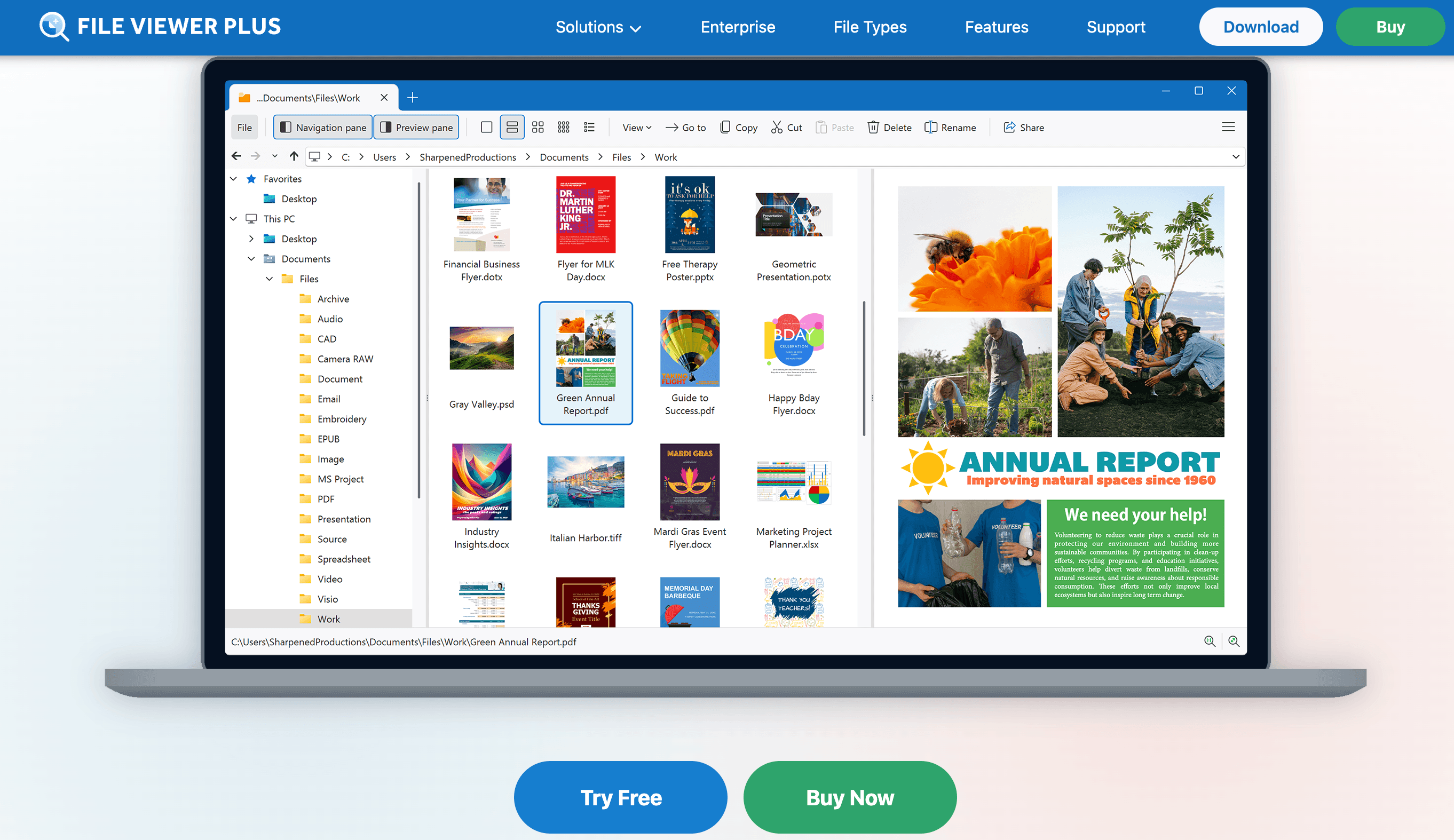
File Viewer Plus opens over 400 file formats in a single Windows app — documents, images, archives, media, emails, and code — and lets you edit, save, and convert them without juggling a dozen separate programs.
Key Features and Technology
File Viewer Plus packs a lot into one window, but its capabilities organize cleanly into a handful of pillars. Here’s how the platform actually breaks down.
400+ Formats and Universal Opening
The headline feature is breadth. File Viewer Plus opens text documents (.doc, .docx, .odt, .rtf), PDFs, spreadsheets (.xls, .xlsx, .csv, .tsv), presentations (.ppt, .pptx, .odp), Visio diagrams, Microsoft Project files, XPS documents, over 100 image formats, dozens of audio and video formats, compressed archives (.zip, .rar, .7z, .gz), email files (.eml, .emlx, .msg, winmail.dat), and source code. Crucially, when it meets a proprietary format it can’t fully render, it doesn’t fail silently — it displays the file header, metadata, and a description of the format so you still learn something useful about the file.
Word Processor and PDF-to-Word Conversion
A built-in word processor opens and edits Microsoft Word documents and many other formats, lets you adjust page formatting, insert charts and images, and export to PDF and other formats. The marquee version 6 upgrade is high-quality PDF-to-Word conversion: it turns PDFs into fully editable DOCX (and XLSX or PPTX) files while preserving layouts, fonts, and formatting. For anyone who has ever needed to reuse the text from a PDF without retyping it, this alone can justify the app — and it’s the feature reviewers and the company highlight most in version 6.
Image Viewer, Editor, and DICOM/CAD Support
The image module views over 100 formats, including modern HEIC and JPEG XL, camera raw (CR2, DNG), PSD, and multipage TIFFs, and plays animated GIFs and APNGs. You can crop, resize, and enhance photos, adjust color, brightness, contrast, and gamma, apply effects, and export to other formats. Beyond everyday images, it includes a DICOM viewer for medical scans (with patient and facility metadata) and a CAD viewer for .dwg and .dxf drawings — letting you zoom, rotate, toggle layers, and convert to PDF or image formats without owning AutoCAD.
Media Player, Email Viewer, and Source Code Editor
The built-in media player handles over 150 audio and video formats, plays full screen, shows waveforms and album art, and converts video to MP4 or audio to M4A/MP3 — including extracting audio tracks from videos. The email viewer opens saved .eml, .emlx, and .msg messages, displays the full header fields and embedded images, opens attachments, and prints or saves messages as PDF — a lifesaver for legal and archival work. The source-code editor opens dozens of programming languages with syntax highlighting, line numbers, code folding, and a syntax tree.
Batch Converter and File Inspector
Two power-user tools round out the suite. The batch converter processes hundreds or thousands of files at once — entire folders including subfolders — with custom conversion options, renaming rules, and saved presets. The File Identifier and Inspector recognizes unknown files by their binary header, inspects contents in raw text and hex, surfaces hidden metadata, and reports EXIF data, MD5 hashes, and MIME types. Together they turn File Viewer Plus from a viewer into a genuine file-management and investigation workbench.
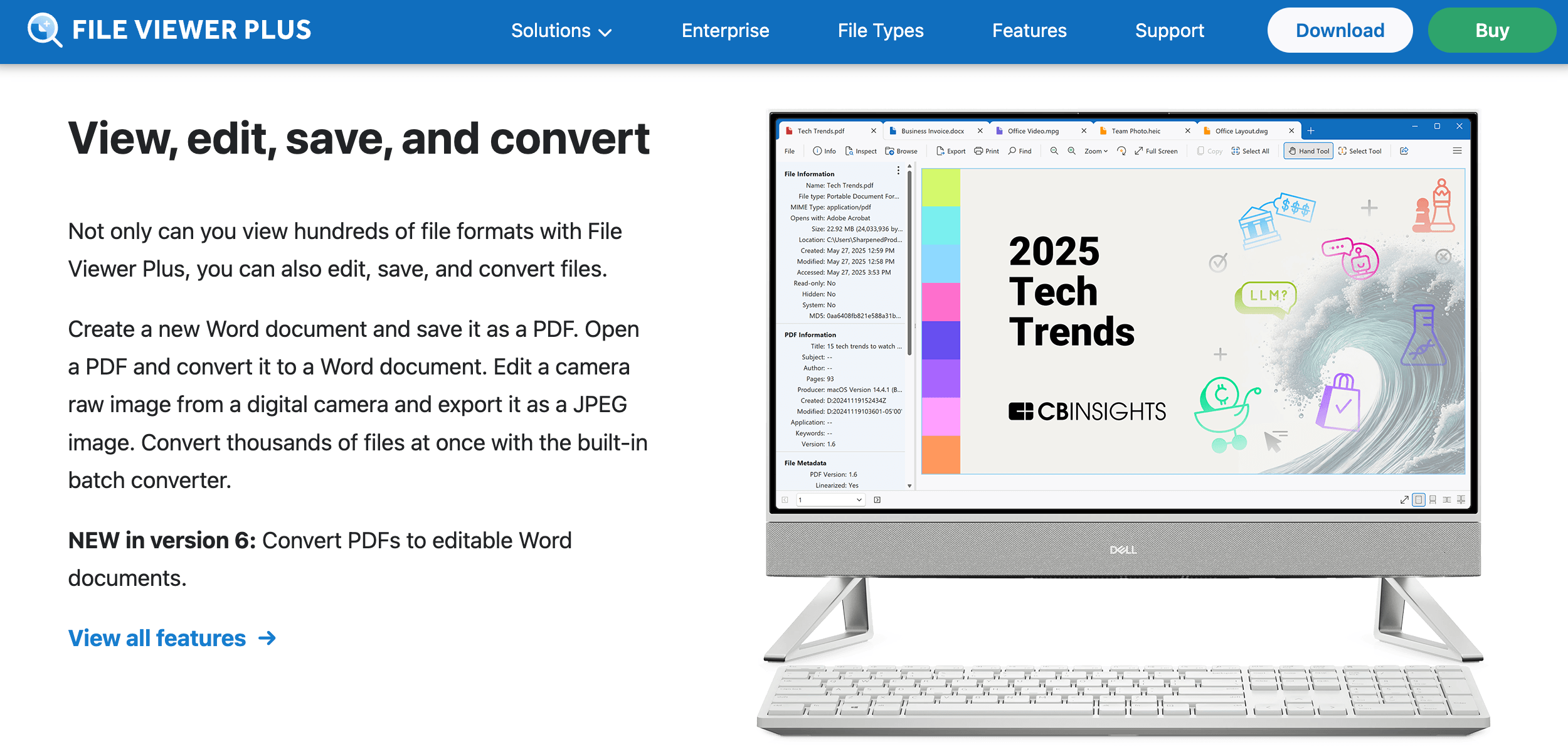
Version 6’s standout upgrade: convert PDFs into fully editable Word, Excel, or PowerPoint files with layouts, fonts, and formatting preserved — plus a batch converter for thousands of files at once.
Pricing, Plans, and Package Structure
File Viewer Plus keeps pricing refreshingly simple, with a one-time-purchase option for people who hate subscriptions and a low annual plan for those who’d rather pay yearly. There’s a fully-featured 14-day free trial so you can test every capability before paying, and every purchase is backed by a 30-day money-back guarantee. The figures below are File Viewer Plus’s standard list prices in USD; always confirm the live price and any active promotion on the official site, since software pricing and bundles change.
| Plan | Price (USD) | What It Is | Best For |
|---|---|---|---|
| 14-Day Free Trial | $0 | Fully-featured trial of version 6 | Testing everything before you buy |
| One-Time Purchase | $50 per user | Perpetual v6 license, all 6.x updates, 2 yrs support | Long-term, subscription-free use |
| Annual Subscription | $25 / year per user | Yearly access, continual updates, cancel anytime | Lower upfront cost or short-term need |
| Volume / Multi-License | Discounted per user | Bulk licensing (50+ licenses: contact sales) | Teams and small businesses |
| Enterprise / Site License | Custom quote | Site-wide, secure/read-only deployment (since 2019) | Large organizations and IT-managed fleets |
How File Viewer Plus Compares to Alternatives
| Factor | File Viewer Plus | FileViewPro | Free single-app stack |
|---|---|---|---|
| Approach | One paid all-in-one utility | One all-in-one viewer | Multiple separate apps |
| Formats | 400+ documented | “All files” (marketing claim) | Depends what you install |
| Edit & convert | Yes — Office, images, PDF→Word, batch | Limited, mostly view-focused | Varies per app |
| Unknown-file ID | Yes — 10,000+ format database | No | No |
| Pricing model | $50 once or $25/yr | Trial → paid (often criticized) | Free |
| Developer / trust | US firm since 2003, 30-day refund | Mixed reputation | Open-source / freeware |
| Platform | Windows 10 / 11 | Windows | Windows / Mac / Linux (varies) |
| Best for | One reputable app for everything | Casual viewing (read the terms first) | Tech-savvy users happy to juggle tools |
vs. FileViewPro: FileViewPro is the most direct “open any file” rival and makes a similar promise, but it’s largely view-focused and is frequently criticized for an aggressive trial-to-subscription billing model with heavily limited free functionality. File Viewer Plus counters with a reputable, 20-year US developer, transparent one-time and annual pricing, a 30-day money-back guarantee, and genuine editing, conversion, and file-identification tools rather than just display. If you’re choosing between the two, File Viewer Plus is the safer, more capable, and more transparent option.
vs. the free single-app stack: The honest free alternative is to assemble your own toolkit — VLC for media, IrfanView or XnView for images, 7-Zip for archives, LibreOffice for documents, and a free PDF reader. That route costs nothing and each tool is excellent in its lane. What you trade away is convenience: you install, update, and switch between several programs, you don’t get unified batch conversion or unknown-file identification, and you lose niceties like Office thumbnails in the file manager. File Viewer Plus is essentially paying money to replace that juggling act with one consistent interface.
vs. Microsoft Office and Adobe Acrobat: For their specialties, the heavyweights are deeper — Word is a better word processor and Acrobat a better PDF suite — but they’re pricier subscriptions and narrow in scope. File Viewer Plus isn’t trying to beat them at their own game; it’s the universal catch-all for everything outside their lanes and the files you only open occasionally. For many people the smart setup isn’t either/or — it’s keeping the specialist tools you already use and adding File Viewer Plus for the long tail of formats they don’t cover.
Pros and Cons
What Users Love
It opens what nothing else will: The most consistent praise across G2, Capterra, and the company’s own reviews is rescuing files other apps refused — old XPS documents, obscure email formats, embroidery files, CAD drawings, and files years old that owners thought were lost. Several reviewers describe it as a “lifesaver” for exactly these moments.
One app replaces many: Owners repeatedly value not needing Office 365 or a pile of separate downloads — they can view, edit, and convert documents, photos, and media from a single program. For users without a full Office subscription, it’s frequently described as doing “it all” in one place.
Genuinely easy to use: Across review sites the interface is called simple, fast, and intuitive, with the tabbed multi-document design and drag-and-drop workflow singled out as making mixed-format work comfortable. Many less-technical users say it became one of the easiest apps on their PC after a short learning curve.
Powerful conversion and batch tools: The ability to convert between formats — and the new PDF-to-Word conversion in version 6 — comes up again and again, with content creators and professionals citing the batch converter for processing many files at once as a real time-saver.
Fair price and no forced subscription: Reviewers consistently call it good value, and many specifically prefer the one-time purchase over subscription-only rivals. Several describe it as a powerful application “for such a low price.”
Responsive support and a trustworthy developer: Customer service is widely described as responsive and helpful, with timely replies and clear guidance. The fact that it’s made and supported in the USA by a long-established company gives buyers confidence the rivals in this category often don’t earn.
Limitations Worth Knowing
Windows-only: The full Plus app runs only on Windows 10 and 11. Mac and Linux users are out of luck for the complete experience — Sharpened’s free File Viewer apps for Mac, Android, and iOS exist but are basic viewers without the Plus version’s editing and conversion power.
Viewing is broader than editing: While it opens 400+ formats, its editing tools are intentionally light. The word processor isn’t a full Word replacement and the image editor isn’t Photoshop. For deep editing in a specific format, you’ll still reach for the dedicated app — File Viewer Plus is best at opening, light editing, and converting.
Large files can load slowly: Several reviewers note that very large files — multi-gigabyte images or big PDFs — can take a while to open, even though the app handles them where other programs fail. The developer says version 6 improved speed, but heavy files remain the most common performance complaint.
Not every format opens fully: Despite the huge list, some proprietary formats still won’t render completely; in those cases the app shows header info, metadata, and a description rather than the file itself. Conversions of complex PDFs or certain Google-native formats can also be imperfect.
Trial-then-buy, and upgrades cost extra: The free trial is a full 14 days, not a permanent free tier, so continued use requires a purchase. And the one-time license covers only version 6.x updates — a future major version will likely be a paid upgrade, something to weigh against the always-current subscription.
Read reviews with context: Many of the glowing testimonials on third-party sites are incentivized (reviewers were offered a small thank-you), and a few users have found the layout dated or specific tasks slow. The overall consensus is genuinely positive — broadly in the 4.4–4.6/5 range across review platforms — but it’s worth filtering for organic, unpaid reviews when you research.
The new file manager generates Office-document thumbnails Windows Explorer can’t show, while the File Inspector identifies unknown or extension-less files using a database of more than 10,000 formats.
Who Should Use File Viewer Plus
People who receive lots of mixed file types: This is File Viewer Plus’s sweet spot. If your inbox and Downloads folder are a grab-bag of formats from clients, colleagues, and devices, one app that opens almost all of them — and identifies the ones it can’t — removes a daily friction. Photographers, designers, engineers, and IT pros feature heavily among happy users.
Solopreneurs and small businesses without full Office: If you don’t want a Microsoft 365 subscription but still need to open, edit, and convert Office documents and PDFs, File Viewer Plus covers the essentials at a one-time price — and volume discounts make it practical to license a small team.
Legal, archival, and records-heavy roles: The email viewer (.eml, .msg, winmail.dat), the read-only secure mode, and the file inspector make it a strong fit for paralegals, legal teams, and anyone who needs to open, print, and convert documents and messages reliably for the record.
Specialists who meet niche formats: If you occasionally need to view a DICOM scan, a CAD drawing, a Visio diagram, an XPS file, or an embroidery pattern but don’t want to buy dedicated software for each, File Viewer Plus opens and often converts them from one place.
Who should look elsewhere: Mac and Linux users needing the full feature set, professionals who require deep editing in one specific format (where the dedicated app wins), and budget-focused, tech-comfortable users who are happy to run a stack of free tools like VLC, IrfanView, 7-Zip, and LibreOffice will all hit File Viewer Plus’s limits. For those, a native specialist app or the free single-app route is the better call — and anyone expecting a permanent free version should know the trial runs out after 14 days.
Getting Started: Step by Step
- Download the free trial. Grab the 14-day fully-featured trial from the official site (or the Microsoft Store version) and install it on Windows 10 or 11. No payment is required to test every feature first.
- Set up the interface. On first launch, choose light or dark mode, pick the simplified, classic, or compact ribbon, and decide between single- or multi-window mode. Enable tabs and split view if you frequently work with several files at once.
- Open your first files. Drag a file (or a whole folder) onto the window, or use the file manager to browse your drive. Try a few different types — a PDF, a HEIC photo, a ZIP archive, an old email — to see how the universal opening and thumbnails work.
- Edit, convert, or extract. Edit a document or image and save it, convert a PDF to an editable Word file, extract individual files from an archive, or play and convert a media file. For unknown files, open the File Inspector to read the header, metadata, and format description.
- Batch-process when you have many files. For bulk jobs, use the batch converter to process hundreds or thousands of files at once — pick a folder (including subfolders), set conversion and renaming options, and save a preset you can reuse.
- Choose your license. If it earns a permanent spot in your workflow, pick the $50 one-time license for long-term subscription-free use or the $25/year plan for lower upfront cost and always-current updates — and deploy read-only mode if you handle sensitive files. The 30-day guarantee has you covered either way.
Tips for Getting Maximum Value
Lean on the file manager as your daily driver rather than just opening individual files — the Office thumbnails, split-view preview, and saved favorite folders turn it into a faster way to scan and organize a messy drive than Windows Explorer. Use the batch converter for any repetitive job (converting a folder of camera-raw shots to JPEG, or a stack of PDFs to Word), and save presets so you never reconfigure the same conversion twice. When a file won’t open anywhere, reach for the File Inspector before giving up: the header and metadata often tell you what the file actually is and which app made it. If you handle untrusted attachments, enable the read-only secure mode so you can inspect a suspicious file without risk. Match the license to your habits — pay once if this becomes permanent infrastructure, subscribe if you only need it for a project or always want the latest version — and start with the 14-day trial so the app proves itself on your real files before you spend anything. Finally, confirm the current price and watch for any active promotion on the official site, since software pricing and bundles change.
Future Outlook and Final Assessment
The need File Viewer Plus addresses isn’t going away — if anything, it’s growing. New formats keep appearing faster than default software supports them (HEIC, JPEG XL, and AVIF are recent examples), legacy formats like XPS keep lingering in Windows, and people increasingly work across devices that all save things differently. A reliable universal opener and converter is more useful in 2026 than it was five years ago, and Sharpened’s two-decade investment in the FileInfo.com format database gives File Viewer Plus a moat most look-alike rivals can’t match. Version 6’s file manager and high-accuracy PDF-to-Word conversion show the product is evolving from a viewer into a broader file-management hub.
The honest caveats remain: it’s Windows-only, its editing is deliberately lighter than the specialist apps, very large files can be slow, and not every proprietary format opens fully. Free single-purpose tools can also cover most viewing for nothing if you’re willing to juggle them. But within those boundaries, File Viewer Plus does its core job — open almost anything, then edit or convert it — better and more conveniently than assembling a toolbox yourself, and it does so from a developer you can actually trust. For the everyday reality of mixed file types landing on a Windows PC, it remains one of the most genuinely useful utilities you can install.
Conclusion
File Viewer Plus isn’t trying to replace your specialist software — it’s trying to handle everything that falls outside it, and at that job it’s remarkably effective. By opening over 400 formats, editing and converting documents, images, and media, identifying unknown files through a 10,000-format database, and adding a genuine file manager and high-accuracy PDF-to-Word conversion in version 6, it removes the single biggest annoyance of using a Windows PC: files you simply can’t open. It rewards realistic expectations — it’s a universal viewer and converter, not a deep editor — and it’s not the right call for Mac users or people happy to juggle a stack of free tools. But for solopreneurs, small businesses, legal and records professionals, and anyone drowning in mixed file types, few utilities deliver more for the money. Download the free trial, confirm the current price, and File Viewer Plus can take the “I can’t open this” problem off your desk for good and make working with any file genuinely easy.
Tired of files your PC just won’t open?
Explore more honest reviews, tutorials and tech comparisons to find the right gear and software for the way you work, travel and live — at World Of Tech, where we make everything easy.
👉 Get File Viewer Plus: https://worldoftech.space/fileviewerplus
👉 Our YouTube Channel: youtube.com/@world_tech79
👉 Our Facebook Fanpage: Facebook
👉 Our X (Twitter): @worldoftech79
Pricing, specifications and policy details in this review were verified against fileviewerplus.com and independent review sources (including G2, Capterra and aggregated user ratings) as of June 2026. Software pricing, features and promotions change frequently, so confirm current details on the official site before purchasing. Competitor prices and details are approximate and subject to change.





