
Turning a character sketch or a product photo into a usable, riggable, animated 3D asset used to mean bouncing between four or five different apps — an image generator, a 3D modeler, a rigging plugin, a motion-capture rig, and finally a render or export tool. V2Fun was built to erase that friction. It’s a browser-based AI 3D creation platform from V2Fun Technology Limited that takes a text prompt, a reference image, or even an ordinary video and carries it all the way through to a rigged, textured, animated 3D character — without ever leaving the browser tab. The pitch is bold: image generation, text-to-3D and image-to-3D modeling, automatic rigging, 8K PBR texture generation, and AI motion capture from regular video, unified into one continuous pipeline.
For indie game developers, VTubers and digital-human creators, 3D-printing hobbyists, and small studios who can’t justify a full 3D art team, that promise is genuinely appealing: what once took a specialist days could, in theory, take one person minutes. But V2Fun is a young product — it only launched publicly in mid-2026 — and an honest look turns up real questions worth answering before you commit a workflow to it, particularly around pricing transparency and independent trust signals. This 2026 review walks through what V2Fun actually does, its core features and technology, what it costs (and what’s still unclear about that), how it stacks up against established rivals like Meshy and Tripo AI, the genuine pros and cons, and exactly who should — and shouldn’t — build their pipeline around it.
V2Fun Review 2026: The All-in-One AI 3D Creation Platform for Characters, Games, and Animation
Overview and Background
V2Fun is a browser-based AI 3D creation platform built by V2Fun Technology Limited around three core capabilities: AI image generation, AI 3D modeling, and AI motion. Rather than being a single-purpose text-to-3D generator, it positions itself as a full pipeline — a creator can start from a written prompt, a reference photo, multi-view images, or an existing model, and move through concept art, 3D mesh generation, automatic rigging, texturing, and animation without switching tools. The company describes its mission plainly on its About page: to hand unnecessary complexity over to AI so creators can focus on ideas rather than software-hopping.
The product is genuinely new. V2Fun launched publicly on Product Hunt in mid-2026, and independent domain-trust scans place the site’s registration age at roughly 14 months, meaning the platform has been live and iterating for a relatively short window. That matters for how you should read this review: V2Fun doesn’t yet have the multi-year track record, large public user base, or established third-party review presence that longer-running rivals like Meshy have built up. What it does have is a clear, self-developed technology stack — the company states its 3D modeling and motion-capture models are built in-house rather than wrapped around a single third-party API — and a genuinely broad feature set for a young product.
What separates V2Fun from a narrower tool like a pure text-to-3D generator is the breadth of the pipeline. Beyond modeling, it bundles an AI image generator tuned for 3D-ready concept art (including access to third-party image models such as Nano Banana), automatic rigging aimed at standard humanoid characters, 8K PBR texture generation, an animation engine with a motion library and custom-file support, and — its most distinctive feature — AI motion capture that extracts human motion from an ordinary video, no mocap suit or studio required. Exports cover FBX, GLB, OBJ, STL, USDZ, and BLEND, which is enough to move assets into Blender, Unity, Unreal Engine, or a 3D-printing slicer.
Why V2Fun Stands Out in 2026
One browser tab replaces a five-app pipeline: The defining reason to consider V2Fun. Concept image, 3D mesh, rig, texture, and animation normally mean juggling a generative image tool, a modeling app, a rigging plugin, a texturing suite, and a mocap setup. V2Fun keeps all five stages inside one continuous, browser-based workflow — a meaningful time saver for solo creators and small teams.
AI motion capture from ordinary video, no hardware required: This is V2Fun’s sharpest differentiator against most text-to-3D competitors. Instead of expensive mocap suits, marker rigs, and dedicated studio space, the platform extracts high-precision human motion directly from a regular video clip and retargets it to a rigged 3D character in the cloud — a capability that’s traditionally been reserved for well-funded studios.
Text-to-3D and multi-view image-to-3D in one engine: A prompt is enough to get started, but for jobs where geometric accuracy matters — industrial design, product visualization, character sheets — V2Fun accepts front, side, and back reference images to produce a more structurally precise, print- and production-ready mesh than a single-image workflow typically allows.
Built-in prompt optimization for 3D-aware output: Clicking “Optimize Prompt” runs your input through V2Fun’s semantic engine, which enriches it with spatial perspective, PBR material cues, and texture parameters before generation — aimed at reducing the trial-and-error that plagues raw text-to-3D prompting.
One-click auto-rigging for humanoid characters: AI keypoint recognition detects joints and places a skeleton automatically, turning a static T-pose or A-pose model into an animatable asset without manual bone placement — with manual node calibration still available for characters that need adjustment.
8K PBR texture generation on demand: The texturing engine can generate or swap full PBR material sets — including gloss and roughness maps — at up to 8192×8192 resolution, without touching the underlying mesh topology, which is useful for producing skin or material variants quickly.
Broad export compatibility: Finished assets export to FBX, GLB, OBJ, STL, USDZ, and BLEND, which covers the major game engines (Unity, Unreal), DCC tools (Blender, Maya), AR/web viewers, and 3D-printing slicers without needing a third-party conversion step for most workflows.
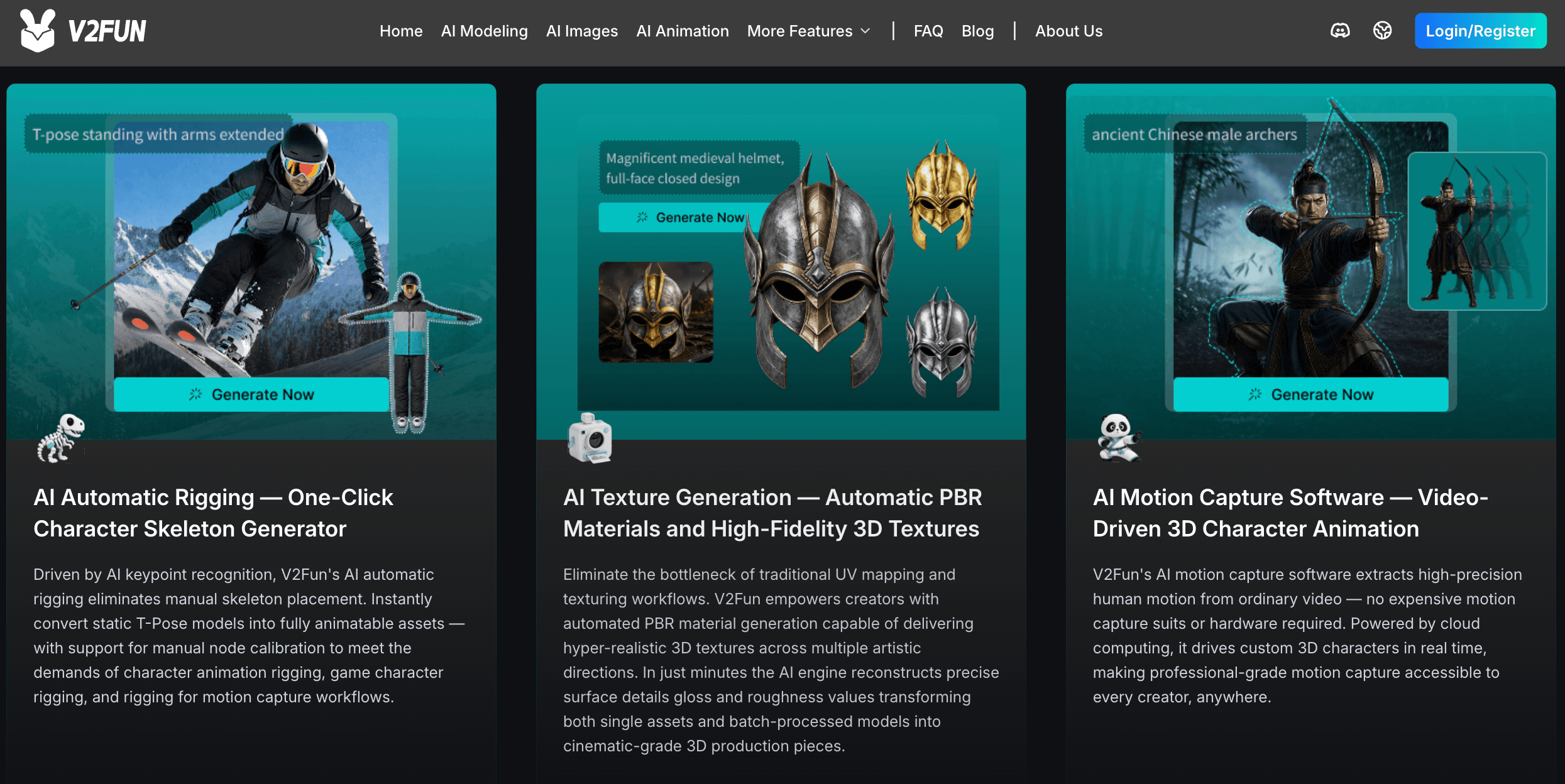
V2Fun combines AI image generation, 3D modeling, auto-rigging, texturing, and animation into a single browser-based pipeline — from concept to a deployable 3D character.
Key Features and Technology
V2Fun’s toolset is broad for a platform this young, but it organizes cleanly into a handful of pillars that map to the stages of a real 3D production pipeline.
AI Image Generation for 3D Concepting
Before a model exists, V2Fun can generate the concept art that feeds it. Powered by third-party image models — including Nano Banana — plus a built-in 3D-aware prompt optimizer, this stage produces structurally accurate, perspective-correct reference images meant to serve as character concept art, scene concept art, or game-asset concept art that flows directly into the 3D modeling stage rather than needing to be re-interpreted from scratch.
Text-to-3D and Image-to-3D Model Generation
The core engine accepts either a text prompt or a reference image and produces a 3D mesh in minutes. For jobs where precision matters more than speed, the multi-view mode takes front, side, and back images and reconstructs a geometrically complete model — the option V2Fun recommends for character design, industrial modeling, and game-asset production. A smart-retopology pass then optimizes the raw mesh into a cleaner, lighter, editable quad-mesh while preserving surface detail, which is what makes the output usable downstream rather than just a dense scan-like blob.
Automatic Rigging and Skeleton Generation
AI keypoint recognition detects a character’s joints and builds a skeleton automatically, converting a static T-pose or A-pose model into an animation-ready asset with no manual bone placement. Manual node calibration is available for cases the automatic pass gets wrong. It’s worth noting this feature is tuned for standard humanoid forms with clearly separated limbs — non-humanoid creatures, props, or ambiguous poses are a weaker fit and typically need manual rigging cleanup afterward.
8K PBR Texture Generation
The texturing engine reconstructs surface detail, gloss, and roughness values automatically, delivering PBR material sets at up to 8192×8192 resolution without altering the base mesh — useful for producing multiple skin or material variants of the same model, whether for a single asset or a batch of them.
AI Animation and Motion Capture
Once rigged, a character can be animated by pulling from a built-in motion library or by uploading custom motion files — or, more distinctively, by uploading an ordinary video and letting V2Fun’s cloud-based AI motion capture extract the human movement and retarget it onto the model. This performs best with clear, stable, single-person footage; multi-person motion capture is described by the platform as a planned rather than current capability, so film-style group scenes still need a different tool for now.
Pricing, Plans, and Package Structure
V2Fun runs on a freemium, credit-based model: a free tier with trial credits so you can test the full pipeline before paying, plus subscription plans that add a fixed monthly credit allowance, higher usage quotas on advanced features, and benefits such as model downloads, asset storage, and commercial licensing that vary by tier. Here’s the honest caveat: V2Fun’s live pricing page is a JavaScript-rendered subscription screen that doesn’t expose exact numbers to automated or archived lookups, and independent write-ups of the platform disagree noticeably on the specifics — some report paid plans starting around $10/month, others cite a $29/month Pro tier with roughly 50 free models and $0.10 in overage per additional model. Given that spread, treat every dollar figure below as approximate and confirm the current numbers on V2Fun’s own subscription page before you buy.
| Plan | Price (USD, approx.) | What It Is | Best For |
|---|---|---|---|
| Free / Basic | $0 | Trial credits on signup; access to the core text-to-3D, image-to-3D, rigging and animation workflow | Testing the pipeline on your real use case first |
| Entry Paid Tier | ~$10/month (unverified — sources vary) | Monthly recurring credits, expanded usage quotas | Casual creators and hobbyists testing regular use |
| Pro Tier | ~$29/month (unverified — sources vary) | Higher monthly credit allowance, advanced feature access, model downloads and asset storage | Regular creators and small studios in active production |
| Usage / Overage Credits | ~$0.10 per model beyond plan credits (reported, unverified) | Pay-as-you-go generation once monthly credits run out | Bursty or project-based usage above your plan’s allowance |
How V2Fun Compares to Alternatives
| Factor | V2Fun | Meshy | Tripo AI |
|---|---|---|---|
| Core pipeline | Image gen + text/image-to-3D + rigging + texture + animation + mocap | Text/image-to-3D + auto-rig + texture | Text/image-to-3D, credit-based generation |
| AI mocap from video | Yes — a core differentiator | Not a core feature | Not a core feature |
| Free tier | Yes, trial credits | Yes, ~100–200 credits/month | Yes, ~300 credits/month |
| Entry paid price | ~$10–$29/month (unverified, disputed) | ~$20/month (approx.) | ~$19.90/month (approx.) |
| Texture resolution | Up to 8K PBR | Up to 4K–8K PBR (varies by plan) | Standard PBR, resolution varies |
| Market maturity | New — launched publicly mid-2026 | Established, large user base | Established, mid-market |
| Export formats | FBX, GLB, OBJ, STL, USDZ, BLEND | FBX, GLB, OBJ, USDZ and more | OBJ, GLTF, GLB; FBX on higher tiers |
| Best for | Full concept-to-animation character pipelines | High-volume 3D asset generation | Budget-conscious individual creators |
vs. Meshy: Meshy is the more established name in AI 3D generation, with a larger user base, a well-documented credit system, and strong general-purpose text-to-3D and image-to-3D quality. It doesn’t offer V2Fun’s video-driven motion capture, though, so if your work is mainly static props, game assets, or 3D-printable objects rather than animated characters, Meshy’s maturity and broader independent track record may weigh more than V2Fun’s extra pipeline stages.
vs. Tripo AI: Tripo AI leans budget-friendly with transparent, published credit tiers and a genuinely useful free plan, making it an easy first stop for casual experimentation. It’s a narrower tool, though — modeling and light rigging rather than a full animation-and-mocap pipeline — so it competes with V2Fun on price and simplicity rather than on feature breadth.
vs. hiring a 3D artist or studio: For a finished, game-ready hero character or a client-facing commercial asset, a skilled human artist or studio still outperforms any current AI 3D tool on control and polish. V2Fun’s real competition isn’t necessarily other software — it’s the hours a solo developer or small team would otherwise spend hand-modeling placeholder assets, concept variations, or a first-pass animated prototype.
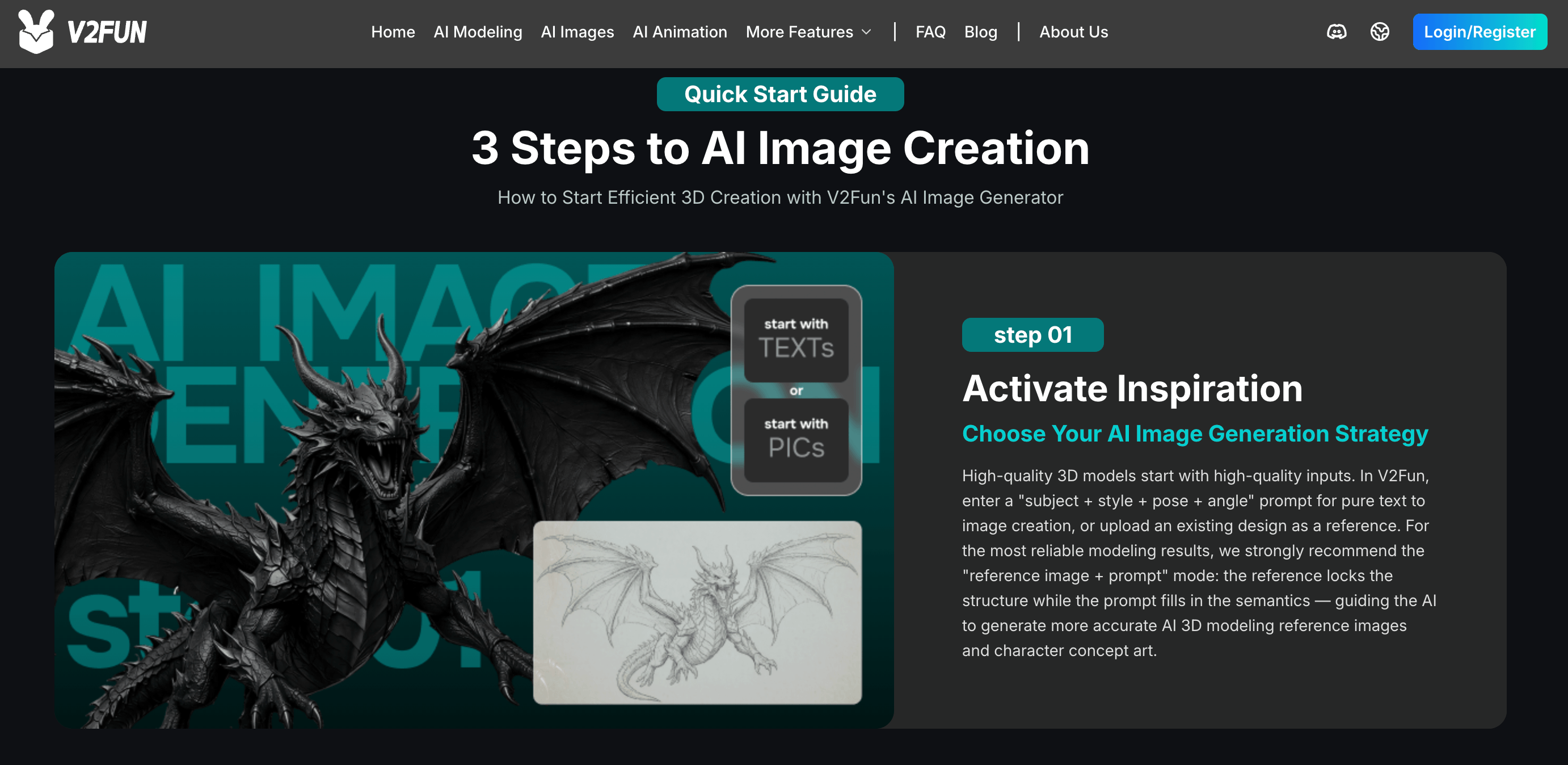
V2Fun’s texturing engine generates up to 8K PBR materials and exports to FBX, GLB, OBJ, STL, USDZ, and BLEND for Blender, Unity, and Unreal Engine.
Pros and Cons
What Users Love
Genuinely all-in-one: Reviewers consistently point to the unified workflow as the standout benefit — going from a prompt to a rigged, animated character without exporting into three or four other apps saves real time, especially for solo creators wearing every hat on a project.
The video-to-motion-capture feature is a real differentiator: For creators who can’t afford a mocap suit or studio, being able to extract usable animation from a phone video is repeatedly called out as the platform’s most valuable single capability, particularly for VTubers and short-form digital-human content.
Auto-rigging removes a genuine bottleneck: Manual skeleton placement is one of the more tedious steps in traditional 3D pipelines, and one-click rigging for standard humanoid models is consistently rated as a meaningful time-saver, even when some manual calibration is still needed.
Free credits make it low-risk to try: Because the free tier lets you run your actual project through the full pipeline before paying anything, reviewers frame it as an easy, low-commitment way to evaluate output quality against your specific use case.
Wide export compatibility: Support for FBX, GLB, OBJ, STL, USDZ, and BLEND is repeatedly cited as a practical strength — assets move into Unity, Unreal, Blender, or a 3D-printing slicer without extra conversion steps.
Limitations Worth Knowing
Pricing is genuinely unclear: This is the most consistent criticism across independent write-ups: V2Fun’s exact subscription prices aren’t clearly published in a way that’s easy to verify externally, and the figures that do circulate ($10/month in one source, $29/month in another) don’t agree. Confirm real numbers inside your own account before budgeting around this tool.
No established Trustpilot or G2 presence yet: As a product that only launched publicly in mid-2026, V2Fun doesn’t yet have a substantial independent review footprint on platforms like Trustpilot or G2 the way older 3D-AI tools do. That’s a normal state for a young product, but it means you’re relying more on your own free-tier test than on a large body of verified user feedback.
Output quality varies with complexity: Like every current AI 3D generator, simple props and stylized characters come out clean, but detailed or anatomically precise figures often need manual topology, UV, and rig-weight cleanup in Blender before they’re truly engine-ready — plan for iteration, not one-shot perfection.
Rigging and mocap have real scope limits: Auto-rigging is tuned for standard humanoid T-pose or A-pose models — non-humanoid creatures and props are a weaker fit. Motion capture works best with clear, stable, single-person video; multi-person capture is a stated future capability, not something available today.
Credit costs can add up with experimentation: Because generation, re-rolling unsatisfying results, and running the full pipeline (image, model, rig, texture, animation) each consume credits, heavy iteration on a single character can burn through an allowance faster than a first-time user expects.
Who Should Use V2Fun
Indie game developers and solo studios: If you’re building a game alone or with a tiny team and can’t justify hiring dedicated 3D artists and animators, V2Fun’s full pipeline can generate character concepts, models, rigs, and basic animations fast enough to keep a prototype moving.
VTubers and digital-human/virtual-idol creators: The video-to-motion-capture pipeline is arguably V2Fun’s best-fit use case — turning ordinary webcam or phone footage into character animation removes the single biggest cost barrier to daily content publishing in this space.
3D-printing and designer-toy creators: Picture-to-3D-model generation with print-compatible export formats (STL, OBJ) makes V2Fun a reasonable way to turn a concept sketch or reference photo into a physically printable object without modeling it by hand.
Educators, students, and concept artists: For learning 3D fundamentals, rapid prototyping of ideas, or producing visualized concepts for a director or stakeholder before committing to full production, V2Fun’s speed and low-friction free tier make it a low-stakes way to experiment.
Who should look elsewhere: professional studios that need guaranteed, consistent output quality on complex or anatomically precise characters without manual rework should treat V2Fun as a concepting aid rather than a final-asset pipeline. Creators who need multi-person group motion capture, or non-humanoid creature rigging, will hit real feature gaps today. And anyone who needs firm, published pricing before signing off on a budget should test the free tier first rather than committing based on numbers found elsewhere online, given how much the reported figures disagree.
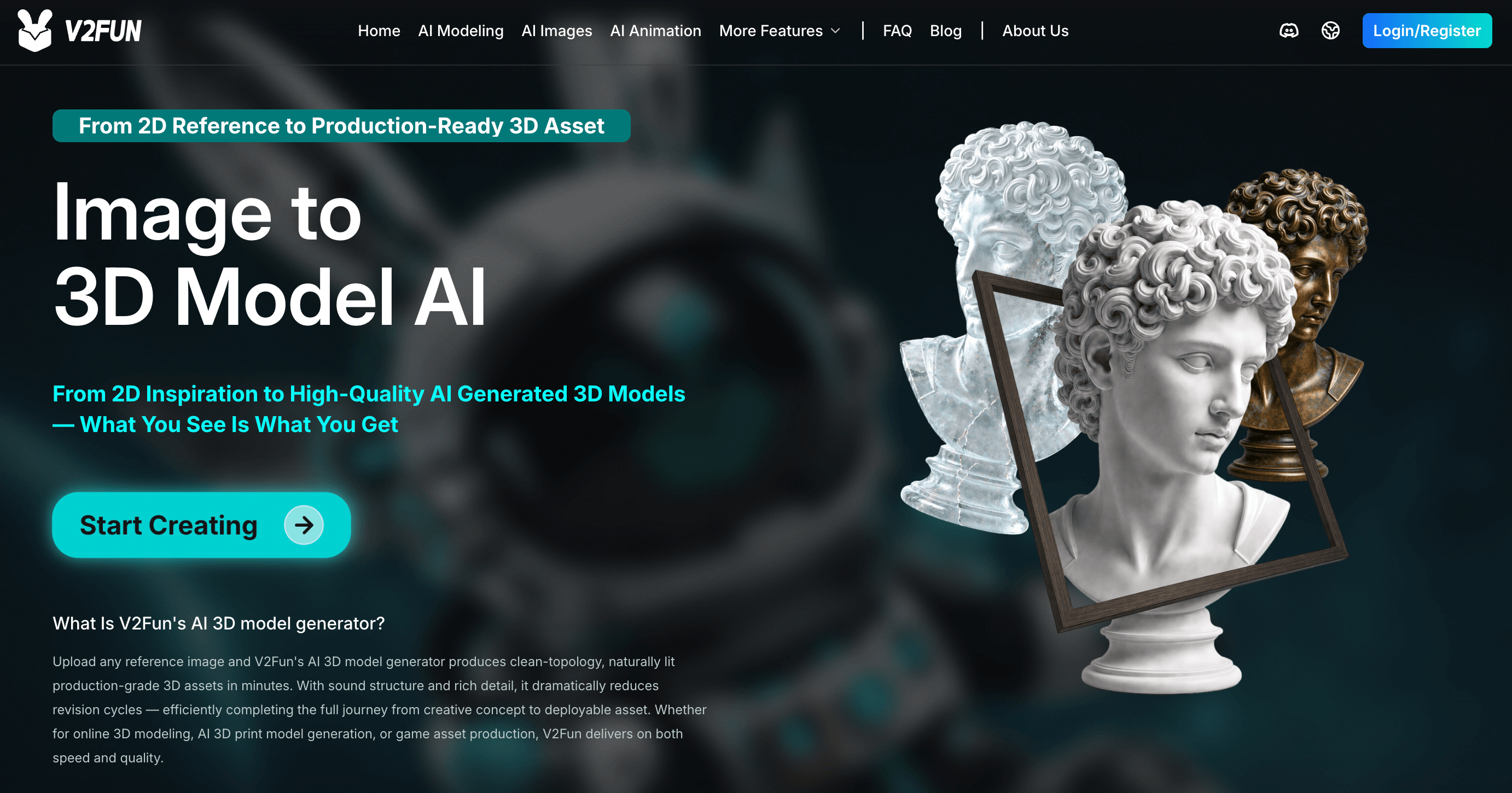
V2Fun’s cloud-based AI motion capture extracts human movement from ordinary video and retargets it onto a rigged 3D character — no mocap suit required.
Getting Started: Step by Step
- Create a free account. Sign up at v2fun.ai to claim your trial credits — no payment required to start testing the pipeline.
- Start from a prompt or a reference image. Write a text description, or upload a single image; for higher geometric accuracy, gather front, side, and back reference shots and use the multi-view mode instead.
- Run “Optimize Prompt” before generating. Let V2Fun’s semantic engine enrich your input with spatial, material, and texture parameters — this step meaningfully improves first-pass output quality.
- Generate the 3D model and review the topology. Check the retopologized mesh before moving on; if it needs correction, iterate on the prompt or reference images rather than proceeding with a flawed base.
- Auto-rig and texture. For humanoid characters, run one-click auto-rigging, calibrating any joints that land incorrectly by hand. Then generate or apply your PBR texture set at the resolution your project needs.
- Animate and export. Pull a motion from the built-in library, upload a custom motion file, or upload a video for AI motion capture. Once you’re happy with the result, export to FBX, GLB, OBJ, STL, USDZ, or BLEND for your target engine, DCC tool, or print slicer.
Tips for Getting Maximum Value
Always run the free tier against your actual project before subscribing to anything — given how much reported pricing varies across third-party sources, your own account is the only reliable place to confirm real costs. Favor multi-view image inputs over a single reference photo whenever geometric accuracy matters, since it consistently produces more structurally complete meshes. Keep motion-capture source video simple: a single, clearly visible person against a stable background gets meaningfully better retargeting results than busy or multi-person footage. Budget time for a Blender cleanup pass on anything headed for a shipped game or commercial product rather than expecting a first-generation result to be final. And if you’re rigging non-humanoid characters or creatures, plan on manual bone placement rather than relying on the automatic pass, since it’s tuned specifically for standard humanoid poses.
Future Outlook and Final Assessment
The AI 3D generation category is moving fast in 2026, and the center of gravity is shifting from single-purpose text-to-3D tools toward full pipelines that also handle rigging, texturing, and animation — exactly the direction V2Fun has bet on from launch. Its video-driven motion capture, in particular, points at where the category is heading: lowering the cost of character animation to something a solo creator can do with a phone camera. If V2Fun keeps shipping at the pace suggested by its already-broad mid-2026 feature set, it has a real chance to become a genuine alternative to more established names like Meshy and Tripo AI.
The honest caveats are the ones you’d expect from any product this young: pricing transparency needs to improve, there isn’t yet a large independent review base to lean on, and output quality — like every AI 3D tool right now — still varies with how complex or unusual your request is. None of that makes V2Fun a bad choice; it makes it a promising but unproven one, best approached through its free tier before you commit budget or a production pipeline to it.
Conclusion
V2Fun isn’t trying to be the biggest name in AI 3D generation — it’s trying to be the most complete one, bundling image generation, modeling, rigging, texturing, and animation, including AI motion capture from ordinary video, into a single browser workflow. For solo creators and small teams who currently lose days switching between specialized tools, that consolidation is a genuine, practical benefit. It’s a young platform with real growing pains around pricing clarity and independent trust signals, and it won’t replace a skilled 3D artist on demanding, polished work — but for rapid character prototyping, indie game assets, and low-cost motion capture, few tools in 2026 cover this much ground in one place. Test it on the free tier with your real project, confirm the current pricing in your own account, and decide from there.
Ready to turn your next idea into a 3D character?
Explore more honest reviews, tutorials and tech comparisons to find the right gear for the way you work, travel and live — at World Of Tech, where we make everything easy.
👉 Try V2Fun: https://worldoftech.space/v2fun
👉 Our YouTube Channel: youtube.com/@world_tech79
👉 Our Facebook Fanpage: Facebook
👉 Our X (Twitter): @worldoftech79
Pricing, specifications and policy details in this review were verified against v2fun.ai and independent review sources as of August 2026. Because V2Fun’s exact subscription pricing is not clearly published and third-party sources disagree, all pricing figures above are approximate — confirm current details in your own account before purchasing. Competitor prices are approximate and subject to change.





