
Most people who need a website don’t need a developer, they need a translator — something that can turn “I want a clean site for my coffee roastery” into an actual, working, good-looking page. Readdy is built to be that translator. It’s an AI website builder that takes a plain-language prompt, a screenshot, a Figma frame, or even just a competitor’s URL, and turns it into a complete, responsive website in minutes — layouts, copy, images and structure included. Since launching on Product Hunt in April 2025 and taking the #1 Product of the Day spot, Readdy has grown into a platform used by more than 500,000 people worldwide, competing directly with Framer, 10Web, Wix ADI and a fast-growing field of “prompt to website” tools.
What makes Readdy stand out isn’t just the generation step — plenty of tools can spit out a homepage from a prompt. It’s the combination of a visual no-code editor, a built-in backend for databases and forms, a 24/7 AI chat agent you can drop onto the finished site, and the ability to export clean React, Vue or HTML/CSS code (or a Figma file) if you ever want to hand the project to a developer. But a credit-based pricing model, a thin third-party review record, and some real complaints about billing mean it isn’t a slam-dunk for everyone. This 2026 review walks through what Readdy actually does, its full pricing structure, how it stacks up against Framer and 10Web, the genuine pros and cons from real users, and exactly who should — and shouldn’t — build their next site on it.
Readdy Review 2026: The AI Website Builder That Turns Prompts Into Published Sites
Overview and Background
Readdy is a no-code, AI-first website builder founded by a developer-turned-founder who goes by Frank. Rather than starting from a blank canvas or a drag-and-drop grid like older builders, Readdy starts from a conversation: you describe your business, upload a screenshot of a design you like, paste a reference URL, or pick from more than 5,000 templates, and the AI generates a multi-page site — home, about, services, contact, blog, whatever the project calls for — with matching copy, imagery and a consistent design system across pages.
The product launched publicly in April 2025 and had an unusually strong debut, earning #1 Product of the Day on Product Hunt with roughly 894 upvotes and going on to win Product of the Week. Since then, the platform reports growth to over 500,000 users globally, and it has positioned itself squarely in the “AI website builder” category alongside Framer AI, Wix ADI, 10Web AI, Durable and Squarespace Blueprint AI. What differentiates the pitch is code ownership: unlike fully proprietary builders, Readdy lets you export your finished project as React, Vue, or plain HTML/CSS, or as a Figma file, so a generated site isn’t necessarily a dead end if you outgrow the no-code editor.
Independent review coverage is still catching up to the user growth, though. On Trustpilot, Readdy carries a 3.5-out-of-5 “Average” TrustScore from roughly 41–47 reviews as of mid-2026 — a mixed record with genuine five-star praise sitting alongside pointed one-star complaints about billing. On G2, the company’s profile has too few reviews for the platform to generate a reliable score, which matters if you’re used to leaning on G2 or Capterra data before committing to a SaaS subscription.
The category Readdy competes in has become crowded fast. “Describe it and get a website” is now the pitch behind Framer’s AI tools, Wix ADI, Durable, Squarespace Blueprint AI, GoDaddy Airo and Webflow’s AI-assisted workflows, alongside AI-native app builders that treat a website as just one output of a broader “vibe coding” workflow. Readdy’s specific angle within that crowd is treating the AI generation step, the visual editor, a lightweight backend, and code portability as one connected pipeline rather than bolting AI features onto an older drag-and-drop product — closer in spirit to how developer-facing AI coding assistants work than to a legacy website builder with an AI button added on top.
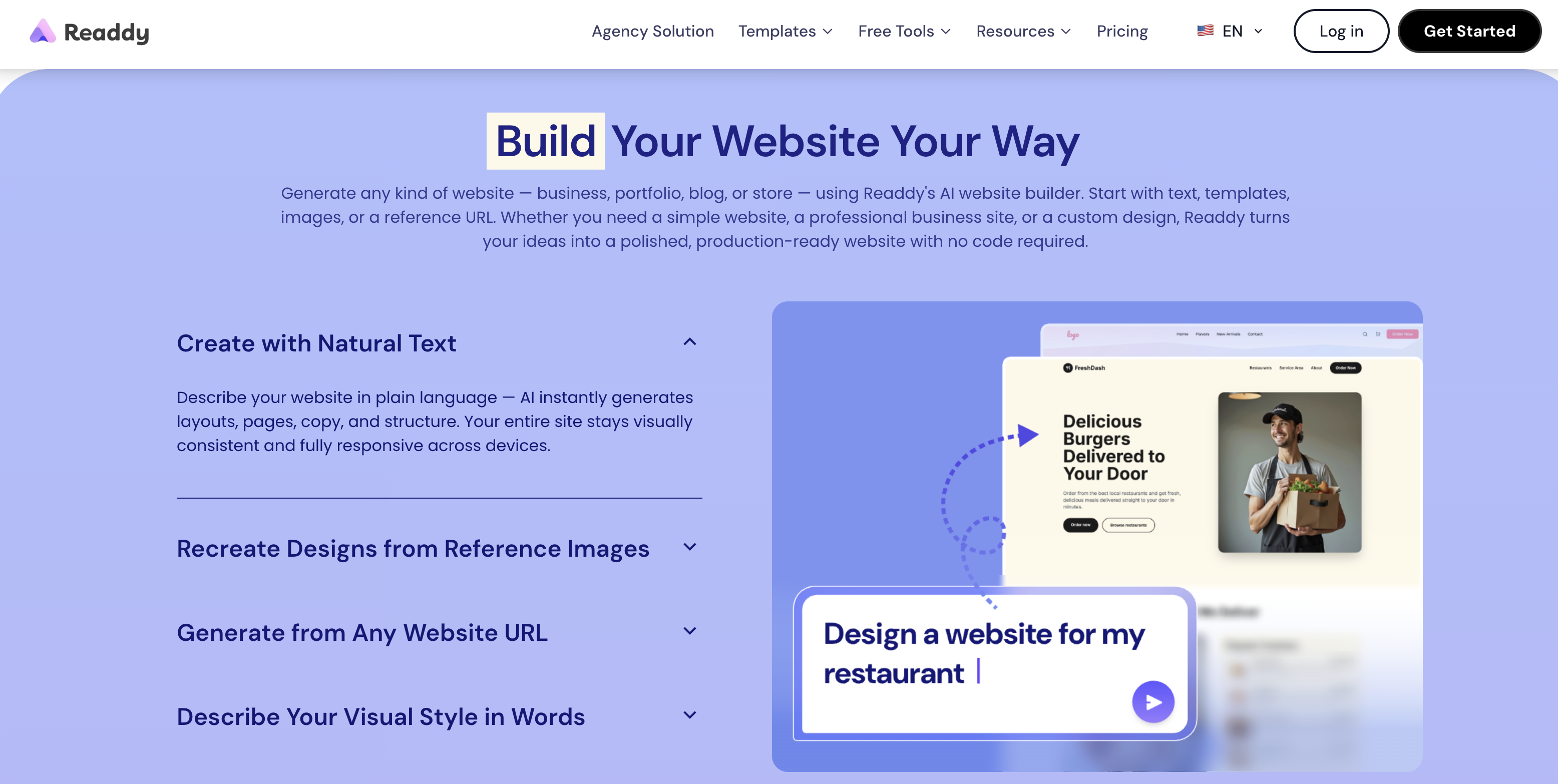
Readdy turns a plain-language prompt into a full multi-page website layout in minutes.
Why Readdy Stands Out in 2026
Multiple starting points, not just a blank prompt box: you can generate from plain text, start from one of 5,000+ templates, upload a screenshot or Figma frame for the AI to reinterpret, or paste a competitor or inspiration URL and let Readdy learn the structure and visual logic. That flexibility matters for agencies recreating a client’s existing brand look, not just founders starting from zero.
A real code and design escape hatch: most AI site builders lock your work inside their own hosting forever. Readdy lets Pro-tier-and-above users export the generated project as clean React, Vue, or HTML/CSS, or push it to Figma — a meaningful option if you want to hand a fast AI draft to an in-house developer for deeper customization later.
Built-in backend, not just a static page generator: the Readdy Backend bundles databases, serverless functions, and secrets management directly into the platform, so forms, bookings, and simple data-driven features don’t require wiring up a separate service for straightforward use cases.
An AI agent that lives on the finished site: Readdy Agent is a built-in chatbot you can train with a specific persona and knowledge base to answer visitor questions, qualify leads, and capture contact details around the clock — a feature most competing builders don’t bundle by default.
Conversational iteration, not just one-shot generation: you refine the site through a chat-style terminal (“make the hero section larger,” “add a pricing table to the services page”) as well as a visual Selector Mode for pinpoint edits — closer to how developers describe working with coding assistants than to a traditional drag-and-drop editor.
Practical integrations out of the box: Stripe, Calendly, Mailchimp, Google Analytics, Supabase and Shopify connections are supported, plus a built-in Readdy Booking system — enough to run a real small-business or service-based site without stitching together five separate plugins.
Fast time-to-launch: multiple independent write-ups describe usable multi-page sites appearing within minutes of a single prompt, with one Product Hunt user reporting a working prototype in three prompts — a genuinely different pace from manually assembling a site section by section.
Key Features and Technology
Readdy’s feature set is built around three layers: AI generation, visual/no-code editing, and a lightweight application backend — plus a growing set of agency-facing tools for teams building sites on behalf of clients.
Beyond the free-text prompt box, Readdy supports several distinct generation starting points aimed at different working styles. The template library (5,000-plus options spanning business, portfolio, e-commerce, real estate, restaurant, education and travel categories) suits users who want a structured starting point rather than a blank prompt. Screenshot and Figma-frame uploads let designers and agencies recreate an existing visual direction the AI then adapts into a working site. Reference-URL generation is arguably the most distinctive mode: paste a competitor’s or inspiration site’s link, and Readdy analyzes its structure, UX patterns and visual logic to produce something that mirrors the feel without directly copying the content — a genuinely useful shortcut for briefs like “something in the style of X, but for our brand.”
AI Generation and the Credit System
Every full site generation and every AI-driven edit consumes credits — roughly 25 credits per action based on the platform’s published rates, though help documentation shows some variance by request type. The Free plan’s 250 monthly credits are enough to test the product with roughly ten generations or edits before you’d need to upgrade or wait for the monthly reset. This model rewards decisive, well-specified prompts and can feel restrictive if your workflow is heavy trial-and-error iteration — a trade-off worth understanding before you commit to a paid tier.
Visual Editor and Selector Mode
Once the AI produces a first draft, Selector Mode lets you click directly on any element — a headline, a button, an image block — and adjust its style, copy or position without writing a new prompt. This bridges the gap between “describe what you want and hope the AI gets it” and traditional drag-and-drop control, and it’s one of the features reviewers most often cite as making Readdy feel less like a black box than pure prompt-only competitors.
Readdy Backend, Agent, and Integrations
Readdy Backend handles databases, serverless functions and secrets without requiring an external setup, which covers common needs like contact forms, simple booking flows, and lead capture. Readdy Agent adds a trainable AI chatbot to the published site itself. For anything more advanced, native connections to Stripe, Calendly, Mailchimp, Google Analytics, Shopify and Supabase extend the platform toward payments, scheduling, email marketing and e-commerce — though it’s worth flagging that some users report the Supabase connection has been unreliable in practice, which matters if your build depends on it.
Code Export, SEO Tools, and Agency Features
Higher-tier plans unlock GitHub connections and full code export (React, Vue, HTML/CSS) or Figma export — genuinely useful if a fast AI draft becomes a longer-term production project handed to developers. Built-in SEO tools cover meta titles and descriptions, URLs, sitemaps and robots settings, with AI-assisted copy generation. Agency and Agency Pro tiers add white-labeling, client management, branded email via Resend, and AI SEO/AEO/GEO analysis aimed at teams building and reselling sites for multiple clients.
Pricing, Plans, and Package Structure
Readdy uses a credit-based subscription model with a genuinely usable free tier and steep annual-billing discounts — the monthly-equivalent prices below assume yearly billing, which the site discounts by 40% versus paying month to month. Pricing was last verified directly on readdy.ai in July 2026 and is subject to change; always confirm current rates before subscribing.
| Plan | Price | What It Is | Best For |
|---|---|---|---|
| Free | $0/mo | 250 credits/mo, 2 projects, 200 MB storage, no site publishing to a custom domain | Testing the AI generation quality before paying |
| Starter | $15/mo (annual) / $25/mo | 30,000 credits/yr, 1 site + custom domain, 10 projects, 1 GB storage, AI Receptionist | Solo founders and small-business owners publishing one live site |
| Pro | $24/mo (annual) / $40/mo | 72,000 credits/yr, 2 sites, 50 projects, 5 GB storage, 10,000 leads/mo | Freelancers and small teams running multiple client or product sites |
| Agency | $72/mo (annual) / $120/mo | 216,000 credits/yr, 6 sites, 150 projects, white-label branded email, AI SEO/AEO/GEO, client management | Growing agencies building sites for multiple clients |
| Agency Pro | $119/mo (annual) / $199/mo | Unlimited credits, 10 sites, GitHub, full code export, fully white-labeled client-facing platform | Agencies reselling Readdy under their own brand |
| Ultimate | $779/mo (annual) / $1,299/mo | Unlimited everything, 50 editors and 200 viewers, unlimited leads | Large enterprise agencies with heavy multi-team usage |
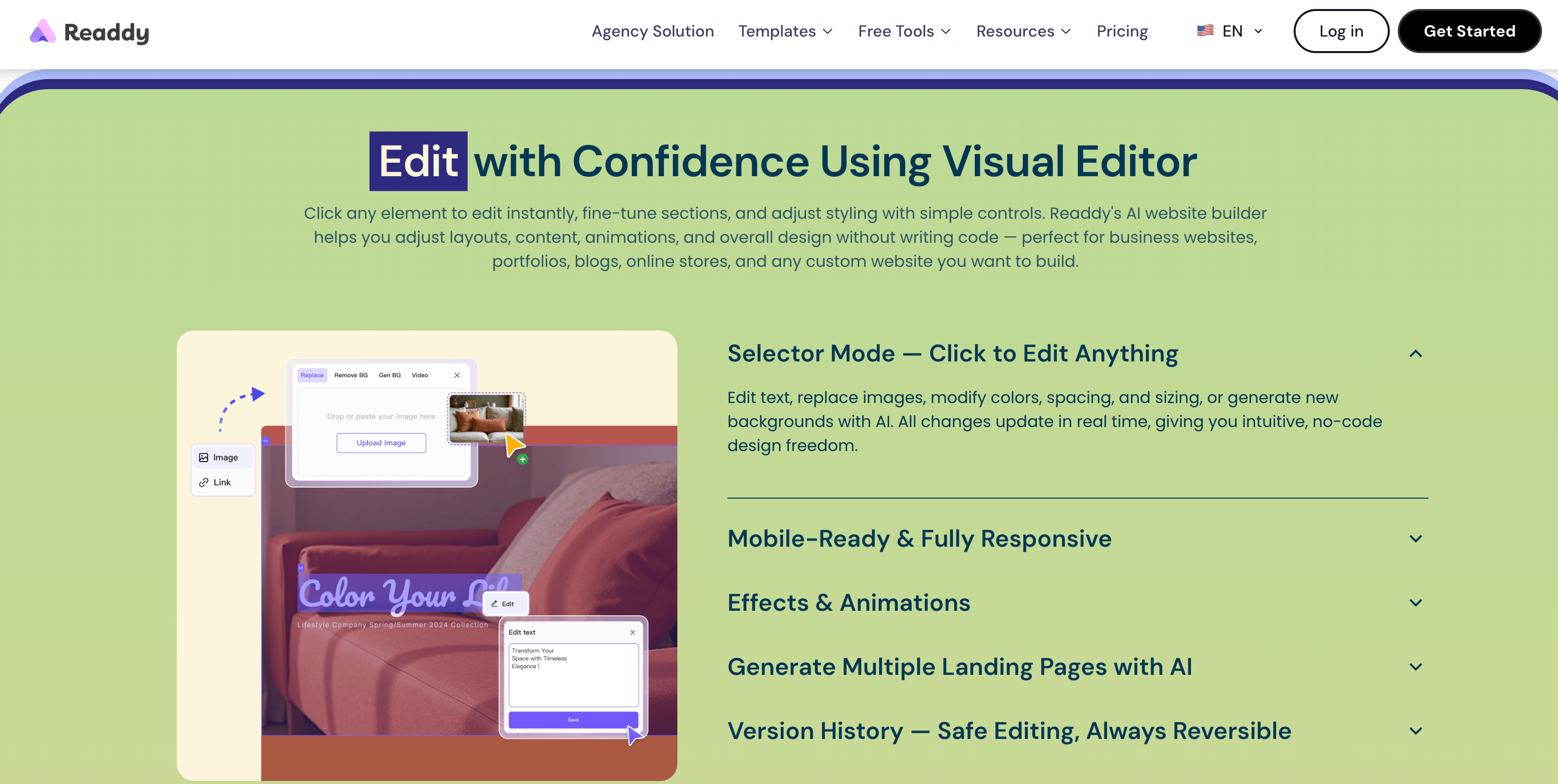
Readdy’s annual billing discount can meaningfully lower the monthly-equivalent cost across every paid tier.
How Readdy Compares to Alternatives
| Factor | Readdy | Framer | 10Web |
|---|---|---|---|
| Starting paid price | ~$15/mo (annual) | ~$10/mo (annual, approx.) | ~$10/mo (annual, approx.) |
| Core model | Prompt-to-website + visual editor, credit-based | Design-first canvas editor with AI assist features | AI-generated WordPress sites with managed hosting |
| Code ownership | React/Vue/HTML export + Figma (higher tiers) | Proprietary hosting, no code export | Standard WordPress files (portable, self-hostable) |
| Backend/database | Built-in Readdy Backend (DB, functions, secrets) | CMS collections only, no app backend | WordPress/WooCommerce plugin ecosystem (65,000+) |
| Independent rating | Trustpilot 3.5/5 (~47 reviews), thin G2 profile | Established G2 presence, generally strong reviews | G2 4.6/5 (~157 reviews) |
| Best for | Fast prompt-driven builds with a code-export exit ramp | Designers wanting fine-grained visual control | Businesses wanting WordPress ownership + managed hosting |
Readdy vs. Framer comes down to starting point: Framer is fundamentally a design canvas with AI assistance layered on, which rewards people who want precise visual control and are comfortable with per-editor-seat pricing. Readdy leads with the AI conversation and lets you drop into visual editing after the fact — a better fit if you’d rather describe outcomes than manually place elements, and its code-export option is something Framer doesn’t offer at all.
Readdy vs. 10Web is more about platform philosophy. 10Web builds on WordPress, meaning you get a portable, self-hostable site and access to WordPress’s enormous plugin ecosystem, backed by a much larger and more established independent review record (a 4.6/5 G2 score across roughly 157 reviews). Readdy’s proprietary backend is simpler to use for basic forms and bookings but doesn’t offer WordPress-level extensibility, and its review footprint is still comparatively thin.
It’s also worth placing Readdy against the wider AI-website-builder field rather than just these two. Wix ADI and Durable AI lean toward instant, low-effort generation for very simple business sites, trading depth of customization for speed and beginner-friendliness. Squarespace Blueprint AI and Webflow’s AI tools sit closer to Framer’s design-first camp, aimed at users who want a polished visual outcome and are willing to spend more editing time to get it. Readdy’s middle position — conversational generation plus a real visual editor plus code export — is what makes it a reasonable default recommendation for founders who want speed without fully giving up the option to go deeper later.
Pros and Cons
What Users Love
Genuine speed: reviewers consistently describe going from a text prompt to a usable multi-page site within minutes, a real change of pace from manual page-by-page building.
Approachable for non-technical users: one long-time marketer reviewer specifically praised how easy it was to launch a company site with no design or coding background, noting the platform still has “a few kinks” typical of a newer product.
Code and Figma export is a real differentiator: among AI website builders, the ability to walk away with production-ready code rather than being locked into proprietary hosting stands out as a meaningful advantage for anyone thinking beyond a quick landing page.
Responsive company support: Readdy has replied to roughly 93–94% of negative Trustpilot reviews, and several unhappy reviewers report the company followed up with resolutions after a complaint was posted publicly.
Limitations Worth Knowing
Credit resets have frustrated some subscribers: multiple Trustpilot reviews describe credits resetting unexpectedly mid-cycle on the Pro plan, forcing an additional purchase to keep working, and one reviewer reported being required to pay over $100 more before the system would even allow a downgrade.
Supabase integration reliability complaints: the same reviewer noted the advertised Supabase connection did not connect reliably, which is worth testing on your specific use case before building a data-dependent feature around it.
Thin independent review record relative to user base: with 500,000+ claimed users but well under 50 Trustpilot reviews and an essentially empty G2 profile, there simply isn’t as much third-party verification available as there is for more established competitors like 10Web or Wix.
Credit system punishes heavy iteration: because every generation and AI edit consumes credits, a workflow built around lots of trial-and-error refinement can burn through a monthly allowance faster than expected, especially on the Free and Starter tiers.
Free plan can’t go live on a custom domain: you can build and test extensively for free, but launching a real, publicly branded site requires at least the Starter subscription.
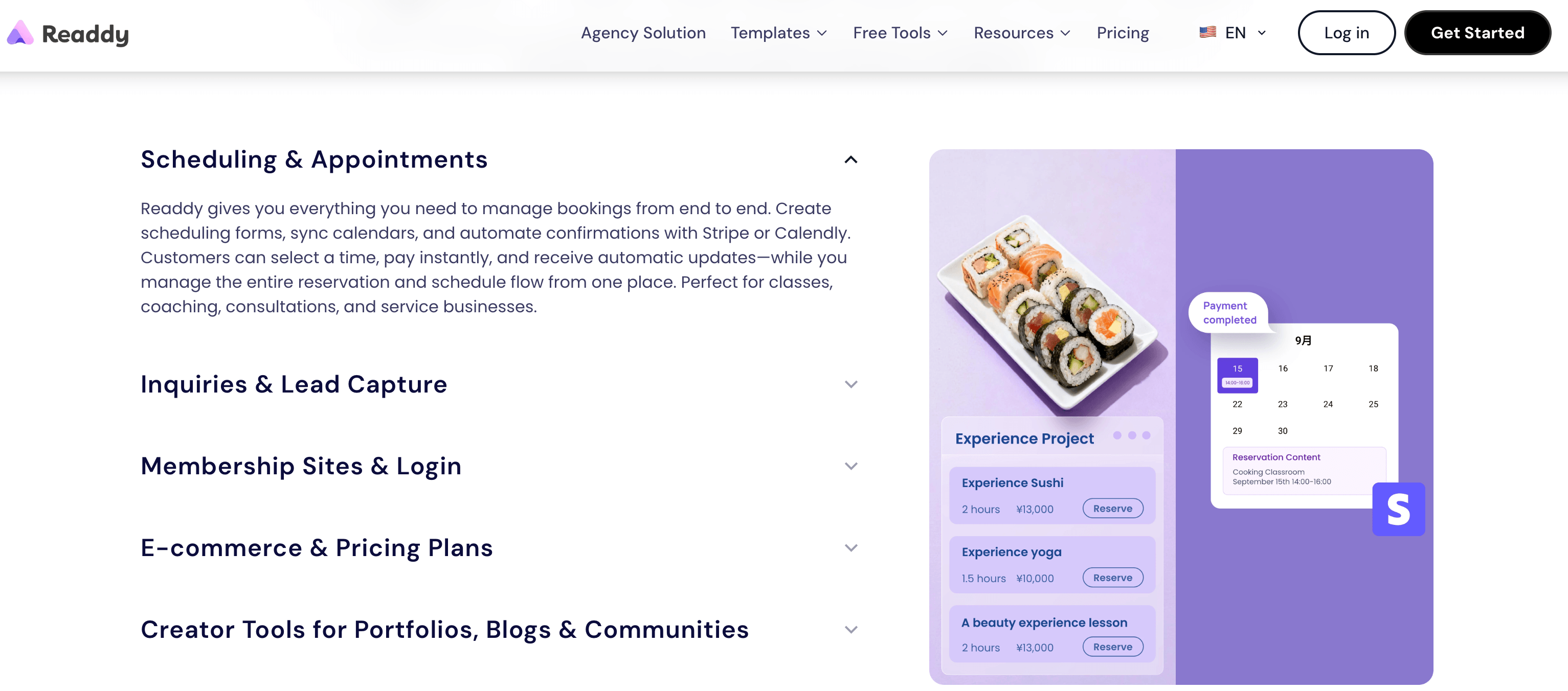
Selector Mode and the built-in Readdy Agent chatbot are among the platform’s most-praised hands-on features.
Who Should Use Readdy
Non-technical founders and small-business owners: if you need a professional-looking site fast and don’t have design or coding skills, Readdy’s prompt-first workflow and Selector Mode give you real control without a learning curve.
Freelancers and small agencies prototyping client concepts: generating a full working draft from a brief in minutes is a strong pitch tool, and the code-export option means a client-approved concept can be handed off for deeper development.
Anyone recreating or modernizing an existing site’s look: the reference-URL and screenshot-upload generation modes are a genuinely useful shortcut for refreshing a dated design without starting from scratch.
Teams that want an on-site AI chatbot without extra tooling: Readdy Agent being bundled in rather than bolted on afterward is a real convenience for service businesses that want 24/7 lead capture.
Who should look elsewhere: if you need deep e-commerce functionality, complex relational data, heavy plugin ecosystems, or a platform with an extensive, mature independent review record before you commit budget, 10Web’s WordPress foundation or a traditional developer-built site will likely serve you better. Teams that iterate constantly through many small AI edits should also budget carefully around Readdy’s credit system before standardizing on it.
Getting Started: Step by Step
- Sign up for the Free plan. Create an account and start with 250 monthly credits — no card required to test generation quality.
- Choose your starting point. Write a plain-language prompt describing your business and audience, pick a template, upload a screenshot or Figma frame, or paste a reference URL.
- Review the AI-generated draft. Readdy produces a multi-page site with matching layouts, copy and imagery in minutes; read through every page before refining.
- Refine with the chat terminal and Selector Mode. Use natural-language instructions for structural changes and Selector Mode for precise, element-level edits.
- Connect the tools you need. Add Stripe for payments, Calendly for bookings, Mailchimp for email capture, or Google Analytics for tracking, and train Readdy Agent if you want an on-site chatbot.
- Upgrade, connect a domain, and publish. Move to at least the Starter plan to connect a custom domain, then publish with one click — hosting, SSL and performance optimization are handled automatically.
Tips for Getting Maximum Value
Because generations and AI edits both consume credits, write your first prompt as specifically as possible — naming your industry, target audience, tone, and the exact pages you need — rather than generating a rough draft and relying on many small follow-up edits to fix it; a well-specified first prompt typically saves credits versus an iterative trial-and-error approach. Use the reference-URL or screenshot-upload modes whenever you already know the look you want, since recreating a known design tends to need fewer refinement passes than generating from a description alone. If you’re testing Supabase or another third-party integration for a business-critical feature, verify it works reliably on your specific setup during the free trial before committing to a paid tier, given the reliability complaints noted above. Finally, track your credit balance inside the dashboard regularly rather than assuming a mid-cycle top-up carries over cleanly, since several billing complaints stemmed from exactly that assumption; if annual billing fits your budget, it meaningfully lowers the monthly-equivalent cost across every paid tier. It’s also worth exporting your code or Figma file periodically once you’re on a plan that includes it, even if you don’t need it immediately — treating the export as a routine backup rather than a last resort gives you a working copy outside Readdy’s hosting if you ever need to migrate, hand the project to a developer, or simply want peace of mind that the site isn’t locked permanently inside one platform.
Future Outlook and Final Assessment
Readdy is moving fast for a product that’s roughly a year into its public life: a strong Product Hunt debut, claimed growth past 500,000 users, an expanding feature set (Readdy Agent, Readdy Backend, GEO/AEO optimization, an agency white-label tier) and continued pricing and platform updates all point to a company investing heavily in the AI-website-builder category rather than coasting on an early launch spike. The company’s high response rate to negative Trustpilot reviews — and reports of it proactively resolving billing complaints after they were posted — suggests a support team that’s engaged, even if the underlying billing mechanics still need tightening.
The bigger open question is whether independent review coverage will catch up to the claimed user base. A 3.5 Trustpilot score from under 50 reviews and a nearly empty G2 profile is thin evidence for a platform this size, and it means early adopters are still somewhat flying on marketing claims and scattered reviewer write-ups rather than a deep, verified track record. For a fast-moving AI product category where feature comparisons go stale within months, that’s a reasonable trade-off if you value speed and code ownership — but it’s worth going in with clear eyes.
Conclusion
Readdy earns its place among the top AI website builders of 2026 on speed, flexibility of starting points, and a code-ownership option that competitors like Framer simply don’t match — but it’s a newer platform with a thinner independent review trail than more established names like 10Web, and its credit-based billing has drawn real complaints worth understanding before you subscribe. If you want a fast, prompt-driven path to a professional site and value the ability to export clean code down the line, it’s well worth testing on the free plan; if you need a mature, heavily plugin-supported platform with a longer verified track record, weigh it carefully against WordPress-based alternatives first.
Ready to build your next site with AI instead of from scratch?
Explore more honest reviews, tutorials and tech comparisons to find the right gear for the way you work, travel and live — at World Of Tech, where we make everything easy.
👉 Try Readdy: https://worldoftech.space/readdyai
👉 Our YouTube Channel: youtube.com/@world_tech79
👉 Our Facebook Fanpage: Facebook
👉 Our X (Twitter): @worldoftech79
Pricing, specifications and policy details in this review were verified against readdy.ai and independent review sources, including Trustpilot and G2, as of July 2026. AI website builder pricing and features change frequently, so confirm current details on the official site before purchasing. Competitor prices for Framer and 10Web are approximate and subject to change.





