
If you’ve owned a Mac for more than a few years, you’ve almost certainly seen a MacKeeper pop-up, ad, or search result promising to “scan your Mac for issues” — and you may also remember the software’s rocky reputation from a decade ago, when aggressive marketing and a class-action lawsuit made it one of the most distrusted names in Mac utilities. That history is real, but it’s also old news. MacKeeper today is developed by Clario Tech FZCO, has passed independent AV-TEST malware detection audits at a 99.7% rate, carries Apple notarization, and has quietly become a genuine all-in-one toolkit bundling antivirus, junk cleaning, a VPN, an ad-blocker, and 24/7 breach monitoring into one menu-bar app used across more than 60 million downloads.
That doesn’t mean the skepticism should disappear entirely — MacKeeper still sits at a premium price point compared to single-purpose competitors, and its past does inform how cautious buyers should be about auto-renewal terms and refund windows. This 2026 review walks through what MacKeeper actually does today, its full feature set and technology, current pricing and plans, how it stacks up against CleanMyMac X and Intego Mac Internet Security, the genuine pros and cons based on independent testing and user reviews, and exactly who should — and shouldn’t — buy in.
MacKeeper Review 2026: Has the Most Controversial Name in Mac Utilities Finally Earned Its Trust?
Overview and Background
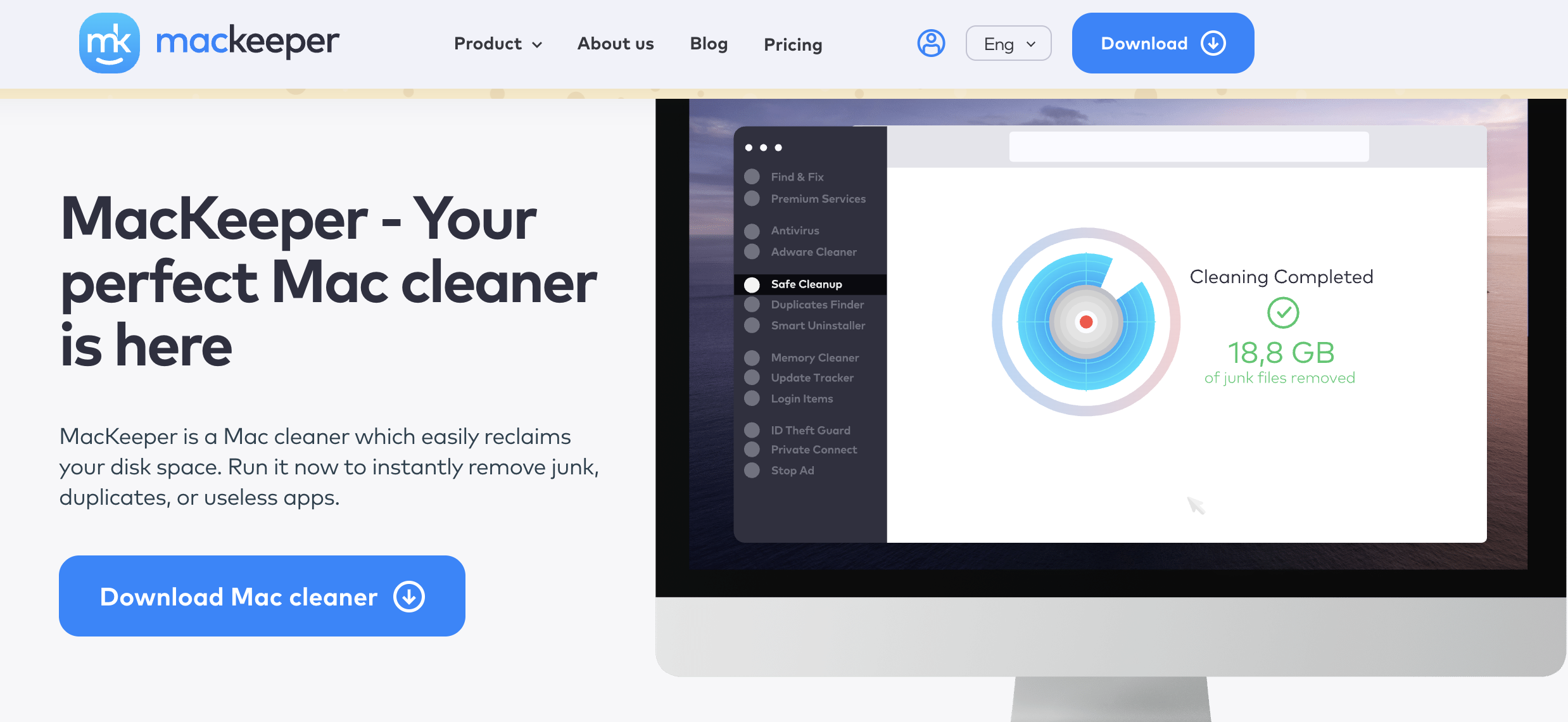
MacKeeper is a macOS-exclusive utility that bundles antivirus, system cleaning, performance optimization, and privacy tools into a single dashboard app that lives in your menu bar. Rather than being a narrow single-purpose scanner, it positions itself as “one app for a clean and secure Mac” — covering malware and adware removal, disk cleanup, duplicate file detection, app uninstalling, memory management, a VPN, an ad-blocker, and 24/7 breach monitoring for leaked passwords, credit cards, and social security numbers, all from one interface.
The product has a complicated history worth knowing before you buy. It launched in 2010 under the developer ZeoBIT and quickly became infamous for scareware-style tactics — deliberately alarming scan results and pushy advertising designed to pressure users into an upgrade. That approach led to a 2014 class-action lawsuit (Yencha v. ZeoBIT), which was settled in 2015 for $2 million, with no admission of wrongdoing. ZeoBIT sold MacKeeper to Kromtech Alliance Corp. in 2013, and the brand has changed hands again since, now operating under Clario Tech FZCO. The current owner has made visible efforts to clean up the marketing playbook and rebuild credibility — including Apple notarization and independent AV-TEST certification — but the software’s past is still the reason many longtime Mac users approach it warily.
On the credibility side, the newer version of MacKeeper has earned real independent validation. AV-TEST, one of the most respected independent security-testing labs, certified MacKeeper at a 99.7% malware detection rate in its most recent home-macOS evaluation cycle, and the app is notarized by Apple, meaning Apple’s automated notary service has scanned it for malicious components (note: notarization is a security check, not a full app review or endorsement). MacKeeper has also picked up favorable coverage from Forbes, PCMag, Macworld, and TechRadar, and it maintains a “Great” band Trustpilot presence with thousands of reviews, most recently sitting around 4 out of 5 stars.
Scale-wise, MacKeeper is not a niche product: the developer cites more than 60 million downloads over the software’s lifetime, and the current build supports macOS 10.15 (Catalina) through the latest releases, including recent c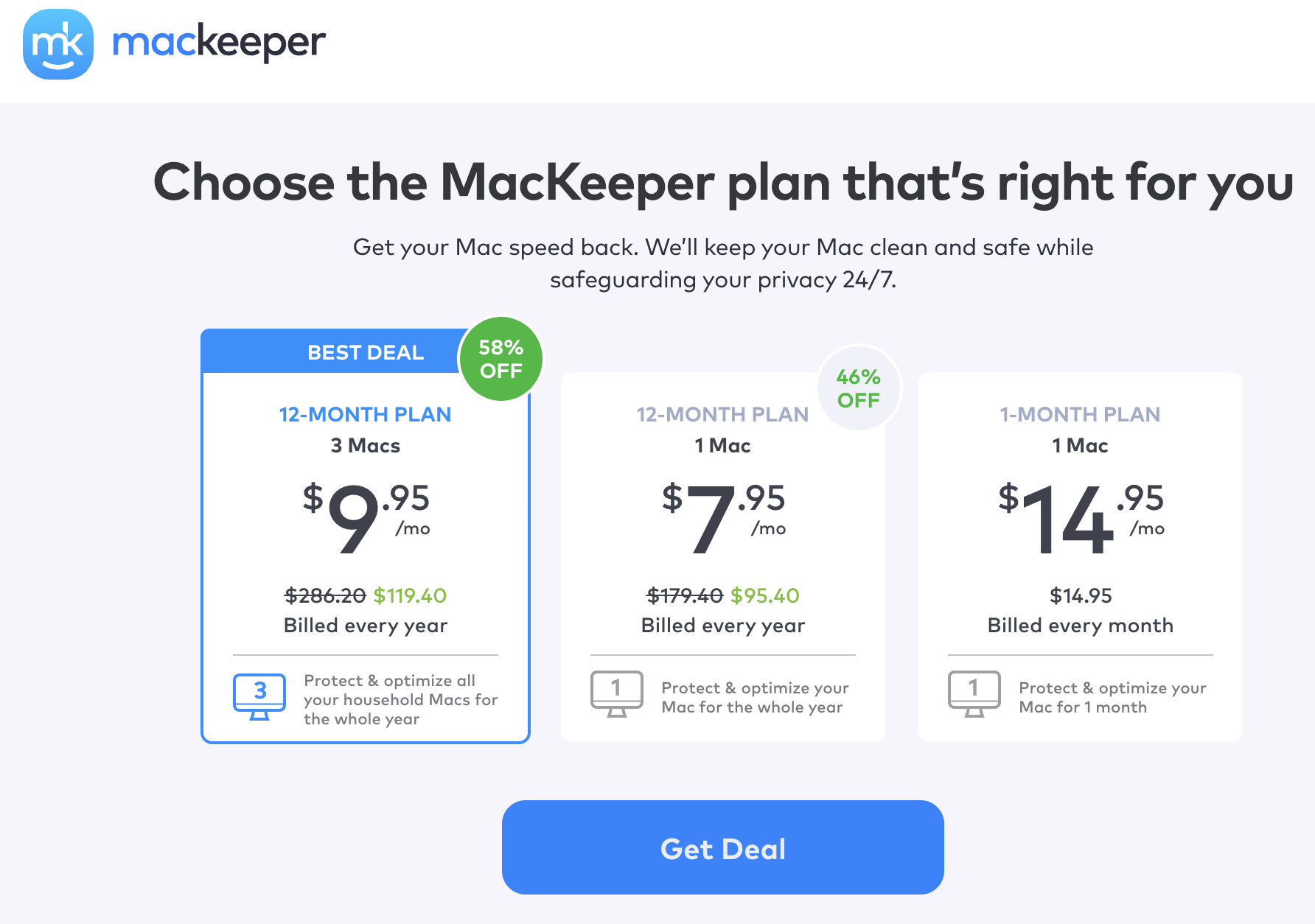 ompatibility work for macOS Sequoia and macOS Tahoe. That longevity matters in a category where plenty of “Mac cleaner” apps appear, get a burst of App Store attention, and disappear within a couple of years — MacKeeper has been continuously maintained and updated for over a decade, for better and for worse given its history.
Why MacKeeper Stands Out in 2026
A genuinely independently-verified detection rate: Plenty of Mac utilities claim strong malware protection, but MacKeeper backs the claim with an AV-TEST certification showing a 99.7% detection rate in real-world testing, alongside strong marks for performance impact and usability. That’s a meaningfully higher bar than self-reported statistics, and it’s one of the clearer signals that the post-rebrand product is functionally different from the scareware-era version.
Everything lives in one dashboard: Instead of running a separate antivirus app, a separate cleaner, a separate VPN client, and a separate breach-monitoring service, MacKeeper consolidates all of it into one menu-bar dashboard where you can scan, clean, and protect in a couple of clicks. For non-technical users especially, that reduces both the cognitive overhead and the subscription sprawl of running four different tools.
24/7 human chat support built into the app: MacKeeper’s support chat — accessible directly from within the app, not just a web contact form — is consistently one of the most-praised aspects of the product across independent reviews and user testimonials, with Forbes specifically calling out the always-available access to a live security and privacy expert as a standout feature.
Real-time breach monitoring most cleaners skip: Beyond junk files and viruses, MacKeeper continuously monitors for your email, passwords, credit card numbers, and SSN appearing in known data breaches, alerting you when something’s been exposed. Pure system-cleaning tools like CleanMyMac X don’t offer this at all, and it’s a genuinely useful layer most users would otherwise have to buy separately.
Apple notarization and a decade-plus track record: Apple’s notary service has verified MacKeeper is free of known malicious components, and the software has been continuously updated and maintained since 2010 — the current build is version 7.7, released July 2026 — giving it a longer support history than many newer, flashier utility apps.
A free tier that’s genuinely functional, not just a locked demo: Unlike many “free trial” utilities that lock every feature behind a paywall from the first click, MacKeeper’s free version includes real one-time cleanup and a week of live malware protection, letting you evaluate actual results — not just a marketing screenshot — before paying anything.
Visible reputation repair, not just claims: The company has publicly acknowledged its scareware-era mistakes rather than pretending they didn’t happen, has scaled back the aggressive affiliate marketing tactics that drove the original lawsuit, and now leans on third-party certifications like AV-TEST rather than in-app scare messaging to make its case — a meaningfully different posture than the 2010s version of the product.
Key Features and Technology
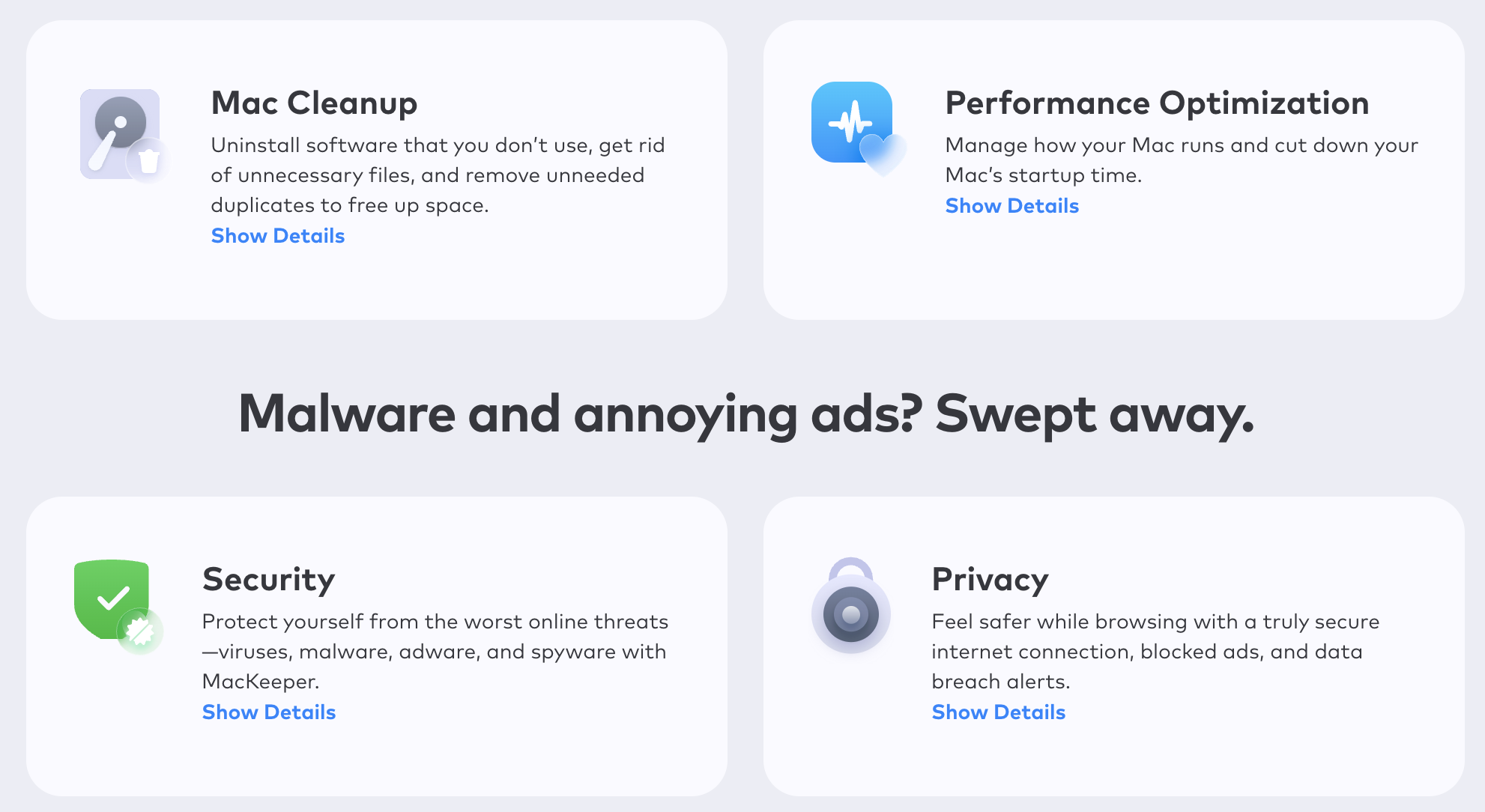
MacKeeper organizes its toolkit into four practical pillars — cleaning, performance, security, and privacy — all accessible from a single dashboard. Rather than presenting a wall of individual toggles, the dashboard groups features into scannable categories, runs a combined health check across all of them, and surfaces a single “issues found” summary you can act on with one click, or drill into module by module if you’d rather review each category separately. Here’s what each pillar actually does.
Cleaning: Mac Cleaner, Uninstaller, Duplicate Finder
The Mac Cleaner module scans for cache files, logs, broken downloads, and other system junk that quietly accumulates over months of use, then lets you clear it in a couple of clicks. The Uninstaller goes beyond simply deleting an app icon — it removes associated preference files, caches, and leftover support files that a manual drag-to-trash typically leaves behind, along with browser extensions. The Duplicate Finder scans photo libraries and file folders for exact and near-duplicate files, helping reclaim storage without manually comparing thousands of images.
Security: Antivirus and Adware Cleaner
MacKeeper’s Antivirus module provides real-time protection against malware, ransomware, spyware, and Trojans, backed by the AV-TEST-certified 99.7% detection rate. In independent EICAR test-file trials, reviewers report MacKeeper consistently quarantines the file immediately, giving reasonable confidence in the real-time engine. The Adware Cleaner specifically targets browser hijackers, unwanted toolbars, and injected ad scripts — a category of nuisance software that traditional antivirus engines sometimes miss because it isn’t technically “malicious,” just intrusive.
Performance: Optimizer and Memory Cleaner
The Optimizer manages startup items, so your Mac boots faster by not launching every app you’ve ever installed, and it can also automate app updates. The Memory Cleaner identifies apps hogging RAM in the background and lets you quit them in one click, freeing up memory without manually digging through Activity Monitor — a genuinely useful feature for anyone running memory-heavy apps like video editors or a dozen browser tabs at once.
Privacy: VPN, Ad-Blocker, and Breach Monitoring
MacKeeper’s VPN encrypts your connection and masks your IP for anonymous browsing — useful on public Wi-Fi, though it’s a bundled convenience VPN rather than a dedicated best-in-class VPN service with a huge server network. The Ad-Blocker strips ads and trackers from your browsing sessions. The ID Theft Protection layer runs continuous 24/7 monitoring of your email accounts, passwords, and financial data against known breach databases, sending an alert the moment your information turns up somewhere it shouldn’t.
Pricing, Plans, and Package Structure
MacKeeper runs on a subscription model with monthly, 6-month, and 12-month plans, plus a 3-Mac household option on the annual tier. List pricing starts at $10.95/month for the 1-month plan, $65.70 billed every 6 months, and $131.40 billed annually for a single Mac — but MacKeeper runs near-constant seasonal promotions (the site was showing a “Summer 2026” deal discounting the annual plan by roughly 35–40% at the time of this review), so the price most people actually pay is meaningfully lower than list. Every paid plan unlocks the full feature set; the only differences are device count and subscription length. A limited free version is also available, offering one-time cleaning, one week of live malware protection, and limited adware blocking.
| Plan | Price (USD, approx.) | What It Is | Best For |
|---|---|---|---|
| Free | $0 | One-time cleanup, 1-week malware protection, limited adware blocking | Testing the app before you buy |
| 1-Month, 1 Mac | ~$10.95/mo, billed monthly | Full feature set, month-to-month | Short-term or trial commitment |
| 6-Month, 1 Mac | ~$44–60 billed every 6 months (list $65.70) | Full feature set, mid-length term | Buyers who want a lower price than monthly without a full year |
| 12-Month, 1 Mac | ~$56–62/yr on promo (list $131.40) | Full feature set, best per-month value | Long-term single-Mac users |
| 12-Month, 3 Macs + 1 extra license | ~$64–72/yr on promo (list $131.40) | Same full feature set across up to 3 Macs | Households or small teams with multiple Macs |
How MacKeeper Compares to Alternatives
| Factor | MacKeeper | CleanMyMac X | Intego Mac Internet Security |
|---|---|---|---|
| Core focus | All-in-one: cleaning + antivirus + VPN + breach monitoring | System cleaning and optimization, basic malware removal | Dedicated antivirus and firewall, no cleaning suite |
| Starting price (approx.) | ~$10.95/mo or ~$56–62/yr on promo | ~$34.95–39.95/yr, or $89.95 one-time | ~$50/yr, single device |
| VPN included | Yes | No | No |
| Breach / ID monitoring | Yes, 24/7 | No | No |
| Independent certification | AV-TEST certified, 99.7% detection | Apple notarized; not a dedicated AV-TEST antivirus entrant | Strong track record in third-party malware testing |
| 24/7 live chat support | Yes, in-app | Email/ticket support only | Email and FAQ support only |
| Best for | Users who want one bundled app for cleaning, security, and privacy | Users who mainly want polished cleanup and storage recovery | Users who want a dedicated, no-frills antivirus and firewall |
MacKeeper vs. CleanMyMac X comes down to scope: CleanMyMac X is widely regarded as the more polished pure cleaning tool with a beautiful interface, and its malware layer is a bonus rather than the core product — it has no VPN and no breach monitoring. MacKeeper trades a bit of that visual polish for a genuinely broader feature set at a comparable or lower promotional price.
MacKeeper vs. Intego Mac Internet Security is a bundle-versus-specialist tradeoff. Intego is a dedicated, no-nonsense antivirus and firewall with a long third-party testing track record but no cleaning tools, no VPN, and no breach monitoring baked in — you’d pay separately for those. MacKeeper costs about the same or less on promotion while covering considerably more ground, though a specialist product can sometimes edge out a bundled suite on pure malware-engine depth.
Zooming out, the bigger-picture choice isn’t really “which app has the best individual feature” so much as “do you want a bundle or a toolkit of specialists.” If you’re the type who likes swapping in the single best-rated app for each job — a dedicated VPN like a top-tier provider, a dedicated antivirus, a dedicated cleaner — you’ll likely end up paying more in total but may get marginally better performance in each category. If you’d rather pay one bill, manage one login, and get a “good enough across the board” result with less setup, MacKeeper’s bundled model is built specifically to win that tradeoff.
Pros and Cons
What Users Love
Everything in one place: Users repeatedly cite the convenience of scanning, cleaning, and protecting from a single dashboard instead of juggling separate apps — a theme that shows up consistently in Trustpilot reviews and independent write-ups alike.
Effective at finding real junk and threats: Multiple reviewers report MacKeeper successfully detecting malware in test scenarios and clearing meaningful amounts of disk clutter, matching its AV-TEST-backed 99.7% detection claim.
Responsive, always-available support: The built-in 24/7 chat is one of the most consistently praised elements across reviews, with users describing tech reps as professional, courteous, and effective at resolving issues on the first contact.
Simple, non-technical interface: Reviewers across PCMag, Macworld, and TechRadar consistently describe MacKeeper as well-organized and easy to navigate, with a guided setup that doesn’t require technical Mac knowledge.
Long-term users report satisfaction: Several Trustpilot reviewers describe using MacKeeper for years without issues and specifically calling out the Memory Cleaner as a favorite ongoing feature.
Limitations Worth Knowing
A reputation it’s still working to overcome: MacKeeper’s scareware-era history and the 2015 class-action settlement over deceptive advertising still shape how some longtime Mac users view the brand, even though the current owner operates differently. It’s a fair reason for caution, even if the present-day product tests well.
Premium pricing at list rate: Some reviewers specifically flag MacKeeper as expensive for what it offers if you’re only after basic antivirus, especially at the undiscounted list price rather than the near-constant promotional rate.
Mac-only, no cross-platform coverage: There’s no Windows or mobile version, so mixed-device households will need a second product for non-Apple devices — a real limitation compared to suites like Norton or Bitdefender that cover everything under one subscription.
No dedicated phishing-link protection: Independent testers note MacKeeper doesn’t pass dedicated phishing-page detection tests, since that isn’t a feature it specifically offers — worth pairing with browser-level phishing protection if that’s a priority for you.
Refund terms have real fine print: The advertised 14-day money-back guarantee is more nuanced in the FAQ — yearly plans get 30 days, monthly plans get 14, and any license used past six months becomes non-refundable regardless of plan. Read this before you subscribe, not after.
Who Should Use MacKeeper
Non-technical Mac owners who want one simple app: If the idea of separately managing an antivirus, a cleaner, a VPN, and a breach-monitoring service sounds like too much overhead, MacKeeper’s single dashboard is built exactly for that use case.
Anyone who values 24/7 human support: If you want to be able to chat with a real person the moment something goes wrong rather than waiting on an email ticket, MacKeeper’s in-app support is a genuine differentiator.
Users who want breach and identity monitoring without a separate subscription: The bundled 24/7 monitoring for leaked passwords and financial data is a feature you’d otherwise pay for separately through a dedicated identity-protection service.
Households with multiple Macs on a budget: The 3-Mac annual plan covers a whole household’s Apple computers under one promotional-priced subscription, which is more cost-effective than buying three separate single-device licenses of a specialist tool.
Who should look elsewhere: if you run a mixed Windows-and-Mac household and want one subscription to cover everything, MacKeeper’s Mac-only scope won’t fit. If you specifically want best-in-class VPN performance or a dedicated enterprise-grade antivirus engine tested at the very top of independent labs, a specialist VPN provider or antivirus vendor will likely outperform MacKeeper’s bundled versions of those tools. And if the brand’s past marketing controversies are a dealbreaker for you regardless of the current product’s testing results, that’s a reasonable line to hold — plenty of equally capable alternatives exist without that baggage.
Getting Started: Step by Step
- Download the free version first. Install MacKeeper from the official site and run an initial scan to see real results on your own Mac before paying anything.
- Run a full system scan. Let MacKeeper check for malware, adware, junk files, and duplicates across your entire disk — this typically takes a few minutes depending on how much data you have.
- Review the findings before fixing anything. MacKeeper flags what it finds in categories; skim through them so you understand what’s being removed rather than blindly clicking “Fix All.”
- Compare current promotional pricing. Check the live pricing page for the active seasonal discount before subscribing — the list price is rarely what you should actually pay.
- Activate your license and enable real-time protection. Paste your activation code, then turn on real-time malware protection and the ID theft monitor so ongoing threats are caught automatically, not just during manual scans.
- Set a calendar reminder before your refund window closes. Given the tiered 14-to-30-day refund policy, mark your calendar a few days before that window ends if you’re still deciding whether to keep the subscription.
Tips for Getting Maximum Value
Get the most out of MacKeeper by treating it as an ongoing maintenance tool rather than a one-time fix: schedule a scan roughly once a month rather than only running it when something feels wrong, and let the Memory Cleaner run in the background during heavy multitasking sessions rather than waiting until your Mac visibly slows down. Turn on the ID theft monitor immediately after activation, since breach alerts are only useful if they’re running continuously from day one. If you’re on a multi-Mac plan, install it on every covered device rather than leaving licenses unused — the 3-Mac tier is priced to make that worthwhile. And always check the pricing page for an active seasonal promotion before your renewal date, since MacKeeper’s discounts are frequent enough that paying full list price on autopilot is usually avoidable with a five-minute check.
Future Outlook and Final Assessment
MacKeeper’s trajectory over the past several years has been a genuine rehabilitation story: a product born out of a scareware-driven marketing playbook that has since earned real independent certification, cleaned up its sales tactics, and built a Trustpilot presence in the “Great” band with thousands of reviews. With continuous version updates — the current release, 7.7, shipped in July 2026 — and consistent AV-TEST participation, the company appears committed to competing on measurable results rather than pop-up pressure going forward.
That said, buyers shouldn’t treat the rebrand as erasing the need for due diligence. The tiered, sometimes confusing refund policy and the habit of displaying an inflated list price alongside an always-active discount are the kind of practices that reward careful reading over quick-click purchasing. For a security and privacy product especially, transparency in pricing and terms matters as much as detection rates.
Conclusion
MacKeeper earns a cautious recommendation for the exact audience it’s built for: Mac owners who want antivirus, cleaning, a VPN, an ad-blocker, and breach monitoring in one dashboard, backed by a 99.7% AV-TEST detection rate and 24/7 human support, without having to research and pay for four separate apps. It’s not the cheapest way to get any single one of those features individually, and its history means it has to keep proving itself to skeptical longtime Mac users — but on the current version’s own merits, independently verified testing and thousands of positive user reviews suggest it has largely earned that second look.
Ready to give your Mac a clean, secure reset?
Explore more honest reviews, tutorials and tech comparisons to find the right gear for the way you work, travel and live — at World Of Tech, where we make everything easy.
👉 Shop MacKeeper: https://worldoftech.space/mackeeper
👉 Our YouTube Channel: youtube.com/@world_tech79
👉 Our Facebook Fanpage: Facebook
👉 Our X (Twitter): @worldoftech79
Pricing, specifications and policy details in this review were verified against mackeeper.com and independent review sources as of July 2026. Software pricing and features change frequently, so confirm current details on the official site before purchasing. Competitor prices are approximate and subject to change.





