
If you have ever tried to add a “featured client,” a price range, a set of specs, or a repeatable list of testimonials to a WordPress page, you already know the standard editor runs out of road fast. Meta Box is the developer-grade answer to that problem — a modular custom fields framework that lets you add virtually any type of structured data to posts, pages, custom post types, taxonomies, users and settings screens, without bloating your site or fighting a clunky admin panel. Built in 2010 and still actively maintained by eLightUp, it now powers 500,000+ active WordPress installs and carries a 4.8 out of 5 rating from 164 reviews on WordPress.org. Whether you are a freelance developer building client sites, an agency managing a portfolio of installs, or a site owner who just wants a cleaner way to manage structured content, this 2026 review walks through what Meta Box actually does well, where it falls short, and whether its pricing model makes sense for your situation.
Meta Box sits in a crowded field alongside Advanced Custom Fields (ACF), Pods, and Toolset, and each of these tools solves the “custom fields” problem a little differently. Rather than repeat marketing claims, we pulled data directly from the official pricing page, the WordPress.org plugin directory, the changelog, and independent plugin review sites to see how Meta Box actually holds up in mid-2026 — including its real strengths, its real limitations, and who should (and shouldn’t) build on it.
Meta Box Review 2026: The Developer’s Custom Fields Framework, Tested
Overview and Background
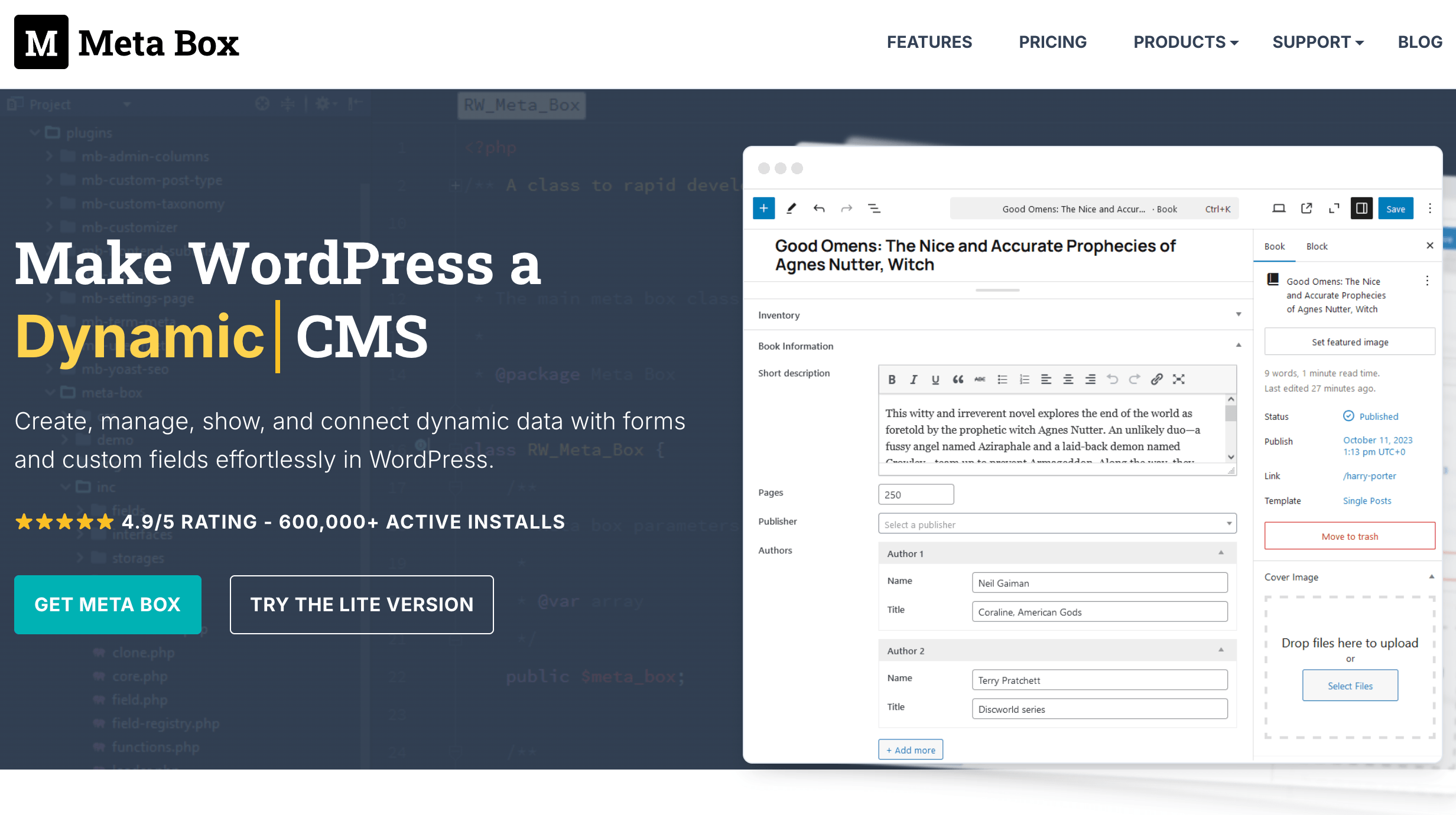
Meta Box is a WordPress plugin and PHP framework, created by developer Anh Tran and now maintained under the company eLightUp. Its core plugin is completely free and hosted on WordPress.org, where it ships 40+ built-in field types — text, WYSIWYG, image, file upload, post select, checkbox, radio, date/time picker, taxonomy, user, oEmbed, and more — along with support for custom post types, custom taxonomies, repeatable/cloneable field groups, and native WordPress storage. On top of the free core, Meta Box sells a catalog of premium extensions (conditional logic, front-end submission forms, custom database tables, a drag-and-drop builder, Gutenberg block fields, and more) that can be bought individually or as a bundle.
The current stable release is version 5.14.0 (released July 30, 2026), which introduced Block Bindings support so Meta Box field values can be tied directly to Gutenberg blocks without shortcodes or PHP. The plugin requires WordPress 6.7 or higher and PHP 7.4 or higher, and it is officially tested up to WordPress 7.0.3, so it is being actively kept current with core WordPress releases rather than left to stagnate.
Meta Box’s positioning has always been “framework first” rather than “app first.” That distinction matters: instead of shipping one rigid workflow for every use case, Meta Box exposes a set of building blocks — field types, storage options, display rules, front-end templates — that developers assemble into whatever the project actually needs, whether that’s a real estate listings site, a staff directory, a product catalog layered on top of WooCommerce, or a headless setup that only talks to WordPress through the REST API. This is also why the project has stayed relevant for well over a decade: rather than betting the whole plugin on one trend, the team has incrementally added support for the block editor, Composer, custom database tables and now AI-facing “Abilities” without breaking backward compatibility for sites built on much older versions.
Why Meta Box Stands Out in 2026
A genuinely free, fully-featured core: unlike some custom-fields competitors that gate essential features behind a paywall, the free Meta Box plugin on WordPress.org already includes 40+ field types, custom post types and taxonomies, cloneable groups, and REST API support. You can build a real production site on the free tier alone before ever considering a paid extension.
Modular architecture that respects performance: Meta Box loads only the modules you actually enable, which keeps it lightweight compared with all-in-one competitors that load their full feature set on every page regardless of use. For agencies running dozens of client sites, that modularity translates into real, measurable speed savings.
Native WordPress storage by default: Meta Box writes to the standard WordPress meta tables rather than a proprietary data structure, which means your custom field data survives plugin migrations, theme changes and WordPress core updates without lock-in. Sites with heavier data needs can opt into a custom database table extension for extra performance.
Active, weekly-grade development: the changelog shows a steady cadence of releases through 2026 — Block Bindings in July, an “Abilities” framework for programmatic post/taxonomy management in June, security fixes, and continuous compatibility patches for WordPress 7.x. This is not an abandoned or slow-moving plugin.
Deep builder ecosystem: extensions like MB Builder (drag-and-drop field creation with PHP export) and MB Views (front-end templating) push Meta Box closer to a no-code experience for teams that don’t want to touch code directly, while still generating clean, exportable code underneath.
Migration paths from competitors: Meta Box documents direct migration routes from ACF, Pods and Toolset, which lowers the switching cost for agencies that inherited client sites built on a different custom-fields plugin.
Multilingual and multisite ready: the plugin has been translated into 22+ locales, is officially WPML-compatible, and works cleanly across WordPress Multisite networks — details that matter for global agencies and larger installations.
Open development on GitHub: the core plugin is developed in the open, so bug reports, feature requests and pull requests are visible and trackable rather than disappearing into a private support queue — a level of transparency that many premium WordPress plugins don’t offer.
Key Features and Technology
Meta Box’s feature set breaks down into the free core framework and a library of paid extensions that layer on top of it. Here’s how the pieces fit together.
40+ Field Types and Repeatable Groups
The free core alone ships more than 40 field types, from basic text and WYSIWYG editors to maps, galleries, taxonomy pickers and oEmbed fields. Most field types support cloning (letting a user add unlimited repeats of a single field) and the MB Group extension lets you nest fields into structured, repeatable blocks — the equivalent of ACF’s Repeater and Flexible Content fields, but available as an add-on rather than locked into one “Pro” tier.
Custom Post Types, Taxonomies and Settings Pages
Through the companion free CPT UI-style tools and extensions like MB Term Meta and MB Settings Page, Meta Box covers the full range of places custom data typically needs to live in WordPress: posts, pages, custom post types, taxonomies, user profiles, comments, and plugin/theme settings screens. There are also dedicated online generators for post types, taxonomies and blocks on the Meta Box site that output ready-to-use PHP.
Gutenberg Blocks and Block Bindings
Meta Box’s `block_editor` field type lets you embed a scoped instance of the block editor inside a custom field, complete with a block inspector, structure/breadcrumb panel and fullscreen mode. The newer Block Bindings feature (added in version 5.14.0) goes a step further, letting Meta Box field values populate native Gutenberg blocks directly from the block bindings panel — no shortcodes or template PHP required for simple use cases.
Conditional Logic and Front-End Submission
The MB Conditional Logic extension shows or hides fields, meta boxes, or even arbitrary HTML elements based on other field values, which is essential for building complex forms that don’t overwhelm the editor. MB Frontend Submission goes further, generating a public-facing form (via shortcode) that lets site visitors submit content — directories, listings, reviews — that lands directly in your WordPress backend for moderation.
Custom Database Tables, REST API and Developer Tools
By default, Meta Box stores data in WordPress’s native meta tables for maximum compatibility, but the MB Custom Table extension lets high-traffic or data-heavy sites move field storage into dedicated database tables for better query performance. On the developer side, Meta Box ships full REST API support for getting and setting field values, Composer support for modern PHP workflows, and an extensive set of WordPress action/filter hooks documented at docs.metabox.io.
Pricing, Plans, and Package Structure
The core Meta Box plugin is free forever on WordPress.org. Premium extensions are sold individually or, more cost-effectively, as annual or lifetime bundles split into Personal (limited sites) and Agency (unlimited sites) tiers. Pricing below was verified directly on the official pricing page.
| Plan | Price | What It Is | Best For |
|---|---|---|---|
| Free Core | $0 | 40+ field types, CPTs, taxonomies, cloning, REST API | Small sites, testing, simple builds |
| Personal Basic | $49/year | 1 site, 12 PRO extensions, 1 year updates & support | Freelancers on a single site |
| Personal Ultimate | $99/year | 3 sites, all PRO + future extensions, Meta Box AIO plugin | Solo developers with a few sites |
| Personal Lifetime | $299 one-time | 3 sites, all extensions + Solutions, lifetime updates/support | Long-term owners who hate renewals |
| Agency Basic | $149/year | Unlimited sites, 12 PRO extensions | Agencies with several client sites |
| Agency Ultimate | $229/year | Unlimited sites, all PRO + future extensions, AIO plugin | Agencies wanting every extension |
| Agency Lifetime | $699 one-time | Unlimited sites, all extensions + Solutions, lifetime access | High-volume agencies, hosting providers* |
How Meta Box Compares to Alternatives
| Factor | Meta Box | Advanced Custom Fields (ACF) | Pods |
|---|---|---|---|
| Free tier depth | Strong — 40+ fields, CPTs, cloning included free | Moderate — repeaters/flexible content require PRO | Very strong — fully free and open source |
| Entry paid price (approx.) | $49/year, 1 site | ~$49/year, 1 site (approximate) | $0 — no paid tier |
| Unlimited-site pricing | $149–$229/year or $699 lifetime | Higher-tier agency licensing (approximate, varies) | N/A — always free |
| Market share / installs | 500,000+ active installs | Millions of active installs (larger footprint) | Hundreds of thousands of active installs |
| Custom database tables | Optional extension | Not native | Native — Pods is built around custom tables |
| Best for | Developers/agencies wanting a modular, affordable, code-friendly framework | Teams already standardized on ACF’s ecosystem and Repeater/Flexible Content UX | Budget-conscious builders needing heavy custom-table-driven content models |
Meta Box vs. ACF comes down to philosophy: ACF has the larger install base and the most third-party tutorials, but locks repeaters, flexible content and options pages behind its PRO tier. Meta Box gives you the equivalent functionality for a comparable or lower price, spread across modular extensions, and its Agency tier undercuts equivalent ACF agency licensing for unlimited sites.
Meta Box vs. Pods is a trade-off between polish and cost. Pods is entirely free and stores data in genuinely custom database tables by default, which some developers prefer architecturally — but Meta Box’s UI, documentation, extension ecosystem and update cadence are generally considered more refined for production client work. Toolset, a third common alternative not shown in the table above, bundles custom fields with a visual page-building layer of its own; it can be a faster path for teams that want fields and front-end display logic in one product, but that convenience comes with tighter lock-in to Toolset’s specific templating system, whereas Meta Box’s output stays closer to standard WordPress and PHP, making it easier to hand off between developers later.
Pros and Cons
What Users Love
Support quality: repeated WordPress.org reviews single out fast, knowledgeable responses from the Meta Box team — including instances where pricing was pro-rated after a purchasing mistake, well beyond what buyers expected.
Ease compared to ACF: multiple reviewers who switched from ACF describe Meta Box as more intuitive, with a “healthier modular approach” that adapts better across different page builder frameworks and client skill levels.
Performance at scale: reviewers building on visual builders like Breakdance specifically call out Meta Box’s performance and its ability to stay lightweight even on complex, high-traffic builds.
Documentation depth: the combination of docs.metabox.io tutorials and sample code is repeatedly cited as the deciding factor when developers get stuck on advanced use cases like custom relationship fields.
Limitations Worth Knowing
Real cost hides behind the free plugin: the headline “free” plugin is genuinely capable, but the features most client projects actually need — conditional logic, front-end forms, custom tables, the builder UI — sit behind paid extensions, so budget for at least the Basic bundle if you’re doing client work.
Thin admin-only free experience: at least one WordPress.org reviewer noted that, while Meta Box is free to use in the admin, several features they expected still required payment — worth confirming exactly which extensions you need before assuming the free tier covers your project.
Occasional release friction: a small number of long-time users have flagged past releases that introduced regressions, cautioning others to test new versions on staging before pushing updates to production sites — standard advice for any actively-developed plugin, but worth heeding here given the frequent release cadence.
Support forum gated for free users: only premium customers can open new support topics on the official forum; free-tier users are directed to the public WordPress.org support forum instead, which typically has slower response times.
No independent Trustpilot presence: we could not find an active, verified Trustpilot profile for metabox.io itself, so third-party sentiment beyond WordPress.org’s 164 reviews and scattered coupon-site listings is limited — treat the WordPress.org rating as the most reliable independent signal available.
Who Should Use Meta Box
Freelance WordPress developers managing client sites will appreciate the modular pricing — pay only for the extensions each project actually needs, or grab the Ultimate bundle once your client roster grows past a couple of sites.
Agencies running many WordPress installs get real value from the Agency tiers, where unlimited-site licensing at $149–$229/year (or $699 lifetime) undercuts what many competitors charge for equivalent unlimited-site coverage.
Directory, listing and marketplace site builders benefit directly from MB Frontend Submission and MB Custom Table, which together enable performant, user-submitted content workflows outside the standard WordPress admin.
Teams migrating off ACF or Toolset will find Meta Box’s documented migration paths and comparison pages a lower-friction switch than starting from scratch.
Who should look elsewhere: site owners who want a purely visual, zero-code experience out of the box, with no PHP or hook familiarity at all, may find page-builder-native custom field tools (bundled directly into their builder of choice) a smoother fit than layering Meta Box on top. Similarly, anyone whose entire content model needs to live in fully custom database tables from day one should evaluate Pods before committing to Meta Box’s extension-based approach. And if your entire team is non-technical with no budget for even occasional developer help, factor that into your extension choices — leaning on MB Builder and MB Views can substitute for hand-written PHP in most common scenarios, but truly custom relationship logic or bespoke front-end templates will still go faster with a developer involved.
Getting Started: Step by Step
- Install the free core plugin. From your WordPress dashboard, go to Plugins → Add New, search “Meta Box,” and click Install then Activate — no account or license key is required for the free tier.
- Decide between code and no-code building. Developers can use the Online Generator at metabox.io to output ready PHP for field groups; non-developers should install the companion Meta Box Lite plugin for a fully visual field-group builder.
- Map out what you actually need. Before buying anything, list the features your project requires — conditional logic, front-end forms, custom tables — and cross-reference against the 12 extensions included in the Basic bundle versus the full Ultimate set.
- Purchase the right bundle for your site count. Choose Personal (1–3 sites) or Agency (unlimited sites) based on how many active installs you manage, and remember the 14-day refund window if it turns out to be the wrong fit.
- Build your first field group and test with real content. Create a field group scoped to a specific post type or page template, add a mix of field types, and confirm they render correctly in both the classic and block editor before rolling out further.
- Layer in extensions as the project grows. Start lean with the core plugin and only add extensions like MB Custom Table or MB Frontend Submission once the project’s requirements genuinely call for them, to keep the site fast and the admin uncluttered.
Tips for Getting Maximum Value
Get the most out of Meta Box by treating it as a toolkit rather than a single product: start every new project on the free core plugin, prototype your field structure with the Online Generator or Meta Box Lite before writing any custom code, and only reach for a paid bundle once you can point to specific extensions — conditional logic, custom tables, front-end forms — that the project genuinely needs. If you manage more than two or three client sites, do the math on Agency Basic versus paying per-site; the unlimited-site tiers usually pay for themselves after the third install. Keep an eye on the changelog before updating production sites, since Meta Box ships frequently and, like any actively developed plugin, an occasional release can introduce a regression — testing on staging first is worth the extra ten minutes. Finally, lean on the official documentation at docs.metabox.io rather than guessing at hooks; the sample code library there covers most real-world relationship, template and custom-table scenarios directly. It’s also worth joining the community Facebook group for Meta Box users — it won’t replace official support, but it’s a fast way to see how other developers solved a problem similar to yours, and to sanity-check a workaround before you build it into a client project.
Future Outlook and Final Assessment
Meta Box’s recent roadmap signals a team paying close attention to where WordPress itself is heading. Block Bindings support ties custom field data directly into the native block editor without extra plugins, and the newer “Abilities” framework for programmatic post and taxonomy management looks squarely aimed at the growing wave of AI-assisted and automated WordPress workflows — a forward-looking move relative to most custom-fields competitors, which have been slower to build for that use case.
Combined with a genuinely useful free tier, an active security and compatibility patch cadence, and pricing that stays competitive even at the unlimited-site agency level, Meta Box is well positioned heading into the next WordPress release cycle. The main open question is whether the team can keep shipping at this pace without introducing the kind of update-day regressions a handful of long-time reviewers have flagged — something worth watching if you plan to build a large, revenue-critical site on top of it.

Conclusion
For developers and agencies who want a lightweight, modular, and honestly priced way to add structured custom fields to WordPress, Meta Box earns its 4.8-star reputation: the free core plugin is capable enough to ship real projects on its own, the paid extensions solve specific, well-defined problems rather than forcing an all-or-nothing upgrade, and the team’s release cadence shows no signs of slowing down. Just go in with realistic expectations about the coding comfort it assumes, budget for the extensions your project actually needs rather than assuming the free tier covers everything, and test updates on staging before pushing them live.
Ready to build smarter custom fields into your WordPress site?
Explore more honest reviews, tutorials and tech comparisons to find the right gear for the way you work, travel and live — at World Of Tech, where we make everything easy.
👉 Shop Meta Box: https://worldoftech.space/metabox
👉 Our YouTube Channel: youtube.com/@world_tech79
👉 Our Facebook Fanpage: Facebook
👉 Our X (Twitter): @worldoftech79
Pricing, specifications and policy details in this review were verified against metabox.io and independent review sources (including WordPress.org) as of August 2026. WordPress plugin pricing and features change frequently, so confirm current details on the official site before purchasing. Competitor prices are approximate and subject to change.





