
MindManager (mindmanager.com) has established itself as the most feature-rich, enterprise-grade mind mapping and visual planning software available in 2026, trusted by over 2 million users worldwide — from solo entrepreneurs and management consultants through Fortune 500 companies like Dow, Procter & Gamble, and major government agencies who rely on its powerful visualization engine to transform scattered ideas, complex data, and multi-stakeholder projects into structured, actionable plans. Before diving into the full feature breakdown and pricing analysis ahead, it’s worth highlighting what makes MindManager the standout choice for serious business visualization in 2026: a comprehensive diagramming suite spanning mind maps, flowcharts, Gantt charts, org charts, concept maps, matrices, swimlane diagrams, and timelines in a single application — with the ability to toggle between any of these views for the same data without rebuilding, deep Microsoft Office integration (Word, Excel, PowerPoint, Outlook, Teams, Project), task management and progress tracking within maps, budgeting and cost tracking, built-in presentation mode, real-time co-editing on Enterprise plans, a one-time perpetual purchase option that is increasingly rare among 2026 software products, a 30-day fully featured free trial with no credit card required, and Windows, Mac, and web browser versions across all plan tiers. Whether you’re a project manager who needs to visualize project scope, dependencies, and resource allocation simultaneously, a strategic planner turning executive brainstorming sessions into executable roadmaps, a knowledge worker who processes information overload into organized visual structures that drive decision-making, a consultant who needs to deliver high-impact visual presentations of complex recommendations, or an enterprise IT team deploying collaborative visual planning infrastructure across hundreds of users, this comprehensive review walks you through every major feature, pricing tier, and real-world buying consideration for MindManager in 2026.
MindManager 2026 Review: The Best Enterprise Mind Mapping and Visual Planning Software for Business Professionals, Project Managers, and Strategic Teams
Overview: What Is MindManager and Who Is It For?
MindManager is a visual thinking and information management platform originally developed by Mindjet in 1998 and now owned by Alludo (formerly Corel). Over its more than 25-year development history, MindManager has evolved from a basic radial mind mapping tool into a full business visualization platform — combining the spatial thinking power of mind maps with the structured organization of Gantt charts, the logical clarity of flowcharts, and the collaborative infrastructure of team co-editing, all within a single application that integrates deeply with the Microsoft productivity ecosystem most business professionals already use daily.
The platform’s core value proposition is deceptively simple: thinking visually produces better outcomes than thinking in linear text. When you convert a meeting agenda, a project plan, or a research synthesis from bullet-pointed documents and spreadsheets into a structured visual map, connections become visible, gaps become apparent, priorities clarify, and action paths emerge. MindManager is the tool that makes this transformation fast, professional, and collaborative — providing the structure for visual thinking without constraining creativity, and the integration with business systems that makes outputs immediately actionable rather than just visually engaging.
In 2026, MindManager is positioned as the premium choice in the mind mapping market — one of the few tools that serious enterprise users, management consultants, and professional project managers choose when they outgrow simpler alternatives. It is not the cheapest mind mapping software (XMind, Coggle, and MindMeister are all less expensive at the individual tier), and it is not the simplest (significant depth requires learning investment). It is the most capable: the tool that handles everything from a five-minute team brainstorm through a multi-hundred-node enterprise project plan with linked documentation, Gantt timeline, progress tracking, and Microsoft Teams co-editing.
MindManager in 2026 — Key Platform Facts
- 2 Million+ Users Worldwide: MindManager’s global user base exceeds 2 million professionals across industries — with enterprise adoption in companies including Dow Chemical, Procter & Gamble, and major government and defense agencies that represent the most demanding operational requirements.
- 25+ Years of Development Since 1998: MindManager’s history spans more than 25 years of continuous development — delivering the accumulated feature depth, stability, and ecosystem integration that newer competitors cannot replicate, and a track record of reliability that enterprise IT teams require for production tool deployment.
- Multi-Diagram Type in One Application: MindManager supports mind maps, flowcharts, Gantt charts, org charts, concept maps, matrices, swimlane diagrams, fishbone (Ishikawa) diagrams, and timelines — all within a single application, enabling teams to use the most appropriate visualization for each context without switching between tools.
- Single-Map Multi-View Toggle: The same data can be viewed as a mind map, org chart, flowchart, or outline simultaneously — switching between visual representations for different audiences or purposes without rebuilding the underlying data structure. This is one of MindManager’s most distinctive and practically valuable capabilities.
- Deep Microsoft Ecosystem Integration: Native integration with Microsoft Word, Excel, PowerPoint, Outlook, Teams, and Project — importing and exporting data between MindManager and the full Microsoft Office suite, embedding maps in Office documents, and enabling Teams-based co-editing for Enterprise users.
- Perpetual Purchase Option Available: MindManager offers a one-time perpetual license option — increasingly rare in 2026 software as most products shift to subscription-only models. Users who prefer ownership over ongoing subscription cost have a genuine purchase alternative that competitors often no longer provide.
- 30-Day Free Trial (No Credit Card): MindManager’s fully featured 30-day trial requires no credit card — providing the longest freely available evaluation period of any major mind mapping platform, sufficient to test the full feature set across real projects before committing.
- Windows, Mac, and Web Browser Versions: All plan tiers include access to Windows desktop, Mac desktop, and web-based browser versions — with mobile viewing apps for iOS and Android, enabling work continuity across devices and platforms.
- Owned by Alludo (formerly Corel): MindManager is part of the Alludo portfolio — a company with significant software infrastructure and long-term investment in the professional productivity tool market, providing business continuity assurance for enterprise IT procurement decisions.
- Education, Government, and Nonprofit Pricing: Special pricing tiers exist for educational institutions, government agencies, and nonprofits — with volume licensing and site licenses available for organizational deployment, making enterprise-grade visual planning accessible beyond corporate budgets.

MindManager transforms scattered ideas, complex project data, and multi-stakeholder information into structured visual mind maps, Gantt charts, flowcharts, and concept maps — giving business professionals, project managers, and strategic teams the visual clarity that linear documents and spreadsheets cannot provide.
Key Features and Platform Capabilities
MindManager’s feature set in 2026 represents the accumulated depth of 25+ years of professional development — covering not just the core mind mapping functionality that defines the category but a comprehensive visual planning platform that addresses the full range of structured thinking needs for business professionals. Here is a detailed breakdown of every major capability.
Core Mind Mapping: The Foundation of Visual Thinking
- Radial Mind Map Creation: MindManager’s primary interface — create a central topic and branch outward with unlimited subtopics, building a visual representation of connected ideas in the radial structure that mirrors human associative thinking. Topics can be connected with relationship lines to show non-hierarchical connections between distant nodes, enabling complex multi-directional relationship mapping.
- Rich Topic Formatting: Individual topics support extensive formatting — custom colors, shapes, borders, fonts, icons, images, callout bubbles, and visual markers that convey status, priority, category, or any other dimension the user defines. The visual differentiation makes large complex maps scannable and self-explanatory to viewers unfamiliar with the content.
- Topic Notes and Attachments: Every topic in a MindManager map can hold rich text notes, file attachments, embedded images, hyperlinks to external URLs, and links to other maps — turning the visual map into a knowledge hub where the visual structure organizes content that would otherwise live in disconnected folders and documents.
- Relationship Lines and Cross-Links: Connect any topic to any other topic with relationship lines — annotated with labels to specify the nature of the relationship — enabling complex knowledge webs, dependency maps, and influence diagrams that hierarchical tree structures cannot represent.
- Boundary Markers: Group related topics visually with boundary shapes — highlighting subsections of a map, drawing attention to related clusters, and creating visual neighborhoods within a larger map that help viewers navigate complex information structures.
- Map Templates: An extensive library of pre-built map templates for common use cases — project planning, meeting agendas, SWOT analysis, risk registers, business plans, process documentation, and strategic frameworks — provides professional starting points that guide structure rather than requiring users to design every map from a blank canvas.
- Collapse and Expand Branches: Show or hide branches within a map — enabling presentation-ready selective disclosure of detail, and allowing navigation of large maps that would be overwhelming if displayed in full simultaneously.
Multi-Diagram Types: Beyond Mind Maps
- Flowcharts and Process Diagrams: Create standard flowchart notation with decision diamonds, process rectangles, terminal ovals, and connector arrows — enabling process documentation, decision trees, and workflow diagrams within the same application used for mind mapping, eliminating the need for separate Visio or Lucidchart subscriptions for basic flowcharting work.
- Gantt Charts (Built-In Project Timeline): MindManager’s integrated Gantt chart capability transforms task lists in mind maps directly into project timelines — assigning start dates, end dates, durations, and dependencies to tasks to produce a Gantt view automatically from the hierarchical task structure. This is the feature that most clearly separates MindManager from pure mind mapping tools and positions it as a genuine project planning platform.
- Org Charts: Generate organizational chart views from hierarchical map data — transforming a reporting structure mind map into a standard org chart format suitable for HR documentation, team onboarding presentations, and organizational planning.
- Concept Maps: Build concept maps with labeled relationship lines between nodes — supporting academic knowledge representation, systems thinking, and cause-and-effect analysis that radial mind maps don’t capture with the same precision.
- Swimlane Diagrams: Organize processes across functional lanes — the standard format for BPMN-style business process documentation that shows which team or role is responsible for each step in a cross-functional workflow.
- Fishbone (Ishikawa) Diagrams: Create cause-and-effect analysis diagrams for quality management, root cause analysis, and problem-solving methodology — a standard tool in manufacturing, operations, and quality improvement contexts.
- Timeline Views: Visualize project milestones, events, and deliverables on a chronological timeline — providing a calendar-like perspective on project progress alongside the hierarchical mind map and linear Gantt views.
- Matrix View: Display map content in a structured grid format — sorting topics by attributes, comparing options across dimensions, and presenting evaluative frameworks in a tabular visual structure.
Project Management and Task Tracking Within Maps
- Task Properties on Topics: Assign project management properties directly to map topics — start date, due date, duration, priority, completion percentage, assigned resource, and project cost. These properties populate the Gantt view and task filters automatically, turning a brainstorm map into a project plan through progressive detail addition.
- Progress Tracking: Visual progress indicators on topics show completion percentage — color-coded progress bars or icons that make the completion status of a project plan visible at a glance in the map view without switching to a separate project management dashboard.
- Resource Assignment: Assign team members to topics as resources — enabling workload visualization across a project map and supporting resource-level planning without a separate resource management tool.
- Budget and Cost Tracking: Add individual cost data to project map topics and visualize budget allocation across the project structure — supporting project cost forecasting and financial tracking within the visual planning environment.
- Priority and Status Tags: Apply priority levels (High, Medium, Low) and status markers (Not Started, In Progress, Complete, Overdue) to topics — enabling filter-based views that show only high-priority or overdue items from a complex project map.
- Filtering and Smart Maps: Apply filters to display only topics matching specific criteria — resource assignments, priority levels, date ranges, or custom tags — reducing a complex map to the relevant subset for a specific role or review context without creating separate filtered copies.
- Customizable Reports: Generate reports from map data — exporting task lists, status reports, and resource allocation summaries in formats suitable for stakeholder reporting without manual data re-entry from the map into a separate reporting tool.
Deep Microsoft Ecosystem Integration
- Microsoft Word Export: Export mind maps to structured Microsoft Word documents — automatically applying heading hierarchy from the map structure to create a formatted document outline with nested headings, enabling rapid documentation from brainstorming maps.
- Microsoft Excel Integration: Import data from Excel spreadsheets into MindManager maps, and export map data to Excel — enabling data-driven map creation from existing business data and extraction of map-organized data into spreadsheet analysis.
- Microsoft PowerPoint Export: Convert maps to PowerPoint presentation slide decks — generating a presentation structure automatically from the map hierarchy, with each topic becoming a slide element that can be refined in PowerPoint for delivery.
- Microsoft Outlook Integration: Create tasks from map topics that sync to Outlook tasks — capturing action items from meeting maps directly into Outlook’s task system for personal to-do management without manual re-entry.
- Microsoft Teams Co-Editing (Enterprise): Enterprise plan users can co-edit maps in real time within Microsoft Teams — enabling collaborative visual planning sessions within the Teams environment that most enterprise organizations already use for communication and collaboration.
- Microsoft Project Sync: Import and export data between MindManager and Microsoft Project — enabling planning in MindManager’s visual environment with hand-off to Project’s formal scheduling and resource management capabilities for complex enterprise project management.
Collaboration and Presentation
- Real-Time Co-Editing (Enterprise): Enterprise plan subscribers can edit maps simultaneously with remote team members — enabling real-time collaborative brainstorming, planning sessions, and map reviews with the same live collaboration feel as Google Docs for visual planning rather than linear document writing.
- Interactive Presentation Mode: Present maps directly from MindManager in a dedicated presentation mode — navigating the map structure as a non-linear presentation, collapsing and expanding branches to reveal information progressively, and zooming to specific areas for audience focus without exporting to a separate presentation tool.
- Web Publishing: Publish maps as interactive web pages — sharing visual plans with stakeholders who don’t have MindManager installed, enabling browser-based navigation of the map’s structure without requiring recipients to own the software.
- Map Linking: Link maps to each other — creating interconnected documentation systems where a master project map links to detailed sub-maps for each component, enabling hierarchical documentation architectures for complex programs and knowledge bases.
- Export Formats: Export to PDF, HTML, SVG, image formats (PNG, JPEG), Microsoft Office formats, and MindManager’s native .mmap format — covering all standard distribution requirements for sharing map outputs with audiences inside and outside the organization.
 MindManager’s built-in Gantt charts, task progress tracking, resource assignment, budget visualization, Microsoft Teams co-editing, and multi-diagram toggle capability make it the visual planning platform that project managers and strategic teams use when standard mind mapping tools aren’t powerful enough for serious business work.
Pricing, Plans, and Value Proposition
MindManager offers multiple purchase and subscription options — a structure designed to accommodate individual professionals who want to own their software permanently alongside organizations that prefer subscription-based access with ongoing updates. Understanding the distinction between the Essentials web-only plan and the Professional full-feature plan is critical for buyers evaluating which tier matches their actual use case.
MindManager Pricing Breakdown for 2026
| Plan | Price | Best For | Key Features | Key Limits |
|---|---|---|---|---|
| Essentials (Web) | ~$99/year | Basic individual web use, students | Web-based MindManager only; core mind mapping; templates; basic export; browser access from any device | Web-only — no Windows or Mac desktop application; reduced feature depth vs. Professional; lacks Gantt, advanced project management, and full Office integration |
| Professional (Annual Subscription) | ~$169–$179/year | Serious individual professionals, small teams | Full Windows + Mac desktop apps; web access; complete feature suite (all diagram types, Gantt, project management, full Office integration); collaboration tools; ongoing version updates; 30-day free trial | Per-seat pricing; Enterprise co-editing requires upgrade; individual use focus |
| Professional (Perpetual / One-Time) | ~$349 one-time | Users preferring permanent ownership over subscriptions | Full feature set for current version; no ongoing subscription; optional annual maintenance for future version upgrades; rare one-time purchase option in 2026 software market | No automatic version upgrades without maintenance plan; requires separate maintenance fee to access new feature versions after initial purchase year |
| Enterprise (Annual Subscription) | Custom pricing (per seat, volume) | Teams, organizations, enterprise IT deployment | All Professional features + real-time co-editing; Microsoft Teams integration; centralized IT administration; SSO; SCIM provisioning; enterprise security; volume licensing; education/government/nonprofit special pricing available | Requires sales engagement for volume pricing; minimum seat requirements may apply |
| 30-Day Free Trial | $0 (no credit card required) | All new users evaluating before purchase | Full Professional feature access for 30 days — the most comprehensive free trial in the mind mapping category, sufficient to test every feature across real projects | 30-day time limit; converts to paid plan or feature restriction after trial; no ongoing free tier available |
| Education Plan | Discounted (verify at mindmanager.com) | Students, educators, academic institutions | Student/educator version with full core feature access; individual use for classroom and academic project productivity | Educational license terms; not for commercial use; verify current discount at official pricing page |
Pricing model explained: MindManager Professional at ~$169–$179/year is the recommended entry point for any user who takes visual planning seriously — the Essentials plan’s web-only access significantly limits the feature depth and performance that make MindManager worth its premium over competitors. The perpetual purchase option at ~$349 is particularly notable in 2026: for users who use MindManager daily across 2+ years, the perpetual license is more economical than cumulative annual subscriptions and provides the satisfaction of permanent software ownership. Compare: $179/year × 2 years = $358 in subscriptions versus $349 one-time for permanent ownership of the current version.
Pro tip: Start with the 30-day free trial rather than making a purchase decision based on demo videos or competitor comparisons — MindManager’s depth of feature advantage over lower-cost alternatives is only apparent during actual use across real project scenarios. Use the trial to build at least three real project maps (a brainstorm, a project plan with Gantt, and an organizational diagram) to evaluate whether the Professional feature set justifies the premium over MindMeister or XMind for your specific work patterns.
Free Trial vs. Paid: Selecting the Right Plan
- Choose Essentials (~$99/year) when: Your use is primarily basic mind mapping for personal organization and you work exclusively in a browser — the web-only tier is sufficient for simple map creation and sharing, but excludes the Gantt, advanced project management, and full Office integration features that define MindManager’s premium value.
- Choose Professional (~$169/year subscription) when: You need the full feature suite — Gantt charts, project task management, the complete Office integration suite, and all diagram types — and prefer ongoing automatic version updates included in the subscription cost.
- Choose Professional (Perpetual ~$349) when: You plan to use MindManager for 2+ years and prefer the security of software ownership over subscription dependency. The 2-year break-even makes the perpetual license cost-efficient for committed long-term users.
- Choose Enterprise when: Real-time co-editing across a team is required, Microsoft Teams integration for collaborative sessions is important, or IT administration (SSO, SCIM, centralized settings) is a procurement requirement for organizational deployment.
Comparisons: MindManager vs. Competitors in 2026
The mind mapping software market in 2026 spans from free browser-based tools through premium desktop applications and collaborative cloud platforms. MindManager’s position is at the premium end of the professional spectrum — more expensive but significantly more capable than alternatives at comparable or lower price points.
MindManager vs. XMind, MindMeister, Miro, and Lucidchart
| MindManager 2026 | XMind | MindMeister | Miro | Lucidchart | |
|---|---|---|---|---|---|
| Entry Paid Price | ~$99–$179/year | ~$59–$79/year | ~$69/year | ~$96/year (Starter) | ~$108/year |
| Built-In Gantt Charts | Yes (native, full-featured) | Limited | No | No (template only) | Yes (basic) |
| Multi-Diagram Toggle (Same Data) | Yes (unique feature) | No | No | No | No |
| Microsoft Office Integration | Deep (Word, Excel, PPT, Outlook, Teams, Project) | Limited (export only) | Limited | Teams integration | Good (Office add-ins) |
| Task/Project Management Features | Yes (task properties, Gantt, resources, costs) | Basic | Basic | No (visual boards only) | Limited |
| Perpetual (One-Time) Purchase | Yes (~$349) | Yes (~$129 one-time) | No (subscription only) | No (subscription only) | No (subscription only) |
| Real-Time Co-Editing | Yes (Enterprise plan) | Yes (paid) | Yes (paid) | Yes (core feature) | Yes (paid) |
| Free Plan Available | No (30-day full trial only) | Yes (limited) | Yes (3 maps free) | Yes (3 boards free) | Yes (limited) |
| Desktop Application | Yes (Windows + Mac) | Yes (Windows + Mac) | Web-primary | Web + Desktop | Web + Desktop |
| Diagram Types | Mind maps, flowcharts, Gantt, org charts, swimlanes, fishbone, timelines, matrices, concept maps | Mind maps, Fishbone, Matrix, some flowcharts | Mind maps primarily | Boards, templates (all types, less structured) | Flowcharts, UML, org charts, network diagrams |
| Best For | Enterprise project planning, complex visual mapping, Microsoft-centric organizations | Design-forward individual mind mapping, Mac users | Team mind mapping with easy collaboration | Creative collaborative whiteboards and workshops | Technical diagramming, UML, network maps |
MindManager’s edge: MindManager’s unique combination of built-in Gantt charts, multi-diagram toggle for the same data set, deep Microsoft Office ecosystem integration including Microsoft Project sync, task/resource/cost management within maps, and perpetual purchase availability creates a capability profile that no competing mind mapping tool in 2026 fully replicates. XMind is an excellent alternative for design-forward personal mind mapping at lower cost; MindMeister is strong for team collaboration focused on mind maps specifically; Miro is better for free-form creative collaboration and visual workshops; Lucidchart is stronger for technical diagramming (UML, network diagrams, ERDs). For professionals who need the full visual planning suite — especially those living in the Microsoft ecosystem — MindManager’s premium over these alternatives is justified by capabilities that none of them individually match.
Getting Started: Step-by-Step Guide for New MindManager Users
MindManager is not the simplest mind mapping tool to learn — the depth of features creates a meaningful learning investment that simpler tools avoid by offering less capability. The 30-day free trial provides sufficient time to move through the learning curve and evaluate the full feature set before purchasing. Here’s how to make the most of that evaluation period.
Step-by-Step Guide for New MindManager Users
- Download and Install the 30-Day Free Trial:
- Visit mindmanager.com and click “Free Trial” — no credit card is required. Download the full desktop application for your platform (Windows or Mac) or access the web version immediately in your browser. The desktop application provides the full feature set; the web version covers core functionality for evaluation if desktop installation isn’t possible.
- MindManager’s built-in tutorial system is accessible from the Help menu and walks through core features with guided interactive examples — plan 2–3 hours with the tutorials during your first week before building real project maps, as the tutorials dramatically accelerate the learning curve and reveal capabilities users frequently miss by self-discovery alone.
- Register your trial with a work email to enable the team features during evaluation — and to receive proper trial-to-purchase migration when you decide to convert.
- Build Your First Mind Map from a Template:
- Open MindManager and select a template from the template library — choose a template relevant to your most common use case (Meeting Agenda, Project Plan, SWOT Analysis, or Business Plan templates are good starting points for most professionals). Starting from a template rather than a blank map accelerates your first productive map and demonstrates the professional formatting capabilities that distinguish MindManager output from simpler tools.
- Populate the template with real content from your current work — an actual upcoming meeting agenda, a real project you’re planning, or a genuine strategic analysis. Evaluating mind mapping software with real work content produces a far more useful assessment than artificial test content.
- Experiment with topic formatting — apply colors, icons, and callout bubbles to a few topics to experience the visual differentiation capabilities. This formatting investment pays off when presenting maps to others who need to quickly understand which topics are most important.
- Explore the Multi-View Toggle:
- With a project-structured map open, locate the View toggle in the toolbar — switch between Mind Map, Org Chart, Flowchart, and Outline views of the same data to experience the multi-representation capability that is unique to MindManager. This feature is often the moment when MindManager users understand why they’re paying the premium: the same planning work delivers outputs appropriate for different stakeholder contexts without rebuilding.
- Try the Gantt Chart view if you’ve added date properties to any map topics — even a simple task list with start and end dates demonstrates how MindManager bridges visual brainstorming and formal project scheduling in a single tool.
- Test the Microsoft Office Integration:
- Export your map to Microsoft Word — observe how the hierarchical map structure automatically generates a formatted document with appropriate heading levels, table of contents, and section organization. This is one of MindManager’s highest daily-use value features for knowledge workers who regularly need to convert meeting maps and planning sessions into formal documents.
- Test the PowerPoint export with a presentation-format map — converting a strategic planning map into a slide deck outline to evaluate the presentation preparation time savings versus manual slide creation from a meeting map.
- Evaluate Against Your Specific Daily Workflow:
- By the end of week 2 of the trial, you should be using MindManager for at least one real work activity daily — the tool’s ROI for regular users is high, but only apparent in regular use. Occasional users may find the simpler alternatives sufficient for their lighter requirements.
- If you use Microsoft Teams, test the Teams integration to understand whether the co-editing capability of the Enterprise plan would benefit your team before making the individual vs. Enterprise plan decision.
- Use the full 30-day trial period — MindManager’s depth means features discovered in the final two weeks of the trial (advanced filtering, smart maps, linked maps) often change the purchase decision from “good but not sure” to “genuinely essential.”
Tips for Getting the Most from MindManager
- Build a personal map library from the start — create standardized template maps for your most recurring work patterns (weekly review map, project kickoff map, meeting agenda map) and clone them as starting points for new instances rather than rebuilding from scratch every time. This template investment pays dividends across hundreds of future maps.
- Use the topic notes attachment capability extensively — the visual map structure organizes information spatially, but the real knowledge depth lives in the notes, links, and attachments connected to each topic. Maps that link to source documents, meeting recordings, and reference materials become genuine knowledge management systems rather than just visual overviews.
- Master the filtering system before building complex project maps — MindManager’s filtering capability (showing only topics matching specific criteria) is the feature that makes large project maps practical rather than overwhelming. Investing in understanding filters early prevents the “my map has become too complex to navigate” frustration that pushes users back to linear lists.
- For team deployment, establish map naming and sharing conventions early — teams that standardize how maps are named, where they’re stored, and how they’re linked to each other avoid the fragmentation that makes organization-wide MindManager libraries hard to navigate without conventions.
- Leverage the export to Word for meeting documentation — the fastest path from a meeting that used a MindManager agenda map to a meeting minutes document is the one-click Word export, which generates a formatted document from the map hierarchy. This use case alone saves professional users hours per month in documentation time.
Advanced Use Cases and Expert Analysis
For management consultants delivering complex client engagements, enterprise project managers coordinating multi-team programs, executives facilitating strategic planning workshops, software architects documenting system architecture, and knowledge workers managing information-intensive professional disciplines — MindManager’s depth of feature set creates value that simpler alternatives simply cannot replicate at any price.
Expert Reviews and Real-World Use Cases
- The Management Consultant Organizing Client Engagements: Consultants use MindManager as the primary tool for intake, synthesis, and delivery across client engagements — capturing research in connected maps, synthesizing interview findings into structured analysis maps, and converting strategic recommendations into Word documents via the Office export. The ability to navigate a complex consulting engagement visually — seeing all the connected threads of a client situation simultaneously — is the use case that makes MindManager a career-long tool investment for serious consultants. G2 reviews from management consulting professionals consistently rank MindManager as indispensable.
- The Project Manager Running Multi-Stream Programs: Program managers overseeing multiple parallel project streams use MindManager’s Gantt integration, task tracking, and linked maps architecture to maintain simultaneous visibility of the full program — a master map linking to detailed sub-maps for each stream, with Gantt views showing cross-stream timeline and dependencies. This level of integrated visual planning is what distinguishes MindManager from pure mind mapping tools that address brainstorming but not ongoing project management.
- The Executive Facilitating Strategic Planning: C-suite leaders and strategy teams use MindManager in annual strategic planning workshops — building the strategic plan map collaboratively during the session, converting it to a PowerPoint for board presentation, and then using the linked maps architecture to cascade strategic objectives to operational team plans that remain connected to the master strategy map.
- The Knowledge Worker Fighting Information Overload: Professionals in information-intensive roles (researchers, analysts, writers) use MindManager to process the overwhelming volume of reports, articles, data, and email into structured knowledge maps — creating a personal knowledge management system where information is organized by relationship and meaning rather than chronological file date. Multiple G2 reviews specifically cite this information overload management as MindManager’s most personally transformative capability.
- The Software Team Documenting System Architecture: Technical teams use MindManager’s flowchart, swimlane, and concept map capabilities to document system architecture, API flows, user stories, and technical dependencies — creating living documentation that links to related design documents and code repositories, and can be navigated in presentation mode for technical reviews and onboarding sessions.
Independent expert consensus: MindManager is consistently described by power users as “the best mind mapping software for business purposes — ever” (Software Advice), “excellent for Windows users who can justify the premium” (multiple Capterra reviewers), and the tool users choose after “outgrowing simpler alternatives.” G2 reviewers from IT, management consulting, and government administration consistently rate it as delivering premium value for daily power users. The consistent critical theme across all review platforms is pricing — reviewers acknowledge MindManager as significantly more expensive than XMind ($59/year), MindMeister ($69/year), and Coggle (free), and note that this premium is justified only for users who actively use the advanced features (Gantt, project management, Office integration) that lower-cost alternatives lack. Users who need only basic mind mapping consistently rate simpler alternatives as better value; users who need the full professional capability consistently rate MindManager as the best option at any price.
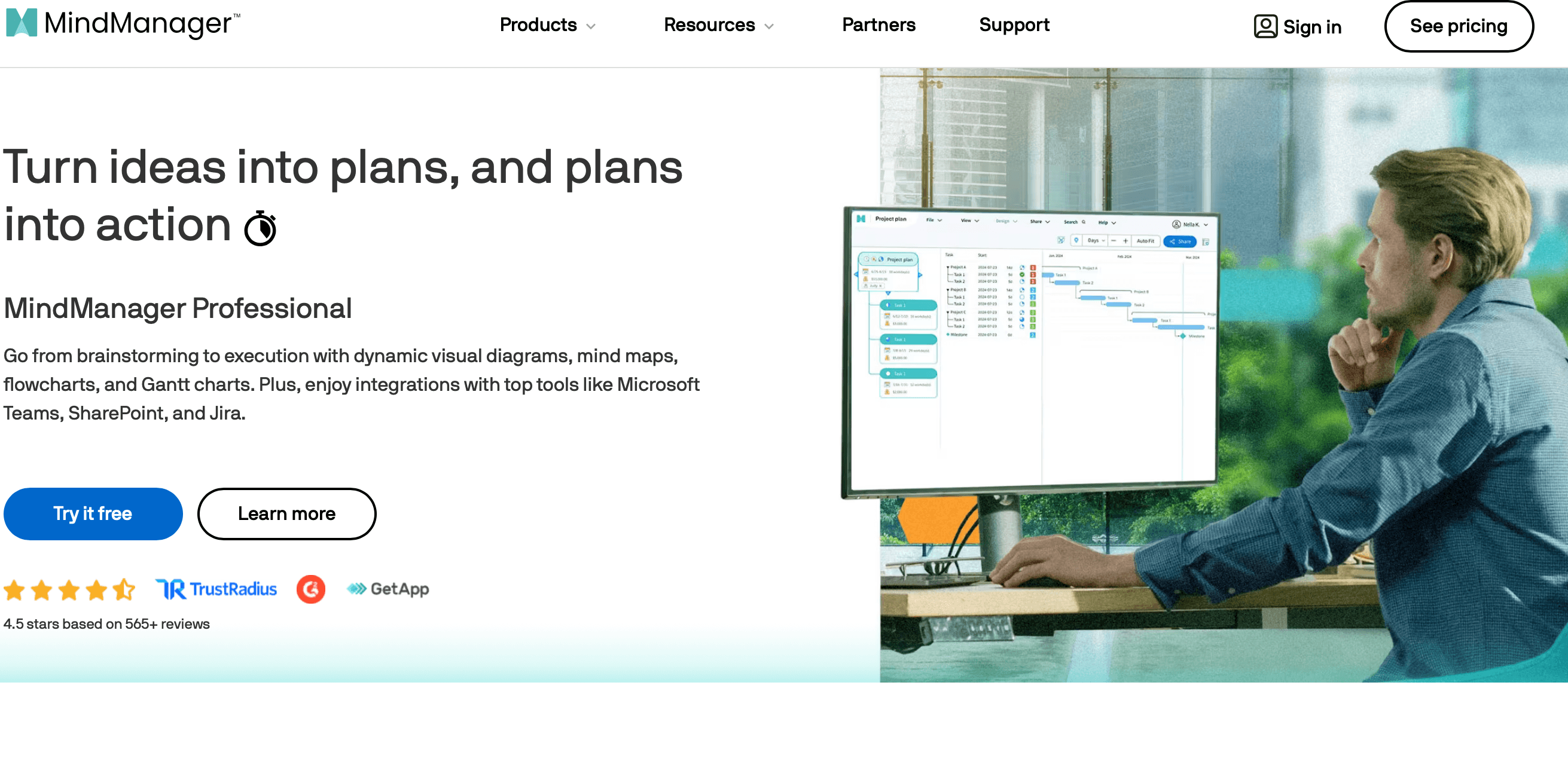 From management consultants synthesizing complex client engagements into structured analysis maps through executive teams cascading strategic plans into operational roadmaps, MindManager’s multi-view toggle, Gantt integration, Microsoft Office export, and linked maps architecture deliver a visual planning capability that no simpler alternative at any price matches for serious professional use.
Potential Limitations and Honest Considerations
MindManager is the most capable mind mapping platform available, but specific limitations matter for certain users and use cases:
- Premium Pricing Relative to Alternatives: At ~$169–$179/year for Professional, MindManager is 2–3× more expensive than XMind ($59/year) and MindMeister ($69/year), and significantly more than free tools like Coggle. For users who need only basic mind mapping, the premium is not justified — the advanced features that define MindManager’s advantage (Gantt, project management, deep Office integration) must be actively used to deliver value that compensates for the cost difference.
- No Permanent Free Plan: MindManager offers only a 30-day trial, not an ongoing free tier — competitors at every price level (XMind, MindMeister, Coggle, Miro) offer some level of free permanent access. Users who want a free option for occasional low-volume use will need to look elsewhere; the MindManager value proposition is for consistent daily professional use that justifies a subscription investment.
- Meaningful Learning Curve: MindManager’s feature depth creates a real learning investment before achieving proficient use. New users who open the application expecting immediate productivity comparable to Canva or Google Docs will be disappointed — the tutorials are good and help substantially, but becoming genuinely productive requires 2–3 weeks of regular use. Teams deploying MindManager organizationally should budget for structured onboarding rather than self-service adoption.
- Mac Version Lags Windows Historically: Multiple independent reviewers specifically note that MindManager’s Mac version has historically lagged the Windows version in feature parity and performance — though this gap has narrowed in recent versions. Mac-primary users should specifically evaluate the Mac version during the free trial rather than assuming Windows review coverage transfers fully to the Mac experience.
- Performance Degrades on Very Large Maps: Maps with hundreds of nodes and attached files can experience rendering performance degradation — particularly on older hardware. Heavy users building comprehensive knowledge management maps with large file attachments should test large-map performance on their actual hardware during the trial before committing.
- Real-Time Collaboration Requires Enterprise Upgrade: The co-editing capability that most collaborative tools offer at mid-tier pricing requires MindManager’s Enterprise plan — the Professional plan supports sharing and sequential editing but not simultaneous real-time co-editing. Teams who rely on live collaborative editing sessions may find the Enterprise upgrade cost significant on a per-seat basis.
- No Free API for Custom Integrations: MindManager does not offer a public API for custom integrations — limiting its connectivity to systems outside the Microsoft ecosystem. Organizations with complex custom integration requirements (Salesforce, custom ERPs, niche project management tools) may need to rely on manual export/import workflows or middleware solutions rather than native automated data flows.
- Mobile App Is Viewing-Only: MindManager’s iOS and Android apps are primarily viewing and light editing tools — full-featured map creation and editing is not supported on mobile at the same level as desktop. Teams who need full mobile editing capability will find MindManager’s mobile experience limiting compared to the desktop-first design.
Future Outlook and Real-World Applications
MindManager’s market position strengthens as the volume and complexity of information that knowledge workers must process continues growing. The fundamental problem MindManager solves — making complex information manageable through visual structure — becomes more valuable as the information environment becomes denser, not less. AI tools that generate summaries and analysis create more structured information that needs to be organized and acted upon; MindManager is the tool that makes this organization visual, connected, and planning-ready.
Use Cases Across Professional Disciplines and Organizations
- The Strategy Team Running Annual Planning: Organizations conducting annual strategic planning cycles use MindManager as the collaborative platform for facilitating planning workshops — building the strategic plan map in real time during the session, exporting immediately to PowerPoint for leadership review, and cascading to departmental operational plans that link back to the master strategy map.
- The Project Management Office Standardizing Visual Planning: PMOs implementing organization-wide project management standards use MindManager to create standardized project plan templates — ensuring consistent project structure, deliverable organization, and Gantt timeline configuration across all projects in the portfolio.
- The Academic Researcher Synthesizing Literature: Researchers and graduate students use MindManager to synthesize reading notes across dozens or hundreds of sources — building thematic concept maps that reveal patterns and connections across literature that linear notes cannot surface, accelerating literature review and supporting research hypothesis development.
- The Technical Writer Structuring Documentation: Technical writers use MindManager to plan documentation structure — building content architecture maps that capture all topics, relationships, and hierarchies before writing begins, and exporting the map structure to Word as the document scaffold for efficient writing that follows a pre-validated organization.
- The IT Team Mapping System Architecture: IT architects and system administrators use MindManager’s diagram capabilities to document network architecture, system dependencies, user flows, and disaster recovery procedures — creating living technical documentation that links to supporting files and can be navigated in presentation mode for architectural reviews and staff onboarding.
Expert prediction: MindManager’s trajectory in 2026 and beyond is toward deeper AI integration — using AI-generated outlines, summaries, and content as inputs to MindManager maps that structure and connect AI outputs in visually navigable architectures. The combination of AI generation speed (producing research summaries, meeting notes, and strategic analyses quickly) with MindManager’s visual structuring and Microsoft ecosystem integration (connecting those AI outputs to actual projects, tasks, and documents) represents a high-value workflow that positions MindManager as the “AI output organizer” for knowledge work — the tool that makes AI-generated information usable rather than overwhelming. Alludo’s continued investment in MindManager’s development and its positioning in the enterprise productivity tool category suggest long-term platform stability and feature development continuity.
Conclusion
MindManager 2026 delivers the most powerful, feature-complete, and enterprise-capable mind mapping and visual planning platform available — with 25+ years of development producing a unique capability combination of multi-diagram toggle for the same data, built-in Gantt charts and project management, deep Microsoft Office ecosystem integration including Word, Excel, PowerPoint, Outlook, Teams, and Project, a perpetual purchase option increasingly rare in 2026 software, real-time co-editing on Enterprise plans, and a 30-day fully featured free trial with no credit card. At ~$169–$179/year for Professional, MindManager is 2–3× more expensive than leading alternatives and has no permanent free plan — making it appropriate for professionals who actively use its advanced capabilities daily, not for occasional basic mind mapping where simpler alternatives deliver sufficient value. But for the management consultant who synthesizes complex client engagements visually, the project manager who needs integrated Gantt and mind map views of the same project data, the strategic planner who converts brainstorming sessions into PowerPoint presentations and Word documentation with a single export, and the enterprise organization deploying collaborative visual planning infrastructure in a Microsoft-centric environment — MindManager’s premium over cheaper alternatives is justified by capabilities that no competing mind mapping tool currently matches, and its 2 million+ user base and 25-year development history provide the stability and depth that serious professional tools demand.
Ready to transform how you think, plan, and communicate visually? Try MindManager free for 30 days — no credit card required:
👉 Open MindManager Account: https://worldoftech.space/mindmanager
👉 Our YouTube Channel: https://www.youtube.com/@world_tech79
👉 Our Facebook Fanpage: https://www.facebook.com/profile.php?id=61576258059614
👉 Our X (Twitter): https://x.com/worldoftech79





