
SwifDoo PDF has established itself as one of the most compelling all-in-one PDF software solutions for individuals, freelancers, and small to medium-sized businesses who need a powerful, affordable alternative to Adobe Acrobat — without sacrificing the features that matter most in daily document workflows. Before diving into the full feature breakdown and pricing analysis ahead, it’s worth highlighting what makes SwifDoo PDF stand out in 2026: a comprehensive feature set covering PDF editing, converting, merging, compressing, annotating, creating, signing, and OCR — all in one lightweight application with a clean, beginner-friendly interface — available at just $8/month on the monthly plan, $41.40/year on the annual plan, and a perpetual lifetime license at $99.90, with third-party promotional deals frequently offering the lifetime Pro license for as low as $29.97–$34.99. Whether you’re a freelancer editing contracts on the go, a small business team converting scanned invoices to editable Word files with OCR, a student annotating research PDFs, an office professional merging multi-department reports, or a solo creator who refuses to pay Adobe’s $239.88/year subscription for PDF editing, this comprehensive review walks you through every major feature, pricing option, and real-world consideration for SwifDoo PDF in 2026.
SwifDoo PDF 2026 Review: The Best All-In-One PDF Editor and Converter for Individuals and Small Business Teams
Overview and What Makes SwifDoo PDF Different in 2026
SwifDoo PDF is a Windows-based all-in-one PDF software application developed by SwifDoo Technology. Positioned as a capable, affordable, and user-friendly alternative to Adobe Acrobat Pro and Nitro PDF, SwifDoo PDF consolidates the full spectrum of PDF document tasks — editing, converting, merging, compressing, signing, annotating, protecting, and OCR processing — into a single lightweight application that doesn’t require a $200+ annual subscription to access professional-level PDF functionality.
The platform’s core value proposition is straightforward: most users need 80–90% of what Adobe Acrobat does at 10–15% of the price. Adobe Acrobat Pro Standard costs $155.88/year; Acrobat Pro costs $239.88/year. SwifDoo PDF’s annual plan is $41.40/year — and a perpetual lifetime license eliminates the subscription entirely at $99.90 one-time (or significantly less during promotional periods). For individuals and small teams who edit PDFs regularly but don’t need enterprise Adobe Sign workflows or complex API integrations, SwifDoo PDF delivers the essential and advanced features at a price point that makes the math compelling.
The platform supports Windows 7 through Windows 11, requires minimal system resources (150MB storage, 1GHz processor), and includes a free trial that lets users evaluate the full feature set before committing to a paid plan. Support is provided in English, French, and German, broadening its reach across key international markets.
SwifDoo PDF in 2026 — Key Platform Facts
- All-In-One PDF Workflow: Covers every major PDF task — editing, creating, converting, merging, splitting, compressing, annotating, signing, protecting, OCR, and form filling — in a single Windows application with no additional tools required.
- Lifetime License Available at $99.90: A perpetual license removes subscription anxiety entirely — pay once, use forever with free upgrade service included. Third-party deal platforms frequently offer the Pro lifetime license at $29.97–$34.99 during promotional periods.
- Lightweight and Fast: At just 150MB installed, SwifDoo PDF runs efficiently on standard hardware — described by reviewers as “lightweight, especially compared to other known software,” loading faster and consuming fewer system resources than Adobe Acrobat.
- Free Online Converter: SwifDoo offers a completely free online PDF conversion tool at swifdoo.com — allowing file conversion without downloading any software, accessible to anyone without an account or payment.
- Multilingual Support: Interface and support available in English, French, and German — broader language support than many comparable PDF tools at this price point.
- Regular Software Updates: SwifDoo PDF receives consistent updates based on user feedback — reviewers note the development team actively incorporates feature requests and bug fixes into release cycles.
- Free Trial Available: Full-feature free trial available without credit card requirement — enabling genuine feature evaluation before any purchase commitment.
- Broad User Base: Serves freelancers, startups, SMEs, agencies, enterprises, nonprofits, and government organizations — with feature depth appropriate for both occasional individual users and regular business workflows.
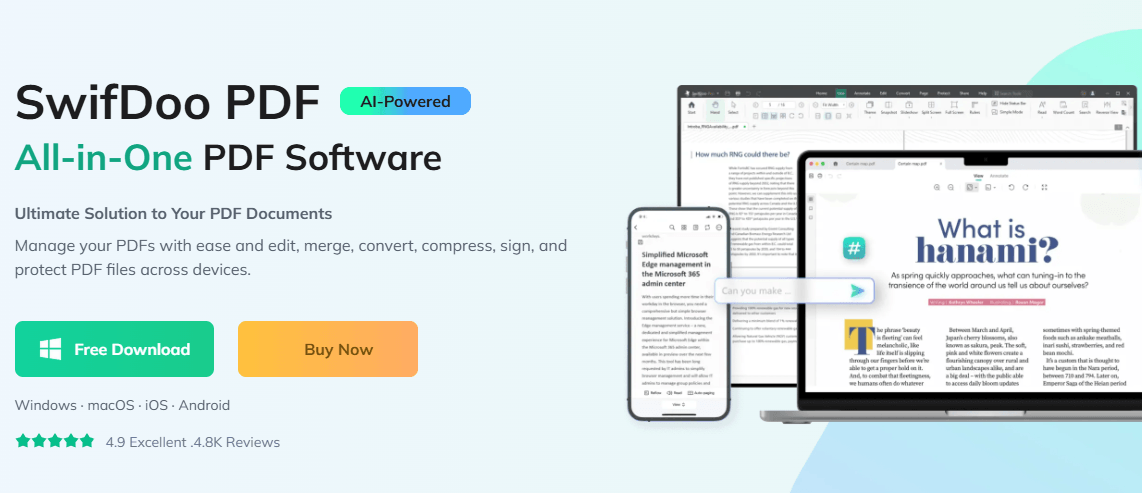
SwifDoo PDF delivers the complete PDF editing, converting, annotating, signing, and OCR workflow that most professionals need daily — at a fraction of Adobe Acrobat’s cost, with a perpetual lifetime license option that eliminates subscription fees entirely.
Key Features and PDF Capabilities
SwifDoo PDF’s strongest competitive position is its breadth — the feature set covers every core PDF task without requiring users to piece together multiple tools, browser extensions, or web services for different operations. Here is a comprehensive breakdown of every major capability.
PDF Editing: Text, Images, Pages, and More
- Text Editing: Edit existing text in PDF documents directly — change wording, fix typos, insert new copy, and modify font style, size, and color within the PDF without converting to another format first. SwifDoo’s text recognition is noted by reviewers as reliable for standard PDFs, with the ability to switch between “Edit” and “Move” modes for text versus layout adjustments.
- Image Editing: Insert, replace, resize, crop, and delete images within PDF documents — enabling visual updates to branded documents, brochures, and reports without full document redesign in a source application.
- Page Manipulation: Reorder, rotate, insert, and delete individual pages within multi-page PDFs — managing document structure without rebuilding from scratch.
- Link Management: Add, edit, and remove hyperlinks within PDF documents — connecting internal document sections or external web resources within the PDF for interactive document creation.
- Headers and Footers: Add, edit, or remove headers and footers across document pages — applying consistent page numbering, document titles, or date stamps across multi-page reports and legal documents.
- Watermarks: Add custom watermarks to PDFs — text or image-based — and remove existing watermarks from documents you own. Useful for draft management, confidentiality marking, and branded document creation.
- Whiteout Tool: Remove unwanted content from PDF pages using the whiteout feature — covering specific sections with white blocks to redact or clean content areas without leaving visible deletion marks.
- Background Editing: Add or modify page background colors and patterns — enabling branded document customization without full redesign in an external application.
- Bates Numbering: Apply Bates numbering for legal document management — adding sequential identifiers to pages across document sets for legal filing and discovery workflows.
PDF Converting: Multi-Format Bidirectional Conversion
- PDF to Word (.docx): Convert PDFs to editable Microsoft Word documents — SwifDoo’s conversion engine preserves formatting, font styles, tables, and layout with high fidelity, significantly reducing the manual reformatting time that typically follows PDF-to-Word conversion with lower-quality tools.
- PDF to Excel: Extract tabular data from PDFs to Excel spreadsheets — maintaining table structure and data relationships for further analysis without manual re-entry.
- PDF to PowerPoint: Convert PDF presentations to editable PowerPoint files — enabling slide modification and content reuse from PDF-locked presentations.
- PDF to Image (JPG, PNG, HEIC): Export individual PDF pages or entire documents as image files — useful for social media content, thumbnail generation, and image-based document sharing.
- PDF to EPUB: Convert PDF documents to EPUB format for e-reader compatibility — useful for content creators and publishers distributing documents across reading devices.
- PDF to CAD: Convert PDF technical drawings to CAD-compatible formats — a specialized capability relevant to engineering and architecture workflows that most PDF editors at this price point do not offer.
- Word/Excel/PPT to PDF: Convert Microsoft Office documents to stable, formatting-preserved PDFs — producing consistent presentation-quality output from editable source documents.
- Image to PDF: Convert JPG, PNG, and other image formats to PDF — ideal for document scanning workflows and image collection archiving.
- Format Preservation: SwifDoo’s conversion engine maintains original formatting quality during conversion — reviewers specifically praise format preservation as a standout characteristic, with one editorial review noting: “No more lost formatting: SwifDoo PDF conversions just work.”
OCR: Converting Scanned Documents to Editable Text
- Optical Character Recognition (OCR): SwifDoo PDF’s OCR engine converts scanned documents and image-based PDFs into searchable, editable text files — transforming paper-origin documents into fully manipulable digital files without manual transcription.
- Multi-Language OCR: OCR processing supports foreign languages with in-program translation capabilities — enabling smooth processing of international documents without separate translation tools.
- Editable Output While Preserving Layout: OCR conversion maintains the original document’s format and layout in the editable output — preserving visual structure alongside text editability for professional-grade document repurposing.
- Scanned PDF Processing: Scanned invoices, contracts, receipts, and forms become editable and searchable PDFs after OCR processing — a critical workflow for businesses digitizing paper document archives or processing incoming scanned correspondence.
Organize: Merge, Split, Compress, and Manage
- Merge PDFs: Combine multiple PDF files into a single organized document — consolidating reports from multiple contributors, aggregating scanned pages, or assembling application packages from separate component files.
- Split PDFs: Divide large PDF documents into smaller, more manageable files — extracting specific page ranges, separating chapters, or creating individual-page exports from multi-page originals.
- Compress PDFs: Reduce PDF file size while maintaining acceptable visual quality — compressing large design files, image-heavy reports, or email-attachment-sensitive documents to manageable sizes without quality degradation that makes them unpresentable.
- Page Reordering: Drag and drop page thumbnails to reorder document pages — correcting scanning order errors or reorganizing section sequence without rebuilding the document.
- PDF Cropping: Crop PDF pages to remove margins, adjust aspect ratios, or reframe content — useful for preparing PDF pages for specific print formats or display contexts.
- Extract Pages: Extract specific pages from a multi-page PDF as individual files — creating standalone documents from selected pages without modifying the original.
Annotate and Review: Comments, Highlights, and Markup
- Highlights and Underlines: Apply color-coded highlights and underlines to key text passages — marking important content for review, study, or collaborative feedback without altering the underlying document.
- Sticky Notes and Comment Boxes: Add sticky note annotations and comment boxes at specific document locations — enabling structured feedback and review workflows without email chains.
- Drawing and Markup Tools: Draw freehand annotations, insert shapes, and add drawing-based markup — useful for diagrammatic feedback on visual documents, forms, and technical drawings.
- Text Stamps: Apply predefined or custom text stamps (Approved, Draft, Confidential, Received) — adding document status indicators without manual text insertion on every page.
- Measurement Tools: Measure distances, areas, and perimeters on PDF technical drawings — relevant to engineering, architecture, and real estate document workflows where spatial relationships in documents need quantification.
Sign and Security: E-Signatures and Password Protection
- E-Signature Creation: Create and apply legally binding digital e-signatures — drawing, typing, or uploading a signature image to finalize contracts, agreements, and approval documents without printing, signing, and scanning.
- Password Protection: Add open-password protection to PDFs — requiring a password to open and view document contents, protecting sensitive documents during transmission.
- Permission Settings: Set document permissions for copying, editing, printing, and commenting — restricting specific actions on distributed documents while allowing others (e.g., allowing printing but preventing editing or copying).
- Password Removal: Remove password protection from PDFs you own — enabling unrestricted access to your own protected documents when password entry is no longer required for the use case.
- Restriction Removal: Remove restrictions on copying, editing, printing, signing, and commenting from PDFs — unlocking workflow-blocking restrictions on documents for which you have legitimate access rights.
- Secure Document Encryption: Encrypt PDF documents with strong encryption — protecting confidential information in documents shared externally or stored on shared systems.
PDF Viewer and Reading Tools
- Multiple Reading Modes: Switch between single-page, continuous scroll, two-page, and fullscreen reading modes — optimizing the reading experience for different document types and screen configurations.
- Text-to-Speech: Convert PDF text to audio playback — enabling hands-free document consumption for accessibility needs, multitasking, and learning preferences.
- Translation Tools: In-document translation capabilities for international content — enabling quick content comprehension across language barriers without leaving the application.
- Full Text Search: Search for specific words or phrases within any open PDF — locating target content within long documents without manual page-by-page scanning. Full Text Search is rated 4.5/5 by SwifDoo users on Capterra.
- Print Management: Print directly from the program with support for double-sided documents and booklet printing — covering professional print output requirements without separate print configuration tools.
- Bookmarks and Navigation: Create, manage, and navigate document bookmarks — enabling structured navigation through long documents without scrolling from page to page.
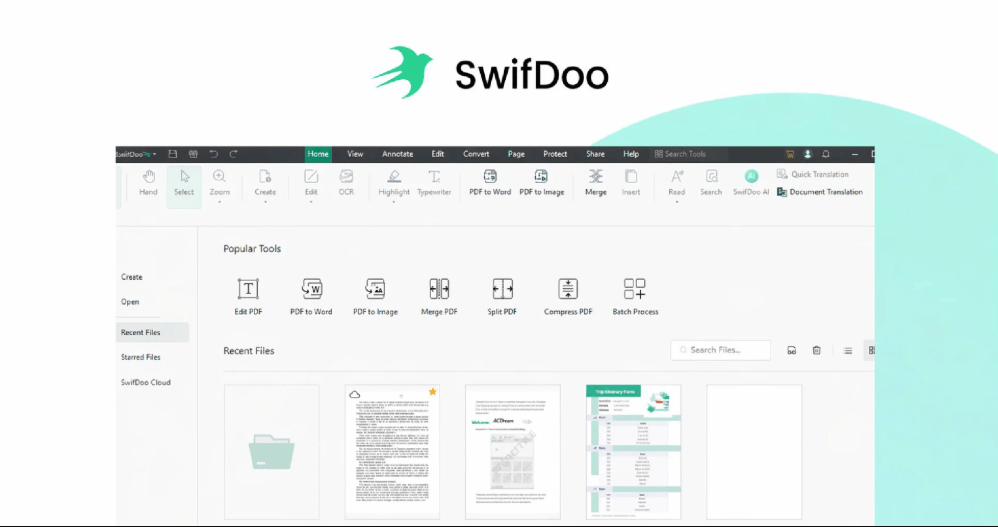
SwifDoo PDF’s all-in-one workflow covers editing, OCR, conversion, annotation, e-signatures, compression, and security — consolidating the tools most professionals use across multiple separate applications into a single lightweight Windows application.
Pricing, Plans, and Value vs. Alternatives
SwifDoo PDF’s pricing model is one of its strongest competitive advantages — offering genuine choice between subscription and perpetual license formats at price points significantly below Adobe Acrobat, Nitro PDF, and ABBYY FineReader. The free trial and free online converter further reduce the barrier to entry for new users.
SwifDoo PDF Pricing Breakdown for 2026
| Plan | Price | Devices | Best For | Key Details |
|---|---|---|---|---|
| Free Trial | $0 | 1 | Evaluation before purchase | Full feature access during trial period; no credit card required; genuine evaluation of all tools before commitment |
| Free Online Converter | $0 | Any browser | Occasional conversion needs | Web-based PDF conversion at swifdoo.com; no software download; no account required; completely free with no usage limits stated |
| Monthly Subscription | $8/month | 1 | Short-term users, occasional use | Access to all SwifDoo PDF features; 1 device; unlimited device switches per month; free upgrade service and tech support included |
| Annual Subscription | $41.40/year (~$3.45/month) | 2 | Regular users — best value subscription | All features; 2 devices simultaneously; unlimited device switches per year; free upgrades and tech support. 57% cheaper than Adobe Acrobat Standard ($155.88/yr) |
| Perpetual License | $99.90 one-time | 2 | Long-term users avoiding subscriptions | Pay once, use forever; all features; 2 devices; free upgrade service and tech support; no recurring charges. Best long-term cost per year at <$10/yr by year 11+ |
| Perpetual License (Promotional) | $29.97–$34.99 (via deal platforms) | 2 | Deal-seekers; budget-conscious professionals | Same lifetime access as $99.90 perpetual license; frequently available on StackSocial, BleepingComputer deals, and third-party resellers at 65–80% discount |
Pricing model explained: SwifDoo PDF’s annual plan at $41.40/year is the most compelling subscription value in the PDF software market for individual users — delivering the full professional feature set at approximately $3.45/month. The perpetual license at $99.90 is the right choice for professionals who plan to use PDF software regularly for several years and want to eliminate subscription costs entirely. For users who find a promotional deal (routinely available at $29.97–$34.99), the perpetual license represents extraordinary value — less than one month of Adobe Acrobat Standard’s cost for unlimited lifetime access.
Pro tip: Check BleepingComputer, StackSocial, DealFuel, and similar software deal platforms before purchasing at full price — SwifDoo PDF Pro perpetual licenses appear regularly at 65–80% off the list price. The deal terms typically include a 30-day redemption window and require an active internet connection for license verification.
Cost Comparison: SwifDoo PDF vs. Major Alternatives
- vs. Adobe Acrobat Pro ($239.88/year): SwifDoo PDF annual plan is 83% cheaper. Adobe wins for enterprise-scale workflows, advanced form creation, Adobe Sign integration, and Mac support — but for the majority of PDF editing tasks most users need daily, SwifDoo PDF delivers equivalent functionality at a fraction of the cost.
- vs. Adobe Acrobat Standard ($155.88/year): SwifDoo PDF annual plan is 73% cheaper. Acrobat Standard has a more polished OCR engine and deeper integration with Adobe Creative Cloud — but for standalone PDF editing, converting, and signing, SwifDoo PDF competes effectively.
- vs. Nitro PDF ($17.70/month): SwifDoo PDF monthly plan ($8/month) is 55% cheaper. Nitro PDF offers stronger enterprise collaboration features; SwifDoo is the better choice for individuals and small teams without enterprise workflow requirements.
- vs. iLovePDF ($9/month): Comparable price point, but SwifDoo PDF is a full desktop application with offline capability; iLovePDF is primarily web-based. SwifDoo is preferable for users who process documents locally for privacy or work in environments with unreliable internet access.
- vs. ABBYY FineReader PDF ($16/month): ABBYY FineReader has the strongest OCR engine in the market; SwifDoo PDF’s OCR is capable but secondary. For OCR-primary workflows (digitizing large document archives), ABBYY is the better specialist tool; for general PDF workflows at lower cost, SwifDoo wins.
Comparisons: SwifDoo PDF vs. Competitors in 2026
The PDF software market in 2026 includes a wide range of competitors from the dominant Adobe ecosystem to web-based tools and specialist alternatives. SwifDoo PDF’s differentiation is its combination of comprehensive desktop features, lightweight performance, and aggressive pricing — particularly the perpetual license option that most competitors don’t offer.
SwifDoo PDF vs. Adobe Acrobat, Nitro, iLovePDF, and ABBYY FineReader
| SwifDoo PDF 2026 | Adobe Acrobat Pro | Nitro PDF | iLovePDF | ABBYY FineReader | |
|---|---|---|---|---|---|
| Annual Price | $41.40/year | $239.88/year | $212.40/year | $108/year | $192/year |
| Lifetime License Available | Yes ($99.90 / deals from $29.97) | No (subscription only) | No | No | No |
| PDF Editing | Yes (text, images, pages) | Yes (industry-leading) | Yes | Basic | Yes |
| OCR | Yes (multi-language) | Yes (industry-leading) | Yes | Limited | Yes (best-in-class) |
| PDF Conversion | Yes (15+ formats incl. CAD) | Yes | Yes | Yes | Yes |
| E-Signatures | Yes (included in all plans) | Yes (+ Adobe Sign) | Yes | Yes (basic) | Limited |
| Free Online Tool | Yes (swifdoo.com) | Limited | No | Yes (primary offering) | No |
| Mac Support | Windows only | Yes (Windows + Mac) | Windows only | Web (all platforms) | Windows + Mac |
| Free Trial | Yes (no credit card) | Yes (7 days) | Yes | Yes (free tier) | Yes |
| Cloud Integration | Limited | Yes (Adobe Cloud) | Yes | Yes (Google Drive, Dropbox) | Limited |
| Best For | Individuals, freelancers, SMEs — value-focused full desktop PDF workflow | Enterprise, creative professionals, Adobe ecosystem users | Enterprise teams needing collaboration | Browser-first users, occasional use | High-volume OCR and document digitization |
SwifDoo PDF’s edge: No competing PDF software at SwifDoo PDF’s price point offers a combination of comprehensive editing, 15+ format conversion (including CAD), multi-language OCR, e-signatures, annotation, compression, and a perpetual lifetime license option — all in a lightweight Windows application with a free online converter and no mandatory subscription. Adobe Acrobat is superior for enterprise-scale workflows and Mac users; ABBYY FineReader leads for heavy OCR workloads; but for the majority of daily PDF tasks at the lowest total cost of ownership, SwifDoo PDF is the strongest value choice in 2026.
Getting Started: Step-by-Step Guide for New Users
SwifDoo PDF is designed for immediate productivity — the clean, ribbon-style interface mirrors Microsoft Office enough that new users can find their way around without a learning curve. Here’s how to get from download to your first productive workflow.
Step-by-Step Guide for New SwifDoo PDF Users
- Download the Free Trial:
- Visit swifdoo.com and download the free trial — no credit card required. The installer is lightweight (150MB) and compatible with Windows 7 through Windows 11, completing in a few minutes on any standard hardware.
- Launch SwifDoo PDF and explore the toolbar — the ribbon interface organizes features by workflow category (Edit, Convert, Organize, Annotate, Protect) making feature discovery intuitive for users familiar with Microsoft Office-style navigation.
- Open any PDF you work with regularly — your first test should be a real document from your actual workflow, not a simple test file. This gives you the most accurate evaluation of whether SwifDoo’s editing, conversion, or OCR handles your specific document type effectively.
- Test Your Core Workflow:
- For editing workflows: Open a PDF with text you need to modify, switch to Edit mode in the toolbar, click on the text you want to change, and make your edit. The “Edit Text” and “Edit Image” modes are clearly labeled and operate similarly to text box editing in Word.
- For conversion workflows: Use Convert → PDF to Word (or your target format) and test the output quality on your specific document types. Check table formatting, font preservation, and image placement in the converted output — these are where PDF conversion tools most often fall short.
- For OCR workflows: Open a scanned PDF or an image-based document, select OCR from the toolbar, choose your language settings, and let the engine process the document. Review the text recognition accuracy on your specific document type before deciding the OCR quality meets your requirements.
- Set Up E-Signatures for Document Signing:
- Navigate to the Sign section in the toolbar — create your signature by drawing it with a mouse or trackpad, typing your name in a signature font, or uploading an image of your handwritten signature.
- Save your signature for reuse — SwifDoo stores created signatures for quick application to future documents, eliminating the need to recreate your signature each time you need to sign.
- Apply the signature to a document by clicking the signature position on the PDF page — position and resize as needed before confirming the signature placement.
- Configure Security Settings for Sensitive Documents:
- Navigate to Protect in the toolbar — set an open password for documents you’re distributing to external parties that require access control.
- Configure permission settings to restrict copying, editing, or printing on distributed documents while maintaining your own full access — useful for contracts and proprietary documents shared for review without modification rights.
- Apply a watermark to draft documents before distribution — preventing premature circulation of documents that are not yet finalized or approved.
- Choose Your Purchasing Plan:
- Evaluate after genuine trial usage — SwifDoo PDF’s value is most apparent when you’ve tested it against your actual workflow rather than generic demo documents.
- For long-term users: the Annual plan at $41.40/year is the best ongoing value; the Perpetual License at $99.90 eliminates subscriptions entirely and pays for itself versus the annual plan in approximately 2.5 years.
- Check deal platforms (BleepingComputer, StackSocial, DealFuel) before purchasing at full price — promotional perpetual licenses appear regularly at $29.97–$34.99, representing 70% savings versus the list perpetual price.
Tips for Getting the Most from SwifDoo PDF
- Use the Compress feature before emailing PDF attachments — SwifDoo’s compression reduces file sizes significantly for image-heavy documents, keeping attachments under email size limits without visible quality degradation for standard business documents.
- For batch document processing (merging multiple client-submitted PDFs, for example), use the Merge function with drag-and-drop file ordering — building the merged document in the correct page order before combining saves editing time after merging.
- When OCR processing scanned documents, verify the language setting matches the document language before running OCR — incorrect language settings are the most common cause of poor OCR accuracy on correctly scanned documents.
- Use the Whiteout tool for quick redaction of sensitive information on shared documents — faster than creating a dedicated redaction layer, though for legal-grade redaction requiring permanent data removal, verify the method meets your jurisdiction’s requirements.
- Add SwifDoo PDF as your default PDF viewer in Windows settings — this makes it the automatic handler for all PDF links and file opens, eliminating the friction of launching SwifDoo separately whenever you receive a PDF that needs attention.
Advanced Use Cases and Expert Analysis
For freelancers, small business owners, consultants, and small team professionals, SwifDoo PDF in 2026 delivers a practical, affordable solution to the PDF problem that has persisted since PDF became the dominant document standard: how do you edit, convert, sign, and manage PDF documents without paying enterprise software prices for tools that most individual users only need 20% of?
Expert Reviews and Real-World Use Cases
- Freelance Consultants and Contract Workers: Independent consultants who receive client documents as PDFs and need to annotate, edit, sign, and return them use SwifDoo PDF as their complete document workflow tool — replacing the Adobe Acrobat subscription their agency job used to provide. At $41.40/year versus Adobe’s $155.88–$239.88/year, the savings are significant for professionals managing their own software costs.
- Small Business Administration Teams: Office managers and administrative staff who process incoming PDF invoices (many of which are scanned), convert them for accounting software import via OCR, and manage outgoing document signing use SwifDoo PDF as a single-tool replacement for multiple browser extensions and web tools that previously handled these tasks separately.
- Students and Academic Researchers: Graduate students and researchers who annotate PDF journal articles, highlight key passages, add margin notes, and compile excerpts from multiple PDF sources into single organized documents use SwifDoo’s annotation, merging, and splitting tools for daily academic document management at student-appropriate pricing.
- Real Estate and Legal Professionals: Real estate agents and paralegal staff who handle high volumes of contracts, disclosure documents, and agreements use SwifDoo PDF for e-signature workflows, Bates numbering for legal document sets, and form filling — at a cost basis that makes sense for individual practitioners without enterprise software budgets.
- Content Creators and Publishers: Digital content creators who produce workbooks, templates, ebooks, and course materials in PDF format use SwifDoo PDF for document assembly (merging), formatting finalization, compression for delivery, and password protection for paid content distribution — covering the full digital publishing workflow at minimal software cost.
Independent assessment: Reviewers across Capterra, G2, SourceForge, and Software Advice consistently identify SwifDoo PDF’s strongest attributes as its ease of use, comprehensive feature coverage, and pricing transparency. Specific praise appears frequently for the clean, non-cluttered interface — described as having “no learning curve” — and the text editing capability, which is called out as “especially good” compared to alternatives in the same price bracket. The software is described as “light yet powerful” and “a great choice for a PDF manager software if you want something that’s both easy to use and fast.” The overall independent editorial verdict from multiple reviewers in 2025–2026: “If you’re looking for an alternative to other pricey editors, you should take advantage of SwifDoo PDF.”
From freelancers signing contracts and small businesses processing OCR invoices to researchers annotating papers and content creators publishing PDF products, SwifDoo PDF delivers the complete professional PDF workflow at a price that makes perpetual licensing genuinely accessible.
Potential Limitations and Honest Considerations
SwifDoo PDF is a strong platform for its target audience, but there are real limitations that matter for specific use cases:
- Windows Only — No Mac Support: SwifDoo PDF is available exclusively for Windows — Mac users need to look at alternatives such as PDF Expert, ABBYY FineReader for Mac, or Adobe Acrobat. This is the single most significant platform limitation for Mac-dominant creative and design environments.
- Limited Cloud Integration: SwifDoo PDF does not offer native integration with Google Drive, Dropbox, or OneDrive — a frequently cited limitation in user reviews. Documents must be downloaded locally for processing rather than opened and saved directly from cloud storage. A forthcoming cloud integration update has been noted as user-requested, but it was not available at the time of this review.
- OCR Quality Below ABBYY FineReader: SwifDoo PDF’s OCR is capable and handles standard scanned business documents well, but for high-volume, precision OCR workflows — digitizing complex document archives with varied formatting, multiple columns, or irregular scan quality — ABBYY FineReader remains the specialist leader. For typical business document OCR, SwifDoo is sufficient; for OCR-primary workflows, ABBYY is the better investment.
- Internet Connection Required for License Verification: The perpetual license version requires an active internet connection to maintain full functionality — users working in fully offline environments should verify whether this requirement is compatible with their operating conditions before purchasing.
- Customer Support Consistency: A subset of user reviews notes support response quality as variable — with some users reporting that support responses defaulted to reinstall instructions rather than investigating specific issues. For critical business workflows, evaluating support responsiveness during the free trial period is advisable before committing to the perpetual license.
- Licensing Management Complexity: Some users report that the license activation and device management system can be confusing — particularly for users who switch between multiple work computers. The annual plan’s unlimited monthly device switches address this partially, but users with complex multi-device setups should review the device terms before purchase.
- No Mobile App: SwifDoo PDF is a desktop Windows application — there is no iOS or Android mobile app. PDF viewing, annotation, and signing on mobile devices requires a separate tool. For professionals who need mobile PDF access, this is a meaningful gap versus Adobe Acrobat’s comprehensive mobile app ecosystem.
Future Outlook and Real-World Applications
The PDF software market in 2026 is increasingly bifurcated between enterprise-scale platforms with deep ecosystem integrations (Adobe Acrobat, Nitro, DocuSign) and accessible, affordable tools serving the vast majority of individual professionals and small teams who need reliable PDF functionality without enterprise pricing. SwifDoo PDF is firmly positioned in the second category — and that positioning aligns with the direction of the market for most non-enterprise users.
PDF Use Cases Across Professions and Business Types
- The Budget-Conscious Professional Leaving Adobe: Individual professionals migrating away from Adobe’s subscription pricing find SwifDoo PDF’s annual plan at $41.40/year — or a one-time perpetual deal at $29.97 — an immediate, significant cost reduction without sacrificing the editing, conversion, and signing tools they use daily.
- The Small Business Owner Managing Documents: Solo business owners who process contracts, invoices, client agreements, and compliance documents use SwifDoo PDF as their complete document management tool — signing, protecting, merging quarterly reports, and converting scanned receipts for accounting without multiple separate tools.
- The Remote Worker Managing PDF Workflows Locally: Remote professionals who handle sensitive client documents and prefer not to upload them to cloud-based web tools use SwifDoo PDF’s fully local desktop processing as a privacy-respecting alternative to browser-based PDF tools.
- The Educator Creating PDF Course Materials: Teachers and course creators who assemble PDF learning materials from multiple sources, add custom annotations, protect finished PDFs with passwords, and compress large files for LMS upload use SwifDoo PDF’s document organization and security tools for content production workflows.
- The Startup Team Avoiding Enterprise Software Costs: Early-stage startup teams managing lean software budgets use SwifDoo PDF to equip multiple team members with professional PDF tools at a per-user annual cost that fits pre-revenue operational constraints — choosing two-device annual licenses for the price of one month of Adobe Acrobat.
Expert prediction: As subscription fatigue continues to drive individual professionals and small businesses toward one-time purchase software, perpetual license PDF tools like SwifDoo PDF will capture a growing share of the market from subscription-only alternatives. Adobe’s pricing and subscription model are appropriate for enterprise environments and power users in the Adobe ecosystem; for the much larger population of professionals who need PDF editing occasionally to regularly but not constantly at enterprise scale, SwifDoo PDF’s pricing model and feature set represent the value proposition that Adobe Acrobat’s economics cannot match. Regular feature updates and growing multi-language support position SwifDoo PDF well for continued international expansion beyond its current English, French, and German language support.
Conclusion
SwifDoo PDF 2026 delivers one of the most complete, accessible, and affordably priced all-in-one PDF software solutions available for Windows users — covering editing, converting (15+ formats including CAD), OCR, merging, splitting, compressing, annotating, signing, and protecting PDFs in a single lightweight application at $41.40/year on the annual subscription or $99.90 as a perpetual lifetime license (with promotional deals as low as $29.97 offering the same lifetime access). The free online converter at swifdoo.com requires no download or account, and the no-credit-card free trial enables genuine feature evaluation before any purchase commitment. Mac support remains the platform’s most significant gap — Windows-only architecture limits SwifDoo PDF to one operating system. Cloud integration with Google Drive and Dropbox is also absent, requiring local file handling rather than cloud-native workflows. But for the majority of individual professionals, freelancers, remote workers, and small business teams on Windows who need reliable, comprehensive PDF tools without Adobe Acrobat’s $155–$240/year subscription, SwifDoo PDF is the most compelling value proposition in the PDF software market in 2026 — particularly for users who find a perpetual license deal and eliminate the subscription equation entirely.
Ready to handle all your PDF tasks without paying Adobe prices? Try SwifDoo PDF free today:
👉 Open SwifDoo PDF Account: https://worldoftech.space/swifdooPDF
👉 Our YouTube Channel: https://www.youtube.com/@world_tech79
👉 Our Facebook Fanpage: https://www.facebook.com/profile.php?id=61576258059614
👉 Our X (Twitter): https://x.com/worldoftech79





