
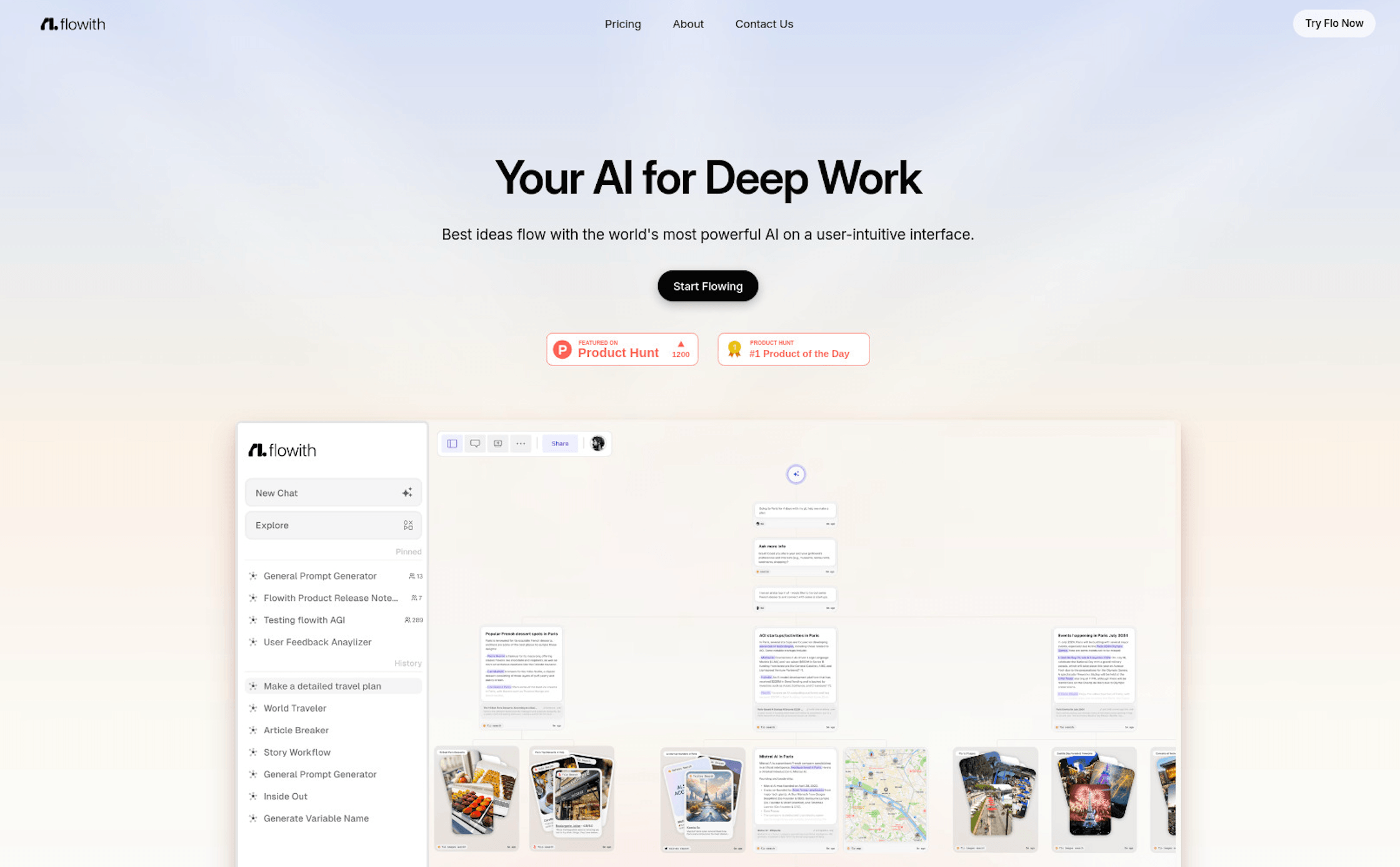
Most AI chats force you into a straight line: ask, answer, scroll up to find “that thing it said earlier,” repeat. Flowith throws that layout out. It’s an AI creation workspace built around an infinite 2D canvas, where every prompt and response becomes a movable node you can branch, rearrange, and revisit — instead of a chat log you lose track of. At its center sits Agent Neo, Flowith’s autonomous agent, which can plan and execute long, multi-step research or creation tasks with a claimed 10-million-token context window and access to over 40 AI models including GPT, Claude, and Gemini families, without you juggling separate subscriptions for each one.
Flowith is aimed at researchers, content creators, and teams handling projects too tangled for a single chat thread — think multi-source research reports, long-form content systems, or campaigns that need image, video, website, and slide generation in one place. It ships a free Starter tier, three paid plans running from roughly $18 to $400 a month, and an unusual credit-and-“free gens” pricing structure that rewards planning ahead but can catch new users off guard. This 2026 review walks through Flowith’s canvas and Agent Neo, its full model and tool lineup, real-world pricing, how it stacks up against Manus AI and a standard ChatGPT Plus subscription, the genuine pros and cons reported by users, and exactly who should — and shouldn’t — build their workflow around it.
Flowith Review 2026: The Infinite Canvas Workspace for Multi-Model AI Work
Overview and Background
Flowith is built by Flowith Technologies, co-founded by Yichen Wu and Derek Nee, with the product launching publicly in 2024 after roughly a year of development. Rather than positioning itself as a single-purpose chatbot, Flowith calls itself an “AI creation workspace” — a platform that blends a visual canvas, a persistent knowledge base (the Knowledge Garden), and autonomous agents into one environment for people whose work spans many AI interactions rather than one-off questions.
The core mechanic is the canvas itself. Every prompt-response pair becomes a node you can drag, branch from, and connect to other nodes, so a research project’s opening question, its follow-up explorations, competing hypotheses, and final synthesis can all live visibly on the same screen instead of buried in chat scrollback. On top of that sits Agent Neo, Flowith’s flagship autonomous agent, designed to break a goal into sub-tasks and work through web searches, document analysis, and synthesis over extended runs without constant hand-holding.
Flowith has also expanded well beyond text. The current product bundles AI image generation, AI video, AI website building, and AI slide creation (including access to models like Nano Banana Pro and Seedance) into the same subscription, plus a desktop environment for Mac called FlowithOS and an iOS app. It’s a broader bet than a typical single-model chatbot wrapper: the pitch is one workspace and one subscription standing in for what would otherwise be several separate AI tool bills.

Why Flowith Stands Out in 2026
A visual canvas instead of a linear chat log: Every exchange becomes a node you can branch, move, and connect. For research or long-form projects, you can zoom out to see the whole landscape of a project and zoom in on one thread for detail work — a genuinely different way of thinking with AI rather than a cosmetic skin on a chatbot.
Agent Neo handles long, autonomous runs: Point Neo at a research task and it plans, searches, reads, and synthesizes across many steps on its own, reportedly supporting extremely long context windows and 1,000+ inference steps on higher plans — well beyond what a single chat turn can hold.
One subscription, 40+ models: Flowith bundles access to a wide range of text, image, and video models — spanning providers like OpenAI, Google, ByteDance, and Kling — so you can switch models mid-project without maintaining separate accounts and separate bills for each one.
Knowledge Garden grounds answers in your own material: Upload documents and Flowith breaks them into discrete knowledge units (“Seeds”) that the AI draws from, so responses lean on your actual source material instead of purely general training data — useful for research and documentation work where accuracy to a source matters.
A genuine multi-tool creative stack: AI image, AI video, AI website, and AI slide generation sit inside the same canvas as the text and research tools, so a single project can move from research notes to a draft deck or landing page without switching platforms.
Real-time collaboration and Notion integration: Teams can work on the same canvas from different devices simultaneously, and Flowith connects with Notion for easy content transfer — useful for teams already running documentation or content pipelines elsewhere.
Climate-conscious positioning: Flowith directs 1% of revenue to permanent carbon removal technologies through partnerships with Stripe Climate and Frontier — a small but genuine differentiator for buyers who weigh a vendor’s environmental footprint.
Key Features and Technology
Flowith’s feature set breaks down into a handful of pillars that work together across the same canvas.
The Infinite Canvas and Multithread Interface
The canvas is Flowith’s foundation: an unlimited 2D space where each prompt-response pair is a node you can branch in multiple directions, reposition, and connect. Rather than one thread per conversation, you can run parallel explorations of the same problem side by side, then visually compare outcomes — a workflow closer to a research whiteboard than a messaging app.
Agent Neo (Infinite Agent)
Agent Neo is Flowith’s autonomous execution layer. Rather than requiring careful prompt engineering, it’s built to recognize intent and independently plan a sequence of sub-tasks — web research, document analysis, drafting, revision — and carry them out with minimal supervision. On higher plans, Neo’s monthly allowance of “Deep Research,” Slides, and Website generations scales sharply: Starter includes 1 of each, Pro roughly 22–36, Ultimate 70–116, and Infinite into the hundreds or low thousands, according to the official comparison table.
Knowledge Garden and Web Clipper
Upload source documents and Flowith atomizes them into “Seeds” — discrete, retrievable knowledge units the AI references when answering questions, keeping output grounded in your actual material. A built-in web clipper lets you capture pages directly into this knowledge base as you browse, which reviewers single out as one of the platform’s strongest, most frequently praised features.
AI Image, Video, Website, and Slides
Beyond text and research, Flowith bundles image generation (including access to Nano Banana Pro and GPT Image 2), video generation (ByteDance Seedance and Kling models), full website building, and AI slide creation into the same subscription. Batch generation and higher concurrency unlock on the paid tiers, making the platform usable for production-style creative workflows rather than one-off assets.
FlowithOS and Mobile Access
FlowithOS is a dedicated Mac desktop environment positioned as an “AI agent operating system,” designed for faster execution and persistent memory outside the browser. A companion Flowith iOS app extends the same credit pool and Agent Neo access to mobile, though the canvas metaphor — as with most spatial interfaces — is built for and works best on a larger screen.
Pricing, Plans, and Package Structure
Flowith runs a free Starter tier plus three paid plans, each billed monthly or yearly (yearly saves roughly 10–20%). Pricing is credit-based: every action on the canvas — a chat turn, an image, a video, an Agent Neo run — consumes credits from a monthly pool, and unused credits do not roll over. Higher tiers also unlock an “Unlimited Pack” that gives fair-use unlimited access to specific top-tier models for a fixed period, separate from the standard credit pool. The figures below reflect Flowith’s officially listed yearly-billed pricing; always confirm the live monthly price and any active promotion before subscribing.
| Plan | Price (USD) | What It Is | Best For |
|---|---|---|---|
| Starter | $0 | 300 one-time credits, standard models, 5 concurrent tasks | Testing the canvas and Agent Neo before committing |
| Pro | $17.91/mo (billed yearly at $214.92) or $19.90/mo | 20,000 monthly credits, 40+ models, 50 concurrent tasks | Individual creators and researchers building momentum |
| Ultimate | $44.91/mo (billed yearly at $538.92) or $49.90/mo | 50,000 monthly credits, Unlimited Pack, 100 concurrent tasks, commercial license | Power users and small teams running heavy workloads |
| Infinite | $399.92/mo (billed yearly at $4,799.04) or $499.90/mo | 500,000 monthly credits, unlimited concurrent tasks, dedicated support | High-volume teams and agencies with heavy AI production needs |
How Flowith Compares to Alternatives
| Factor | Flowith (Pro / Ultimate) | Manus AI | ChatGPT Plus |
|---|---|---|---|
| Interface | Infinite 2D canvas, branching nodes | Linear chat + agent task runner | Linear chat only |
| Model access | 40+ third-party text/image/video models | Manus’s own 1.6 model family only | OpenAI GPT models only |
| Autonomous agent | Agent Neo, long-context multi-step runs | Yes — Manus’s core focus, task automation | Limited (tasks/agent mode, narrower scope) |
| Creative tools | Image, video, website, slides bundled in | Slides, basic docs; limited image/video | Image generation (DALL·E) only, no video/site builder |
| Entry paid price | ~$17.91–$19.90/mo | ~$20/mo (Pro/Standard) | $20/mo |
| Pricing model | Credit-based, no rollover, variable per-model cost | Credit-based, no rollover, variable per-task cost | Flat monthly fee, usage caps not credits |
| Best for | Visual, multi-threaded research and creation | Hands-off task automation and deployment | Everyday chat, predictable flat pricing |
vs. Manus AI: Manus is a closer peer than ChatGPT — both are credit-based, agent-first platforms with a free tier and roughly $20/month entry pricing. The real difference is scope: Manus concentrates on autonomous task execution and deployment using its own model family, while Flowith spreads across a visual canvas, a 40+ model library, and a broader creative-content stack. If your priority is a single agent that quietly finishes a defined task, Manus is more focused; if you want to see and steer the thinking process across a sprawling project, Flowith’s canvas has the edge.
vs. ChatGPT Plus: ChatGPT Plus is cheaper to reason about — a flat $20 a month with predictable usage limits and no credit math. It’s faster for a quick one-off question and has a far larger, more mature user base and support ecosystem. Flowith trades that simplicity for breadth: multiple model providers, a visual workspace built for long projects, and bundled image/video/website generation that ChatGPT Plus doesn’t natively offer. For simple day-to-day questions, ChatGPT still wins on speed; for sprawling, multi-model creative or research projects, Flowith’s structure starts to pay for itself.
vs. running each tool separately: Buying separate subscriptions to a few premium chat models, an image generator, and a video generator commonly runs well past $60–$100 a month combined. Flowith’s Pro or Ultimate tier undercuts that on paper — but only if your actual usage pattern fits comfortably inside the monthly credit pool, which is the trade-off worth testing on the free tier first.
Pros and Cons
What Users Love
The canvas genuinely changes how you work: Reviewers repeatedly describe the branching, node-based layout as more than a gimmick — it lets them keep an entire research landscape visible instead of scrolling through chat history to find a previous answer.
Strong image-editing workflow: G2 reviewers specifically praise Flowith’s tree-branch approach to image editing (with models like Nano Banana), which makes it easy to step back to earlier prompt versions when an edit takes a wrong turn — a common pain point in single-thread image tools.
Knowledge Garden and web clipper stand out: Product Hunt reviewers (4.8/5 across available ratings) specifically call out the AI-powered knowledge base and web clipper as effective, genuine differentiators rather than bolted-on features.
Real multi-model value for the price: Access to 40+ models across text, image, and video for around $18–$20 a month is a meaningfully lower combined cost than subscribing to several premium AI tools individually, and users on tighter budgets note the value clearly.
Agent Neo handles genuinely long tasks: Testers who’ve pointed Neo at extended research assignments report it working through subtasks, searches, and synthesis over sustained periods without needing to be re-prompted at every step — a real step up from single-turn chat responses.
Limitations Worth Knowing
Credit costs can change with little warning: This is the most serious complaint in independent reviews. At least one documented case describes a per-image credit cost jumping roughly 160-fold between subscription renewals with no clear in-app notice, burning through a month’s allowance in a handful of generations before the user realized what happened.
Independent review volume is still thin: Flowith’s Trustpilot page currently shows only a single public review, and third-party ratings elsewhere (Product Hunt, G2) are based on small sample sizes. Treat any aggregate score as an early signal, not a settled verdict, and weigh individual complaints — like the credit-pricing issue above — accordingly.
Overkill for simple, one-off tasks: For a quick answer or a single short generation, the canvas adds setup friction that a plain chat interface doesn’t have. Multiple reviewers note that a standard chatbot is simply faster for that kind of everyday use.
Free tier is minimal: 300 one-time (non-renewing) credits is enough to get a feel for the interface but not much more — properly evaluating Agent Neo or the premium models generally requires committing to a paid plan first.
Mobile experience trails desktop: Desktop and Mac (FlowithOS) apps exist, but the spatial canvas is built for and works best on a large screen — phone usage for anything beyond checking in is described as awkward.
Interface can lose your place: At least one G2 reviewer notes the app doesn’t reliably retain your position within a branching thread, forcing you to search back through the canvas each time you resume a complex project rather than picking up exactly where you left off.
Who Should Use Flowith
Researchers and academics: The canvas’s ability to hold multiple hypotheses, sources, and threads visibly on one screen — paired with the Knowledge Garden’s document grounding — suits literature reviews and multi-source research directly.
Content creators and marketers: Teams producing blog systems, newsletters, or multi-platform content calendars benefit from having research, drafting, image generation, and knowledge storage in one workspace instead of stitching together separate tools.
Small teams and agencies: Real-time canvas collaboration, the Ultimate plan’s commercial license, and bundled image/video/website/slide tools make Flowith a workable shared production hub for a small creative or research team without the cost of several separate SaaS seats.
Multi-model power users: If you regularly switch between different AI models for different jobs — one for reasoning, another for images, a third for video — Flowith’s bundled access removes the overhead of managing several separate subscriptions.
Who should look elsewhere: If you mainly need quick, single-turn answers, a flat-rate chatbot like ChatGPT Plus will be faster and easier to budget for. If unpredictable, credit-based billing is a dealbreaker for your workflow, weigh that carefully against Flowith’s variable per-model costs before committing to an annual plan. And if hands-off task automation with minimal setup is the priority over visual exploration, a narrower agent platform may fit better than Flowith’s broader canvas approach.
Getting Started: Step by Step
- Sign up for the free Starter plan. Create an account and use the one-time 300 credits to explore the canvas interface, try a small Agent Neo task, and get a feel for how nodes branch and connect before spending any money.
- Test the specific models and tools you actually need. Run a representative research query, one image generation, and a short Agent Neo task, and note the exact credit cost of each — this tells you far more than the marketing copy about how far a paid plan’s credit pool will really stretch.
- Choose Pro or Ultimate based on task volume, not price alone. Pro’s 20,000 monthly credits suit individual creators and researchers; Ultimate’s 50,000 credits plus Unlimited Pack access make more sense if you’re running heavy image/video generation or supporting a small team.
- Set up your Knowledge Garden early. Upload the documents and reference material central to your work before diving into research tasks, so Agent Neo and chat responses stay grounded in your actual sources from the start.
- Structure your canvas by project, not by date. Create separate canvases for distinct projects rather than letting everything pile into one board — it keeps branching threads navigable as a project grows.
- Monitor credit usage weekly. Since credits don’t roll over and per-model costs can change, check your remaining balance regularly rather than discovering a shortfall mid-project, especially after any announced pricing update.
Tips for Getting Maximum Value
Treat the free gens attached to Pro and Ultimate as a monthly allowance worth planning around — using them deliberately on the specific models they cover (GPT Image 2, Nano Banana Pro, Seedance) stretches your credit pool noticeably further than defaulting to whichever model is fastest. Lean on the Knowledge Garden and web clipper early in a project rather than after the fact, since grounding Agent Neo’s research in your own captured sources produces more reliable output than relying on general web search alone. For teams, keep canvases organized by project and use real-time collaboration rather than passing exported documents back and forth, which is where the visual layout earns its keep over a standard shared doc. If you’re evaluating whether the annual discount is worth it, run at least one full billing cycle on monthly pricing first so your actual usage — not the marketing estimate — determines whether you’ll consistently need Pro, Ultimate, or whether Starter’s free credits cover occasional use. And because credit costs per model have changed before without prominent warning, recheck the live pricing page before any high-volume generation session rather than assuming last month’s rates still apply.
Future Outlook and Final Assessment
The AI workspace category is crowding fast in 2026, with agent-first platforms like Manus AI, Genspark, and others competing directly for the same researchers, creators, and small teams Flowith targets. Flowith’s bet — a visual canvas plus a genuinely broad multi-model library plus an autonomous agent, all in one subscription — is a real differentiator in a field where most competitors pick one of those three and specialize. As Agent Neo’s context window and step count continue to expand and the creative tool stack (image, video, website, slides) matures, the platform’s core value proposition of replacing several separate AI subscriptions with one workspace should keep strengthening.
The honest caveats are real, though. The credit-based pricing model, while flexible, has already produced at least one well-documented case of a sudden, poorly communicated cost increase that damaged user trust — a pattern worth watching closely as the platform scales. Independent review volume remains thin compared to more established players, and the canvas’s learning curve means Flowith rewards sustained, project-based use far more than occasional or single-question use. Within those limits, Flowith in 2026 is one of the more genuinely differentiated AI workspaces available — not because any single feature is unmatched, but because the combination of canvas, agent, and multi-model access in one place is still uncommon.
Conclusion
Flowith isn’t trying to be the fastest way to get one quick AI answer — it’s trying to be the workspace that holds an entire messy, multi-threaded project in one visible place, and on that job it largely delivers. Between the branching canvas, Agent Neo’s long autonomous runs, the Knowledge Garden’s document grounding, and access to 40+ models under one subscription, it consolidates a genuinely useful stack of AI tools that would otherwise mean several separate bills. It rewards a bit of upfront learning and careful credit budgeting, and it’s not the right pick if you just want a fast, predictable chatbot — but for research-heavy work, content systems, and small-team production, few platforms bundle this much into one canvas. Confirm the live pricing and credit costs for the models you actually plan to use, and Flowith can genuinely replace a handful of separate AI subscriptions with one coherent workspace.
Ready to bring your research and creative work into one canvas?
Explore more honest reviews, tutorials and tech comparisons to find the right tools for the way you work, create and build — at World Of Tech, where we make everything easy.
👉 Try Flowith: https://worldoftech.space/flowith
👉 Our YouTube Channel: youtube.com/@world_tech79
👉 Our Facebook Fanpage: Facebook
👉 Our X (Twitter): @worldoftech79
Pricing, specifications and policy details in this review were verified against flowith.io and independent review sources (including Trustpilot, G2, and Product Hunt) as of July 2026. AI workspace pricing, credit costs, and features change frequently, so confirm current details on the official site before subscribing. Competitor prices are approximate and subject to change.





