
If you’ve ever searched “best web hosting for beginners,” you’ve already met Bluehost. It’s the host WordPress.org itself recommends, the one bundled into nearly every “how to start a blog” tutorial on the internet, and — after more than two decades in business — still one of the most recognizable names in the industry. In 2026 it’s grown into a far broader platform than the $3.99/month shared-hosting plan that made it famous: AI website and store builders, WooCommerce hosting, VPS and agent hosting for developers running tools like n8n and Claude Code, dedicated servers, and even a bundled “all four” AI chatbot subscription. Behind all of it sits Newfold Digital, one of the largest hosting groups in the world, and a Trustpilot record of 4.5 out of 5 across more than 31,000 reviews.
The pitch is simple: get a website online in under 60 minutes, for less than the price of a coffee subscription, with a free domain, free SSL and 24/7 human support included. For solo bloggers, small businesses and first-time WordPress users, that’s a genuinely strong starting point. But Bluehost isn’t without real trade-offs — a steep renewal price jump, mixed marks on independent B2B review sites, and shared-hosting limits that heavier sites will outgrow. This 2026 review walks through Bluehost’s full lineup — shared, WordPress and WooCommerce hosting, the AI tools, current pricing, how it stacks up against Hostinger and SiteGround, the genuine pros and cons, and exactly who should (and shouldn’t) sign up.
Bluehost Review 2026: Affordable WordPress Hosting With AI Tools Built In
Overview and Background
Bluehost was founded in 2003 in Provo, Utah, and today operates as part of Newfold Digital, the parent company that also owns HostGator and iPage — one of the largest privately held web hosting groups in the world. Bluehost isn’t a niche or specialist product; it’s a full-stack platform covering shared web hosting, managed WordPress and WooCommerce hosting, VPS and dedicated servers, domains, professional email, and — new for 2026 — a suite of AI tools including an AI website builder, an AI store builder, and managed hosting for AI agents and automation tools like n8n and Claude Code.
Its biggest credibility marker is simple: Bluehost is one of a small handful of hosts officially recommended by WordPress.org, a badge it has held since 2005. WordPress now powers roughly 43% of all websites, and Bluehost leans heavily on that relationship — one-click WordPress installs, managed updates, staging environments and WP-CLI access are built into every plan. The company reports over 5 million customers and says its free migration tool has moved more than 500,000 websites onto its servers, with the first five site migrations free within a new customer’s first 30 days.
On the trust side, the picture is genuinely mixed and worth stating plainly rather than smoothing over. Bluehost’s Trustpilot score is very strong — 4.5 out of 5 from more than 31,000 reviews, most of it driven by praise for its live-chat and phone support agents. But on B2B review platforms the score is noticeably lower: G2 puts Bluehost at 3.4 out of 5 across 280 reviews, and Capterra sits at 3.6 out of 5 from 121 reviews, with billing complaints and renewal-price surprises showing up repeatedly in the lower-rated reviews on both sites. That divergence — a high consumer-support score alongside more moderate marks from business software reviewers — is a real signal, not noise, and it’s covered in the Pros and Cons section below.
Why Bluehost Stands Out in 2026
Official WordPress.org recommendation: This one carries real weight. WordPress.org has recommended only a short list of hosts for two decades, and Bluehost has been on it since 2005. For anyone building on WordPress — still the world’s dominant content management system — that endorsement, backed by deep one-click install and managed-update tooling, is hard for newer competitors to match on reputation alone.
AI tools bundled directly into hosting: Bluehost’s AI Website Builder generates a complete, on-brand site — copy, images, pages and basic SEO — from a one-sentence description in under a minute, with a 14-day free trial and no credit card required. The companion AI Store builds and helps run a WooCommerce shop, handling day-to-day tasks like adding products and tracking orders. Few budget hosts have integrated AI this deeply into the actual setup flow.
Genuinely global, NVMe-backed infrastructure: Every plan runs on NVMe SSD storage across more than 20 global data centers, with an integrated CDN spanning 200-plus edge nodes and proprietary caching layered on top. Bluehost cites independent testing (via WPShout) showing a 0.35-second US load time, a 0.65-second first contentful paint and a 98/100 performance score — solid numbers for shared infrastructure.
A 99.99% uptime SLA with an actual remedy: Bluehost’s shared-hosting uptime commitment is 99.99%, and unlike many hosts that state a number with no recourse, Bluehost’s policy allows customers to claim a 5% monthly billing credit if that threshold is missed, provided the claim is filed within 30 days.
24/7 support with real humans on the phone: Live chat, phone support and an extensive knowledge base are available around the clock, and Bluehost specifically advertises average live-chat response times under two minutes. This is the single most consistently praised element across thousands of Trustpilot reviews — customers repeatedly single out specific support agents by name for resolving stubborn issues.
One platform that scales from blog to agency: Unlike hosts that force a painful migration once you outgrow shared hosting, Bluehost’s ladder runs from $3.99/month shared plans all the way to managed VPS, dedicated servers from $144.19/month, and custom agency and enterprise hosting from $400/month — all under one account, one support team and one dashboard.
Built for developers too, not just beginners: Beyond the beginner-friendly shared plans, Bluehost now offers one-click agent hosting for n8n, OpenClaw, GatorClaw and Claude Code, root-access VPS with NVMe storage from $4.69/month, and Docker support — a real pivot toward AI builders and automation workflows that most legacy shared hosts haven’t made.
Bluehost pairs its WordPress.org recommendation with AI site-building tools, global NVMe infrastructure and 24/7 human support — a broad platform built to take a site from launch to scale.
Key Features and Technology
Bluehost’s lineup spans far more than basic shared hosting. Here’s how the platform actually breaks down by category.
WordPress and WooCommerce Hosting
Every plan includes one-click WordPress installation, managed core and plugin updates, WordPress staging sites, SSH and WP-CLI access, and object and static content caching tuned specifically for WordPress. WooCommerce hosting adds payment processing (PayPal, Stripe, RazorPay), automatic WooCommerce installation, product subscriptions, membership tools, gift cards, an affiliate program module and a bundled Commerce Solution add-on with dozens of eCommerce plugins pre-integrated.
AI Website Builder, AI Store, and AI All-Access
The AI Website Builder turns a short business description into a live, editable site — copy, images, pages and SEO basics included — with a 14-day free trial and no card required upfront. AI Store extends this to eCommerce, with the AI agent handling ongoing tasks like adding products and monitoring orders. Separately, Bluehost also resells an “AI All-Access” bundle that gives businesses access to ChatGPT, Claude, Gemini and Grok under one $20/month-per-user subscription, with a higher-tier “Secure AI for Business” plan adding data sanitization and end-to-end encryption for $25/month-per-user.
Performance and Security Suite
All plans ship with free SSL certificates (Let’s Encrypt), free malware scanning, and a free integrated CDN. Business plans and above add AI-powered malware detection and removal, a Web Application Firewall, DDoS protection, and domain privacy free for the first year. Weekly website backups are included from the Starter tier up; higher tiers unlock more frequent backup schedules and CodeGuard-style restore tools.
Beyond Shared Hosting: VPS, Cloud, and Agent Hosting
Developers get root-access VPS on NVMe storage starting at $4.69/month (1 vCPU, 2GB RAM), managed dedicated servers from $144.19/month (8 vCPU, 32GB DDR5, 1TB NVMe, three dedicated IPs), and one-click “agent hosting” for running n8n workflow automation, OpenClaw, GatorClaw and Claude Code on managed infrastructure — a notable addition aimed squarely at the current wave of AI-agent and automation builders.
Free Migration and 24/7 Support
Bluehost’s free migration tool promises zero-downtime transfers with all themes, plugins and media preserved and SEO rankings intact, with up to five sites migrated free in a new customer’s first 30 days. Support runs 24/7 across live chat, phone and a searchable knowledge base, with phone support included from the Business plan up (Starter customers get chat and digital support only, no phone line).
Pricing, Plans, and Package Structure
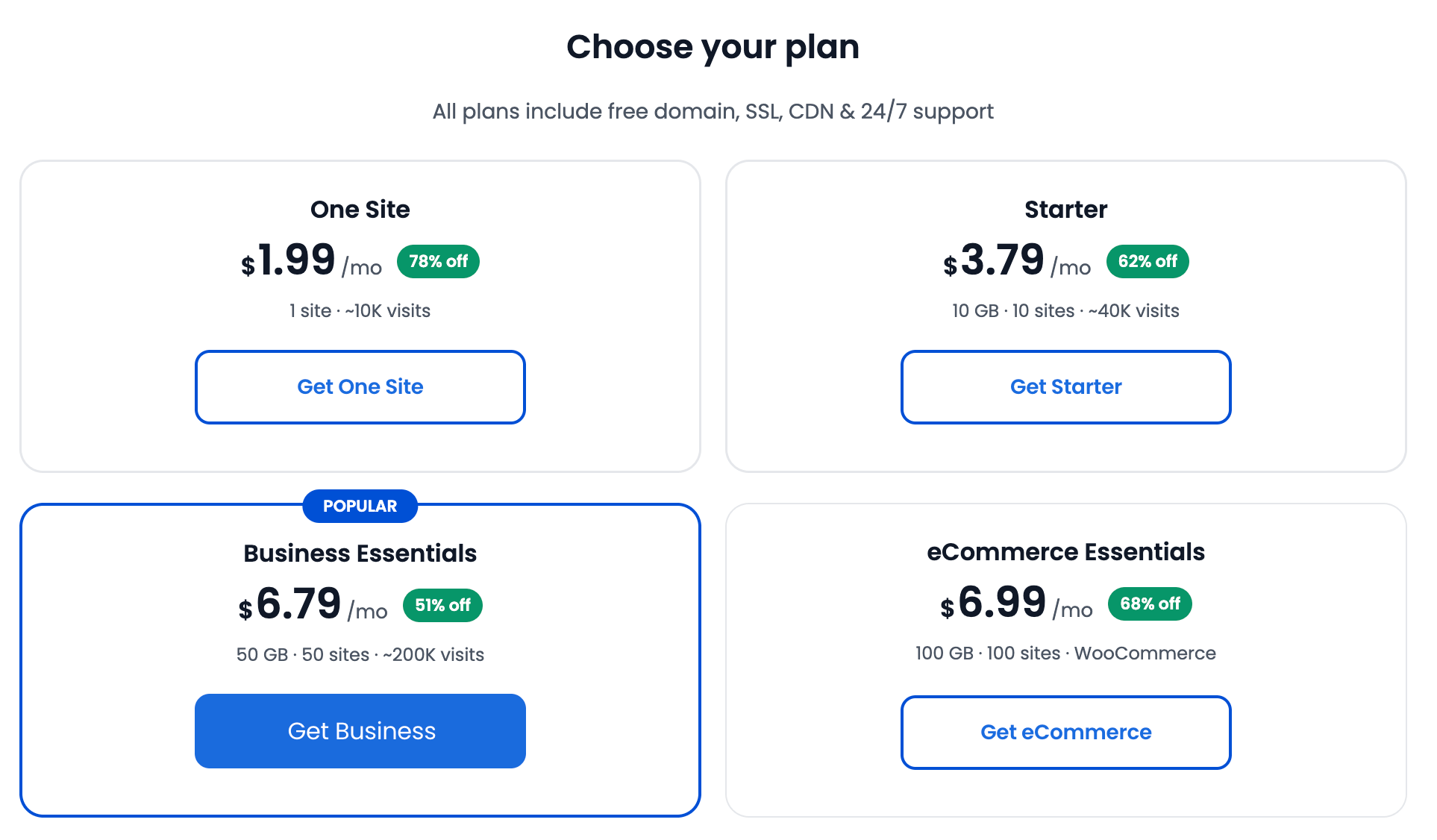
Bluehost’s shared and WordPress hosting plans are billed on long-term terms — typically 36 months — with a discounted introductory rate that renews at a considerably higher price once the initial term ends. VAT/GST is excluded from the advertised price and itemized at checkout. The table below reflects Bluehost’s current published rates for its 36-month term, verified directly against bluehost.com’s pricing page; always confirm the live price and any active promo before checking out, since Bluehost runs frequent seasonal discounts (including Black Friday deals of up to 70% off).
| Plan | Price (USD) | What It Is | Best For |
|---|---|---|---|
| Starter | $3.99/mo (renews $9.99/mo) | 10 websites, 10GB NVMe SSD, ~40K visits/mo, free domain year one | First blog or small business site |
| Business | $6.99/mo (renews $13.99/mo) | 50 websites, 50GB NVMe SSD, ~200K visits/mo, phone support, WAF + DDoS protection | Growing sites needing security + backups (most popular) |
| eCommerce Essentials | $14.99/mo (renews $21.99/mo) | 100 websites, 100GB NVMe SSD, ~400K visits/mo, WooCommerce auto-install, secure checkout | Selling products or courses online |
| VPS NVMe 4 | From $9.49/mo (renews $11.99/mo) | 2 vCPU, 4GB DDR5 RAM, 100GB NVMe, full root access | Developers, Docker/agent hosting, higher-traffic apps |
| Enterprise & Custom | Custom quote (managed from ~$400/mo) | Custom checkout logic, dedicated solution design team, high-traffic readiness | Agencies and large eCommerce operations |
How Bluehost Compares to Alternatives
| Factor | Bluehost | Hostinger | SiteGround |
|---|---|---|---|
| Entry price (intro) | $3.99/mo | ~$2.49–2.99/mo (approx.) | ~$3.99/mo (approx.) |
| WordPress.org recommended | Yes, since 2005 | No | No |
| Websites on entry plan | 10 sites | Up to 100 sites (approx.) | 1 site (approx.) |
| Storage (entry tier) | 10GB NVMe SSD | ~100GB (approx.) | ~10GB (approx.) |
| Uptime SLA | 99.99% with billing-credit remedy | 99.9% (approx.) | 99.9% (approx.) |
| Built-in AI website/store builder | Yes, native (14-day free trial) | Yes, native AI builder | Limited / no native builder |
| Independent B2B rating (G2) | 3.4/5 (280 reviews) | 4.4/5 (approx., 579 reviews) | 4.3/5 (approx., 256 reviews) |
| Best for | WordPress beginners who want an official-partner host + AI tools | Best overall value and renewal pricing | Support quality and advanced WordPress tooling |
vs. Hostinger: Hostinger is consistently the cheaper option at both signup and renewal, and independent testers rate it slightly higher on speed and B2B review sites. It also ships its own AI website builder, so the AI gap between the two has narrowed. Bluehost’s edge is the official WordPress.org recommendation and deeper managed-WordPress tooling — if budget and raw value are the deciding factor, Hostinger tends to win; if the WordPress.org endorsement and phone support matter more, Bluehost holds its ground.
vs. SiteGround: SiteGround is priced similarly to Bluehost at entry level but is widely regarded as having stronger support quality and more advanced WordPress-specific tooling (its own caching system, staging, and Git integration). The trade-off is storage and site limits — SiteGround’s entry plan caps out at a single website with less storage than Bluehost’s Starter plan. For a single, performance-critical WordPress site, SiteGround is a common upgrade pick; for someone who wants to host multiple sites cheaply, Bluehost’s entry tier goes further.
vs. building on a website builder platform (Wix/Squarespace): A drag-and-drop builder platform bundles hosting, design and support into one flat monthly fee with less technical setup. Bluehost’s AI Website Builder narrows that gap considerably, but Bluehost still gives you full WordPress ownership, portability and plugin access that closed-platform builders don’t — a meaningful difference for anyone planning to grow past a simple brochure site.
Bluehost’s entry-level plan hosts more sites than most rivals at a similar price — the trade-off shows up at renewal, where the price increases more steeply than several competitors.
Pros and Cons
What Users Love
Genuinely helpful, human support: Across thousands of Trustpilot reviews, the single most repeated praise is for individual support agents solving specific, stubborn problems — DNS errors, migration hiccups, billing confusion — often on the first contact. Bluehost’s 4.5/5 Trustpilot score, built on more than 31,000 reviews, is driven almost entirely by this.
Low barrier to entry: At $3.99/month with a free domain and free SSL, Bluehost removes nearly every excuse for not launching a first website. The AI Website Builder shortens the setup process to minutes rather than hours for anyone intimidated by a blank WordPress install.
Official WordPress recommendation carries weight: For a WordPress-first site, Bluehost’s decades-long relationship with WordPress.org translates into genuinely deeper integration — managed updates, staging, and one-click installs that feel purpose-built rather than bolted on.
Room to grow without switching hosts: Shared hosting, WordPress hosting, VPS, dedicated servers and agent hosting all live under one account. A site that outgrows shared hosting can move up to VPS or dedicated without a full platform migration.
Strong published uptime and speed numbers: A 99.99% uptime SLA with an actual billing-credit remedy, plus independently-cited load-time figures under half a second, are solid marks for shared infrastructure at this price point.
Limitations Worth Knowing
The renewal price jump is steep: This is Bluehost’s most consistent complaint on independent review sites. The Starter plan renews at $9.99/month from a $3.99/month intro rate — roughly a 150% increase — and higher tiers see similar jumps. Several G2 and Capterra reviewers specifically describe feeling surprised or misled by the renewal charge; budget for it from day one.
B2B review scores are noticeably softer than the Trustpilot number: G2 (3.4/5 from 280 reviews) and Capterra (3.6/5 from 121 reviews) both sit well below Bluehost’s 4.5/5 Trustpilot score. Complaints there skew toward billing transparency and support consistency for more technical, business-critical use cases rather than first-website setup.
Shared hosting has real ceilings: Storage on entry tiers is modest (10GB) and shared server resources mean performance can degrade under heavy simultaneous traffic — a known limitation of shared hosting generally, not unique to Bluehost, but worth planning around if you expect rapid growth.
Phone support isn’t on every plan: The entry-level Starter plan includes 24/7 chat but not phone support — you need to step up to Business or above to get a direct line, which matters if phone access is a priority for you.
Free-domain cancellation fees: If you cancel within your first 30 days and your plan included a free first-year domain, Bluehost deducts a non-refundable domain fee from your refund at the domain’s regular retail price — a detail easy to miss when signing up for the “free domain” hook.
Who Should Use Bluehost
First-time website owners and bloggers: The combination of a low entry price, free domain, one-click WordPress and an AI builder for anyone intimidated by setup makes Bluehost one of the easiest on-ramps to a first website, backed by support that’s easy to reach at 2 a.m.
Small businesses running multiple sites: The Business plan’s 50-site allowance, phone support and included security stack (WAF, DDoS protection, domain privacy) suit an agency or small business managing several client or brand sites on one account.
Store owners starting with WooCommerce: The eCommerce Essentials plan bundles WooCommerce auto-install, payment processing and commerce tooling at a lower entry price than most dedicated eCommerce hosts, making it a reasonable starting point before a store needs enterprise-grade infrastructure.
Developers exploring AI agent hosting: The one-click n8n, OpenClaw, GatorClaw and Claude Code hosting on root-access NVMe VPS is a genuinely useful, low-friction option for developers who want managed infrastructure without building it from scratch.
Who should look elsewhere: High-traffic sites that need consistent performance under heavy load, businesses that prioritize the lowest possible renewal cost over brand recognition, and anyone who wants month-to-month billing without a long-term contract will likely be better served by Hostinger’s lower renewal rates or a managed WordPress specialist. B2B teams weighing this primarily against G2/Capterra ratings of hosting vendors should factor in the notably lower scores Bluehost carries on those platforms specifically.
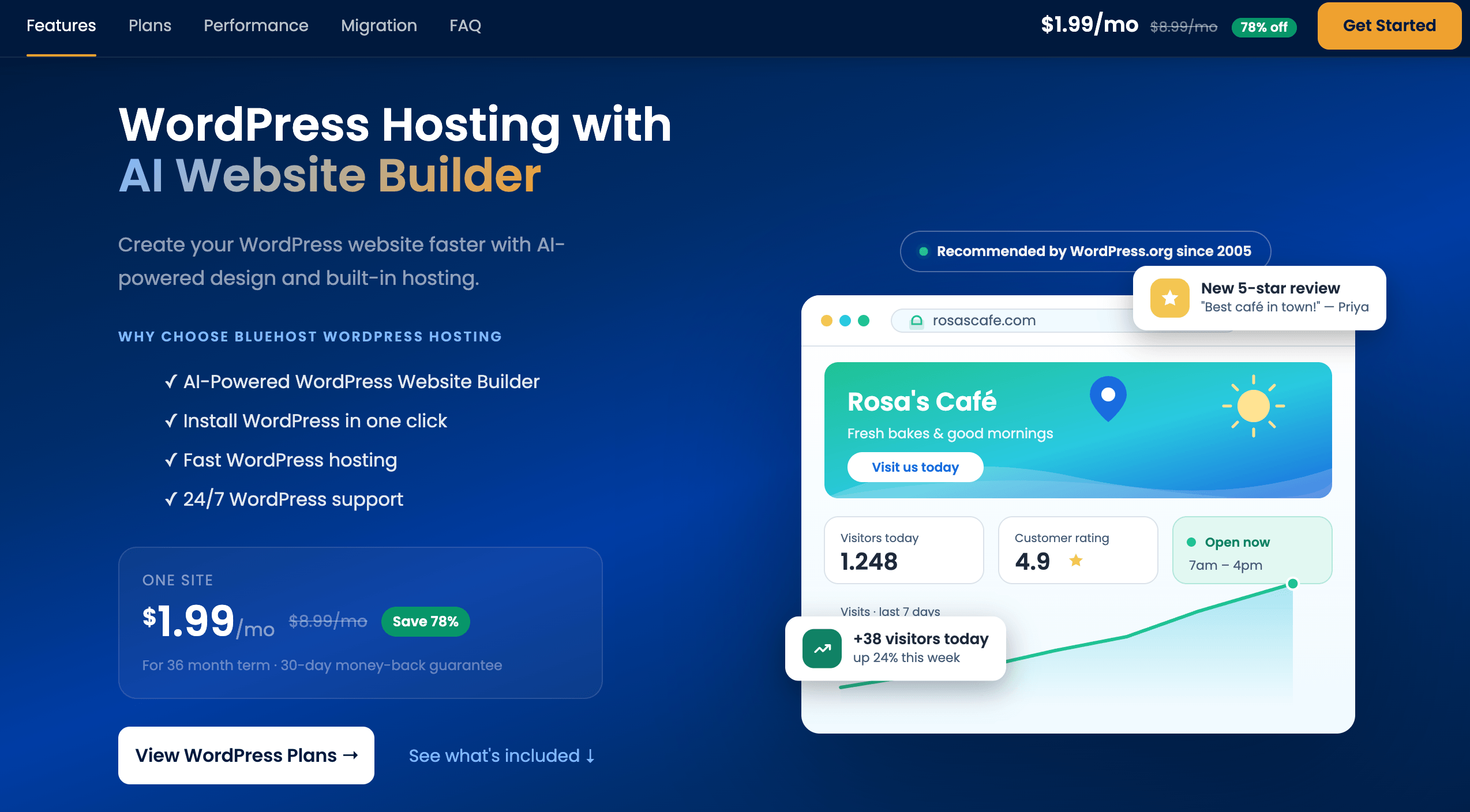
Bluehost’s sweet spot is the first website, the first online store, or an agency managing several client sites — not a high-traffic app that has already outgrown shared infrastructure.
Getting Started: Step by Step
- Pick your plan and term. Choose Starter for a first site, Business if you need phone support and more sites, or eCommerce Essentials if you’re launching a store. Select the 36-month term for the lowest advertised rate if you’re comfortable committing.
- Claim your free domain or connect an existing one. New plans of 12 or 36 months include a free domain for the first year on eligible TLDs (.com, .net, .org and more). If you already own a domain, you can point it to Bluehost instead during checkout.
- Choose how you’ll build. Use the AI Website Builder to generate a complete site from a short description in under a minute, or install WordPress manually with a one-click setup if you want full control from the start.
- Set up SSL and security. Free SSL activates automatically on most plans; confirm it’s enabled, then turn on the malware scanning and (on Business and above) the Web Application Firewall from your dashboard.
- Migrate an existing site if needed. Use Bluehost’s free migration tool — up to five sites free in your first 30 days — for a zero-downtime transfer that preserves themes, plugins, media and SEO rankings.
- Mark your renewal date. Note the date your introductory term ends and set a reminder 30–60 days ahead so the steep renewal price doesn’t catch you off guard — this is the single step most new customers skip.
Tips for Getting Maximum Value
Commit to the longest term you can genuinely afford, since Bluehost’s per-month price drops significantly between 12-month and 36-month billing — but pair that with a calendar reminder for your renewal date so you can shop the market or call to negotiate before the higher rate bills automatically. Use the free migration tool rather than a manual transfer if you’re moving an existing WordPress site; it’s free for your first five sites and avoids the SEO risk of a botched DIY move. If you’re not sure WordPress is right for you, try the AI Website Builder’s 14-day free trial before committing to a full build — it costs nothing to see whether the generated site fits your brand. Turn on the Web Application Firewall and domain privacy as soon as they’re available on your plan rather than treating them as optional extras, and keep an eye on your renewal center in the account dashboard, which shows your actual upcoming rate well before the charge hits. Finally, watch for Bluehost’s recurring seasonal promotions — Black Friday discounts of up to 70% off have become a predictable yearly event — since timing a signup or an upgrade around one of these windows is often the single easiest way to lower your total cost.
Future Outlook and Final Assessment
Web hosting in 2026 is being reshaped by two forces at once: AI tools lowering the barrier to launching a site, and a growing wave of developers who need infrastructure for agents and automation rather than just a blog. Bluehost has moved deliberately on both fronts — its AI Website Builder and AI Store put it ahead of many legacy shared hosts on ease of setup, and its new agent-hosting stack for n8n, OpenClaw and Claude Code shows it’s not standing still on the developer side either, even while its core identity remains the WordPress-recommended host for beginners.
The honest caveats remain real: the renewal pricing jump is steep and needs to be planned for, not discovered, and Bluehost’s scores on B2B-focused review platforms trail its strong Trustpilot number, suggesting more technical or business-critical users have a rougher experience on average than casual first-site owners. Competitors like Hostinger continue to undercut it on both entry and renewal pricing. But within those bounds, Bluehost remains one of the most complete, well-supported entry points into WordPress hosting available in 2026, and its official WordPress.org recommendation is a credibility marker few rivals can claim.
Conclusion
Bluehost’s staying power in 2026 comes down to a simple formula: an official WordPress.org endorsement, genuinely helpful human support, and a low-friction entry price, now paired with AI tools that shorten the path from idea to live website. It isn’t the cheapest host at renewal, and its scores on business-focused review platforms are a fair warning that more demanding, technical use cases sometimes have a rougher experience than casual bloggers do. But for a first website, a small business managing a handful of sites, or a first WooCommerce store, it remains one of the most complete, well-supported starting points in mainstream hosting. Confirm the current promotional price, plan for the renewal jump from day one, and Bluehost can get a serious website online in under an hour.
Ready to get your website online today?
Explore more honest reviews, tutorials and tech comparisons to find the right gear for the way you work, travel and live — at World Of Tech, where we make everything easy.
👉 Shop Bluehost: https://worldoftech.space/bluehost
👉 Our YouTube Channel: youtube.com/@world_tech79
👉 Our Facebook Fanpage: Facebook
👉 Our X (Twitter): @worldoftech79
Pricing, specifications and policy details in this review were verified against bluehost.com and independent review sources (including Trustpilot, G2 and Capterra) as of September 2026. Web hosting pricing and promotions change frequently, so confirm current details on the official site before purchasing. Competitor prices are approximate and subject to change.





