
Turning a script, a blog post, or a rough idea into a finished video used to mean hours in a timeline editor — or a much bigger budget for a freelance editor. Invideo has spent years chasing that problem, and its latest push, Agent Two, takes it further than most: describe the video you want, and a crew of AI agents writes the script, generates or sources the footage, adds voiceover, music and subtitles, and hands you a first cut in minutes. Backed by investors behind Stripe, Spotify and ByteDance and reportedly used by 7 million-plus creators, Invideo now spans two products — the agentic invideo AI generator and the more traditional invideo Studio drag-and-drop editor — giving it one of the broadest feature sets in the AI video space.
For marketers, YouTubers, and small teams who need to publish video regularly without hiring an editor, that promise is genuinely appealing. But an honest look at Invideo also has to reckon with a real split in independent feedback: strong ratings on G2 sit alongside a noticeably more mixed Trustpilot record, with recurring complaints about the credit system, refund handling, and gaps between what the AI promises and what it actually delivers. This 2026 review walks through what Invideo actually does, its core features, real current pricing, how it stacks up against Veed and Pictory, the genuine pros and cons, and exactly who should — and shouldn’t — build a video workflow around it.
Invideo Review 2026: The AI Video Platform That Writes, Shoots and Edits From a Prompt
Overview and Background
Invideo started life as a browser-based video editor — invideo Studio — built around thousands of templates, a drag-and-drop timeline, and a large stock media library, aimed at marketers and creators who wanted professional-looking video without learning a desktop editing suite. Over the past few years the company has layered a genuinely different product on top: invideo AI, a prompt-driven generator that writes a script, assembles footage, records a voiceover and edits transitions automatically from a single text description.
The newest version of that AI product, branded Agent Two, pushes further into agentic territory. Rather than a one-shot generator, it’s positioned as a persistent creative collaborator: it holds long-term memory of a project’s characters, locations and style, supports multi-shot edits (change one detail and every relevant clip updates), and lets teams build custom agents for roles like cinematographer or sound designer. Invideo says the platform is backed by investors who’ve also funded Stripe, Spotify, Flipkart and ByteDance, and lists client logos including Google, NVIDIA, Salesforce, Visa, IBM, Netflix and HubSpot — evidence, at minimum, of real enterprise interest alongside its consumer creator base.
Functionally, the platform gives access to more than 200 third-party image, video, audio and music models — including Google Veo 3.1, Kling 3, Seedance 2.5, Nano Banana Pro and ElevenLabs — wrapped behind a single credit system, plus stock media from providers like iStock and Storyblocks. That breadth is Invideo’s core pitch: rather than subscribing separately to a text-to-video model, an avatar generator and a stock footage library, one subscription and one credit pool covers all of it.
Why Invideo Stands Out in 2026
One subscription, 200+ AI models: Instead of juggling separate subscriptions for a text-to-video model, an avatar generator, and a stock library, Invideo’s credit system spans video models (Veo, Kling, Seedance), image models (Nano Banana Pro, Ideogram, Seedream), and audio (ElevenLabs) under one account — genuinely useful for creators who don’t want to manage five different tools and five different bills.
Agent Two’s project memory is a real step up from one-shot generation: Most AI video tools treat each generation as a blank slate. Agent Two is built to remember a project’s characters, locations and visual style across sessions, so a creator can come back a week later and keep working without re-briefing the AI from scratch — a meaningful advantage for longer-form or serialized content.
Multi-shot editing saves real re-generation time: Changing a costume, a location, or a character detail across many clips normally means regenerating each one individually. Invideo’s agents are designed to propagate a single described change across every affected shot automatically.
Genuine breadth from quick social clips to full narratives: The same platform handles 15-second social cuts, full-length explainer videos, product ads, and — per Invideo’s own positioning — multi-scene film and microdrama projects, which is a wider range than most single-purpose AI video tools attempt.
No prompt-engineering skill required: Rather than expecting users to hand-craft prompts for each underlying model, Invideo’s agents choose the right model and write the technical prompt for each shot based on a plain-English description — lowering the skill floor considerably compared to working with raw generative video tools directly.
Built-in team collaboration: Multiplayer mode with live cursors, in-context comments, storyboarding, script co-writing, and a full timeline editor mean Invideo can function as a shared production tool for a small marketing or content team, not just a solo-creator app.
Strong G2 standing among verified business reviewers: Invideo holds roughly a 4.3–4.5 out of 5 rating across 170-plus G2 reviews, with reviewers specifically praising ease of setup, script-to-video speed, and the media library — a meaningfully stronger signal from a business-software audience than the more mixed Trustpilot consumer feedback discussed below.
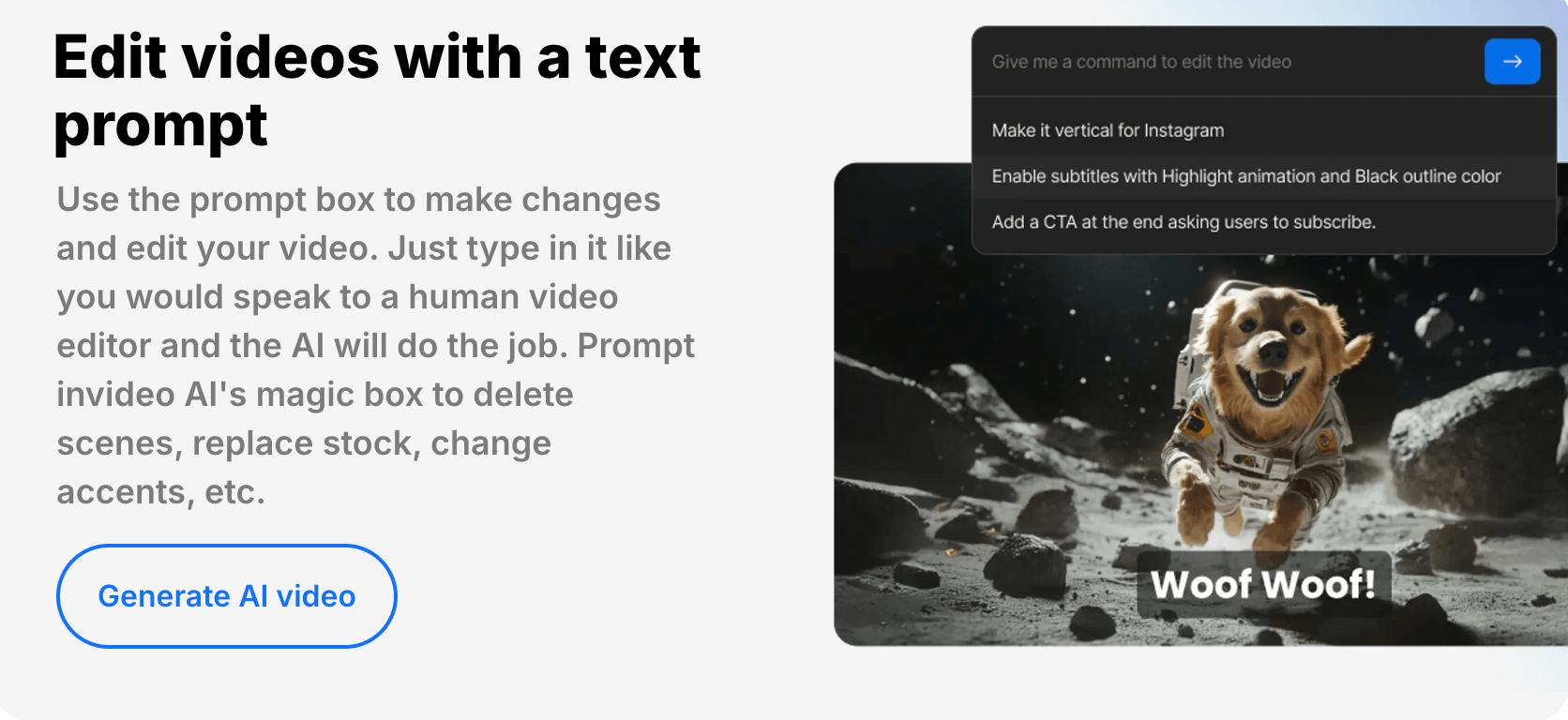
Invideo’s Agent Two writes the script, generates or sources footage, and assembles a first-draft video from a single prompt or uploaded script and treatment.
Key Features and Technology
Invideo’s platform splits cleanly into two working modes, plus a shared model and collaboration layer underneath. Here’s how it actually breaks down.
Invideo AI / Agent Two: Prompt-to-Video Generation
Type a video idea, paste a script, or drop in a blog URL, and Invideo’s AI writes a storyboard, selects or generates matching visuals from its stock and AI-model library, records an AI voiceover in one of 50-plus languages and accents, and assembles the result with music, subtitles and transitions. Generation typically runs a few minutes for short-form content and up to 20 minutes for longer pieces. A “Magic Box” editing layer lets you issue plain-English edit commands — change the accent, delete a scene, add a funny intro — instead of manually scrubbing a timeline.
Invideo Studio: The Traditional Editor
For creators who want more manual control, invideo Studio is a browser-based drag-and-drop editor with over 5,000 templates and 9 million-plus premium media assets, built for social-format exports (Instagram Stories, YouTube, Facebook ads) without needing desktop software. It’s the better fit when you already have a clear structure in mind and want precise, manual control rather than an AI-driven first draft.
200+ AI Models Under One Credit System
Every paid plan gets access to the same roster of third-party generative models — Seedance 2.5, Veo 3.1, Kling 3.0, Nano Banana Pro, Ideogram, ElevenLabs and dozens more — rather than gating specific models behind higher tiers. Model and agent pricing is subject to change, and premium generative models are billed against your credit pool at rates tied to the underlying provider’s own API costs, so heavy use of the priciest models will burn credits faster than lighter, cheaper generations.
AI Avatars and Voice Cloning
Each plan includes a set number of AI avatars and voice clones (4 on Plus, scaling up to 200 on Elite), useful for talking-head explainer videos, UGC-style ads, or product demos without filming a presenter. This puts Invideo in direct competition with dedicated avatar tools, though avatar quality and lip-sync accuracy still vary by underlying model, as with any AI avatar generator in 2026.
Collaboration and Custom Agents
Multiplayer mode allows real-time collaboration with live cursors so a producer, editor, writer and sound designer can work the same project simultaneously. Teams can also build custom agents assigned to specific creative roles, extending Agent Two beyond a single generalist assistant into something closer to a configurable virtual production crew.
Pricing, Plans, and Package Structure
Invideo runs on a credit-based subscription model with four individual tiers, all priced with a meaningful discount for annual billing (roughly 10–15% off versus month-to-month, per Invideo’s own pricing page). There’s a free trial to explore the interface, but independent trackers report no permanent free tier for ongoing use — worth confirming directly on the pricing page since promotions do shift. Credits are consumed by generative AI media (avatar generation, AI video/image generation); working from your own uploaded footage or the stock library does not draw down credits.
| Plan | Price (USD, annual billing) | Credits & Key Limits | Best For |
|---|---|---|---|
| Plus | $17/mo (billed $200/yr) | 75 credits/mo, 4 AI avatars, 20 GB storage, 100 iStock assets | Exploring the platform, occasional short-form videos |
| Max | $85/mo (billed $1,000/yr) | 390 credits/mo, 16 AI avatars, 100 GB storage, 200 iStock assets | Occasional-to-regular creators (Invideo’s “Most popular”) |
| Generative | $170/mo (billed $2,000/yr) | 800 credits/mo, 40 AI avatars, 2 TB storage, 1,000 iStock assets | Daily creators and small content teams (Invideo’s “Best value”) |
| Elite | $900/mo (billed $10,800/yr) | 4,250 credits/mo, 200 AI avatars, 10 TB storage, 5,000 iStock assets | Power creators and production-heavy teams |
| Team / Enterprise | Custom quote | Volume credits, SOC 2 (in progress), GDPR compliance | Larger organizations with security/compliance needs |
Invideo’s credit-based plans scale from a 75-credit Plus tier to a 4,250-credit Elite tier, all with access to the same 200-plus AI models.
How Invideo Compares to Alternatives
| Factor | Invideo | Veed.io | Pictory |
|---|---|---|---|
| Core strength | Agentic prompt-to-video, 200+ AI models | Editing, subtitles, translation and dubbing | Blog/script-to-video for content marketers |
| Free tier | Free trial, no lasting free plan (approx.) | Yes — free plan with watermark, 720p | 14-day free trial, no permanent free plan |
| Entry paid price (approx.) | $17/mo (annual) | $12–19/mo (annual, varies by source) | $25/mo (annual) |
| G2 rating (approx.) | 4.3–4.5 / 5 (~170+ reviews) | Generally strong, varies by source | Generally strong, varies by source |
| Trustpilot rating (approx.) | ~3.3–4 / 5, mixed (800+ reviews) | Not independently verified here | Not independently verified here |
| Agentic / long-term memory | Yes — Agent Two’s core feature | No — editor-first, not agentic | No — script/blog-to-video, not agentic |
| Best for | Full AI-generated video pipelines, teams | Editing, subtitling and repurposing existing footage | Turning written content into video fast |
vs. Veed.io: Veed leans into editing, subtitles, translation and dubbing rather than full agentic generation, and it offers a genuinely usable free tier — a real advantage for anyone who mostly needs to polish existing footage rather than generate new video from scratch. Invideo pulls ahead specifically on generative breadth and Agent Two’s project memory, which Veed doesn’t attempt to match.
vs. Pictory: Pictory is narrower by design, focused specifically on converting blog posts, scripts and podcasts into video content for marketers — a more predictable, lower-friction workflow if that’s specifically what you need. Invideo’s broader model access and avatar/animation range make it the better fit once your needs go beyond text-to-video into fuller creative production.
vs. hiring a freelance video editor: For a one-off, brand-critical piece — a launch ad, a high-stakes pitch video — a skilled human editor still outperforms any current AI tool on nuance and polish. Invideo’s real competition is the routine, high-volume content (social clips, explainer videos, weekly uploads) that would otherwise eat a disproportionate amount of a small team’s time and budget.
Pros and Cons
What Users Love
Genuine speed on first drafts: G2 reviewers repeatedly highlight how quickly a script or idea becomes a usable first-cut video — a workflow that would otherwise take hours compressed into minutes, which is consistently cited as Invideo’s strongest single benefit.
A genuinely intuitive interface for non-editors: Reviewers on both G2 and Trustpilot praise how approachable the platform is for people with no video-editing background, particularly the Magic Box’s plain-English edit commands.
Model breadth in one subscription: Having Veo, Kling, Seedance, Nano Banana and ElevenLabs all accessible under one credit pool is repeatedly cited as a real convenience versus subscribing to each generative model separately.
Responsive support, for some users: Multiple reviews specifically praise fast, helpful live-chat support that resolved confusing errors quickly — though as noted below, this isn’t a universal experience.
A wide range of use cases in one tool: From 15-second social clips to explainer videos to multi-scene narrative projects, reviewers note that Invideo covers ground most single-purpose tools don’t attempt.
Limitations Worth Knowing
A meaningfully mixed Trustpilot record: While G2’s business-reviewer audience rates Invideo strongly, Trustpilot’s roughly 3.3–4 out of 5 across 800-plus reviews tells a more mixed story, with recurring complaints about billing surprises, refund refusals, and a gap between marketed AI capability and actual output quality. Weigh both signals rather than either alone.
Credit system confusion is a recurring theme: Several reviewers describe running out of credits mid-project, being unclear on what specifically consumes credits versus what’s free (stock media vs. generative media), or feeling that headline pricing understates real monthly cost for anyone generating video at volume.
Refund and cancellation friction reported by multiple users: A notable pattern in Trustpilot feedback involves difficulty getting refunds after a trial converts to a paid subscription, including at least one report of continued charges months after a user believed they’d cancelled. Confirm your cancellation explicitly and keep a record.
Output consistency and image repetition issues: Some reviewers report AI-selected or generated images repeating across a video, or visuals not matching the intended narrative closely enough without manual correction — an issue not unique to Invideo among AI video tools, but a real one.
Brand and asset limits even on higher tiers: G2 reviewers specifically note that even Invideo’s top consumer tier restricts users to a single brand asset kit, limiting multi-brand management for agencies or businesses running more than one brand through the platform.
Who Should Use Invideo
Marketers and content teams publishing regularly: If your team needs a steady stream of social clips, explainer videos, or ad variations without a dedicated in-house editor, Invideo’s speed and breadth genuinely compress a real workload.
Solo creators and YouTubers wanting a fast first draft: The prompt-to-video workflow is well-suited to creators who’d rather refine an AI-generated starting point than build a video from a blank timeline every time.
Small studios experimenting with AI-assisted narrative content: Agent Two’s project memory and multi-shot editing genuinely target filmmakers and microdrama creators working on longer, character-consistent projects — a niche most competitors don’t address.
Teams that want everything under one roof: If managing five separate AI-model subscriptions is more friction than it’s worth, consolidating under Invideo’s credit system is a legitimate simplification.
Who should look elsewhere: anyone who needs airtight billing predictability and a hassle-free cancellation experience should read the Trustpilot complaints carefully and set explicit calendar reminders before any trial ends. Agencies managing multiple distinct brands may find the single-brand-kit limit a real constraint even on top-tier plans. And if your primary need is polishing or subtitling footage you’ve already shot rather than generating new video, Veed’s editor-first approach and free tier may be the simpler, cheaper fit.

Invideo’s multiplayer mode lets producers, editors, writers and sound designers collaborate on the same project in real time.
Getting Started: Step by Step
- Start with the free trial before subscribing. Test the actual output quality on your specific use case — a real script or project, not a throwaway prompt — before committing to a paid tier.
- Write a specific, detailed prompt or script. A vague one-line prompt produces generic results; a brief with tone, platform, length, and a clear structure produces something genuinely usable as a starting point.
- Let Agent Two generate the first draft. Review the storyboard, script and scene selection before letting the full generation run, especially for longer or higher-stakes projects.
- Refine with the Magic Box or manual editing. Use plain-English commands for quick fixes (change the accent, swap a scene), and drop into the manual timeline editor for anything requiring precise control.
- Track your credit usage as you go. Distinguish between stock-media workflows (no credit cost) and generative AI media (avatars, AI-generated clips) so you don’t run out mid-project.
- Export and confirm your subscription status. Once you’re happy with the result, export without a watermark on paid plans — and if you decide not to continue, cancel explicitly and keep confirmation of the cancellation.
Tips for Getting Maximum Value
Write prompts the way you’d brief a human editor — platform, length, tone, structure and a clear call to action — since specificity is consistently what separates a usable first draft from a generic one. Lean on stock-footage-based generation for routine, lower-stakes content and save credit-consuming generative AI models for pieces where the visual quality genuinely matters. If you’re on a lower tier and hit a credit wall mid-project, check whether swapping a generative clip for a stock alternative solves it before buying a top-up. Use the multiplayer mode from day one if you’re working with a team, since live collaboration and commenting cut down on the usual back-and-forth of sharing exported drafts. And before your free trial or first billing cycle ends, mark a calendar reminder and take a screenshot of your cancellation if you decide not to continue — it’s the single most effective way to avoid the billing complaints that show up repeatedly in independent reviews.
Future Outlook and Final Assessment
AI video generation is one of the fastest-moving categories in software right now, and Invideo’s shift from a template-based editor toward a full agentic platform with Agent Two reflects where the whole category is heading: less prompt-and-pray generation, more persistent, memory-aware creative collaboration. Backing from investors behind Stripe, Spotify and ByteDance, plus a genuine enterprise client list, suggests real staying power rather than a fad product, and the sheer model breadth on offer (200-plus models under one roof) is hard for narrower competitors to match quickly.
The honest caveats are real, though: the gap between G2’s stronger business-reviewer sentiment and Trustpilot’s more mixed consumer feedback suggests billing clarity and refund handling need continued work, and credit-system confusion is a recurring, fixable friction point rather than a one-off complaint. None of that erases Invideo’s genuine strengths — it means going in with clear expectations about what a “first draft” actually means, and paying close attention to your subscription and cancellation status.
Conclusion
Invideo isn’t trying to be a single-purpose text-to-video tool — it’s trying to be the whole video production pipeline, from script to shot to soundtrack, powered by an agent that remembers your project instead of forgetting it between sessions. For teams and creators who publish regularly, that breadth and speed genuinely compress a real workload into minutes rather than hours. It rewards specific, well-briefed prompts and a little post-generation polish, and it’s not the right call for anyone who needs bulletproof billing predictability without reading the fine print first. Start on the free trial, write a real brief instead of a one-liner, and keep an eye on your subscription status — and Invideo can take a meaningful chunk of video production off your plate in 2026.
Ready to turn your next idea into a finished video?
Explore more honest reviews, tutorials and tech comparisons to find the right gear for the way you work, travel and live — at World Of Tech, where we make everything easy.
👉 Try Invideo: https://worldoftech.space/invideo
👉 Our YouTube Channel: youtube.com/@world_tech79
👉 Our Facebook Fanpage: Facebook
👉 Our X (Twitter): @worldoftech79
Pricing, specifications and policy details in this review were verified against invideo.io and independent review sources (including G2 and Trustpilot) as of August 2026. AI video pricing, credit costs and model access change frequently, so confirm current details on the official site before purchasing. Competitor prices are approximate and subject to change.





