
If you have ever spent an entire evening before a submission deadline reformatting a bibliography by hand — chasing down a missing DOI, fixing a citation style a journal quietly changed, or untangling duplicate references after merging two Word documents — you already understand why reference managers exist. EndNote is the tool that essentially created this category. Owned by Clarivate and built on the Web of Science data engine, it has been the default citation manager for PhD students, professors, medical researchers and institutional libraries for more than three decades, and the newest release, EndNote 2025, adds an AI-powered Research Assistant that summarizes papers, answers questions about your library, and translates PDFs on the fly.
EndNote’s pitch is straightforward: import references from any database, insert perfectly formatted in-text citations and bibliographies as you write in Word, Google Docs or LibreOffice, and never lose a source again. It is also, by most researchers’ own admission, one of the pricier and heavier tools in its category — a fact that has pushed a meaningful share of students toward free alternatives like Zotero. This 2026 review walks through what EndNote actually does, its full feature set and AI additions, current pricing and licensing, how it stacks up against Zotero and Mendeley, the honest pros and cons reported by real users, and exactly who should — and shouldn’t — pay for it.
EndNote Review 2026: Is the Original Reference Manager Still Worth Paying For?
Overview and Background
EndNote traces its roots to 1988, when it launched as one of the first dedicated citation-management programs for researchers. It changed hands through Thomson Reuters before landing with Clarivate — the same company that owns the Web of Science citation database — in 2016. That ownership matters: EndNote’s online search and “Find Full Text” tools are built directly on Clarivate’s own indexing infrastructure, which gives it access and metadata accuracy that smaller, independent tools generally cannot match on their own.
The product today is really three things bundled together: a desktop application (Windows and macOS) where most of the heavy library management happens, EndNote Web/EndNote Online for browser access and syncing, and mobile apps for iPhone and iPad. A single license installs the desktop software on up to three machines for one named user, and includes web and mobile access, cloud sync, and unlimited online storage as part of the package rather than as a separate add-on. That bundling is worth noting up front, since several rival tools charge separately for cloud storage tiers once your library grows past a small free allotment.
The current generation, EndNote 2025, is the company’s first release built around generative AI. The headline addition is EndNote Research Assistant, which lets you ask natural-language questions about a paper or your whole library, generates “Key Takeaways” summaries of PDFs, and can translate documents to break through language barriers — features aimed squarely at researchers drowning in literature reviews rather than casual students citing a handful of sources.
EndNote’s customer base skews heavily academic and institutional rather than consumer. Publicly available market-segment data shows a large majority of its reviewer base coming from higher education, research institutes, hospitals and biotech, with enterprise-scale organizations (over 1,000 employees) making up the majority of reported usage. That’s a meaningfully different audience than a general-purpose note-taking or writing app, and it shapes almost every product decision Clarivate makes — from the depth of citation-style coverage to the emphasis on retraction tracking and journal-submission tools that only matter once you’re actually trying to get published.
Why EndNote Stands Out in 2026
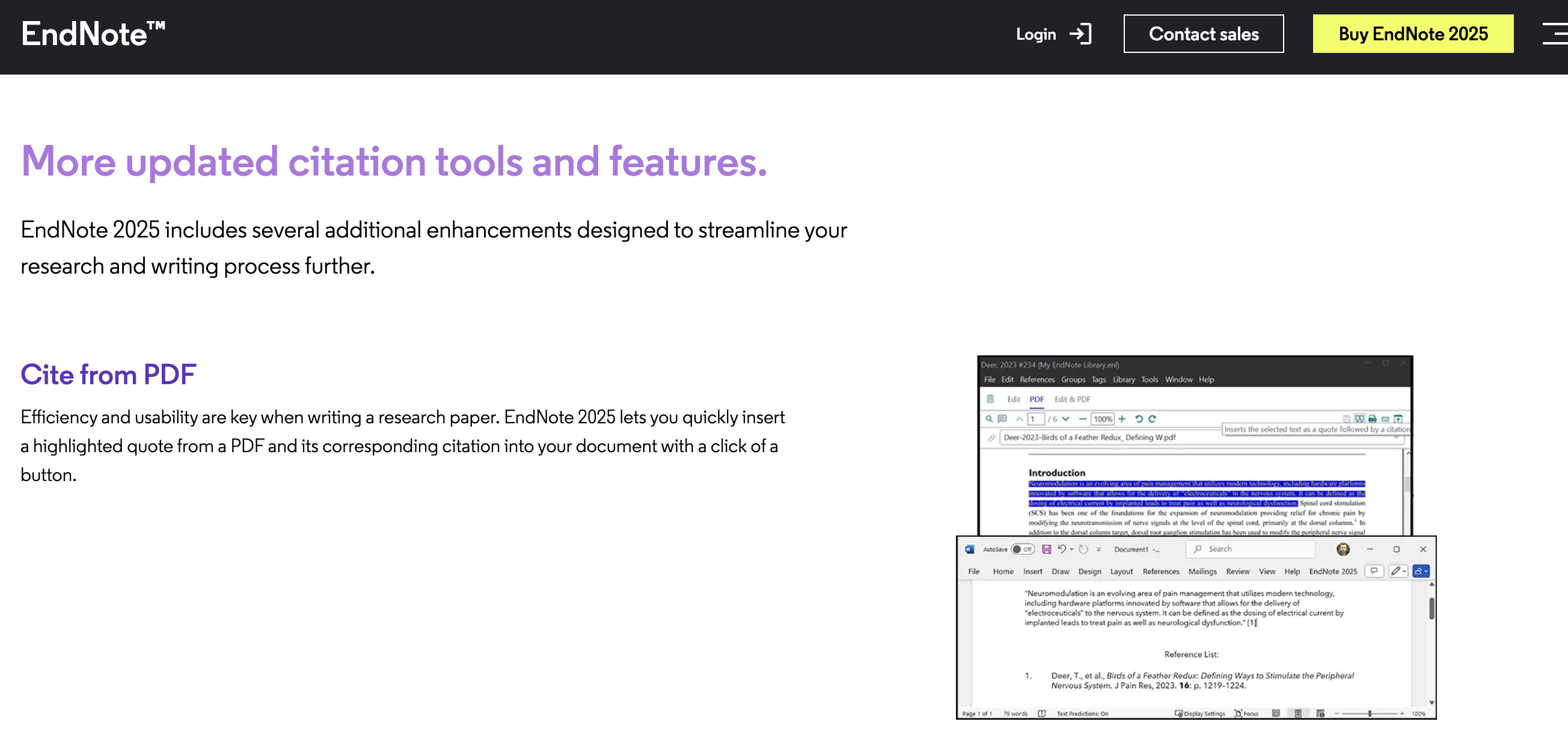
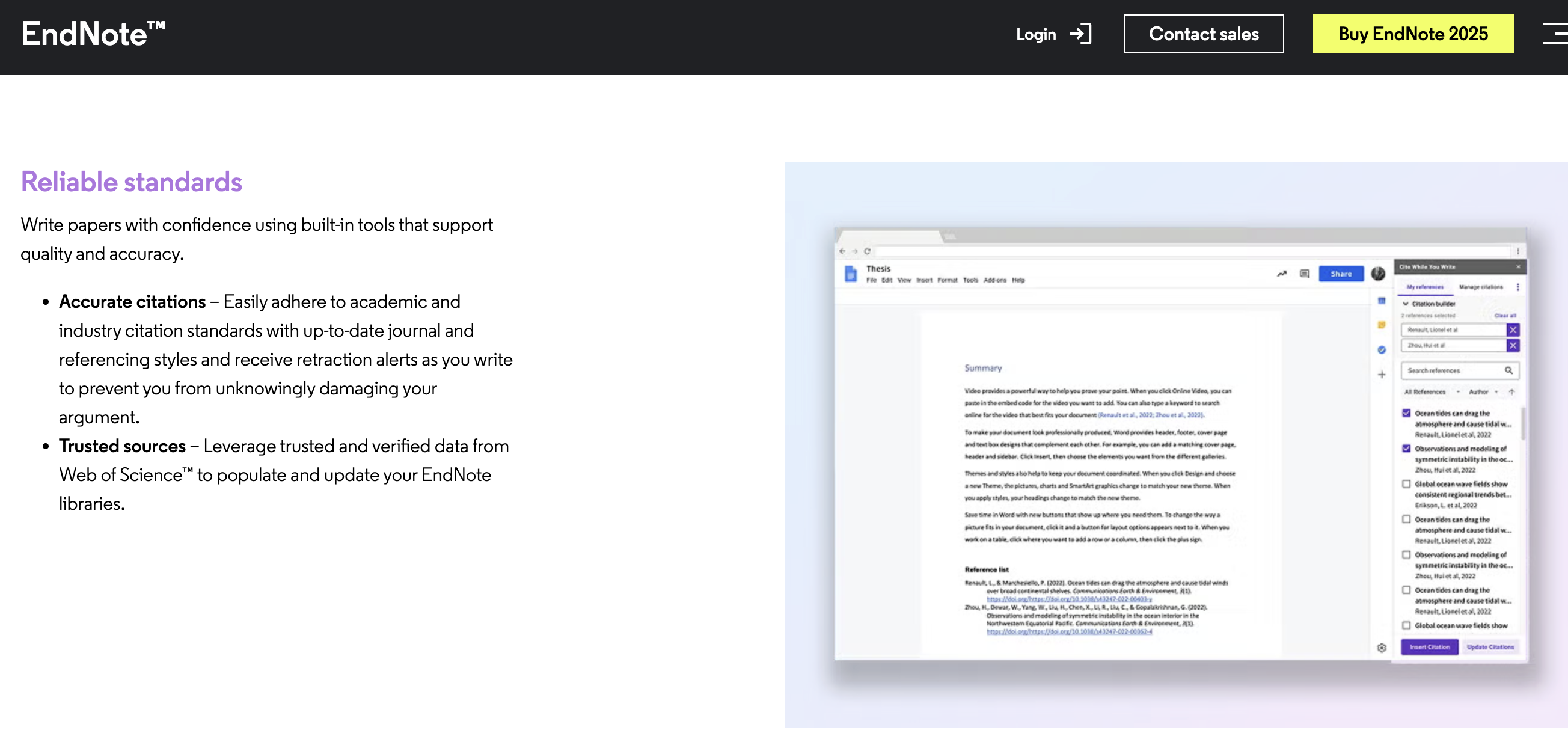
Cite While You Write is genuinely fast: The Word, Google Docs, Apple Pages and LibreOffice plug-ins let you search your library and drop a properly formatted citation into your document without leaving your writing flow, then regenerate the entire bibliography automatically whenever you add, remove or reorder sources.
Web of Science-grade metadata: Because EndNote sits on Clarivate’s own citation database, imported references tend to come in cleaner and more complete than tools relying purely on crowd-sourced or scraped metadata — a real advantage when you’re managing a library with thousands of entries.
Retraction alerts built in: EndNote flags retracted papers directly inside your library and while you’re citing them in Word — a quietly important feature that protects the integrity of your work in a way most competing tools simply don’t offer.
Massive citation-style library: EndNote ships with thousands of continuously updated journal and academic referencing styles, so switching a finished manuscript from APA to a specific journal’s house style is usually a dropdown change rather than a manual rewrite.
Large-scale sharing: Full libraries, or curated subsets of references, can be shared with up to 1,000 collaborators with configurable read or edit permissions and visible activity logs — built for labs and departments, not just individuals.
AI research assistant is a genuine time-saver: The new Key Takeaways and conversational Q&A tools in EndNote 2025 let you interrogate a dense PDF for its core argument and methodology in seconds rather than reading it cover to cover first — useful for triaging a large literature pile during the early stages of a review.
Find a Journal and manuscript support: Beyond citation management, EndNote helps identify a good-fit journal for a finished manuscript, closing the loop between “manage references” and “get published” that most pure citation tools leave to you.
Backed by a real support and data-protection team: Unlike open-source or community-run tools, EndNote offers 24/7 phone, chat and email support and a formal data-restoration function for damaged libraries — a meaningful safety net when your entire dissertation’s reference base lives in one file.
Key Features and Technology
EndNote’s feature set spans reference capture, library organization, writing integration, and — new for 2025 — AI-assisted comprehension. Here is how the core pillars break down.
Reference Capture and Organization
References can be pulled in from online databases, imported from PDFs with a labeled DOI, dragged in directly, or entered manually with EndNote’s structured reference forms. The Tags feature lets you build a custom classification system and set rules so incoming references auto-sort into the right folders, while an unlimited reference and attachment count means your library can scale with a multi-year project rather than a single semester.
PDF Handling and Annotation
EndNote can upload, read, highlight and annotate PDFs directly inside the app, with sticky notes searchable later across your whole library. The one-click “Find Full Text” tool attempts to auto-retrieve the PDF for a reference, though — as several long-time users note — its success rate depends heavily on your institution’s subscription access and reportedly works only about half the time for open-access-only searches.
EndNote Research Assistant (AI)
The 2025 release’s flagship addition turns a static PDF into something you can interrogate: ask follow-up questions about the paper’s methodology or findings, get an auto-generated Key Takeaways summary, and translate documents into other languages. It’s a meaningful step toward the “AI research copilot” positioning that competitors like Paperpile and ReadCube have also been chasing, though it is exclusive to EndNote 2025 and not available to users still running EndNote 21 or earlier.
Online Search and Database Connections
Rather than forcing you out to a browser, EndNote lets you query online databases and library catalogs directly from inside the desktop app and pull matching records straight into your library, complete with author, journal, DOI and abstract metadata already populated. For researchers working across PubMed, Web of Science and institutional catalogs in the same afternoon, staying inside one application for search, import and citation noticeably cuts down on the copy-paste tedium that eats into actual reading and writing time.
Collaboration and Cloud Sync
Libraries sync automatically between desktop, web and mobile through your EndNote account, and can be shared with collaborators at scale with granular permissions. Purchase of the desktop software includes EndNote Online with unlimited cloud storage, EndNote for iPhone, and EndNote for iPad at no extra cost — a meaningful contrast with competitors that gate storage tiers behind separate subscriptions.
Citation Formatting and Journal Styles
EndNote maintains one of the largest libraries of citation and bibliography output styles in the category, refreshed on an ongoing basis to track changes journals make to their formatting requirements. In practice this means switching a completed manuscript from, say, APA 7th edition to a specific medical journal’s house style is usually a dropdown selection rather than a manual line-by-line rewrite — a detail that matters far more once you’ve submitted to your third journal and gotten a third different style guide back.
Find a Journal and Manuscript Support
Beyond reference management, EndNote’s Find a Journal tool analyzes a finished manuscript’s abstract and content to suggest journals it’s likely to be a good fit for — a small but genuinely useful step toward the actual publishing process that most citation-only tools leave entirely up to the researcher. It won’t replace an editor’s judgment, but as a first-pass filter for narrowing dozens of possible journals down to a shortlist, reviewers generally describe it as a helpful time-saver rather than a gimmick.
Pricing, Plans, and Package Structure
EndNote is sold as a one-time, perpetual-license purchase rather than a recurring subscription — you buy the version once and own it, though Clarivate releases a new annual version and eventually stops supporting older ones for compatibility with new Word releases. Individual pricing sits meaningfully above free competitors, which is the single biggest factor buyers weigh before purchasing.
| Plan | Approx. Price (one-time) | What It Is | Best For |
|---|---|---|---|
| Full / New License | ~US$249.95 | First-time purchase, full desktop + web + mobile access | Researchers, professionals, non-students buying for the first time |
| Upgrade License | ~US$100–150 | Discounted move from EndNote 21 or earlier to the current version | Existing EndNote owners wanting the AI Research Assistant |
| Student License | ~US$115 | Full version at a discount, eligibility verification required | Enrolled students who don’t already have free access via their university |
| Multi-User / Site License | Custom quote | Negotiated bulk licensing for labs, departments or entire institutions | Universities, libraries, corporate R&D teams |
How EndNote Compares to Alternatives
| Factor | EndNote | Zotero | Mendeley |
|---|---|---|---|
| Cost | ~$249.95 one-time (approx., subject to change) | Free; unlimited storage ~$120/yr (approx.) | Free (2GB); premium storage from ~$5/mo (approx.) |
| Ownership model | Proprietary, Clarivate | Open-source, community-run | Proprietary, owned by Elsevier |
| Citation styles | Thousands, continuously updated | 9,000+ CSL styles, broadest coverage | More limited style library |
| AI features | Research Assistant: summaries, Q&A, translation (2025+ only) | None built-in; relies on plugins | Limited AI-assisted features |
| Retraction alerts | Yes, built in | No native support | No native support |
| Best for | Institution-mandated, large-scale, systematic-review work | Budget-conscious solo researchers and students | Teams already inside the Elsevier/Office ecosystem |
EndNote vs. Zotero comes down to budget versus backing: Zotero is free, open-source and now the default recommendation for most independent researchers, while EndNote justifies its price with Web of Science-grade metadata, retraction alerts, and dedicated 24/7 institutional support that a volunteer-run open-source project cannot fully replicate.
EndNote vs. Mendeley is closer to a coin flip for teams already inside Microsoft Office and Elsevier’s ecosystem — Mendeley’s PDF annotation and academic social features are polished, but it has trimmed functionality since the Elsevier acquisition, while EndNote has continued investing in AI and institutional features that keep it ahead for heavy, publication-focused workflows.
Where EndNote pulls clearly ahead of both free rivals is scale and support: a 24/7 phone, chat and email support line, retraction alerts built into the citation workflow, and metadata sourced directly from Web of Science are things neither Zotero’s volunteer community nor Mendeley’s reduced-headcount Elsevier team currently match. Where it falls clearly behind is cost of entry — for a student or independent writer with a modest reference load, that gap is difficult to justify against a free tool that covers the same core job.
Pros and Cons
What Users Love
Reliability at scale: Long-time users describe managing libraries of tens of thousands of references without the tool breaking down, which is exactly the workload EndNote was engineered for.
Strong customer support: Multiple Trustpilot reviewers single out EndNote’s phone, chat and email support for being patient and effective at resolving upgrade and installation issues — a genuine differentiator versus community-support-only competitors.
Deep Word integration: Cite While You Write is consistently praised as fast and low-friction once your library is set up, letting citation formatting fade into the background of the writing process.
Cross-platform access: Being able to move between desktop, web and iPad versions of the same library without rebuilding anything is repeatedly cited as a major convenience for researchers working across multiple devices.
Handles enormous libraries without slowing down: Several longtime reviewers specifically mention successfully managing libraries approaching 50,000 references, a scale that would strain many lighter-weight or browser-based competitors.
Limitations Worth Knowing
Rating divergence is significant: EndNote scores 4.1/5 on G2 (183 reviews) and 4.4/5 on Capterra (37 reviews), but only 3.1/5 on Trustpilot across 216 reviews, with 57% five-star ratings offset by a notable 15% one- and two-star block — a gap worth weighing rather than relying on a single source.
Billing complaints appear repeatedly: A recurring pattern in negative reviews involves free-trial cancellations that didn’t take effect, with at least one user reporting an unexpected charge processed through EndNote’s third-party payment handler after they believed they had cancelled — worth reading the trial terms closely before signing up.
“Find Full Text” is inconsistent: Several reviewers note the automatic full-text retrieval feature only succeeds roughly half the time, and its performance depends heavily on your institution’s existing subscription access rather than being a universal capability.
Interface feels dated to some: A share of reviewers describe the online interface as clunky compared to newer competitors, and several long-time users say recent versions removed features that existed in older releases without clear communication.
Price is the biggest objection: At roughly $250 for a first-time individual license, EndNote costs meaningfully more than free, fully capable alternatives like Zotero — a gap that is easy to justify for institution-funded researchers but harder for self-funded students and independent writers.
Who Should Use EndNote
PhD students and career researchers: If you’re managing a library that will grow across years of a dissertation or an entire research career, EndNote’s scale, retraction alerts and Web of Science-grade metadata pay for themselves in accuracy and time saved.
Systematic review teams: Large-scale reference deduplication, tagging rules, and the ability to share a curated library with up to 1,000 collaborators make EndNote well-suited to Cochrane-style or multi-author systematic reviews.
University-affiliated researchers with a site license: If your institution already provides EndNote free through a library or department license, there’s little reason not to use it — you get the premium tool at zero personal cost.
Labs standardized on EndNote: When your collaborators, co-authors or department already work in EndNote libraries, switching tools creates more friction than it solves — staying consistent is usually the pragmatic choice.
Researchers who value institutional support over community forums: If you’d rather call a support line and get a direct answer than search a community forum for a fix, EndNote’s 24/7 phone, chat and email support is a real point of difference versus open-source alternatives.
Who should look elsewhere: undergraduates, self-funded independent writers, and anyone citing a modest number of sources for occasional papers will likely get everything they need from Zotero at no cost, and should think carefully before paying roughly $250 for capabilities they may only use a fraction of.
Getting Started: Step by Step
- Check for free institutional access first. Search your university or employer’s library site for an existing EndNote site license before purchasing individually.
- Start the free trial. Download EndNote 2025’s trial from the official site to test the interface and AI Research Assistant before committing to a purchase.
- Choose the correct license type. Select Full, Upgrade or Student pricing based on your eligibility, and verify current prices at checkout since they change periodically.
- Install Cite While You Write. Add the plug-in for your writing app of choice — Word, Google Docs, Pages or LibreOffice — so citations insert directly as you draft.
- Import your existing references. Bring in citations from your current tool, a database export, or PDFs with labeled DOIs, and set up Tags to auto-organize incoming sources.
- Sync across devices. Sign in to EndNote Online and the iPad/iPhone apps so your library stays current whether you’re writing at your desk or reading on the go.
Tips for Getting Maximum Value
Set up your Tags and group rules before you start bulk-importing references, since retrofitting an organization system onto a library of several thousand entries is far more painful than building it in from the start; enable retraction checking early so it flags problems before you cite a since-retracted paper deep into a draft; use the free EndNote Click browser plugin to grab full-text PDFs as you browse rather than relying solely on the built-in Find Full Text tool, which performs unevenly outside your institution’s subscribed journals; back up your library file periodically even though EndNote includes data-restoration functions, since a corrupted .enl file mid-dissertation is not a risk worth taking; if you’re on the fence about the AI Research Assistant, use the free trial specifically to test it against a handful of your own dense papers before paying for the upgrade, since its usefulness varies by field and reading style; and if you collaborate with co-authors, agree on a shared Tags and folder convention at the start of a project rather than after references have already piled up, since retrofitting an organizational scheme onto a shared library with multiple contributors is considerably harder than establishing one from day one.
Future Outlook and Final Assessment
EndNote’s move into generative AI with the 2025 release signals where Clarivate intends to compete going forward — not on price, where free tools like Zotero have already won the budget-conscious segment, but on depth: summarization, translation, and conversational literature review sit on top of decades of citation-formatting infrastructure that newer entrants haven’t matched. Expect future versions to expand AI-assisted literature discovery and manuscript preparation further, continuing to widen the gap between EndNote’s premium, institution-oriented positioning and the free tier occupied by Zotero and basic Mendeley.
The honest tension in EndNote’s 2026 position is that its core reference-management job has effectively been commoditized by free, capable competitors, while its premium price increasingly has to be justified by extras — AI, institutional support, retraction alerts, Web of Science integration — that not every researcher personally values enough to pay for out of pocket.
That said, count-outs of legacy academic software have been wrong before, and EndNote’s institutional entrenchment is a real moat: decades of accumulated site licenses, department-level standardization, and a support infrastructure that universities budget for year after year aren’t things that get displaced overnight simply because a free alternative exists. The more realistic trajectory for 2026 and beyond is a split market — Zotero consolidating the individual, budget-conscious segment, and EndNote holding its ground with institutions, labs and researchers who need the extra layer of accuracy, support and AI tooling that a paid, professionally maintained product can offer.
Conclusion
EndNote earns its long-standing reputation through reliability at scale, Web of Science-grade citation accuracy, strong human support, and — as of 2025 — a legitimately useful AI research assistant layered on top of decades of citation-management refinement. Its real weaknesses are equally real: a noticeable gap between its glossy marketing rating and its actual Trustpilot standing, recurring billing-cancellation complaints, an inconsistent full-text retrieval feature, and a price tag that free competitors have made much harder to justify for casual use. For institution-funded PhD candidates, systematic-review teams and labs already standardized on the tool, EndNote is still a smart, defensible choice in 2026. For everyone else, it’s worth trialing Zotero first and asking whether you actually need what the extra cost buys you before reaching for your card.
The clearest way to decide is to actually use it: run the free trial against a real, messy slice of your own reference library — not a demo dataset — and see whether the AI summaries save you meaningful time and whether Cite While You Write fits naturally into how you actually draft. Software this specialized rewards a hands-on test far more than a spec sheet ever will.
Ready to see if EndNote fits your research workflow?
Explore more honest reviews, tutorials and tech comparisons to find the right gear for the way you work, travel and live — at World Of Tech, where we make everything easy.
👉 Shop EndNote: https://worldoftech.space/endnote
👉 Our YouTube Channel: youtube.com/@world_tech79
👉 Our Facebook Fanpage: Facebook
👉 Our X (Twitter): @worldoftech79
Pricing, specifications and policy details in this review were verified against endnote.com and independent review sources (G2, Capterra, Trustpilot) as of July 2026. Reference-management software pricing and features change frequently, so confirm current details on the official site before purchasing. Competitor prices are approximate and subject to change.





