
Typing a sentence and watching it turn into a moving, camera-panned video clip still feels like a magic trick — and Hailuo AI is one of the tools making that trick cheap and fast enough for everyday creators. Built by MiniMax, the Beijing-based AI lab behind the Hailuo 2.3 model, the platform turns text prompts or a single uploaded photo into short AI-generated video clips, complete with camera moves, physics-aware motion and a growing library of viral templates for dance videos, pet clips, baby content and meme-style effects. It has grown into one of the most-used AI video tools worldwide, riding a wave of attention after MiniMax’s high-profile Hong Kong IPO in January 2026.
For social media managers, meme pages, indie filmmakers and anyone who wants a quick AI clip without learning a full production pipeline, Hailuo AI’s pitch is simple: fast generation, a generous free tier to test the waters, and paid plans that undercut Western rivals like Runway or Sora on price. But speed and price aren’t the whole story — Hailuo AI also carries one of the roughest reputations for billing and support in the AI video space, and that’s worth knowing before you hand over your card details. This 2026 review walks through what Hailuo AI actually does, its full feature set and pricing, how it stacks up against Kling, Runway and Veo 3.1, the genuine pros and cons, and exactly who should (and shouldn’t) sign up.
Hailuo AI Review 2026: Fast, Cheap AI Video Generation With a Rocky Track Record
Overview and Background
Hailuo AI is the consumer-facing video and image generation platform built by MiniMax Group, an AI company founded in 2022 (with roots going back to computer-vision researchers formerly at SenseTime). The Hailuo brand launched its video generator in 2024 and has since expanded into a broader creative suite covering text-to-video, image-to-video, AI image generation and a set of themed “tools” — from a wedding-style LoveFrame generator to PetPal animal clips, BabyForm baby videos and PlayFun meme effects. In January 2026, MiniMax completed a Hong Kong IPO that raised roughly $619 million at an approximate $4 billion valuation, with backing from investors including Alibaba and Tencent, giving the company significant capital to keep scaling the platform.
At the core of the product is MiniMax’s own video model family, currently led by Hailuo 2.3, alongside the earlier Hailuo 02 and 01 generations. The engine is built around a large mixture-of-experts architecture and is tuned specifically for realistic motion physics — objects colliding, fluids moving, fabric and hair behaving naturally — which is where Hailuo has earned genuine technical credibility, including a top ranking on the WorldModelBench physics-simulation benchmark. Generation speed is also a selling point: most clips render in under two minutes, noticeably faster than several competing platforms. That speed advantage compounds when you’re iterating on a prompt rather than accepting whatever the model produces on the first try — being able to test five variations in the time a slower platform takes to render one is a meaningful practical difference for anyone working under a content deadline.
On the reputation side, the picture is more mixed. Hailuo AI’s Trustpilot presence sits in roughly the 1.4–1.7 out of 5 range across its various regional listings, driven largely by billing disputes, continued charges after cancellation, and frustration over credits being consumed by failed or low-quality generations. That combination — strong underlying model, weak account and billing experience — is the central tension running through this whole review.
It’s worth understanding why that gap exists. MiniMax built Hailuo primarily as a showcase for its own foundation-model research, and the product grew explosively through organic sharing of viral clips — dancing pets, transformation effects, cinematic action shots — long before the company invested heavily in customer-facing infrastructure like billing dashboards, self-service cancellation, or live support. That’s a common pattern for fast-scaling AI products, but it means the parts of the experience that don’t touch the model itself (account management, refunds, subscription changes) have lagged noticeably behind the generation quality, and that gap is exactly what shows up in the review data.
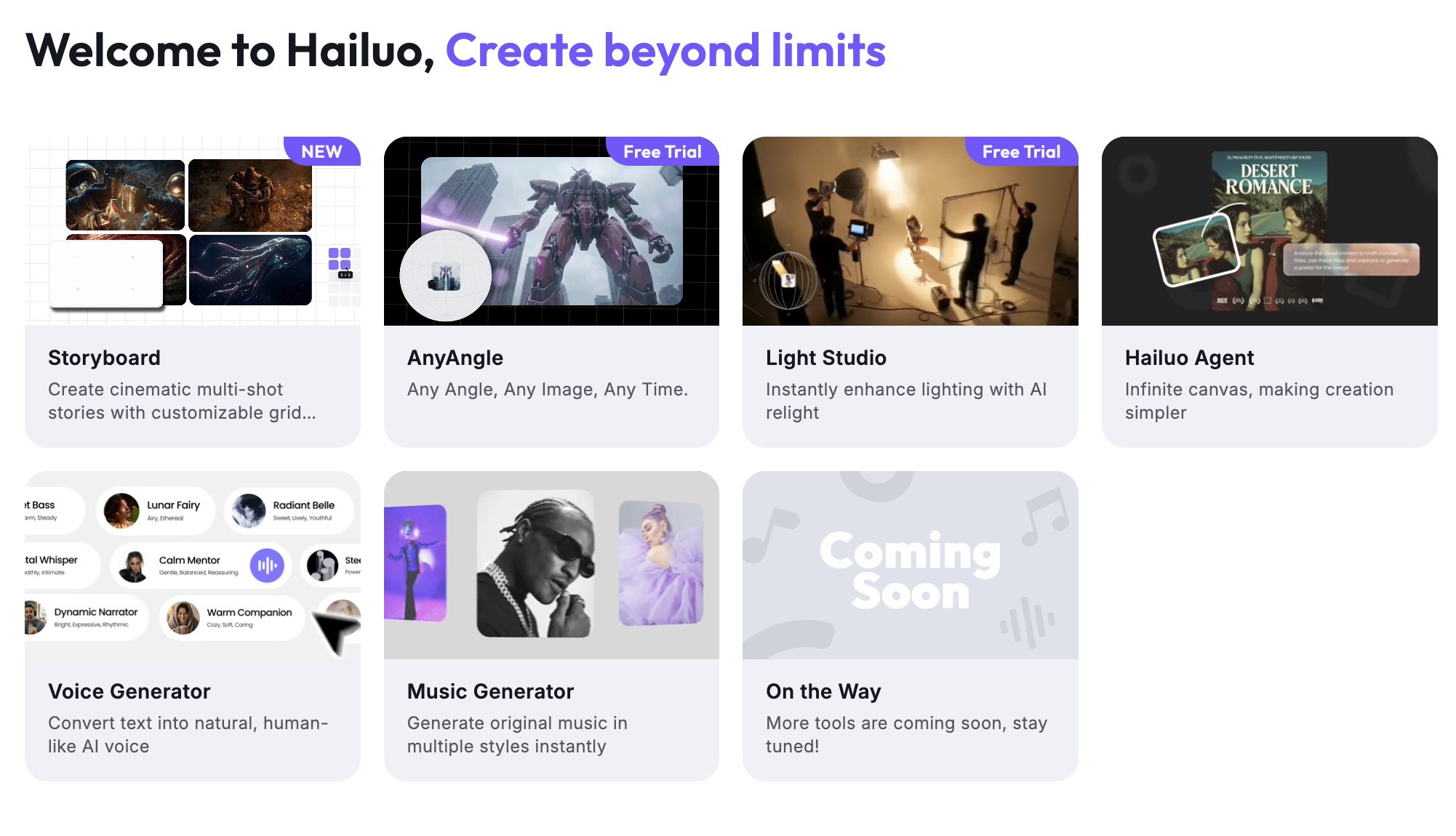
Hailuo AI turns a text prompt or a single photo into a short AI-generated video clip.
Why Hailuo AI Stands Out in 2026
Genuinely fast generation: Most clips render in roughly 30–90 seconds, which is noticeably quicker than many rival platforms and makes rapid iteration far less painful when you’re testing prompt variations.
Physics-aware motion: Hailuo’s model has been benchmarked as a top performer for realistic physical simulation — weight, collision, fluid and cloth behavior — which shows up as fewer “melting” or impossible-motion artifacts in action-heavy scenes compared to some competitors.
Aggressive pricing relative to Western rivals: Entry plans start under $10 a month, and per-clip costs on the standard tiers undercut premium platforms like Runway or Sora by a wide margin, making Hailuo attractive for creators producing high volumes of short social content.
Multi-model bundling on higher tiers: Paid plans now bundle access to outside models — including Veo 3.1, Sora 2 and Seedance 2.0 for video, plus image models such as Nano Banana Pro and Seedream — turning a single Hailuo subscription into a broader creative toolbox rather than a single-engine app.
A large library of viral, prompt-free templates: Tools like LoveFrame, PetPal, BabyForm, SnapMorph and PlayFun let non-technical users upload a photo and get a shareable video without writing a single prompt, which is a real differentiator for casual and social-first users.
Strong anime and stylized output: Independent reviewers consistently rate Hailuo’s stylized and anime-style generations above its photorealistic work, making it a solid pick for creators leaning into illustrated or stylized content rather than strict realism.
Cross-platform access: The tool is available on web, iOS and Android, so mobile-first creators can generate and publish clips without ever touching a desktop.
Active promotional and creator programs: MiniMax regularly runs affiliate, creator-partnership and prompt-challenge programs (with cash prizes for standout generations), which keeps a steady stream of fresh templates, trending effects and community content flowing into the platform rather than letting it stagnate between model releases.
Key Features and Technology
Hailuo AI’s feature set spans core generation modes plus a growing set of themed creative tools built on top of the same engine. Rather than positioning itself purely as a raw text-to-video box, MiniMax has layered a consumer-friendly product experience on top of the model — one that leans heavily on templates, one-click effects and social-sharing hooks. Here’s what’s actually inside the platform.
Text-to-Video and Image-to-Video
The two core modes let you either describe a scene in a written prompt (subject, action, lighting, camera movement, mood) or upload a still photo and animate it into motion with added depth and atmosphere. A start/end-frame control lets you define the opening and closing frames so transitions feel more intentional rather than fully open-ended, and camera-motion commands support pans, zooms, tilts and tracking shots.
The Hailuo Model Lineup
Hailuo 2.3 is the current flagship, tuned for physics accuracy and used as the default engine for most generations. Hailuo 02 focuses on cinematic, higher-fidelity output and 1080p rendering, while earlier T2V and I2V generations remain available for lighter, faster drafts. Paid tiers add access to third-party frontier models like Veo 3.1 and Sora 2 inside the same interface, so subscribers aren’t locked to MiniMax’s own engine alone.
Themed Creative Tools
Beyond raw prompting, the Tools tab packages the engine into single-click experiences: LoveFrame for couple/relationship-style clips, PetPal for animal videos, BabyForm for baby content, PlayFun for meme and comedy effects, SnapMorph for photo transformations, Style Switch for style transfer, CineScope for cinematic shots, and an ASMR-focused generator. These are aimed squarely at social creators who want a finished, shareable clip in a couple of taps rather than a full prompt-engineering session.
Image Generation and Audio
A separate image-generation mode covers static AI art and product-style imagery, and higher tiers add access to models like Nano Banana Pro and Seedream, which is useful if you need a still thumbnail, cover image or reference frame alongside your video clips. Audio is the platform’s clearest gap: Hailuo generates silent video by default, and while MiniMax Audio exists as a companion product for voice, music and cloning, users report it’s less mature and less tightly integrated than the video engine, so most creators still route voiceover, dialogue and sound design through a dedicated third-party audio tool rather than relying on Hailuo end-to-end.
One more practical detail worth flagging: because output is capped at short single-clip durations, longer-form projects mean stitching multiple generations together in an external editor. For a 30-second product ad or a 60-second explainer, expect to generate several short clips and assemble them yourself — Hailuo AI is a clip generator, not a sequencing or storyboard tool, and treating it as one will lead to frustration.
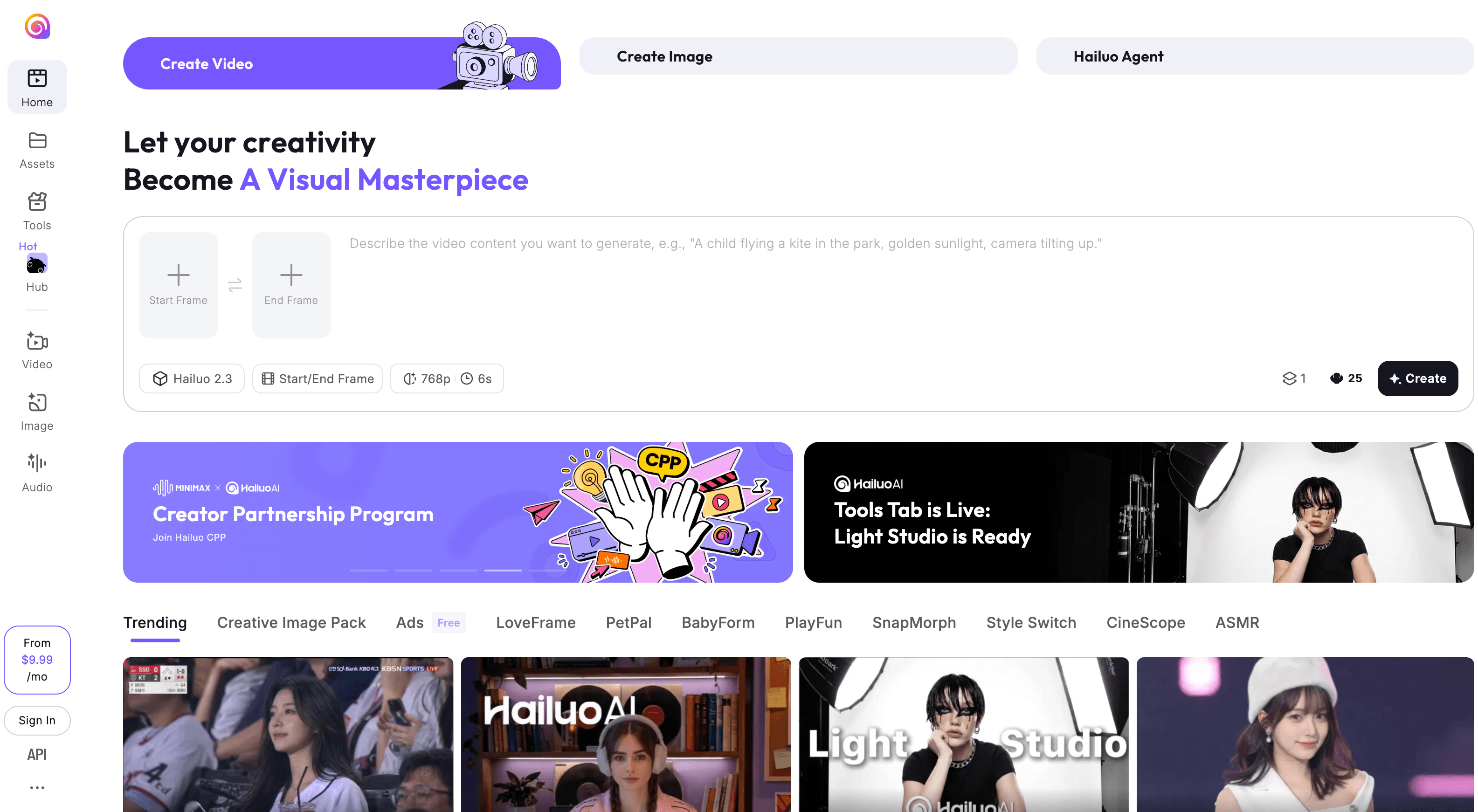
Hailuo AI’s themed tools turn a single photo into a shareable clip without any prompt writing.
Mobile App and Everyday Workflow
The iOS and Android apps mirror the web experience closely, letting you snap or select a photo, apply a themed effect, and export directly to a phone’s camera roll or share sheet without ever opening a browser. This mobile-first design is a deliberate choice — a large share of Hailuo’s traffic comes from short-form social platforms, and the app is built around the assumption that most users are generating a clip specifically to post it within minutes, not to archive it as part of a larger production. An “Assets” library keeps a history of your generations and their credit cost, which is useful for tracking spend, though it stops short of offering a true project or folder structure for organizing larger campaigns.
Pricing, Plans, and Package Structure
Hailuo AI runs on a credit-based subscription system with a free tier and several paid tiers. Every paid plan removes the watermark and unlocks 1080p export and commercial usage rights; higher tiers add bigger monthly credit pools, faster queue priority, and bundled access to outside models like Veo 3.1 and Sora 2. Because MiniMax has changed pricing and included perks (like daily bonus credits) more than once in the past year, treat the figures below as a snapshot rather than a guarantee — always check the live pricing page before subscribing.
The credit system itself is the part that trips up most new subscribers. Instead of a flat “X videos per month” allowance, every generation is priced in credits based on the model, resolution and duration you choose — a fast draft-quality clip can cost a fraction of what a full 1080p cinematic render costs, and the more demanding models (higher resolution, longer duration, cinematic presets) can eat through a monthly allotment surprisingly quickly if you’re not tracking usage. Critically, a failed or rejected generation still consumes the credits spent on it, which is why the pro-tip below matters more here than on most subscription platforms.
| Plan | Price (approx.) | What It Is | Best For |
|---|---|---|---|
| Free | $0 | Watermarked video, capped at 720p/768p, slow queue priority | Testing generation quality before paying |
| Standard | ~$8–10/mo | ~1,000 monthly credits, watermark removed, 1080p export, faster queue | Casual creators making occasional clips |
| Pro | ~$20–35/mo | Larger credit pool, priority rendering, access to bundled outside models | Regular content creators and small teams |
| Unlimited | ~$95/mo | Unlimited credits on core models, higher queue priority | Agencies and daily production workflows |
| Max | ~$199.99/mo | Largest credit allocation, unmetered access to core engines, top priority | High-volume studios and marketing departments |
How Hailuo AI Compares to Alternatives
Hailuo AI competes in a crowded AI video field. Here’s how it stacks up against two of the most commonly compared alternatives, Kling AI and Runway.
| Factor | Hailuo AI | Kling AI (approx.) | Runway (approx.) |
|---|---|---|---|
| Entry price | ~$8–10/mo | ~$10–13/mo | ~$15/mo |
| Generation speed | Very fast (~30–90 sec) | Moderate | Slower on relaxed/queue mode |
| Motion physics | Strong (top physics benchmark result) | Strong on human subjects | Good, more editorial control |
| Max clip length | Up to ~10 sec | Longer clips supported | Longer, more editing tools |
| Billing reputation | Weak — frequent complaints | Mixed | Generally stronger |
| Best for | Fast, cheap short clips and stylized/anime content | Human subjects, longer narrative shots | Professional editorial workflows |
Hailuo AI vs. Kling AI: Kling generally wins on clip length and how it handles human subjects and dialogue-driven scenes, while Hailuo answers back with faster rendering and a lower entry price — a reasonable trade if your priority is volume over polish.
Hailuo AI vs. Runway: Runway remains the more professional, editing-focused platform with deeper creative controls and a stronger track record on account and billing support, but it costs more per clip. Hailuo trades some of that polish and reliability for speed and a noticeably lower price per generation.
Hailuo AI vs. Google Veo 3.1 and OpenAI Sora: on pure photorealism and native audio sync, Veo 3.1 and Sora are generally considered ahead of Hailuo’s own engine, which is exactly why MiniMax now bundles both of them into its higher-tier plans rather than trying to out-render them directly. In practice, that means a Pro or Unlimited Hailuo subscriber isn’t choosing “Hailuo instead of Veo” — they’re getting Hailuo’s fast, cheap default engine for everyday clips, with the option to switch to a bundled frontier model when a specific shot needs more photorealistic detail or synced dialogue.
Pros and Cons
What Users Love
Speed: Reviewers consistently point to Hailuo’s rendering speed as a standout, especially useful for testing multiple prompt variations quickly.
Price-to-quality ratio: Several independent reviews call Hailuo one of the better value AI video tools available, undercutting premium platforms on cost per clip while still producing usable output.
Ease of use: No timeline, layers or keyframes — type a prompt or upload a photo and get a clip, which makes it approachable for complete beginners.
Image-to-video quality: Users specifically praise how well Hailuo animates portraits, product shots and mood-based scenes with subtle, natural camera movement.
Prompt-following on detailed instructions: Several reviewers note that Hailuo tends to follow detailed, well-structured prompts more reliably than some entry-level competitors, especially once you learn its preferred prompt structure.
Limitations Worth Knowing
Billing and cancellation complaints: This is the single most common complaint across Trustpilot reviews — charges continuing after cancellation, duplicate charges, and refund requests going unresolved for weeks.
Credits burned on failed generations: Community reports suggest a meaningful share of complex-prompt generations produce unusable output — morphing artifacts, ignored instructions — and those credits are not refunded automatically.
Thin customer support: Support runs primarily through email and Discord, with no live chat, no phone line and no self-service billing portal — a real gap compared to more mature Western SaaS tools.
Short, silent clips: Generations are capped at roughly 6–10 seconds and produce no native audio, so voiceover, dialogue and sound design have to be added in a separate tool.
Inconsistent content moderation: Some users report otherwise harmless prompts getting blocked by an overly strict and unpredictable content filter, which can be frustrating mid-project.
No self-service billing portal: Several reviewers point out there’s no in-app page to view payment history, update a card, or downgrade a plan independently — subscription changes often require contacting support directly, adding friction exactly where users need the least of it.
Who Should Use Hailuo AI
Social and meme content creators: The themed tools (PlayFun, SnapMorph, PetPal) and fast turnaround make Hailuo a strong fit for anyone producing high volumes of short, disposable social clips.
Budget-conscious creators experimenting with AI video: The low entry price and free tier make it a reasonable place to learn prompt-to-video workflows before committing to a pricier platform.
Anime and stylized-content creators: Hailuo’s output leans favorably toward stylized and illustrated aesthetics, making it a solid pick for that specific niche.
Anyone who wants access to multiple video engines in one place: Higher-tier subscribers effectively get Veo 3.1, Sora 2 and Seedance 2.0 bundled alongside Hailuo’s own model, which is convenient if you don’t want separate subscriptions.
Developers building automated pipelines: Teams that want to integrate video generation into an app or automation, rather than click through a web UI, can bypass the consumer subscription entirely and use MiniMax’s pay-per-generation API through third-party platforms — a different pricing model that avoids the credit-expiry and subscription issues altogether.
Who should look elsewhere: if you need long-form, dialogue-driven or heavily edited video, a platform with dependable billing and responsive support, or native audio generation, Hailuo AI’s current limitations will likely outweigh its speed and price advantages — a more established tool with stronger account protections is probably the safer choice. Businesses running client-facing or brand campaigns should also weigh the reputational risk of building a workflow around a vendor with a documented pattern of billing complaints, and may prefer to test thoroughly on a month-to-month basis before committing to an annual plan.
Getting Started: Step by Step
Getting your first usable clip out of Hailuo AI takes only a few minutes, but a little discipline around credit spending will save you money and frustration once you’re past the free tier. Here’s a straightforward path from signup to a finished, downloadable video.
- Create a free account. Sign up on the Hailuo AI website or mobile app to claim your initial free credits.
- Pick a generation mode. Choose text-to-video to write a prompt from scratch, or image-to-video to animate an uploaded photo.
- Write a focused prompt. Keep it simple at first — subject, action, camera movement, mood — and avoid ambiguous or sensitive references that may trip the content filter.
- Generate at draft quality first. Test at the lowest-cost resolution before spending higher-tier credits on a final 1080p render.
- Refine and regenerate. Adjust the prompt based on the result and re-run until the motion and composition look right.
- Upgrade only if needed. Move to a paid tier once you’ve confirmed the free tier’s output quality meets your bar, and track your subscription status closely given the platform’s billing history.
Tips for Getting Maximum Value
Get the most out of Hailuo AI by treating credits like a limited resource rather than an unlimited playground: write detailed, unambiguous prompts that specify camera movement, lighting and subject behavior up front, since vague prompts are far more likely to produce a wasted generation; test complex or multi-subject scenes at draft resolution before committing higher-cost credits to a final render; break busy scenes into single-subject clips and composite them afterward in a separate editor rather than asking the model for everything at once; route audio, voiceover and sound design through a dedicated tool since Hailuo’s own audio capability is still maturing; and, given the platform’s documented billing issues, subscribe with a card you can easily monitor or cancel, keep a written record of any cancellation request, and check your statement for a month or two after canceling to make sure charges actually stop. It also helps to keep a running log of which prompt phrasings triggered content-filter rejections, since the moderation system’s behavior isn’t always predictable — once you’ve identified a handful of trigger words or themes to avoid, your rejection rate (and wasted credits) tends to drop noticeably.
Future Outlook and Final Assessment
With fresh IPO capital and a rapidly growing user base reportedly in the hundreds of millions, MiniMax has both the resources and the incentive to keep pushing Hailuo’s video model forward — expect continued upgrades to physics accuracy, resolution and generation speed, along with deeper bundling of third-party models as the “one subscription, many engines” strategy matures. The technology trajectory looks genuinely strong.
Whether the platform closes the gap on trust and support is a separate question. The billing and refund complaints piling up on Trustpilot aren’t new-product growing pains at this point — they’re a recurring pattern that MiniMax will need to address directly if it wants Hailuo AI to be seen as a dependable long-term subscription rather than a tool people try once and cancel warily. As a newly public company, MiniMax now faces more investor and market scrutiny than it did as a private startup, which could push it toward tightening billing practices and formalizing support channels — or it could simply mean more capital chasing model improvements while the customer-experience gap persists. Either way, it’s a space worth watching over the next few review cycles.
Competitively, the AI video category is only getting more crowded — Kling, Runway, Veo and Sora are all iterating quickly, and Hailuo’s speed and price advantages could narrow if rivals cut their own per-clip costs. For now, though, Hailuo AI’s combination of fast rendering, strong physics simulation and an aggressive free-to-paid on-ramp keeps it firmly in the conversation for creators who prioritize volume and speed over polish and support.
Conclusion
Hailuo AI earns its popularity honestly — it’s one of the fastest, cheapest ways to turn a prompt or photo into a shareable AI video clip, and its physics-aware motion holds up well against far pricier competitors. But this is a tool to use with your eyes open: test with the free tier first, keep your prompts simple, watch your billing closely, and treat it as a fast concept generator rather than a full production platform, and Hailuo AI can earn a genuinely useful spot in your creative toolkit.
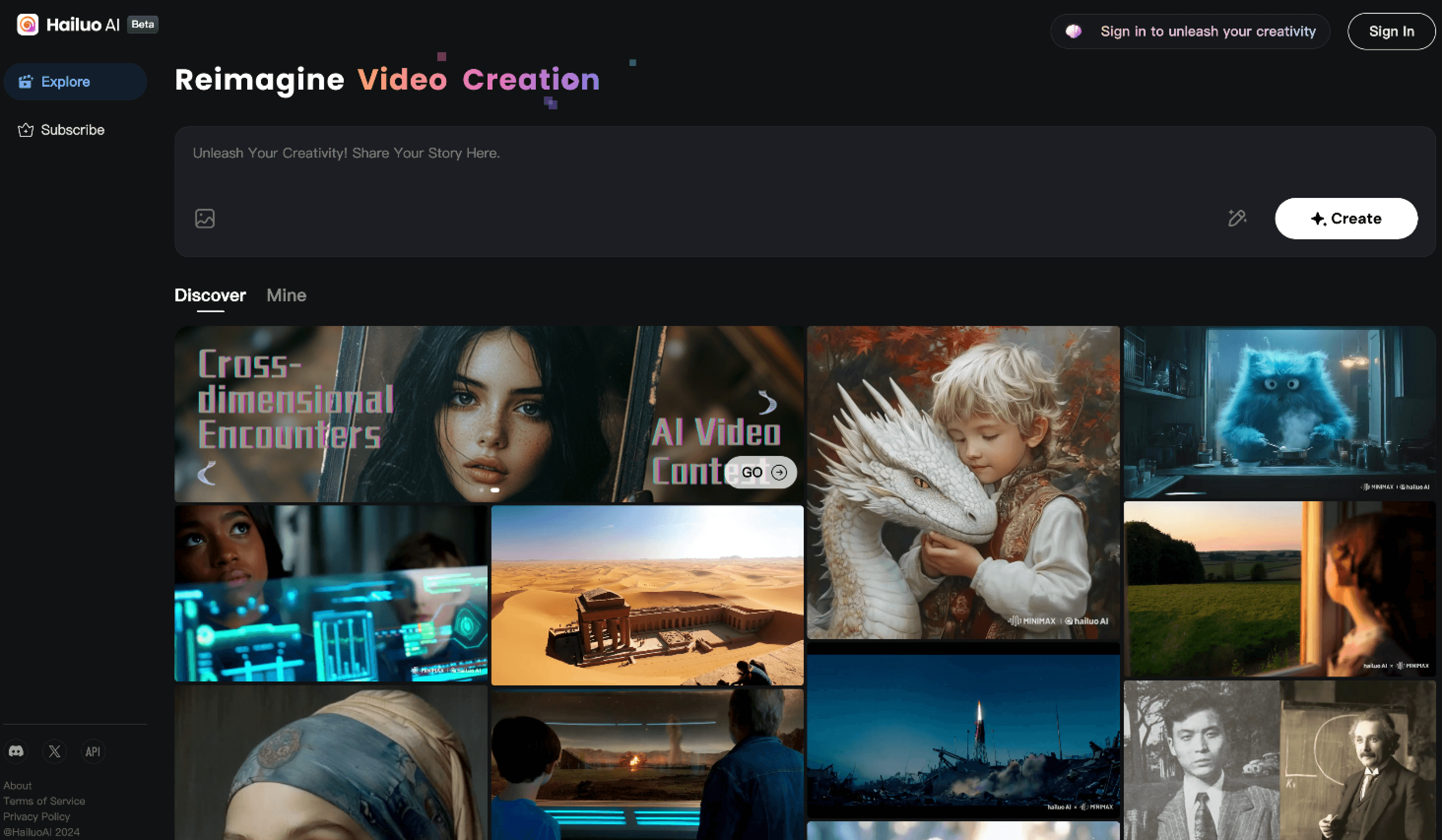
A finished Hailuo AI clip, generated from a single text prompt in under two minutes.
Ready to try AI video generation the smart way?
Explore more honest reviews, tutorials and tech comparisons to find the right gear for the way you work, travel and live — at World Of Tech, where we make everything easy.
👉 Try Hailuo AI: https://worldoftech.space/hailuoai.ai
👉 Our YouTube Channel: youtube.com/@world_tech79
👉 Our Facebook Fanpage: Facebook
👉 Our X (Twitter): @worldoftech79
Pricing, specifications and policy details in this review were verified against hailuoai.video and independent review sources as of July 2026. AI video pricing and features change frequently, so confirm current details on the official site before purchasing. Competitor prices are approximate and subject to change.





