
If you live on a Mac, iPad or iPhone and PDFs are part of your day, you already know the friction: Apple’s built-in Preview can highlight and sign but can’t truly edit text, free web tools choke on big files and raise privacy worries, and Adobe Acrobat is powerful but pricey and famously heavy. PDF Expert, built by the Ukrainian productivity studio Readdle, is designed to erase that friction on Apple devices specifically. It lets you edit text, images and links directly inside a PDF, annotate with a deep markup toolkit, convert PDFs to Word, Excel and PowerPoint, run OCR on scans, fill and sign forms, and even chat with a document through an AI assistant called PDF Copilot — all wrapped in an interface that genuinely feels native to macOS and iOS. With a 4.7/5 rating across more than 211,000 App Store reviews, an Apple “App of the Year” runner-up award, an Editors’ Choice badge and around 30 million users worldwide, it’s one of the most established names in the category.
For students, knowledge workers, freelancers, educators and small businesses who live inside the Apple ecosystem, the value proposition is immediate: an Acrobat-class toolkit that’s cheaper, faster and far easier to learn. But PDF Expert isn’t for everyone, and an honest look reveals real trade-offs around its Apple-only availability, a confusing lifetime license, and a subscription push that has frustrated some long-time buyers. This 2026 review walks through the full picture — the core editing, annotation and conversion tools, the AI Copilot and OCR tech, the complete pricing structure, head-to-head comparisons against Adobe Acrobat, Foxit and UPDF, the genuine pros and cons, and exactly who should (and shouldn’t) buy in.
PDF Expert Review 2026: The PDF Editor That Finally Feels at Home on Mac, iPad and iPhone
Overview and Background
PDF Expert is a PDF reader and editor made by Readdle, a privately held productivity company that has been on the App Store since the day it launched in 2008. It isn’t a general office suite or a browser plugin — it’s a dedicated, purpose-built PDF app for Apple devices, designed around one idea: give Mac, iPad and iPhone users a complete, professional PDF workflow without the bloat, cost or learning curve of the enterprise giants. You open a document and can read, annotate, edit, convert, fill, sign and organize it from a single clean interface that behaves the way Apple software is supposed to behave.
Readdle is the same studio behind Spark (email), Scanner Pro, Documents and Calendars, and its apps have been downloaded by roughly 194 million people worldwide. PDF Expert is its flagship, with around 30 million users, an Apple “App of the Year” runner-up nod and an Editors’ Choice award. Independent reviewers at Macworld, TechRadar, ZDNET and others have consistently rated it as one of the best — often the best — PDF editors for the Apple ecosystem, praising it as the most “Mac-like” and approachable of the major PDF apps. It is, in other words, a credible and well-supported product, not a fly-by-night utility.
What separates PDF Expert from the crowd is its blend of genuine depth and genuine simplicity, sharpened in 2026 by AI. The latest versions add PDF Copilot — an AI assistant that can summarize a document, pull out key points, generate keywords and answer questions about the content, linking each answer back to the exact pages it came from — plus an AI-powered “Enhance” feature that cleans up messy scans. One account syncs your work across iPhone, iPad and Mac via iCloud, Google Drive or Dropbox, and every plan comes with a 7-day free trial and a 30-day money-back guarantee.
Why PDF Expert Stands Out in 2026
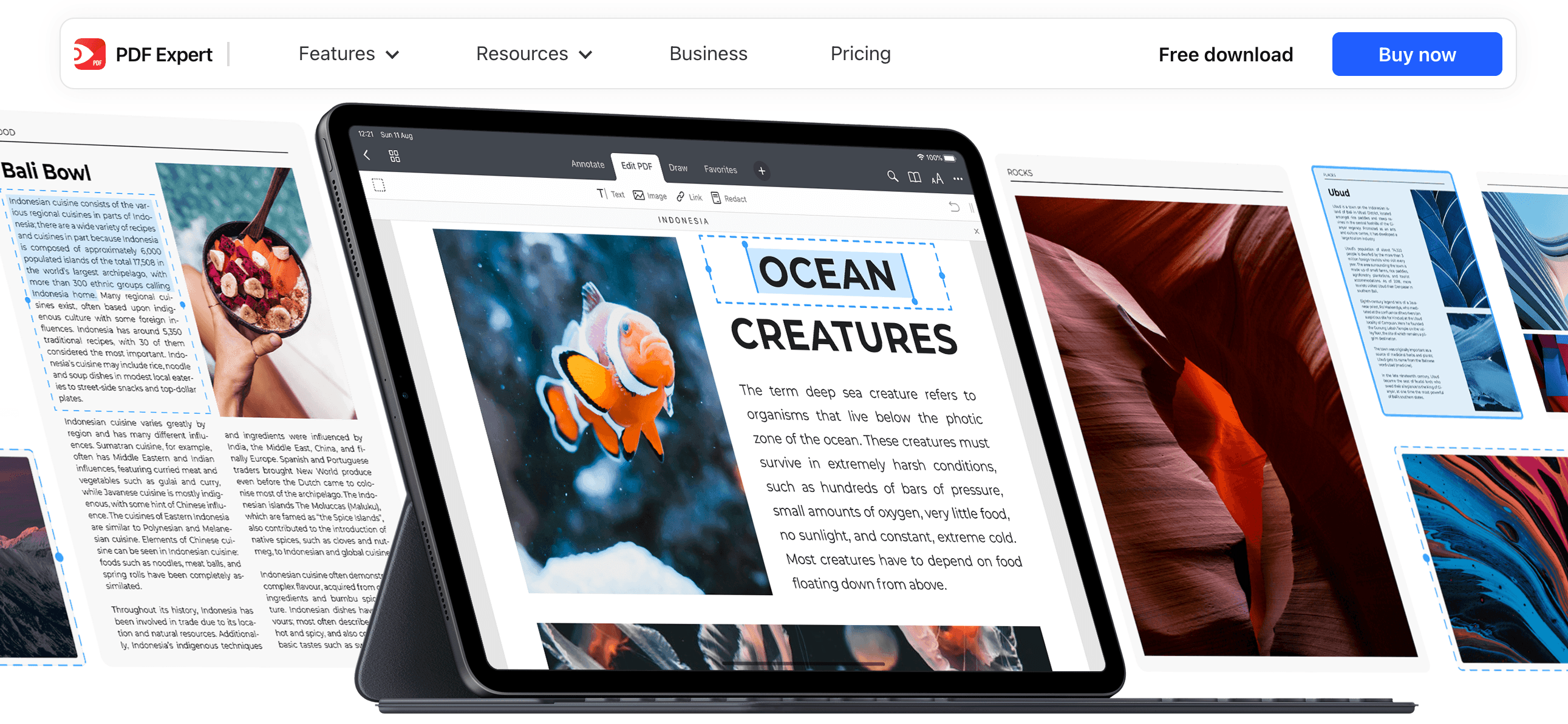
It edits PDFs like a real document, not an overlay: This is the line that separates serious PDF editors from free tools. Most free apps only let you add new text on top of a page; PDF Expert lets you change the words, images, links and signatures that are already inside the file. Click a paragraph and retype it, swap a photo, fix a typo in a contract — the kind of in-place editing that normally requires Adobe Acrobat.
It feels genuinely native to Apple: Reviewers repeatedly call PDF Expert the most “Mac-like” of the major PDF apps, and it’s the differentiator that keeps people loyal. The interface is clean and uncluttered, gestures and Apple Pencil support feel right on iPad, and nothing is buried in nested menus the way it is in heavier suites. Despite being feature-rich, it rarely feels overwhelming.
PDF Copilot brings real AI to your documents: The 2026 versions add an AI assistant that summarizes long PDFs, extracts key points, generates keywords and answers content questions in plain language. Crucially, it cites the exact pages its answers come from, so finding the relevant passage in a 40-page report becomes a single question instead of a long scroll.
A deep, well-organized annotation toolkit: Notes, highlights, stamps, stickers, drawing and even audio notes are all here, and annotations stay editable — you can change a doodle’s color, size, position and opacity after the fact. For students marking up readings, lawyers reviewing contracts or teams commenting on drafts, it’s one of the most complete markup sets on Apple devices.
OCR and AI Enhance rescue your scans: Built-in optical character recognition turns scanned documents and even handwriting into searchable, selectable, copyable text, while the AI-powered Enhance feature fixes distortions, removes shadows and improves contrast. You can also split double-page scans and crop away ugly margins — turning a phone snapshot of a document into something usable.
It converts and reflows beautifully: PDF Expert exports PDFs to Word, Excel, PowerPoint and JPG with strong accuracy, and its reading experience is a standout — a smart Reading Mode reflows even two-column PDFs to fit your screen, with Day, Night and Sepia themes that make long sessions on an iPhone genuinely comfortable.
Trust, sync and a safety net: Backed by a 4.7/5 rating from 211,000+ App Store reviewers, Readdle’s long track record, seamless iCloud/Google Drive/Dropbox sync, a 7-day free trial and a 30-day money-back guarantee, PDF Expert is a low-risk product to try — you can use the full app before paying a cent.
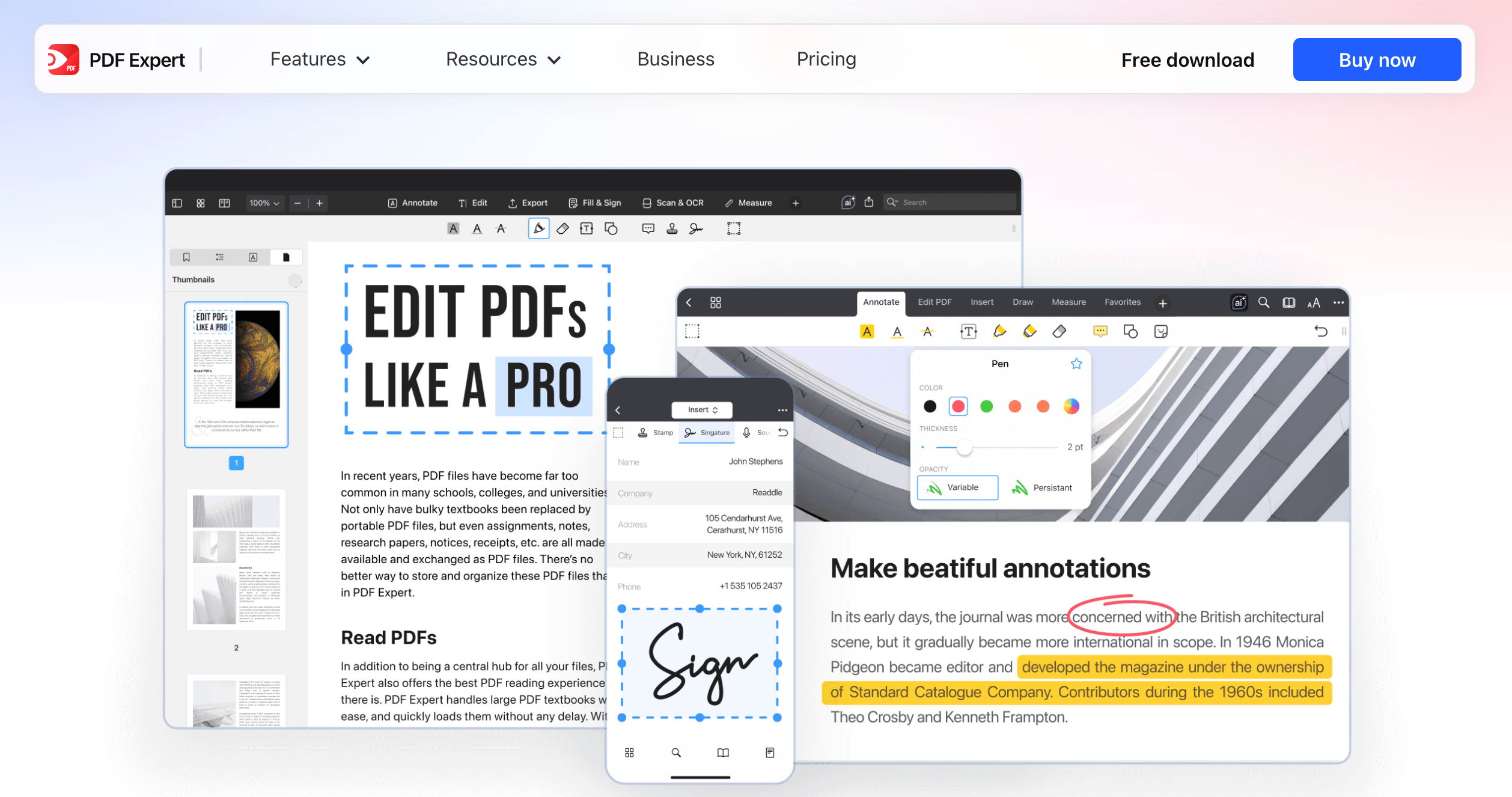
PDF Expert lets you edit the text, images and links already inside a PDF — and ask its AI Copilot to summarize the whole document — all in an interface that feels native to Mac, iPad and iPhone.
Key Features and Technology
PDF Expert’s feature set is broad, but it organizes cleanly into a handful of pillars. Here’s how the platform actually breaks down.
In-Place Editing of Text, Images and Links
The heart of the product. PDF Expert lets you edit existing text directly — change wording, adjust fonts and formatting, and have the layout adapt — rather than simply stamping new text on top. You can replace or move images, add and edit hyperlinks, redact sensitive content, and manage signatures. For most people this is the single feature that justifies paying for a dedicated editor over Apple’s free Preview, which can annotate and sign but cannot genuinely edit a PDF’s content.
Annotation and Markup Toolkit
A full set of review tools: highlights, underlines, notes, comments, stamps, stickers, freehand drawing and audio notes recorded straight into the document. Annotations remain editable after you add them, so you can recolor, resize or reposition them later. On iPad, Apple Pencil support makes handwritten markup and note-taking feel natural, and you can customize the toolbar — combining pens, colors and line weights — to match the way you work.
Conversion, Forms and Page Management
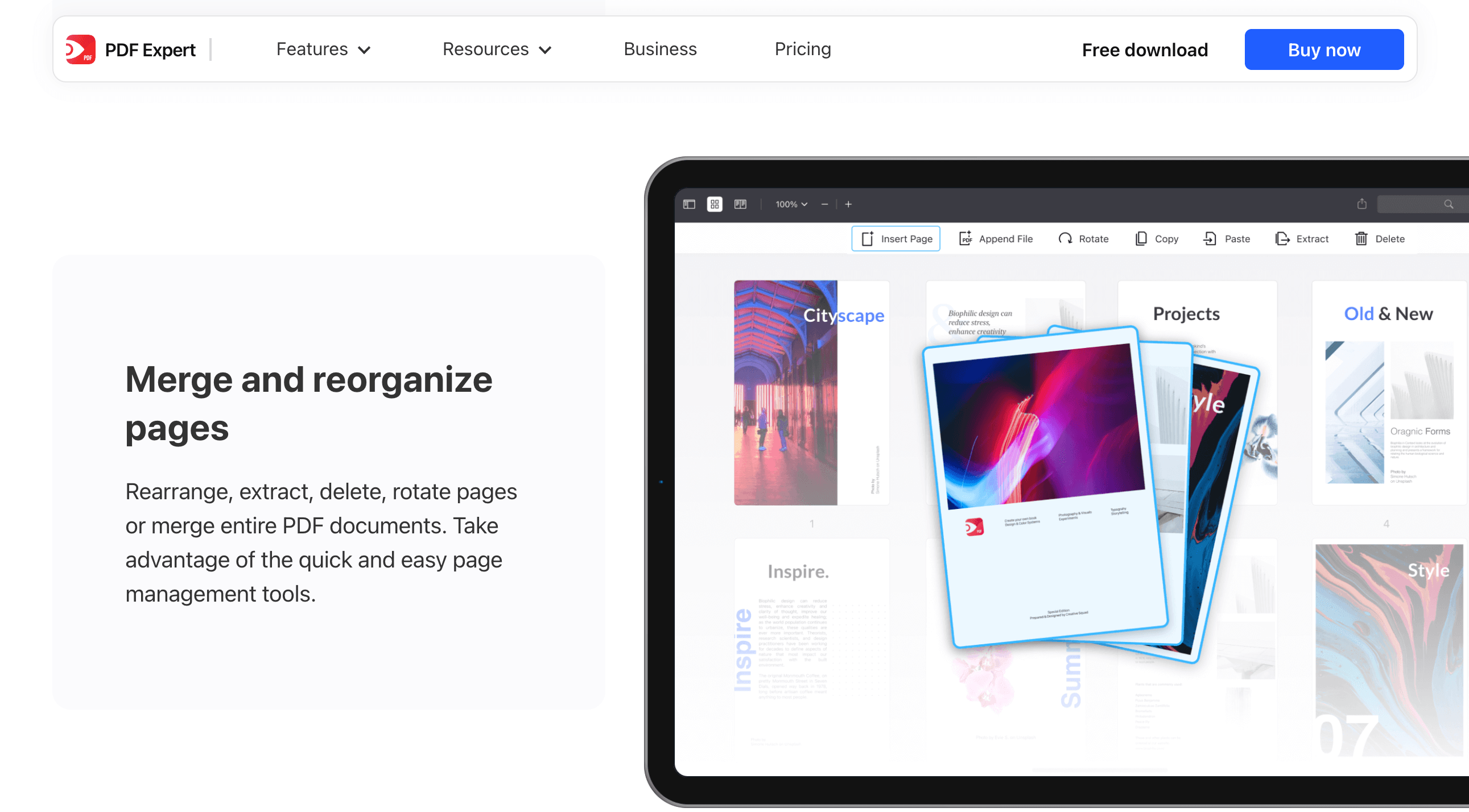
PDF Expert converts PDFs to Word, Excel, PowerPoint and JPG with solid fidelity, and reverses the process by creating PDFs from other files. It fills out demanding forms — including checklists with formulas and calculations, plus insurance and tax forms — and handles e-signatures, with a special feature on iPhone and iPad for collecting a customer’s signature in person. Page management is quick and visual: rearrange, extract, delete, rotate or merge pages and whole documents with drag-and-drop.
OCR and AI “Enhance” for Scans
Optical character recognition turns scanned PDFs into searchable, highlightable, copyable text and reportedly handles handwriting well. The AI-powered Enhance feature is the standout here: it fixes perspective distortions, removes shadows and lifts contrast so an old or phone-shot document looks clean. You can also split double-page scans into separate pages and crop away unwanted margins — a genuinely useful pipeline for digitizing paperwork.
PDF Copilot, Reading Modes and Translation
PDF Copilot is PDF Expert’s AI layer: ask it to summarize a document, list key points, generate hashtags or answer a question, and it responds with sourced page references. Alongside it, the app offers a class-leading reading experience — fluid scrolling, a Reading Mode that reflows even two-column PDFs to fit a phone screen, Day/Night/Sepia themes, indexed search, bookmarks and search history. A Translate PDF feature rounds out the toolkit for working across languages. Measurement tools also make it a quiet favorite among architects and engineers working with drawings and blueprints.
Pricing, Plans, and Package Structure
PDF Expert sits in the mid-tier of PDF pricing — clearly more expensive than free tools and the cheapest budget apps, but a fraction of Adobe Acrobat’s long-run cost. There are three ways to pay: a weekly subscription, an annual subscription (the best value for full features), and a one-time Lifetime license with notable restrictions. Every plan includes a 7-day free trial and a 30-day money-back guarantee, and Readdle offers students and educators a discount on the annual plan. The prices below are PDF Expert’s standard rates verified on the official site; promotions and coupon codes appear regularly, so always confirm the live price before checkout.
| Plan | Price (USD) | What It Is | Best For |
|---|---|---|---|
| Weekly | $4.99 / week | Full features (Mac + iOS), AI Copilot, cancel anytime | A short, one-off project or burst of work |
| Yearly (Best value) | $79.99 / year (~$1.53/week) | Full features across Mac, iPad & iPhone + AI Copilot + updates | Most users who want everything, on all devices |
| Lifetime | $139.99 one-time | Mac-only; no iOS apps and no AI Copilot; major upgrades may cost extra | Mac-only users who hate subscriptions |
| Student / Educator | ~30–50% off annual | Annual plan discount via verified educational email | Students and teachers in education |
| Free Trial | $0 (7 days) | Full-feature trial; no payment details required on the web | Trying before you buy |
How PDF Expert Compares to Alternatives
| Factor | PDF Expert | Adobe Acrobat Pro | Foxit / UPDF |
|---|---|---|---|
| Platforms | Mac, iPad, iPhone only | Windows, Mac, mobile, web | Windows, Mac, iOS, Android |
| Annual price (approx.) | $79.99/yr or $139.99 lifetime | ~$240/yr (~$20–30/mo) | Foxit ~$130–150/yr; UPDF much cheaper |
| Ease of use | Very high — clean, native feel | Powerful but steeper learning curve | Office-style ribbon; UPDF very clean |
| AI assistant | PDF Copilot (subscription only) | AI Assistant + multi-doc search (add-on) | Single-document AI on both |
| Editing depth | Excellent for nearly all users | Deepest, most complete on the market | Strong; ~90% of Adobe (Foxit) |
| OCR & scans | OCR + AI Enhance for scans | Best-in-class OCR accuracy | Good; Foxit OCR can lag on scans |
| Best for | Apple users wanting power + simplicity | Legal, enterprise & power users | Cross-platform & budget shoppers |
vs. Adobe Acrobat Pro: Acrobat is the industry standard and the most feature-complete editor available — best-in-class OCR, professional redaction, advanced form creation and an AI Assistant that can even search across many documents at once. But it costs roughly $240 a year, runs heavier, and carries a famously steep learning curve. PDF Expert covers what the large majority of people actually need at a fraction of the long-run cost, with a far gentler interface. If you’re a legal or enterprise power user, Acrobat earns its premium; if you’re an everyday Apple user, PDF Expert is the smarter buy.
vs. Foxit and UPDF: These are PDF Expert’s closest value rivals — both work on Windows, Mac, iOS and Android, which PDF Expert can’t match. Foxit offers an Office-style ribbon and roughly 90% of Adobe’s feature depth, though its macOS build is less polished than its Windows one and its OCR can lag on scans. UPDF undercuts almost everyone on price with a single license across all devices. If cross-platform reach or rock-bottom price is your priority, these win; if you live on Apple devices and value a truly native, refined experience, PDF Expert pulls ahead.
vs. Apple Preview (free): Preview is built into every Mac and handles basic viewing, annotation and signing for free — for many casual users that’s genuinely enough. What it can’t do is edit the actual text and images inside a PDF, run OCR, convert reliably to Office formats, or chat with a document via AI. PDF Expert is what you reach for when Preview hits its ceiling, which for regular PDF users happens quickly.
Pros and Cons
What Users Love
Clean, intuitive, genuinely native design: The most consistent praise across reviews is how pleasant and easy PDF Expert is to use. Reviewers describe a “gorgeous” interface that’s feature-rich without feeling cluttered, and several long-time Mac users say it’s the rare app where they can’t think of how to improve the experience.
It does almost everything most people need: Owners highlight the full toolkit — in-place editing, annotation, conversion, OCR, forms and signing — and conclude it may be the only PDF editor most Apple users will ever require. Independent outlets reach the same verdict, calling it one of the best PDF editors for the Apple ecosystem.
Strong value next to Adobe: Many reviewers frame PDF Expert as affordable, capable PDF editing that lets you say “goodbye Preview” without paying Acrobat money. For the feature set, users repeatedly call the price reasonable — especially the annual plan and the educational discount.
Seamless Apple-device sync: A single account keeps documents in sync across Mac, iPad and iPhone, with iCloud, Google Drive and Dropbox support. Owners love starting markup on an iPad with Apple Pencil and finishing on a Mac without missing a beat.
A useful, well-implemented AI Copilot: Reviewers single out the AI assistant for summarizing long documents, surfacing key points and answering questions with page-level citations — a real time-saver when you’re working through dense reports or contracts.
Responsive support, when it works: A notable share of positive reviews specifically praise Readdle’s customer support as quick and human — users describe getting helpful, personal replies that solved license and activation problems.
Limitations Worth Knowing
Apple-only — no Windows or Android: This is the biggest limitation by far. PDF Expert simply doesn’t exist on Windows or Android, so if any part of your workflow lives outside Apple’s ecosystem, it can’t follow you there. Cross-platform users need Adobe, Foxit or UPDF instead.
A confusing, restricted Lifetime license: The one-time $139.99 license is Mac-only, leaves out the iPhone/iPad apps and the AI Copilot, and may not include future major upgrades. Several buyers expected a full perpetual license and felt misled when they discovered the gaps — read the terms carefully before choosing it.
The subscription and account push: A recurring complaint on Trustpilot is that updates began requiring an account sign-in, and some users who thought they’d bought a perpetual license report being nudged toward a subscription or seeing the app stop working as before. Others were surprised by an annual charge. Go in clear-eyed about the account requirement and billing terms.
Inconsistent support and license recovery: While much support feedback is positive, a real minority describe slow or unhelpful responses and trouble reactivating old licenses after a hardware change or reinstall. Keep your purchase records and license codes safe.
Not the deepest tool for true power users: For the most advanced needs — complex redaction at scale, the most accurate OCR, multi-document AI search, or heavy form creation — Adobe Acrobat still goes further. PDF Expert targets the broad middle brilliantly, but specialists in regulated industries may hit its ceiling.
Minor interface nitpicks: Some reviewers note the toolbar icons lack labels or tooltips, which can briefly slow down newcomers, and a few mobile users dislike that iPhone/iPad access is subscription-only with no one-time mobile option.
Who Should Use PDF Expert
Apple-ecosystem professionals and freelancers: This is PDF Expert’s sweet spot. If you work across a Mac, iPad and iPhone and regularly edit, annotate, convert and sign PDFs, it gives you an Acrobat-class workflow that’s cheaper and far easier to live with. Consultants, lawyers, managers and remote workers feature heavily among happy users.
Students and educators: With Apple Pencil markup on iPad, smart reading modes for long PDFs, OCR for scanned readings and the AI Copilot for summarizing dense material — plus a sizable education discount — it’s a strong fit for academic life. Note-taking and annotation are where it shines for this group.
Small businesses and teams on Apple hardware: Contracts, invoices, forms and signatures are handled cleanly, and a Business plan exists for organizations. Reviewers call it a robust, easy-to-use solution for managing business documents without enterprise-grade complexity.
Architects, engineers and technical users: The measurement tools for working with drawings and blueprints make PDF Expert a quiet favorite in technical fields, on top of the standard editing and markup capabilities.
Who should look elsewhere: Windows or Android users, anyone whose workflow spans multiple operating systems, and hardcore power users who need the deepest redaction, OCR or multi-document AI should choose differently — Adobe Acrobat for maximum capability and compliance, Foxit or UPDF for cross-platform reach and lower cost. And if your needs are truly basic, the free Apple Preview may be all you require. Anyone drawn to the Lifetime license should also go in knowing it’s Mac-only and AI-free.
Getting Started: Step by Step
- Confirm your devices. Make sure you’re on a Mac running macOS Monterey or later, or an iPad/iPhone on a current iOS/iPadOS. PDF Expert is Apple-only — if you also need Windows or Android, plan to use a different tool there.
- Start the free trial. Download PDF Expert from the official site or the App/Mac App Store and begin the 7-day full-feature trial. On the web you can claim it without entering payment details, so you can test the whole app risk-free.
- Pick the plan that fits your use. Choose the $79.99/year subscription if you want the AI Copilot and use across Mac, iPad and iPhone; choose the $139.99 Lifetime license only if you work solely on a Mac and never want a subscription (accepting no AI and no mobile apps). Students and educators should verify their educational email first for the discount.
- Set up sync and your toolbar. Sign in with one account and connect iCloud, Google Drive or Dropbox so documents follow you across devices. Then customize the toolbar — arrange your most-used pens, colors and tools — so your routine tasks are one tap away.
- Learn the core workflow. Open a PDF and try the essentials: edit text and images in place, add annotations, run OCR on a scan (and clean it with AI Enhance), convert to Word or Excel, fill a form and add your signature. Ask PDF Copilot to summarize a long document to see the AI in action.
- Keep your license details safe. Save your account credentials and any license code somewhere secure — several users have hit trouble reactivating after a reinstall or new computer, so a backup of your purchase info saves headaches later.
Tips for Getting Maximum Value
Always begin with the 7-day free trial and the 30-day money-back guarantee — there’s no reason to pay before you’re sure it fits your workflow. If you’re a student or teacher, verify your educational email before checkout to unlock up to roughly 50% off the annual plan, and watch for Readdle’s regular promo codes since the software rarely needs to be bought at full price. Lean on the AI Copilot for the documents that actually drain your time — long contracts, reports and research — and let it jump you straight to the relevant page instead of scrolling. On iPad, pair it with the Apple Pencil for the best annotation experience, and use Reading Mode with a Night or Sepia theme for long sessions on a phone. Build a few reusable signatures and stamps once so signing and reviewing become a couple of taps, and choose the subscription over the Lifetime license unless you’re certain you’ll only ever use a Mac and never want the AI or mobile apps. Finally, keep your account and license details backed up so a future reinstall is painless.
Future Outlook and Final Assessment
The PDF editor market in 2026 is being reshaped by AI, and PDF Expert is moving with that current rather than against it. PDF Copilot already summarizes, extracts and answers questions with sourced citations, and Readdle has signaled it sees AI as central to where the product goes next — pointing toward more transformative, workflow-level capabilities beyond a simple chat assistant. Combined with its long track record, its 4.7/5 reputation across 211,000+ reviews and Apple’s repeated recognition, PDF Expert remains the most polished, approachable PDF editor in the Apple ecosystem, and the AI direction only strengthens that position.
The honest caveats remain real: it’s Apple-only, the Lifetime license is confusingly restricted, the move toward required accounts and subscriptions has annoyed a slice of long-time buyers, and support is occasionally inconsistent. For the deepest professional needs, Adobe Acrobat still goes further, and cross-platform users will need something else entirely. But within its chosen boundary — a fast, native, well-priced, genuinely capable PDF editor for Mac, iPad and iPhone — PDF Expert delivers one of the best experiences available in 2026, and for most Apple users it’s the easiest recommendation in the category.
Conclusion
PDF Expert isn’t trying to be everything to everyone — it’s trying to be the best PDF editor for people who live on Apple devices, and at that job it’s remarkably effective. By letting you truly edit text and images, annotate with a deep toolkit, convert to Office formats, run OCR on scans and chat with documents through AI, all inside an interface that feels native to macOS and iOS, it removes the friction most people hit with free tools and the cost and complexity they hit with Adobe. It rewards realistic expectations: it won’t run on Windows or Android, the Lifetime license has strings attached, and the account-and-subscription model deserves a careful read before you buy. But for students, professionals and small businesses inside the Apple ecosystem, few PDF apps deliver more for the money. Start the free trial, confirm the current price and any active discount, and PDF Expert can take the hardest part of working with PDFs and make it genuinely easy.
Ready to make PDFs effortless on your Mac, iPad and iPhone?
Explore more honest reviews, tutorials and tech comparisons to find the right gear for the way you work, travel and live — at World Of Tech, where we make everything easy.
👉 Try PDF Expert: https://pdfexpert.com/
👉 Our YouTube Channel: youtube.com/@world_tech79
👉 Our Facebook Fanpage: Facebook
👉 Our X (Twitter): @worldoftech79
Pricing, specifications and policy details in this review were verified against pdfexpert.com and independent review sources (including Trustpilot, Macworld, TechRadar and hands-on reviewer testing) as of June 2026. PDF software, pricing and promotions change frequently, so confirm current details on the official site before purchasing. Competitor prices are approximate and subject to change.





