
If you create visual content for a living — or even just for fun — you have probably felt the tab fatigue: one app to generate images, another to upscale them, a third to make a video, a fourth to clean up a background, and a separate subscription for each. OpenArt was built to collapse that pile of tools into a single workspace. It’s an all-in-one, browser-based AI creative studio that bundles text-to-image generation, in-browser editing, video creation, audio, custom model training and one-click storytelling — with access to more than 100 underlying AI models from the likes of OpenAI, Google, Flux, Stability AI and others, all under one login. Founded in 2022 by two former Google employees and now used by a community the company describes as 8 million-plus creators, OpenArt has grown from an AI prompt search engine into one of the most feature-dense creative platforms in the category.
For solopreneurs, content creators, marketers and small business owners, the pitch is immediate: replace several specialist subscriptions with one credit-based plan and move from idea to finished asset without ever leaving the browser. But OpenArt is not flawless, and an honest look turns up real trade-offs — a credit system that can drain faster than expected, billing and refund complaints worth knowing about, and output quality that varies between models. This 2026 review walks through OpenArt’s full toolkit — the model hub, consistent characters, the viral One-Click Story feature, the editing suite, complete pricing tier by tier, head-to-head comparisons against Midjourney, Leonardo AI and Adobe Firefly, the genuine pros and cons, and exactly who should (and shouldn’t) sign up.
OpenArt Review 2026: The All-in-One AI Studio for Images, Video and Consistent Characters
Overview and Background
OpenArt is a US-based generative-AI company (headquartered in the San Francisco Bay Area) that builds a single platform for creating and editing images, videos and audio. It is not a single-model image generator like some rivals — its core idea is aggregation: rather than picking one engine, you get a hub that routes your prompt to whichever model fits the job, from Stable Diffusion and DALL·E to Google Imagen, Flux, Ideogram and video models like Veo 3, Kling and Sora-class systems. You provide a prompt, sketch or reference image, choose a model and a workflow, and OpenArt handles the generation, editing and export in the browser.
The company was founded in 2022 by Coco Mao, a former Google product manager who worked on Google Search, and John Qiao, a senior engineer. It started life as what it calls the world’s largest AI prompt search engine, then pivoted in 2023 into a full creative suite. That history shows in the product: OpenArt leans heavily on a huge prompt and style library, a public community gallery and pre-built workflows that let non-technical users skip prompt engineering entirely. The platform is backed by roughly $35 million in funding, including a $30 million Series A led by Canaan Partners alongside early backers Basis Set Ventures and DCM Ventures.
What separates OpenArt from the wider wave of AI art tools is breadth. Instead of doing one thing, it tries to be the whole studio: generate an image, fix a hand with inpainting, expand the canvas with outpainting, swap a background, upscale to high resolution, train a custom model on your own character or brand style, then animate it into a short video with voice-over — all in one session. It runs entirely in the browser with no installation and, unlike some competitors, no Discord requirement to get started. Plans are credit-based subscriptions rather than unlimited usage, and a free tier exists to let you test before paying.
Why OpenArt Stands Out in 2026
One subscription instead of five: This is OpenArt’s defining advantage and the main reason to choose it. Image generation, video, audio, editing, upscaling and model training all live inside one plan, so you stop paying for — and switching between — a separate generator, editor, upscaler and video tool. Reviewers consistently cite this consolidation as the platform’s standout benefit.
100+ models under one roof: Rather than locking you into a single engine, OpenArt gives you access to a deep bench — including DALL·E, GPT Image, Google Imagen, Flux, Stable Diffusion, Ideogram, and video models such as Veo 3 and Kling. You can compare outputs from different models on the same prompt without juggling multiple accounts, which is genuinely useful for finding the right look fast.
Consistent characters and custom training: Arguably its most-loved feature, OpenArt lets you create a character once and reuse it across scenes, outfits and videos with the same face every time — and train custom (LoRA-style) models on your own references for a recurring brand mascot or art style. For comics, visual novels, AI influencers and serialized content, this solves the consistency problem that defeats most single-prompt tools.
One-Click Story for instant video: The feature that drove OpenArt’s viral moment turns a single sentence, script or even a song into a roughly one-minute video with a real story arc, using templates like Character Vlog, Music Video and Explainer. It’s a fast on-ramp to short-form content for TikTok, Reels and YouTube Shorts without manually stitching clips together.
A real in-browser editing suite: OpenArt isn’t only a generator. Inpainting, outpainting, object removal, Find & Replace, face correction, background swap and a Creative Upscale tool (V2 supports very high resolutions) mean you can refine a near-perfect image without regenerating it from scratch — the kind of editorial control most generators lack.
Beginner-friendly by design: No installation, no Discord, no prompt expertise required. A Magic Prompt helper, around 15 no-prompt workflows, sketch-to-image, a clean dashboard and a large prompt library make OpenArt one of the easiest places for a newcomer to get a usable result within minutes, while still offering ControlNet-style depth when you’re ready.
Active development and responsive support: The platform ships new models and features at a steady clip, and — despite the billing complaints covered later — a striking number of reviews single out fast, helpful customer support by name. For a fast-moving AI tool, that pace of improvement is a meaningful reason buyers stick around.
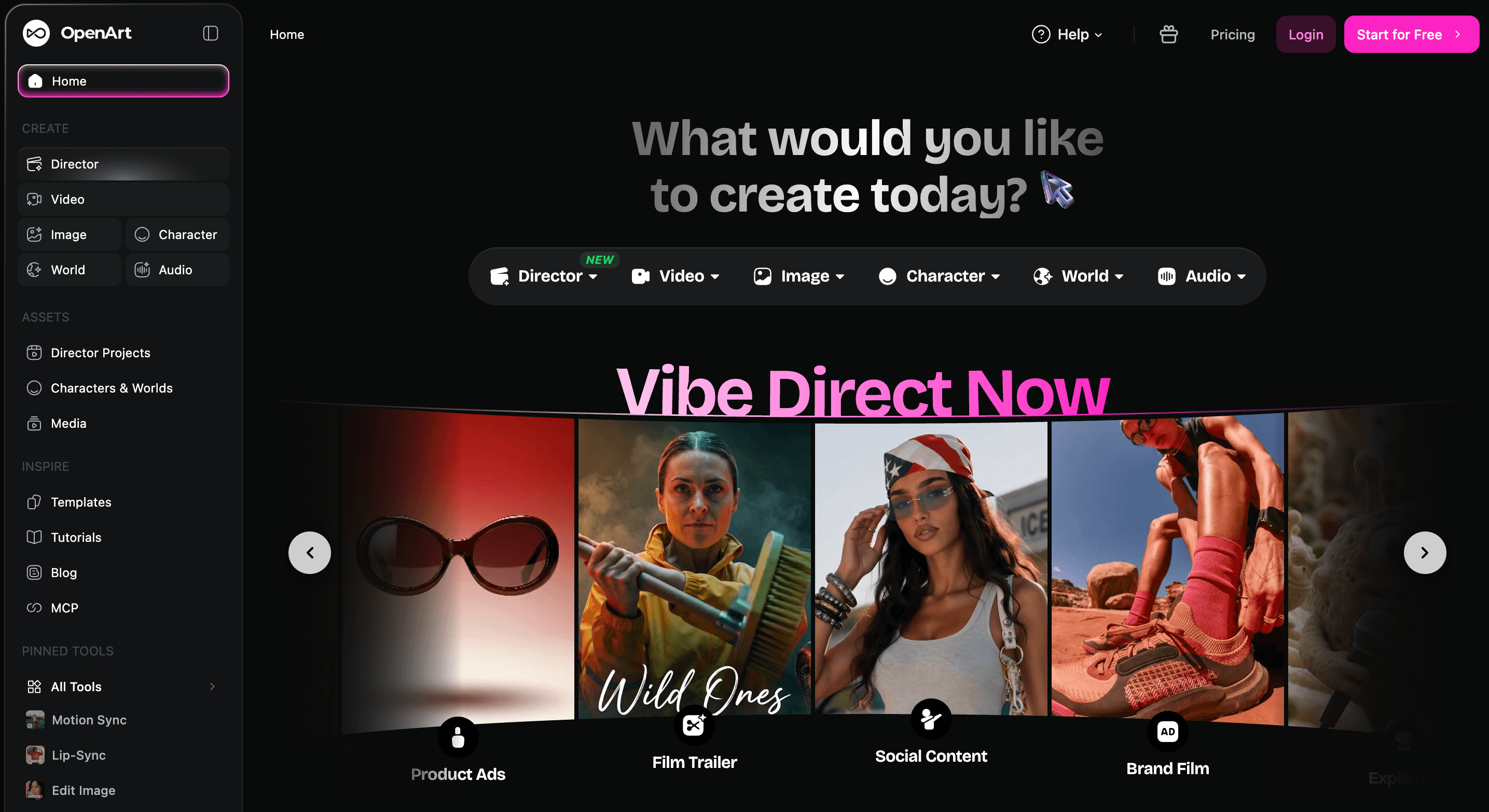
OpenArt bundles image generation, video, audio, editing and custom model training into one browser-based studio — with access to 100+ AI models under a single subscription.
Key Features and Technology
OpenArt’s toolset is wide, but it organizes cleanly into a handful of pillars. Here’s how the platform actually breaks down.
The Multi-Model Hub
At the heart of OpenArt is model aggregation. From one prompt box you can pick from 100+ image, video and audio models — Stable Diffusion variants, DALL·E, GPT Image, Google Imagen, Flux, Ideogram and more for stills, plus Veo 3, Kling and similar engines for video. Different models excel at different things (photorealism, anime, typography, cinematic motion), so being able to switch without leaving the platform is a practical time-saver. The trade-off: each model can interpret the same prompt differently, so results aren’t uniform across the board.
In-Browser Editing and Upscaling
Once you generate an image, you can refine it in place. Inpainting repaints a selected area (fixing an awkward hand or swapping one element) without regenerating the whole image; outpainting expands the canvas; object removal and Find & Replace handle quick fixes; face correction and style transfer reshape the look. The Creative Upscale tool sharpens and enlarges final images for delivery, with the newer V2 supporting very high resolutions. It’s a point-and-click workflow that replaces a round-trip into separate editing software for many tasks.
Consistent Characters and Custom Models
This is where OpenArt pulls ahead for storytellers. You can define a character once and keep its face and look consistent across scenes, poses and outfits, and you can train custom models on your own reference images to lock in a brand style or recurring persona. Each plan caps how many consistent characters and personalized models you can keep, scaling from a handful on entry tiers to hundreds on the top plan — useful for agencies maintaining multiple client brands or creators building AI influencers.
Video, Story and Audio Tools
Video is the fastest-growing part of the platform. You get text-to-video and image-to-video, a Smart Shot tool that generates multi-cut clips with camera moves from one prompt, lip-sync and voice-over, plus the headline One-Click Story that builds a short narrative video from a sentence, script or song. Audio helpers and text-to-speech round it out. Be aware that video is the most credit-hungry workflow on OpenArt — premium video models and features like 4K clip upscaling or lip-sync draw heavily from your monthly pool.
Workflows, Templates and Community
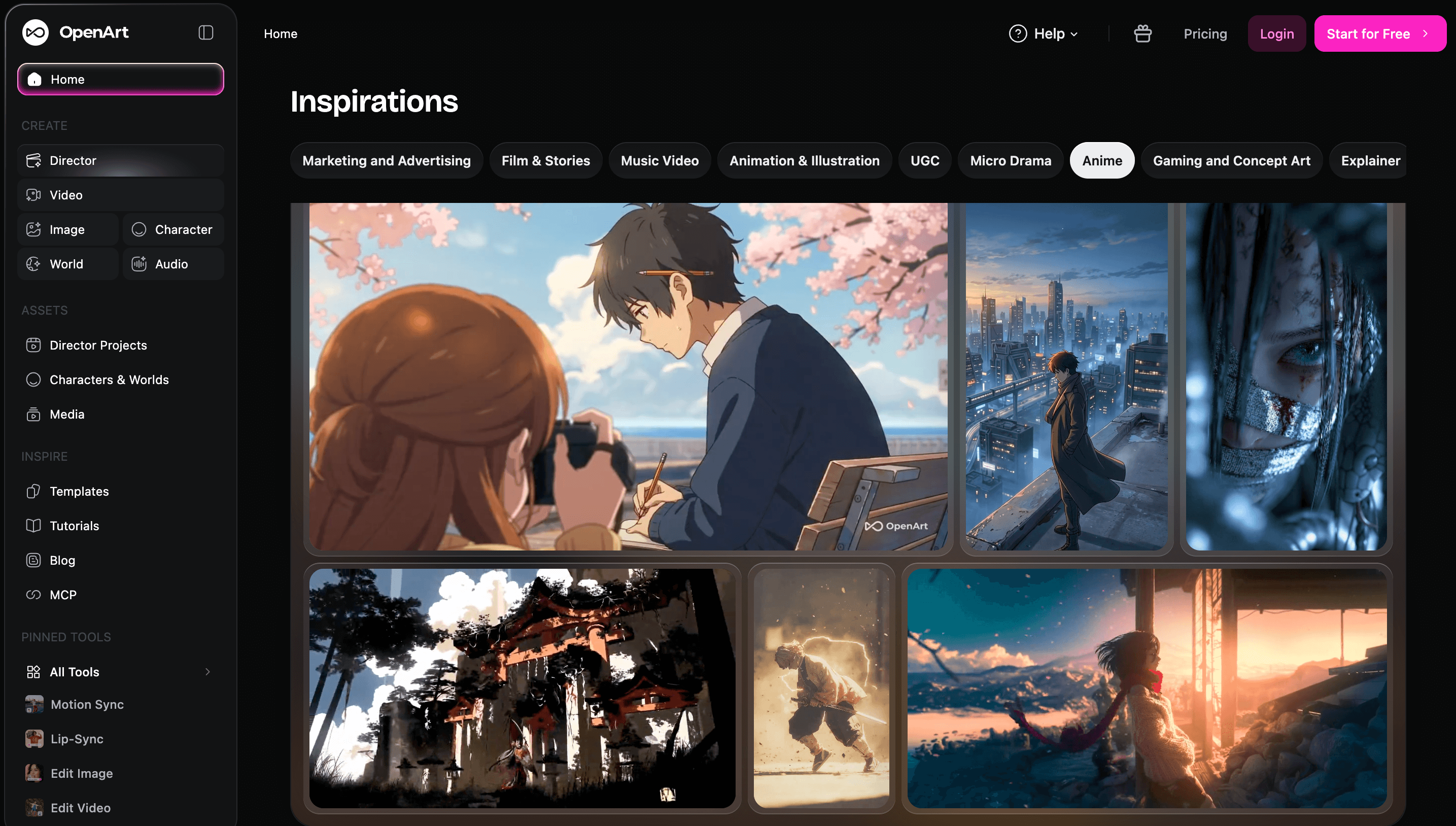
Around the core engine sits a deep layer of convenience: roughly 15 no-prompt workflows (sketch-to-image, upscaling, face replacement and more), dozens of specialized generators (YouTube thumbnails, posters, product ad videos, background changer/remover, HD photo converter), a Magic Prompt assistant, a large prompt book, ComfyUI-based advanced workflows and an active community gallery plus a Discord. For beginners these templates remove friction; for power users the ComfyUI side offers serious control.
Pricing, Plans, and Package Structure
OpenArt runs on a credit-based subscription model: every plan includes a monthly pool of credits, and each generation or edit deducts a variable amount depending on the model and output. There are five consumer tiers — Free, Essential, Advanced, Infinite and Wonder — plus a Team plan and an optional Extra Credit add-on. Annual billing cuts the monthly rate by roughly 50%, so the figures below lead with the annual-equivalent price (with the monthly price noted in the text). Credits on subscription plans don’t roll over month to month, while purchased add-on credits do. Always confirm the live price and any active promotion on the official pricing page before checkout.
| Plan | Price (USD, annual) | What You Get | Best For |
|---|---|---|---|
| Free | $0 | 40 one-time trial credits (7 days), 4 parallel generations, creations are public | Testing the platform before paying |
| Essential | ~$7/mo (≈$14 monthly) | 4,000 credits/mo, 100+ models, 8 parallel, ~13 characters, private creations | Hobbyists & casual creators |
| Advanced | ~$14.50/mo (≈$29 monthly) | 12,000 credits/mo, commercial rights, 16 parallel, ~40 characters, add-on packs | Freelancers & client deliverables |
| Infinite (Most Popular) | ~$28/mo (≈$56 monthly) | 24,000 credits/mo, 32 parallel, ~80 characters, unlimited select models, priority support | Frequent creators & small agencies |
| Wonder (Best Value, power users) | ~$120/mo (≈$240 monthly) | 106,000 credits/mo, ~353 characters, unlimited select models, model discounts, priority support | Studios & high-volume production |
| Team | ~$17.50/seat/mo | 12,000 credits per seat, pooled across the team, shared assets, role management | Collaborative creative teams |
| Extra Credit add-on | $15/mo | ~5,000 extra credits that roll over indefinitely (requires Advanced or higher) | Covering busy-month spikes |
How OpenArt Compares to Alternatives
| Factor | OpenArt | Midjourney | Leonardo AI |
|---|---|---|---|
| Core focus | All-in-one image + video + audio + editing | Artistic image quality (now some video) | Image gen + game/character art |
| Model choice | 100+ models (DALL·E, Imagen, Flux, Veo 3…) | Proprietary Midjourney model only | Leonardo models + some third-party |
| Custom training (LoRA) | Yes (from Advanced) | No | Yes |
| Video & story tools | Yes — text/image-to-video, One-Click Story | Newer / limited | Limited |
| Consistent characters | Yes — a core feature | Partial (character reference) | Yes (character tools) |
| Entry price (approx.) | ~$7/mo (annual) | ~$10/mo | ~$12/mo (free tier available) |
| Commercial rights | From Advanced tier | Included on paid plans | Included on paid plans |
| Best for | One-subscription, all-in-one creators | Pure artistic image quality | Game art & character design |
vs. Midjourney: Midjourney remains the benchmark for out-of-the-box aesthetic quality — its default images often look more polished with zero setup. But it’s a single-model tool with no custom training and, historically, a Discord-first workflow. OpenArt counters with far more breadth: 100+ models, LoRA training, integrated video and editing, and a lower entry price. If you want gorgeous images with no fuss, Midjourney may justify its premium; if you want customization and a full studio, OpenArt is the better value.
vs. Leonardo AI: Leonardo is OpenArt’s closest all-rounder — similar pricing, custom model training, and a strong reputation specifically for game art and character design. OpenArt’s edge is broader model access, a more developed video and storytelling layer, and the one-click story workflow. The honest call is use-case based: pick Leonardo if your work centers on game assets and characters, OpenArt if you want the widest toolset and model variety in one place.
vs. Adobe Firefly and single-model tools: If you already pay for Adobe Creative Cloud, Firefly’s marginal cost is effectively zero and its outputs are designed to be commercially safe — hard to beat on price and licensing peace of mind, though its customization is far narrower (no LoRA training, tighter model choice). Likewise, a single tool like DALL·E is simpler for straightforward text-to-image. OpenArt isn’t trying to win on simplicity or on one perfect model; it wins when you need many models, training, editing and video without assembling a stack of subscriptions.
Pros and Cons
What Users Love
Everything in one place: The most consistent praise is consolidation — image, video, audio, editing, upscaling and training in a single subscription instead of paying for several specialist tools and exporting between them. For creators who used to juggle a stack of apps, this alone is the reason they switched.
Model variety without extra accounts: Access to 100+ image, video and audio models under one login is repeatedly cited as a genuine advantage. Being able to test the same idea across different engines and keep all your outputs organized in one library saves real time.
Character consistency that actually works: Illustrators, comic and visual-novel creators and AI-influencer builders single out the consistent-character system. Reviewers describe keeping the same protagonist across 20-plus scenes — something most single-prompt tools simply can’t do reliably.
Genuinely beginner-friendly: No installation, no Discord, a clean dashboard, Magic Prompt and ready-made workflows make the first result fast and painless. Independent reviewers frequently rate it among the easiest entry points into AI art for newcomers.
Fast, helpful customer support: Notably, even amid billing criticism, a large share of positive reviews specifically praise the support team — quick, courteous responses and named agents who resolve subscription issues, sometimes with goodwill credits or refunds. For many users it’s the standout positive.
Constant improvement and full ownership: The platform ships new models and features regularly, so it doesn’t feel stagnant, and the company states you fully own what you create — usable in ads, client work and merchandise with no attribution required (commercial rights apply from the Advanced tier).
Limitations Worth Knowing
The credit system drains fast: This is the number-one complaint. Credits don’t roll over month to month, video and premium models burn through them quickly, and failed or disappointing generations still cost credits — so experimentation can feel expensive. Several users also report allocations being reduced or per-action costs rising mid-subscription, which makes budgeting harder.
Billing, refund and cancellation issues: A real and recurring theme in negative reviews involves charges after a perceived cancellation, a subscription-management page that some users found broken, denied refund requests and difficulty downgrading. If you subscribe, cancel well before renewal, keep records, and treat the cancellation flow carefully.
No commercial rights on the cheapest plans: The Free and Essential tiers don’t include commercial usage rights, so anyone producing work for clients or a business must be on Advanced or higher. It’s an easy detail to miss and an important one for professional use.
Output quality is inconsistent: Because results depend on the model and prompt, quality varies. Reviewers report uneven prompt adherence, hands and eyes that go wrong, clothing details drifting between generations, and difficulty with specific tasks like clean transparent-background PNGs. Some models shine while others disappoint on the same prompt.
Fairness and representation gaps: A serious complaint raised by multiple users is uneven handling of certain subjects — reports include darker skin tones being rendered inaccurately and a subject’s apparent gender being changed. These are model-level biases worth knowing about if accurate, inclusive representation matters to your work.
Practical caveats: OpenArt is browser-only with no offline mode and (at the time of writing) no public API, and its terms prohibit automated or bot-based use; a dedicated mobile app has been on the roadmap rather than shipped. The free tier is also tight — 40 one-time credits and public creations — so it’s a demo, not a workspace.
Who Should Use OpenArt
Solopreneurs and small business owners: If you need product visuals, social graphics, ad creative and short videos without hiring a designer or stacking up subscriptions, OpenArt’s all-in-one studio is a strong fit — just start on Advanced so you have commercial rights for business use.
Content creators and short-form video makers: This is a sweet spot. Between One-Click Story, Smart Shot, image-to-video and consistent characters, creators producing TikToks, Reels, Shorts, thumbnails and AI-influencer content can move from idea to posted asset quickly.
Storytellers, illustrators and game/concept artists: If you need a recurring character or a locked-in style across many images — comics, visual novels, storyboards, concept art — the consistent-character and custom-training tools are the headline reason to choose OpenArt over single-prompt generators.
Beginners curious about AI art: With no setup, a clean interface and no-prompt workflows, OpenArt removes most of the friction that makes AI generation intimidating. The free trial and cheap Essential tier make it a low-risk place to learn the ropes.
Who should look elsewhere: If you want the single most beautiful default image with zero tuning, Midjourney may serve you better; if you live inside Adobe and need guaranteed-licensed output, Firefly is cheaper and safer; if you need truly unlimited, predictable per-asset billing or a public API for automation, OpenArt’s credit model and current limitations will frustrate you. And anyone for whom accurate, inclusive representation is non-negotiable should test the platform carefully on the free tier first, given the reported fairness gaps.
Getting Started: Step by Step
- Sign up and claim your free credits. Create an account to get the one-time trial credits, and grab the bonus credits offered for joining the OpenArt Discord. Use this free window purely to learn the interface and test output quality before paying.
- Generate your first image. Type a prompt (or use Magic Prompt), pick a model, set the aspect ratio, and generate. Try the same prompt across two or three models to see how the look changes — this is the fastest way to learn which engine suits your style.
- Edit instead of regenerating. When an image is close but not perfect, use inpainting, Find & Replace or object removal to fix just the problem area, then run Creative Upscale for a higher-resolution final. Editing usually costs fewer credits than starting over.
- Build a consistent character (optional). If you’re making a series, brand mascot or AI persona, create a character or train a custom model on your references so the same face and style carry across every scene and video.
- Make a video with One-Click Story. Feed in a sentence, script or song, choose a template (Character Vlog, Music Video or Explainer), and generate a short narrative clip. Check the credit cost first — video is the most expensive workflow.
- Pick the right plan, then go annual. Once you know your monthly credit burn, choose Essential (hobby), Advanced (client/commercial work) or Infinite (frequent/high volume). Switch to annual billing for the ~50% discount only after you’re confident in your usage.
Tips for Getting Maximum Value
Watch the credit cost displayed before every action and reserve premium video models and 4K upscales for finals, not experiments — that single habit stretches a monthly allocation dramatically. Because subscription credits don’t roll over but add-on packs do, buy a $15 add-on during a busy month rather than permanently jumping to a higher tier, and remember the add-on requires Advanced or above. Lean on editing tools like inpainting and Find & Replace to fix near-perfect images instead of regenerating from scratch, since edits are usually cheaper than fresh generations. If you produce client or commercial work, make sure you’re at least on Advanced so you actually hold commercial rights, and keep your invoices and cancellation confirmations given the billing complaints in the wild. Test a new model on a cheap, simple prompt before committing a complex project to it, time any annual upgrade around a seasonal promotion, and start on the free tier long enough to confirm the output quality genuinely fits your use case before you pay.
Future Outlook and Final Assessment
The AI creative market in 2026 is consolidating around platforms that do everything — image, video, audio and editing — rather than single-purpose generators, and OpenArt is squarely positioned for that shift. With a fast-growing user base, profitability, fresh Series A funding and a relentless cadence of new models and features, it’s one of the most complete creative suites available, and the all-in-one promise only gets stronger as it adds capabilities like richer multi-character video and a planned mobile app. For creators tired of juggling a stack of subscriptions, that breadth is the core appeal.
The honest caveats are real and shouldn’t be glossed over. OpenArt’s reputation is genuinely mixed — it sits at roughly 3.5 out of 5 on Trustpilot across 600-plus reviews, with sentiment sharply split between users who love the toolset and support, and users burned by the credit system, billing and inconsistent output. Commercial rights gated behind the Advanced tier, reported fairness gaps, and a credit meter that’s always running mean it rewards a clear-eyed, budget-aware approach. But within those boundaries, few platforms pack this much capability into one affordable subscription.
Conclusion
OpenArt isn’t trying to be the single best image model on the market — it’s trying to be the one place you can do all of your visual work, and at that job it’s remarkably capable. By combining 100+ models, a real editing suite, consistent characters, custom training and one-click video under a single credit-based subscription, it removes the friction of jumping between half a dozen tools. It rewards realistic expectations, a little learning and careful credit management, and it’s not the right call for everyone — pure-aesthetic purists, Adobe loyalists and anyone needing predictable per-asset billing or an API may prefer alternatives. But for solopreneurs, content creators and storytellers who want enormous range without enormous cost, OpenArt is one of the most versatile AI studios you can subscribe to in 2026. Confirm the current pricing, test the free tier on your own use case, and OpenArt can take a whole stack of creative tools and make it genuinely easy.
Ready to create images, videos and consistent characters from one place?
Explore more honest reviews, tutorials and tech comparisons to find the right tools for the way you work, create and grow — at World Of Tech, where we make everything easy.
👉 Try OpenArt: https://worldoftech.space/openartai
👉 Our YouTube Channel: youtube.com/@world_tech79
👉 Our Facebook Fanpage: Facebook
👉 Our X (Twitter): @worldoftech79
Pricing, features and policy details in this review were verified against openart.ai and independent review sources (including Trustpilot and hands-on reviewer testing) as of June 2026. AI software pricing, credit costs, model availability and promotions change frequently, so confirm current details on the official site before subscribing. Competitor prices are approximate and subject to change.





