
Every time you connect to public Wi-Fi at a café, airport, or hotel, your personal data — passwords, financial logins, private messages — travels across a network you don’t control and don’t trust. The solution the security industry built for exactly this problem is a VPN, but most VPN products come bundled with complexity, confusing settings, and a steep learning curve that casual users simply don’t have time for. That’s the gap AdGuard VPN fills. Made by AdGuard Software Limited — the company behind one of the world’s most trusted ad blockers, with over 410 million users worldwide since 2009 — AdGuard VPN is a privacy-first VPN service built for people who want genuine protection without becoming network engineers. It encrypts your traffic with AES-256, hides your real IP address, operates from Cyprus (outside the 5/9/14 Eyes intelligence alliances), offers 1,000+ servers across 65+ locations, and introduces its own proprietary VPN protocol that makes your encrypted connection look like normal HTTPS web traffic — defeating deep packet inspection on restricted networks.
For remote workers, travelers, families, and existing AdGuard ecosystem users, the case builds quickly: a strict no-logs policy, built-in DNS-level ad blocking on every connection, split tunneling, a kill switch, simultaneous protection for up to 10 devices, a free plan with 3 GB monthly data, and paid plans starting at just $2.99/month on the two-year deal with a 30-day money-back guarantee. But AdGuard VPN isn’t perfect — its server network is smaller than market leaders, its no-logs policy hasn’t been independently audited, and customer support is email-only with no 24/7 live chat. This 2026 review walks through every feature, the honest pros and cons, detailed pricing, a head-to-head comparison against NordVPN, Surfshark and Proton VPN, and exactly who should — and shouldn’t — choose AdGuard VPN as their privacy tool of choice.
AdGuard VPN Review 2026: The Privacy-First VPN With Built-In Ad Blocking for Everyday Users
Overview and Background
AdGuard Software Limited was founded in 2009 by Andrey Meshkov, Dmitry Zaytsev, and Igor Lukyanov, initially as a web tool before pivoting to ad blocking in 2011. Today, AdGuard is a globally recognized privacy company with over 410 million users across its ecosystem of products — including the AdGuard Ad Blocker, AdGuard DNS, and AdGuard VPN. The company is headquartered in Limassol, Cyprus, a jurisdiction that sits firmly outside the 5-Eyes, 9-Eyes, and 14-Eyes intelligence-sharing alliances, giving its privacy commitments stronger legal backing than VPNs operated from the US, UK, or EU countries with more aggressive government data-access frameworks.
AdGuard VPN launched in 2020 as a natural extension of the company’s privacy mission — applying over a decade of privacy infrastructure expertise to the VPN market. Unlike VPN providers that built privacy products from scratch, AdGuard brings proven DNS infrastructure, deep ad-blocking knowledge, and an established security protocol engineering culture to the VPN product. The result is a VPN that integrates uniquely with AdGuard’s ad-blocking technology at the DNS level, works seamlessly with AdGuard’s other privacy tools, and operates with the reliability and trust reputation that AdGuard’s decade-plus market presence has established.
The VPN is available on Windows, macOS, Android, iOS, Android TV, and Linux, plus browser extensions for Chrome, Firefox, Edge, and Opera — covering every major device and platform combination used by both individual consumers and small business teams. AdGuard VPN’s app is updated approximately once per month, reflecting the active development pace reviewers note as a distinguishing characteristic from stagnant competitors. Multiple independent review outlets have tested the product in 2025–2026, consistently confirming fast speeds on nearby servers, reliable streaming unblocking for Netflix, Hulu, and Disney+, and a clean, beginner-friendly interface that requires no VPN knowledge to use effectively from day one.
Why AdGuard VPN Stands Out in 2026
A proprietary VPN protocol that hides your VPN traffic as normal HTTPS: AdGuard VPN uses its own custom-built protocol rather than generic OpenVPN or WireGuard implementations. The protocol makes VPN connections appear indistinguishable from standard HTTPS web traffic — defeating deep packet inspection (DPI) used by restrictive networks, ISPs, and certain countries to detect and block VPN usage. This obfuscation is built into the protocol itself rather than relying on separate obfuscation servers, meaning every single connection benefits from it by default without additional configuration.
Built-in DNS-level ad and tracker blocking on every connection: No other mainstream VPN product integrates ad blocking and tracker protection as deeply as AdGuard VPN does. AdGuard DNS operates at the DNS resolution layer — when you visit any URL, AdGuard DNS checks the corresponding IP address against its blocklists for advertising, phishing, and malicious domains before allowing the connection. The result is cleaner, faster browsing with fewer trackers, even on websites where browser-level ad blockers don’t fully operate (mobile apps, smart TV apps, etc.). This is AdGuard’s core expertise applied directly inside the VPN tunnel.
Cyprus jurisdiction — outside all intelligence-sharing alliances: AdGuard VPN operates from Limassol, Cyprus, which sits entirely outside the 5-Eyes (US, UK, Canada, Australia, New Zealand), 9-Eyes, and 14-Eyes intelligence-sharing alliances. This means that unlike US or UK-based VPN services, AdGuard has no legal obligation to cooperate with intelligence agency data requests under those frameworks. For users who view government surveillance as their primary threat model, Cyprus jurisdiction provides meaningfully stronger legal privacy protection than equivalently priced competitors based in alliance member countries.
The fastest nearby servers of any VPN tested — minimal speed loss on local connections: Independent testing by AllAboutCookies in December 2025 found that the Dallas server actually increased download speeds versus the base connection — a genuinely unusual result for any VPN. Cloudwards’ testing confirmed speeds within 0.5% of baseline on nearby servers, with only a 25% drop on distant international servers. For the majority of everyday VPN use cases — browsing, streaming, video calls, secure file transfers — AdGuard VPN’s speed profile is excellent and noticeably better than several higher-priced competitors in the same category.
Protect 10 devices simultaneously on one subscription: AdGuard VPN’s paid plans cover up to 10 simultaneous device connections — phones, laptops, tablets, smart TVs — under a single account. For households where two to four people share a subscription, this coverage means every device in the home is protected without buying additional subscriptions or juggling separate accounts. Many competing VPNs at similar price points limit simultaneous connections to 5–6 devices.
Perfect integration with the full AdGuard privacy ecosystem: For the estimated 410 million+ users who already use AdGuard Ad Blocker, AdGuard DNS, or AdGuard Home, adding AdGuard VPN creates a unified, deeply integrated privacy stack where the ad blocking, DNS protection, and VPN tunnel work together seamlessly. AdGuard VPN is specifically engineered to allow AdGuard Ad Blocker to operate simultaneously through the VPN tunnel — a technical challenge that most competing VPN-plus-ad-blocker combinations handle poorly or not at all.
A free plan with 3 GB monthly data and no credit card required: AdGuard VPN’s free tier provides real VPN access — 10 server locations, 3 GB of monthly data, and up to 2 simultaneous connections — at zero cost with no payment information required to start. While 3 GB won’t sustain heavy daily VPN use, it’s sufficient for secure Wi-Fi protection when traveling, accessing region-locked content for specific occasions, and genuine evaluation of the VPN’s interface and speed before committing to a paid plan.
AdGuard VPN’s clean, beginner-friendly interface shows three fastest server recommendations, real-time speed indicators, and a single-tap Connect button — no VPN knowledge required to achieve military-grade AES-256 encryption on any device.
Key Features and Technology
AdGuard VPN’s feature set is built around two priorities: maximum privacy protection for ordinary users, and clean integration with AdGuard’s broader privacy ecosystem. Here is a detailed breakdown of every major capability the service provides in 2026.
Security and Encryption
AdGuard VPN encrypts all traffic using AES-256-GCM encryption — the same standard used by banks, government agencies, and enterprise security infrastructure worldwide. This encryption makes intercepted traffic computationally infeasible to decrypt even with powerful hardware, providing genuine protection against eavesdropping on public networks, ISP traffic monitoring, and man-in-the-middle attacks on unsecured connections. The encryption is applied across all platforms and all connection types — there is no “lite” encryption mode that trades security for speed. Full DNS leak protection is included, verified by independent testers at AllAboutCookies who confirmed clean DNS leak test results during their December 2025 testing session. IP leak protection prevents your real IP address from being exposed during server switches or connection interruptions.
Proprietary AdGuard Protocol and Obfuscation
The AdGuard VPN protocol is a proprietary custom-built VPN protocol developed by AdGuard’s engineering team. Its defining technical characteristic is traffic obfuscation at the protocol level: VPN connections are engineered to appear identical to ordinary HTTPS web traffic, preventing deep packet inspection systems from identifying or blocking the VPN connection. This obfuscation operates on every connection by default — unlike competitors where obfuscation is a separate “stealth mode” requiring manual activation. The practical benefits are significant: AdGuard VPN works reliably on school and corporate networks that block VPN traffic, in countries with internet filtering, and on hotel Wi-Fi networks with restrictive firewall policies. Protocol compatibility with UDP and TCP provides additional flexibility for varied network conditions.
Kill Switch and Split Tunneling
The kill switch ensures that if your VPN connection drops unexpectedly — due to a network change, server issue, or device sleep/wake cycle — your internet connection is immediately severed rather than falling back to your unprotected real IP address. This prevents the “VPN gap” scenario where brief connection drops expose real identities to ISPs or site operators. The kill switch is available on Windows, macOS, Android, and iOS, and can be enabled with a single toggle in the app settings. Split tunneling allows users to specify which applications or websites route through the VPN tunnel and which connect directly without VPN protection. This enables use cases like: keeping banking apps on the direct connection (avoiding VPN-triggered fraud alerts) while routing browsers through the VPN for privacy, or vice versa. Both app-level and domain-level split tunneling rules are supported, giving precise per-application and per-website control over VPN routing behavior.
AdGuard DNS — Ad Blocking Inside the VPN Tunnel
AdGuard DNS is available as the default DNS option within AdGuard VPN, providing DNS-level blocking of advertising domains, tracking scripts, and known phishing and malware distribution sites on every connection routed through the VPN. Because this blocking happens at the DNS resolution stage — before any content is loaded — it operates across all applications using the internet connection, including mobile apps, smart TV streaming platforms, and browser extensions that traditional ad blockers cannot reach. Users can also select from alternative DNS providers including Google DNS, Cloudflare DNS (1.1.1.1), Cisco OpenDNS, and Quad9 — or configure a custom DNS server — if they prefer a different DNS provider for performance or additional filtering capability reasons.
Server Network: 1,000+ Servers in 65+ Locations
AdGuard VPN operates 1,000+ servers across 65+ locations worldwide on paid plans. The app surface displays real-time server speed indicators — color-coded green for fast, with exact ping rates visible before connecting — and consistently recommends the three fastest servers for your current location, updated in real time as network conditions change. Servers are listed alphabetically and can be searched by country or city. While 65 locations is smaller than the 90+ countries offered by NordVPN or Surfshark, independent reviewer testing confirms the available servers are well-maintained and fast, with particularly strong performance across North America and Western Europe. The network continues to expand — Cloudwards’ review notes that AdGuard is “continuously expanding the offer” as the service scales.
Streaming Compatibility: Netflix, Hulu, Disney+, and More
Multiple independent reviews confirm AdGuard VPN’s strong streaming performance on major platforms. AllAboutCookies’ April 2025 testing confirmed successful unblocking of Netflix US, Canada, UK, and Australia libraries. SafetyDetectives’ multi-region team testing found “not a single unsuccessful test” with paid servers across major platforms. Platforms confirmed working in 2025–2026 independent tests include Netflix (multiple regional libraries), Hulu, Disney+, BBC iPlayer, ITVX, Peacock, ESPN+, and Max. Amazon Prime Video results were inconsistent across reviewers — some testers successfully unblocked while others encountered VPN detection. For users whose primary streaming goal is Netflix and Disney+, AdGuard VPN is reliable; for Amazon Prime Video dependency, testing during the free trial period is recommended before subscribing.
Platform Coverage and App Quality
AdGuard VPN provides native apps for Windows, macOS, Android, iOS, Android TV, and Linux, plus browser extensions for Chrome, Firefox, Edge, Opera, and Brave. The app is available in 26 languages. Independent reviewers consistently describe the interface as “clean,” “intuitive,” and “visually appealing” — AllAboutCookies called it “simple, beginner-friendly, and easy to navigate,” while VPNWiki praised its “imaginative graphics” and accessibility for VPN newcomers. Automatic features include: launch on device start, auto-connect when the app opens, and live server speed/ping updates across the server list. The monthly update cadence ensures compatibility with the latest OS releases and ongoing performance improvements.

AdGuard VPN’s split tunneling lets you route specific apps and websites through the VPN while leaving others on the direct connection — banking apps, VoIP calls, and local services stay fast while browsers and streaming apps get full privacy protection.
Pricing, Plans, and Package Structure
AdGuard VPN uses a straightforward freemium model with a functional free tier and three paid plan durations that offer identical features at different price points — the only variable is cost, not capability. All paid plans include the full feature set: unlimited data, all 65+ server locations, 10 simultaneous connections, streaming support, split tunneling, kill switch, and AdGuard DNS integration. Prices verified against adguard-vpn.com as of June 2026 — confirm current rates before subscribing.
| Plan | Price | What It Is | Best For |
|---|---|---|---|
| Free Plan | $0 — no credit card | 3 GB/month data; 10 server locations; 2 simultaneous connections; no streaming or torrenting | Occasional public Wi-Fi protection and platform evaluation |
| Monthly Plan | ~$9.99 / month | Full feature access; unlimited data; all 65+ locations; 10 devices; no money-back guarantee on monthly | Short-term travel or project-specific use without long-term commitment |
| 1-Year Plan | ~$3.99 / month (billed annually) | All features; unlimited data; 65+ locations; 10 devices; 30-day money-back guarantee | Regular users wanting balance between flexibility and savings |
| 2-Year Plan | ~$2.99 / month (billed every 2 years) | All features; unlimited data; 65+ locations; 10 devices; 30-day money-back guarantee; best long-term value | Committed privacy users seeking maximum value per dollar |
How AdGuard VPN Compares to Alternatives
| Factor | AdGuard VPN | NordVPN | Surfshark | Proton VPN |
|---|---|---|---|---|
| Best 2-Year Price | ~$2.99/mo | ~$3.39/mo | ~$2.12/mo | ~$3.59/mo (2yr) |
| Server Network | 1,000+ / 65+ locations | 6,400+ / 111 countries | 3,200+ / 100 countries | 9,100+ / 112 countries |
| Simultaneous Devices | 10 | 10 | Unlimited | 10 |
| Built-In Ad Blocking | ✅ Yes — DNS-level (AdGuard DNS) | ✅ Threat Protection (paid add-on) | ✅ CleanWeb (basic) | ✅ NetShield (paid plans) |
| No-Logs Audit | Self-stated (not yet audited) | ✅ Independently audited | ✅ Independently audited | ✅ Open-source + audited |
| Protocol Options | Proprietary AdGuard protocol only | NordLynx (WireGuard), OpenVPN, IKEv2 | WireGuard, OpenVPN, IKEv2 | WireGuard, OpenVPN, IKEv2 |
| 24/7 Live Chat Support | No — email only | ✅ Yes | ✅ Yes | ✅ Yes |
| Free Plan | ✅ Yes — 3 GB/month, no card | No | No | ✅ Yes (unlimited data, slow) |
| Jurisdiction | Cyprus (outside 5/9/14 Eyes) | Panama | Netherlands | Switzerland |
| Best For | Privacy-first everyday users, AdGuard ecosystem, beginners | Maximum feature set, power users, gaming | Unlimited devices, families, budget value | Security researchers, open-source advocates, free-tier users |
vs. NordVPN (~$3.39/mo): NordVPN is the most feature-rich VPN on the market — it has an independently audited no-logs policy, RAM-only servers, a 6,400+ server network, WireGuard-based NordLynx protocol, and 24/7 live chat support. AdGuard VPN is simpler, slightly cheaper, and integrates natively with AdGuard’s ad-blocking ecosystem. For power users who want maximum features and audit transparency, NordVPN wins. For users who value simplicity, ad blocking integration, and the AdGuard brand trust — AdGuard VPN is the better everyday choice.
vs. Surfshark (~$2.12/mo): Surfshark is the most cost-competitive major VPN, offers unlimited device connections, and has been independently audited. At $2.12/month on the 2-year plan it undercuts AdGuard’s $2.99/month. For pure price-per-value calculations, Surfshark is hard to beat. However, Surfshark lacks the DNS-level ad blocking depth and ecosystem integration that AdGuard VPN offers to existing AdGuard users, and the AdGuard brand’s longer privacy track record (since 2009) gives some users greater confidence in its privacy commitments.
vs. Proton VPN (~$3.59/mo): Proton VPN is the most transparency-focused VPN available — open-source code, independent audits, Swiss jurisdiction, and a fully unlimited free plan. For users whose threat model centers on maximum verifiable transparency, Proton VPN is the strongest privacy story. AdGuard VPN’s free plan includes ad blocking, provides faster speeds on nearby servers, and suits users who don’t need open-source code verification as part of their trust evaluation.
Pros and Cons
What Users Love
DNS leak tests passed — zero IP or DNS leaks confirmed: AllAboutCookies’ December 2025 testing confirmed clean DNS leak test results and zero IP leaks across all tested servers. No real IP address or DNS queries escaped the VPN tunnel during connection drops or server switches — the fundamental requirement for a VPN that actually protects your identity rather than just appearing to.
Blazing fast on nearby servers — one tester’s speeds actually improved: AllAboutCookies found the Dallas server increased download speed above baseline — an extraordinary result. Cloudwards confirmed nearby server speed loss of just 0.5%. For the everyday VPN use cases where most people actually use a VPN — secure browsing, streaming, video calls on public Wi-Fi — AdGuard VPN’s speed profile is excellent and eliminates the “VPN is too slow to use” frustration that kills most people’s privacy habits.
Netflix, Hulu and Disney+ unblocked reliably: SafetyDetectives’ multi-region team reported zero unsuccessful streaming tests with paid servers. AllAboutCookies confirmed Netflix US, Canada, UK, and Australia libraries unblocked successfully. For the most common streaming motivation for VPN subscriptions, AdGuard VPN delivers consistent performance that many more expensive competitors struggle to match due to streaming platform VPN-detection improvements.
App quality that puts many category leaders to shame: Multiple independent reviewers in 2025–2026 specifically called out AdGuard VPN’s app interface as above-average for the VPN category — clean, visually polished, with real-time server speed indicators and three fastest-server recommendations updating continuously. New users who have never used a VPN can be fully operational in under five minutes without reading documentation.
Trust earned through 15+ years of privacy product development: VPNs from unknown companies are a genuine security risk — a VPN operated by bad actors can expose all your traffic rather than protecting it. AdGuard’s 15+ year history of delivering privacy tools trusted by 410 million+ users, its transparent corporate structure, and its Cyprus-based independent operation provide a level of trust foundation that new-to-market VPN services simply cannot offer at equivalent pricing.
Limitations Worth Knowing
No-logs policy has not been independently audited: AdGuard VPN states a strict no-logs policy as a core product commitment, but unlike NordVPN, Surfshark, and Proton VPN — which have all published independent third-party audits verifying their no-logs claims — AdGuard VPN’s policy remains self-stated as of June 2026. For users whose threat model specifically requires independently verified no-logs evidence, this is a meaningful gap versus category leaders. An independent audit would significantly strengthen the privacy trust case.
Speed drops significantly on distant international servers: Cloudwards’ testing found a 25% speed decrease on far-off servers, while SafetyDetectives noted remote servers are “too slow for streaming or downloading torrents.” For users regularly connecting to servers on different continents — Europe-to-Southeast Asia, Americas-to-Eastern Europe — the speed degradation on distant connections is noticeable and may disappoint users with high expectations from VPN marketing claims. Nearby server performance is excellent; distant server performance is average.
Only one VPN protocol — no WireGuard or OpenVPN option: AdGuard VPN currently operates exclusively on its own proprietary protocol. While this protocol has strong obfuscation properties, the lack of WireGuard and OpenVPN support means technically sophisticated users cannot choose between protocols based on speed (WireGuard) versus compatibility (OpenVPN), and cannot take advantage of WireGuard’s independently reviewed open-source architecture. For power users who want protocol flexibility, competitors including NordVPN, Surfshark and Proton VPN provide superior choice.
Email-only support — no 24/7 live chat: AdGuard VPN’s customer support is accessible only by email at support@adguard-vpn.com, with no live chat available at any plan tier. Multiple reviewers flagged this as a notable weakness — WizCase noted the email team “quickly and helpfully responded” but the absence of instant live chat is a real disadvantage for time-sensitive issues, particularly for users experiencing VPN connection problems while traveling or during a security event. All competing major VPN services at comparable pricing offer 24/7 live chat.
Free plan is quite limited after the first month: The free tier’s 3 GB monthly data cap and restriction to 10 server locations will be quickly exhausted by any user with regular VPN needs. This is primarily a limitation for users who expected the free plan to cover ongoing daily use — it functions well as an evaluation vehicle and an occasional-use safety net, but not as a sustainable privacy solution for regular streaming, working from public Wi-Fi, or everyday browsing with VPN enabled continuously.
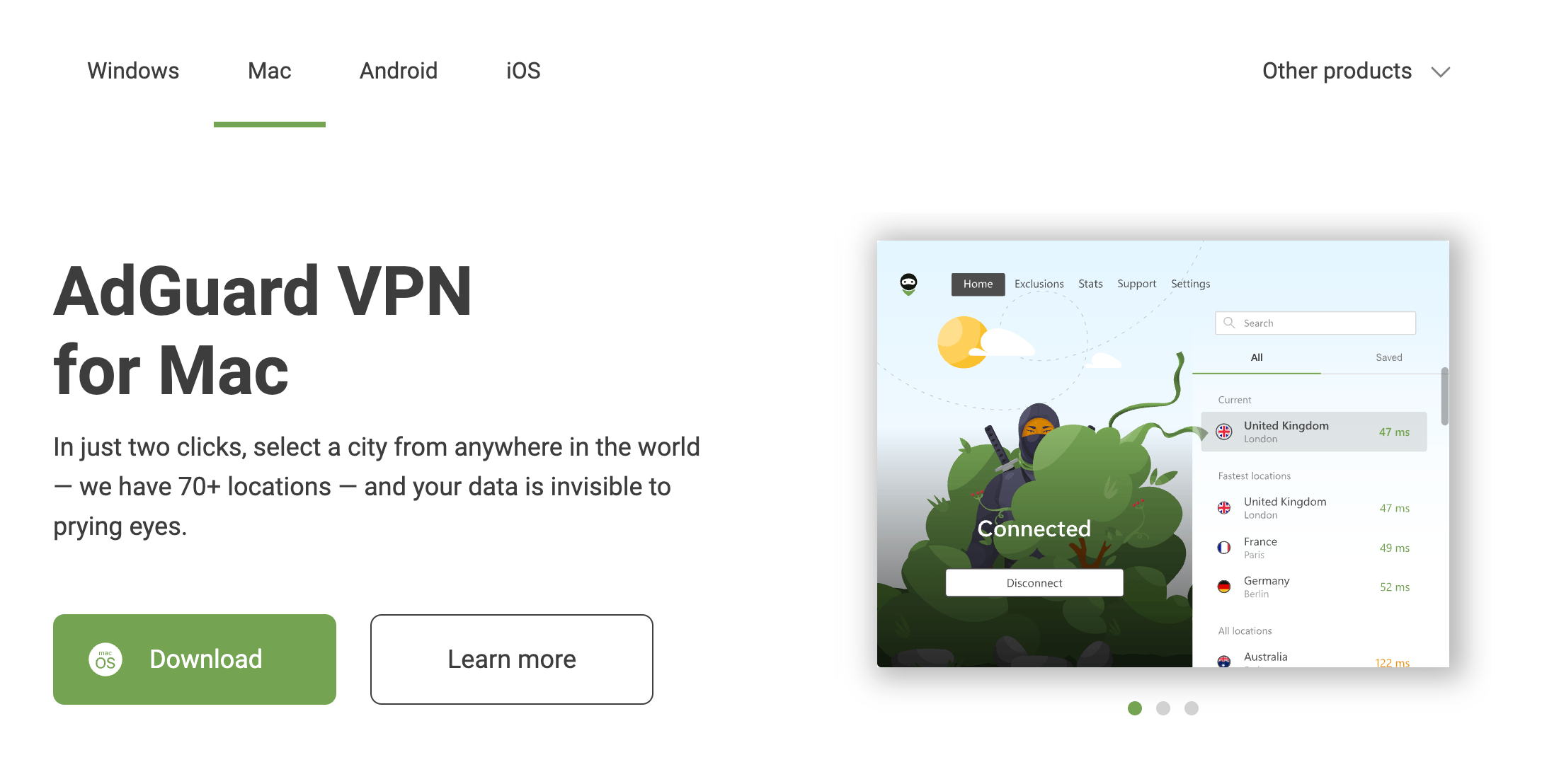
AdGuard VPN’s server list displays real-time speed and ping indicators, auto-recommends three fastest servers for your location, and color-codes server availability — making optimal server selection instant even for first-time VPN users with no technical background.
Who Should Use AdGuard VPN
Existing AdGuard Ad Blocker and DNS users: If you already use AdGuard’s ad blocking or DNS products, AdGuard VPN is the most natural extension of your privacy stack. The products are specifically engineered to work simultaneously without conflicts — a technical quality few VPN + ad blocker combinations achieve — and adding the VPN completes a unified privacy layer that protects traffic at the DNS, browser, and tunnel levels simultaneously.
Privacy-first everyday users who find other VPNs overcomplicated: AdGuard VPN is genuinely simpler to operate than most VPN competitors — one large Connect button, three auto-recommended servers, real-time speed indicators, and a clean visual interface that doesn’t require reading documentation before using. For users whose goal is “protect my browsing on public Wi-Fi and access Netflix while traveling,” AdGuard VPN provides exactly that experience without requiring them to understand VPN protocols or configure split tunneling rules from scratch.
Families protecting multiple devices under one subscription: The 10 simultaneous device limit covers every device in a household under a single $2.99/month subscription — smartphones, laptops, tablets, and smart TVs for an entire family. No other mainstream VPN at this price point combines this device coverage with built-in DNS-level ad blocking that benefits every connected device simultaneously, including family members’ mobile apps where browser-level ad blockers don’t reach.
Travelers who need reliable streaming access and public Wi-Fi security: The combination of consistent Netflix, Hulu, and Disney+ unblocking confirmed by multiple independent reviewers, excellent nearby-server speeds, and military-grade encryption for public Wi-Fi protection makes AdGuard VPN a practical travel companion. The obfuscated protocol adds reliability on hotel and airport networks that actively block VPN traffic.
Who should look elsewhere: If you need an independently audited no-logs policy for high-stakes privacy requirements, choose NordVPN or Proton VPN. If you want WireGuard protocol access for maximum speed on distant connections or advanced gaming performance, NordVPN or Surfshark are better fits. If 24/7 live chat support for real-time troubleshooting is non-negotiable, all three major competitors provide it. If you torrent heavily and need P2P optimization across all servers, dedicated torrenting VPNs will serve you better. For these power-user requirements, AdGuard VPN’s simplicity focus becomes a genuine capability limitation.
Getting Started: Step by Step
- Create your free account at adguard-vpn.com. Sign up with an email address only — no credit card required for the free plan. You’ll receive 3 GB of monthly data and access to 10 server locations immediately. Download the app for your primary platform (Windows, macOS, Android, or iOS) from the official site or your device’s app store.
- Install and open the app — connect in two taps. After installation, open AdGuard VPN and you’ll see the main screen showing three fastest server recommendations based on your location’s ping rates. Tap “Connect” on the recommended server or select a specific location from the server list. The green connection indicator confirms your traffic is now encrypted.
- Enable the kill switch immediately. Go to Settings → General and enable the kill switch before your first browsing session. This ensures your real IP is never exposed if the VPN connection drops unexpectedly — the single most important configuration step that new VPN users commonly skip. It takes under ten seconds to enable and protects you permanently going forward.
- Configure AdGuard DNS for ad blocking. In Settings → DNS, confirm that AdGuard DNS is selected as your DNS provider. This activates DNS-level ad and tracker blocking on every connection through the VPN — cleaning up ads in mobile apps, smart TV interfaces, and every browser simultaneously without requiring separate software or configuration on each device.
- Set up split tunneling for banking and local apps. Navigate to Settings → Exclusions and add your banking app, VoIP app, and any local network services you want to connect without the VPN. This prevents VPN-triggered fraud alerts from your bank and maintains access to local network devices (printers, smart home controllers) while keeping your browser and streaming apps fully protected through the VPN tunnel.
- Upgrade to a paid plan when the 3 GB free cap approaches. When your monthly free data approaches its limit, navigate to adguard-vpn.com to upgrade. The 2-year plan at ~$2.99/month includes the 30-day money-back guarantee — you can request a full refund by emailing support@adguard-vpn.com within 30 days of annual or biannual subscription purchase if the service doesn’t meet your expectations.
Tips for Getting Maximum Value
Always connect to the geographically nearest server for your use case — AdGuard VPN’s speed advantage is concentrated on nearby servers where the speed impact is negligible or even positive. Reserve distant servers specifically for geo-unblocking content from a specific country rather than as a default connection. For streaming, connect to a server in the content’s home country (US server for Netflix US, UK server for BBC iPlayer) rather than simply choosing the fastest overall server, as streaming platform unblocking is tied to the exit server’s location. Enable auto-launch and auto-connect in the app settings if you regularly use public Wi-Fi — having the VPN activate automatically the moment you leave home Wi-Fi eliminates the “I forgot to turn on the VPN” security gap that defeats many users’ privacy intentions. If you use AdGuard Ad Blocker on a desktop, keep both the Ad Blocker and VPN active simultaneously — they are specifically engineered not to conflict, and the combination of DNS-level blocking through the VPN plus browser-level blocking through the extension provides the most comprehensive ad and tracker elimination available at any price point. For households with multiple users, share the account across all family devices up to the 10-device limit — every person in the household gets full VPN and DNS-level ad blocking protection without additional subscription cost.
Future Outlook and Final Assessment
AdGuard VPN is a relatively young service in a mature market — launched in 2020, it’s building its reputation and expanding its infrastructure against VPN competitors with decade-long head starts in server network scale and third-party audit transparency. The monthly update cadence confirmed by VPNWiki (“approximately once a month”) signals active product development, and the continuously expanding server network suggests systematic investment in geographic coverage. The clearest near-term improvement that would significantly advance AdGuard VPN’s competitive position is an independent no-logs audit — the single most cited gap in every comprehensive 2025–2026 review. Adding WireGuard protocol support would expand the addressable user base to include performance-focused power users who currently choose NordVPN or Surfshark specifically for NordLynx or native WireGuard implementations.
The broader privacy market trend clearly benefits AdGuard VPN’s positioning: public awareness of ISP tracking, government surveillance, and data broker ecosystems continues growing, while VPN adoption among non-technical users accelerates — exactly the audience AdGuard VPN’s design-first, simplicity-focused approach serves best. The integration advantage with AdGuard’s 410+ million user base creates a natural upgrade funnel that no standalone VPN startup can replicate. As the server network expands and an independent audit is (presumably) published, AdGuard VPN is well-positioned to move from “solid second-tier choice” to genuinely competitive with the category leaders for its specific audience segment.
Conclusion
AdGuard VPN in 2026 delivers a compelling privacy-first VPN backed by 15 years of AdGuard’s security expertise — combining AES-256 encryption, a proprietary obfuscated protocol that defeats DPI on restricted networks, DNS-level ad and tracker blocking on every connection, a clean kill switch, split tunneling, 10 simultaneous device connections, 1,000+ servers across 65+ locations, confirmed Netflix and Disney+ unblocking, excellent nearby-server speeds, and a 30-day money-back guarantee on annual plans — starting at $2.99/month from a Cyprus-based company outside all intelligence-sharing alliances. The no-logs policy lacks independent audit verification, distant server speeds disappoint power users, 24/7 live chat support is absent, and the free plan’s 3 GB monthly cap limits ongoing daily use. For existing AdGuard users, privacy-conscious families, travelers, and everyday users who want genuine protection without VPN complexity — AdGuard VPN’s combination of trust, simplicity, ad blocking integration, and competitive pricing makes it a straightforward recommendation at the ~$2.99/month long-term rate.
Ready to browse with real privacy — and block ads at the same time?
Explore more honest reviews, tutorials and tech comparisons to find the right gear for the way you work, travel and live — at World Of Tech, where we make everything easy.
👉 Get AdGuard VPN: https://worldoftech.space/adguard
👉 Our YouTube Channel: youtube.com/@world_tech79
👉 Our Facebook Fanpage: Facebook
👉 Our X (Twitter): @worldoftech79
Pricing, specifications and policy details in this review were verified against adguard-vpn.com and independent review sources including AllAboutCookies, SafetyDetectives, Cloudwards, VPNMentor, and WizCase as of June 2026. VPN pricing and feature inclusions change frequently — confirm current details on the official site before purchasing. Competitor prices are approximate and subject to change.





