
Before you delve into this comprehensive review of MindManager 2026, it’s important to understand why the right mind mapping and visual planning software is a game changer for busy professionals and teams. This article covers every update, feature, and integration detail of the newest release, revealing how MindManager has evolved into a premier solution for project management, data visualization, and seamless collaboration with the Microsoft 365 ecosystem. You’ll find practical advice, pricing comparisons, user sentiment, and actionable tips to help decide if this tool delivers genuine ROI—and see side-by-side examples of usability and value. Whether you’re an enterprise, consultant, or solo strategist, this enhanced HTML experience makes it easy to absorb the information visually and efficiently.
MindManager 2026: Comprehensive Mind Mapping and Visual Planning Software Review
Overview: MindManager 2026 Evolution and Market Position
MindManager has been at the forefront of digital mind mapping and visual information management for over two decades. From its inception as a brainstorming tool for knowledge workers, it has evolved to an enterprise-grade platform used by millions—from global corporations to agile startups. The 2026 edition represents a significant leap in both feature set and market positioning, embracing hybrid work trends, advanced data visualization, and deep integrations with productivity ecosystems.

Brief History and User Base Expansion
MindManager was founded during the early wave of visual thinking software, quickly becoming the gold standard for hierarchical mind maps. Over time, the user base broadened to include:
- Project managers coordinating complex workflows
- Consultants and trainers delivering strategic insight with visuals
- IT professionals mapping dependencies and data architectures
- Enterprise teams seeking clarity across departments
Major enterprises, top universities, and government organizations have cemented MindManager’s position as a trusted mind mapping suite.
Core Features of MindManager 2026
MindManager 2026 is designed to feel intuitive for solo ideation yet powerful enough for enterprise-scale planning. Here’s what makes it stand out in the crowded mind mapping software landscape:
Hierarchical Mind Mapping Details and Formatting Options
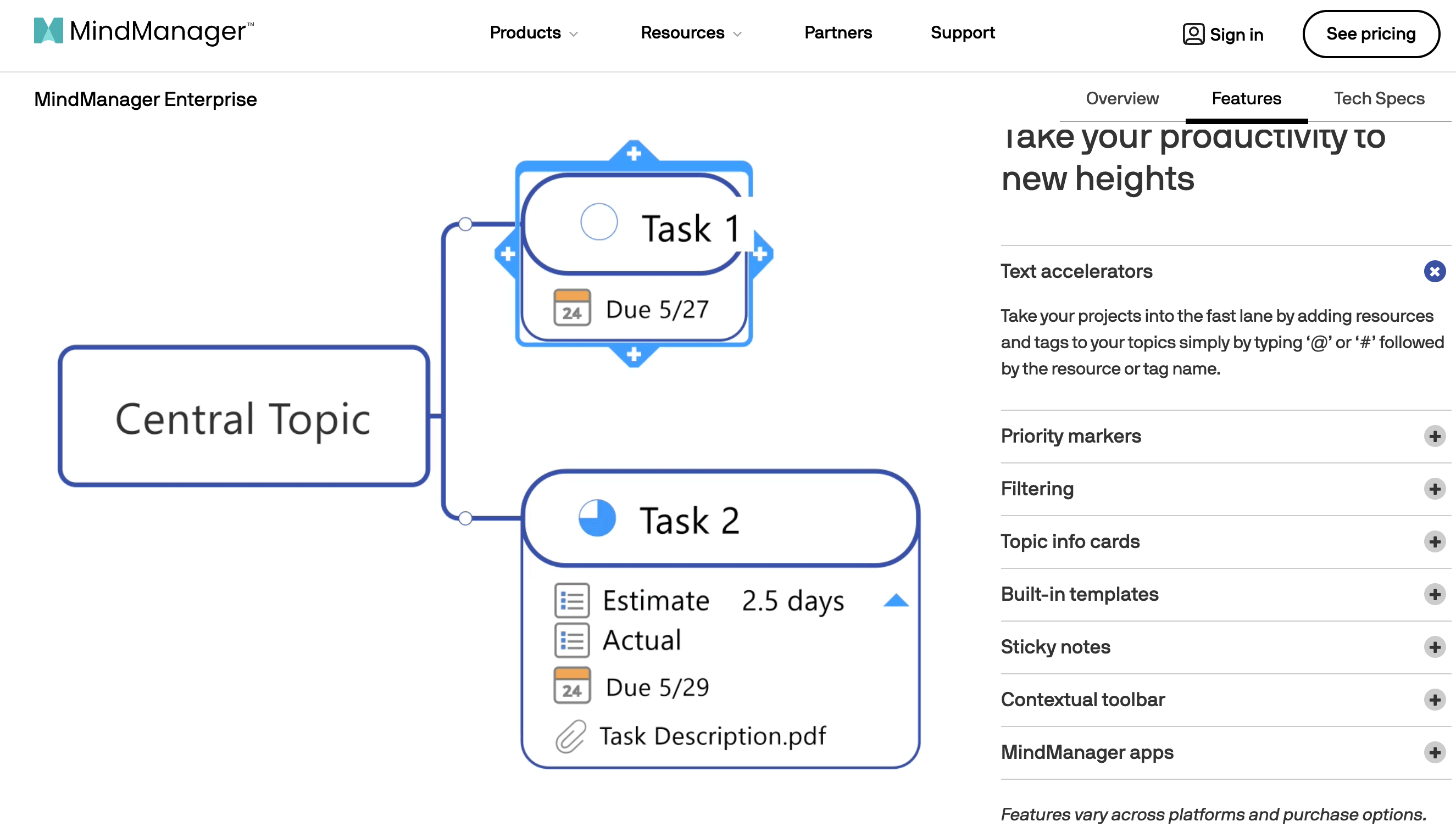
MindManager starts with industry-leading mind mapping capabilities, allowing you to:
- Drag-and-drop to build complex visual hierarchies
- Customize colors, shapes, icons, and links for context and clarity
- Add notes, attachments, images, and hyperlinks to any topic
Intuitive formatting features let users quickly differentiate between priorities, tasks, and information flows. A new Quick Insert tool speeds up map-building for rapid idea capture.
Diagram Types, Viewing Modes, and Project Planning in Depth
Not just for brainstorming, MindManager supports multiple map types and planning views:
- Radial and Org Chart maps for strategic overviews
- Kanban, Timeline, and Workflow diagrams for process management
- Gantt charts for project planning, tracking dependencies and milestones in real time
- Presentation mode for stakeholder engagement
Excel Data Mapper, Auto-Calc, and SmartRules Explained
MindManager 2026 has new data-driven intelligence features:
- Excel Data Mapper: Import/export structured data for dynamic visualization
- Auto-Calc: Aggregate task data, budgets, and timelines within maps
- SmartRules: Create conditional logic to automate formatting, task states, or assignments
These make MindManager as much an interactive dashboard as a thinking canvas.
Best Practice Tip: For complex project planning, use Gantt charts to visualize dependencies, then overlay SmartRules for real-time alerts and updates based on task changes.
Integrations: Microsoft 365 and Cloud Ecosystem
Integration is the linchpin of modern productivity—MindManager 2026 arguably leads the pack with deep, bi-directional ties to Microsoft 365 and cloud platforms.
Bidirectional Sync with Outlook, Excel, Word, Teams, SharePoint
Examples of streamlined workflows include:
- Send tasks directly from MindManager to Outlook or Teams
- Embed Excel tables that sync live with data changes
- Export structures to Word for documentation or SharePoint for wider sharing
- Schedule meetings, assign resources, and manage files without leaving the map
Tip: Leverage OneDrive or SharePoint cloud sync to let distributed teams access the latest project status wherever they work.
Cloud Storage Places and Workflow Benefits
MindManager’s cloud ecosystem enables seamless access and backup options, reducing the risk of lost data and facilitating real-time collaboration (more below).
Collaboration and Sharing in MindManager 2026
Collaboration is where MindManager 2026 truly shines for modern organizations and remote teams.
Real-time Co-Editing, HTML Exports, and Enterprise Publishing
Key benefits:
- Simultaneous co-editing: Multiple users can update maps live on the web or desktop
- Publish as interactive HTML: Share with stakeholders even without a MindManager license
- Secure enterprise publishing: Set permissions per department or project
Comparison of Browser vs. Desktop Collaboration
- Web (Essentials version): Ideal for quick map edits, commenting, and external stakeholder sharing
- Desktop (Professional/Enterprise): Access to full feature set, project timelines, advanced automation
Technical tip: If you encounter sync delays, check network latency and ensure that cloud storage endpoints are up-to-date across platforms.
Pricing and Editions Comparison (2026)
Choosing the right edition is critical for budget-conscious buyers. MindManager now offers clear tiers tailored to individual, SMB, and enterprise needs.
Detailed Pricing Breakdown (Table)
| Edition | Platform | Key Features | Price (Annual/One-Time) |
|---|---|---|---|
| Essentials | Web only | Basic mapping, simple sharing | $99/year |
| One-Time | Windows/Mac | Full mapping suite (no cloud) | $349 one-time |
| Professional | Win/Mac + Web | Full features, cloud sync, Gantt | $179/year |
| Enterprise | All platforms | Advanced collaboration, API, admin | Custom quote |
Prices subject to region and volume discounts (2026).
Capabilities for Each Edition (Essentials, One-Time, Professional, Enterprise)
- Essentials: Unlimited basic maps, HTML export, no Gantt or data integration
- One-Time: Full-feature desktop, limited updates, no cloud
- Professional: Everything in One-Time + Gantt, Excel integration, web access, all updates
- Enterprise: Pro features plus SSO, admin controls, API integration, managed deployment
Tip: For teams needing Gantt charts or Excel integration, Professional is the sweet spot. Enterprise is ideal for global teams with IT governance needs.
User Reviews and Expert Analyses (2026)
MindManager is consistently top-rated among mind mapping and visual planning tools. Here’s a distillation of what users and experts are saying this year:
Pros and Cons from G2 and Independent Reviews
What users love:
- Flexibility and power: “Nothing matches its ability to handle complex projects.”
- Deep integrations: “The best platform for moving ideas straight to execution with Microsoft 365.”
- Collaboration: “Live mapping has transformed remote workshops.”
Drawbacks highlighted:
- Pricing: “Can be a premium buy for solo users.”
- Learning curve: “Some features take time to master—an expert toolset.”
User Sentiment Statistics from G2, YouTube, and Expert Sites
- Avg. User Score (2026): 4.7 / 5 (across 1,200+ reviews on G2, TrustRadius)
- Enterprise Adoption: Up 25% YoY, according to industry analysts
- YouTube Tutorials: Over 1 million views on MindManager 2026 feature breakdowns
Sentiment Analysis and Use Case Illustrations
Many reviewers praise enterprise-level enhancements and the new real-time Gantt updates. One global consulting firm reported a 15% reduction in project delivery times after standardizing MindManager for cross-department planning.
Pro tip: Frequent power users recommend leveraging the Excel Data Mapper together with Gantt for agile-style project tracking within corporate environments.
Current Trends and Use Cases for MindManager 2026
Enterprise Project Management and Enhanced Data Tools
Enterprises now expect visual tools to handle more than basic ideation. MindManager rises to this with:
- Resource allocation visualization: Quickly see task loads and pivot as needed
- Embedded metrics: Track KPIs and budgets alongside milestones within the map
- Compliance-ready export and audit trails
A case study with a Fortune 500 supply chain group found they could cut status meeting times in half using MindManager’s centralized dashboards.
Popular Business Applications and Expert Positioning
- Strategy mapping: From C-suite to frontline, align initiatives and OKRs visually
- Process documentation: SOPs, onboarding flows, and risk assessments all in interactive, map-based form
- Research and development: Map innovation cycles, knowledge management
MindManager’s visual-first approach means it often replaces half a dozen siloed tools—pulling planning, communication, and execution into one interface.
“MindManager 2026 has made communicating complex projects so much easier. Gantt views, live collaboration, and Microsoft 365 integrations are seamless—it’s my planning superpower.” – Senior Project Manager, G2 Review
For another perspective on leading visual planning and AI-driven tools, check out Watch more to compare MindManager’s project interoperability with next-generation agents.
Features Checklist and Actionable Tips
- Gantt charts: Drag-and-expand for dependencies, add durations inline, switch to task view
- Integration: Link Outlook, Teams, and SharePoint for seamless workflow transitions
- SmartRules: Set conditional logic for task coloring or percent complete
- Data import/export: Excel, Project, CSV—batch update maps
- Collaboration: Use professional/enterprise for shared team maps and advanced versioning
Frequently Asked Questions (FAQs)
Q1: Can MindManager 2026 maps be shared with users who don’t have a license?
Yes, with HTML export or web-based Essentials, anyone can view and comment.
Q2: Is Gantt chart support available on all editions?
Full Gantt chart planning is available only in Professional and Enterprise (Win/Mac).
Q3: What is SmartRules and why is it important?
SmartRules enables rule-based formatting and info management, saving time and automating map updates.
Q4: Does MindManager 2026 offer mobile access?
Yes, via web browser in Essentials and Professional, though editing is more limited on mobile.
Q5: How does MindManager stack up against competitors like XMind or Miro?
MindManager leads in Microsoft 365 integration, desktop feature depth, and corporate compliance.
Troubleshooting & Technical Tips
- Sync issues: Ensure all users are on latest version and using supported cloud storage (e.g., SharePoint, OneDrive)
- Integration errors: Double-check permissions for Microsoft 365 account linking and API access
- Performance: For very large maps, prefer Windows/Mac desktop for optimal speed and memory allocation
Still undecided? If you want a side-by-side comparison of project data recovery, collaboration, and cloud capabilities, Watch more to see how robust digital tools protect your valuable work and workflows.

Conclusion: Is MindManager 2026 Worth It?
MindManager 2026 is the most powerful and complete mind mapping and visual planning software on the market. With its intuitive UI, feature-packed diagrams (including Gantt and Kanban), intelligent data and automation tools, and unmatched Microsoft 365/cloud integration, it’s designed for teams who want to move ideas to execution without friction. Though priced as a premium solution, the ROI in saved time, clarity, and project velocity is hard to beat—especially for organizations operating at scale.
Whether you’re a project manager looking for robust Gantt tools, an enterprise requiring real-time and secure collaboration, or a consultant needing presentation-ready maps, MindManager 2026 is an investment in better thinking—and better outcomes.
👉 Open MindManager: https://worldoftech.space/mindmanager
👉 Our YouTube Channel: https://www.youtube.com/@world_tech79
👉 Our Facebook Fanpage: https://www.facebook.com/profile.php?id=61576258059614
👉 Our X ( Twitter ): https://x.com/worldoftech79





