If you publish long videos, podcasts, webinars or interviews, you already know the uncomfortable math: one hour of footage can hide a dozen great moments, but finding, cropping, captioning and exporting them by hand eats an entire afternoon. Klap is built to remove that afternoon. It is an AI video tool that takes a YouTube link or an uploaded file, picks the most engaging moments, reframes them into vertical 9:16 clips, adds animated captions and gets them ready for TikTok, Instagram Reels, YouTube Shorts and LinkedIn. Klap says it serves 3.5 million users who have created 8.5 million clips (self-reported figures), and its paid plans start at $14 per month on yearly billing or $29 per month on monthly billing, with unlimited social accounts included on every plan.
For podcasters, coaches, educators, agencies and solo creators who talk to a camera, the promise is simple: turn one long recording into a week of short-form content in minutes rather than hours. But Klap is not perfect, and an honest look reveals trade-offs around billing terms, a light editor, mixed independent ratings and some pricing details that are described differently across sources. This 2026 review walks through what Klap does, how its features hold up, the latest pricing and plans, how it compares with OpusClip and Vizard, the real pros and cons, and exactly who should (and should not) subscribe.
Klap Review 2026: The AI Video Clipper That Turns Long Videos Into Viral Shorts
Overview and Background
Klap is an AI-powered video repurposing platform operated by ZIGG SAS, trading as Klap, and its homepage credits two founders, Theo and Victor. It is not a general video editor or a motion-graphics suite. It is purpose-built for one job: take a long-form video that already has strong spoken content and automatically turn it into a batch of short, vertical, captioned clips that are ready to post. You can start from a file upload or simply paste a YouTube link, and the platform handles transcription, moment selection, reframing and captions without a timeline in sight.
The product sits in one of the most competitive corners of the creator-tool market, alongside OpusClip, Vizard and a growing list of AI clippers. What Klap leans on is speed and simplicity. Its homepage cites a rule of thumb of roughly five clips per minute of source video, supports 52 languages, scores each clip for viral potential, and lets you schedule posts directly to connected social accounts. For teams that need to automate at scale, Klap also publishes API documentation and lists integrations with Zapier, Make and n8n, plus an affiliate program of its own.
On independent reputation, the picture is mixed rather than glowing. Trustpilot shows a 3.9 out of 5 score from 54 reviews, with 54% giving five stars and 30% giving one star, so opinions are sharply polarized. The single-star reviews cluster around billing terms rather than clip quality, a pattern we unpack later. Capterra currently lists only one user review, which is too thin to treat as a signal. Klap has replied to every negative Trustpilot review, which is a point in its favor on support culture.
Why Klap Stands Out in 2026
It finds the moments for you: Klap analyzes the transcript and delivery of a long video and surfaces the topics, quotable lines and high-energy passages most likely to hold attention. Instead of scrubbing through an hour of footage, you review a ranked set of ready-made clips and keep the best ones.
Reframe 2 adapts the layout to the content: Plain center-cropping ruins screen recordings and gameplay. Klap’s AI Reframe 2 changes the vertical layout to suit the footage, with options such as split screen, screencast layouts and gaming layouts, while keeping the active speaker in frame. For talking-head video it is one of the more polished automatic reframing systems in this category.
Captions are a genuine strength: Independent hands-on write-ups consistently single out the animated captions as the best part of the product, with word-level highlighting and several styles that usually need little manual fixing. Klap also suggests post captions so the written copy is ready alongside the video.
A viral-potential score for every clip: Each clip gets a score so you can sort quickly and decide what to publish first. As with any such score, treat it as a guide rather than a prediction, but it speeds up triage when you are sitting on dozens of candidates.
Brand customization without a design tool: You can set fonts, colors, logos and framing once and reuse them, so every clip looks like it belongs to the same channel. Agencies and creators who publish daily will appreciate not rebuilding the look each time.
Publishing and scheduling built in: Klap connects to TikTok, YouTube, Instagram and LinkedIn, lets you schedule posts, and includes unlimited social accounts on every plan. Reviewers also praise the time saved by posting from the same place where clips are made.
Wide language support: Klap lists 52 languages, and some Trustpilot reviewers specifically credit it for Arabic support that competitors lack. For multilingual channels this is a practical advantage over English-first tools.
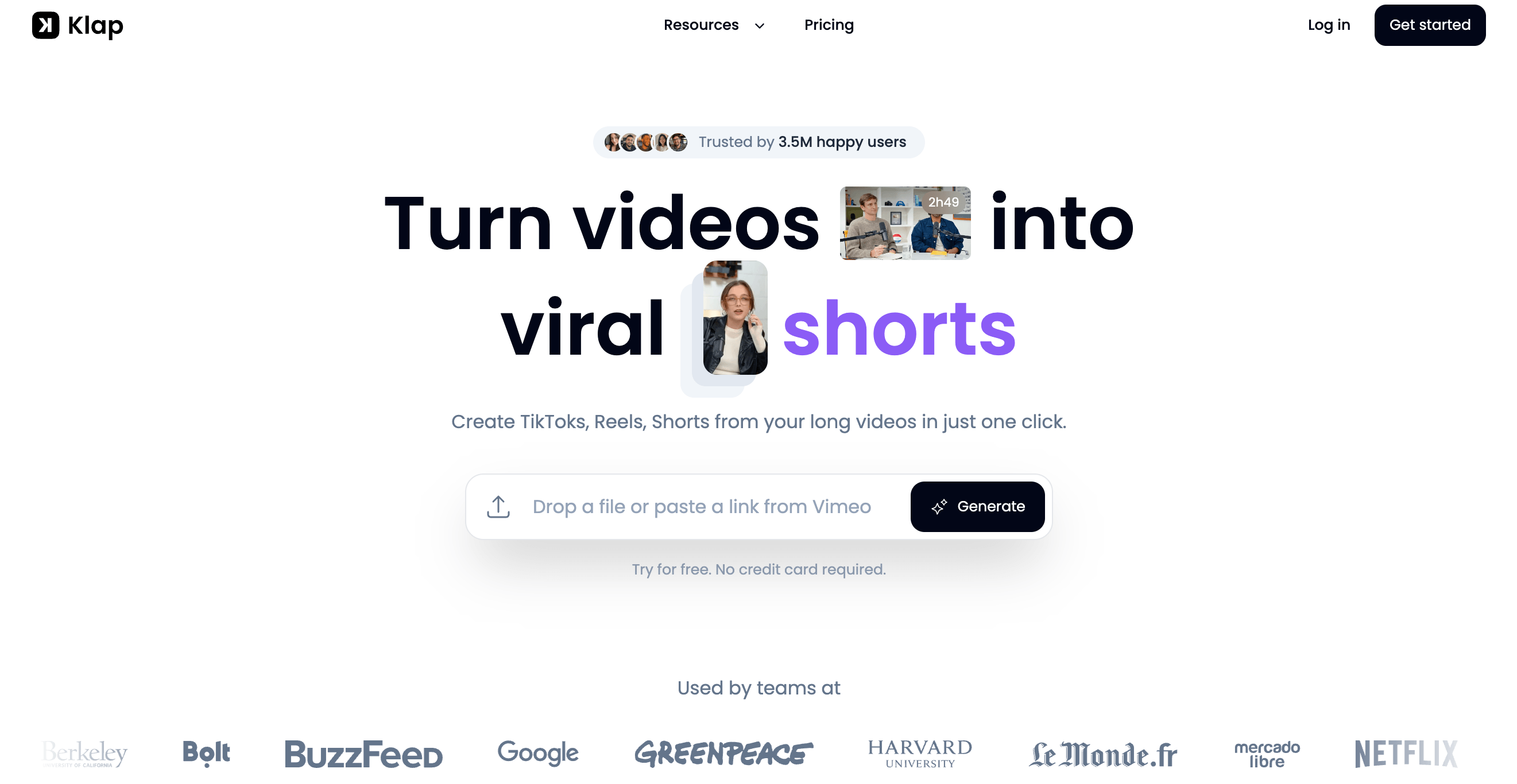
Klap converts a long video or YouTube link into captioned, reframed vertical clips, ranked by viral potential and ready to schedule to TikTok, Reels, Shorts and LinkedIn.
Key Features and Technology
Klap’s feature set is focused, and it organizes into a handful of pillars. Here is how the platform actually breaks down in practice.
AI Clip Discovery and Viral Scoring
After you upload a file or paste a link, Klap transcribes the audio and proposes clips, typically in the 15 to 90 second range according to independent testers. It tends to choose well on dialogue-driven material such as interviews, tutorials and talks, and less well on abstract or visual content with little speech. A reviewer who tested it estimated about 15 to 20 minutes of review time versus two to three hours of manual cutting, though processing itself can take 15 to 30 minutes per video at peak times. Prompt-directed discovery lets you steer what the AI looks for, which helps when you want clips about a specific topic.
AI Reframe 2 and Auto-Reframing
Reframe 2 is Klap’s headline technology. It tracks the main subject, converts 16:9 footage into 9:16, and switches layout for different content types. It does a good job with one or two people on camera. Testers report that it can crop awkwardly with wide group shots, big camera movement or very busy scenes, so footage with a clear single speaker gives the cleanest results.
Captions, Subtitles and Branding
Animated subtitles with word-level highlighting are generated automatically and can be styled to match your brand with custom fonts, colors and logos. You can edit the transcript to fix names or jargon before export. The editor itself is described by some reviewers as sluggish, with limited precision controls and no real-time caption preview, so expect to fix text rather than fine-tune animation timing.
Scheduling and Social Publishing
Klap connects to TikTok, Instagram, YouTube and LinkedIn, so you can approve clips and queue them without downloading each file. Unlimited connected accounts on every plan make it practical for agencies managing several clients. Analytics are included on all plans so you can see which clips actually perform.
API and Automation
For developers and larger teams, Klap offers a separate API with managed-user and embed options, and integrations with Zapier, Make and n8n. One third-party analysis lists API pricing of about $0.44 per input, $0.32 per generated short and $0.48 per export, which would put a five-clip job at roughly $4.44. Treat those API figures as reported by an outside source and confirm them in Klap’s API documentation before building on them.
Pricing, Plans, and Package Structure
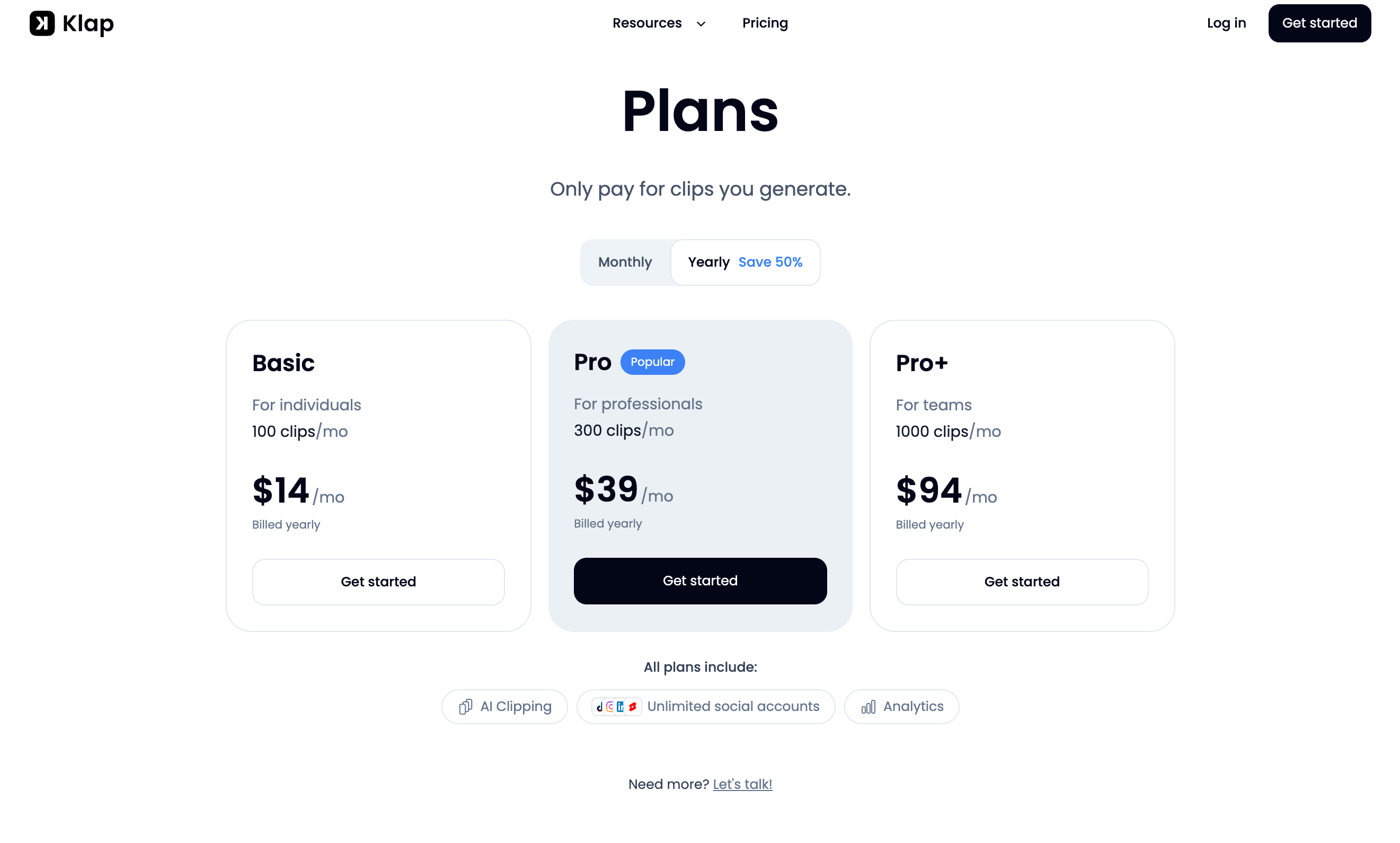
Klap uses a tiered subscription with three paid plans. The pricing page displays prices with yearly billing selected by default and a “Save 50%” badge on the yearly toggle. Monthly billing costs roughly double: Basic is $29 per month, Pro is $79 and Pro+ is $189, while paying yearly brings those to the equivalent of $14, $39 and $94 per month. The yearly figures below come directly from the live pricing page; the monthly figures are confirmed by independent price trackers and by Klap’s own replies to Trustpilot reviewers. All plans include AI clipping, unlimited social accounts and analytics.
| Plan | Price (USD) | What It Is | Best For |
|---|---|---|---|
| Free trial | $0, one video | A single test conversion, no recurring free plan. Sources disagree on whether trial clips can be downloaded without a paid plan. | Testing quality on your own footage |
| Basic | $29/mo monthly, or $14/mo billed yearly ($168/yr) | About 100 clips per month, AI clipping, captions, unlimited social accounts, analytics | Solo creators and casual podcasters |
| Pro (Popular) | $79/mo monthly, or $39/mo billed yearly ($468/yr) | About 300 clips per month, same core toolset with a larger allowance | Professional creators and weekly shows |
| Pro+ | $189/mo monthly, or $94/mo billed yearly ($1,128/yr) | About 1,000 clips per month, positioned for teams | Agencies and multi-channel teams |
| API (pay as you go) | About $0.44 per input, $0.32 per short, $0.48 per export (third-party reported) | Programmatic clipping and exports, separate from consumer plans | Developers and SaaS builders |
One important caveat on allowances. The live pricing page we checked meters plans in clips per month (100, 300 and 1,000). However, some independent sources report that logged-out visitors and newer accounts may instead see an uploaded-minutes allowance of 300, 900 and 2,700 minutes at the same prices, and Klap’s homepage FAQ still mentions upgrading to Pro for $29 per month, which conflicts with the pricing page where $29 is the monthly price of Basic. In short, the dollar prices are consistent, but the unit that meters your plan is described differently in different places.
How Klap Compares to Alternatives
Klap competes mainly with OpusClip and Vizard. The table below summarizes the differences that matter most when choosing. Competitor prices are approximate and change often, and the free-plan details vary by source.
| Factor | Klap | OpusClip | Vizard |
|---|---|---|---|
| Entry paid price | $29/mo monthly, $14/mo yearly | About $15/mo (Starter), $29/mo (Pro) | About $14.50 to $20/mo (Creator, varies) |
| Free option | One free video, not a recurring plan | Recurring free plan, about 60 credits, watermarked | Free tier, about 60 minutes, watermark, 720p |
| How usage is counted | Clips generated (or uploaded minutes, per some sources) | 1 credit per minute of source video | Uploaded minutes, with rollover reported |
| Editing depth | Transcript editor, captions, Reframe 2 | Deeper text and timeline editor, AI B-roll, scheduler | More manual timeline control, AI dubbing |
| Languages | 52 | Broad multilingual support | 100+ subtitle languages reported |
| Best for | Simple, speech-first clipping with scheduling | Creators wanting clipping and editing in one tool | Budget-minded, high-volume source minutes |
Klap vs. OpusClip: OpusClip is the closest rival. It charges one credit per minute of source video regardless of how many clips you keep, offers a recurring (watermarked) free plan and has a deeper editor with B-roll and dubbing. Klap counts differently and is lighter and simpler. Creators who want one place to clip and polish may prefer OpusClip, while those who want fast, clean output with unlimited social accounts may prefer Klap.
Klap vs. Vizard: Vizard generally gives more source minutes per dollar and more manual timeline control, with 4K export on paid tiers, but its clip selection is often considered less sharp. If your workflow is high-volume and price-sensitive, Vizard is worth testing side by side.
Klap vs. editing manually: A traditional editor in Premiere Pro or CapCut gives you total control, but each short can take thirty minutes or more. Klap trades some precision for an enormous speed gain, which is the whole point for anyone publishing daily.
Pros and Cons
What Users Love
Fast, usable first drafts: Reviewers describe clips that are well cut and reframed on the first pass, saving hours versus manual editing. Most of your time shifts from cutting to choosing.
Excellent animated captions: Captions are widely cited as the standout feature, with styles that look native to short-form platforms and need little correction.
Posting and scheduling in one place: Direct publishing to TikTok, Instagram, YouTube and LinkedIn, with unlimited accounts on every plan, removes a whole download-and-upload step.
Responsive support: Trustpilot reviewers praise helpful support, especially chat, and Klap replies to every negative review, usually within a month.
Strong language coverage: Fifty-two languages, including Arabic, make Klap a practical choice for non-English channels.
Easy to learn: The workflow is paste, review, export. There is almost no learning curve, which is why non-editors adopt it quickly.
Limitations Worth Knowing
Billing terms trip people up: The most prominent Trustpilot complaints involve annual billing, with users saying they were charged for a full year when they expected monthly billing. Klap replies that the annual option is clearly labeled and shows the total before payment, but the risk is real if you rush checkout.
Mixed independent ratings: A 3.9 out of 5 Trustpilot score across 54 reviews, with 30% giving one star, is solid but not outstanding. Klap also notes it has not recently invited customers to review, so the sample may not be representative, and Capterra has just one review.
Light editor: Reviewers want better editing tools, including professional transitions and sound effects, and describe the editor as sluggish with limited precision. If you want to polish every frame, you will export to another editor.
Uneven results on complex footage: Reframing can crop awkwardly with group shots, wide angles or heavy camera movement, and AI B-roll is inconsistent. Music-heavy or visual content performs worse than interviews and talks.
Unclear free trial and allowance rules: Sources disagree on whether the free trial lets you download clips, and the plan allowance is described in clips on one version of the pricing page and in minutes on another. There is no recurring free plan.
Data-handling questions: One outside review of Klap’s privacy policy notes that explicit consent for sharing data with third-party AI models was not yet obtained as of the policy update, with an opt-in mechanism in progress. Businesses handling sensitive recordings should review the terms and DPA before uploading.
Who Should Use Klap
Podcasters and interviewers: Long conversations are exactly what Klap is built for. Upload an episode, review the proposed clips and schedule a week of posts in one sitting.
Coaches, educators and course creators: Training sessions and webinars contain many self-contained teaching moments that become strong short clips with captions.
Solo creators and small brands: If you talk to a camera and do not have an editor, the Basic plan removes the biggest bottleneck in publishing short-form content consistently.
Agencies and social media managers: Unlimited social accounts, brand presets and the Pro+ allowance suit teams managing several clients, with the API available for automation.
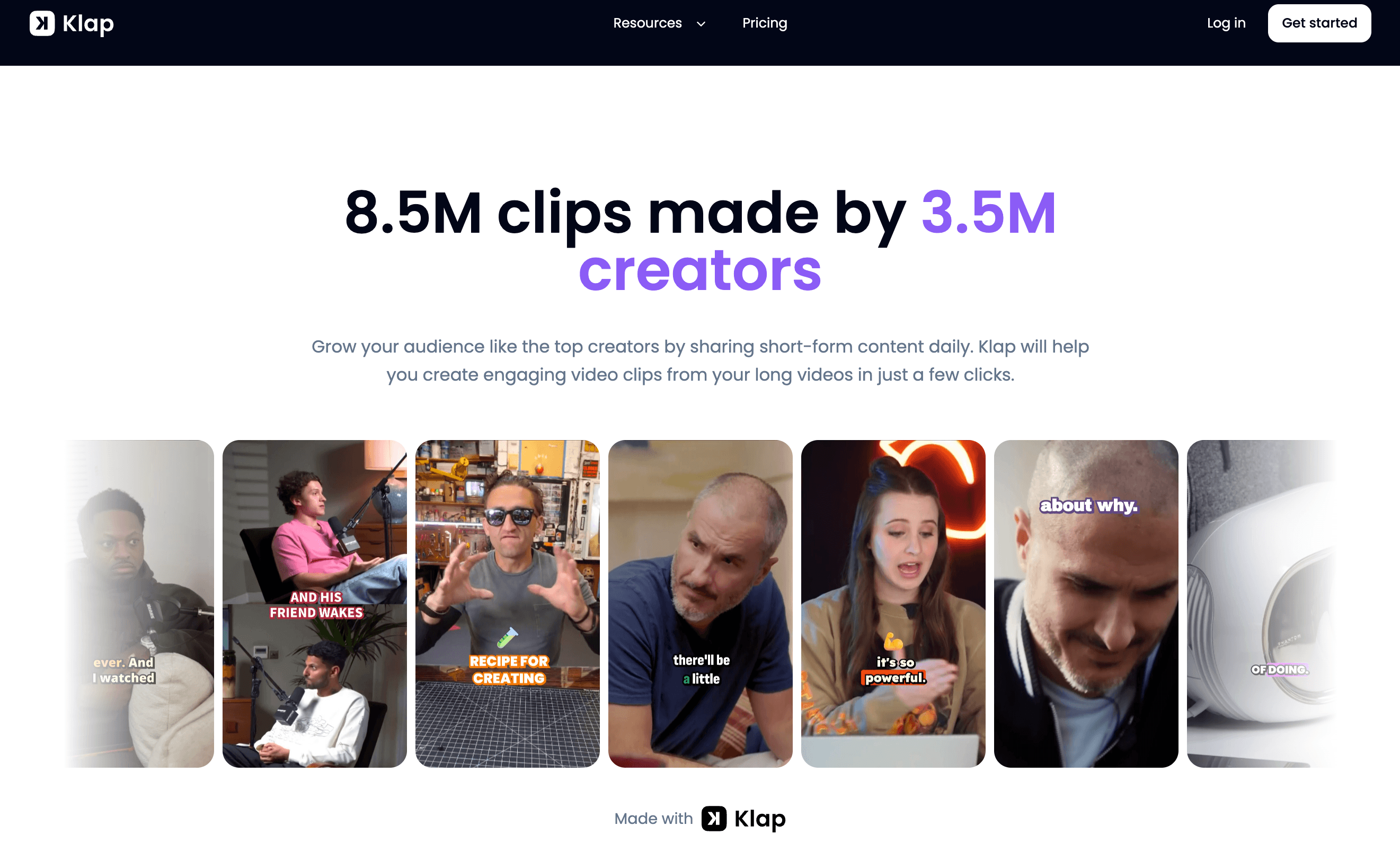
Klap suits speech-first content: record once, review a ranked set of clips, and schedule them across your social accounts.
Who should look elsewhere: If you want a recurring free plan, OpusClip is the more natural starting point. If you need frame-level creative control, motion graphics or music-driven edits, a full editor is a better fit. If you are very price-sensitive on high volumes of source video, test Vizard. And if your footage involves sensitive client material, read the privacy policy and DPA closely first.
Getting Started: Step by Step
- Start with the free trial. Go to klap.app and create a clip from one video to see the quality on your own footage before paying anything.
- Add your source. Paste a YouTube link or upload a file. Pick a speech-heavy video with a clear single speaker for the best first impression.
- Choose your settings. Select the language and layout, and add a short prompt if you want clips about a specific topic.
- Review the proposed clips. Sort by viral-potential score, preview each clip and discard weak ones. Fix captions or trim the start and end where needed.
- Apply your branding. Set your fonts, colors, logo and framing once so every clip matches your channel.
- Connect accounts and schedule. Link TikTok, Instagram, YouTube or LinkedIn, queue your best clips, and check analytics after a week to see what works.
Tips for Getting Maximum Value
Feed Klap your cleanest audio and your best single-speaker footage, because input quality drives output quality more than any setting. Use the prompt box to point the AI at specific themes rather than accepting generic picks, and review a batch the same day so ideas are fresh. Keep a consistent caption style and brand preset so your feed looks cohesive, and publish at a steady cadence rather than dumping everything at once. Watch your clip or minute counter during the first week to understand how the allowance is consumed, start on monthly billing before committing to a year, and track analytics to double down on the topics and hooks your audience actually watches. For long-term value, treat Klap as the first pass in a pipeline and export the best clips to an editor when a clip deserves extra polish.
Future Outlook and Final Assessment
AI clipping is moving fast. Rivals keep adding editors, B-roll, dubbing and scheduling, and Klap has answered with Reframe 2, a documented API, workflow integrations and wider language coverage. The areas to watch are clearer allowance and billing communication, a smoother editor and the promised opt-in controls around AI data processing. If Klap tightens those, its simplicity becomes a real competitive edge.
As it stands, Klap earns a solid recommendation for speech-first creators who value speed. Its strengths in captions, reframing and publishing are real, while its weaknesses are mostly about transparency and depth rather than core quality. A mixed 3.9 Trustpilot score reminds buyers to read billing terms carefully, which is easy to do and fully within your control.
Conclusion
If your bottleneck is turning long recordings into consistent short-form content, Klap removes most of the manual work and does the parts that matter well: finding moments, reframing and captioning. It is not a replacement for a full editor and its billing and allowance details deserve a careful read, but for podcasters, educators, coaches and small teams it offers one of the quickest paths from one long video to a full week of posts. Try the free conversion on your own footage, compare it with OpusClip if you want a recurring free plan, and subscribe only once the output convinces you.
Klap turns one long video into a batch of ready-to-post vertical clips, so you spend your time choosing and publishing instead of cutting.
Ready to turn one long video into a week of short-form content?
Explore more honest reviews, tutorials and tech comparisons to find the right tools for the way you create, work and grow, at World Of Tech, where we make everything easy.
👉 Try Klap: https://worldoftech.space/klap
👉 Our YouTube Channel: youtube.com/@world_tech79
👉 Our Facebook Fanpage: Facebook
👉 Our X (Twitter): @worldoftech79
Pricing, specifications and policy details in this review were verified against klap.app and independent review sources as of October 2026. AI video tool pricing and features change frequently, so confirm current details on the official site before purchasing. Competitor prices are approximate and subject to change.