
Every office worker, student and freelancer eventually hits the same wall: a PDF that needs editing, converting, signing or squeezed down in size — and a desktop app that’s either bloated, locked behind an expensive Adobe subscription, or missing the one tool you actually need. LightPDF was built to be the single place that solves all of it. It’s an AI-powered, cloud-based PDF platform that bundles conversion, editing, OCR, e-signatures, watermark removal and a growing stack of AI tools — from a document-chatting AI Agent to invoice and mind-map generators — into one account that works the same way on Web, Windows, Mac, iOS and Android.
Backed by Shenzhen Wangxu Technology and running since 2015, LightPDF has grown into a genuinely broad toolkit rather than a one-trick converter — but a broad toolkit isn’t automatically the right one for you, and an honest look turns up real trade-offs around the free plan’s limits, credit-based AI usage, and a few billing and account-gating complaints worth knowing before you subscribe. This 2026 review walks through LightPDF’s full feature set, its current pricing and package structure, how it stacks up against Smallpdf, iLovePDF and Adobe Acrobat, the genuine pros and cons from verified user reviews, and exactly who should — and shouldn’t — make it their default PDF tool.
LightPDF Review 2026: The AI-Powered PDF Toolkit That Covers Nearly Everything
Overview and Background
LightPDF is a cloud-based PDF platform developed by Shenzhen Wangxu Technology Co., Ltd, a company that has been building PDF and document-conversion technology since 2015. The brand launched as a dedicated one-stop PDF service in 2018, expanded to cover editing on every major platform by 2020, and pushed into SaaS and cloud document processing from 2022 onward. It isn’t a single desktop program — it’s a connected ecosystem spanning a web app, Windows and Mac desktop clients, iOS and Android apps, a Chrome/Edge browser extension, and a developer API/SDK, all tied to one login.
The company reports (self-reported, not independently audited) more than 1,000,000 active users across over 100 countries, and it holds ISO/IEC 27001 (security management), ISO/IEC 27701 (privacy management) and GDPR compliance certifications, which matters for anyone processing business documents through a cloud service. Independent trust signals are respectable but modest in volume: LightPDF sits around a 4.1–4.3 out of 5 “Good/Excellent” score on Trustpilot across roughly 74–75 reviews (regional Trustpilot mirrors show slightly different totals), and around 4.6 out of 5 on G2 from a small pool of verified users — solid ratings, but based on far fewer reviews than category leaders like Smallpdf or iLovePDF.
What separates LightPDF from a plain converter is how far it has pushed into AI-assisted document work. Beyond the expected convert/merge/split/compress toolkit, it now includes an AI Agent that can chain multiple PDF tasks together, a ChatPDF-style document Q&A tool, AI-generated PDFs, presentations, invoices and mind maps, PDF translation, and AI-powered image cleanup tools (watermark, logo, sticker and text removal). All of that runs on a monthly AI-credit allowance rather than being unlimited, which is the central trade-off of the pricing model.
Why LightPDF Stands Out in 2026
One account, every device, one Pro plan: Instead of separate purchases for a desktop editor, a mobile app and a web tool, a single LightPDF Premium subscription unlocks the Windows app, Mac app, iOS app, Android app and the web platform together. You can start a task on your laptop and finish it on your phone without paying twice.
An unusually deep tool catalog: LightPDF covers more ground than most rivals in a single toolkit — over a dozen PDF-to-X and X-to-PDF conversions (including niche formats like Markdown, CAD, OFD and CAJ), full text editing and redaction, e-signatures, PDF comparison, and organize/optimize tools like deskewing, shadow removal and auto-crop that most converters simply don’t offer.
AI features that go beyond “chat with your PDF”: Most competitors bolted on a basic ChatPDF clone; LightPDF built an AI Agent that can execute multi-step tasks (convert, then translate, then summarize) from one prompt, plus dedicated generators for presentations, invoices and mind maps — genuinely useful for anyone turning a messy PDF into a finished deliverable rather than just reading it.
AI-powered image cleanup is a real differentiator: The AI watermark, logo, sticker and text removers, plus a scanned-document enhancer, deshadower and handwriting cleaner, put LightPDF closer to a lightweight Photoshop-for-documents than a typical PDF converter — a toolset most direct PDF competitors don’t attempt at all.
Aggressively priced against Adobe: At $5.99/month or $15.99/year, LightPDF undercuts Adobe Acrobat’s standalone Standard/Pro plans by a wide margin while covering a comparable — in some areas broader — feature list, which is exactly the positioning the company leans into (“half the price” messaging on its own homepage).
A genuine lifetime option: Where Smallpdf and iLovePDF only offer recurring subscriptions, LightPDF’s $39.99 one-time Lifetime plan (40,000 AI credits, no expiry) is a meaningful option for anyone who wants to stop paying for a PDF tool altogether after a single purchase.
Compliance credentials most free-tier PDF tools skip: ISO/IEC 27001, ISO/IEC 27701 and GDPR certification give LightPDF a stronger security story than many budget PDF converters, which matters if you’re routing business or client documents through it.
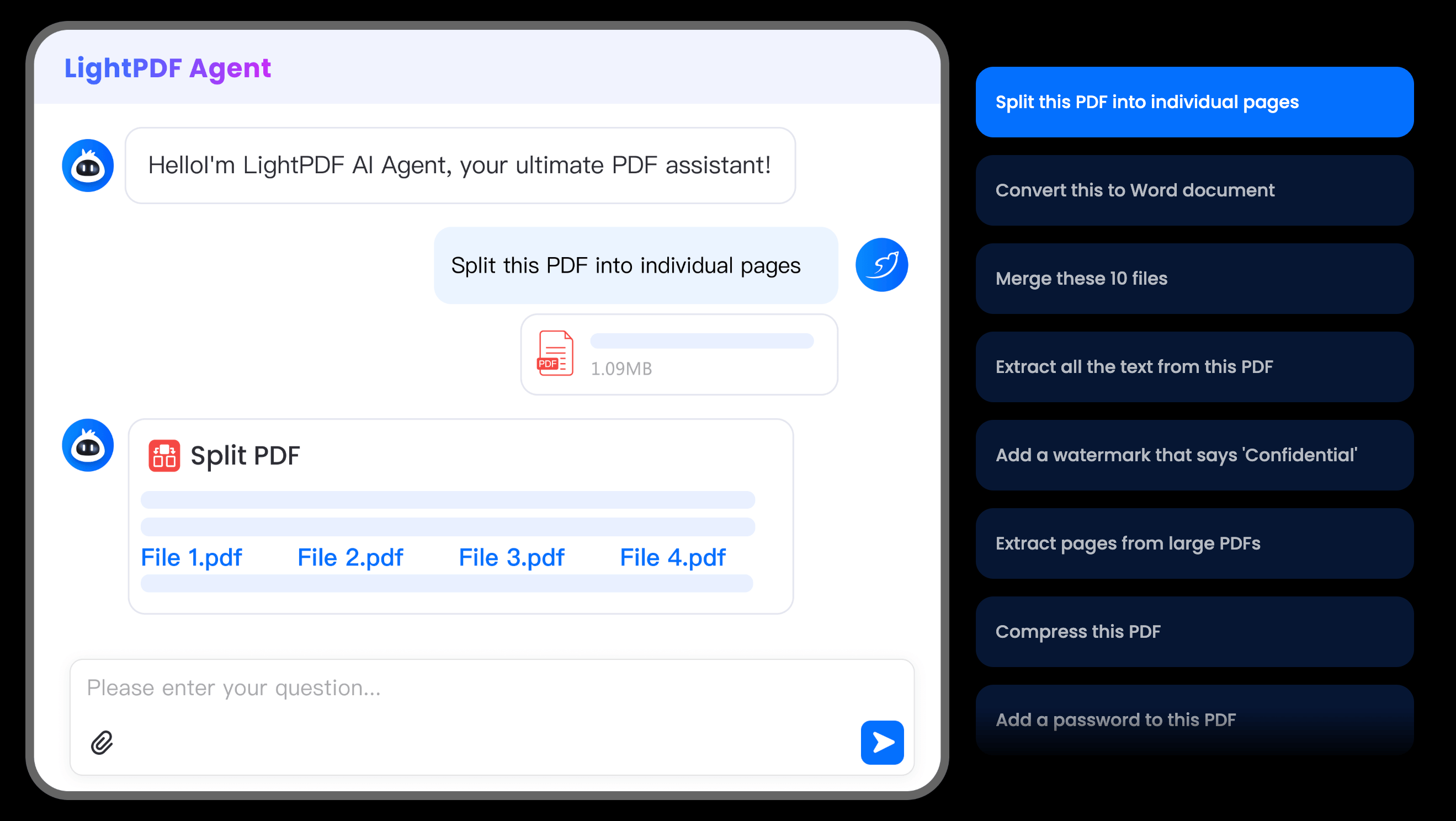
LightPDF’s dashboard puts conversion, editing, OCR and AI tools behind one login that syncs across Web, Windows, Mac, iOS and Android.
Key Features and Technology
LightPDF’s tool list runs long, but it organizes into a handful of clear pillars. Here’s how the platform actually breaks down.
Conversion, OCR and Data Extraction
This is LightPDF’s deepest bench. PDF converts to and from Word, PowerPoint, Excel, TXT, RTF, PNG, JPG, Markdown and PDF/A, plus niche formats like OFD and CAJ for regional document standards. Image-to-PDF covers everything from JPG and PNG to HEIC, SVG, TIFF and WebP. Built-in OCR turns scanned pages into searchable, editable text, and a dedicated Data Extraction suite pulls structured data from bank statements, invoices, receipts and purchase orders straight into Excel — a genuinely time-saving feature for bookkeeping and back-office work.
Editing, Annotation and E-Signatures
The editor lets you replace text directly in a PDF (including scanned documents via AI text editing), annotate, redact sensitive content, fill and create fillable forms, add or remove watermarks, and apply legally binding e-signatures. A PDF Comparison tool flags differences between two document versions — useful for contract redlines — and dedicated tools remove handwriting or old annotations from a page without touching the rest of the layout.
Organize and Optimize
Split, merge, crop, cut, rotate, deskew and remove pages cover the day-to-day housekeeping every PDF user needs. On the optimization side, Compress PDF shrinks files for email, Repair PDF fixes corrupted documents, and a set of scan-cleanup tools (Enhance Scanned PDF, Shadow Remover, Deskew, Make PDF Searchable) specifically target phone-scanned documents — a category most competitors handle poorly.
AI Agent and Generative Tools
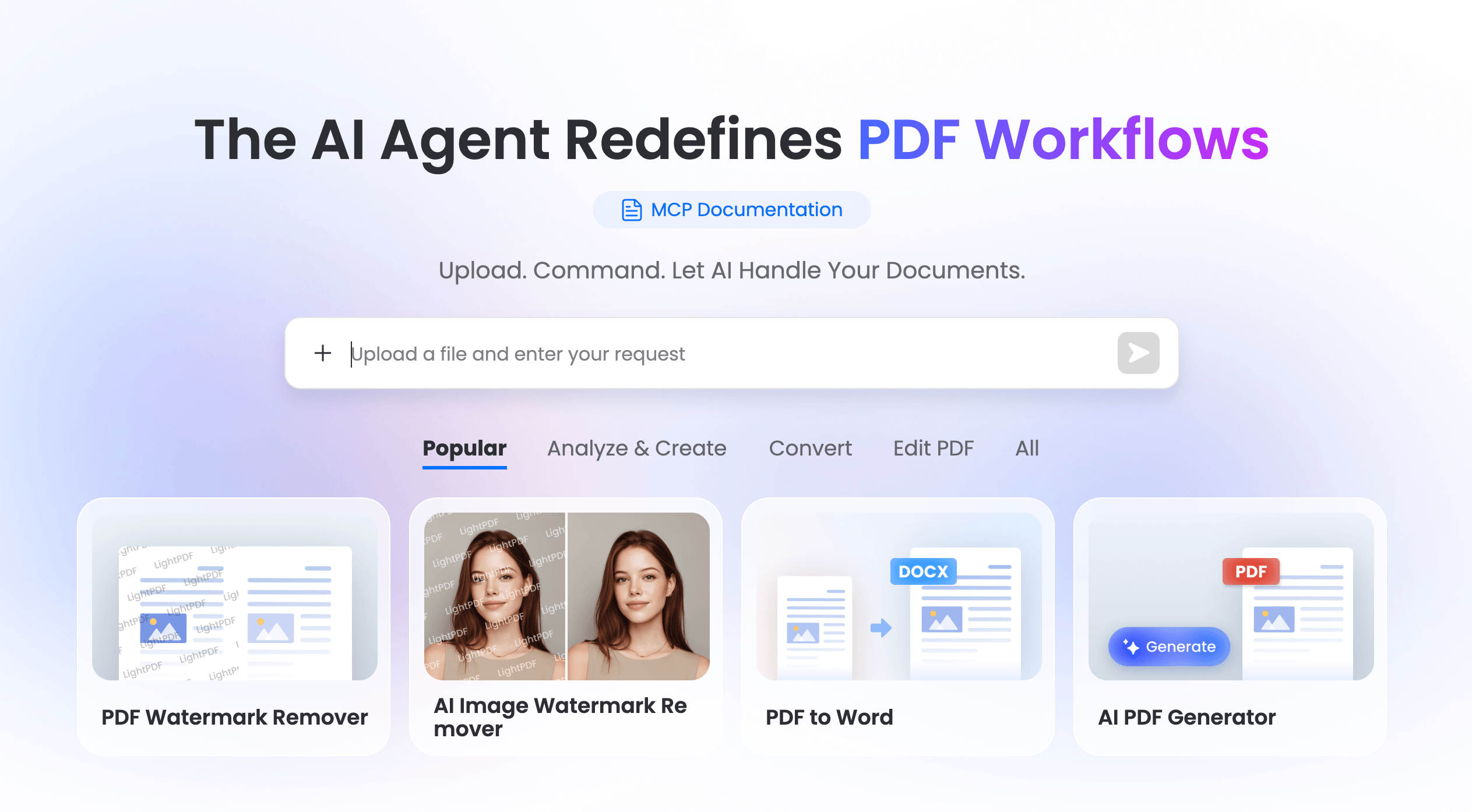
The LightPDF AI Agent is the platform’s flagship AI feature: describe what you need in plain language and it chains together conversion, translation, summarization or extraction tasks automatically. Around it sit an AI PDF Generator, AI Presentation Maker, AI Invoice Generator, PDF Translation, ChatPDF (document Q&A), AI mind-map creation, an AI Summarizer, AI Analysis, and even ChatYouTube (summarizing or extracting information from YouTube videos). Every AI action draws from the plan’s monthly credit pool, with costs ranging from 1 credit for a simple auto-fill to 40 credits for AI-mode text removal or advanced document enhancement.
Image AI and Security
Beyond PDFs, LightPDF’s AI image tools remove watermarks, logos, stickers and unwanted text from photos, enhance low-resolution images, and clean up handwriting — features aimed at marketers, resellers and students working with scanned or downloaded reference material. On the security side, Protect/Unlock PDF, password encryption and redaction round out the toolkit for anyone handling sensitive documents.
Pricing, Plans, and Package Structure
LightPDF runs a freemium subscription model with an unusual bonus: a genuine one-time Lifetime plan alongside the usual Monthly and Yearly subscriptions. All paid tiers unlock the same core toolkit (Web, Mobile and Desktop, unlimited file size, unlimited cloud storage, watermark-free downloads); what changes between them is price, billing frequency, and the size of the monthly AI-credit allowance. Prices below are LightPDF’s current standard rates as listed on its pricing page; always confirm the live price before checkout, since AI-tool pricing across this category changes frequently.
| Plan | Price (USD) | What It Includes | Best For |
|---|---|---|---|
| Free | $0 | Web only, 10MB max file, 1-year/5-file cloud storage, 3 AI chat questions/day, 1 ChatPDF file/day | Testing the tools before buying |
| Monthly | $5.99/mo | Web/Mobile/Desktop, unlimited file size & storage, watermark-free, 1,000 AI credits/month | Short-term or one-off projects |
| Yearly | $15.99/yr (≈$1.33/mo) | Same as Monthly, plus a 3-day free trial before you’re charged | Best value for regular PDF users |
| Lifetime | $39.99 one-time | Full feature set, 40,000 lifetime AI credits, no recurring charge | Buyers who want to avoid subscriptions entirely |
| Team & Business | Custom quote | Centralized billing, user management, volume discounts | Teams and enterprise document workflows |
How LightPDF Compares to Alternatives
| Factor | LightPDF | Smallpdf | iLovePDF |
|---|---|---|---|
| Entry paid price | $15.99/yr (≈$1.33/mo) | ~$9–15/mo (approx., varies by billing term) | ~$5–9/mo (approx., varies by billing term) |
| One-time lifetime option | Yes — $39.99 | No | No |
| Free plan limits | Web only, 10MB/file | ~2 tasks/day, 5MB/file | Limited daily tasks, web only |
| Built-in AI toolkit | Extensive — AI Agent, generators, translation, image AI | Basic AI tools, growing | Limited AI features |
| Platforms | Web, Windows, Mac, iOS, Android, browser extension | Web, desktop, mobile apps | Web, desktop, mobile apps |
| Independent rating | ~4.1–4.3/5 Trustpilot (~75 reviews) | 4.6–4.7/5 Capterra (~960+ reviews) | 4.7/5 Capterra (~1,750 reviews) |
| Best for | AI-heavy workflows & budget-conscious buyers | Polished UI & team collaboration | High-volume simple conversions |
vs. Smallpdf: Smallpdf has a cleaner, more polished interface and a much larger independent review base (~960+ on Capterra alone), which signals a more battle-tested product for teams. But it costs more per month, has no lifetime option, and its AI features are less developed than LightPDF’s AI Agent and generator suite. If interface polish and team features matter most, Smallpdf edges ahead; if price-per-feature and AI breadth matter most, LightPDF wins.
vs. iLovePDF: iLovePDF is the closest in spirit — a broad, affordable conversion-first toolkit with a large, well-reviewed user base. It’s competitively priced and simple to use, but its AI layer is thinner than LightPDF’s, and it doesn’t offer a one-time lifetime purchase. For pure conversion tasks the two are close; LightPDF pulls ahead once AI-assisted editing, translation or document generation enters the picture.
vs. Adobe Acrobat: Adobe remains the enterprise standard — deeper legal/compliance features, the widest third-party integration support, and the most established brand trust — but its Standard/Pro plans commonly run $19.99 and up per month, roughly three to four times LightPDF’s yearly rate. For individuals, students and small teams who don’t need Adobe’s enterprise-grade certification and integration ecosystem, LightPDF (or a rival like it) covers the everyday 90% of PDF work for a fraction of the cost.
Pros and Cons
What Users Love
A genuine all-in-one replacement: Reviewers on Trustpilot, G2 and Capterra consistently describe LightPDF as covering “nearly all essential PDF editing tools” in one place, cutting out the need to juggle separate converters, editors and signature tools.
The AI Agent genuinely saves time: G2 reviewers specifically call out the AI Agent for chaining multiple tasks — removing a watermark, compressing and converting a file in one pass — as a real time-saver over doing each step manually.
Watermark removal that preserves layout: A recurring theme across reviews is that the watermark remover strips marks in a few clicks while keeping the document’s original formatting intact — a common pain point with cheaper or free tools that mangle layout.
Solid value against Adobe: Multiple reviewers, including on Capterra, describe LightPDF as “a great affordable alternative to Acrobat” with a feature set that competes well despite the much lower price.
Clean, uncluttered interface: Early and recent reviews alike praise the interface for being simple and fast to navigate despite the size of the tool catalog — a real usability win given how many features are packed in.
Responsive to feedback: The company actively replies to positive Trustpilot reviews and has continued shipping new features (like the recently added Enhance Scanned PDF tool), signaling ongoing investment rather than a stagnant product.
Limitations Worth Knowing
The free plan is narrow: Web-only access, a 10MB file cap, and daily limits on AI actions (as few as 3 AI chat questions or 1 ChatPDF file per day) mean the free tier is really a trial, not a usable long-term option for anyone with regular PDF work.
Some free tools gate the download behind sign-up: At least one recent Trustpilot review (July 2026) reports being asked to create an account just to download a file processed through a “free” tool — worth expecting rather than being surprised by, since not every “free” tool on the site is download-ready without registering.
AI credits run out: Because AI features are metered (1,000 credits/month on paid plans, with some tools costing 20–40 credits per use), heavy users of AI text editing, translation or PPT generation can burn through the monthly allowance faster than expected, and unused credits don’t roll over.
Trust-signal divergence worth flagging: LightPDF’s Trustpilot score varies slightly by regional mirror (roughly 4.1 to 4.3 out of 5 across ~74–75 reviews depending on locale), and the review count is thin compared to Smallpdf and iLovePDF, which each carry over ten times as many independent reviews — a smaller, less battle-tested sample to judge consistency from.
At least one lifetime-plan complaint on record: A Trustpilot reviewer reported that a lifetime purchase didn’t deliver the dedicated Mac/PC/Android/iOS apps as pictured in the store listing at the time — an isolated report, but worth confirming current platform availability for your devices before buying the Lifetime plan.
Cloud-based processing may not suit every workflow: Like all browser/cloud PDF tools, files pass through LightPDF’s servers during processing. The company holds ISO 27001/27701 and GDPR certifications, but organizations with strict data-residency or confidentiality requirements should review the privacy policy before uploading regulated documents.
Who Should Use LightPDF
Students and researchers: The conversion suite, OCR and AI summarizer/mind-map tools make LightPDF genuinely useful for turning scanned readings or downloaded papers into editable, searchable, summarized study material.
Freelancers and small-business admins: Invoice generation and OCR, contract e-signatures, PDF comparison for redlines, and cross-device access cover most of what a solo operator or small team needs without an Adobe-tier bill.
Marketers and content teams: The AI watermark, logo and text remover tools, plus batch conversion, fit naturally into content workflows that involve cleaning up reference images or reformatting client-supplied documents.
Budget-conscious Adobe switchers: Anyone paying for Adobe Acrobat mainly for basic edit/convert/sign tasks — not deep enterprise compliance features — can likely replace it with LightPDF’s Yearly plan for a fraction of the cost.
The AI Agent can chain multiple PDF tasks — convert, translate, summarize — from a single plain-language request, a workflow most budget PDF tools don’t offer.
Who should look elsewhere: Large enterprises with strict compliance and integration requirements are better served by Adobe Acrobat’s established enterprise ecosystem. Anyone who needs guaranteed offline-only processing for highly regulated documents (legal, healthcare, finance under strict data-residency rules) should review LightPDF’s cloud-processing policy carefully — or choose a local-only desktop tool — before uploading confidential files. And extremely light users who touch a PDF once a year are probably better off with a free one-off tool than any paid subscription.
Getting Started: Step by Step
- Pick your access point. Use the web app at lightpdf.com for a quick task, or download the Windows/Mac desktop app or iOS/Android app if you plan to work with PDFs regularly across devices.
- Create a free account and run a real task. Sign up, then test the exact workflow you need most — converting a file, removing a watermark, or trying the AI Agent — to see how the interface and output quality fit your files before paying anything.
- Check the file size and daily limits. If your files exceed 10MB or you need more than a couple of AI actions per day, you’ll hit the Free plan’s ceiling quickly — decide at this point whether a paid plan makes sense.
- Start the Yearly plan’s 3-day free trial. This is the lowest-risk way to unlock unlimited file size, cross-platform access and the full 1,000 AI-credit allowance before committing to the $15.99/year charge.
- Budget your AI credits. Note which features you use most (a simple conversion may cost nothing extra, while AI text editing or long-video ChatYouTube summaries can cost 20–160+ credits) so you don’t run out mid-month.
- Decide between Yearly and Lifetime. If you’re confident LightPDF will stay in your toolkit for more than two to three years, switch to the $39.99 Lifetime plan during your refund window to stop the recurring charge for good.
Tips for Getting Maximum Value
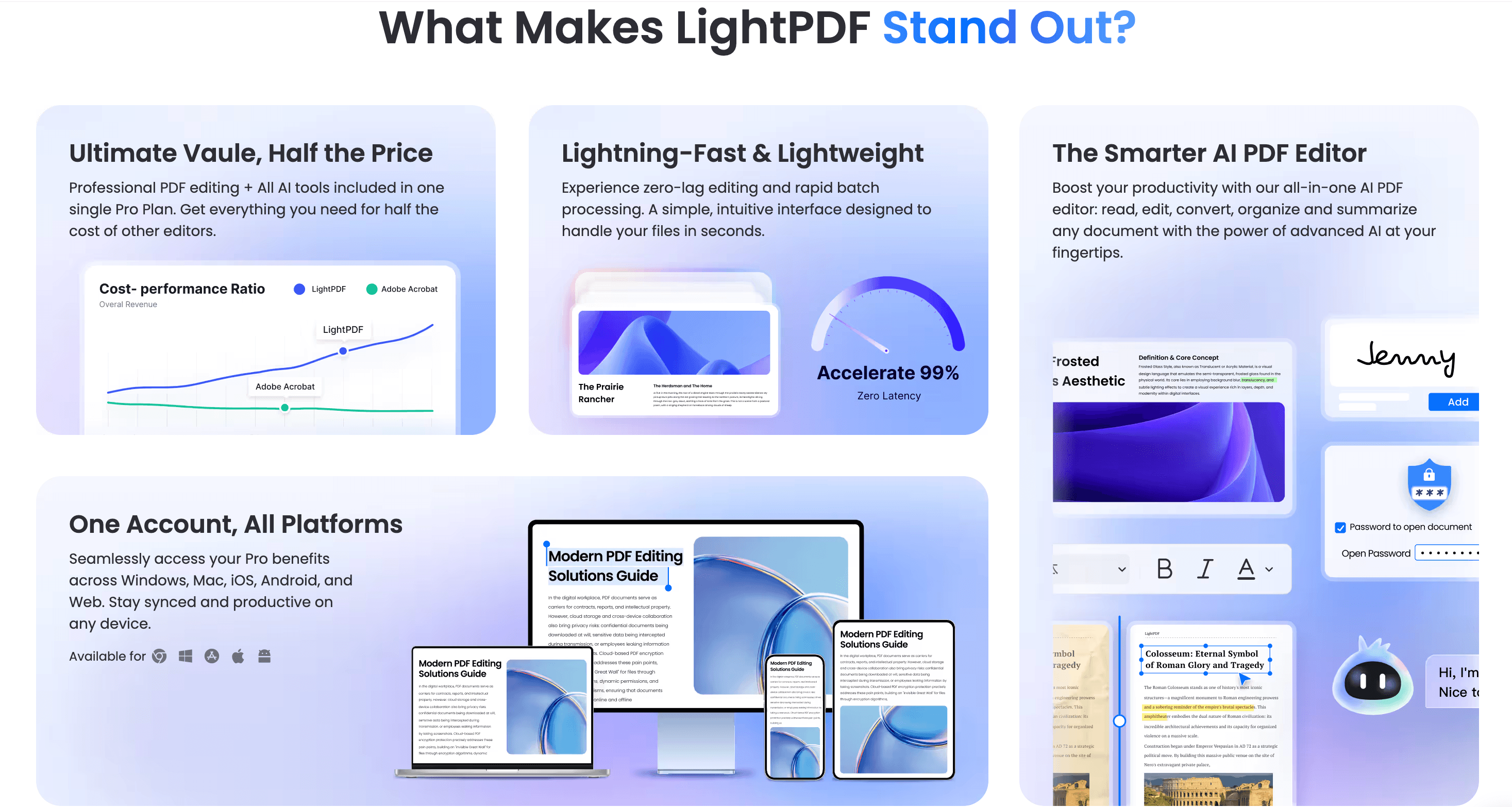
One LightPDF Premium account unlocks the Web, Windows, Mac, iOS and Android apps together — no separate purchase per platform.
Install the Chrome/Edge browser extension so you can convert or edit a PDF straight from a web page without uploading it manually — it’s an easy way to save clicks on repeated tasks. Reserve AI credits for the tasks that genuinely need AI (translation, summarization, the AI Agent, image watermark removal) and use the plain conversion and organize tools — which don’t draw from your credit pool — for everything else, so your monthly allowance stretches further. If you’re evaluating LightPDF for a team, ask sales about the Team & Business plan’s volume pricing before defaulting to individual seats, since centralized billing and admin controls only unlock there. And because refund windows are short (3 days on Monthly, 7 on Yearly), do your real-world test — including a file close to the size and format you actually work with — inside the trial or refund period rather than after it closes.
Future Outlook and Final Assessment
The PDF-tools category in 2026 is being reshaped by AI faster than almost any other productivity segment: what used to be a commodity market of convert/merge/split utilities now competes on how well a tool can understand, summarize and act on document content, not just reformat it. LightPDF has clearly read that shift correctly — its AI Agent, generative tools and image-cleanup AI put it ahead of pure conversion-first rivals like iLovePDF on feature depth, and its continued feature releases (Enhance Scanned PDF, Document Data Extractor, Image Text Editor) suggest the company is still investing rather than coasting on its 2015-era conversion roots.
The honest caveats remain: the review base is thinner than category leaders, the free plan is more of a trial than a usable tier, AI credits add a layer of budgeting most users aren’t used to with PDF software, and Microsoft, Google and Adobe are all pushing free or bundled AI document features into tools people already have — a real long-term competitive threat to any standalone PDF subscription. Within those limits, though, LightPDF in 2026 is a genuinely capable, well-priced, AI-forward PDF platform that punches above its price point.
Conclusion
LightPDF isn’t trying to be a niche tool that does one thing perfectly — it’s trying to be the one PDF app you never have to think twice about opening, whether that means converting a file, signing a contract, removing a watermark, or asking an AI Agent to handle three steps at once. It mostly succeeds: the toolkit is genuinely broad, the pricing undercuts Adobe by a wide margin, and the AI layer goes further than most budget rivals attempt. It rewards realistic expectations about the free plan’s limits and the AI credit system, and it’s not the right call for enterprises needing Adobe’s compliance depth or for anyone who can’t put documents through a cloud processor — but for the everyday reality of students, freelancers and small teams juggling PDFs across devices, LightPDF delivers a lot of capability for very little money. Confirm the current price, use the free trial, and it can take PDF busywork off your plate for less than the cost of a couple of coffees a month.
Ready to clear your PDF backlog for less?
Explore more honest reviews, tutorials and tech comparisons to find the right gear for the way you work, travel and live — at World Of Tech, where we make everything easy.
👉 Try LightPDF: https://worldoftech.space/lightpdf
👉 Our YouTube Channel: youtube.com/@world_tech79
👉 Our Facebook Fanpage: Facebook
👉 Our X (Twitter): @worldoftech79
Pricing, specifications and policy details in this review were verified against lightpdf.com and independent review sources (including Trustpilot, G2 and Capterra) as of September 2026. PDF and AI-tool pricing and features change frequently, so confirm current details on the official site before purchasing. Competitor prices are approximate and subject to change.





