
If you are a founder, freelancer or small team trying to run marketing, sales and customer support without paying enterprise software prices, you already know the usual trap: one tool for email, another for the CRM, a third for the helpdesk, and a monthly bill that quietly climbs past what the business can justify. EngageBay was built to break that pattern. It is a cloud-based, all-in-one CRM platform that brings email marketing, marketing automation, landing pages, a sales pipeline, live chat and a ticketing helpdesk into a single login, with a free plan for up to 15 users and paid plans that start at $14.99 per user per month on monthly billing. Founded in 2017, it positions itself as the small business answer to HubSpot, promising a similar breadth of tools at a fraction of the cost, and it backs that pitch with a 4.8 out of 5 Trustpilot score and a 4.6 out of 5 rating on Capterra.
For startups, agencies, consultants, e-commerce stores and growing sales teams, the value proposition is easy to understand: stop stitching tools together and manage the whole customer journey from first click to support ticket in one place. But an honest look reveals real trade-offs around reporting depth, email sending limits, occasional bugs and a pricing ladder that jumps sharply between tiers. This 2026 review walks through EngageBay’s full platform, the Marketing, Sales and Service bays, the latest pricing across every plan, head-to-head comparisons against HubSpot and Zoho CRM, the genuine pros and cons, and exactly who should (and should not) sign up.
EngageBay Review 2026: The Affordable All-in-One CRM That Puts Marketing, Sales and Support in One Place
Overview and Background
EngageBay is a software-as-a-service platform that combines customer relationship management with marketing automation and customer support. It is not a single-purpose email tool, and it is not an enterprise suite built for global sales organizations. It is purpose-built for one idea: give small and growing businesses the three core systems they need to attract, convert and keep customers, all sharing the same contact database. When a visitor fills in a form, joins an email sequence, chats with your team, becomes a deal and later opens a support ticket, every one of those moments lands on the same contact record.
The company launched in 2017 and has spent the years since competing on price and simplicity rather than on the sheer size of its feature list. It sells the platform as three separate “bays” that can be bought on their own or combined: Marketing Bay for email, automation, landing pages, forms, SMS and push notifications; Sales and CRM Bay for contacts, lead scoring, deals, telephony and appointment scheduling; and Service Bay for ticketing, live chat and customer support. The All-in-One Suite bundles all three. EngageBay’s own marketing leans heavily on a direct HubSpot comparison, claiming paid plans from $12.74 per user per month against HubSpot marketing plans that start at roughly $800 per month.
On independent trust signals, EngageBay performs well. Trustpilot shows a 4.8 out of 5 “Excellent” TrustScore across about 1,015 reviews, with roughly 89% of them five-star, and Capterra lists a 4.6 out of 5 average across about 912 reviews, with customer service rated 4.8 and value for money 4.7. EngageBay’s homepage advertises G2 badges including Leader in Small Business CRM, High Performer and Easiest To Use. One caution on self-reported numbers: the site cites both “46,000+” and “135,000+” small businesses in different places, and attributes its 4.7 rating to Capterra in one section and G2 in another, so treat customer counts as marketing claims rather than audited figures.
Why EngageBay Stands Out in 2026
Marketing, sales and service in one login: This is EngageBay’s defining strength. Instead of paying for a CRM, an email platform, a live chat widget and a helpdesk separately, you get all four under one subscription with a shared contact database. Fewer integrations to maintain, fewer logins to manage and a single timeline for every customer.
A free plan that is actually usable: The Free plan supports teams of up to 15 users with no credit card required, and includes CRM basics, live chat, basic email broadcasts and a helpdesk for around 250 contacts. For solopreneurs and tiny teams, that is enough to run a real pipeline before spending anything.
Pricing far below the big-name suites: Paid plans start at $14.99 per user per month on monthly billing and drop to $12.74 on a two-year commitment. Even the mid-tier Growth plan, which unlocks full marketing automation, costs a small fraction of what comparable HubSpot tiers charge once you add up seats, contacts and onboarding fees.
Strong marks for support and value: Capterra reviewers rate customer service at 4.8 and value for money at 4.7, and Trustpilot reviewers repeatedly single out responsive live chat support. For a small team without an IT department, quick human answers matter more than a long feature list.
Marketing automation without the enterprise bill: Drag-and-drop workflows, email sequences, lead scoring, landing pages, web forms, SMS and push notifications are all part of the platform, with more than 1,000 customizable email templates to start from. Teams that want automation but cannot justify a four-figure monthly plan will find this the most compelling part of the product.
Built-in helpdesk and live chat: Many CRMs treat support as an afterthought or an expensive add-on. EngageBay includes ticketing, canned responses, support groups, service automations and live chat inside the same platform, plus an AI chatbot that can be trained on your own knowledge base and files.
Easy to learn: Reviewers consistently describe the interface as intuitive, and EngageBay’s own G2 badge for Easiest To Use in the CRM category reflects that positioning. Onboarding is guided, and most small teams can be sending campaigns and tracking deals within a day or two.
EngageBay puts email marketing, a sales pipeline, live chat and a ticketing helpdesk on one contact record, so small teams manage the whole customer journey in a single place.
Key Features and Technology
EngageBay’s feature list is long, and the company says the platform includes more than 30 features across its three bays. It organizes cleanly into a handful of pillars. Here is how the platform actually breaks down.
The All-in-One Suite and the Three Bays
The architecture is simple. Marketing Bay, Sales and CRM Bay and Service Bay are separate modules that all read from the same contact and company records. You can start with just the CRM side, add marketing when you are ready to run campaigns, and turn on service when support volume justifies it. The All-in-One Suite switches everything on together, which is also where EngageBay’s headline entry price of $14.99 per user per month applies.
Email Marketing and Automation
Marketing Bay covers broadcasts, automated sequences, a drag-and-drop email builder, A/B testing, landing pages, web forms, SMS and push notifications. The visual workflow builder lets you trigger actions from form submissions, email behavior, deal stages or contact properties, and combine marketing and sales steps inside the same automation. Full workflow automation is a paid feature tied to the Growth and Pro tiers, so the Free and Basic plans are better thought of as manual tools with light automation.
Sales CRM, Pipelines and Lead Scoring
Sales and CRM Bay gives you contact management with a 360 degree customer view, a Kanban-style deal board with multiple pipelines, task management, appointment scheduling synced to your calendar, email tracking and built-in calling. Lead scoring ranks contacts by behavior so reps can focus on the warmest prospects first. Two-way email sync works with Gmail, Outlook and other major providers. Independent testers note that scoring applies to contacts rather than deals or companies, which is more basic than HubSpot’s approach.
Helpdesk, Live Chat and the AI Chatbot
Service Bay turns inbound support into tickets, with canned responses, support groups, service automations and reporting. A live chat widget sits on your website and feeds conversations straight into the contact record, and EngageBay’s AI chatbot can answer routine questions using your own knowledge base and uploaded files. For a lean team, having chat, tickets and CRM history in one window removes a surprising amount of friction.
Integrations, Mobile Apps and Security
EngageBay advertises integrations with 250+ business tools and lists names such as Zapier, SendGrid, Mailgun, Amazon SES, Shopify, Stripe, QuickBooks, Xero, Twilio and DocuSign. In practice, the native integration list is shorter than at HubSpot or Zoho, and niche connections often go through Zapier. iOS and Android apps are available, and independent testers report two-factor authentication, granular permissions and GDPR compliance.
Pricing, Plans, and Package Structure
EngageBay uses per-user pricing with four tiers: Free, Basic, Growth and Pro. Prices drop when you commit to longer billing periods, with separate monthly, annual and two-year (biennial) rates. The figures below reflect the latest published rates for the All-in-One Suite, cross-checked against EngageBay’s own tier table and Capterra’s live listing. Contact allowances rise with each tier, and exceeding your limit means upgrading or buying a contact add-on, so always confirm the live price, your contact count and any active promotion on the official pricing page before checkout.
| Product | Price (USD) | What It Is | Best For |
|---|---|---|---|
| EngageBay Free | $0 per user, up to 15 users | CRM basics, live chat, basic email broadcasts and helpdesk, around 250 contacts, EngageBay branding | Solopreneurs and tiny teams testing the platform |
| EngageBay Basic | $14.99 monthly, $13.79 annual, $12.74 two-year (per user per month) | Entry paid tier with around 500 contacts, lead scoring, landing pages and email templates | Freelancers and small teams moving beyond spreadsheets |
| EngageBay Growth | $64.99 monthly, $59.79 annual, $55.24 two-year (per user per month) | Around 5,000 contacts with full marketing automation, advanced reporting and A/B testing | Growing teams running active campaigns |
| EngageBay Pro | $119.99 monthly, $110.39 annual, $101.99 two-year (per user per month) | Highest contact limits, custom roles, advanced automation and priority support | Larger teams that need permissions and scale |
How EngageBay Compares to Alternatives
| Factor | EngageBay | HubSpot | Zoho CRM |
|---|---|---|---|
| Free plan | Up to 15 users, around 250 contacts | Free CRM with limited automation | Free for up to 3 users |
| Entry paid price | $14.99 per user monthly ($12.74 on two-year) | Starter from about $15 to $20 per seat | Standard around $14 per user (annual) |
| Full marketing automation | Growth plan, $64.99 per user monthly | Marketing Hub Professional, roughly $800 to $890 per month | Higher tiers, around $23 to $40 per user |
| Built-in helpdesk | Yes, in Service Bay | Service Hub, tiered | Requires Zoho Desk add-on |
| Integrations | Fewer natives, Zapier fills gaps | Very large marketplace | Large Zoho ecosystem |
| Reporting depth | Adequate, limited for data-heavy teams | Deep, customizable | Strong, with Zoho Analytics |
| Best for | Budget all-in-one for small teams | Scaling teams with budget | Customizable CRM on a budget |
vs. HubSpot: HubSpot is the category leader, with deeper reporting, a huge integration marketplace and a more polished experience. It is also far more expensive once you move beyond the free tier, with Professional plans that require annual contracts and onboarding fees that can run from about $1,500 into the thousands. EngageBay gives up some depth and polish, but for a small team that wants marketing automation, a pipeline and a helpdesk without a four-figure monthly bill, it is dramatically cheaper. Note that much of the HubSpot comparison data online, including parts of EngageBay’s own, comes from vendor sources, so verify current HubSpot rates directly.
vs. Zoho CRM: Zoho’s per-user pricing is competitive and its ecosystem of connected apps is broad, but features like helpdesk, live chat and social tools usually mean adding separate Zoho products. EngageBay’s advantage is that these arrive inside one subscription. Zoho’s advantage is customization depth and a larger family of apps if you are willing to assemble them.
vs. a stack of separate tools: Pairing a standalone email platform, a basic CRM and a helpdesk can look cheaper on paper, but costs add up and data fragments across apps. EngageBay is the simpler, single-bill alternative, and for many small teams the real saving is the time not spent syncing contacts between tools.
Pros and Cons
What Users Love
Remarkable value for what you get: Capterra’s strongest theme is an affordable all-in-one platform, with about 96% positive sentiment, and its value for money score of 4.7 is among the highest sub-ratings. Reviewers repeatedly say they replaced several tools with one.
Responsive customer support: Support is the most common praise on Trustpilot, where reviewers describe fast live chat and accurate answers, and it carries a 4.8 sub-rating on Capterra. For small teams, this is often what keeps them on the platform.
Time-saving automation: Reviewers point to workflows that handle follow-up emails, lead assignment and task creation automatically, with about 95% positive sentiment on automation features. Once configured, it quietly removes a lot of manual work.
Effective lead tracking: Lead scoring, deal pipelines and a full contact timeline help small sales teams see who is engaged and what to do next, and Capterra users rate lead tracking tools around 95% positive.
A generous free tier: Fifteen users, a working CRM, live chat and helpdesk basics at no cost make EngageBay one of the more usable free plans in the category for tiny teams.
Easy onboarding: Guided setup, an intuitive layout and a short learning curve mean most teams do not need a consultant to get started.
Limitations Worth Knowing
Occasional bugs and slowdowns: On Capterra, bugs and slowdowns are the most mentioned concern, with roughly 48% negative sentiment across about 86 mentions. Some Trustpilot reviewers also describe buggy automation workflows, so test your critical workflows before relying on them.
Email sending limits: Email delivery and sending limits draw about 50% negative sentiment on Capterra, and one Trustpilot reviewer described discovering an email cap only after being upsold to a different plan. Check the limits for your tier and contact count before you migrate a large list.
Limited reporting: Reporting is the weakest area in user feedback, with about 66% negative sentiment on Capterra. Data-heavy teams that need custom dashboards, attribution and deep forecasting will likely outgrow it.
A steep pricing jump between tiers: The step from Basic at $14.99 to Growth at $64.99 per user is large, and since full automation sits on Growth and above, teams that need it pay much more per seat. Per-user pricing also scales quickly as headcount grows.
Fewer native integrations and thinner documentation: Independent testers note a smaller list of native integrations than the big suites, English-only support in at least one review, and a knowledge base that is thin on topics like lead scoring setup. Note that some of these observations come from a review last updated in 2024, so check whether they still apply.
Support experiences are not uniform: Most feedback is glowing, but some low ratings report generic or delayed answers, and the Trustpilot page notes the company has not recently invited reviews or replied to negative ones. A 4.8 score across about 1,000 reviews is strong, yet it is worth reading the critical reviews yourself.
Who Should Use EngageBay
Startups and solopreneurs: The Free plan and the low-cost Basic tier let you run a real pipeline, capture leads and send email without a software budget. If you are replacing spreadsheets and a patchwork of free tools, EngageBay is an easy first CRM.
Small businesses and agencies: Teams that want marketing automation, a sales pipeline and a helpdesk under one subscription will find the strongest value here. The shared contact record removes the hand-offs that usually fall through the cracks between departments.
E-commerce and service businesses: Integrations with Shopify, Stripe and Zapier plus live chat and ticketing make it practical for stores and service providers who handle both marketing and support with a small team.
HubSpot refugees on a budget: If you like HubSpot’s approach but cannot justify the bill as your contact list grows, EngageBay delivers a similar shape of platform at a much lower price, with the trade-offs in reporting and polish described above.
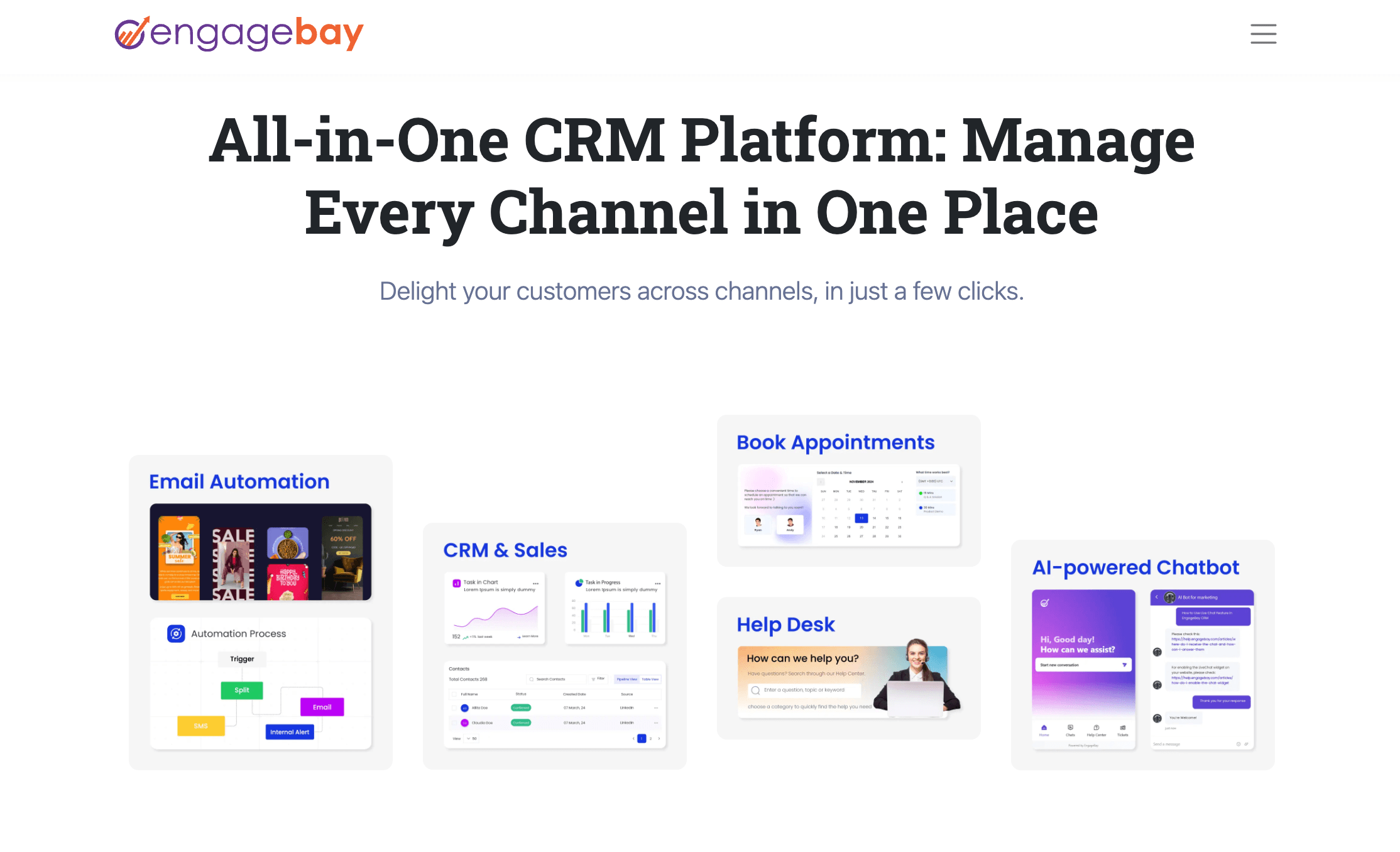
From the Free plan to Pro, EngageBay scales with the team: start with contacts and a pipeline, then add automation and support as the business grows.
Who should look elsewhere: Larger organizations that need advanced reporting, complex permissions, a huge integration marketplace or enterprise-grade support will hit EngageBay’s limits. Data-driven marketing teams who live in custom dashboards, and anyone sending very large volumes of email, should compare HubSpot, Zoho or a dedicated email platform. And if your whole need is a simple contact list, a lighter free CRM may be enough.
Getting Started: Step by Step
- Create a free account. Sign up on the EngageBay website with no credit card required. The Free plan covers up to 15 users, so you can test the CRM, live chat and basic email tools before paying anything.
- Choose your bay or suite. Decide whether you need the full All-in-One Suite or just one bay. If marketing, sales and support all matter, the Suite is the best value; if you only manage deals, start with the Sales and CRM Bay.
- Import your contacts. Upload a CSV or connect your email inbox and tools. Clean the list first, add tags and custom fields, and remember that each tier has a contact limit.
- Set up your pipeline and forms. Build your deal stages, create a web form or landing page, and add the live chat widget to your site so new leads flow into the CRM automatically.
- Build one automation. Start with a simple welcome sequence or lead-nurturing workflow, test it on yourself, and only then expand. Full workflow automation requires the Growth tier or above.
- Review, then upgrade only if needed. After a few weeks, check which limits you are hitting. Upgrade when contacts, automation or reporting genuinely require it, and consider annual or two-year billing only once you are sure.
Tips for Getting Maximum Value
Start on the Free plan and let real usage tell you when to upgrade, rather than guessing. Keep your contact list clean, because contact count drives which tier you need, and archiving cold or invalid leads can keep you on a cheaper plan for longer. Choose seats carefully since pricing is per user, and give full access only to the people who need automation or reporting. Build a small number of reliable workflows, such as lead capture to welcome email to sales task, instead of dozens of fragile ones, and test each one before turning it on, since workflow bugs are the most common complaint. Use the built-in landing pages, forms and live chat instead of paying for separate tools, connect niche apps through Zapier only when necessary, and check email sending limits before moving a large mailing list. Finally, ask about current promotions and compare monthly, annual and two-year rates on the pricing page before you commit, since the two-year discount is real but requires a long prepayment.
Future Outlook and Final Assessment
The small business CRM market in 2026 is increasingly about AI and consolidation, and EngageBay is moving in that direction with its AI chatbot trained on your own knowledge base, AI assistance for email copy and timing, and a continued push to keep the whole customer journey inside one platform. As larger vendors raise prices and add complexity, an affordable all-in-one with a usable free tier has a clear place, particularly among startups, agencies and service businesses that value simplicity over depth.
The honest caveats remain: reporting is limited, email sending limits and contact caps can catch buyers off guard, occasional bugs affect automation, and the price jump from Basic to Growth is steep. Larger competitors keep investing in polish and integrations. But within those boundaries, EngageBay delivers one of the most complete small business platforms available in 2026, and for teams that want marketing, sales and service without an enterprise bill, it remains a smart value pick.
Conclusion
EngageBay does not try to out-feature the largest CRM platforms. It tries to give small teams the three systems they need most, marketing, sales and support, in one affordable subscription, and at that job it is remarkably effective. A free plan for up to 15 users, paid tiers from $14.99 per user per month, strong ratings on Trustpilot and Capterra, and responsive support make it an easy platform to try. It rewards clean data and realistic expectations, and it is not the right call for reporting-heavy or enterprise-scale organizations. For startups, agencies and small businesses, few all-in-one platforms deliver more for the money. Check the current pricing, start with the Free plan, and EngageBay can bring your customer journey into one place.
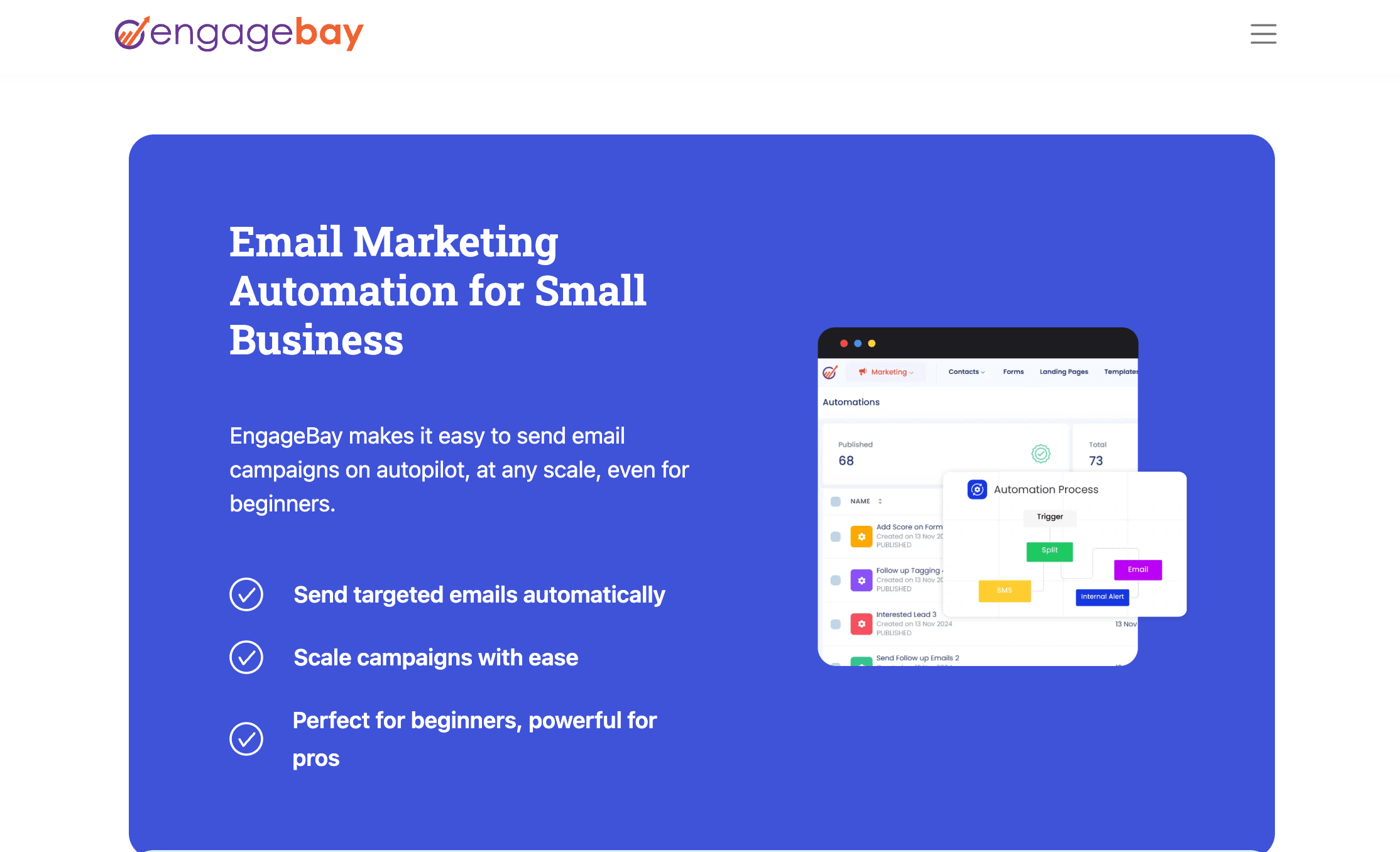
EngageBay’s free plan and low entry pricing make it one of the easiest all-in-one CRMs for small businesses to test before committing.
Ready to run marketing, sales and support from one affordable CRM?
Explore more honest reviews, tutorials and tech comparisons to find the right gear for the way you work, travel and live, at World Of Tech, where we make everything easy.
👉 Try EngageBay: https://worldoftech.space/engagebay
👉 Our YouTube Channel: youtube.com/@world_tech79
👉 Our Facebook Fanpage: Facebook
👉 Our X (Twitter): @worldoftech79
Pricing, features and policy details in this review were verified against engagebay.com and independent review sources (including Trustpilot, Capterra and hands-on reviewer testing) as of October 2026. CRM and marketing software pricing and features change frequently, so confirm current details on the official site before purchasing. Competitor prices are approximate and subject to change.