
Every infrastructure team that runs VMware has spent the last two years doing the same uncomfortable math: subscription only licensing, per core pricing, bundled suites and renewal quotes that keep climbing. ZSvirt is one of the newest answers to that problem. It is an open source virtualization platform from ZStack, released under the GPL 3.0 license in August 2026, built on the same ZSphere engine that ZStack sells commercially. The community edition costs nothing, has no stated limit on hosts or VMs, and ships with high availability, DRS style load balancing, snapshots, backup, a full API, security features like Secure Boot and vTPM 2.0, and a built in agentless VMware migration toolset called ZMigrate.
For sysadmins, MSPs, homelab builders and IT managers weighing a move away from VMware, the pitch is immediate: a vSphere shaped experience on standard KVM, with no license fee and a credible enterprise upgrade path. But ZSvirt is brand new, version 1.0.0, and an honest look reveals real trade-offs around maturity, independent validation, backup depth and the line between the free and paid editions. This 2026 review walks through what ZSvirt is, how it installs, its core features, its real pricing, how it compares with Proxmox VE and VMware, the genuine pros and cons, and exactly who should (and should not) deploy it.
ZSvirt Review 2026: The Free, Open Source VMware Alternative Built on an Enterprise Engine
Overview and Background
ZSvirt is an open source virtualization management platform for KVM based infrastructure. It handles compute, storage, networking and clusters through a single web console, with a REST API, command line access and SDKs underneath. It is not a desktop hypervisor like VirtualBox or a sprawling cloud stack. The project positions itself as lightweight and virtualization focused, scaling from a homelab to very large estates, and it is explicitly not an OpenStack derivative.
The backstory matters here. ZStack, a Shanghai based infrastructure vendor founded in 2015, has sold its commercial ZSphere virtualization platform for years, and says ZSphere has run in more than 1,000 production deployments across a customer base of more than 5,000 enterprises. On August 12, 2026, ZStack open sourced the engine as ZSvirt under GPL 3.0, with version 1.0.0 including the complete source code, build scripts, a signed installation ISO and documentation. Those figures are self reported, so treat them as context rather than audited fact.
What separates ZSvirt from most open source virtualization projects is that it did not start as a community experiment. It is a commercial grade engine released to the public, which is why version 1.0.0 already includes distributed switching, DRS style scheduling, VM encryption and an agentless migration pipeline. The flip side is that the open source community is only a few months old, so forum answers, tutorials and third party integrations are still scarce compared with Proxmox VE or VMware.
Why ZSvirt Stands Out in 2026
Genuinely free, with no stated host or VM cap: The community edition is licensed under GPL 3.0 and ZStack says it can run in production indefinitely with no license fee. Independent coverage repeats that there are no stated limits on hosts, VMs or features, which is the headline reason ZSvirt exists.
An enterprise engine, not a hobby project: ZSvirt shares its core with ZSphere, ZStack’s commercial platform. That lineage shows from day one: clustering, HA, DRS, snapshots, backup, distributed switching, RBAC and audit logging are all in the first public release.
Agentless VMware migration is included: ZMigrate connects to vCenter, discovers clusters and VMs, keeps workloads online through full and incremental block level replication, validates network, storage and boot mappings, and then cuts over in a planned window with a rollback path. ZStack says cutover can take as little as five minutes per VM, and the toolset is bundled at no extra charge.
Designed for scale: The vendor says a single control plane can manage more than 10,000 hosts, with VMs up to 768 vCPUs and up to 50 concurrent migrations. Those are design targets stated by ZStack, not benchmarks independent reviewers have reproduced.
Security features that are often paid extras: Secure Boot, vTPM 2.0, VM and disk encryption, a native key provider, micro segmentation through security groups, MFA or 2FA and immutable audit logs are all listed in the community edition.
Automation first: More than 2,000 asynchronous REST and OpenAPI endpoints, official SDKs for Go, Python and Java, and a native Terraform provider make GitOps style workflows realistic.
A low barrier to trying it: A hosted Live Demo needs no installation or sign up, and OVA and QCOW2 images can launch an evaluation environment in about five minutes inside an existing vSphere or KVM setup, according to the project.
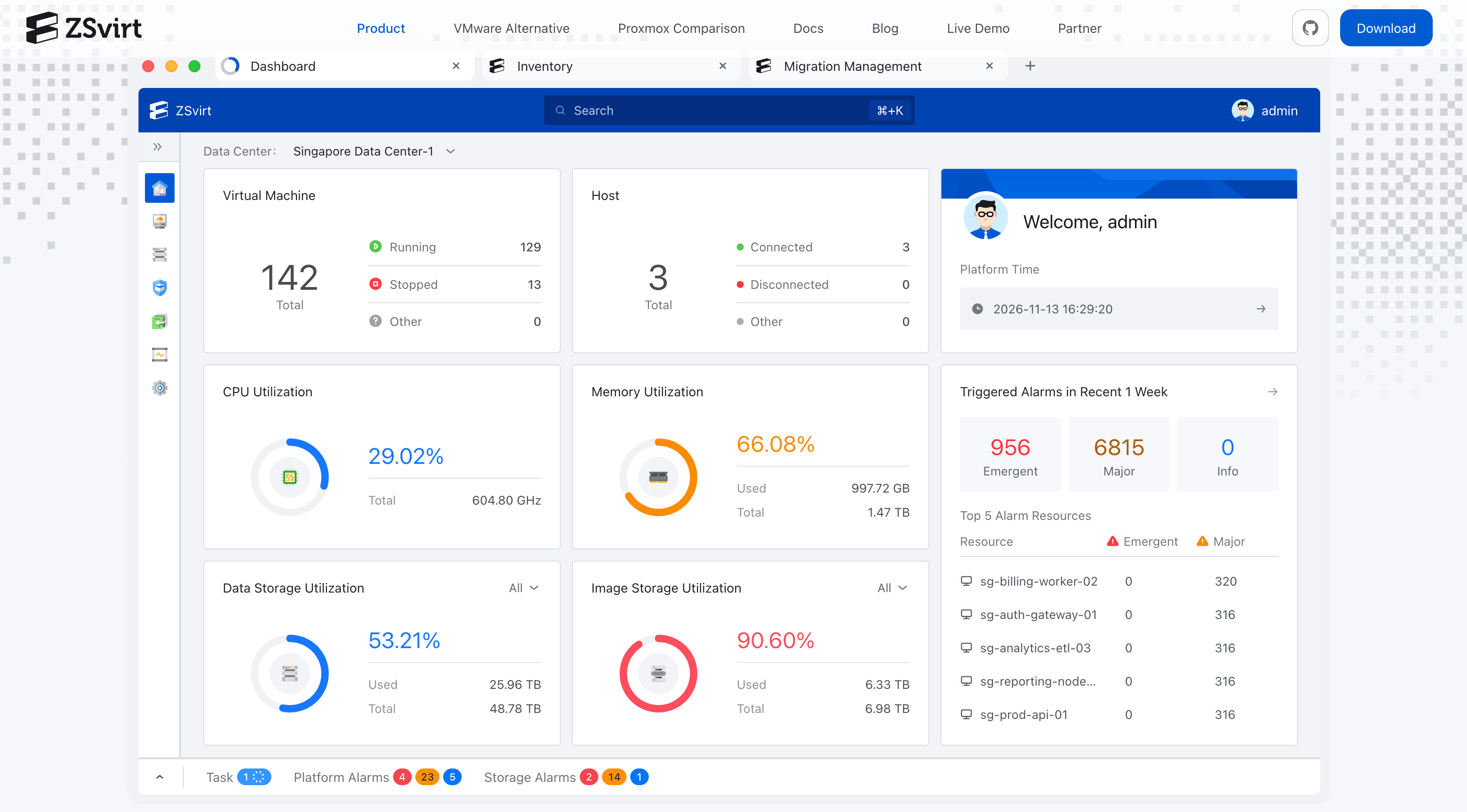
ZSvirt combines a vSphere style web console, built in HA and DRS, and agentless VMware migration in a free GPL 3.0 platform built on the ZSphere engine.
Key Features and Technology
ZSvirt covers a lot of ground for a first release. Here is how the platform actually breaks down once you look past the marketing.
Installation and Management Experience
Deployment is offered as a DVD ISO for bare metal or as OVA and QCOW2 virtual appliances for labs. The installer boots into a hardened Linux environment where you choose a management node, set a static management IP and a root password, and let it finish. The quick start says installation takes about ten minutes, after which a first login wizard walks you through creating a datacenter and cluster, adding hosts, storage and networking, importing an image and launching a VM. A reviewer compared the flow to installing ESXi and vCenter from a single image and found the interface fast and polished.
Requirements are modest by enterprise standards. The documented minimum is Intel VT or AMD-V, 8 cores, 8 GB of memory and a 100 GB system disk, with 24 cores, 24 GB and 200 GB or more recommended. A static IP is mandatory because the address is written into the platform configuration during install.
High Availability, DRS, and Clustering
HA is included in the community edition and is built around restart policies for host, storage and network failures, so VMs come back up when infrastructure fails. A DRS style scheduler offers automatic or manual load balancing based on live CPU and memory thresholds, plus scheduling groups and startup policies. The practical caveat is that cluster HA needs a second node and shared storage, and the quick start only covers a single management node, so a production design needs real planning.
VMware Migration with ZMigrate
ZMigrate is the feature that will pull most readers in. It works at the hypervisor layer without guest agents, supports VMDK, and runs a four stage flow: connect vCenter, sync continuously, validate mappings, then cut over with a controlled rollback path. Offline import has no stated scale limit, while online migration currently has a concurrency cap that ZStack says will be relaxed in later releases, so large estates migrate in batches. ZStack is candid that downtime depends on workload behavior and change rate, and stresses mapping hidden dependencies such as backup agents and monitoring before you move anything.
Security and Compliance Features
The security stack includes Secure Boot, vTPM 2.0, VM, disk and migration encryption, a built in native key provider, security groups for micro segmentation, MFA or 2FA and immutable audit logs. Note that some advanced multi-cluster and compliance capabilities are described on the vendor’s own migration page as Enterprise only, so check the exact boundary before assuming everything on a feature list is free.
Networking, Storage, and Automation
Networking uses distributed switches and port groups, with SR-IOV accelerated networking that supports live migration. Storage options include local datastores for testing and shared or distributed storage for clustering, and backup is a built in module with retention policies that also works alongside Veeam, Commvault and Veritas. Day to day extras include a platform level ISO library, a GUI wizard for OVF import, native OVA export, a recycle bin for deleted VMs and batch VM creation from templates.
Pricing, Plans, and Package Structure
This is where ZSvirt differs most from a typical software review: there is no subscription ladder. The community edition is free under GPL 3.0, with no license fee and no stated time limit, and the vendor says it matches the commercial edition in features. A ZSvirt Enterprise edition exists for teams that want vendor backed support, SLAs and long term support releases, but ZStack does not publish its price and aggregator listings just say to contact the vendor. The table reflects the official site and download page as of November 2026.
| Product | Price (USD) | What It Is | Best For |
|---|---|---|---|
| ZSvirt Community Edition | $0 (GPL 3.0, no license fee) | Full platform: compute, storage, networking, HA, DRS, snapshots, backup, API and SDKs, plus ZMigrate | Labs, SMBs, MSPs and teams comfortable with community support |
| ZSvirt Enterprise Edition | Not published (contact vendor) | Adds vendor backed support, SLAs, LTS releases and Enterprise only capabilities such as advanced multi-cluster and compliance features | Regulated or large production environments that need guaranteed support |
| DVD ISO (v1.0.0, x86_64) | $0 (5.41 GB) | Bare metal installer for the management node or compute node | Production and first real environment |
| OVA and QCOW2 images | $0 (17.02 GB and 24.02 GB) | Pre-built appliances to launch an evaluation in about five minutes on vSphere or KVM | Labs and proofs of concept |
| ZMigrate toolset | $0 (included) | Agentless VMware migration, online migration with a current concurrency cap, unrestricted offline import | Teams moving off VMware |
| Live Demo (demo.zsvirt.io) | $0 (hosted) | Free hosted environment, no installation or sign up required | A first look before downloading |
Free does not mean costless. You still pay for hardware, shared storage if you want HA, third party backup licenses such as Veeam or Commvault, and staff time to learn a new platform. Community support runs through GitHub Discussions, GitHub Issues and Discord, and the project says it responds to issues on business days, which is not an SLA. One practical wrinkle: the download page distributes packages as magnet links, so you will need a torrent client or the GitHub and mirror options.
How ZSvirt Compares to Alternatives
ZSvirt competes with two very different incumbents: Proxmox VE, the dominant open source KVM platform, and VMware vSphere, the commercial standard it is explicitly trying to replace. Competitor prices below are approximate list figures from public reseller and analyst sources, and they vary by contract, region and term.
| Factor | ZSvirt | Proxmox VE | VMware vSphere (VVF / VCF) |
|---|---|---|---|
| License | GPL 3.0 open source | AGPL 3.0 open source | Proprietary, subscription only |
| Software cost | $0 community edition | $0 without a subscription | ~$135 to $190 per core per year (VVF), ~$350 (VCF) list |
| Paid support | Enterprise edition, price not published | ~EUR 120 to EUR 1,100 per CPU socket per year | Included in the per core subscription |
| Hypervisor | KVM | KVM plus LXC containers | ESXi |
| Built in HA and DRS | Yes, in community edition | HA yes, CRS load balancing | Yes, in paid bundles |
| Multi-cluster control plane | Single control plane designed for 10,000+ hosts (vendor claim) | Needs Proxmox Datacenter Manager | vCenter |
| VMware migration | ZMigrate, agentless, included | Built in ESXi import, VM must be powered off | Not applicable |
| Community and maturity | New, launched Aug 2026 | Large, mature forum and ecosystem | Huge, but vendor controlled |
| Best for | Large scale and VMware exits needing a vSphere like model | Homelabs, SMBs and community driven learning | Shops locked into the VMware ecosystem |
vs. Proxmox VE: Proxmox is the safe default for learning and small to mid-size production, with a huge community, built in Ceph and a long track record. ZSvirt offers a more vSphere like operating model, stronger official automation, one control plane across clusters and a bundled migration tool. The most detailed head to head comparison is published by the ZSvirt project itself, so it favors ZSvirt, yet even that page concedes Proxmox is stronger for homelabs and community depth.
vs. VMware vSphere: The cost gap is the whole story. VMware sells only per core subscriptions with a 16 core minimum per CPU, and some resellers still quote a 72 core order floor, which can make small clusters expensive. ZSvirt removes the license line entirely and adds a free migration path, but it cannot match VMware’s certified hardware lists, third party ecosystem or decades of operational maturity.
vs. renewing VMware: For many teams the real alternative is simply paying the renewal. A free platform that lets you pilot a migration with real workloads is a legitimate way to build either an exit plan or negotiating leverage.
Pros and Cons
What Users Love
Independent validation is thin, and that deserves a clear note. We found no Trustpilot or G2 reviews for ZSvirt, and its Capterra and SourceForge pages show zero user reviews as of this writing, so we substituted other signals: one detailed hands-on review from a well known virtualization blogger, trade press coverage, and the project’s public traction on GitHub. ZStack itself reported more than 1,400 GitHub stars within roughly two weeks of launch. Treat the praise below as early impressions, not a long term reliability record.
A familiar, fast interface: The hands-on reviewer found the console quick, polished and lighter than vCenter, and prefers it to the Proxmox interface. For vSphere admins, the learning curve looks gentle.
Truly free, with the features included: Community edition users get HA, DRS, backup, the full API and migration tooling without a license fee, which is rare for a platform with this much scope.
Built in VMware migration: Agentless, incremental and bundled. For anyone leaving VMware, having migration tooling included from the start is the most practical feature on the list.
Strong HA policy options: Scenario based restart policies for host, storage and network failures impressed the reviewer.
Strong automation and security: More than 2,000 API endpoints, official SDKs, a Terraform provider, Secure Boot, vTPM 2.0 and encryption give DevOps and security teams real building blocks.
Easy to evaluate: The hosted Live Demo and the five minute OVA and QCOW2 images make trying ZSvirt far cheaper than provisioning a physical lab.
Limitations Worth Knowing
It is a 1.0 release: ZSvirt was open sourced in August 2026, and early coverage expects some rough edges in documentation and leftover naming from the upstream product. Long term stability in the open source build is simply unproven.
Independent testing is limited: The one detailed hands-on review ran only a basic install, a cluster setup and a single Windows VM in a nested lab, without testing HA, backup, migration or physical hardware. Most claims you read are documented features or vendor statements, not verified results.
The free versus paid boundary is fuzzy: The vendor says the community edition matches the commercial one, yet also says Enterprise adds separate capabilities and that advanced multi-cluster and compliance features are Enterprise only. Until that list is public and specific, you cannot fully model what you will need to buy.
Backup is basic: Built in backup is crash consistent only, with no application aware processing or granular restore, and the reviewer noted there is no native Veeam plugin yet. Serious production use will lean on third party tools.
Clustering needs real infrastructure: HA requires at least two nodes and shared storage, the quick start covers only a single management node, and online migration currently has a concurrency cap. Hibernation is not supported either.
Small community and support path: Support is GitHub, Discord and business day issue responses. That is fine for a lab, but business critical use effectively needs the Enterprise edition, whose price is not published.
Vendor claims dominate the marketing: Figures like 3.8x VM density, 3x performance per watt, 1M+ IOPS or sub 1% overhead come from ZStack and are unverified. The customer logos on the homepage reflect the ZSphere lineage, and the site does not say which organizations run the open source build.
Who Should Use ZSvirt
IT teams planning a VMware exit: This is the sweet spot. A vSphere like model, free agentless migration and zero license cost make ZSvirt a serious candidate for a staged pilot, starting with dev, test and non-critical workloads.
MSPs and hosting providers: Zero license cost plus a strong API, Terraform provider, security groups and RBAC can improve margins, provided you are comfortable self-supporting or buying Enterprise for workloads that need an SLA.
Sysadmins and homelab builders who want to learn: The OVA and QCOW2 images and the Live Demo make ZSvirt a low risk way to explore a modern platform, though even the project concedes Proxmox is the stronger default for pure learning.
Large or multi-cluster operators: If you manage many clusters and want one control plane, ZSvirt’s architecture is aimed at you, but validate its claimed scale yourself.
Teams that value open source and API driven operations: GPL 3.0, public governance documents and an open roadmap appeal to organizations that want to avoid vendor lock-in.
Who should look elsewhere: Teams that need years of proven production history, a large community, certified hardware lists, native application aware backup or guaranteed support from day one should look at Proxmox VE with a paid subscription, VMware itself, or ZSvirt Enterprise once you have a written quote and a reference customer. If nobody on your team can troubleshoot Linux and KVM, a free platform will cost more in time than it saves in licenses.
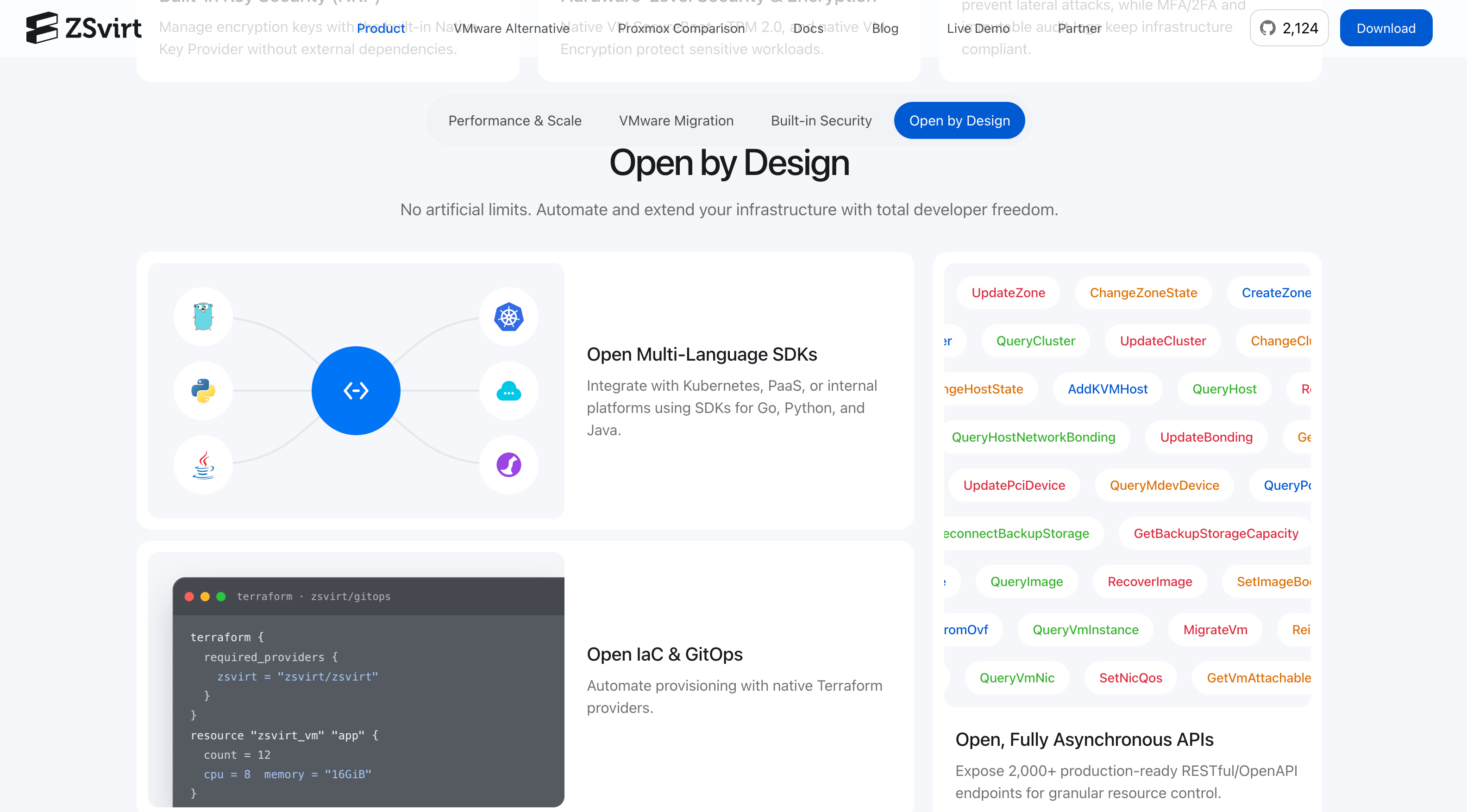
ZSvirt targets teams leaving VMware, MSPs and multi-cluster operators who want a vSphere like model without per core license fees.
Getting Started: Step by Step
- Try the Live Demo first. Open demo.zsvirt.io and use the demo login to explore the console, inventory and migration screens with no installation or sign up.
- Choose your installation media. Download the DVD ISO (5.41 GB) for bare metal, or the OVA (17.02 GB) or QCOW2 (24.02 GB) image for a lab on vSphere or KVM. Verify the published checksums, and have a torrent client ready because the download page uses magnet links.
- Prepare the host. Enable Intel VT or AMD-V, plan at least 8 cores, 8 GB of memory and a 100 GB disk for a minimum test, reserve a static IP, and set DNS and NTP in advance. Check that the machine clock is not earlier than the installer build date.
- Install the management node. Boot the ISO, select the disk, choose the ZSvirt Management Node mode, set the static network address and root password, and let the roughly ten minute install finish. Confirm the management service and web UI show as running before moving on.
- Log in and secure the platform. Open the web UI at the management node IP, change the default administrator password immediately, check the platform time, and then create a datacenter, a cluster and your first host with a datastore and image storage.
- Launch a VM, then test migration. Import a system image, create a distributed switch and port group, and boot a first VM. Once that works, add a second node with shared storage to test HA, and try ZMigrate on a non-critical VMware workload before you plan anything bigger.
Tips for Getting Maximum Value
Treat the first month as a structured proof of concept rather than a deployment: run the Live Demo, stand up the OVA image in a lab, then rebuild on spare physical hardware so you test real storage and networking instead of a nested environment. Map every dependency of the VMware workloads you plan to move, including backup agents, monitoring, automation scripts and VMware Tools, and migrate in small batches because online migration currently has a concurrency cap. Pair the built in backup with a third party tool such as Veeam or Commvault if you need application aware recovery, and test restores rather than assuming they work. Follow the project’s GitHub releases so you hear about fixes early, ask ZStack for a written list of Enterprise only capabilities, and compare your total cost against both Proxmox subscriptions and your real VMware renewal quote.
Future Outlook and Final Assessment
The virtualization market in 2026 is being reshaped by VMware’s licensing changes, and every credible open alternative benefits. ZSvirt entered that conversation with unusual credentials: a production proven commercial engine, free production use, bundled migration tooling and a public commitment to an open roadmap and contribution guidelines. Early signals are encouraging, including fast GitHub attention and positive hands-on impressions, and ZStack says the online migration limit will be relaxed in later releases.
The honest caveats are equally clear. This is a 1.0 release with a young community, limited independent testing, a basic native backup story and a free versus Enterprise boundary that is not yet fully documented. The project is also vendor led, so its direction depends on ZStack keeping its promises, and Proxmox VE keeps adding enterprise capabilities of its own. Within those boundaries, ZSvirt is one of the most interesting new VMware alternatives of 2026, and it is easy to test at zero cost.
Conclusion
ZSvirt is not trying to be everything to everyone. It offers a free, open source, vSphere shaped alternative on standard KVM, backed by an engine ZStack has sold commercially for years. By including HA, DRS, security features, a full API and an agentless migration tool at zero license cost, it removes much of the financial pressure behind the VMware exodus. It rewards careful evaluation and realistic expectations about a brand new release, and it is not the right call for teams that need a long track record or application aware backup today. But for teams running the VMware renewal numbers and not liking the answer, few new platforms deserve a lab slot more. Check the current downloads on zsvirt.io, spin up the Live Demo, and see whether the model fits your infrastructure.
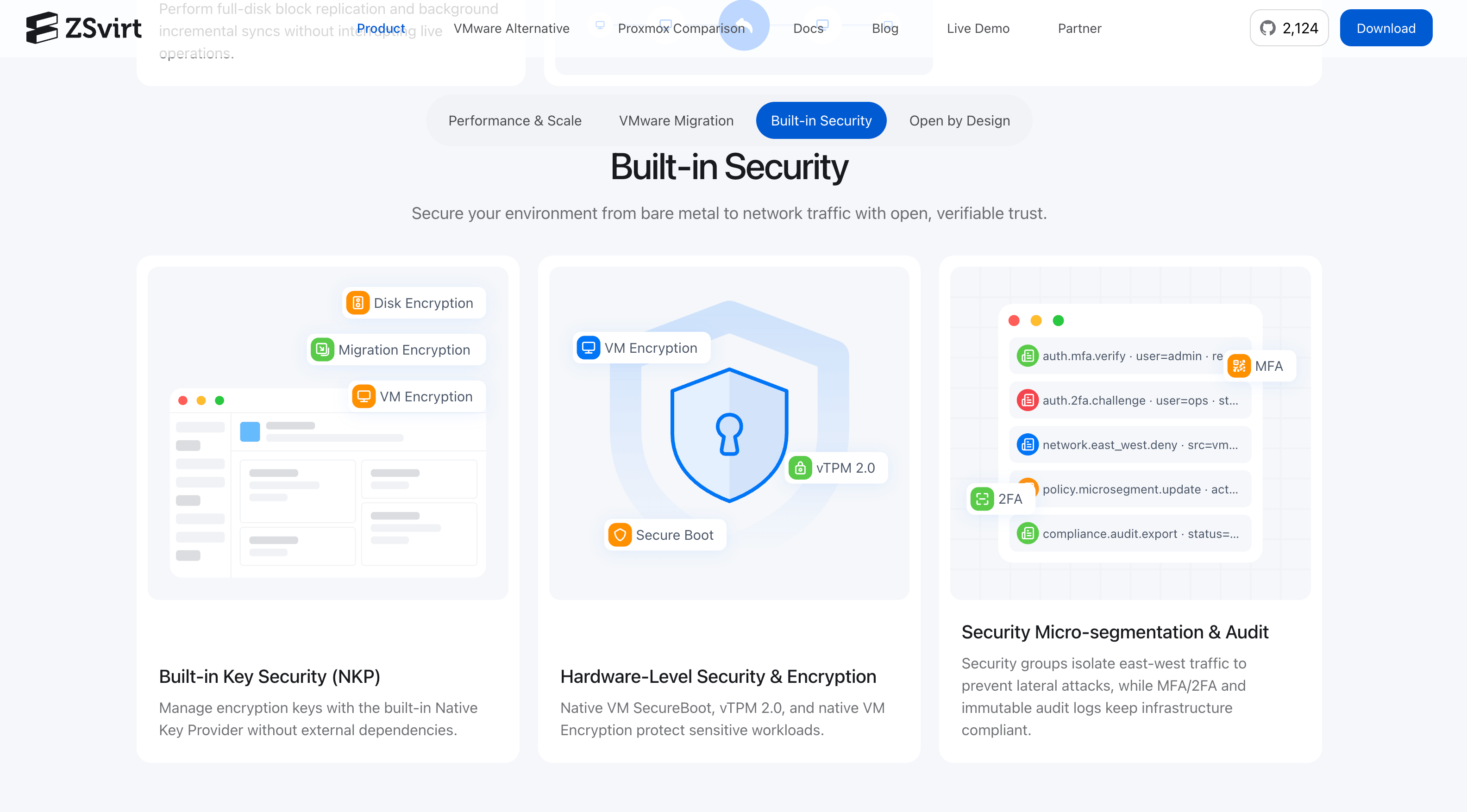
With ZMigrate included and zero license cost, ZSvirt gives VMware users a low risk way to test a migration before committing.
Ready to test a free VMware alternative in your own lab?
Explore more honest reviews, tutorials and tech comparisons to find the right gear for the way you work, travel and live, at World Of Tech, where we make everything easy.
👉 Try ZSvirt: https://worldoftech.space/zsvirt
👉 Our YouTube Channel: youtube.com/@world_tech79
👉 Our Facebook Fanpage: Facebook
👉 Our X (Twitter): @worldoftech79
Pricing, specifications and policy details in this review were verified against zsvirt.io, docs.zsvirt.io and independent sources (including a hands-on reviewer, trade press and software directories) as of November 2026. ZSvirt is a new open source project and its licensing, editions and features may change, so confirm current details on the official site before deploying. Many performance and scale figures are vendor claims. Competitor prices are approximate and subject to change.