
If your inbox is the first thing you open and the last thing you close, you already know the real cost of email: not the messages themselves, but the sorting, the context switching, the replies you keep meaning to write, and the meeting follow-ups that slip through the cracks. Fyxer is an AI executive assistant built to take that admin off your plate. It connects to Gmail or Outlook, labels every incoming email by priority, drafts replies in your own writing tone for you to review, joins your Zoom, Google Meet and Microsoft Teams calls to take notes, and reminds you of the commitments hiding in both. It is built by Fyxer AI Limited, carries a 4.0 “Great” Trustpilot score across more than 740 reviews, and is used by professionals at companies such as ClickUp and eXp Realty.
For consultants, agency owners, real estate agents, accountants and any founder who lives in a high volume inbox, the pitch is simple: give back an hour or more a day. But Fyxer is not magic, and an honest look reveals real trade-offs around draft quality, sorting mistakes, a credit based pricing model and a notetaker that gets mixed reviews. This 2026 review walks through what Fyxer does, how the newest Free, Pro, Team and Enterprise pricing works, how it compares with Superhuman, Microsoft Copilot and Gemini, the genuine pros and cons, and exactly who should (and shouldn’t) sign up.
Fyxer Review 2026: The AI Email Assistant That Sorts Your Inbox, Drafts in Your Voice and Takes Your Meeting Notes
Overview and Background
Fyxer is a UK registered software company (Fyxer AI Limited) that sells an AI assistant focused on one job: removing the administrative weight of email, calendars and meetings for busy professionals. It is not a new email client you have to migrate to. Instead, it plugs into the Gmail or Outlook account you already use, works in the background, and shows its output as labels, folders, saved draft replies and meeting summaries inside the tools you already open every day.
The core idea is a small set of connected jobs. Fyxer reads each new email and files it into a category so the important messages rise to the top. It studies your past sent mail to learn how you write, then drafts replies and follow ups in that tone. It sends a notetaker to your video calls, summarizes them, and pulls out the action items. And it keeps a running memory of clients and conversations so you can ask what was said last time without digging through threads.
Fyxer has built credibility quickly. Its website displays SOC, ISO 27001, GDPR and HIPAA compliance badges and promises that your data stays private, it publishes customer stories from companies like PerfectTed, Paradigm and eXp Realty, and it carries a 4.0 out of 5 Trustpilot TrustScore from roughly 744 reviews (63% of them five star). On G2 the rating is 4.1 out of 5, though from only about 20 reviews, so treat that figure as a small sample. This is a venture backed product competing on automation quality rather than a hobby project.
Why Fyxer Stands Out in 2026
It works inside the inbox you already use: There is no new app to learn and no migration. Fyxer connects to Gmail or Outlook with a Google or Microsoft sign in, and its labels, drafts and summaries appear right where you work. For many professionals, avoiding the switching cost of a new email client is the deciding factor.
It sorts email by priority automatically: Every new message is labeled and the important ones are moved to the top, so you start the day with the conversations that matter instead of a flat list of 200 unread items. One ClickUp marketing leader cited on the site described receiving 589 emails in a week of which only 32 needed a timely response, which is exactly the kind of noise this feature targets.
Drafts are written in your own tone: Rather than a generic robotic reply, Fyxer learns from your sent history and prepares drafts that sound like you. Custom Tone settings let you push the style toward shorter, warmer or more formal. You review each draft and send it yourself, which keeps you in control.
Email and meetings live in one assistant: Most inbox tools ignore calls, and most notetakers ignore email. Fyxer covers both, joining Zoom, Google Meet and Microsoft Teams meetings, summarizing them, and then using that context when it drafts your follow ups. That connected memory is its biggest structural advantage over single purpose rivals.
It remembers clients and commitments: The Recall feature lets you ask about any client or conversation and retrieve what was said, while priorities and reminders scan emails and meetings for promises you made. For anyone managing many client relationships, this reduces the dropped ball problem.
You can ask it questions where you work: Fyxer supports @Fyxer mentions inside connected apps such as Slack, so you can ask whether you missed anything important today instead of opening a dashboard. It is a small touch that makes the assistant feel like a colleague.
Serious security posture and a real free tier: Fyxer lists SOC, ISO 27001, GDPR and HIPAA badges, states that data is not used to train shared models, and now offers a permanent Free plan alongside its paid tiers, so you can test the meeting notes and briefings without a card before deciding on the inbox features.
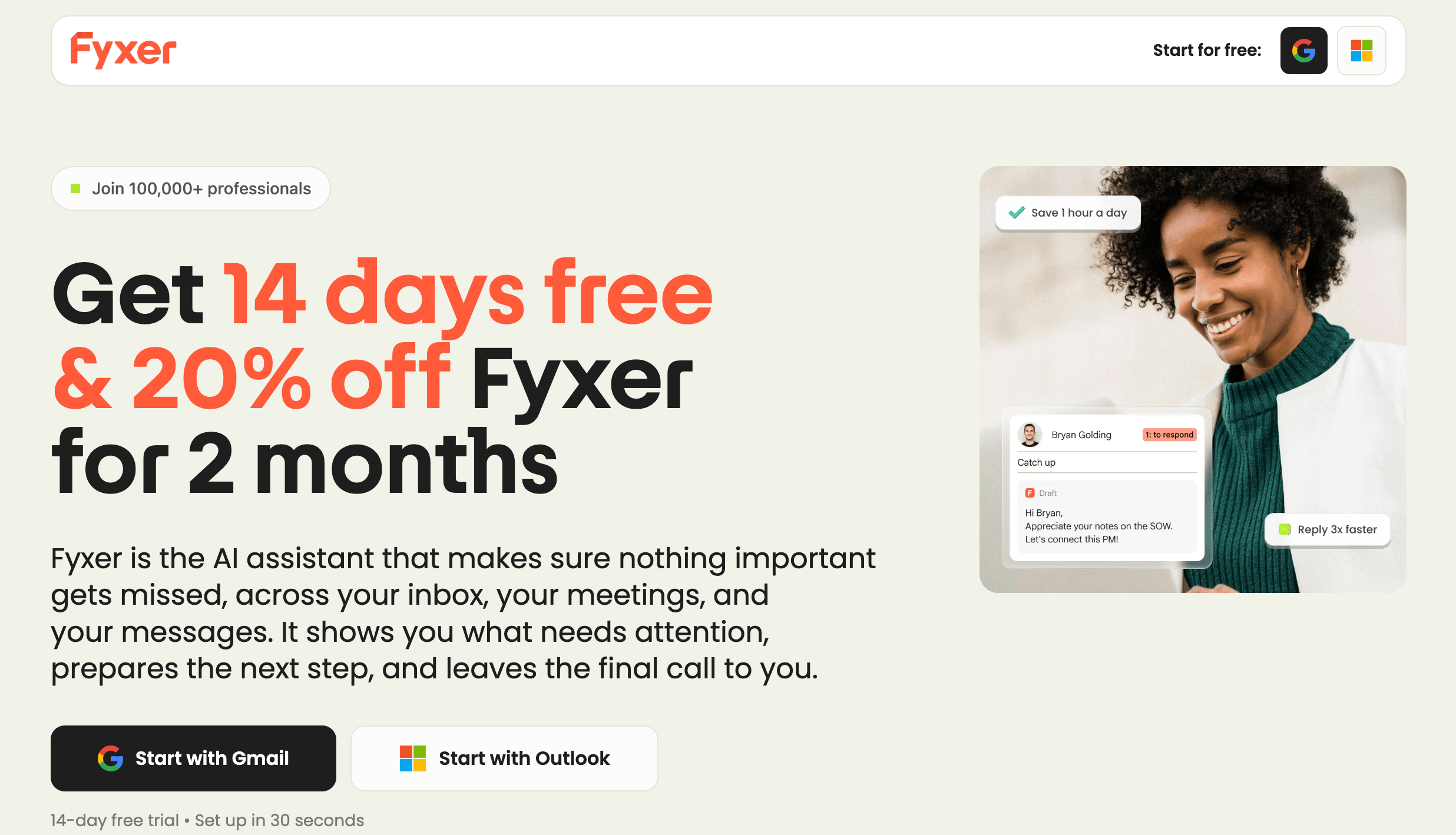
Fyxer labels every incoming email, drafts replies in your own tone and summarizes your meetings, so you can start the day with the messages that actually matter.
Key Features and Technology
Fyxer packs a lot into one dashboard, but it organizes into a handful of pillars. Here is how the platform actually breaks down in daily use.
Inbox Organizer and Priority Labels
The foundation of the product. Fyxer reads each new email, assigns a label such as to respond, FYI or marketing, and moves the important items to the top while tucking newsletters and notifications out of the way. You can add Custom Rules to tell it how to treat specific senders. Independent testers note that it works best once you whitelist key contacts, because early on it can misfile a newsletter or, more worryingly, hide something important. Inbox sorting is a paid feature, so the Free plan does not include it.
Draft Writer in Your Tone
Fyxer prepares reply drafts and follow ups based on how you have written in the past and leaves them in your drafts folder. It does not send anything automatically. Reviewers describe default drafts as sometimes stiff or corporate, but the Custom Tone controls help, and the quality is generally strongest for routine replies such as scheduling, confirmations and short acknowledgements. Long, nuanced or sensitive emails still deserve your own pass.
Meeting Notetaker and Summaries
A notetaker joins your calls on Zoom, Google Meet and Microsoft Teams and produces a summary with action items. The Free plan includes audio only meeting notes, while paid plans record every meeting. Opinions are mixed: some users love the transcripts, while hands on testers report missing context, mis-heard names and an occasional failure to join a Zoom call. If meeting intelligence is your main need, test it on a few real calls before committing.
Priorities, Reminders and Recall
Fyxer scans emails and meetings for commitments, deadlines and follow ups, then reminds you before they slip. Recall adds a searchable memory: ask about a client or conversation and Fyxer pulls up what was said across email and meetings. Team plans add shared follow ups with named owners, which turns individual reminders into a lightweight accountability layer for small teams.
Spaces, Briefings and Integrations
Spaces organize work around clients or projects. Free users get three personal spaces, Pro unlocks unlimited personal spaces plus three shared spaces per seat, and Team removes the cap on shared spaces. Daily and weekly briefings summarize what needs attention. Fyxer integrates with Gmail, Outlook, Google Calendar, Outlook Calendar, Slack, Zoom, Google Meet and Microsoft Teams. Third party reviewers report that Apple Mail, generic IMAP accounts and on premise Exchange are not supported, so confirm your setup first.
Pricing, Plans, and Package Structure
Fyxer uses per seat subscription pricing with a monthly credit allowance, and the structure has changed recently. Older third party reviews still quote retired Starter and Professional tiers at $22.50 and $37.50 per seat, so ignore those. The figures below come from Fyxer’s own pricing page as verified in October 2026. Annual billing is the cheaper route, saving roughly 25% on Pro and up to 35% on Team compared with paying month to month.
| Plan | Price (USD) | What It Is | Best For |
|---|---|---|---|
| Free | $0 | 400 personal credits a month. Daily dashboard and weekly email briefing, audio only meeting notes, 3 personal spaces. No inbox sorting. | Testing the meeting notes and briefings before paying |
| Pro | $37 per user per month billed annually ($49 billed monthly) | 3,000 credits per member. Adds inbox sorting and labels, daily briefings, drafted replies in your tone, recording of every meeting, unlimited personal spaces and 3 shared spaces per seat. | Solo professionals, consultants and founders with heavy email |
| Team | $64 per user per month billed annually ($99 billed monthly) | 6,000 pooled credits per member. Adds unlimited shared spaces, shared follow ups with owners, an organization profile, usage reporting and admin controls. | Small and mid size teams, agencies and real estate offices |
| Enterprise | Custom annual contract | Private cloud or single tenancy, full API, SSO, SCIM, audit logs, retention rules, data residency (EU, UK, US), HIPAA support, onboarding and an SLA. | Large organizations with security and compliance needs |
| Viewer seats | Free on paid plans | People who only need to see shared work do not count as paid seats. A seat is one paid member, however many inboxes they connect. | Assistants, managers and collaborators who only read shared spaces |
How Fyxer Compares to Alternatives
| Factor | Fyxer | Superhuman | Microsoft 365 Copilot / Gemini |
|---|---|---|---|
| Core approach | AI assistant layered onto your existing Gmail or Outlook | Fast, keyboard driven email client you switch to | Built in AI assistant inside Microsoft 365 or Google Workspace |
| Inbox sorting | Automatic priority labels | Split inbox and AI triage | Summaries and prompts, less automatic filing |
| Drafts in your voice | Yes, learned from sent mail | Yes, AI drafts | Generic drafts, not voice trained |
| Meeting notes | Yes, Zoom, Meet and Teams | Not a focus | Teams (Copilot) or Meet (Gemini) only |
| Needs a new email app | No | Yes | No |
| Entry price (approx.) | Free tier. Paid from $37 per user per month annual | About $25 to $30 per user per month | Copilot Business about $18 per user per month annual. Gemini bundled with Workspace plans |
| Best for | High volume professionals who want email and meetings handled together | Power users who want maximum email speed | Teams already standardized on one ecosystem |
vs. Superhuman: Superhuman (roughly $25 to $30 per user per month) is the speed benchmark. It is a polished email client built for fast, human controlled triage and is generally viewed as more reliable at inbox handling. But you have to adopt a new app, and it does little for meetings. Fyxer asks you to change nothing and adds meeting notes, at a higher price for the Pro tier.
vs. Microsoft 365 Copilot and Gemini: Copilot Business (about $18 per user per month on an annual plan) and Gemini inside Google Workspace are convenient because they are already part of the suite you pay for. The trade-off is that they are siloed to one platform and their drafts are not trained on your personal voice. Fyxer is the stronger pick if you want a dedicated assistant that learns your style and covers both Gmail and Outlook.
vs. Shortwave and standalone notetakers: Shortwave (from roughly $9 per user per month) is a Gmail only client with strong AI summarization but no meeting layer. Dedicated notetakers such as Fathom or tl;dv usually record meetings better than Fyxer does. If meeting intelligence is the priority, a specialist may serve you better; if you want one tool for inbox and calls, Fyxer is the more integrated answer.
Pros and Cons
What Users Love
Real time savings on email: The most consistent praise on Trustpilot is hours given back each week. Reviewers say sorting and categorization alone changes how they approach the morning, and testimonials on the site describe an empty inbox at the end of the day for the first time in years.
Drafts that sound like you: Users repeatedly note that replies reflect their own tone and need only light edits for routine messages, which is where most email volume lives.
No new tools to adopt: Because Fyxer lives inside Gmail and Outlook, onboarding is quick (the partner page says about 30 seconds) and there is no migration or retraining of habits.
Email and meetings in one place: Having the same assistant summarize your calls and then draft the follow up email is a genuine workflow advantage that few competitors match.
Strong security credentials: Compliance badges for SOC, ISO 27001, GDPR and HIPAA, plus an Enterprise tier with SSO, SCIM, audit logs and data residency options, make it easier to get past a company security review.
Responsive company engagement: Fyxer replies to every negative Trustpilot review, typically within a day, and many reviewers describe patient, helpful support and onboarding calls.
Limitations Worth Knowing
Draft quality is inconsistent: Trustpilot reviewers describe some drafts as generic, irrelevant or poorly matched to context, and hands on testers say that for varied, longer emails editing can take as long as writing from scratch. It shines on routine mail and struggles on nuance.
Sorting mistakes can hide important mail: Several users report misplaced or duplicated messages and cluttered folders, and one tester noted that Fyxer has to fail first before you catch the error. Plan to whitelist key senders and spot check the labels.
The meeting notetaker is the weak link: Testers report missing context, mis-heard names and summaries that capture only the first few minutes of a long call, plus occasional failures to join Zoom meetings. Do not rely on it for critical records without checking.
Pricing is high and the credit model is confusing: At $37 to $99 per seat per month, Fyxer costs more than many rivals, and some reviewers complain of unexpected charges tied to email volume. The pricing page also contradicts itself on free trial terms for Pro, which erodes confidence.
Billing and cancellation complaints exist: About 13% of Trustpilot reviews are one star, and recurring themes include difficulty cancelling, support that felt limited to a chatbot, and an auto add setting for company domains that can create paid seats for colleagues. One reviewer reported getting a refund after cancelling, so it is possible, but review the settings before inviting a team.
Platform and polish limits: There is no dedicated mobile app, Apple Mail and IMAP accounts are reportedly unsupported, and some users describe bugs and a difficult adjustment period in the first weeks.
Who Should Use Fyxer
Consultants, agencies and client facing founders: If your day is a flood of client emails, scheduling and follow ups, Fyxer is aimed squarely at you. The recall feature and priority labels reduce the chance of dropping a client conversation.
Real estate, accounting and professional services teams: The site highlights these industries, and the Team plan’s shared follow ups and spaces suit offices where several people touch the same client threads.
Executives without an assistant: If you cannot afford or justify a human executive assistant, Fyxer delivers a meaningful slice of that value, including triage, drafted replies and meeting notes, for the price of a software seat.
Microsoft 365 and Google Workspace users who want to stay put: Anyone who dislikes the idea of moving to a new email client will appreciate that Fyxer layers onto what they already use.
Who should look elsewhere: People with low email volume will not recoup the cost, and neither will anyone who wants a fully hands off autopilot. Buyers who mainly need excellent meeting transcripts are better served by a dedicated notetaker, speed obsessed power users may prefer Superhuman, and teams already paying for Copilot or Gemini may find those good enough. If you use Apple Mail or a plain IMAP account, check compatibility before you pay.
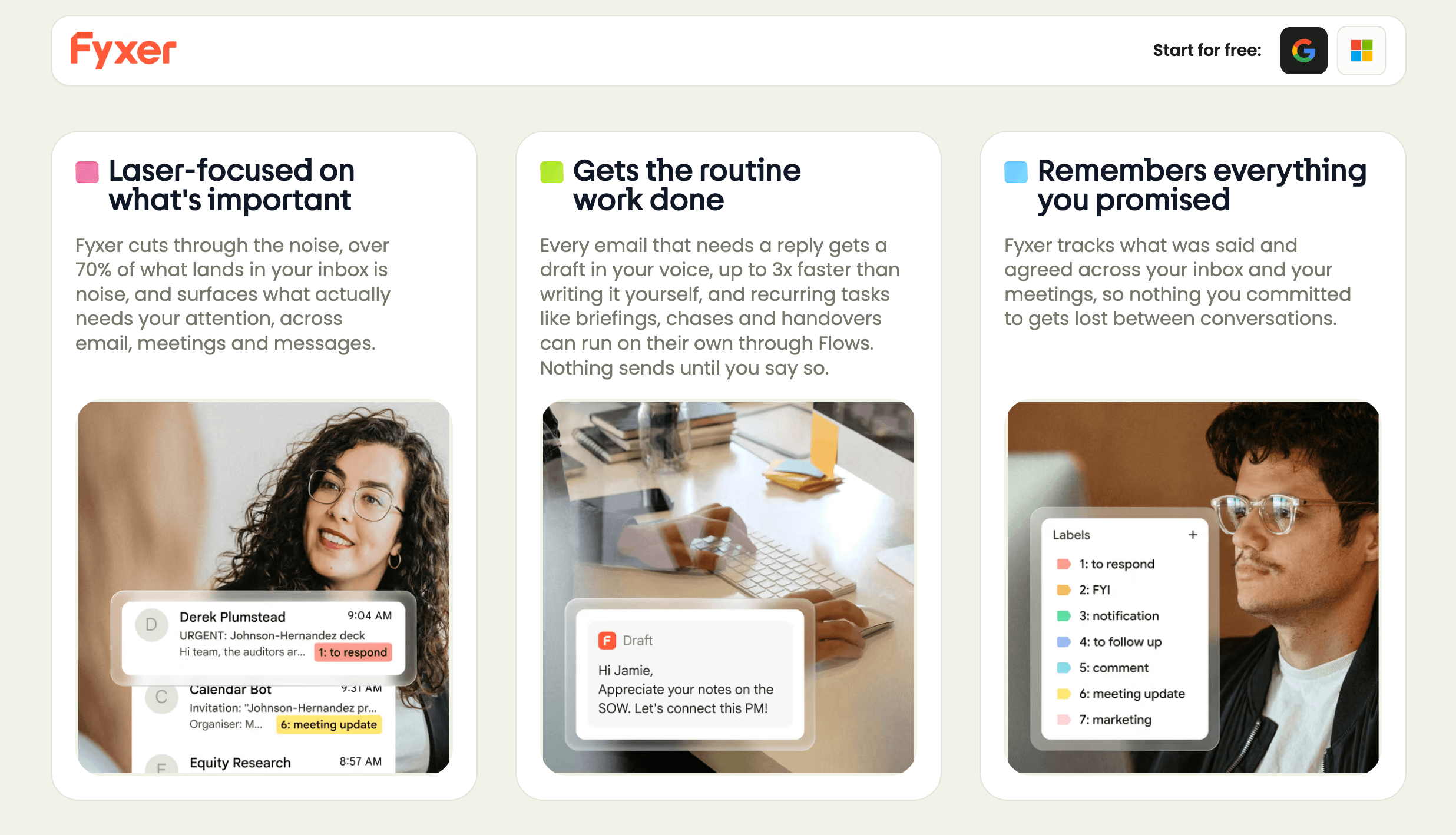
Fyxer is built for professionals who live in their inbox and spend their day moving between email and video calls.
Getting Started: Step by Step
- Start from the partner link. Open the World Of Tech link to reach Fyxer’s signup page so the current trial and discount offer applies, then choose to sign up with your Google or Microsoft account.
- Connect your inbox and calendar. Grant access to Gmail or Outlook and your calendar. Setup takes only a minute or two, and Fyxer begins learning from your sent mail.
- Set your tone and rules. Open the dashboard and configure Custom Tone and Custom Rules. Whitelist your most important contacts so their emails never get filed away by mistake.
- Enable the meeting notetaker. Connect Zoom, Google Meet or Microsoft Teams and decide which meetings the notetaker should join. Test it on one or two low stakes calls first.
- Review drafts for the first week. Read every draft, edit what is off and spot check the labels. The more carefully you correct early on, the better the assistant matches your voice.
- Pick a plan before the trial ends. Decide whether Free is enough or whether to upgrade to Pro or Team, and check the credit allowance, cancellation steps and seat settings before adding colleagues.
Tips for Getting Maximum Value
Spend the first week treating Fyxer like a new junior assistant: correct its drafts, whitelist VIP senders and write clear Custom Rules for the messages you never want hidden. Use the Pro annual plan if you are confident, since it saves around 25% compared with monthly billing, but start with the trial so you can judge the draft quality on your own mail before committing. Keep an eye on credits, especially after the three month unlimited launch period ends, and switch off any auto add of company domain members so you do not pay for seats you did not intend to. Pair Fyxer with a sentence or two of manual context on important replies, test the notetaker on real calls before trusting it for client records, and use the weekly briefing as a Friday review so nothing falls through the cracks. Finally, ask a few teammates to share viewer access rather than buying paid seats for everyone, since viewers are free on paid plans.
Future Outlook and Final Assessment
AI assistants for email and meetings are moving from novelty to necessity in 2026, and the center of gravity is shifting from simple summaries toward agents that triage, draft and remember on your behalf. Fyxer is one of the clearest examples of that direction: it targets a real, expensive problem, plugs into the tools professionals already use, and keeps improving through a steady stream of updates and a fast growing user base. As its models, credit system and notetaker mature, the core promise of getting hours back each week becomes more credible.
The honest caveats remain: drafts are uneven outside routine replies, sorting needs supervision, the notetaker trails specialist tools, and the pricing and billing details deserve careful reading. Competitors such as Superhuman, Copilot and Gemini are closing in from different angles. Within those limits, Fyxer delivers one of the most complete AI inbox and meeting assistants available, and for high volume professionals it can be worth many times its cost.
Conclusion
Fyxer is not trying to replace your judgment or your inbox; it is trying to give you back the hours that email quietly steals each week. By sorting your messages by priority, drafting replies in your own voice and turning meetings into notes and follow ups, it removes a large share of the admin that clogs a professional’s day. It rewards patience in the first weeks, it is not the right call for low volume users or anyone who wants meeting transcripts above all else, and its billing details need a careful read. But for busy consultants, founders, agents and executives, the result is a calmer inbox and more time for work that matters, which is exactly the job it set out to do.
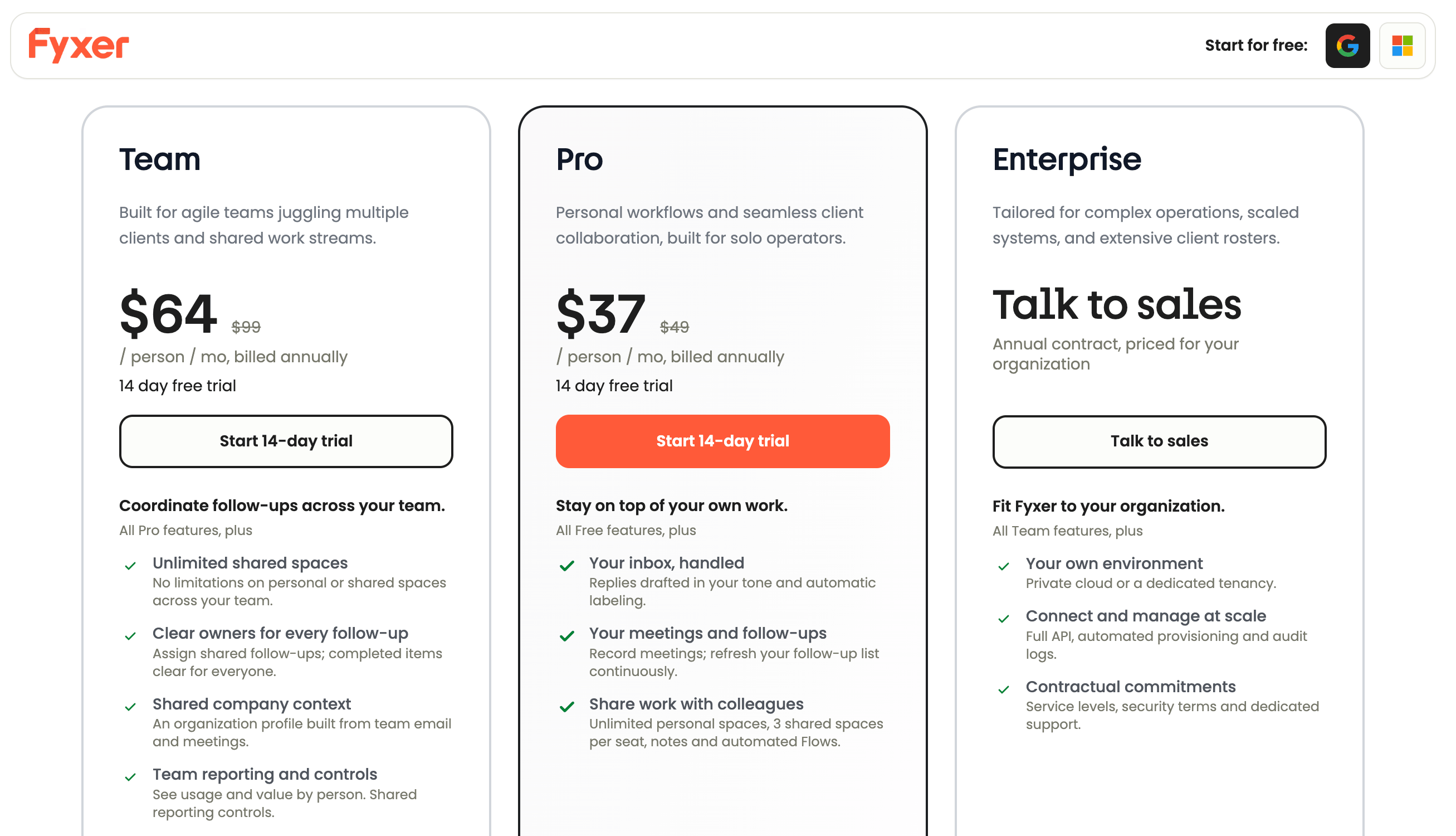
With Fyxer sorting email and capturing meeting follow ups, busy professionals can spend less time on admin and more time on work that matters.
Ready to get your inbox, drafts and meeting notes under control?
Explore more honest reviews, tutorials and tech comparisons to find the right tools for the way you work, travel and live, at World Of Tech, where we make everything easy.
👉 Try Fyxer: https://partners.fyxer.com/world-of-tech
👉 Our YouTube Channel: youtube.com/@world_tech79
👉 Our Facebook Fanpage: Facebook
👉 Our X (Twitter): @worldoftech79
Pricing, features and policy details in this review were verified against fyxer.com and independent review sources (including Trustpilot, G2 and hands on reviewer testing) as of October 2026. AI software pricing, credits and features change frequently, so confirm current details on the official site before purchasing. Competitor prices are approximate and subject to change.