
Most VPNs ask you to trust a stranger with your traffic. AdGuard VPN asks you to trust a company you may already know — the team behind one of the web’s most widely used ad blockers, now applying the same “block trackers, stay invisible” philosophy to a full VPN client. Built around a proprietary connection protocol the company finally open-sourced in January 2026, AdGuard VPN promises AES-256 encryption, 70+ server locations, and a genuinely usable free tier, all wrapped inside apps that already feel familiar to anyone who has used AdGuard’s other privacy tools.
For everyday browsers, existing AdGuard users, and anyone who wants a lighter, less expensive alternative to the big-name VPN subscriptions, that pitch is genuinely appealing. But AdGuard VPN isn’t trying to out-muscle the largest players on server count or device limits, and an honest look reveals real trade-offs around network size, consistency, and independent auditing. This 2026 review walks through AdGuard VPN’s core technology, its full pricing structure, how it stacks up against NordVPN and Surfshark, the genuine pros and cons, and exactly who should — and shouldn’t — make it their daily VPN.
AdGuard VPN Review 2026: Can the Ad-Blocking Company’s VPN Compete on Its Own?
Overview and Background
AdGuard VPN comes from AdGuard Software Ltd, the Cyprus-based company that has been building ad-blocking and privacy tools since 2009. The ad blocker came first and built the brand’s reputation; the VPN launched later, in 2020, as a natural extension of the same “keep the internet open and your data private” mission. It isn’t a general-purpose security suite bolted onto a VPN as an afterthought — it’s a standalone client with its own apps, its own subscription, and its own engineering team, sold as a companion to (but not a replacement for) AdGuard’s ad blocker.
The company’s broader product line has grown well beyond ad blocking over the years, and now spans AdGuard DNS (network-level filtering), AdGuard Home (a self-hosted DNS sinkhole), AdGuard Mail, and AdGuard Wallet, in addition to the ad blocker and the VPN reviewed here. That breadth matters for context: AdGuard VPN isn’t a side project from a company chasing a trend, it’s one piece of a privacy-focused portfolio the company has been iterating on for close to two decades, which is part of why its pricing and feature decisions tend to favor bundling over standalone add-ons.
The defining move of 2026 came in January, when AdGuard open-sourced its custom connection protocol under the name TrustTunnel. Most consumer VPNs run WireGuard or OpenVPN under the hood; AdGuard had spent years promising a homegrown alternative designed to disguise VPN traffic as regular HTTPS, and this year it finally made good on that promise and released it publicly, with the stated goal of TrustTunnel becoming a vendor-neutral protocol other VPN services can adopt. That’s a meaningful transparency move in an industry where “trust us, it’s secure” is the default answer.
On the ground, AdGuard VPN covers the platforms most people actually use: Windows, Mac, Linux, Android, and iOS apps, plus browser extensions for Chrome, Firefox, Edge, and Opera. Android TV and Apple TV get dedicated apps, and routers, Xbox, PlayStation, and Chromecast are supported through router-level or DNS-level setup rather than a native client. AdGuard reports a 4.7/5 aggregate rating across more than 9,300 in-app and app-store reviews — a self-reported figure worth treating as a headline number rather than gospel, but one that broadly lines up with what independent sources show.

AdGuard VPN’s connected-status screen, one tap away from picking a new location.
Why AdGuard VPN Stands Out in 2026
TrustTunnel is now open and inspectable. Rather than asking users to take its “unique, undetectable protocol” claim on faith, AdGuard published TrustTunnel’s source in January 2026. That doesn’t replace an independent third-party security audit, but it’s a rare instance of a mid-size VPN provider putting its core technology where anyone can actually look at it.
The free tier is genuinely usable, not a bait-and-switch. 3 GB of traffic a month with no card required is enough for a real amount of browsing, and it’s paired with only two device connections rather than one — most competitors either skip a free plan entirely or gate it behind a trial that expires.
Every paid plan bundles AdGuard DNS Personal for free. That’s network-level ad and tracker blocking layered on top of the VPN’s encryption, at no extra charge — a feature most VPN providers sell separately or don’t offer at all.
Pricing consistently undercuts the biggest names. AdGuard VPN’s long-term plans routinely land below NordVPN’s published 2-year rate, and it’s frequently discounted further during seasonal sales, making it one of the more accessible ways to get a 10-device, unlimited-traffic VPN subscription.
It plays naturally with the AdGuard ecosystem. For anyone already running the AdGuard ad blocker, adding the VPN is a low-friction upgrade — same account, familiar interface conventions, and a company you’ve presumably already decided to trust with your browsing.
A no-nonsense no-logs policy. AdGuard states plainly that it does not record activity or connection logs and collects only the minimal technical data needed to keep the service running — a claim consistent with the company’s long-standing privacy-first marketing, though it has not yet published a formal third-party audit of that policy the way some larger rivals have.
Key Features and Technology
Underneath the friendly interface, AdGuard VPN is built around a fairly focused feature set — it isn’t trying to be an all-in-one security suite the way some competitors have become, and that focus shows in what it does and doesn’t include.
TrustTunnel Protocol and Encryption
TrustTunnel is designed to disguise VPN traffic as regular HTTPS, which helps it slip past VPN blocks used by some networks, workplaces, and countries with restrictive internet policies. All traffic is encrypted with AES-256, the industry-standard symmetric cipher used by most reputable VPN and security products. AdGuard’s own marketing frames the protocol as a way to stay “unnoticed” on networks that actively try to detect and block VPN traffic.
Server Locations and Speed
The paid plan unlocks 70+ locations across roughly 50 countries, spanning North and South America, Europe, the Middle East, Asia-Pacific, and Africa, with several countries (the US, UK, Germany, France, Italy, Canada, and Spain among them) offering multiple cities to choose from. The app shows a live ping rate per location so you can pick the fastest option rather than guessing. Independent testing has clocked AdGuard VPN at strong practical throughput — enough for 4K streaming and torrenting on a good connection — though its total location count remains smaller than the largest VPN networks.
Device Coverage and Exclusions
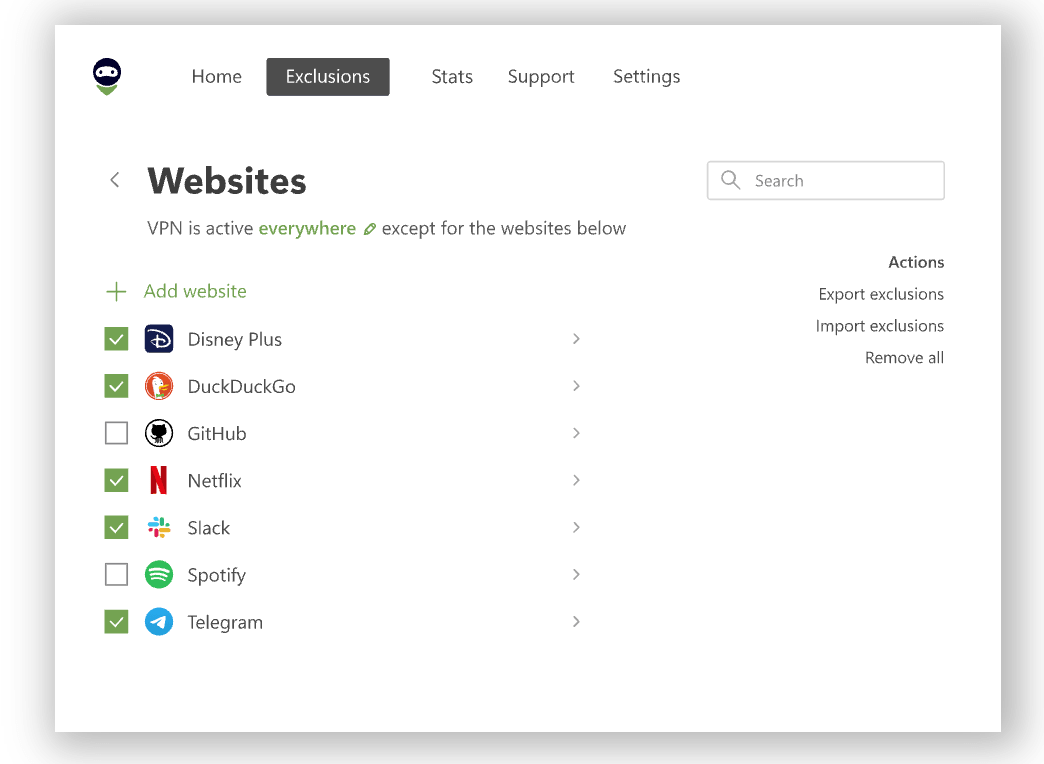
Native apps cover Windows, Mac, Linux, Android, and iOS, with browser extensions for Chrome, Firefox, Edge, and Opera, plus dedicated Android TV and Apple TV apps. Routers, Xbox, PlayStation, and Chromecast (3rd generation) connect through router-level setup rather than a native client. A standout usability feature is exclusions: you can set the VPN to protect everything except a chosen list of sites and apps, or the reverse — only route specific sites and apps through the VPN — which is genuinely useful for saving free-tier data or keeping banking apps on your normal connection.
Privacy Policy and Payment Options
AdGuard states that it does not store activity or connection logs and collects only the minimal technical information needed to identify and fix service issues — information the company says cannot be tied back to a specific user’s browsing behavior. Payment options cover bank cards, PayPal, and cryptocurrency, though the company notes that licenses paid for with crypto aren’t set up for automatic renewal, so a longer plan term is the more convenient choice if that’s your preferred payment method. Every subscription, regardless of length, can be bound to a single email-based account, and additional device slots beyond the 10-device cap require either disconnecting an existing device or purchasing a second subscription under a different email.
Pricing, Plans, and Package Structure
AdGuard VPN keeps its plan structure simple: one feature set, three commitment lengths, plus a genuine free tier. There’s no tiered “Basic vs. Premium” split the way some rivals do it — every paid subscriber gets the same 10 devices, all locations, and unlimited speed and traffic.
| Plan | Price | What It Is | Best For |
|---|---|---|---|
| Free | $0 | 3 GB of traffic per month, 2 devices, a reduced set of locations, no card required | Trying it out or light, occasional use |
| 1-Month | ≈$11.99/mo | All 70+ locations, unlimited speed and traffic, 10 devices, free AdGuard DNS Personal | Short-term or no-commitment use (note: excluded from the money-back guarantee) |
| 1-Year | ≈$3.99/mo (~$47.88 billed annually) | Same full feature set as the monthly plan, at a lower effective rate | Most users who want a fair long-term rate without the biggest upfront commitment |
| 2-Year | ≈$2.40–$2.99/mo (~$58–$72 billed once) | Same feature set, lowest effective monthly cost of the three paid terms | Buyers confident they’ll stick with AdGuard VPN long-term |
All paid tiers unlock the same features — only the price per month and the commitment length change.
How AdGuard VPN Compares to Alternatives
AdGuard VPN doesn’t try to out-spec the biggest VPN brands, so it’s worth seeing exactly where it wins, where it loses, and where the gap simply doesn’t matter for most people.
| Factor | AdGuard VPN | NordVPN | Surfshark |
|---|---|---|---|
| Starting price (2-yr)* | ≈$2.40–$2.99/mo | ≈$3.49/mo* | ≈$2.49/mo* |
| Simultaneous devices | 10 (2 free) | 10 | Unlimited |
| Server footprint | 70+ locations, ~50 countries | 9,300+ servers, 137 countries* | 100+ countries* |
| Core protocol | TrustTunnel (open-sourced Jan 2026) | NordLynx (WireGuard-based)* | WireGuard-based* |
| Free tier | 3 GB/month, no card needed | None (trial only) | None |
| Ad/tracker blocking | Bundled AdGuard DNS Personal | Threat Protection (built-in)* | CleanWeb (built-in)* |
| Best for | Existing AdGuard users, budget-minded light use | Power users wanting the biggest network | Large, device-heavy households |
*Competitor figures are approximate, current as of publication, and subject to change — always confirm live pricing and specs on each provider’s official site before purchasing.
AdGuard VPN vs. NordVPN: NordVPN wins decisively on raw server count and country coverage, which matters if you regularly need to appear in dozens of specific regions or lean hard on streaming unblocking. AdGuard VPN counters with a genuinely free tier NordVPN doesn’t offer and a lower long-term price for a comparable 10-device allowance.
AdGuard VPN vs. Surfshark: Surfshark’s unlimited-device policy is the standout difference for large households, and its 2-year pricing is competitive with AdGuard’s. Where AdGuard pulls ahead is the free tier and the bundled DNS-level ad blocking that ties naturally into its wider product line — a combination Surfshark doesn’t replicate. Surfshark also offers add-on tiers (One and One+) that bundle antivirus and data-leak alerts for a higher monthly fee, a level of tiering AdGuard doesn’t attempt; if you specifically want those extras bundled into one subscription, Surfshark’s higher tiers are the more direct match, whereas AdGuard keeps things simpler at the cost of not offering that upsell path at all.
Pros and Cons
What Users Love
A free plan that actually works: 3 GB per month with no card and only a modest device cap is enough for real, if limited, everyday browsing — reviewers on Trustpilot and Google Play repeatedly flag this as the free tier’s biggest strength.
Reliability and ease of setup: Independent reviewers describe fast connection times, clear and simple interfaces, and stable performance during normal browsing and streaming sessions.
Exclusions and split tunneling: The ability to route specific apps and sites in or out of the VPN tunnel is called out often as genuinely useful, not just a checkbox feature.
Responsive support: Multiple Trustpilot reviews describe fast, helpful replies from the support team when connection issues came up.
Limitations Worth Knowing
Trust signals diverge depending on where you look: Third-party sources place AdGuard VPN’s Trustpilot score anywhere from roughly 4 to 4.7 out of 5 across a few hundred reviews, with a recurring minority of complaints about intermittent disconnects and slow periods during peak hours — worth knowing since the picture isn’t uniformly glowing everywhere it’s discussed.
Smaller network than the category leaders: 70+ locations across ~50 countries is solid but noticeably behind NordVPN’s and Surfshark’s country counts, which can matter for streaming variety or very specific geo needs.
10-device cap, not unlimited: Fine for most individuals and small families, but larger households will find Surfshark’s unlimited-device policy more accommodating.
No independent no-logs audit yet: AdGuard states its no-logs policy plainly and has open-sourced TrustTunnel, but it hasn’t published the kind of third-party audit of its logging practices that some larger competitors have completed.
Monthly plan carries no refund protection: The 30-day money-back guarantee only covers 1-year and 2-year purchases made directly from AdGuard — the monthly plan is explicitly non-refundable, and resellers follow their own separate policies.
Who Should Use AdGuard VPN
Existing AdGuard ad-blocker users: If you already trust AdGuard for ad and tracker blocking, adding the VPN is the lowest-friction way to extend that protection to your full connection, using an account and interface you already know.
Casual and occasional VPN users: Anyone who mainly wants privacy on public Wi-Fi, the occasional geo-unblock, or basic anonymity — without needing 100+ country coverage — gets real value from the free tier or an inexpensive long-term plan.
Budget-conscious buyers willing to commit long-term: The 2-year plan’s effective monthly rate undercuts most premium VPN subscriptions, making AdGuard VPN an easy pick for anyone comfortable locking in a longer term for the lowest ongoing cost.
Small households wanting DNS-level filtering bundled in: The free AdGuard DNS Personal add-on gives households an easy way to layer basic ad and tracker blocking on top of the VPN itself, without buying a separate product.
Who should look elsewhere: Large households needing more than 10 simultaneous connections, streaming enthusiasts who rely on dozens of specific country servers, and privacy purists who want a formally audited no-logs certification before they commit will find AdGuard VPN’s current offering a step behind Surfshark, NordVPN, or audit-focused providers like Proton VPN.

Exclusions let you decide exactly which apps and sites go through the VPN — and which don’t.
Getting Started: Step by Step
- Pick your plan. Start on the free tier if you just want to test the waters, or go straight to the 1-year or 2-year plan if you already know you’ll want unlimited traffic and all 70+ locations.
- Create your AdGuard account. Sign up with an email address — this account ties your subscription (or free-tier data) across every device you install the app on.
- Install the app for your platform. Download the native app for Windows, Mac, Android, or iOS, or add the browser extension for Chrome, Firefox, Edge, or Opera, and log in.
- Connect to a server. Use the auto-recommended fastest location for everyday browsing, or manually pick a specific country or city from the 70+ available locations based on what you need.
- Set up exclusions. Decide whether the VPN should protect everything except a short list of sites and apps, or the reverse — only route specific traffic through the tunnel — to save free-tier data or keep banking apps on your normal connection.
- Add AdGuard DNS Personal. Turn on the bundled DNS filtering in your account settings for an extra layer of ad and tracker blocking on top of the VPN’s encryption.
Tips for Getting Maximum Value
If you’re on the free tier, use exclusions aggressively so your 3 GB monthly allowance only covers the traffic that genuinely needs privacy, rather than burning data on background app updates or streaming. Time a paid purchase around one of AdGuard’s frequent seasonal sales — Black Friday and Cyber Monday discounts have pushed the 2-year plan well below its list price in past years — and always buy directly from adguard-vpn.com if you want the 30-day money-back guarantee to apply. If you’re already paying for the AdGuard ad blocker, check your account for any bundle pricing on the VPN before buying it separately. And if a specific streaming service or a very particular country location matters to you, verify it’s actually supported before committing to a longer plan, since AdGuard’s 70+ locations are solid but not exhaustive compared with the largest VPN networks.
Future Outlook and Final Assessment
Consumer VPNs are converging on the same basic promise — encryption, a no-logs policy, and a growing server list — which makes differentiation harder every year. AdGuard VPN’s answer in 2026 is transparency and bundling: open-sourcing TrustTunnel is a genuine step most competitors haven’t matched, and folding in a free AdGuard DNS Personal subscription gives paid users a real second layer of protection at no extra cost. If AdGuard follows through with an independent audit of its no-logs claims and keeps expanding its server locations, it has a credible path to closing the gap with the category’s biggest names. The broader market context also favors AdGuard’s approach: as more networks, workplaces, and even some countries actively try to detect and block VPN traffic, a protocol built specifically to disguise itself as ordinary HTTPS — and one the company is now willing to let outside researchers examine — is likely to matter more, not less, over the next few years.
The honest caveats remain, too: the server network is still meaningfully smaller than NordVPN’s or Surfshark’s, the device cap sits at 10 rather than unlimited, and a portion of independent reviews point to inconsistent connections during peak periods. None of that makes AdGuard VPN a bad choice — it makes it a well-priced, focused option rather than an outright leader on every spec sheet.
Conclusion
AdGuard VPN isn’t trying to be the biggest VPN on the market — it’s trying to be the easiest one to trust if you already trust the AdGuard name, and at that job it largely succeeds. Between the open-sourced TrustTunnel protocol, a free tier that actually holds up to daily use, and pricing that consistently beats the premium leaders, it earns a place on the shortlist for anyone who doesn’t need the single largest server network available. It isn’t the right call for households needing unlimited simultaneous connections or streaming fanatics chasing every possible country, but for the everyday case of hiding your location and encrypting your traffic without overpaying, AdGuard VPN delivers real value. Confirm the current price, check for an active seasonal sale, and it’s an easy service to try risk-free on its 3 GB free plan before you commit to anything longer.
Ready to browse without giving up your location?
Explore more honest reviews, tutorials and tech comparisons to find the right gear for the way you work, travel and live — at World Of Tech, where we make everything easy.
👉 Shop AdGuard VPN: https://worldoftech.space/adguard
👉 Our YouTube Channel: youtube.com/@world_tech79
👉 Our Facebook Fanpage: Facebook
👉 Our X (Twitter): @worldoftech79
Pricing, specifications and policy details in this review were verified against adguard-vpn.com and independent review sources (including Trustpilot, app-store ratings, and third-party VPN testing) as of September 2026. VPN pricing, promotions, and features change frequently, so confirm current details on the official site before purchasing. Competitor prices are approximate and subject to change.





