
Anyone who works from an inbox knows the quiet tax it charges: the newsletters buried between client emails, the replies you keep meaning to write, and the meeting notes you promised to send an hour ago. Fyxer was built to take that tax off your shoulders. It is an AI assistant that connects to your email, calendar and video calls, sorts incoming mail into clear categories, drafts replies in your own tone, joins your meetings to take notes and write follow-ups, and now ties it all together with shared Spaces, automated Flows and an AI chat that can answer questions about your day. Founded by brothers Richard and Archie Hollingsworth, backed by a $30M Series B led by Madrona, and trusted by a claimed 25,000+ companies, Fyxer has grown from a London startup into one of the best known AI productivity brands on the market.
For founders, consultants, agents, executives and busy teams, the pitch is easy to understand: get hours of your week back without changing the tools you already use. But Fyxer is not a magic wand, and an honest look reveals real trade-offs around draft quality, rigid inbox categories, a credit-based pricing model and a mixed pattern of billing complaints worth knowing before you start a trial. This 2026 review walks through what Fyxer does, how the new Free, Pro, Team and Enterprise pricing works, how it compares with Superhuman, Shortwave and other alternatives, the genuine pros and cons, and exactly who should (and should not) sign up.
Fyxer Review 2026: The AI Executive Assistant That Sorts Your Inbox, Drafts Your Replies and Writes Your Meeting Notes
Overview and Background
Fyxer is a UK-founded, AI-powered productivity assistant that plugs into the email, calendar and meeting tools professionals already use. It is not a new email client you have to learn, and it is not a generic chatbot. The core idea is that it sits across your work, quietly organizing your inbox in Gmail or Outlook, preparing draft replies, attending your video meetings to take notes, and keeping a running list of follow-ups, so that you only have to review and decide. The company’s own tagline captures the promise: “Fyxer prepares, you decide.”
The founding story helps explain the product. Richard and Archie Hollingsworth previously ran a virtual executive assistant business that reportedly reached around $5 million in revenue, which gave them a close view of what a good human assistant actually does all day. Fyxer is an attempt to automate that routine. Together with CTO Matt Ffrench, the team raised a $30M Series B in September 2025 led by Madrona with participation from Lakestar, and at that point reported more than 180,000 users and an annual recurring revenue jump from $1M to $17M in eight months. Those are company-reported figures, so treat them as self-reported growth claims rather than audited numbers.
In 2026 the product has expanded beyond its original inbox-and-notes core. The current homepage positions Fyxer as “the AI assistant across all your work,” adding client Spaces, automated Flows, briefings, meeting prep, Slack queries and CRM updates, and it lists integrations with Gmail, Outlook, Google Calendar, Outlook Calendar, Zoom, Microsoft Teams, Google Meet, Slack, HubSpot, Claude and ChatGPT. The company also displays SOC, HIPAA, ISO 27001, GDPR and ADA Tier 2 CASA compliance badges and says you can disconnect your accounts at any time.
Why Fyxer Stands Out in 2026
It works inside the tools you already use: Fyxer does not ask you to migrate to a new email app. It connects to Gmail or Outlook and your calendar, then adds labels, drafts and notes where you already work. For busy professionals who dread changing workflows, that low-friction setup is the main reason people try it.
Inbox sorting that separates signal from noise: Incoming mail is automatically labeled into categories so action items, meeting requests and conversations that need a reply are easy to see, while newsletters and notifications get out of the way. Reviewers with heavy inboxes consistently name this as the feature that pays for itself first.
Draft replies in your own voice: Instead of generic AI phrasing, Fyxer learns from your sent mail and prepares replies that sound like you. Paid plans draft automatically, so a reply is often waiting by the time you open the thread, ready to edit and send.
A meeting notetaker that is often called the best part: Independent roundups repeatedly rate the notetaker as Fyxer’s strongest feature. It joins Zoom, Teams and Google Meet calls, produces summaries and transcripts, and feeds action items into your follow-up list so nothing slips after the call.
Briefings, agendas and meeting prep: Fyxer can send daily briefings, build meeting agendas that are shared with attendees an hour before a call, and prepare you with context from earlier emails and meetings. It is a small touch that makes the assistant feel proactive rather than purely reactive.
New Spaces and Flows for teams and clients: Spaces group the emails, notes and follow-ups for a client or project in one place, and Flows automate recurring tasks. On the Team plan these can be shared, with clear owners on follow-ups and team-wide analytics, which moves Fyxer beyond a purely personal tool.
Serious funding and a growing track record: A $30M Series B, a claimed 25,000+ companies and named customers such as eXp Realty and Knight Frank suggest this is a durable business rather than a weekend experiment. Customer support also earns frequent praise on Trustpilot, with reviewers describing the team as fast and patient.
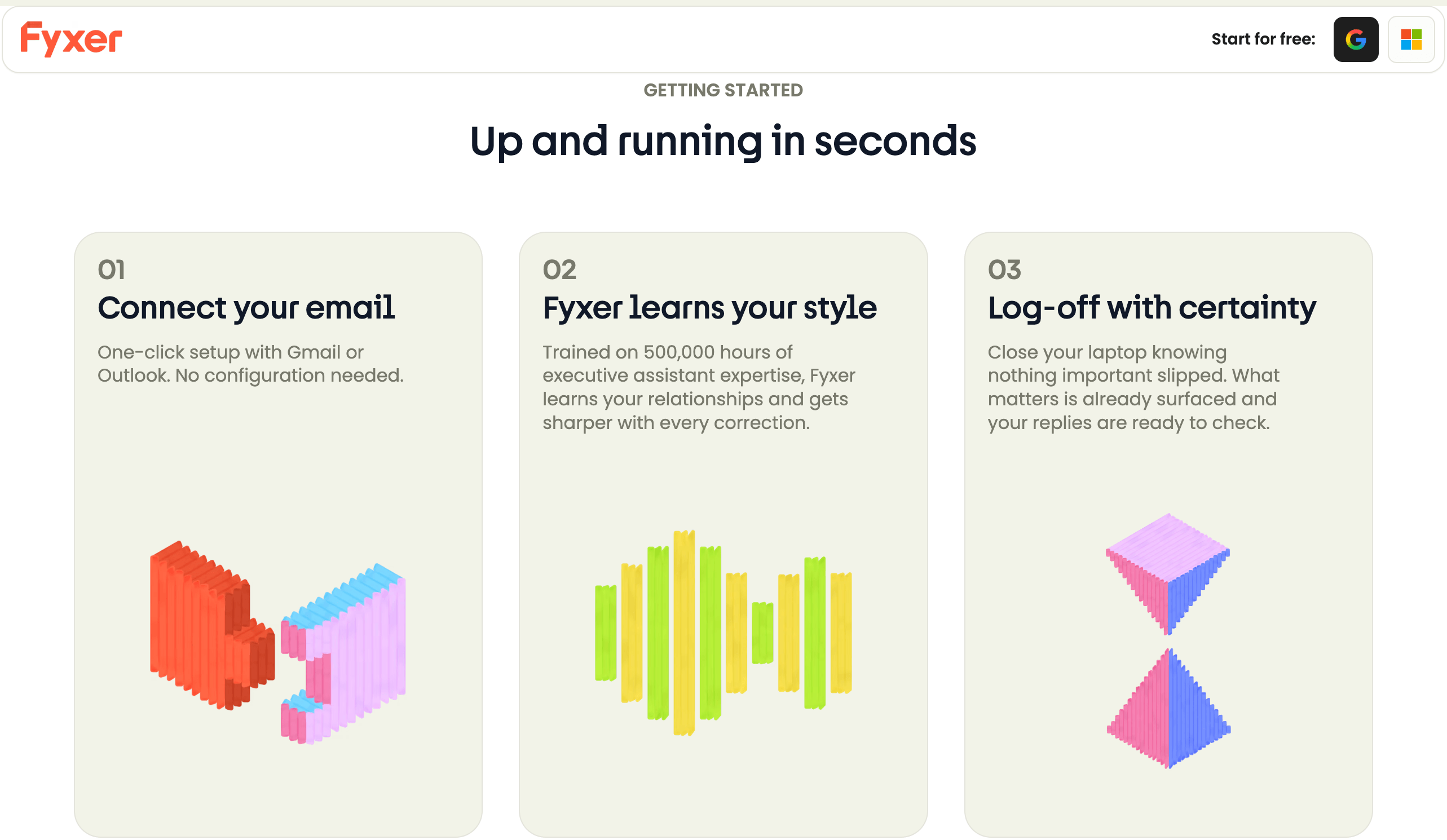
Fyxer sits across your email, calendar and meetings, sorting the inbox, drafting replies in your tone and turning calls into notes and follow-ups.
Key Features and Technology
Fyxer’s feature set has grown quickly, but it organizes cleanly into a handful of pillars. Here is how the platform actually breaks down.
Inbox Sorting and Labeling
The original Fyxer feature. Once connected, it reads incoming email and applies labels so your inbox is pre-triaged into things that need action, things to read later and noise. On paid plans this runs automatically, and Fyxer’s credit table prices it at 5 emails per credit, or 0.2 credits per labeled email. Independent reviewers note that the categories are fixed rather than fully customizable and that important messages such as invoices are occasionally mislabeled, so a quick weekly scan of the lower folders is a smart habit.
Drafts Written in Your Tone
Fyxer prepares reply drafts and saves them in your email client, so you can review, edit and send. It learns from your previous emails, and one competitor review estimates it samples roughly your 300 most recent messages. The more consistent and clear your past writing is, the closer the draft gets. Reviewers broadly agree that drafts are a strong starting point but that the “send in one click” dream rarely holds, especially in the first weeks while the model learns your style.
Meeting Notetaker and Follow-Ups
A bot joins your Zoom, Microsoft Teams or Google Meet calls, records, and delivers summaries, transcripts and action items. On Pro and Team plans every meeting can also be saved as a video recording, and an always-current follow-up list tracks what you owe and what others owe you. Recording is metered by credits at 1 credit per recorded minute. One caveat from hands-on reviewers is that running Fyxer alongside other meeting bots can occasionally cause join problems.
Spaces, Flows, Briefings and AI Chat
Spaces gather everything related to a client, deal or project, Flows automate recurring work (each run costs 5 credits), and briefings summarize your day or week. The AI chat, which also works from Slack, lets you ask questions such as “what are my priorities today?” or have notes pushed into a HubSpot profile. Each chat message with a completed response costs 20 credits, and a deep research question costs 175, so heavy use of these newer tools is where the credit system starts to matter.
Integrations, Security and Privacy
Fyxer connects to Gmail, Outlook, Google Calendar, Outlook Calendar, Zoom, Teams, Google Meet, Slack, HubSpot, Claude and ChatGPT. On security, the site displays SOC, HIPAA, ISO 27001, GDPR and ADA Tier 2 CASA badges, and the Enterprise tier adds private cloud or dedicated tenancy, SSO, SCIM, audit logs, retention rules and a choice of EU, UK or US data region. Because the tool reads your email, it is worth reviewing the company’s security documentation against your own compliance needs before connecting a sensitive inbox.
Pricing, Plans, and Package Structure
Fyxer has reorganized its pricing in 2026, and many older reviews still quote retired Starter and Professional tiers. As of October 2026 the official pricing page lists four plans: Free, Pro, Team and Enterprise. Pro and Team are priced per person per month, and annual billing is advertised as saving up to 35% (25% on Pro and 35% on Team, according to Fyxer’s FAQ). The plans also run on a monthly allowance of credits, which are consumed by actions such as meeting recording, chat messages, Flow runs and inbox sorting. As a launch offer, Pro and Team include unlimited credits for the first three months, then settle at 3,000 credits per paid member per month on Pro and 6,000 per member on Team, pooled across the team.
| Product | Price (USD) | What It Is | Best For |
|---|---|---|---|
| Free | $0 | 400 credits per month, daily dashboard briefing, weekly email briefing, audio meeting notes using credits, 3 personal Spaces. No inbox sorting. | Testing the notetaker and briefings at no cost |
| Pro | $37 per person per month billed annually ($49 billed monthly) | Everything in Free plus inbox sorting and labeling, automatic drafts in your tone, video recording of meetings, an always-current follow-up list, unlimited personal Spaces, shared Flows and email support. | Solo professionals, founders and consultants |
| Team | $64 per person per month billed annually ($99 billed monthly) | Everything in Pro plus unlimited shared and personal Spaces, shared follow-ups with owners, shared company context, team reporting and admin controls, team-wide analytics and pooled credits. | Small and mid-size teams that share clients and workflows |
| Enterprise | Custom, annual contract | Everything in Team plus private cloud or dedicated tenancy, full API, SSO and SCIM, audit logs, retention rules, EU/UK/US data region, HIPAA support, custom terms and a dedicated support channel. | Large or regulated organizations |
A few details from the pricing page are worth knowing. A paid seat is one paid member no matter how many inboxes or calendars they connect, viewer seats are free on paid plans, and teams of 10 or more members are directed to sales for a volume quote. The page also advertises a launch banner of 14 days free plus 20% off for three months, though promotions like this change often.
How Fyxer Compares to Alternatives
| Factor | Fyxer | Superhuman | Shortwave |
|---|---|---|---|
| Approach | AI layer inside your existing Gmail or Outlook | Standalone email client with built-in AI | AI-first standalone Gmail client |
| Inbox sorting | Yes, fixed categories (paid plans) | Yes, split inbox and AI triage | Yes, AI labels and bundles |
| Auto drafts in your tone | Yes (Pro and above) | Yes, AI writing and reply tools | Yes, AI assistant |
| Meeting notetaker | Yes, joins Zoom, Teams and Meet | Not its core focus (verify current features) | Not its core focus (verify current features) |
| Outlook support | Yes (reported to have fewer features than Gmail) | Verify current support | Gmail focused |
| Entry price (approx.) | Free; $37 per month annual Pro | ~$30 per month | Free tier; ~$24 per month |
| Best for | Pros who want sorting, drafts and notes without switching apps | Speed-focused heavy email users | Gmail users who want an AI-native inbox |
vs. Superhuman: Superhuman is the speed-obsessed incumbent: a polished standalone client with keyboard shortcuts and AI tools, at roughly $30 per month. If you are willing to move your email into a new app, it can be a joy to use. Fyxer takes the opposite approach. It stays inside Gmail or Outlook and adds a meeting notetaker that Superhuman does not center on, which makes it the better pick if you do not want to change apps.
vs. Shortwave: Shortwave is an AI-first Gmail client with a free tier and paid plans around $24 per month (approximate). It is a strong choice for Gmail loyalists who want search and summaries inside an AI-native interface. Fyxer offers broader coverage across calendar and meetings and supports Outlook, but it does not replace your email interface.
vs. team-inbox tools such as Gmelius and DragApp: These tools are built around shared inboxes, routing, automations and collaboration, with entry plans roughly in the $12 to $25 per user range (approximate). Competitor reviews correctly point out that Fyxer manages your own inbox rather than a shared one, so support desks and sales teams that triage a common mailbox may find those tools a better fit. Fyxer’s own Team plan, with shared Spaces and follow-ups, narrows the gap but is not a shared-inbox product.
vs. built-in assistants from Google and Microsoft: Gemini in Gmail and Copilot in Outlook are the obvious free-or-bundled alternatives. They integrate deeply and may cost little extra if you already pay for Workspace or Microsoft 365. Fyxer’s edge is the specialized workflow: automatic labeling, drafts waiting in your inbox, and a notetaker that follows you across platforms. Whether that is worth a separate subscription depends on how much of that routine you actually use.
Pros and Cons
What Users Love
Real time savings on a busy inbox: The most common praise on Trustpilot is simple: reviewers say Fyxer saves them time and keeps the inbox organized, especially people who receive a high volume of email every day.
A strong meeting notetaker: Independent roundups call the notetaker the standout feature. Summaries, transcripts and action items arrive without effort, and the follow-up list keeps commitments visible.
Drafts that sound like you: When it has good context, Fyxer’s replies match the user’s tone well enough that many people only tweak a sentence or two before sending, which beats starting from a blank page.
No new app to learn: Because it works inside Gmail or Outlook, onboarding is quick and there is no migration, which is a major advantage over standalone clients.
Support that gets praised: Many Trustpilot reviewers describe customer support as fast, patient and helpful, with several singling out the team as a highlight of the experience.
A product that keeps improving: Spaces, Flows, briefings, Slack chat and CRM updates show an active roadmap, and the company’s funding gives it room to keep building.
Limitations Worth Knowing
Billing and cancellation complaints: This is the most serious pattern in the reviews. On Trustpilot, which currently shows a 4.0 TrustScore from 749 reviews (about 63% five-star and 13% one-star), a visible group of reviewers report unexpected charges and difficulty cancelling after a trial. Reviews are not fact-checked and the company replies to many of them, but anyone starting a trial should treat the cancellation process as something to verify up front.
Drafts and sorting need supervision: Reviewers report that drafts sometimes miss context, and that important emails such as invoices can land in the wrong category. The “one-click send” promise rarely holds in practice, so plan to read every draft.
Fixed inbox categories: Competitor and independent reviews note that categories cannot be fully customized, and some users say sorting occasionally stops or drafts disappear. If you want custom tags and routing rules, other tools offer more control.
Credits add complexity: The credit system means heavy use of chat (20 credits per message), deep research (175 credits) or long recorded meetings (1 credit per minute) can consume an allowance faster than expected. The launch offer of unlimited credits for three months hides this until it ends, so check usage before the allowance changes.
Built for individuals first: Fyxer manages your inbox, not a shared one. It lacks shared inboxes, conversation assignment and collision detection, and SSO and SCIM are Enterprise only, so larger collaborative teams may outgrow it.
Uneven independent coverage and Outlook gaps: Capterra currently shows no user reviews for Fyxer, and G2 figures cited in roundups come from only a handful of reviews, so Trustpilot is the main large sample. Reviewers also say the Outlook version has fewer features than Gmail, and the pricing page’s trial wording is inconsistent.
Who Should Use Fyxer
Founders, executives and consultants: If your day is a stream of client email and back-to-back calls, Fyxer’s triage, drafts and notes remove the most repetitive parts of the job. This is the group that benefits most.
Real estate agents, recruiters and client-facing sales: Professionals who juggle many conversations and follow-ups, such as the eXp Realty teams Fyxer showcases, can use Spaces and the follow-up list to keep every client moving without a human assistant.
Meeting-heavy managers: If you spend your day on Zoom, Teams or Meet and lose track of action items, the notetaker and follow-up list may be worth the subscription on their own, even if you barely use the email features.
Small teams that share clients: The Team plan’s shared Spaces, shared follow-ups with owners and team analytics suit agencies and small firms that want a common view of client work without adopting a full help desk.
Gmail and Outlook users who dislike switching apps: If you want AI help but refuse to leave your current inbox, Fyxer is one of the most seamless ways to get it.
Who should look elsewhere: Support teams that run a shared mailbox, anyone who needs custom categories and routing rules, people who want fully hands-off auto-sending, and buyers who are uncomfortable giving an AI service access to sensitive email will hit Fyxer’s limits. Light email users may also find the Free plan or a built-in assistant such as Gemini or Copilot is enough.
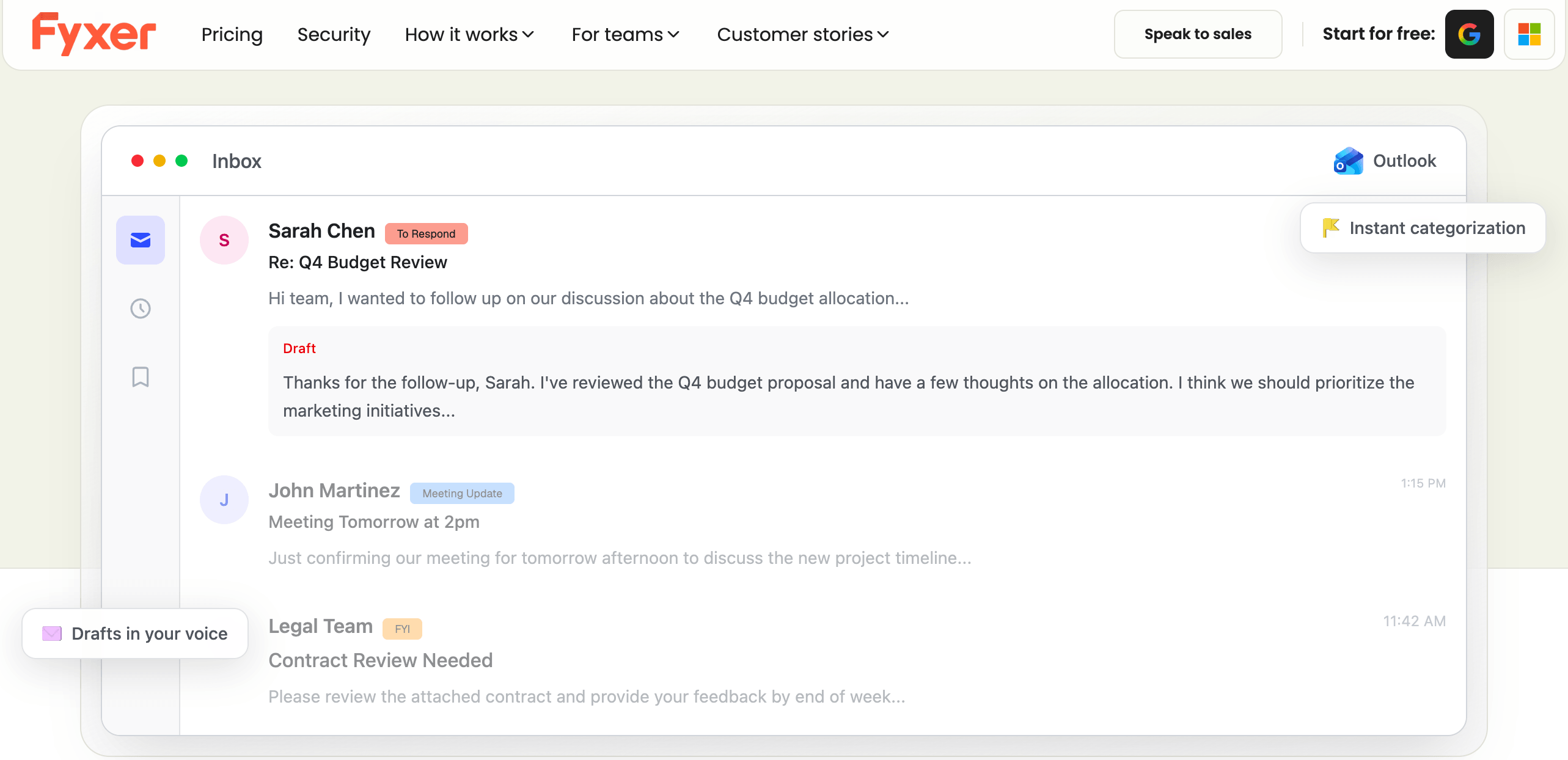
Fyxer is aimed at client-facing professionals whose days are split between a crowded inbox and back-to-back video calls.
Getting Started: Step by Step
- Choose your plan and start the trial. Go to Fyxer through our link, sign up with your work email, and note which plan the trial begins on (Pro or Team) and the exact trial end date, since the pricing page wording on this differs.
- Connect your email and calendar. Link Gmail or Outlook plus Google or Outlook Calendar. You can disconnect your accounts at any time, so there is little risk in connecting while you evaluate.
- Set your preferences and tone. Let Fyxer learn from your sent mail, then add any instructions about how you like to write, sign off and handle common requests.
- Turn on the notetaker. Connect Zoom, Teams or Google Meet so the bot can join your calls, and decide which meetings it should attend to avoid clashing with other recording bots.
- Review drafts and labels daily for the first two weeks. Edit drafts, move mislabeled emails and check the lower folders so the system learns your priorities.
- Expand to Spaces, Flows and chat. Once the basics feel reliable, set up a Space for your top clients, automate one recurring task with a Flow, and watch your credit usage before the launch allowance ends.
Tips for Getting Maximum Value
Start with the features that save the most time for you, which for most people is the notetaker and the inbox labels, and ignore the rest until they are working well. Keep your sent mail clear and consistent, because drafts mirror what the model sees, and spend the first two weeks correcting labels and drafts so the system learns quickly. Review every draft before sending, particularly anything involving money, dates or commitments. Watch your credit usage in the dashboard, especially after the three-month unlimited launch period ends, and avoid burning credits on long deep-research questions you could run elsewhere. Use annual billing only after you are sure the tool sticks, since the discount is meaningful but a missed cancellation is costly. Finally, set a calendar reminder a few days before any trial ends, and keep a screenshot of your cancellation confirmation, so there are no surprises on your next statement.
Future Outlook and Final Assessment
The AI assistant market in 2026 is shifting from single-purpose tools toward assistants that sit across email, calendar, chat and meetings, remember context and automate recurring work. Fyxer’s move into Spaces, Flows, Slack chat and CRM updates shows it understands that direction, and its funding, customer base and steady release pace give it a credible shot at staying in the top tier. At the same time, Google and Microsoft keep improving the assistants built into Gmail and Outlook, which will pressure standalone tools to prove they are meaningfully better.
The honest caveats remain: drafts still need review, categories are rigid, the credit model adds complexity, and a visible minority of reviewers report billing and cancellation frustration. Competitors such as Superhuman and Shortwave offer faster or more customizable inbox experiences for people willing to switch apps. But within those boundaries, Fyxer delivers one of the most practical, low-friction ways to reclaim time from email and meetings, and the notetaker alone is a strong reason to try it.
Conclusion
Fyxer is not trying to replace your judgment or your inbox. It is trying to take the repetitive parts of email and meetings off your plate, and at that job it is genuinely effective. By sorting mail, drafting in your tone, recording and summarizing calls and keeping follow-ups visible, it removes much of the daily friction that makes inboxes exhausting. It rewards patience during the first few weeks, it demands a quick review of everything it writes, and it asks for care around trials and billing. For client-facing professionals and busy teams, few assistants deliver as much in a package that works inside the tools they already use. Check the live price, start a trial with a clear end date, and Fyxer can give you back real hours every week.
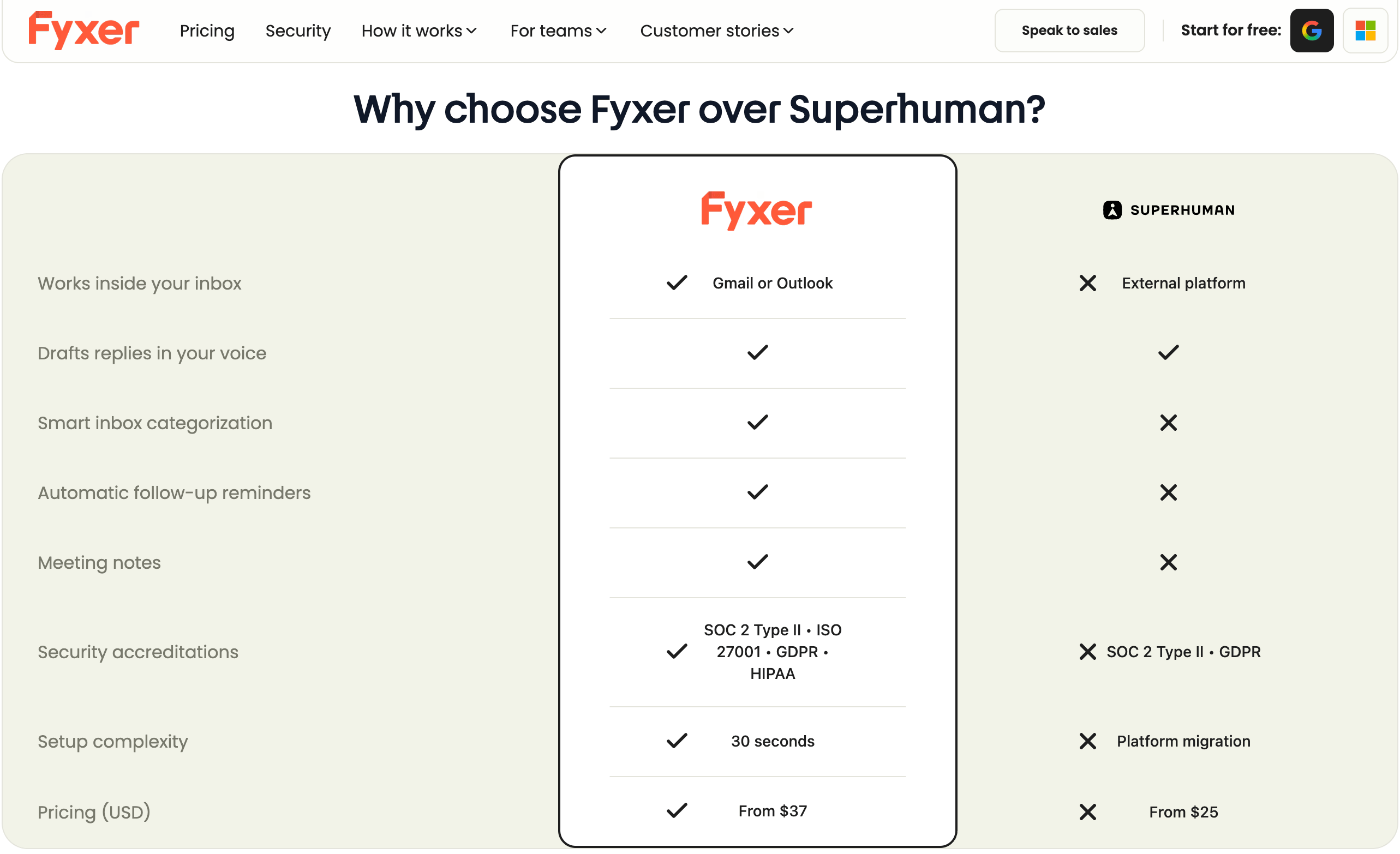
From inbox triage to meeting follow-ups, Fyxer aims to act like a capable executive assistant that prepares the work while you make the decisions.
Ready to get hours of your week back from email and meetings?
Explore more honest reviews, tutorials and tech comparisons to find the right tools for the way you work, travel and live, at World Of Tech, where we make everything easy.
👉 Try Fyxer: https://partners.fyxer.com/world-of-tech
👉 Our YouTube Channel: youtube.com/@world_tech79
👉 Our Facebook Fanpage: Facebook
👉 Our X (Twitter): @worldoftech79
Pricing, specifications and policy details in this review were verified against fyxer.com and independent review sources (including Trustpilot and hands-on reviewer testing) as of October 2026. AI productivity software pricing, credits and features change frequently, so confirm current details on the official site before purchasing. Company growth figures are self-reported. Competitor prices are approximate and subject to change.