
Most team chat apps ask you to trust a cloud you don’t control. Troop Messenger takes a different bet: the same instant messaging, calls, and file sharing you’d expect from Slack or Teams, but with a genuine option to run it entirely on your own servers — the kind of setup defence ministries and space agencies actually sign off on.
Built by Hyderabad-based Tvisha Technologies and used by organizations ranging from the Indian Air Force to the European Space Agency, Troop Messenger has spent nearly a decade positioning itself as the security-first alternative in a crowded field. It’s now layering on AI features and a fresh coat of paint. This 2026 review walks through what it does well, where it still shows its smaller-company roots, and whether it deserves a spot on your shortlist.
Troop Messenger Review 2026: The Secure, AI-First Team Chat Built for Defence, Government, and Regulated Enterprises
Overview and Background
Troop Messenger is a team messaging and collaboration platform built by Tvisha Technologies, an IT services firm founded in Hyderabad, India. The product itself was conceived in 2017 by founder and CEO Sudhir Naidu, after his own consulting team grew tired of stitching together separate apps for chat, calls, and file sharing. What started as an internal tool for Tvisha’s own staff has since grown into a standalone platform used by enterprises, government bodies, and defence organizations across more than 200 countries and territories.
The pitch is straightforward: one app for one-to-one and group messaging, audio and video calling, screen sharing, and file exchange, wrapped in enterprise-grade security. What sets Troop Messenger apart from most of its Slack-alternative peers is that it doesn’t stop at SaaS. It also ships as an On-Premise/self-hosted deployment, hosted and on-premise Chat APIs, a fully custom-built app option, and even air-gapped configurations for defence use — a range of delivery models few competitors in this price range offer at all.
That security-first positioning shows up in its client list. Troop Messenger names the Indian Air Force, the European Space Agency, Airbus Defence and Space, the UK’s Ministry of Defence (UKHO), and Australia’s Department of Foreign Affairs and Trade among its users, alongside more conventional enterprise customers like Jindal Poly Films and Mold-Tek Group. For 2026, the company has layered a “Next-Gen AI” feature set on top of the existing platform — auto-suggested replies, meeting summaries, an AI assistant, and real-time translation — pushing it toward the same AI-first framing every collaboration vendor is chasing right now.
Why Troop Messenger Stands Out in 2026
Real on-premise and air-gapped deployment, not just a cloud checkbox: Where most affordable team chat apps are cloud-only, Troop Messenger genuinely runs on your own infrastructure if you need it — including a dedicated air-gapped configuration built for defence. That’s a category most Slack or Teams alternatives simply don’t compete in.
End-to-end encryption across chats, calls, and conferences: Troop Messenger encrypts messages, voice, video, and conference sessions end-to-end by default, backed by an audit log module you can export or pipe into a Syslog server — the kind of compliance tooling regulated industries actually ask for.
A genuinely unusual feature set: Burnout gives you a self-destructing chat window with no backup trail for sensitive conversations. Forkout sends one message to many users and groups at once. Jointly Code opens a shared code editor inside a video call for developer teams. Orange Member brings in external guests without a full license. Few competitors bundle this combination out of the box.
New AI layer across the whole workflow: The 2026 AI push adds Auto Suggestions for faster replies, Smart Summaries that recap meetings and discussions instantly, an AI Buddy assistant that finds files and drafts replies, and AI Translate for cross-language teams — all built directly into the chat experience rather than bolted on as a separate app.
Dramatically lower entry price than Slack or Teams: Troop Messenger’s Premium tier starts at $2.50 per user per month, well under Slack’s $7.25 Pro tier and roughly in line with Microsoft Teams’ cheapest add-on plan — but with security features neither offers at that price point.
Multi-lingual by design: The platform supports more than 20 languages, from English and Hindi to Arabic, Japanese, Korean, Swedish, Bengali, and several regional Indian languages — a genuinely global feature set, not an afterthought translation plugin.
Trust signals from serious, security-conscious buyers: Defence and government agencies don’t sign procurement contracts casually. Troop Messenger’s client roster — the Indian Air Force, the European Space Agency, and multiple national defence ministries — is a stronger trust signal for security-sensitive buyers than star ratings alone.
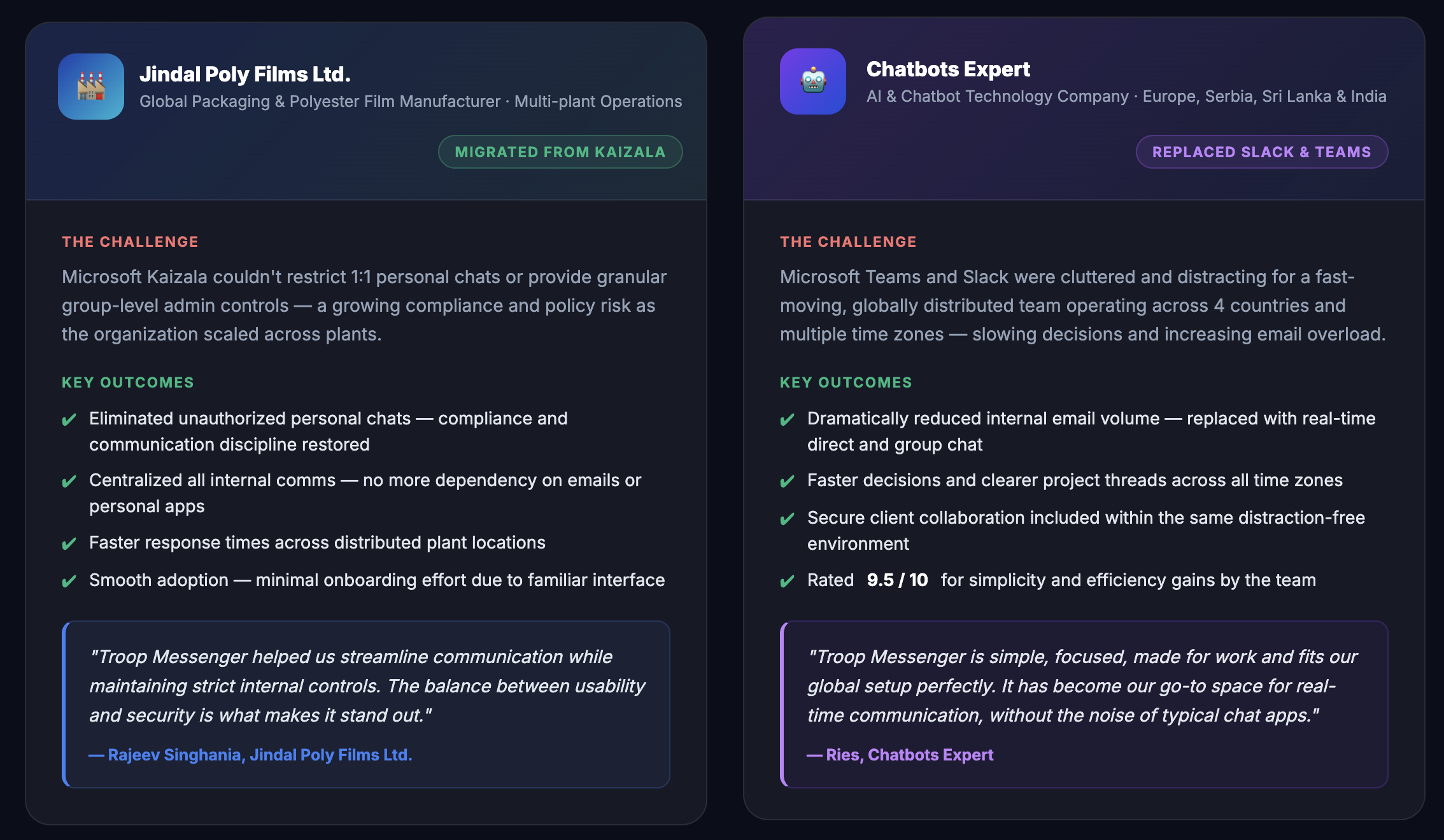
Troop Messenger combines end-to-end encrypted messaging, audio/video calling, and screen sharing with a genuine on-premise deployment option — a rare combination at this price point.
Key Features and Technology
Troop Messenger’s feature list is long enough to feel overwhelming at first glance — a criticism echoed in several verified G2 reviews — but it organizes cleanly into a few core pillars.
Core Messaging, Calling, and File Sharing
At its foundation, Troop Messenger covers the basics every team chat app needs: one-to-one and group instant messaging, audio and video calling (1:1 and group), remote screen sharing, and file sharing for text documents, PDFs, PPTs, images, videos, and URLs, all previewable directly in the chat UI. It’s available across Windows, Mac, Linux, Android, iOS, and web, with sync across every device.
Next-Gen AI Layer
The newest addition is a suite of AI features aimed at productivity: Auto Suggestions offer context-aware reply drafts, Smart Summaries generate instant recaps of meetings and long discussion threads, AI Buddy acts as an in-chat assistant that can summarize conversations, locate files, draft replies, and surface task reminders, and AI Translate converts messages between languages in real time. These land directly in the chat window rather than as a separate tab, which keeps the workflow from fragmenting.
Signature Productivity Tools
This is where Troop Messenger differentiates itself from generic chat clones. Burnout opens a self-destructible chat window with no chat backup, for exchanging sensitive information. Forkout broadcasts a message or attachment to multiple users and groups in one action. Jointly Code gives developers a shared, in-call code editor. Orange Member lets you invite customers or stakeholders as guest users without full licenses. Read Receipts, Message Recall (within a 10-minute window), a Quick Response Panel for canned replies and snippets, and Airtime Groups for one-way announcement broadcasts round out a genuinely deep productivity toolkit.
Security, Compliance, and Deployment
Chats, calls, and conferences are end-to-end encrypted by default. Higher tiers add LDAP/Active Directory and SSO integration, multi-factor authentication, granular admin controls over which features each user can access, and an Audit Log module for usage tracking and Syslog export. Deployment options span SaaS, On-Premise/self-hosted, hosted and on-premise Chat APIs, fully custom-built apps, and Mobile Device Management (MDM) for controlling company devices — plus dedicated air-gapped configurations for defence customers.
Pricing, Plans, and Package Structure
Troop Messenger’s SaaS pricing is billed per user per month, with a yearly option that saves 17% over monthly billing. On-Premise, Defence, Politics, NGO, Education, and API deployments each run on separate, custom-quoted pricing tracks not reflected in the table below. The prices here are Troop Messenger’s current standard SaaS rates; always confirm the live price before checkout, since the vendor’s own pricing page still displays some leftover promotional copy from a 2019 offer alongside the current figures.
| Plan | Price (USD) | What It Is | Best For |
|---|---|---|---|
| Free | $0 /user/mo | Core messaging, audio calling, group chats, file sharing, 50GB storage, 1–50 users | Small teams testing the platform |
| Premium | $2.50 /user/mo | Adds Forkout, guest access controls, attachment preview, delete & recall, 150GB storage | Small-to-mid teams wanting more than the basics |
| Enterprise | $5 /user/mo | Adds Burnout, LDAP/SSO, unlimited video conferencing, remote screen sharing, admin roles, 1TB storage | SMEs and startups needing real security controls |
| Superior | From $9 /user/mo | All Enterprise features plus remote desktop control, whiteboard, custom branding, SAML, high availability | Corporates and large enterprises (500+ users) |
| FileDeck Add-on | $2 /user/mo | Centralized file storage sync add-on | Teams juggling files across multiple apps |
| TM Monitor Add-on | $2 /user/mo (or $24/yr) | Admin visibility into user chat history for compliance | Regulated teams with usage-compliance requirements |
| On-Premise / Defence / APIs | Custom quote | Self-hosted, air-gapped, or API-based deployment | Government, defence, and data-residency-sensitive buyers |
How Troop Messenger Compares to Alternatives
| Factor | Troop Messenger | Slack | Microsoft Teams |
|---|---|---|---|
| Entry paid price | $2.50/user/mo | ~$7.25/user/mo (annual) | ~$4–7/user/mo (annual) |
| Self-hosted / On-Premise option | Yes, incl. air-gapped defence configs | No — cloud only | No standard self-host; Azure hybrid for large enterprise only |
| End-to-end encryption (default) | Yes — chats, calls, conferences | Encrypted in transit/at rest; full E2E is enterprise-add-on territory | Encrypted in transit/at rest; not full E2E by default |
| Built-in AI | Auto Suggestions, Smart Summaries, AI Buddy, AI Translate | Slack AI (summaries, search) from Pro tier up | Copilot, but usually a separate, pricier tier |
| Third-party integrations | Limited (Zapier, Dropbox, Drive, LDAP); several “upcoming” | Very large marketplace | Deep Microsoft 365 ecosystem |
| Review scores | G2 4.7/5 (103), Capterra 4.8/5 | Higher overall G2 satisfaction, far larger review volume | Widely reviewed, strong for Microsoft-native teams |
| Best for | Regulated, security-first, budget-conscious teams | Teams that live in a large app ecosystem | Orgs already on Microsoft 365 |
vs. Slack: G2’s own head-to-head data shows Slack ahead on overall satisfaction and integration depth, backed by a far larger review base. But Slack has no self-hosted option at any price, and its entry-level Pro plan costs nearly three times Troop Messenger’s Premium tier. If your priority is data residency, air-gapped deployment, or per-seat cost, Troop Messenger closes a gap Slack doesn’t compete in at all.
vs. Microsoft Teams: Teams wins decisively for organizations already paying for Microsoft 365 — the bundling makes it close to free at the margin. But standalone Teams pricing has crept up over 2026, and Copilot’s AI features now sit behind a considerably pricier tier than Troop Messenger’s built-in AI Buddy. Teams also lacks a genuine self-hosted option outside large Azure hybrid enterprise deals.
vs. Rocket.Chat and other open-source alternatives: Open-source self-hosted tools can match Troop Messenger’s data-control appeal, but usually demand far more in-house DevOps effort to deploy, secure, and maintain. Troop Messenger’s On-Premise and Defence tracks aim to deliver that same control as a managed, supported product rather than a bring-your-own-infrastructure project.
Pros and Cons
What Users Love
Genuine data control: The On-Premise and air-gapped deployment options come up repeatedly as the reason security-sensitive buyers picked Troop Messenger over cloud-only rivals — it’s a real differentiator, not marketing language.
Simplicity and fast onboarding: G2 reviewers consistently highlight that Troop Messenger doesn’t take long to learn, with a straightforward setup process that smaller teams appreciate compared to heavier platforms.
Unifies scattered communication: Multiple independent reviewers describe replacing a patchwork of WhatsApp, email, and phone calls with Troop Messenger as a direct productivity win, citing reduced app-switching as the biggest benefit.
Strong perceived security: Reviewers repeatedly flag the encrypted file sharing and internal discussions as a standout, particularly for teams handling sensitive client or government data.
Consistently high independent scores: Across Capterra (4.8/5), G2 (4.7/5, 103 reviews, 85% five-star), TrustRadius (9.8/10), and GetApp (4.8/5), Troop Messenger holds up well against far bigger-name competitors on user satisfaction.
Affordable relative to feature depth: Reviewers on Techjockey specifically call out the platform as more affordable than comparable tools while still delivering encrypted chats and controlled access.
Limitations Worth Knowing
Feature overload for new users: More than one G2 reviewer specifically calls out that Troop Messenger offers so many features it can feel overwhelming at first — the same depth that appeals to power users can slow down onboarding for less technical teams.
Support responsiveness can be inconsistent: One independent hands-on test in 2026 reported no reply via the listed live chat channel during a full week of testing, though an unofficial WhatsApp channel responded within a minute. Budget in some patience if you rely on live chat specifically.
Thin independent trust signals on Trustpilot: Troop Messenger’s Trustpilot page carries only a handful of reviews at a 4-star average — too small a sample to lean on independently, which is why this review weights G2, Capterra, TrustRadius, and GetApp more heavily.
Mobile app ratings trail desktop: The Google Play listing sits at roughly 3.5/5, noticeably lower than the 4.7–4.8 range seen on desktop-focused review platforms — worth testing on your team’s actual devices before a full rollout.
A much smaller integration marketplace: Compared to Slack’s thousands of app integrations, Troop Messenger currently offers a short list — Zapier, Dropbox, Google Drive, LDAP, and CattleCall — with GitHub, Jira, and Mailtrim still listed as upcoming.
A relatively small company behind a mission-critical tool: Troop Messenger is run by a lean, self-funded team (reportedly around a dozen employees on the core product). That keeps costs low, but it’s worth weighing against the scale and financial backing of Slack (Salesforce) or Microsoft Teams for organizations that prioritize long-term vendor stability above all else.
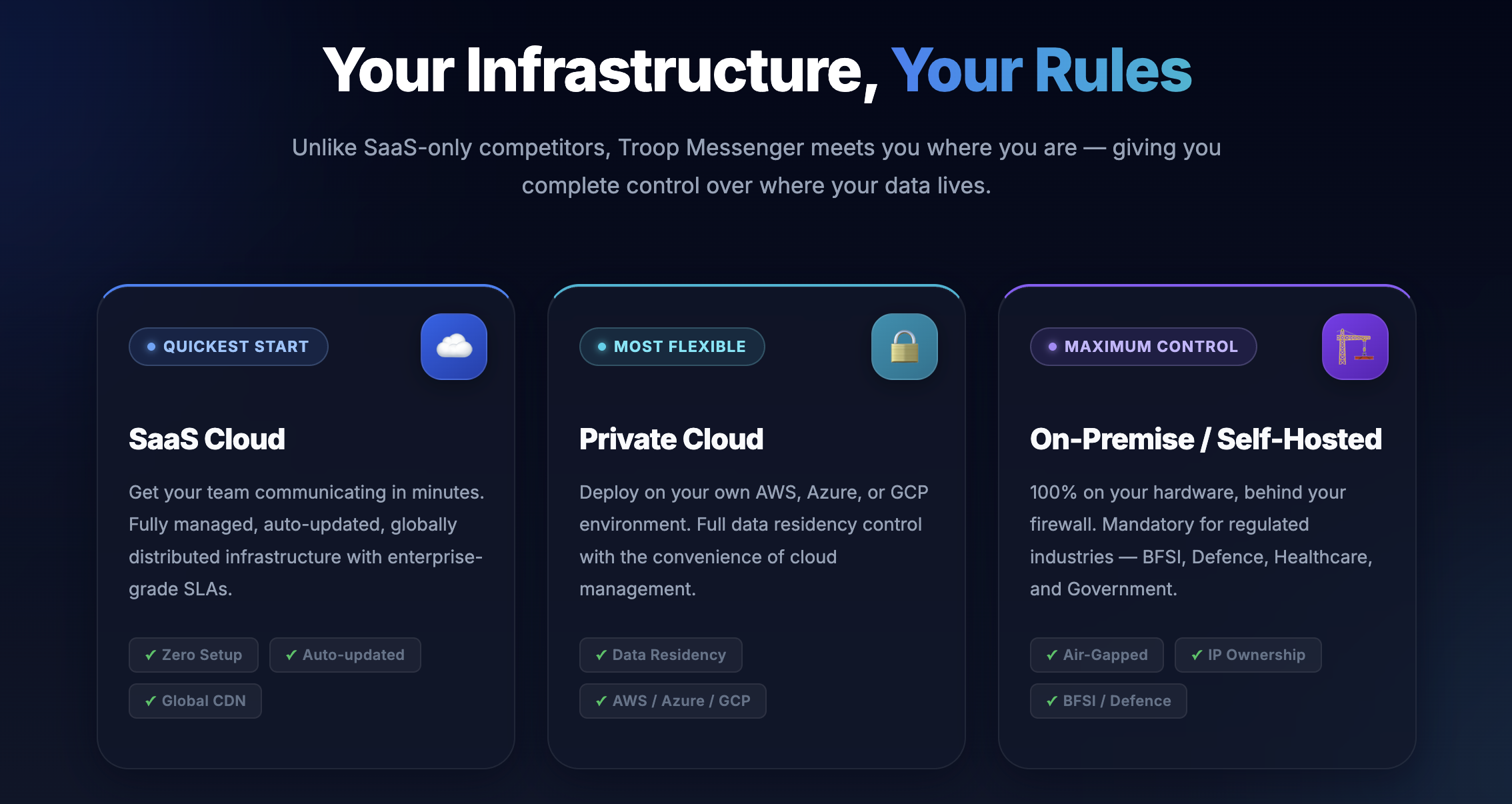 On-Premise and air-gapped deployment options are the feature that most consistently pulls in security-conscious buyers, from defence agencies to regulated enterprises.
Who Should Use Troop Messenger
Defence, government, and regulated industries: If your compliance or security team requires on-premise or air-gapped deployment, Troop Messenger is one of the few team chat platforms in this price bracket that can actually meet that requirement.
Budget-conscious SMEs and startups: Teams that want the core of a Slack-like experience — messaging, calls, file sharing — without Slack’s price tag will find real value in the $2.50–$5 per-user range.
Global and multilingual teams: With 20+ supported languages and built-in AI Translate, distributed teams working across language barriers get a genuinely native experience rather than a bolted-on plugin.
Developer and technical teams: Jointly Code’s shared in-call code editor is a genuinely rare feature that developer-heavy teams may find worth the switch on its own.
Who should look elsewhere: Teams heavily invested in Slack’s or Microsoft 365’s app ecosystem, or those that need hundreds of pre-built integrations, will find Troop Messenger’s marketplace too thin today. Organizations that prioritize the most mature, deeply embedded AI assistant (Copilot-level) over cost and deployment flexibility may also be better served by Microsoft Teams.
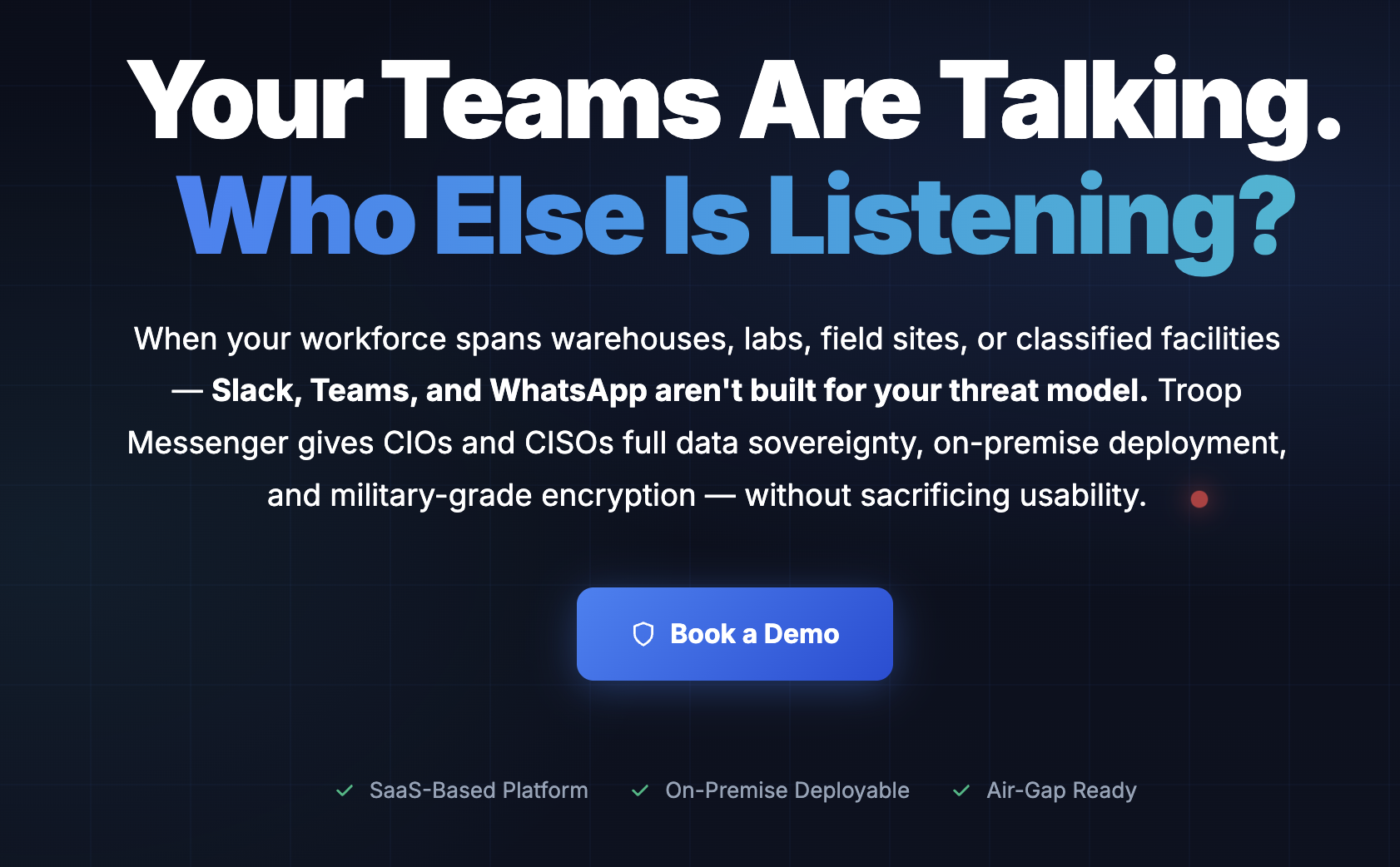
The 2026 AI layer — Auto Suggestions, Smart Summaries, AI Buddy, and AI Translate — is built directly into the chat window rather than bolted on as a separate app.
Getting Started: Step by Step
- Choose your service model. Start with the free 7-day SaaS trial to test the platform quickly, or contact sales directly if you already know you need On-Premise, Defence, or a fully custom deployment.
- Sign up and create your organization workspace. Register with your work email, set your organization name, and choose a plan — Free is enough to evaluate core messaging and calling before committing.
- Invite your team and set roles. Bring in colleagues by email or bulk invite, then assign admin roles for anyone who’ll manage feature access controls and the Enterprise dashboard.
- Lock down security settings. If you’re on Enterprise or above, connect LDAP/Active Directory or SSO, enable multi-factor authentication, and configure the audit log export before rolling out to the wider team.
- Set up groups and pin your essentials. Create project or department groups, add Orange Members for external stakeholders who need limited access, and pin your most-used contacts and channels for faster navigation.
- Explore the AI Buddy and signature tools. Once the basics are running, try AI Buddy for chat summaries and reply drafts, and get familiar with Burnout, Forkout, and Jointly Code — the features that set Troop Messenger apart from a generic chat app.
Tips for Getting Maximum Value
Map your must-have features to a plan before you buy rather than after — LDAP/SSO, Burnout, and unlimited video conferencing all sit behind the Enterprise tier, so a Premium subscription that looks cheaper on paper may force an upgrade later anyway. If your organization handles regulated or classified data, start the On-Premise or Defence conversation with sales early, since those deployments run on custom timelines and pricing that the standard SaaS signup flow won’t surface. Lean on Orange Member for external clients or contractors instead of issuing full seats, and use Forkout for company-wide announcements instead of manually pasting the same message into a dozen group chats. Test the mobile apps on your team’s actual devices before a full rollout, given the gap between mobile and desktop review scores, and if support responsiveness matters to your team, confirm current support-channel options directly with sales rather than relying solely on the advertised live chat.
Future Outlook and Final Assessment
The team collaboration market in 2026 is bifurcating: on one side, Slack and Microsoft Teams are racing to bundle ever-more-capable AI assistants at ever-higher price points; on the other, security- and cost-conscious buyers are looking for platforms that don’t force them into a single cloud vendor’s ecosystem. Troop Messenger’s 2026 AI push — Auto Suggestions, Smart Summaries, AI Buddy, and AI Translate — shows it’s not conceding that first battle entirely, while its On-Premise, air-gapped, and API deployment tracks keep it firmly planted in the second, harder-to-serve category.
The honest caveats remain real: a much smaller integrations marketplace than Slack, support responsiveness that’s inconsistent by at least one hands-on account, and a comparatively small company behind a tool many organizations will treat as mission-critical. But for the specific buyer it’s built for — a defence agency, a regulated enterprise, or simply a budget-conscious team that wants real encryption and deployment flexibility without Slack-level pricing — Troop Messenger delivers a genuinely differentiated product in 2026, not just a cheaper clone.
Conclusion
Troop Messenger isn’t trying to out-integrate Slack or out-bundle Microsoft Teams — it’s betting that a meaningful slice of the market cares more about data control, real encryption, and a fair per-seat price than about a marketplace of a thousand plugins. For defence agencies, regulated enterprises, and cost-conscious teams that fit that profile, it delivers a genuinely capable, security-first alternative backed by strong independent review scores and a growing AI feature set. It rewards buyers who map their must-have features to the right plan before signing up, and it’s not the right call for teams that live and breathe Slack’s integration ecosystem — but for the security-and-value niche it targets, few platforms in 2026 serve it as directly. Confirm the current pricing on your quote, and Troop Messenger can genuinely replace the patchwork of apps most teams are stuck juggling today.
Ready for a team chat app you actually control?
Explore more honest reviews, tutorials and tech comparisons to find the right gear for the way you work, travel and live — at World Of Tech, where we make everything easy.
👉 Shop Troop Messenger: https://worldoftech.space/troopmessenger
👉 Our YouTube Channel: youtube.com/@world_tech79
👉 Our Facebook Fanpage: Facebook
👉 Our X (Twitter): @worldoftech79
Pricing, specifications and policy details in this review were verified against troopmessenger.com and independent review sources (including G2, Capterra, TrustRadius, and GetApp) as of September 2026. Troop Messenger’s own SaaS pricing page still displays some leftover promotional copy from a 2019 offer, so confirm the current live price before purchasing. SaaS software pricing and features change frequently; competitor prices are approximate and subject to change.





